How can I remove block bounces and unblock Yahoo and AOL in Salesforce Marketing Cloud?

Published 4 Jul 2025
Updated 31 Jul 2026
11 min read
Summarize with
Updated on 31 Jul 2026: We updated this guide with Salesforce's current Held-status reactivation process and Yahoo's sender requirements.
Yes, but there are two separate fixes. A block bounce is an event classification, so historical bounce records are not deleted. If repeated bounces have placed subscribers in Held status, a Marketing Cloud administrator can return confirmed deliverable addresses to Active after the cause is fixed. A Yahoo or AOL provider block requires evidence about the sending IP, domain, and SMTP response before an unblock request is appropriate.
A contact can remain Bounced or Held in SFMC after a provider block has cleared. The sending IP or domain can also remain restricted at Yahoo while subscriber records show Active. Reactivating Held addresses before the mailbox-provider problem is fixed can repeat the same failures and make recovery harder.
The shortest practical path is to pause Yahoo and AOL mail, collect bounce samples, check each sending IP and domain, fix authentication and audience issues, request provider help when needed, then restart gradually. Suped's DMARC reporting and blocklist or blacklist alerts fit this workflow by keeping authentication sources, listings, and changes visible during the investigation.
Start by separating the two problems
The exact answer depends on what "unblock" means. In SFMC, a block bounce is a delivery-event classification. Bounced and Held are subscriber statuses, and only Held prevents future sends. At Yahoo and AOL, a block or throttle is a mailbox-provider decision based on the sending IP, domain, mailstream, authentication, recipient response, or message characteristics.
SFMC subscriber status
This is the internal SFMC side. Check whether each affected subscriber is Active, Bounced, or Held before changing any record.
- Marketing Cloud administrators can reactivate a verified Held subscriber individually or by import.
- Reactivating too early can produce more Yahoo and AOL bounces and reset the subscriber's bounce count.
- Record subscriber keys, current status, job IDs, event dates, and sample SMTP responses.
Yahoo and AOL unblock
This is the mailbox-provider side. The goal is to stop a current rejection or throttle after the underlying sending problem is corrected.
- The sender provides the evidence, while Salesforce Support can help with Salesforce-managed IP details.
- Moving traffic without fixing the cause can spread reputation problems across routes.
- Record the IP type, authentication results, complaint rate, volume change, and exact SMTP text.
Salesforce documents the basics in Bounce Mail Management and its block bounce guide. Start with raw evidence because a UI category alone does not show whether Yahoo is blocking an IP, temporarily deferring a mailstream, rejecting authentication, or responding to complaints.
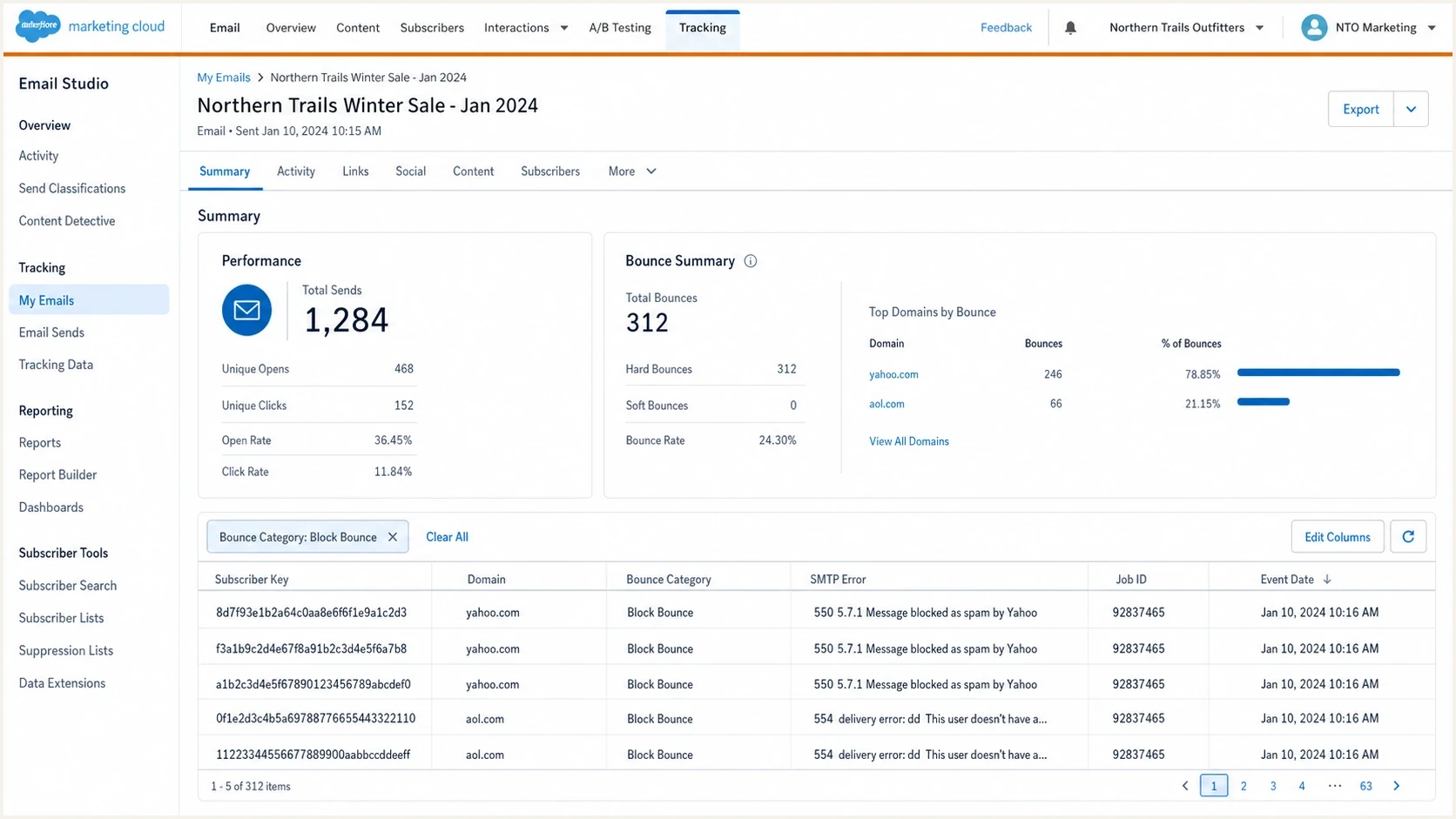
Salesforce Marketing Cloud bounce tracking filtered to Yahoo and AOL block bounces.
Confirm the block before asking for removal
Before opening an unblock request, confirm whether the problem is a current Yahoo or AOL restriction. Yahoo's sender requirements apply to AOL and the other consumer email brands hosted by Yahoo, so similar responses across both domains are meaningful. Proof still needs to identify the affected IP, domain, job, and provider response.
- Export the bounce message data with job ID, subscriber key, domain, bounce category, event date, and full SMTP text.
- Group Yahoo and AOL separately before comparing them with other domains to find provider-specific behavior.
- Review each dedicated IP separately. For shared IPs, ask Salesforce Support for the sending information available to the account.
- Use Suped's domain health check to validate DMARC, SPF, and DKIM before treating the issue as provider-only.
Blocklist checker
Check your domain or IP against 144 blocklists.







A public blocklist or blacklist result is not the same as a Yahoo internal restriction, but it is useful evidence. If one dedicated IP has a listing and the others do not, pause that route while checking whether the problem is limited to the IP or connected to the domain and audience. The broader blocklist basics matter because external listings often trace back to complaint spikes, invalid recipients, authentication failures, or abrupt volume changes.
|
|
|
|---|---|---|
Provider-specific response | Read SMTP reason | |
Yahoo-hosted policy | Check same controls | |
All domains | Wider sender issue | Pause broad sends |
One dedicated IP | IP reputation or route | Pause that route |
Event classification | Query _Bounce |
Use the SMTP evidence, not the category alone, to choose the next action.
Query the _Bounce data view
A Tracking Extract is the simplest way to pull bounce details. A Query Activity against the _Bounce data view is better when the investigation needs a short date window or specific domains. Salesforce records the receiving system's response in SMTPBounceReason and SMTPMessage. Block bounces use BounceCategoryID 3.
Recent Yahoo and AOL block bouncessql
SELECT
  JobID,
  SubscriberKey,
  EventDate,
  Domain,
  BounceTypeID,
  BounceCategoryID,
  SMTPCode,
  LEFT(SMTPBounceReason, 4000) AS SMTPBounceReason,
  LEFT(SMTPMessage, 4000) AS SMTPMessage
FROM _Bounce
WHERE EventDate >= DATEADD(day, -5, GETDATE())
  AND BounceCategoryID = 3
  AND LOWER(Domain) IN ('yahoo.com', 'aol.com')
Match the target data extension field lengths to the query output. The LEFT function prevents long SMTP fields from exceeding a text field set to 4,000 characters. If the query, extract, and file transfer run in one automation, place them in separate sequential steps.
- A 421 or other 4xx response usually indicates temporary deferral or throttling. Reduce volume and inspect the full reason.
- A 5xx response indicates rejection, but the enhanced code and text identify whether authentication or reputation caused it.
- A temporary delay that succeeds during SFMC retry processing does not produce a final bounce row.
- Compare JobID and EventDate with the volume change that preceded the first rejection.
Fix the cause before reopening Yahoo and AOL
An unblock request will not repair active sender problems. Yahoo and AOL judge the next mail they receive. Unauthenticated mail, invalid recipients, high complaint rates, missing unsubscribe controls, or abrupt volume changes can cause the restriction to continue.
Do not bulk reactivate first
Return Held subscribers to Active only after the Yahoo and AOL issue is understood and each selected address has been confirmed as deliverable.
- Suppress Yahoo and AOL marketing recipients during remediation instead of resending immediately.
- Remove invalid addresses and stop using acquisition sources that produced the rejection spike.
- Restart with smaller engaged groups only after the provider response returns to normal.
Yahoo's requirements also apply to AOL and other consumer brands hosted by Yahoo. All senders need SPF or DKIM, a spam complaint rate below 0.3%, and valid forward and reverse DNS. Bulk senders need both SPF and DKIM, DMARC that passes with at least p=none, a From domain that meets DMARC alignment, and a functioning List-Unsubscribe header for marketing mail. Marketing messages also need a visible unsubscribe link in the body. Yahoo accepts relaxed DMARC alignment and expects unsubscribe requests to be honored within two days.
In SFMC, check every sender profile, reply domain, Sender Authentication Package domain, and private domain used by the affected mailstream. Confirm that DKIM signs with the intended domain, SPF authorizes the actual return-path, and each dedicated IP has valid reverse DNS.
DMARC monitoring record exampledns
v=DMARC1; p=none; rua=mailto:dmarc-reports@example.com;
This example is not a universal record to copy. Set the policy and reporting address for the domain's actual rollout, then use aggregate reports to verify every sending source. Suped's DMARC reporting shows which SFMC sources pass, which fail, and whether another sender using the same From domain is contributing to the problem.

Issue steps to fix dialog showing the issue overview, tailored fix steps, and verification action
After authentication, inspect audience and volume signals. If the spike followed a campaign to old Yahoo and AOL addresses, a sweepstakes source, a winback send, or a sudden increase on a newly warmed IP, the fix is operational. DNS changes cannot compensate for an audience that did not request or no longer wants the mail.
Restart risk levels
A simple way to stage Yahoo and AOL traffic after a block bounce event.
Low risk
0-30 days
Recent openers and clickers only
Watch closely
31-90 days
Engaged but less recent contacts
Hold back
90+ days
Dormant or complaint-prone contacts
Open the right Salesforce ticket
Open a Salesforce Marketing Cloud support case when the evidence points to a current Yahoo or AOL restriction and Salesforce-managed sending information or escalation is needed. State whether the IP is dedicated or shared. Keep the provider request separate from subscriber reactivation, which an administrator can handle after confirming the Held addresses are deliverable.
Support ticket detailstext
Subject: Yahoo/AOL block bounces on SFMC sending IP
MID: 123456789
IP type: dedicated or shared
Sending IPs, if known: 192.0.2.10, 192.0.2.11
Affected domains: yahoo.com, aol.com
Sample SMTP errors: attach export with timestamps
First affected JobID and date: add details
Paused segments: Yahoo and AOL since YYYY-MM-DD
Fixes completed: authentication, list cleanup, volume controls
Request: confirm the sending route and provide available evidence for provider escalation
Give Support enough detail to identify the route and the start of the problem. Marketing Cloud permits subscriber-status updates, but Salesforce discourages reactivating undeliverable addresses without confirmation. A bulk import that sets records to Active can also reset their bounce counts, so limit it to verified addresses and run it from the top-level enterprise account when using Enterprise 2.0.
What to ask Salesforce for
- Confirm the sending route and whether the response indicates a current block, throttle, or completed retry.
- Request Salesforce-owned IP details or other evidence needed for a Yahoo or AOL escalation.
- Ask about account-specific bounce behavior if the observed status does not match the documented process.
If the bounce text contains repeated 554 soft bounces, include those samples. If the errors and blocklist or blacklist signals point to a receiving-side IP problem, use the same evidence package needed for a Yahoo IP block: IPs, timestamps, envelope sender, visible From domain, authentication results, campaign volume, and completed remediation.
Restart traffic carefully
Once the provider restriction is no longer active and any verified Held subscribers have returned to Active, do not resume full Yahoo and AOL volume in one send. Start with the most engaged recipients, then widen only while block bounces and complaints remain stable on every sending IP.
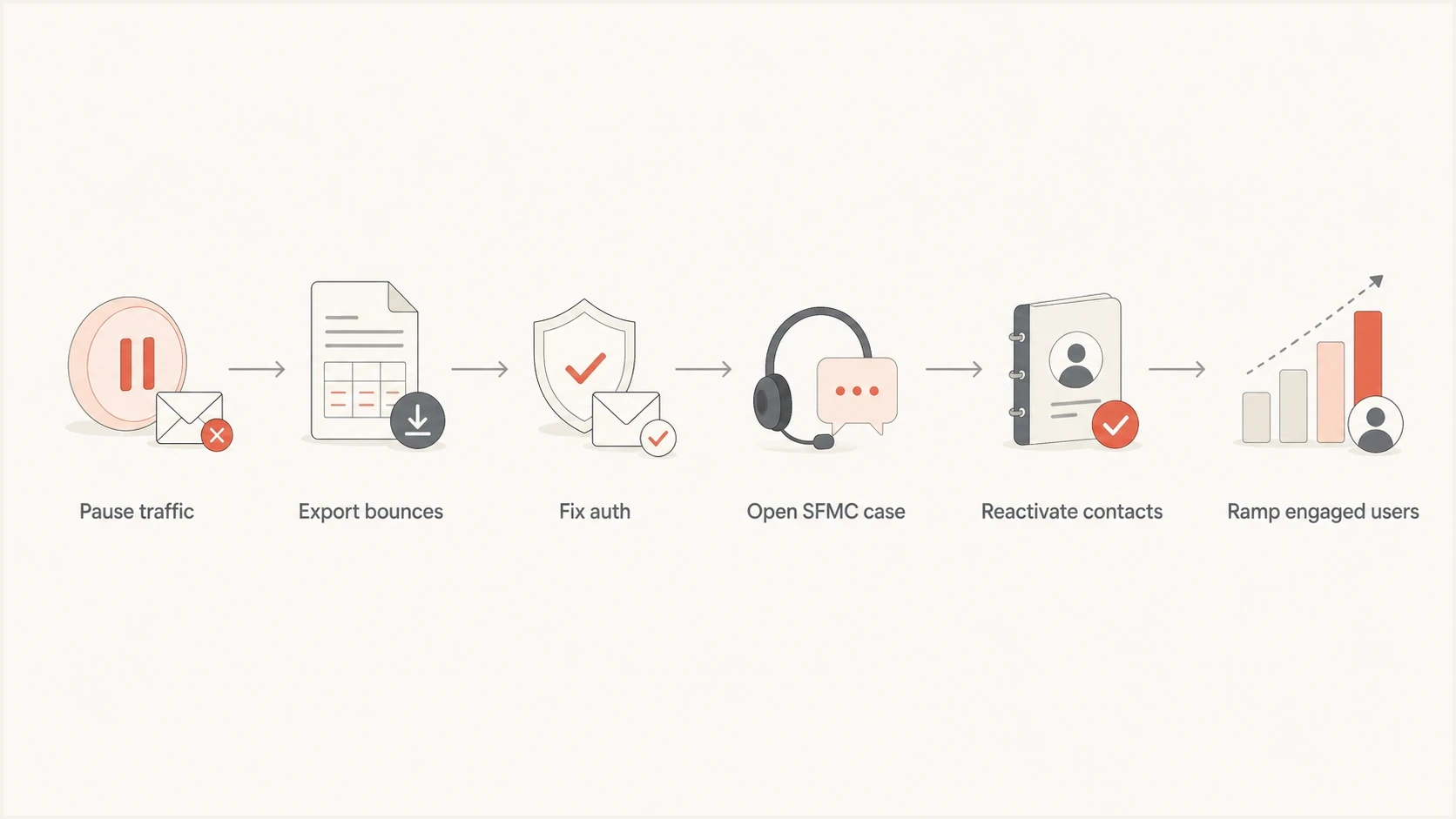
Flowchart for pausing, fixing, reopening, and ramping Yahoo and AOL sends.
Send test messages that use the same From domain, headers, authentication path, sender profile, and content family as the production campaign. A basic seed test is insufficient when the live send uses a different private domain. Suped's email tester can identify DMARC alignment, header, and authentication differences that a DNS-only check misses.
- On day one, send only to recent Yahoo and AOL clickers or openers with low complaint risk.
- On day two, add a larger engaged group only if bounce and complaint signals remain stable.
- On day three, increase volume only if block bounces remain low on every dedicated IP.
- Keep dormant Yahoo and AOL contacts suppressed until normal delivery has remained stable.
For prevention, use continuous blocklist and blacklist monitoring instead of waiting for a campaign report. Suped's alerts and DMARC source reports can show whether a new provider rejection coincides with a public listing, an authentication change, or an unexpected sender using the same domain.
Views from the trenches
Best practices
Separate Held-status reactivation from provider-block remediation in every incident.
Keep Yahoo and AOL segments paused until SMTP responses show normal acceptance again.
Attach raw bounce evidence, affected IPs, send volume, and remediation notes to Support.
Common pitfalls
Treating every SFMC block bounce as a current Yahoo or AOL block causes wrong fixes.
Reactivating Held contacts before remediation can damage the same mailstream again.
Moving traffic to another dedicated IP without list cleanup can spread reputation issues.
Expert tips
Use suppression logic for Yahoo and AOL while testing authentication and volume changes.
Compare each sending IP separately, then group only mailstreams with shared behavior.
Review DMARC, SPF, DKIM, reverse DNS, and complaints before requesting provider help.
Expert from Email Geeks says subscriber status and provider blocks need separate checks because a bounce category does not confirm a current IP block.
2024-03-08 - Email Geeks
Marketer from Email Geeks says Yahoo and AOL failures should be reviewed together when inbox placement and bounces rise across both domains.
2024-03-09 - Email Geeks
The practical recovery path
To remove block-bounce effects and unblock Yahoo and AOL in Salesforce Marketing Cloud, split the work into diagnosis, remediation, provider action, subscriber-status review, and a controlled restart. Marketing Cloud administrators handle justified Held-status reactivation. Salesforce Support helps when the case needs Salesforce-managed sending IP evidence or account-specific investigation.
A durable fix uses a complete evidence package, correct authentication, a permission-based audience, and gradual volume increases. Suped can keep DMARC results and blocklist or blacklist alerts visible during recovery, which helps identify a renewed issue before more subscribers accumulate bounce events.




