How can I diagnose and fix deliverability issues in Salesforce Marketing Cloud?


Updated on 11 Aug 2026: We updated this guide with Salesforce's current IP policies, one-click unsubscribe handling, six-month bounce data, and the current DMARC standard.
To diagnose and fix deliverability issues in Salesforce Marketing Cloud, start with authentication, reputation, list quality, and sending behavior. Check that SPF, DKIM, DMARC, tracking, bounce, and reply domains belong to the intended branded sending setup. Then compare performance by mailbox provider, send classification, audience segment, and date. If spam placement started suddenly, look for a campaign, list import, automation change, domain change, or volume spike just before the drop.
The fastest fix is rarely a new subdomain. A fresh subdomain helps only after you know what damaged reputation. If the same unengaged list, complaint pattern, bad acquisition source, or authentication mistake moves to the new subdomain, the new reputation will deteriorate too.
Treat SFMC deliverability recovery as an incident response process: preserve data, isolate affected mail streams, reduce risky sending, repair authentication, suppress bad addresses, and rebuild reputation through consistent mail to engaged recipients. Salesforce has its own deliverability FAQ, but the practical work happens in your data extensions, automations, DNS, and post-send reporting.
Start with a clean incident timeline
Before changing DNS or pausing every journey, build a simple timeline. Deliverability problems become much easier to diagnose when you can point to the first bad day and compare it with what changed. In SFMC, review send logs, bounce extracts, complaint data, data extension imports, automation runs, and campaign calendars.
- Find the first failure date: Identify when opens, clicks, inbox placement, deferrals, or spam complaints changed. Use exact dates rather than weekly impressions.
- Map every send change: List new automations, new audiences, new forms, new imports, new templates, and any change to send cadence.
- Separate mailbox providers: Break results out for Gmail, Yahoo, Microsoft, Apple, corporate domains, and your largest recipient domains.
- Preserve raw evidence: Export bounce reasons, SMTP codes, complaint counts, unsubscribes, send volumes, and engagement before dashboards roll up the detail.
For recurring evidence, query _Bounce, _Complaint, and _Job through Automation Studio. The bounce and complaint data views retain six months of records, so copy the fields needed for longer incident comparisons into a retained data extension.
Do not diagnose SFMC deliverability from open rate alone. Privacy filtering, image caching, bot clicks, and mailbox provider behavior can distort opens. Use opens and clicks as signals, but confirm the issue with bounces, complaints, inbox placement tests, seed results, DMARC aggregate data, and domain-level performance.
|
|
|
|---|---|---|
Bounces | Tracking and _Bounce | Mailbox rejection, throttling, or invalid address problems. |
Complaints | _Complaint and FBL data | Recipient dissatisfaction and reputation pressure. |
DMARC | Aggregate reports | Authentication pass rates and source matching. |
Engagement | Data views | Whether recent sends are reaching people who respond. |
Blocklist or blacklist | Domain and IP checks | Whether a domain or IP has a visible listing. |
Signals to check before making a remediation plan.
Check SFMC authentication first
Authentication is the first technical layer to validate because it creates clear pass or fail evidence. In Salesforce Marketing Cloud, a branded sending setup normally includes a Private Domain or Sender Authentication Package domain, DKIM signing, SPF authorization through the return-path domain, branded link wrapping, and DMARC domain matching. A Sender Authentication Package also includes account branding, Reply Mail Management, and a dedicated IP unless the account uses Salesforce's shared IP space.
Run a broad check on the sending domain before you inspect campaign content. Suped's domain health checker checks SPF, DKIM, DMARC, and related domain matches in one workflow.
?
What's your domain score?
Deep-scan SPF, DKIM & DMARC records for email deliverability and security issues.
After the DNS check, send a real test message from the affected SFMC business unit. Inspect the headers, not only the UI settings. The message should show SPF pass, DKIM pass, and DMARC pass, with the visible From domain matched through SPF or DKIM. If DMARC passes through DKIM domain matching, confirm the DKIM signing domain matches or is a valid subdomain of the visible From domain.
Example DMARC record for monitoringdns
_dmarc.example.com. 3600 IN TXT
"v=DMARC1; p=none; rua=mailto:dmarc@example.com; adkim=s; aspf=s"
- SPF result: Check the envelope sender domain. SPF authenticates the return-path domain, not necessarily the visible From domain.
- DKIM result: Confirm SFMC signs with the expected selector and domain. A pass on the wrong domain will not fix DMARC domain matching.
- DMARC domain match: Verify the visible From domain matches either SPF or DKIM. This is the identity mailbox providers and recipients see.
- Tracking domains: Use branded click and image domains. Shared or unexpected tracking domains can carry different URL reputation.
DMARC record detail view showing SPF, DKIM, DMARC, rDNS diagnostics, and DNS records
Suped's DMARC monitoring tracks authentication by source over time, flags new failures, and provides fix steps for SPF, DKIM, DMARC, and domain-matching issues. That matters in SFMC because different business units, domains, and automations can create separate authentication patterns.
Use a real message test, not only DNS checks
DNS records can be correct while the actual campaign still fails. A real-message test catches template-level and routing-level problems: broken links, suspicious redirects, missing plain text, malformed headers, link wrapping problems, and authentication that differs between test sends and production sends.
Use a production-like send path. Send from the same business unit, sender profile, Delivery Profile, send classification, and IP pool as the affected campaign. If the issue appears only for a triggered journey, test that triggered path rather than a manual Email Studio send.
Email tester
Send a real email to this address. Suped shows a results button when the test is ready.
?/43tests passed
Suped's email tester lets you send an SFMC message to a test address and review authentication, content, configuration, and header signals together. That is more useful than guessing from a campaign preview.
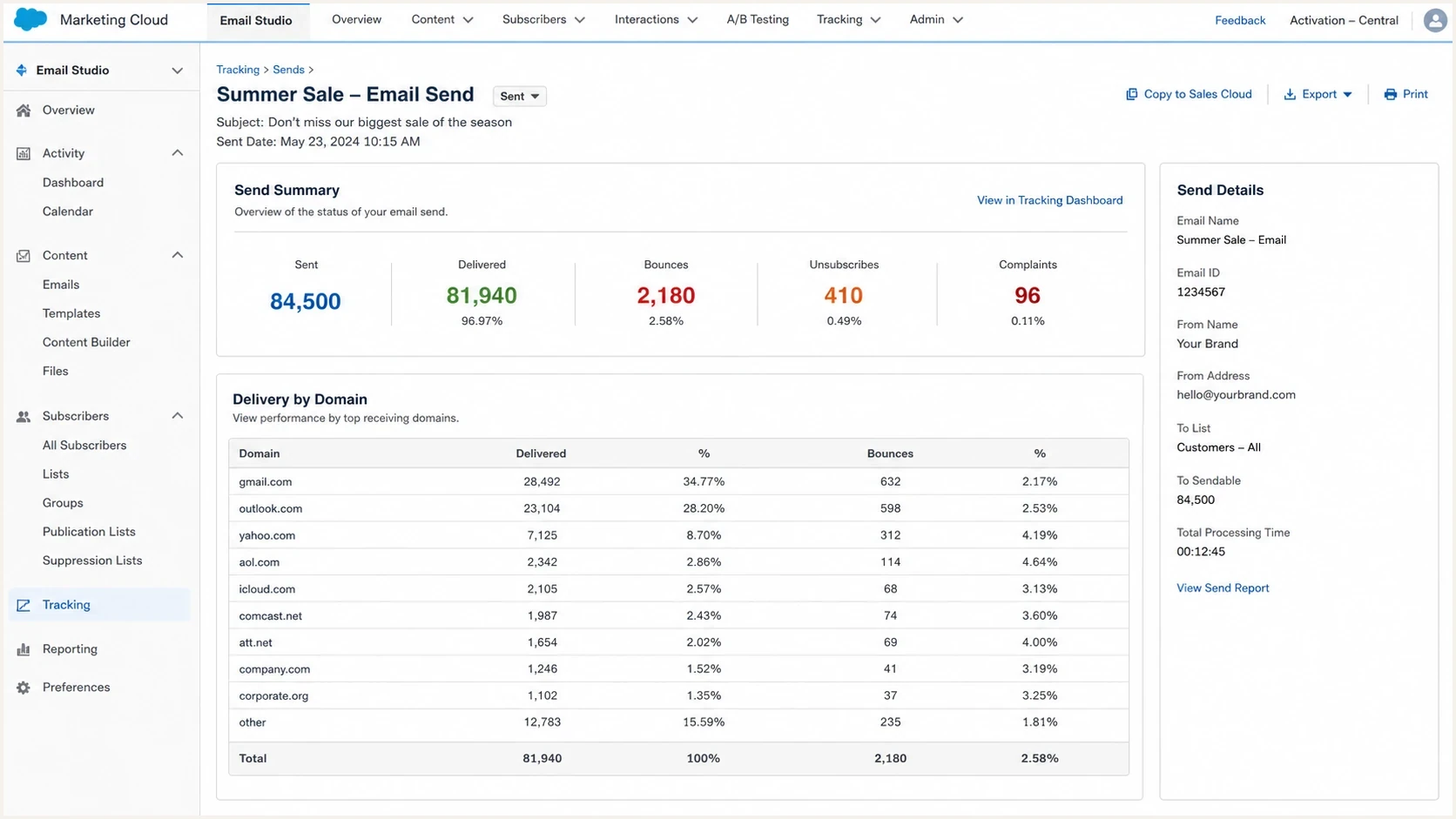
Salesforce Marketing Cloud tracking screen showing delivery, bounce, unsubscribe, and complaint metrics.
A single clean test does not prove the whole SFMC program is healthy. Test each distinct mail stream: promotional campaigns, lifecycle journeys, transactional notices, reactivation sends, and any business unit using a different sender profile or IP pool.
Diagnose reputation by mailbox provider
When a sender says the domain reputation went red, the next question is where. Reputation is not one global score. Gmail, Microsoft, Yahoo, Apple, corporate filters, and regional mailbox providers all make independent filtering decisions. A campaign can inbox well at one provider and land in spam or get throttled at another.
Create a domain-level report for your largest recipient domains. At minimum, track delivered, bounced, deferred, opened, clicked, unsubscribed, complained, and converted counts. If you have a large B2B audience, group corporate domains by company or MX provider so one customer domain does not hide inside an "other" bucket.
Provider-level risk signals
Example scoring model for prioritising investigation by mailbox provider.
Microsoft
82%Gmail
64%Yahoo
51%Apple
28%Corporate
74%If Microsoft is the main problem, review deferrals, complaint rates, and blocklist or blacklist signals tied to the sending IPs. If Gmail is the main problem, examine domain reputation, user engagement, spam complaints, and domain matching. If corporate filters are the issue, inspect content, URL reputation, DNS, TLS, and security gateway rejections.
Mailbox-specific issue
- Symptom: One provider shows spam placement, deferrals, or low engagement while others remain normal.
- Likely cause: Provider-specific reputation, complaint, filtering, or throttling rules.
- Fix path: Reduce risky volume to that provider and rebuild with recently engaged recipients.
Program-wide issue
- Symptom: Most providers show worse placement, higher bounces, or lower engagement at the same time.
- Likely cause: List quality, authentication, new traffic source, volume change, or content problem.
- Fix path: Pause the riskiest streams and repair the root cause before ramping volume.
A blocklist (blacklist) check is still worth doing, especially when bounces mention policy blocks, spam sources, poor reputation, or rejected IPs. Suped's blocklist monitoring provides ongoing visibility across domains and IPs instead of a one-off lookup during an incident.
Check shared and dedicated IP reputation
Confirm whether the SFMC Enterprise sends through shared or dedicated IP space. Shared IP reputation combines traffic from customers in the pool. A dedicated IP gives your program control of IP reputation, but it also makes your volume, complaints, bounces, and cadence fully responsible for that reputation. Domain reputation and list behavior follow either model.
Salesforce currently recommends a dedicated IP above 100,000 messages per month and requires one above 250,000. Senders below 100,000 messages per month often lack enough regular volume to maintain a dedicated IP. Shared and dedicated IPs cannot operate at the same time within one Enterprise, and every new dedicated IP needs a controlled warmup.
|
|
|
|---|---|---|
Shared IP | Pool reputation can change outside your own sends. | Compare affected providers across recent jobs and open a Salesforce case when clean mail streams share the same IP-level block. |
Dedicated IP | Irregular volume or a weak warmup damages reputation quickly. | Check volume history, provider deferrals, reverse DNS, and whether the IP appears on a blocklist or blacklist. |
Multiple dedicated IPs | A job can use the wrong IP or concentrate too much volume. | Verify the sender profile, Delivery Profile, send classification, and IP pool used by the affected job. |
How IP configuration changes the SFMC investigation.
Do not move to a dedicated IP during an incident unless the team can supply steady engaged volume and complete a warmup. A cold dedicated IP can perform worse than a stable shared pool even when authentication is correct.
Fix list quality before warming anything new
List quality is usually the largest driver of SFMC reputation problems. If a new list source, old segment, partner import, or dormant customer file entered the program before the decline, treat it as suspect until the data proves otherwise.
Start by suppressing addresses that are likely to generate complaints, bounces, or non-engagement. That includes hard bounces, repeated soft bounces, recent complainers, role accounts when they are not expected, typo domains, imported addresses with no permission trail, and subscribers with no opens, clicks, purchases, logins, or site activity inside your chosen window.
Complaint rate thresholds
Use internal complaint-rate thresholds as an incident severity signal for promotional sends.
Healthy
Below 0.05%
Keep monitoring by provider and campaign.
Watch
0.05% to 0.10%
Investigate acquisition source and segment quality.
High risk
Above 0.10%
Pause risky streams and tighten suppression.
Treat those bands as conservative operating thresholds, not universal acceptance rules. Mailbox providers calculate user-reported spam and feedback-loop complaints differently. For Gmail traffic, keep the reported spam rate below 0.10% and avoid reaching 0.30% or higher.
- New imports: Compare every recent import against complaint, bounce, and unsubscribe rates by source.
- Old audiences: Suppress long-dormant subscribers before recovery sends. Reintroduce only small engaged cohorts.
- Bad domains: Remove typo domains and domains with repeated invalid responses. Keep a permanent suppression table.
- Unsubscribe handling: Keep opt-out easy, visible, and fast. A frustrated subscriber often uses the spam button instead.
SFMC includes List-Unsubscribe and List-Unsubscribe-Post headers on commercial sends. Inspect a received commercial message to confirm both headers, keep a visible unsubscribe link in the body, and verify that publication lists plus Reply Mail Management apply the request at the intended scope. Do not classify promotional mail as transactional to bypass an unsubscribed status.
Do not move a contaminated audience to a new subdomain. The domain changes, but the complaint behavior follows. Fix consent, segmentation, suppression, and cadence first.
Review SFMC sending behavior and automation design
SFMC makes it easy to create automations that send more mail than intended. A journey entry source can expand, a filter can loosen, or a triggered send can fire for events that were not originally planned. That creates reputation risk even when the email template is unchanged.
Review send volume by day, hour, business unit, IP pool, sender profile, and campaign type. Compare the four weeks before the issue with the first week of decline. If volume spiked, restore a normal cadence and prioritize subscribers with recent positive engagement.
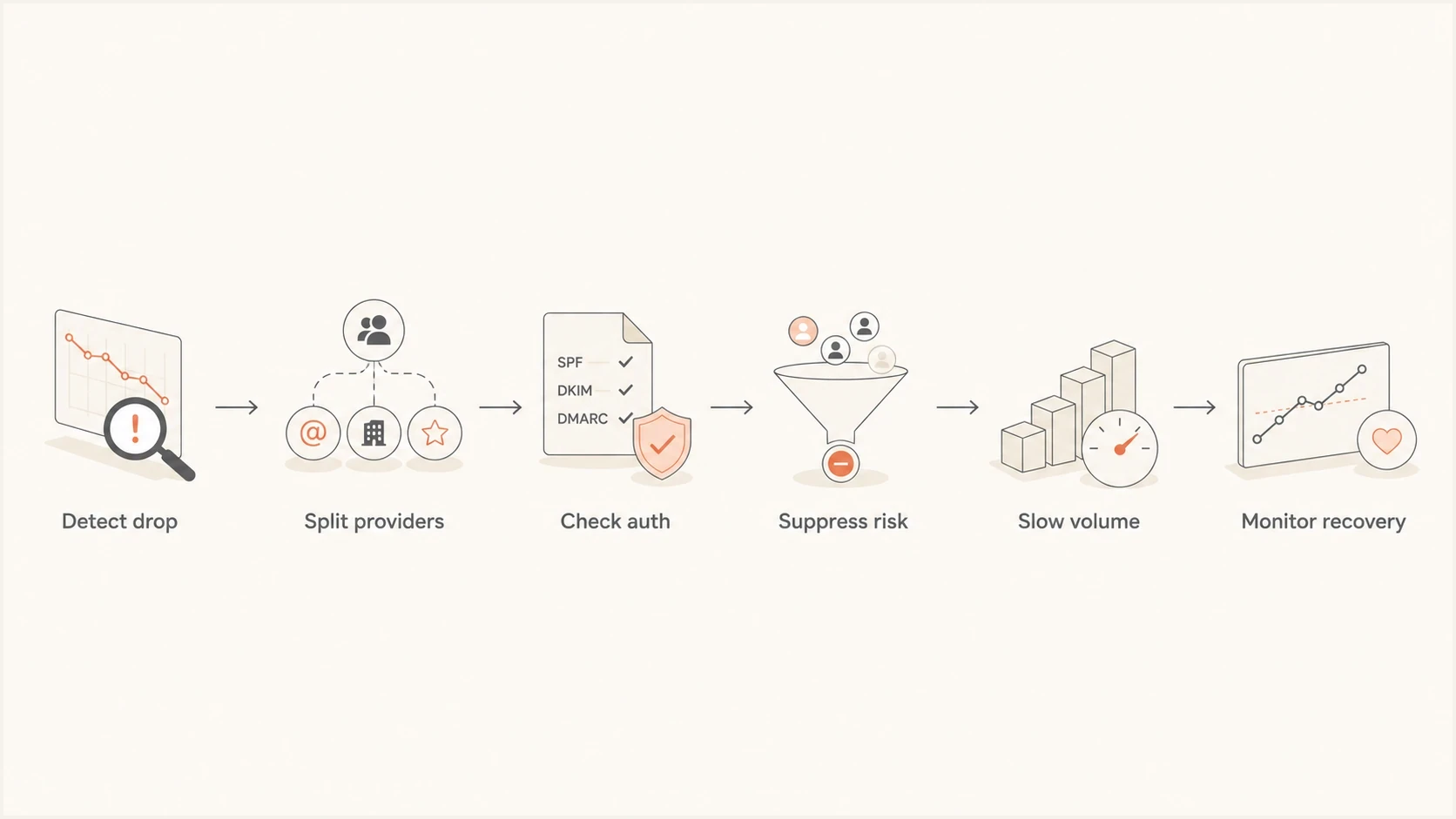
Flowchart showing SFMC deliverability recovery from detection through monitoring.
Risky recovery
- Volume: Keeps full campaign volume running while reputation is already declining.
- Audience: Includes dormant, imported, or low-consent recipients during the repair period.
- Cadence: Sends bursts that create unstable engagement and throttling signals.
Controlled recovery
- Volume: Reduces risky sends and restores volume only after provider metrics improve.
- Audience: Starts with recent openers, clickers, buyers, account users, and other active recipients.
- Cadence: Uses steady daily sending so mailbox providers see predictable engagement.
If you send a monthly newsletter that reliably earns opens and clicks, keep it in the recovery plan, but distribute it carefully. A steady send to engaged subscribers can help rebuild positive signals. A sudden blast to the full historical database can make the incident worse.
Interpret bounces and blocks correctly
Bounces tell you whether the receiving system rejected the message, delayed it, or found an address problem. In SFMC, do not stop at the bounce category. Export the raw SMTP reason and group it by provider, JobID, and date. SFMC separates block, hard, soft, and technical bounces, and each category needs a different response.
|
|
|
|---|---|---|
5.7.x policy or authentication response | Block bounce | Read the full SMTP reason, then check authentication, complaints, reputation, and URLs. |
4.x.x temporary response | Deferral | Reduce bursts, watch retries, and review provider-level reputation. |
User or domain unknown | Hard bounce | Suppress the address and investigate its acquisition source. |
Mailbox full or temporary DNS failure | Soft bounce | Let normal retries run and suppress repeated failures under your policy. |
Listed IP or domain | Blocklist or blacklist | Confirm the exact listing and fix the sending behavior before following the operator's removal process. |
Common SFMC bounce patterns and practical responses.
A bounce message that mentions spam does not always mean the content is the root cause. It can be a shorthand policy reason attached to reputation, authentication, URL reputation, volume, or complaints. That is why the same SMTP code must be interpreted alongside list source, provider, timing, SFMC bounce category, and authentication results.
Move DMARC to enforcement safely
If SFMC authentication is failing, fix it before attempting reputation recovery. Mailbox providers penalize inconsistent identity. Even when deliverability problems began with list quality, authentication failures make recovery harder because providers cannot connect good engagement to a trusted domain identity.
DMARC aggregate data gives you a source-level view of what is passing, failing, and matching your From domain. Suped's DMARC monitoring turns aggregate XML reports into source names, failure reasons, and fix steps. Suped also puts hosted DMARC, hosted SPF, SPF flattening, MTA-STS, blocklist or blacklist monitoring, and alerts in the same domain workflow.
Strict DMARC record after validationdns
_dmarc.example.com. 3600 IN TXT
"v=DMARC1; p=quarantine; rua=mailto:dmarc@example.com; adkim=s; aspf=s"
RFC 9989 replaced RFC 7489 and made the pct tag historic. Start with p=none when you still need to inventory legitimate sources. After SFMC and every other valid source pass with the intended domain, change the policy as a whole to quarantine or reject. Do not rely on pct for percentage-based enforcement. RFC 9990 now defines aggregate reporting separately.
A good SFMC authentication result needs more than SPF pass or DKIM pass. The visible From domain must match at least one passing authentication mechanism, and that result must hold across the real production send paths.
Decide whether to use a new subdomain
A new SFMC sending subdomain is appropriate when the current domain identity is too damaged, the business needs separation between mail streams, or a legacy setup cannot be repaired cleanly. It is not a shortcut around poor list quality. Treat a new subdomain as a migration after root-cause repair, not as the first remediation step.
Keep the current subdomain
- Use when: Authentication is fixable and complaint sources are identified.
- Benefit: You preserve any positive reputation that still exists.
- Risk: Recovery takes time and requires disciplined segmentation.
Create a new subdomain
- Use when: Mail streams need separation or the current setup has structural damage.
- Benefit: You can rebuild with cleaner identity and stricter controls.
- Risk: The same bad audience or cadence will damage the new domain.
If you use a new subdomain, warm it with your most engaged recipients first. Keep risky reactivation, low-permission lists, and purchased or appended data out of the warmup entirely. Set daily caps, watch provider-level metrics, and expand only after complaints, bounces, and spam placement stay controlled.
Example warmup cap
A controlled warmup expands only after metrics remain stable.
Daily cap
Build an SFMC recovery checklist
Once the cause is known, turn recovery into an operating checklist. The goal is to stop reputation loss, show mailbox providers better recipient behavior, and prevent the same failure from returning.
- Pause risky sends: Stop reactivation, cold segments, weak consent sources, and high-complaint campaigns while the incident is active.
- Fix authentication: Repair SPF, DKIM, DMARC, tracking domains, bounce domains, and sender profiles for every affected business unit.
- Tighten suppression: Remove hard bounces, complainers, inactive recipients, typo domains, and source segments with poor consent.
- Restore cadence: Send predictable daily volume to recently engaged recipients before expanding to older audiences.
- Monitor by provider: Track the top recipient domains every week and investigate changes before they become program-wide problems.
Suped fits this workflow when teams need an operational view of authentication and reputation across domains. The relevant workflow includes issue detection, fix steps, real-time alerts, hosted SPF, hosted DMARC, MTA-STS setup, blocklist or blacklist monitoring, and multi-domain management.
For broader troubleshooting outside SFMC, the same incident pattern applies: authenticate, isolate the failing providers, identify the audience or send change, reduce risky volume, and monitor recovery. The guide to emails going to spam covers the same diagnosis when the problem spans more than one sending platform.
Views from the trenches
Best practices
Build a provider-level report for the largest domains before changing infrastructure.
Suppress high-risk segments first, then rebuild volume with active subscribers only.
Use DMARC data and message headers to confirm real production authentication paths.
Common pitfalls
Starting a new subdomain before finding the cause repeats the same reputation damage.
Treating open rate as proof of inboxing hides complaint, bounce, and spam-folder issues.
Mixing dormant imports with engaged audiences makes recovery signals harder to read.
Expert tips
Keep a permanent bad-domain suppression list so recurring invalid domains stay blocked.
Review weekly domain metrics for delivery, clicks, opt-outs, bounces, and complaints.
Separate lifecycle, promotional, and reactivation mail so one stream cannot hurt all.
Marketer from Email Geeks says reputation recovery starts with finding the cause, including list source changes, older audiences, sending frequency, engagement, and complaint spikes.
2022-08-09 - Email Geeks
Marketer from Email Geeks says SFMC experience matters when an incident needs both platform knowledge and deliverability remediation, especially when domain reputation has declined.
2022-08-09 - Email Geeks
What to do next
The direct fix for SFMC deliverability issues is to diagnose the root cause before changing the sending domain. Validate authentication, send a real production-path test, identify the IP configuration, segment performance by mailbox provider, suppress risky audiences, review automation volume, and only then decide whether the current subdomain can recover or a new one needs a controlled warmup.
Suped helps turn the technical work into a monitored workflow. Use Suped to review DMARC, SPF, DKIM, blocklist or blacklist, hosted SPF, hosted DMARC, and MTA-STS issues across domains, then track whether the fixes hold as SFMC volume ramps back up.




