How can I diagnose email deliverability issues when using Constant Contact?

Updated on 4 Oct 2026: We added a list quality and sending change check, and clarified Constant Contact bounce and authentication troubleshooting.
To diagnose email deliverability issues in Constant Contact, prove four things in order: the campaign selected the subscriber, Constant Contact sent or suppressed that address correctly, the receiving server accepted or rejected the delivery attempt, and the sending domain passed authentication. Only after those checks should a blocklist or blacklist result be treated as a likely cause.
That order matters. When a subscriber says they signed up but never received anything, the cause is often not a deliverability failure. It can be an unused signup form, a segment rule, a scheduled campaign that has not run, a suppressed contact, or a welcome series that was not connected to the form. A blocklist check has value, but it cannot tell you whether a specific person was included in a specific send.
Email delivery means the receiving server accepted the message, though a later failure can still produce a bounce. Deliverability asks where an accepted message landed, such as the inbox, a category tab, or spam. Diagnose the send path first, then use campaign trends, authentication checks, real mailbox tests, and blocklist monitoring to confirm wider domain health.
Start with the delivery question
The first question is not "are we blocklisted?" It is "did this message have a real chance to reach this recipient?" Constant Contact can show campaign reporting, contact status, bounces, opt-outs, and other delivery signals once you have account access. Without that access, you can collect useful clues, but you cannot finish the diagnosis.
Use this quick triage path when a Constant Contact send looks missing:
- Confirm the campaign, automation, or resend actually ran during the expected time window.
- Confirm the subscriber was in the selected list or segment at send time.
- Check whether the address was active, unsubscribed, bounced, held, or otherwise suppressed.
- Look for evidence that Constant Contact attempted delivery to that address.
- Search inbox, spam, promotions, quarantine, rules, and logs for the exact message.
Do not diagnose from one silent signup
A newsletter form submission does not prove a campaign should arrive immediately. The form can feed a different list, the welcome email can be disabled, or the business can have no scheduled mail during that period. Treat a silent signup as a clue, not a conclusion.
Trace one subscriber in Constant Contact
Once you have access, pick one address you control and trace it end to end. This is faster than reviewing every campaign. A single known subscriber gives you a clean test case: when the address was added, which form captured it, which list it entered, which campaign selected it, and what Constant Contact reported after the send.
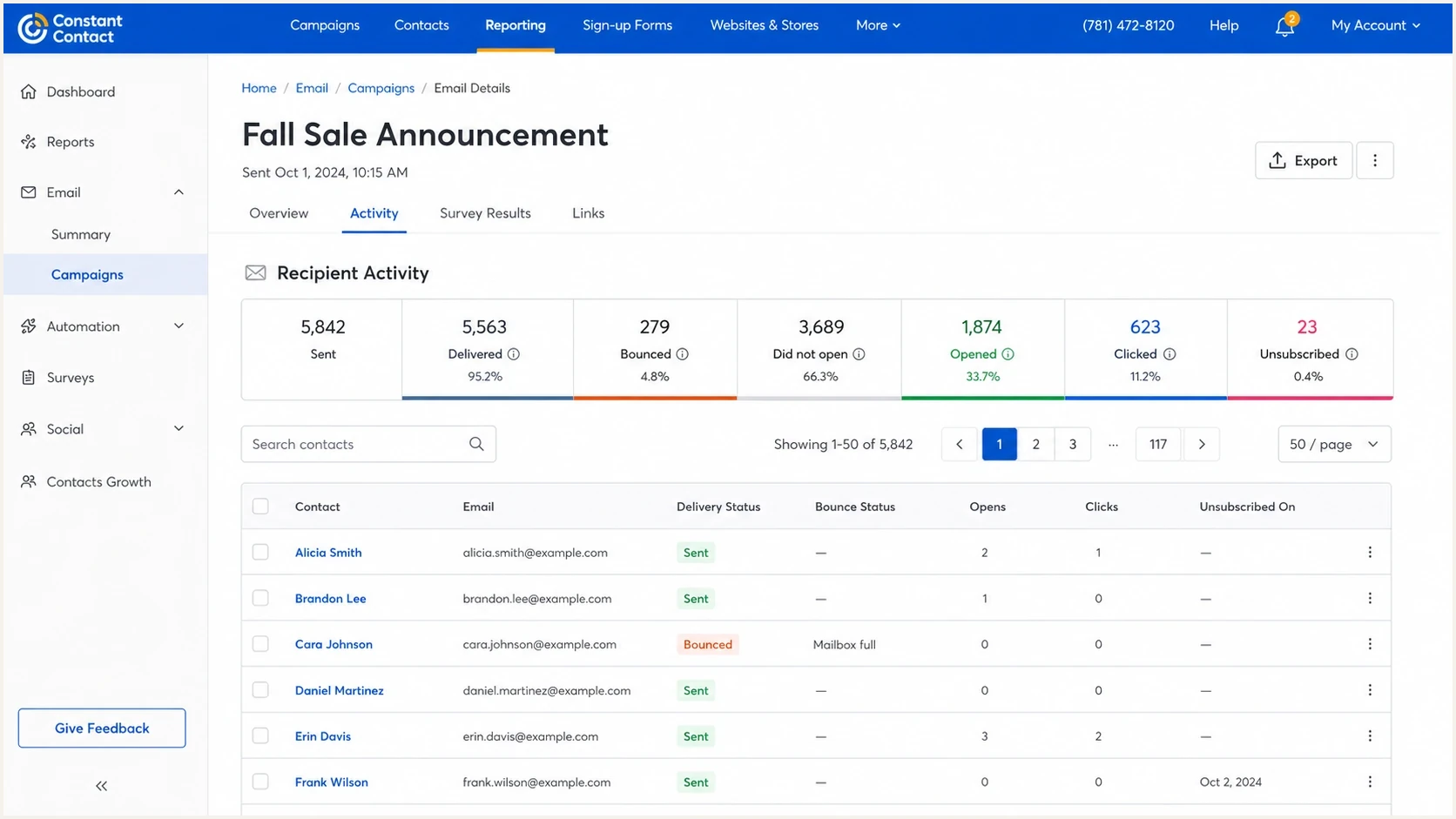
Constant Contact reporting view for checking whether a subscriber was included in a send.
Constant Contact's own deliverability tips point readers toward list quality, engagement, authentication, and sending practices. Those are useful, but subscriber-level facts still come first because they separate setup errors from filtering problems.
|
|
|
|---|---|---|
Form | Correct list | Old form |
Segment | Included | Excluded |
Contact | Active | Suppressed |
Send | Attempted | Skipped |
Result | Delivered | Bounced |
Subscriber trace checkpoints
If Constant Contact says the address was not included, check the list, segment, form, consent, and scheduling logic. If it says the address bounced, open the Bounced report and use the category and available response detail. A Suspended result can follow a Non-existent bounce in any Constant Contact account; the address is held for 15 days after the first such bounce. If it says Delivered but the recipient cannot find the message, move to mailbox-side filtering and controlled tests.
Read campaign metrics as patterns
One campaign rate rarely proves the cause. Compare the affected send with several similar campaigns that used the same message type, audience, and approximate volume. Start with delivery rate, bounce rate, click-through rate, unsubscribe rate, spam complaint count, and confirmed opens. Treat raw open rate separately because privacy proxies can inflate it. A sudden change against that baseline is more useful than a generic industry average, especially when you can isolate the change by list, segment, signup source, or mailbox provider.
|
|
|
|---|---|---|
Bounces | Receiver rejection or delivery failure | Split Non-existent, Suspended, Blocked, Undeliverable, and Mailbox Full |
Spam complaints | Permission or relevance problem | Compare signup source, segment, message, and frequency |
Unsubscribes | Expectation mismatch | Review form promise, audience, and campaign cadence |
Clicks and confirmed opens | Engagement trend | Compare with prior like-for-like campaigns |
Provider pattern | Local or broad failure | Group bounce domains and seed results by mailbox provider |
How to turn Constant Contact reporting into diagnostic evidence
Do not diagnose from raw open rate alone
Privacy proxies and automated security systems can create opens that did not come from a person. Use Constant Contact's confirmed and proxy open distinction, then give more weight to clicks, replies, bounces, spam complaints, and controlled mailbox results.
Do not label low engagement as a delivery failure automatically. If delivery stays stable but clicks and confirmed opens fall across providers, inspect list segmentation, campaign frequency, content relevance, and signup permission. If Blocked bounces rise at one provider, read the rejection detail and investigate that provider-specific pattern before changing the whole program.
Check list quality and sending changes
If the decline began with a new list import, a dormant segment, or a large increase in volume, inspect that change before rewriting the campaign. Stale or poorly permissioned addresses can raise Non-existent bounces and spam complaints, while an abrupt jump in sending can change how receivers filter the mail.
- Compare the affected campaign's audience source, list age, and consent record with earlier sends.
- Separate invalid addresses from temporary bounces; correct typos and stop repeatedly sending to addresses marked Non-existent or Suspended.
- Compare daily volume and frequency with the sender's usual pattern, then send to a smaller, recently engaged segment while investigating a sudden decline.
- If one receiving domain drives Blocked bounces, keep its response text and ask Constant Contact support to help interpret the rejection.
Use the bounce category and actual receiver response to choose the next step. Constant Contact can retry an Undeliverable address before assigning that category, so a temporary delivery problem needs a different response from a permanently invalid address.
Run controlled mailbox tests
A controlled test should remove as much uncertainty as possible. Use a small seed list with addresses at mailbox providers that matter for the sender, usually Gmail, Outlook, Yahoo, iCloud, and a mailbox on a domain you control. The controlled mailbox is useful because its server logs can prove whether a delivery attempt happened. A same-domain test sent to your own organization can trigger spoofing controls because mail appears to come from the organization but arrives through an external service. If public seed inboxes receive it and company inboxes do not, inspect the corporate gateway and domain impersonation rules, including quarantine decisions.
Do not use only test emails. Test email workflows can differ from a real campaign send. Create a real campaign, send it to a test list, and make sure the subject, sender, links, domain, and template match the production send closely enough to make the result meaningful.
Weak test
- One personal Gmail address.
- A test-send version of the campaign.
- Checked immediately after signup.
- Only whether one inbox received mail.
Stronger test
- Several mailbox providers plus one controlled mailbox.
- A real campaign sent to a dedicated test list.
- Observed across the full delivery window.
- Campaign report, mailbox result, and server log.
For the controlled mailbox, record the exact timestamp, sending domain, visible From address, return-path domain, subject line, and message ID if you can see it. If its server logs show no delivery attempt, check the gateway logs and log coverage, then compare that evidence with Constant Contact's campaign report. A missing log entry alone does not prove that Constant Contact skipped the send.
Email tester
Send a real email to this address. Suped shows a results button when the test is ready.
?/43tests passed
A live message test also helps you inspect headers. Suped's email tester is useful when you need one place to review authentication, message structure, and obvious delivery issues from an actual sent email.
Verify Constant Contact authentication
After confirming the message was actually sent, check whether the domain is self-authenticated for Constant Contact. SPF, DKIM, and DMARC do not guarantee inbox placement, but an authentication or identifier-matching failure can contribute to filtering, quarantine, delivery delay, or rejection.
Use the DKIM CNAME or TXT values Constant Contact generates inside the account and publish the required DMARC record for the visible From domain. Verify that the From address is approved in the account and uses the authenticated domain; Constant Contact warns that other From domains can bounce after self-authentication is active. Do not add a generic SPF include copied from another setup. Constant Contact's return-path can pass SPF under a service-owned domain, while the custom-domain DKIM signature gives DMARC a matching identifier. If the domain already has an enforcement policy, do not replace it with the monitoring example below.
Record shape onlyDNS
[Constant Contact selector]._domainkey.example.com CNAME [Constant Contact target]
_dmarc.example.com TXT "v=DMARC1; p=none; rua=mailto:dmarc@example.com"
What to validate
- Confirm the Constant Contact account shows the custom domain as active after DNS propagation.
- Confirm the custom-domain DKIM signature passes and matches the visible From domain.
- Confirm at least one authenticated identifier passes and matches the visible From domain for DMARC.
- A default auth.ccsend.com DKIM signature and a custom-domain signature can both appear in headers.
- Confirm DNS has the exact generated names and values, with no duplicate DMARC record.
If you want a fast outside-in check, run the domain through a domain health check. It will not replace Constant Contact reporting, but it quickly catches broken SPF, missing DKIM, DMARC errors, and DNS problems.
?
What's your domain score?
Deep-scan SPF, DKIM & DMARC records for email deliverability and security issues.
DMARC reports are especially helpful because they show which sources are sending mail for the domain and whether those sources pass authentication. Suped's product turns the XML reports into source-level evidence, so you can confirm that Constant Contact is authorized and see whether failures come from it or another sender.
Check blocklists without over-weighting them
A blocklist or blacklist lookup is worth doing, but it is rarely the first or only answer. Many listings have no visible impact on a shared ESP sending path. Some affect one receiving network heavily. Others matter only for direct-to-MX mail or for a sender's own infrastructure. The right question is: which domain or IP is listed, and does that listed asset participate in this Constant Contact send?
For Constant Contact, you usually do not control the shared sending IP pool. You do control your domain reputation, authentication, list quality, and the links inside the email. That means a sender-domain blacklist result can matter more to your remediation plan than a shared IP result you cannot directly change.
|
|
|
|---|---|---|
Sender domain | High | Reputation |
Link domain | High | Content |
Shared IP | Low | ESP support |
Own IP | High | Mail logs |
How to interpret listing types
If a blocklist result appears, compare it with your actual symptoms. A real blocklist problem often has matching bounce text, consistent rejection at a receiving provider, or a sudden drop across one mailbox network. A listing with no matching delivery symptom is a monitoring item, not proof of the root cause.
Blocklist checker
Check your domain or IP against 144 blocklists.







Suped's blocklist monitoring is useful when you need ongoing visibility instead of one-off blacklist screenshots. It lets you track IP and domain reputation beside DMARC and authentication data, so the listing is judged with the rest of the delivery evidence.
Use Suped for ongoing evidence
For a one-time Constant Contact investigation, the minimum evidence is campaign reporting, a subscriber trace, a controlled test send, authentication results, and any relevant blocklist or blacklist data. For an ongoing program, manual checks become too slow and too easy to forget.
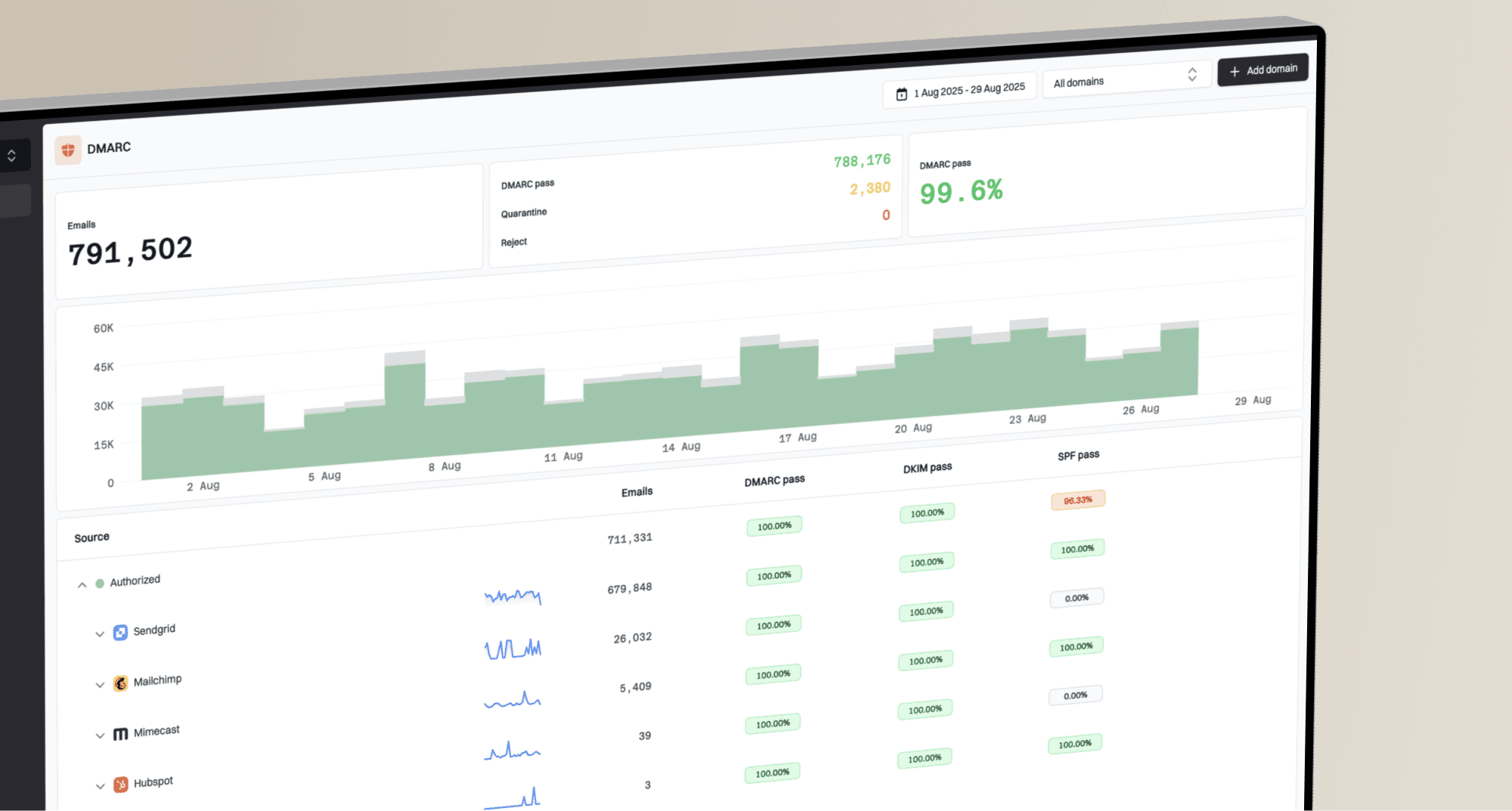
Suped DMARC dashboard showing email volume, authentication health, and source breakdown
Suped's product puts DMARC source data, SPF and DKIM results, blocklist monitoring, and alerts in one workflow. That is useful when Constant Contact is one approved sender among several, because a team can verify its authenticated traffic without confusing failures from another platform or an unknown source.
One-off diagnosis
- One send, one symptom, one short window.
- Reports, headers, logs, and manual checks.
- Problems can return after the investigation ends.
Ongoing monitoring
- All approved sources and sending domains.
- DMARC trends, issues, alerts, and reputation.
- Alerts support earlier investigation of new failures.
With Suped, add the domain, publish the reporting address in DMARC, confirm Constant Contact appears as an approved source, fix authentication issues, and set alerts for new failures or suspicious senders. If multiple clients or brands are involved, the multi-tenant view keeps each domain separate while retaining an account-wide view.
For teams moving toward enforcement, Suped's DMARC monitoring helps show when the domain is ready to move from monitoring to quarantine or reject without breaking legitimate mail.
Questions to ask before access arrives
While waiting for Constant Contact access, prepare questions that let the account owner hand over useful evidence quickly. That keeps the first working session focused and avoids fixing a problem that is not broken.
- Which mailbox providers or domains are missing the mail?
- When did the issue start, and which sends changed around that date?
- Did list size, frequency, or campaign cadence change before the drop?
- Which lists, segments, tags, and signup forms fed the affected campaign?
- What bounce text, complaints, opens, clicks, and support notes exist?
- Which domain is used in the visible From address, links, and return path?
Also sign up through every public form you can find and record the URL, timestamp, form copy, confirmation behavior, and list expectation. That does not prove a delivery issue by itself, but it often exposes old forms, abandoned automations, or mismatched lists before anyone opens the ESP.
Views from the trenches
Best practices
Start with one traceable subscriber, then widen the diagnosis only after facts are clear.
Use a controlled seed list and a mailbox you own to separate delivery from filtering.
Compare blocklist findings with bounce text and provider symptoms before taking action.
Common pitfalls
Assuming a silent signup proves delivery failure creates false work and bad conclusions.
Checking a blacklist first often hides list, form, schedule, or segmentation problems.
Treating shared IP listings as sender-controlled can lead to the wrong remediation path.
Expert tips
Ask the sender what data made them suspect a problem before choosing diagnostics.
Keep signup tests running for days because real campaigns do not always send quickly.
Document the form URL, campaign ID, timestamp, and mailbox result for each test.
Expert view
Expert from Email Geeks says deliverability work should begin with whether the mail was delivered successfully, because most blocklist results explain less than send and engagement data.
2024-01-04 - Email Geeks
Marketer view
Marketer from Email Geeks says ESP data is essential, and without access to send and delivery reporting, a consultant can only make limited, test-based claims.
2024-01-05 - Email Geeks
What to fix first
The fastest Constant Contact deliverability diagnosis starts with proof of send, not proof of reputation. Trace one subscriber, confirm the campaign and segment, review the bounce category, compare the affected send with similar campaigns, run a controlled campaign test, then validate authentication, DNS, and relevant blocklist or blacklist signals.
If the account data shows the subscriber was never selected, fix the form, list, segment, or automation. If the message bounced, follow the category and receiver response. If the message was accepted but landed poorly across a controlled test list, move into authentication, engagement, content, and reputation work.
Frequently asked questions
No. A blocklist or blacklist result only matters when the listed domain or IP is used in the actual send path and the symptoms match. Always compare the listing with bounce text, mailbox provider behavior, and campaign reporting.
Check whether the campaign or automation ran, whether the contact was active and included in the selected audience, and whether Constant Contact recorded a bounce, delivery, unsubscribe, or suppression event.
Only partially. You can sign up through public forms, run domain and blocklist checks, and use controlled mailboxes, but you still need account reporting to prove whether a specific address was included in a send.
The form can feed an old list, the welcome automation can be off, the next campaign can be scheduled later, or the address can be excluded by segment rules. A missing message is not enough evidence by itself.
No. Delivered means the receiving server accepted the message. It does not prove whether the message reached the inbox, a category tab, spam, or a mailbox-side quarantine, and a later delivery failure can still produce a bounce.
DMARC helps confirm whether Constant Contact and other senders authenticate mail for your domain correctly. It is especially useful when multiple systems send mail and you need source-level evidence.