Domain health checker
Check your domain's email authentication health. Scan SPF, DKIM and DMARC records for issues.
Check your domain health across DMARC, SPF and DKIM
Full authentication scan
Run a live email authentication audit to find DNS issues, weak policies, lookup limit problems, and missing DKIM selectors in one report. For ongoing visibility, use Suped's DMARC monitoring to track authentication results, sender changes and domain health over time. If a check points to policy work, compare the DMARC tags and DMARC policy examples before changing DNS.
Get started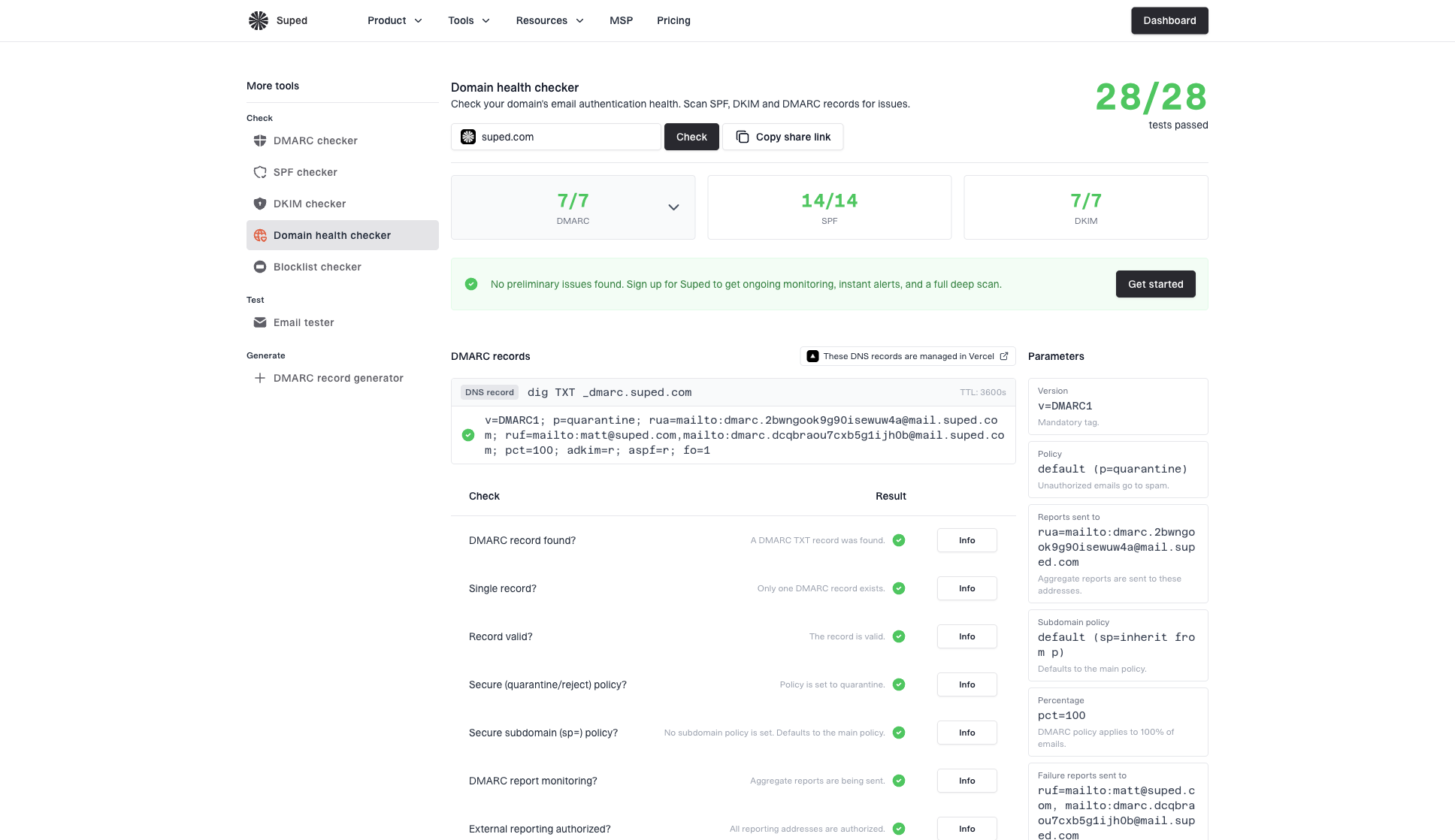


One domain health checker, endless uses
Use the domain health checker to audit a new domain, review client DNS, troubleshoot authentication failures, or confirm a security rollout after propagation. It brings DMARC, SPF and DKIM checks into one readable report so you can see what passes, what fails, and what to fix first.
7/7
DMARC
16/16
SPF
7/7
DKIM
Combined health score
See DMARC, SPF and DKIM pass counts together before opening each detailed section.
DMARC policy
SPF record
DKIM selectors
Authentication coverage
Confirm the domain has the core records receivers need to authenticate mail.
Priority fix
Move DMARC from monitoring to quarantine after sender alignment passes.
Prioritized fixes
Turn failing checks into a short action summary you can send to the right owner.
DMARCvalid
SPFvalid
DKIMfound
DMARC, SPF and DKIM checks
Inspect policy, lookup limits, duplicate records, selectors, keys and reporting setup.
DNS provider
Managed in Cloudflare
DNS provider context
Identify where records are managed so fixes happen in the right DNS account.
Health report
Copy link
Shareable audit
Send the same report to a client, vendor or teammate without screenshots.
Domain health checker FAQs
Answers to common questions about checking domain health, reading authentication results, and deciding what to fix next.
No. It performs live DNS lookups and reports what is currently published.
It checks DMARC, SPF and DKIM records for the domain, then summarizes the results into separate scores for each authentication area.
The checker looks for a DMARC record, confirms there is only one record, validates syntax, checks the main and subdomain policy, verifies aggregate reporting, and checks external reporting authorization.
The checker looks for an SPF record, confirms there is only one record, validates syntax, checks DNS lookup and void lookup limits, detects include loops, checks record length, verifies the all mechanism, flags +all, PTR, duplicate includes, empty includes, macros, and records with no authorized senders.
The checker scans common DKIM selectors, checks whether records exist, confirms each selector has a single record, validates syntax, checks RSA compatibility, SHA-256 hashing, 2048-bit key strength, and whether testing mode is enabled.
Each protocol protects a different part of email authentication. Separate scores make it clear whether the domain has a DMARC policy problem, an SPF DNS problem, a DKIM key problem, or a mix of issues.
DMARC requires SPF or DKIM to pass and align with the From domain. A record can be valid but still fail DMARC if the authenticated domain does not match the visible sender domain.
Knowing where DNS is managed helps you route fixes to the right account or team. The checker shows provider context when nameservers make it possible to identify.
Fix missing or invalid DMARC, SPF, and DKIM records first. Then address SPF lookup limits, weak DMARC policies, missing reporting, and weak DKIM keys.
Yes. Run a check and use the share link to send the same report to a teammate, client, or vendor.
No. The domain health checker validates DNS records. To inspect whether a real email passed SPF, DKIM and DMARC alignment, use the email tester.
A one time check is useful for audits and troubleshooting. For ongoing visibility into authentication failures, sender changes and DMARC reports, use DMARC monitoring.


How MONEYME proactively strengthens domain security and unlocks higher email engagement with Suped
See how MONEYME uses Suped
How cybersecurity specialist Jam Cyber delivers scalable DMARC protection with Suped
See how Jam Cyber uses Suped

How Vision Australia maintains full DMARC enforcement across a large domain portfolio with Suped
See how Vision Australia uses Suped

How The POP Team turns domain checks and DMARC visibility into client ready delivery work
See how The POP Team uses Suped

How DigiBean simplified DMARC monitoring and improved email security for their MSP clients
See how DigiBean uses Suped

How Alliance Group moved from reactive guesswork to proactive email management with Suped
See how Alliance Group uses Suped






Start monitoring your DMARC reports today

What you'll get with Suped
Real-time DMARC report monitoring and analysis
Automated alerts for authentication failures
Clear recommendations to improve email deliverability
Protection against phishing and domain spoofing