How to resolve email IP blocks with Yahoo Mail?

Published 21 Jun 2026
Updated 22 Aug 2026
14 min read
Summarize with
Updated on 22 Aug 2026: We updated this guide for Yahoo's current support process, including shared IP ownership, and RFC 9989.
To resolve an email IP block with Yahoo Mail, first confirm that Yahoo is blocking the sending IP, then pause or throttle Yahoo-bound mail, fix the reputation and authentication issues behind the block, and submit a Yahoo Sender Support Request with clean evidence. If a mail host controls the affected shared IP, give its administrator the SMTP error, timestamps, sending IP, and message counts so the provider can investigate and contact Yahoo. Yahoo does not run an IP whitelisting program, but it reviews support requests and can adjust reputation when needed.
The fastest recovery path is not to keep retrying at full volume. Yahoo cares about recipient engagement, complaint rates, bounce quality, authentication, and whether the sending pattern looks stable. A good blocklist monitoring workflow gives you the evidence to separate a true Yahoo IP block from a temporary deferral, a DNS problem, or a local recipient issue.
- Confirm: Collect SMTP errors, affected Yahoo and AOL domains, timestamps, sending IPs, and message samples before changing infrastructure.
- Pause: Reduce Yahoo-bound traffic while the IP is blocked, because aggressive retries add more negative signal.
- Fix: Clean list sources, remove invalid recipients, check authentication, and inspect blocklist or blacklist status.
- Request review: Submit a concise Yahoo support request after the root cause is handled, not before.
Do not make users solve an IP block
Asking subscribers to add the sender to their address book helps a few individual recipients, but it does not remove a Yahoo IP block. Use it as a support workaround for affected users, not as the main fix.
How to fix a Yahoo IP block
Treat a Yahoo Mail IP block as a reputation incident. The direct fix is to prove the block, stop making the signal worse, correct the sending problem, and ask Yahoo to review the IP. There is no reliable personal contact route for normal senders. The route that scales is the Yahoo Sender Hub support path, backed by evidence that the sender has corrected the issue.
- Capture: Save the exact SMTP responses, affected IPs, domains, date range, and sending stream.
- Classify: Decide whether the problem is a hard IP block, a temporary deferral, or a content-related rejection.
- Throttle: Lower Yahoo volume and retry slowly so the queue does not hammer the same MX hosts.
- Repair: Fix authentication, bounce processing, complaint suppression, and stale audience segments.
- Submit: Send the support request with short evidence and a clear statement of remediation.
- Ramp: Restart Yahoo traffic gradually after the block clears, watching complaints and deferrals.
Common Yahoo-style SMTP symptomstext
421 4.7.0 [TSS04] Messages from 192.0.2.10 temporarily deferred
421 4.7.1 [TS03] All messages from 192.0.2.10 will be permanently deferred
554 Message not allowed - [PH01] Email not accepted for policy reasons
451 4.7.1 Please try again later from 192.0.2.10
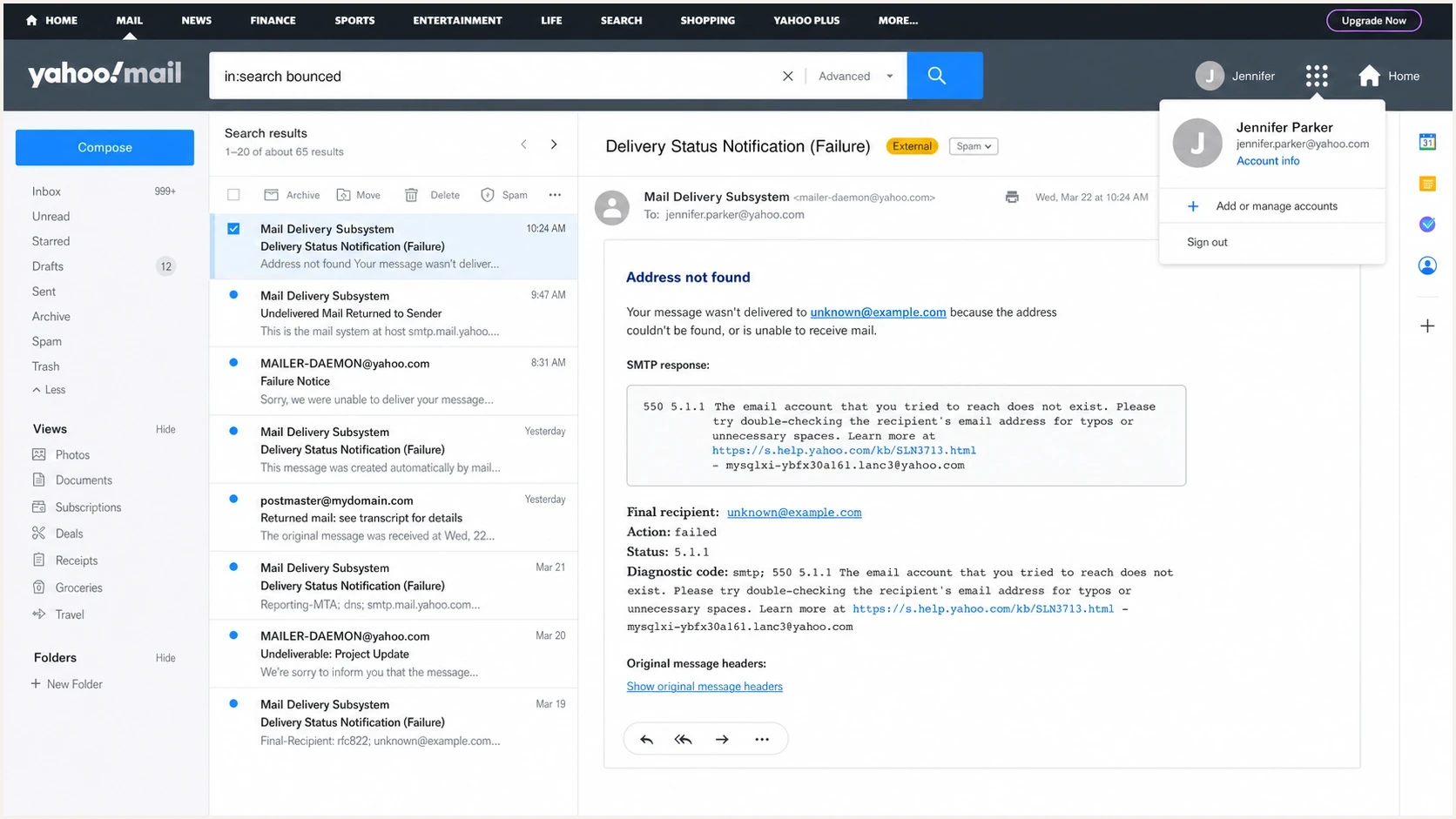
Yahoo Mail delivery failure search showing SMTP bounce details for an IP block.
Confirm the block before changing anything
Treat Yahoo blocks as evidence-led incidents because the wrong diagnosis wastes time. A 4xx deferral means Yahoo is slowing or temporarily rejecting traffic, so the mail server can retry later with controlled backoff. A 5xx rejection is permanent for that delivery, so do not retry the same message. Both require investigation, but the pacing and support language differ.
Yahoo's error guidance points to several recurring causes: unusual traffic patterns, spam-like content, complaints, invalid recipients, authentication failures, and listed or damaged IP reputation. Read the underlying remote-server response inside a hosted-mail non-delivery report, because a generic local 550 wrapper can contain the more useful Yahoo 554 response or PH code. Do not retry mail that returns a 5xx response. Suppress an invalid recipient after confirming the code, then investigate repeated policy failures across the sending stream.
Start with a real message test and a domain check. A focused email tester result can expose header, SPF, DKIM, and content problems in one place. A domain health check catches the DNS issues that often sit behind Yahoo filtering. Then compare the sending IP against public blocklists and blacklists, because Yahoo filtering can correlate with broader reputation damage even when Yahoo has its own internal signals. A clean public blocklist or blacklist result does not rule out an internal Yahoo reputation block.
Keep domain families separate while reading logs. Yahoo Mail, AOL, and consumer brands hosted by Yahoo belong in the Yahoo case. NetZero and Juno should be grouped separately as a United Online issue, because mixing those signals can send the support request to the wrong receiving path.
|
|
|
|---|---|---|
TSS04 or TS* | Temporary deferral | Throttle and retry |
Repeated TS03 | Persistent deferral | Fix then request support |
553 or 554 | Permanent rejection | Do not retry message |
PH* | Content policy block | Inspect content and queue |
High unknown users | Bad audience | Suppress hard fails |
Use the SMTP response to choose the next action.
Email tester
Send a real email to this address. Suped shows a results button when the test is ready.
?/43tests passed
What to check first
- Headers: Verify the visible From domain, return path, DKIM domain, and DMARC result line.
- Recipients: Split new, inactive, imported, and engaged Yahoo recipients before judging the whole stream.
- Queues: Check whether retry settings are repeatedly hitting Yahoo MX hosts too fast.
- Reputation: Compare blocklist (blacklist) status, complaint signals, and recent volume changes.
Determine who controls the sending IP
Before opening a Yahoo support request, identify who owns the IP in the non-delivery report. A hosted or shared relay often uses an IP controlled by the mail provider, not the sending organization. Yahoo tells senders who do not administer the mail server to contact that administrator, and its error guidance notes that other senders on a shared IP can damage the same IP reputation.
|
|
|
|---|---|---|
Shared or provider-managed IP | Mail host or relay administrator | Send the IP, full Yahoo error, timestamps, and affected volume to the provider. Ask it to inspect the pool and handle Yahoo escalation. |
Dedicated or self-hosted IP | Sending organization or its administrator | Fix reverse DNS, authentication, queues, audience quality, and rate controls before submitting the Yahoo request. |
Route the case to the party that can change the affected infrastructure.
Provider ownership does not remove the sender's responsibility for consent, complaints, authentication, or list quality. Give the provider proof of those fixes. Moving to a dedicated IP is not an immediate cure either, because a new IP needs gradual, consistent traffic before it earns a stable reputation.
Meet Yahoo sender requirements before review
Yahoo's sender requirements are now part of the recovery checklist, not a future change to plan for later. For all senders, Yahoo expects at least SPF or DKIM, low spam complaints, valid forward and reverse DNS, and RFC-compliant mail. Bulk senders need both SPF and DKIM, passing DMARC under a valid p=none or stronger policy, marketing one-click unsubscribe, and fast unsubscribe handling.
- Complaint rate: Keep spam complaints below 0.3%. Yahoo's Complaint Feedback Loop is domain-based for DKIM-signed mail and no longer provides IP or CIDR-based complaint reporting.
- Unsubscribe: Add a functioning List-Unsubscribe header, one-click handling, and a visible body link for marketing mail, then honor requests within 2 days.
- Yahoo scope: Measure AOL and consumer domains hosted by Yahoo with Yahoo Mail, but treat Yahoo Japan separately.
- Stream separation: Keep bulk mail away from transactional and user-triggered mail by using distinct IPs or DKIM domains where practical.
Review evidence should match current mail
A support request is weaker when the sender says the problem is fixed but Yahoo is still seeing old lists, missing unsubscribe headers, or fast retries. Clean the live stream first, then submit the request.
Fix the causes Yahoo checks before review
Yahoo review works best after the underlying issue is corrected. If authentication is broken, Yahoo has little reason to trust the domain. If complaint or bounce rates are high, the IP looks risky even with perfect SPF, DKIM, and DMARC. If the sender keeps retrying blocked mail at scale, Yahoo sees pressure rather than repair.
Technical baseline
- SPF: Publish one valid SPF record and keep DNS lookups under the limit.
- DKIM: Sign all production streams with selectors that resolve consistently.
- DMARC: Publish p=none or stronger and make the From domain match an SPF or DKIM authenticated domain.
- rDNS: Match the sending IP to stable hostnames that do not look generic.
Reputation baseline
- Complaints: Remove sources or campaigns driving spam reports and keep the rate below Yahoo's threshold.
- Bounces: Suppress invalid Yahoo addresses immediately after hard failures.
- Engagement: Restart with recipients who recently opened, clicked, bought, or replied.
- Consistency: Avoid sudden Yahoo volume jumps after periods of low traffic.
Example DMARC record for monitoring before enforcementdns
_dmarc  TXT  "v=DMARC1; p=none; rua=mailto:dmarc@yourdomain.com;"
             "adkim=s; aspf=s"
RFC 9989 makes pct historic, so new DMARC records should not use percentage sampling for staged enforcement. Use DMARC aggregate reports defined by RFC 9990, monitoring mode, and controlled policy changes before moving to enforcement.
Suped's DMARC reporting and email authentication product supports this workflow by showing which sources pass SPF or DKIM alignment, which fail DMARC, and which sending IPs appear on public blocklists (blacklists). That evidence helps teams fix the live stream before opening a Yahoo support request.
DMARC record detail view showing SPF, DKIM, DMARC, rDNS diagnostics, and DNS records
Yahoo IP block recovery workflow
Once the basics are clean, use a structured recovery workflow. The order matters because Yahoo has to see stable, lower-risk traffic after the repair. If you submit a support request while the same bad audience keeps generating complaints or bounces, the evidence conflicts with the current sending behavior.
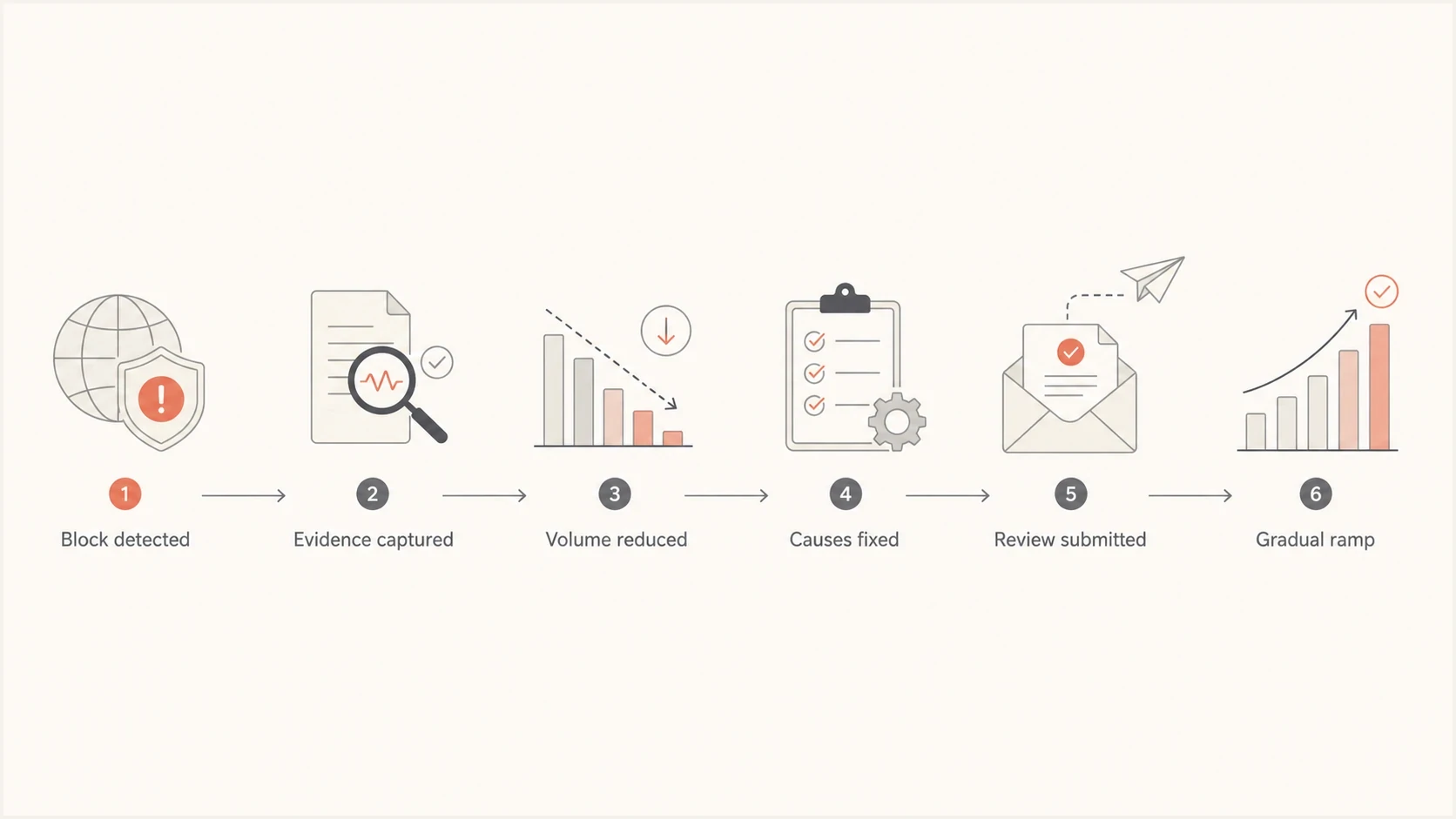
Yahoo Mail IP block recovery process from evidence capture to gradual ramp.
- Separate: Put Yahoo, AOL, and consumer brands hosted by Yahoo into their own delivery group so changes are measurable.
- Suppress: Remove hard bounces, known complainers, role accounts, old imports, and inactive addresses.
- Slow: Use low concurrency and long retry intervals for Yahoo MX hosts until deferrals fall.
- Prove: Send only to recent engagers during the first recovery window.
- Document: Keep notes on list cleanup, authentication fixes, rate limits, and blocklist results.
- Review: Submit the Yahoo request after the traffic pattern is clean enough to support it.
If the response looks like a Yahoo deferral instead of a hard block, focus first on throttling, queue behavior, and warmup. For TSS04 errors, the fix often has more to do with volume pacing and audience quality than a formal support request.
Do not route around the block
Moving the same mail to a fresh IP without fixing the cause spreads the reputation problem. If you have another clean range, use it only for controlled, consented, engaged traffic. Do not use it to push the same suppressed or stale segment.
If you have no alternate IP range
A sender with no alternate range has fewer tactical options, but the recovery plan is still clear. Pause the riskiest traffic, keep critical transactional mail as clean as possible, and reduce Yahoo retries. If the IP has to keep sending, split the streams so password resets, receipts, and account notices are not mixed with bulk campaigns.
Single blocked IP
- Risk: Every bad retry worsens the same IP reputation.
- Action: Pause bulk Yahoo traffic and keep only essential mail.
- Evidence: Show cleanup, throttling, and authentication repair in the support request.
Alternate clean range
- Risk: Bad traffic can damage the second range too.
- Action: Send only high-consent, recently engaged Yahoo mail.
- Evidence: Keep the blocked IP request separate from the controlled fallback stream.
Sending decisions during a Yahoo block
Use recipient quality and urgency to decide what stays paused.
Low risk
Send slowly
Recent account activity, expected transactional mail, clean authentication.
Medium risk
Limit volume
Recent marketing engagement, low complaint history, clear consent.
High risk
Pause
Old imports, inactive contacts, repeated bounces, weak consent.
The address book workaround has a narrow place here. Support can ask affected customers who need a specific message to add the sending address to contacts, but that does not repair IP reputation for the rest of the audience. It is a customer-support instruction, not a deliverability plan.
Prepare the Yahoo support request
A good support request is short, specific, and honest. Yahoo does not offer IP whitelisting, so focus on the facts it needs to evaluate reputation and delivery. Show that the sender understands the cause, has stopped the bad traffic pattern, and has a clean plan for future Yahoo delivery.
- IP: Include the exact sending IP or CIDR, not a broad hosting range.
- Domain: Include the visible From domain, return-path domain, and DKIM signing domain.
- Errors: Paste a few representative SMTP responses with timestamps and message counts.
- Cause: State what changed, such as an imported list, bounce spike, retry bug, or campaign volume jump.
- Fixes: List the suppression, authentication, rate limiting, and list-quality actions already completed.
- Plan: Explain the gradual ramp and monitoring plan for Yahoo-bound traffic.
Support request notestext
Sending IP: 192.0.2.10
From domain: example.com
Return-path domain: bounce.example.com
DKIM domain: example.com
Issue: Yahoo Mail is rejecting or deferring mail from this IP.
Sample error: 421 4.7.0 [TSS04] temporarily deferred
Cause found: inactive Yahoo segment and aggressive retry settings.
Fix completed: suppressed hard bounces and inactive contacts.
Fix completed: reduced Yahoo concurrency and extended retry intervals.
Authentication: SPF, DKIM, and DMARC are passing.
Requested action: please review the IP for delivery restoration.
Yahoo does not run an IP whitelist, and a support response will not guarantee inbox delivery. Judge recovery by declining deferrals and restored SMTP acceptance, not by whitelist status.
How Suped fits into the fix
Suped's DMARC reporting and email authentication product ties the technical and reputation work together. The Yahoo block itself is usually an IP reputation problem, but the evidence lives across authentication reports, source discovery, DNS records, blocklist status, and ongoing alerts. Suped puts those signals into one workflow rather than leaving the team to stitch together screenshots and logs.

Issue steps to fix dialog showing the issue overview, tailored fix steps, and verification action
- Detection: Suped surfaces failing sources, DMARC policy problems, and authentication drift.
- Action: Issue pages include practical steps to fix, so the team knows what to change.
- Alerts: Real-time notifications help catch authentication failures before they become delivery incidents.
- Scale: MSP and multi-tenant views help agencies manage many client domains during block recovery.
- Control: Managed DNS controls reduce configuration drift while the team fixes and monitors Yahoo traffic.
For a Yahoo IP block, Suped helps confirm authentication health, monitor blocklist and blacklist exposure, identify unverified senders, and track whether fixes are holding while Yahoo traffic ramps back up.
Views from the trenches
Best practices
Confirm the issue is IP-based before changing domains, templates, or DNS records.
Submit Yahoo support requests after cleanup, with exact IPs, errors, and fixes listed.
When a host owns the shared IP, send it the exact Yahoo error so it can escalate.
Common pitfalls
Treating address-book requests as a block fix leaves the sender reputation unchanged.
Continuing full-volume retries during a block gives Yahoo more negative traffic data.
Submitting a request before fixing bounces and complaints makes the evidence weaker.
Expert tips
Yahoo has no whitelist program; support can still adjust reputation when needed.
Segment Yahoo traffic separately so deferrals, blocks, and recovery trends are clear.
Use support notes that state what changed, what was fixed, and how ramping will work.
Marketer from Email Geeks says the first question is whether Yahoo is blocking the IP, because domain and content fixes alone will not clear an IP-level block.
2024-02-13 - Email Geeks
Marketer from Email Geeks says a sender without another clean range has to reduce Yahoo traffic and repair the blocked IP instead of shifting the same mail elsewhere.
2024-04-19 - Email Geeks
The practical path back to Yahoo inboxes
The answer is direct: confirm the Yahoo IP block, reduce traffic, fix the sender reputation causes, submit the support request, and ramp back carefully. Do not keep pushing the same mail at the same speed while waiting for Yahoo to change its mind.
The teams that recover fastest have clean evidence. They know which IP was blocked, which error Yahoo returned, which audience segment caused the risk, and which fixes were completed. They also keep watching authentication and blocklist (blacklist) signals after delivery resumes, because recovery is a process, not a single form submission.




