How to resolve temporary deferred messages from Yahoo and other email deliverability issues?


Updated on 3 Aug 2026: We added Yahoo's current sender requirements, complaint controls, and a clearer escalation path for persistent TSS04 deferrals.
The direct fix for temporary deferred Yahoo messages is to stop repeated high-rate retries, isolate the source of the complaint or volume spike, pause Yahoo-bound traffic for the affected IP or sending stream, then restart with lower volume and cleaner recipient segments. A Yahoo TSS04 response means Yahoo is asking your mail server to retry later because the traffic looks risky. Yahoo lists substantial complaints, spam-like content, poor IP or subnet reputation, and unusual traffic patterns among the causes of temporary deferrals.
Treat these incidents as reputation recovery, not as a DNS-only issue. Authentication still matters, but a perfect SPF, DKIM, and DMARC setup does not erase a spam complaint burst. The fastest path is to prove the abusive sender is gone, reduce Yahoo pressure, verify the domain identity, and watch whether accepted mail increases as retries settle.
- First action: pause or sharply reduce Yahoo-bound mail for the affected IP instead of letting retries pile up.
- Second action: find the exact sending source, campaign, customer, or user that triggered the complaint pattern.
- Third action: restart only with engaged Yahoo recipients, lower hourly limits, and clear monitoring.
The direct answer
To resolve Yahoo temporary deferred messages, collect the full SMTP error, group failures by sending IP and message stream, suspend the affected Yahoo queue when TSS04 appears, and resume slowly after you remove the cause. If a malicious user sent spam two weeks ago, the fix is not just deactivating that user. You also need to suppress the damaged recipient segment, reduce retry pressure, and show Yahoo a cleaner pattern over time.
A temporary deferral is not a normal bounce and not a confirmed permanent block. It is Yahoo telling your MTA to try later, but repeated retries at the same pace can extend the problem.
Typical Yahoo TSS04 response
smtp;421 4.7.0 [TSS04]
Messages from 203.0.113.24 temporarily deferred
due to unexpected volume or user complaints - 4.16.55.1
The most useful clue is the exact code. TSS04 points toward throttling tied to volume, complaints, content, or reputation. A 550 block from Charter, Spectrum, Roadrunner, or a related domain is a different issue. Comcast/Xfinity and Charter/TWC/RR/Spectrum are separate receiver groups, so keep their error codes in separate incident buckets.
- Capture evidence: save the SMTP code, affected IP, envelope sender, recipient domain, send time, and retry count.
- Stop pressure: pause Yahoo traffic for the affected stream when TSS04 repeats across normal retries.
- Clean the stream: remove the abusive sender, suppress complainers, and avoid unengaged Yahoo recipients.
- Restart slowly: resume with a small engaged slice, then increase only when deferrals fall.
What Yahoo TSS04 means
Yahoo TSS04 usually means your mail is being throttled. Yahoo accepted enough negative signal to slow the stream, but it has not necessarily rejected every message permanently. That distinction matters because the correct response is queue control and reputation repair, not constant resubmission.
If you need a deeper breakdown of that specific code, the Yahoo TSS04 guide explains why it appears and how it differs from hard rejections.
Yahoo queue response levels
Compare Yahoo deferrals with your normal baseline instead of relying on a universal percentage threshold.
Normal
Baseline
A small number of transient retries clears without a sustained trend.
Throttle
Rising
TSS04 rises above the stream's normal level and delays mail.
Pause
Persistent
Repeated deferrals continue after a meaningful rate reduction.
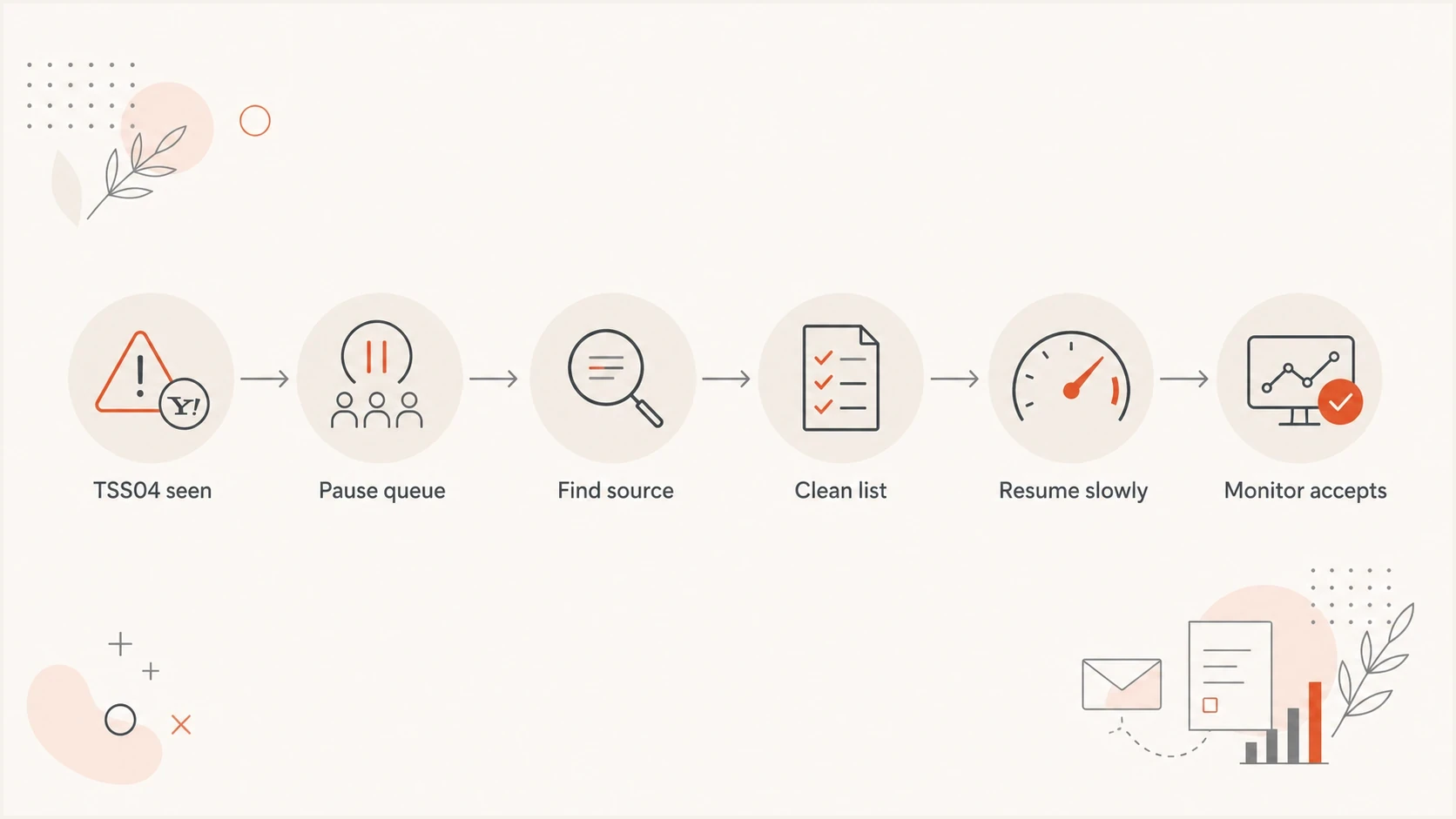
Flowchart showing a Yahoo TSS04 recovery path from pause to monitoring.
A sender can keep a slow configured rate and still see deferrals. That happens when the baseline reputation is already damaged, or when Yahoo sees the current audience as risky. Do not rely on one global rate limit. Split traffic by receiver, IP, domain, customer, and message class so a bad actor cannot poison every stream.
A practical recovery plan
The recovery plan starts with the MTA, because the MTA decides whether Yahoo sees respectful retry behavior or a wall of repeated mail. Configure the queue to react to TSS04 automatically. When the same IP receives repeated TSS04 responses, suspend the Yahoo queue for that stream, then resume with a fraction of the prior volume and increase gradually only when acceptance improves.
Illustrative MTA control logic
# Tune these values to your baseline and MTA
receiver_group = yahoo
on_error = 421 4.7.0 [TSS04]
action = pause_queue
pause_for = 4h
resume_rate = 25%
review_after = 24h
The example values are not Yahoo-prescribed limits. Choose the pause, retry backoff, and restart rate from your normal volume, queue lifetime, and observed acceptance. A pause gives Yahoo time to reassess the connection pattern. A reduced restart avoids turning every delayed message into a new complaint risk.
- Freeze bad mail: stop the customer, app token, campaign, or automation that sent spam content.
- Suppress weak recipients: remove recent complainers, hard bounces, and dormant Yahoo addresses.
- Use engaged mail: restart with transactional messages and recipients with recent clicks or other reliable activity before bulk campaigns.
- Track accepted mail: watch deferrals, queue age, accepted messages, and delayed customer complaints together.
During recovery, send a real message through the same infrastructure and inspect headers, authentication, and placement signals with an email tester. That does not replace Yahoo queue metrics, but it catches identity issues that make recovery harder.
Email tester
Send a real email to this address. Suped shows a results button when the test is ready.
?/43tests passed
Do not clear the queue at full speed after a pause. Resume below the old rate, send to the safest recipients first, and increase only after the Yahoo deferral percentage stays near its normal baseline.
Authentication checks that matter
Authentication is not the whole fix, but it is one of the first checks to run. Yahoo and other mailbox providers need a stable sending identity. If SPF breaks, DKIM fails, or DMARC is missing, a reputation recovery plan has weaker evidence behind it.
Start with a domain health check across the exact domain used in the From header, the return-path domain, and the DKIM signing domain. Then use DMARC monitoring to confirm which sources are passing and which ones are sending without authorization.
|
|
|
|---|---|---|
SPF | Passes and aligns when used for DMARC | Fail or permerror |
DKIM | Passes and aligns when used for DMARC | Missing or failing signature |
DMARC | Passes for the From domain | Missing or failing alignment |
rDNS | Valid forward and reverse DNS | Missing or generic PTR |
Authentication checks to run before ramping Yahoo traffic.
DMARC record detail view showing SPF, DKIM, DMARC, rDNS diagnostics, and DNS records
Suped's product puts DMARC results, SPF and DKIM diagnostics, rDNS, blocklist or blacklist status, and alerts in one operational view. During a Yahoo recovery, use those signals to verify the sending identity, find unauthorized sources, and confirm that a DNS change has not introduced another failure.
Yahoo sender requirements during recovery
Queue control treats the immediate TSS04 symptom. The recovery also needs to satisfy Yahoo's current sender requirements, especially when promotional or bulk mail caused the incident. Use the authenticated From domain as the main unit for complaint and compliance checks.
- Authenticate every stream: all senders need SPF or DKIM at minimum, while bulk senders need both SPF and DKIM.
- Make DMARC pass: bulk senders need a valid DMARC policy of at least p=none and alignment through SPF or DKIM.
- Keep complaints below 0.3%: Yahoo calculates its rate using mail delivered to the inbox, so use Yahoo's own complaint data when available.
- Make unsubscribing easy: marketing and subscribed messages need a functioning list-unsubscribe method, a visible body link, and processing within two days.
- Check the sending host: use valid forward and reverse DNS and make sure the messages comply with RFC 5321 and RFC 5322.
Yahoo's Complaint Feedback Loop is domain-based and requires DKIM-signed mail. Enroll each relevant DKIM signing domain, process the ARF complaint reports, and suppress the complaining recipient from future campaigns. Sender Hub Insights can also show delivered volume and Yahoo's calculated spam complaint rate for a verified domain.
Yahoo does not operate a whitelist that guarantees delivery. If the same deferral continues for more than 48 hours after meaningful remediation, submit a Sender Support request with the exact diagnostic code, sending IP, timestamps, affected domains, volume pattern, and changes already made.
How to separate Yahoo from other issues
Do not put every delayed or rejected message into one deliverability incident. Yahoo TSS04, Spectrum AUP blocks, Comcast errors, and enterprise gateway deferrals can share symptoms but still need different evidence and routing. Separate them by receiver family, SMTP status code, sending IP, and first-seen time.
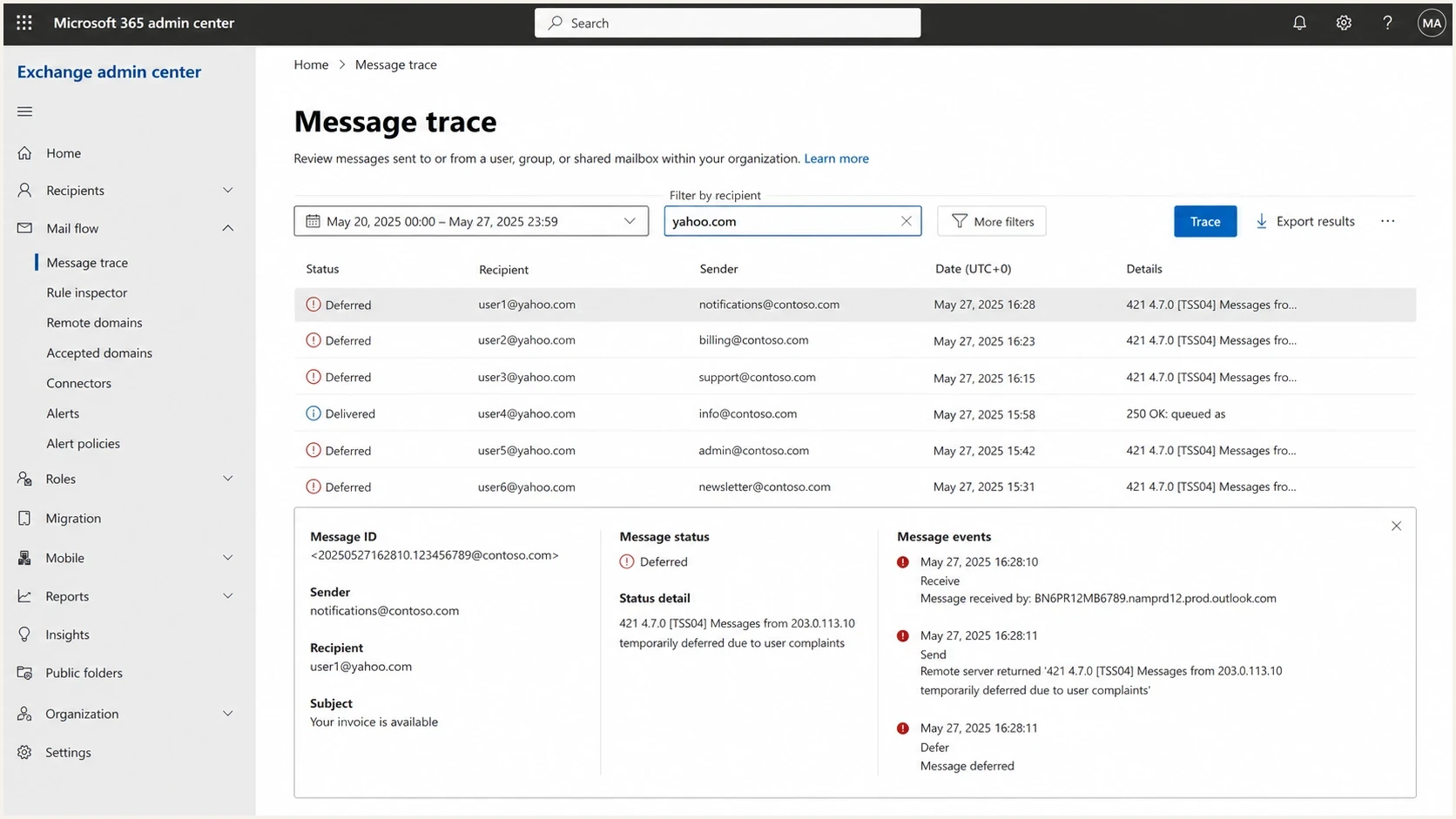
Microsoft 365 Exchange admin center message trace showing deferred Yahoo messages.
Temporary deferral
A temporary deferral asks your server to retry later. The message can still be accepted if you slow down and clean the stream.
- Typical code: 421 or 4xx.
- Best response: pause, rate-limit, and restart safely.
Hard block
A hard block rejects the message. You need the receiver-specific reason before you request review or change routing.
- Typical code: 550 or 5xx.
- Best response: fix cause, then follow receiver guidance.
For Yahoo, queue behavior and recipient quality usually matter most. Yahoo's sender requirements apply across the consumer domains and brands it hosts, while Yahoo Japan is separate. Use the MX host and exact SMTP response to group domains instead of assuming that a similar brand name means the same receiver. For Charter, TWC, Roadrunner, and Spectrum domains, the AUP code and IP history matter. For Comcast/Xfinity, use the Comcast-specific error response.
|
|
|
|---|---|---|
Yahoo | TSS04 | Pause queue |
Spectrum | AUP code | Review cause |
Comcast | 5xx code | Check policy |
Gateway | Tempfail | Check IP |
Receiver issue sorting for deliverability triage.
Blocklist and blacklist triage
A blocklist or blacklist check is useful, but it does not replace receiver-specific evidence. If Yahoo says TSS04 and your IP is clean on major lists, focus on Yahoo's complaint, volume, content, and reputation signals. If a blacklist listing lines up with the same time and IP as the incident, handle it as part of the recovery plan.
A network-wide Level 2 listing can be a distraction because it often describes the surrounding network rather than your exact sender behavior. Do not ignore every listing, but give higher priority to blocklist (blacklist) data that matches real deferrals, complaints, and receiver rejections. Suped's blocklist monitoring workflow helps connect a listing to the affected IP and mail stream.
Do not pay for a listing removal until you know the listing is affecting delivery. Spend that time proving the abuse source is gone, cleaning the audience, and reducing pressure on the affected receivers.

Blocklist monitoring page showing domain and IP checks across blocklists with importance and status
For ongoing monitoring, answer these questions: which IP or domain is listed, which mail streams use it, and whether a real receiver is rejecting or delaying messages because of it. Suped's product connects those checks to DMARC and deliverability data, so the team can decide whether a blocklist or blacklist event needs action.
Monitoring setup that catches the next issue
The incident is not closed when Yahoo starts accepting mail again. Keep monitoring that catches the next bad sender, broken DNS change, or sudden receiver throttle before customers report delays. That means alerts on authentication failures, deferral spikes, blocklist and blacklist changes, and unknown sources in DMARC reports.
Example incident review allocation
An illustrative split of the signals to review during the week after Yahoo throttling.
Yahoo deferrals
35%Complaint risk
25%Auth failures
20%Blocklist hits
20%Suped's product supports this workflow with DMARC monitoring, SPF and DKIM diagnostics, alerts, hosted authentication controls, and blocklist monitoring. Use the shared view to assign an owner, verify remediation, and keep evidence from each receiver incident with the affected domain. Agencies and MSPs can keep client domains and alerts separated through multi-tenant controls.
- Alert on spikes: trigger alerts when Yahoo deferrals rise above your normal baseline.
- Watch unknown sources: flag new sending services or compromised systems before they build reputation damage.
- Stage policy safely: move DMARC enforcement gradually after legitimate sources pass consistently.
- Reduce DNS risk: use hosted SPF and SPF flattening when lookup limits or DNS access slow fixes.
For Yahoo specifically, keep a receiver-level view for accepted mail, temporary failures, hard failures, queue age, and complaint-related events. Yahoo Sender Hub Insights adds delivered volume and Yahoo's calculated complaint rate for verified domains. A single daily number hides the pattern, while a receiver-level view shows whether the restart is working or the MTA needs another pause.
Views from the trenches
Best practices
Pause Yahoo queues after TSS04, then restart with lower volume and clean segments.
Keep the SMTP error, recipient domain, sending IP, campaign, and queue timing together.
Use complaint spikes and authentication failures to decide when to slow or stop traffic.
Common pitfalls
Treating a temporary Yahoo deferral like a delisting form problem wastes recovery time.
Ignoring a malicious sender after deactivation leaves reputation damage unmeasured in logs.
Chasing a network-wide Level 2 listing can distract teams from real receiver signals.
Expert tips
Build MTA rules that suspend Yahoo traffic when TSS04 appears repeatedly for an IP.
Separate Charter, Spectrum, Roadrunner, Comcast, and Xfinity codes before escalation.
Watch mail accepted after retries, because delayed success still hurts customer experience.
Marketer from Email Geeks says Yahoo TSS04 should trigger a temporary pause, not constant retries, because slow sending alone does not fix a damaged stream.
2024-10-05 - Email Geeks
Expert from Email Geeks says the full SMTP error and actual sending IP matter because receiver guidance depends on the exact code and IP reputation.
2024-10-05 - Email Geeks
What to do next
Temporary deferred messages from Yahoo are usually solved through restraint, cleanup, and proof. Pause the affected queue, remove the abuse source, rebuild volume with engaged recipients, and verify the authentication identity behind the mail. If the issue involves Spectrum, Comcast, or another receiver, split it into its own case before you chase the wrong fix.
Suped's product fits the recurring work after the urgent incident is under control: keep DMARC visible, catch unauthorized senders, watch blocklists and blacklists, and alert the team before deferrals become a customer problem. That separates one-off troubleshooting from a repeatable monitoring process.
- Today: pause repeating Yahoo TSS04 traffic and document the exact error pattern.
- This week: restart with cleaner Yahoo segments and monitor deferrals by IP and stream.
- Ongoing: use DMARC, authentication, and blocklist monitoring to catch the next risk.




