
How to resolve Yahoo email deferrals (TSS04) and internal ESP timeouts?

Updated on 14 Oct 2026: We clarified Yahoo TSS04 recovery, shared IP troubleshooting, and safe ESP retry and suppression handling.
Resolve Yahoo TSS04 deferrals and internal ESP timeouts as two connected problems. The 421 4.7.0 [TSS04] part is Yahoo temporarily refusing delivery. Its wording points to unexpected volume or user complaints, but the response alone does not identify the exact reputation signal. The [internal] message timeout in this combined error means the ESP or MTA retried until its configured queue lifetime expired, then reported the repeated temporary failures as a final bounce.
Pause or sharply reduce campaign traffic to consumer domains hosted by Yahoo Mail, including AOL, and confirm whether the ESP placed recipients into a bounced or suppression state. Re-enable only valid, consented addresses suppressed solely because of queue expiry after the ESP confirms the remote failure was temporary. Keep invalid addresses, spam complainants, and unsubscribed recipients suppressed. Restart with small, high-intent segments and increase volume only after Yahoo accepts mail consistently. Check the sending IP, From domain, visible URLs, authentication, complaint sources, and unsubscribe flow before restarting. Do not switch to a new IP first, because the same list and message signals can damage the new route.
Treat this as an operations issue before treating it as a DNS issue. DNS has to be clean, but valid authentication records do not override Yahoo's live reputation controls. Use Suped's DMARC reporting to monitor authentication during recovery, then use ESP logs to control retry behavior, recipient state, and Yahoo-specific volume.
What TSS04 and internal message timeouts mean
Split the response into its two owners. Yahoo owns the temporary deferral. The ESP or MTA owns the final internal timeout and any recipient suppression, bounce classification, retry queue policy, or re-enable process that follows repeated deferrals.
Typical combined SMTP response
554 5.4.7 [internal] message timeout
(exceeded max time, last transfail:
421 4.7.0 [TSS04] Messages from a.b.c.d temporarily deferred
due to unexpected volume or user complaints - 4.16.55.1)
Yahoo did not accept the message during one or more delivery attempts. The ESP or MTA retried until its configured queue lifetime expired, then reported a final 554 5.4.7 delivery-expiry status. Yahoo's SMTP error codes describe 421 and 451 as temporary errors caused by conditions such as unusual traffic, spam-like message characteristics, complaints, busy mail servers, unavailable name servers, or temporary authentication lookup failures.
A 5.4.7 delivery-expiry status does not prove that the recipient address is invalid. If the logs contain no TSS04 response and instead show connection or SMTP command timeouts, ask the ESP to check DNS resolution, TCP connectivity, and the failing SMTP stage. RFC 5321 distinguishes connection and command timeouts from the overall retry lifetime.
|
|
|
|
|---|---|---|---|
TSS04 | Temporary deferral | Yahoo | Reduce Yahoo volume |
[internal] | Locally generated event | ESP or MTA | Check retry policy |
554 5.4.7 | Delivery time expired | ESP or MTA | Inspect queues |
421 4.7.0 | Temporary policy or security deferral | Yahoo | Throttle, then test |
Yahoo's temporary deferral and the local delivery expiry are separate events.
Do not treat the internal timeout as Yahoo's final verdict
A final bounce generated by the ESP or MTA can hide the fact that every remote attempt received a temporary Yahoo deferral. Ask for raw remote responses, retry timestamps, the configured queue lifetime, the final classification, and the resulting recipient state.
- Raw attempts: Get several Yahoo responses, not only the final locally generated bounce.
- Recipient state: Confirm whether affected recipients were suppressed after repeated temporary failures.
- Re-enable path: Restore only valid, consented recipients after the recovery controls are ready.
- Queue lifetime: Record how long the system retries before it converts deferrals into final bounces.
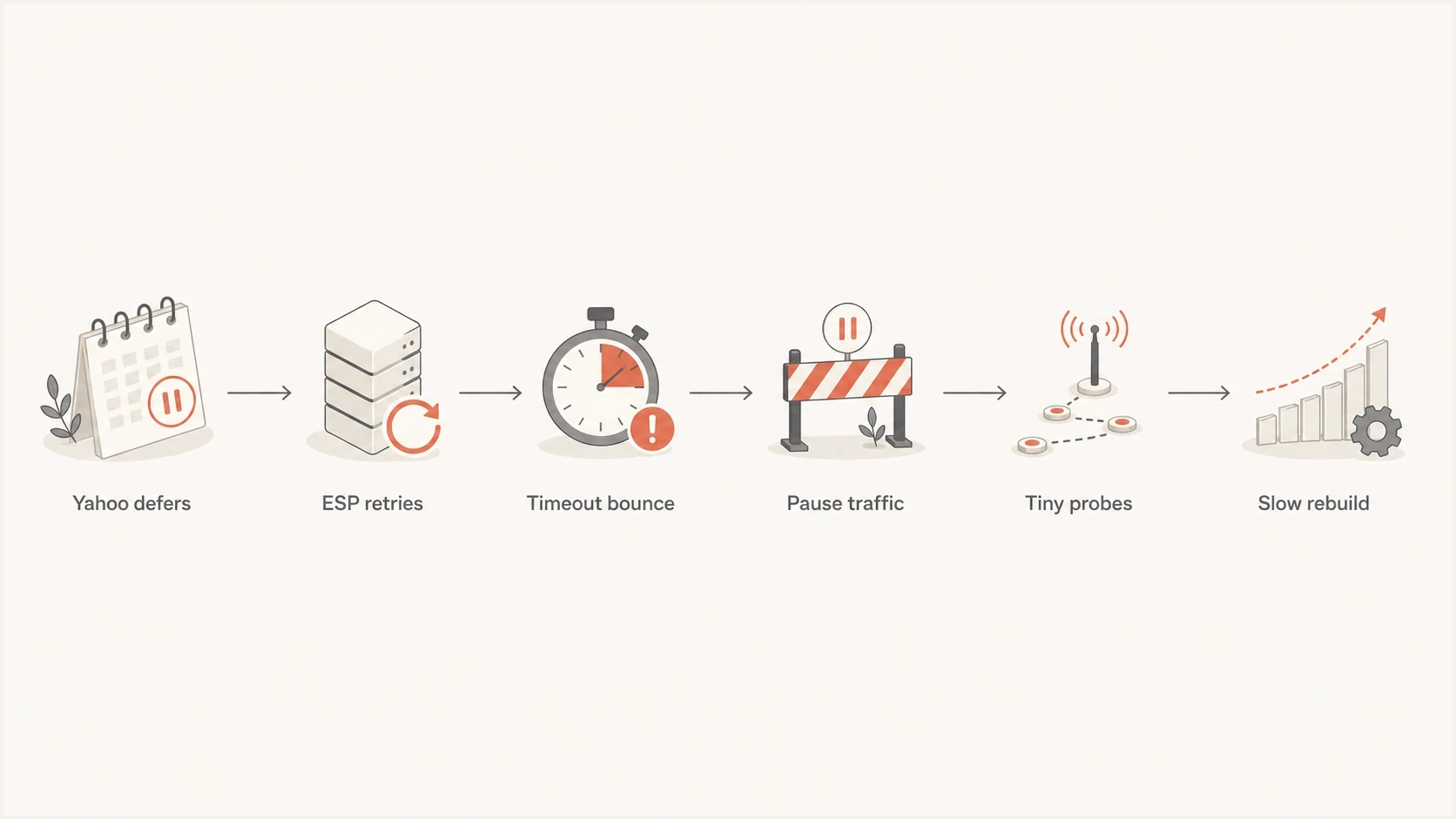
Yahoo TSS04 recovery flow: deferral, ESP queue timeout, traffic pause, test sends, and gradual volume increase.
Reduce Yahoo traffic and control ESP retries
Do not keep retrying normal campaign volume because the same audience performs well elsewhere. Yahoo can judge the same traffic differently from another mailbox provider. A dedicated IP and strong delivery outside Yahoo do not prove the Yahoo reputation path is healthy.
Use an order that separates Yahoo recovery from ESP cleanup. If the ESP has already stopped sending to affected recipients, Yahoo can report little recent traffic while the ESP dashboard still shows failures. Compare the raw SMTP attempts with the recipient state before drawing conclusions.
- Freeze campaign volume: Pause normal traffic to Yahoo-hosted consumer domains or reduce it to controlled tests.
- Audit ESP state: Collect retry logs, suppression rules, final bounce mapping, and recipient re-enable steps.
- Control retries: Use provider-specific throttling, backoff, and concurrency limits, and avoid duplicate manual resends. Count queued retries toward Yahoo-bound traffic and release the backlog gradually as acceptance improves.
- Check message risk: Review visible URLs, redirect domains, tracking hosts, image hosts, and footer domains.
- Restart small: Use recent high-intent recipients and increase only after repeated acceptance.
What to stop
- Normal cadence: Do not resume the same Yahoo volume after a short pause.
- Manual retries: Do not create new copies while the original messages remain in the retry queue.
- New IP first: Do not move the same list and message problems to a fresh route.
- Assumed consent: Do not rely on opens because privacy activity can distort engagement.
What to do
- Throttle by provider: Lower volume and connection concurrency for Yahoo-hosted domains.
- Use intent signals: Favor recent clicks, replies, purchases, logins, or service activity.
- Separate streams: Keep transactional mail isolated from bulk recovery traffic.
- Document evidence: Prepare IPs, domains, samples, timestamps, and complete error lines for Yahoo.
Do not use a fixed waiting period as proof of recovery. Keep normal campaign traffic paused while the configured MTA retries use backoff, then test only after the likely causes have been corrected. Stop the ramp if TSS04 returns. Review content and sending practices if errors continue beyond 48 hours; submit a Yahoo Sender Support Request if the same error persists over an extended period after remediation.
Test the actual message before restarting. Suped's email tester helps inspect the received message, including authentication results and unsubscribe headers. Use ESP logs to confirm Yahoo acceptance; a successful test elsewhere does not establish Yahoo recovery.
Email tester
Send a real email to this address. Suped shows a results button when the test is ready.
?/43tests passed
Keep a Yahoo support case operational and specific. Include the sending IP, envelope sender domain, header From domain, affected Yahoo-hosted recipient domain, full error including the trailing diagnostic code, sample timestamps with time zone, retry history, volume before and after throttling, and completed remediation. Yahoo does not have an IP whitelisting program, so a support request does not replace sender-reputation work.
Check the sending IP and shared pool
Use the IP shown after 'Messages from' in the TSS04 response. It is the outbound sending IP, which is not necessarily your website's IP. Yahoo's SMTP error guidance warns that traffic from other domains on a shared IP can damage its sending reputation.
- Confirm with the ESP whether the affected IP is shared or dedicated, and whether your account uses several outbound IPs.
- Compare deferrals by sending IP and stream. Ask whether other customers on the same pool are seeing similar Yahoo errors.
- For a shared pool, ask the ESP to investigate other senders' complaints and volume, and coordinate any routing change.
- For a self-managed server, inspect outbound queues for compromised accounts or an open relay, then stop unauthorized traffic.
A dedicated IP is an option when shared-pool problems are confirmed, but it requires a suitable sending volume and gradual warm-up. Correct your own list and message problems before moving traffic.
Measure complaints and recovery in Yahoo Sender Hub
Use Yahoo Sender Hub Insights with the raw ESP logs. The SMTP logs show whether Yahoo accepted or deferred each attempt. Insights adds aggregated delivery statistics for the sending domain; compare these with campaign-level ESP data to investigate a broader domain pattern. SMTP acceptance does not establish inbox placement.
- Enroll signing domains: Yahoo's Complaint Feedback Loop is domain based and supports DKIM-signed mail. Confirm each exact DKIM d= domain, including subdomains, is enrolled directly or through the ESP.
- Map complaints: Use the DKIM signing domain, campaign identifiers, and timestamps to connect ARF reports to a sending stream, then suppress identified complainants from further campaigns.
- Use the right denominator: Yahoo calculates its spam rate against inbox-delivered mail, not all attempted or accepted mail.
- Cover hosted domains: Apply the recovery controls to consumer domains hosted by Yahoo Mail, including AOL. Yahoo Japan is separate.
- Read silence carefully: No complaint report does not prove the complaint rate is zero or the traffic is healthy.
Yahoo complaint reporting is not IP based
Yahoo no longer provides IP or CIDR Complaint Feedback Loop reporting. Keep a stable DKIM signing domain for each stream and preserve message identifiers so complaint reports can be traced to the responsible audience, campaign, or client.
Use Yahoo's published complaint ceiling as a safety limit, not as a target. All senders must stay below 0.3%, and lower complaint rates provide more room for normal variation. Pair complaint data with recurring SMTP acceptance because either metric alone can hide an active TSS04 problem.
Check Yahoo authentication and unsubscribe requirements
Authentication does not repair TSS04 by itself, but weak authentication makes recovery harder. Yahoo requires every sender to use SPF or DKIM, maintain valid forward and reverse DNS, and follow SMTP message standards. Bulk senders must use both SPF and DKIM and publish a valid DMARC policy of at least p=none. DMARC must pass through SPF or DKIM with From-domain alignment; relaxed alignment is acceptable. Yahoo does not publish a fixed bulk-sender volume threshold. Check these against Yahoo's sender requirements.
For bulk senders, marketing and subscribed messages need a functioning one-click List-Unsubscribe header plus a visible unsubscribe link in the body, and requests must be honored within two days. Yahoo recommends RFC 8058 HTTPS POST and also accepts mailto. For HTTPS POST, include List-Unsubscribe-Post: List-Unsubscribe=One-Click. A footer link alone does not meet the header requirement. Yahoo does not apply the one-click requirement to transactional messages such as order confirmations and password resets. Check each stream separately.
Run Suped's domain health checker before increasing Yahoo volume to review published authentication records. Confirm SPF, DKIM, and DMARC results in an actual message, and ask the ESP to verify forward and reverse DNS for the sending IP. Review TLS connection failures and message URL domains separately in the relevant logs.
DMARC record detail view showing SPF, DKIM, DMARC, rDNS diagnostics, and DNS records
BIMI is not a TSS04 diagnostic
A missing Yahoo BIMI logo does not prove that sender reputation caused the deferral. Yahoo lists a valid SVG logo and BIMI record, DMARC enforcement, bulk sending, and sufficient reputation and engagement among its display conditions. Fix the TSS04 delivery path first, then troubleshoot BIMI separately.
Check blocklist and blacklist status for the sending IP, the From domain, and URL domains in the message. A listing can explain a wider reputation problem, but a clean public result does not prove Yahoo's private reputation is healthy. Suped's blocklist monitoring tracks public blocklist (blacklist) changes alongside authentication alerts during recovery; Yahoo deferrals still need ESP log analysis.
Use Suped's DMARC monitoring to identify reported sources that pass or fail authentication and DMARC alignment. DMARC aggregate reports are not SMTP retry logs and cannot confirm the outcome of every deferred message. Use ESP logs for queue age, retry attempts, and Yahoo acceptance.
Internal recovery gates
These are operational decisions, not Yahoo-published acceptance thresholds.
Pause campaign traffic
Pause
Small tests still receive TSS04 after remediation.
Hold volume
Hold
Yahoo accepts some mail but deferrals recur.
Controlled rebuild
Rebuild
Small high-intent batches are accepted repeatedly.
Ongoing review
Monitor
Acceptance stays stable and complaint data remains healthy.
How to avoid repeating the issue
After Yahoo starts accepting mail again, do not treat one successful batch as complete recovery. The next sending cycles show whether the safer traffic mix holds or the previous complaint pattern returns.
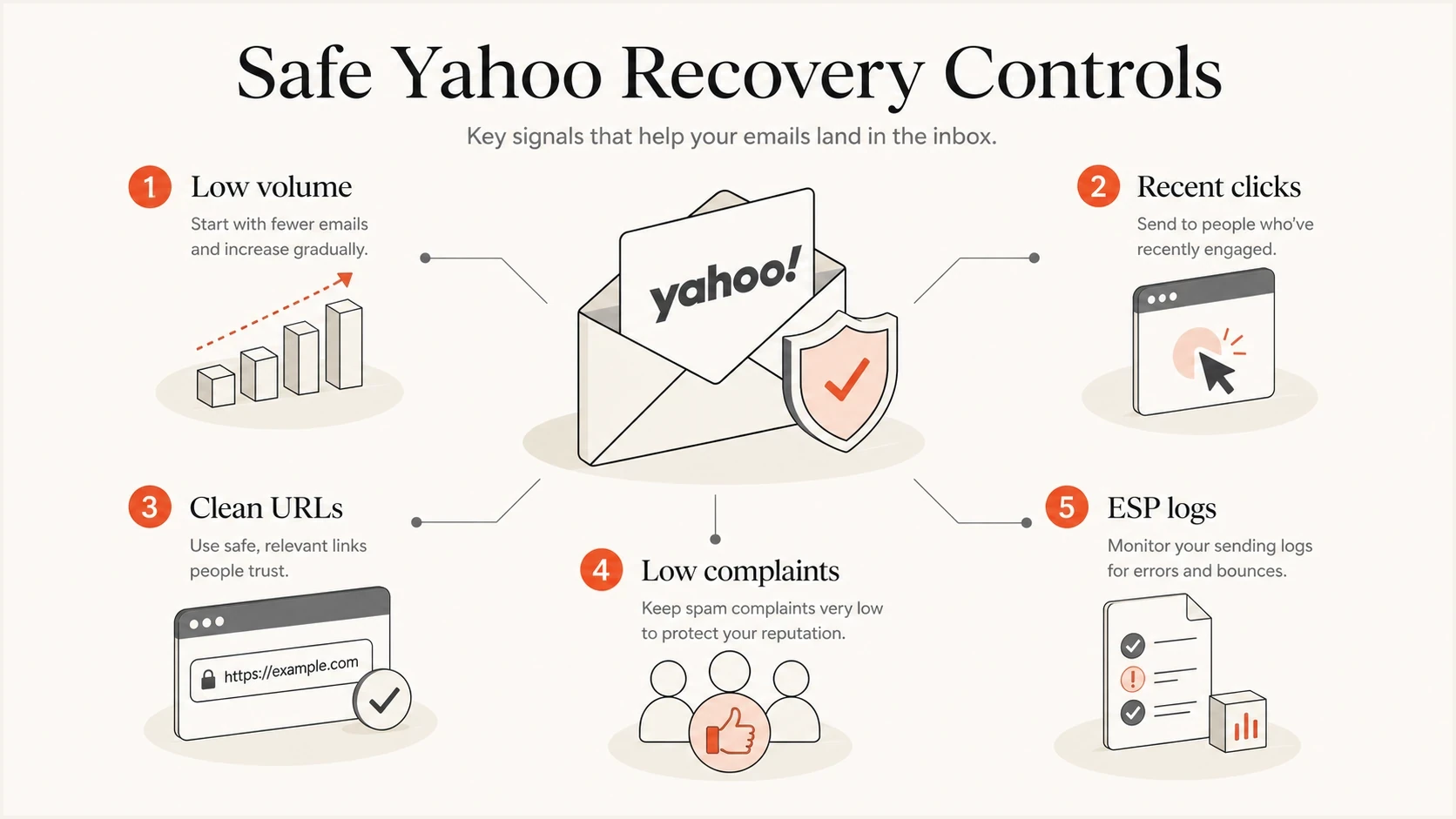
Yahoo email deferral recovery controls: low volume, recent clicks, clean URLs, low complaints, and ESP logs.
Use a stricter Yahoo recovery segment than the normal engaged segment. Opens are weaker than clicks, replies, purchases, account activity, or recent subscription updates. A 90-day open rule can retain people who no longer want the mail, especially when privacy systems inflate open activity. Exclude purchased, scraped, or otherwise unconsented addresses.
- Complaint review: Compare templates, offers, send times, and list sources for Yahoo complaint spikes.
- URL review: Check every link domain, redirect hop, tracking host, image host, and footer domain.
- Cadence review: Limit consecutive sends to the same Yahoo recipients during the rebuild.
- Bounce review: Remove invalid recipients, complainants, and unsubscribers. Classify queue expiry separately from invalid-address bounces so temporary deferrals do not trigger the same suppression policy.
- Consent review: Trace every segment to a clear opt-in source and suppress weak or unknown acquisition sources.
- Support review: Escalate with fresh samples after changes instead of reusing old failing evidence.
If recovery overlaps with a new IP or a low-volume transactional stream, use a slower temporary deferral warm-up process and keep that stream separate from bulk campaign traffic.
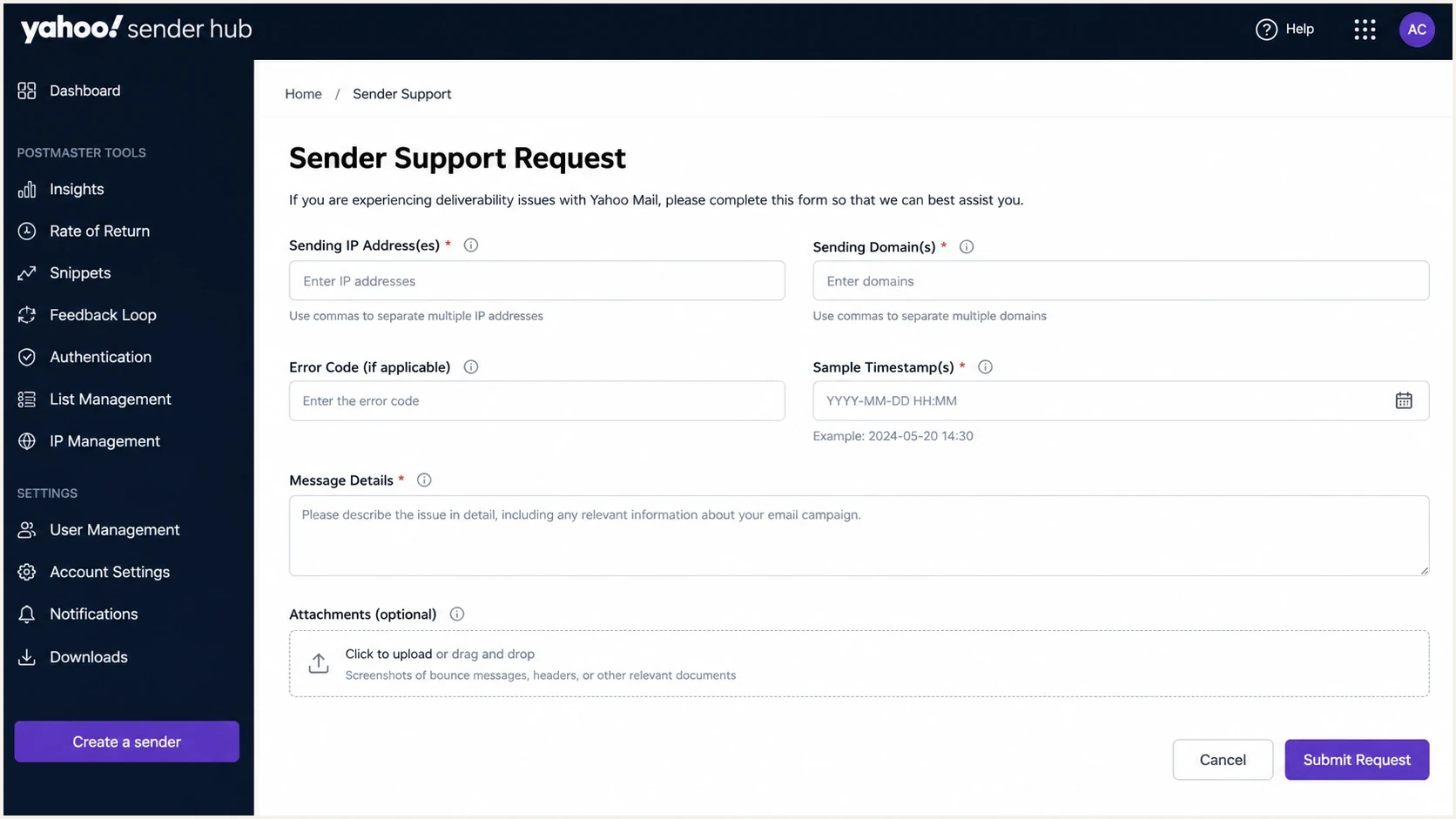
Yahoo Sender Hub support request screen with fields for a TSS04 case.
Views from the trenches
Best practices
Pause Yahoo campaign traffic while controlled retries run to avoid a growing delivery backlog.
Ask the ESP for raw remote responses, recipient state, and retry timing before changes.
Restart with recent clickers or active customers, then increase only after acceptance holds.
Document IPs, domains, samples, timestamps, and fixes before sending a support request.
Common pitfalls
Treating the ESP timeout as Yahoo's final decision hides the repeated TSS04 deferrals.
Reactivating recipients before correcting the cause makes the same Yahoo deferrals recur.
Assuming strong delivery elsewhere proves that the Yahoo route has a healthy reputation.
Relying on opens alone can keep low-intent recipients inside the Yahoo recovery audience.
Expert tips
Review URL domains and tracking hosts because Yahoo considers URL reputation in delivery.
Use small Yahoo tests after remediation and pause the ramp when the same deferral returns.
Separate transactional traffic from bulk recovery so one stream does not mask the other.
Revisit BIMI after stable Yahoo delivery, then check its separate eligibility requirements.
Expert view
The discussion identified the ESP as the source of the internal timeout and recommended reviewing raw retry logs and recipient state before Yahoo recovery.
2025-06-18 - Email Geeks
Expert view
The discussion explained that repeated TSS04 responses can exhaust the ESP retry window and produce a final timeout even though Yahoo issued temporary errors.
2025-06-18 - Email Geeks
Monitor authentication during Yahoo recovery
Suped's DMARC reporting and email authentication platform supports recovery by monitoring authentication changes and public blocklist or blacklist changes across the affected domains. Compare Suped alerts with the ESP's incident timeline to identify changes that need investigation, while the ESP controls retry queues and Yahoo-specific throughput. Keep queue age and deferral rates in the ESP's recovery checks.
Recovery target
The target is recurring acceptance for a small, low-risk stream, followed by controlled growth that does not trigger the same TSS04 pattern.




