How do I warm up a new IP address for transactional emails?

Updated on 30 Jul 2026: We added safer controls for transactional latency, provider-level ramping, and rewarming an idle IP.
Yes, warm up a new dedicated IP address for transactional email. The process differs from a newsletter or campaign warmup, but the IP and sending subdomain are still new reputation assets that mailbox providers have not learned to trust.
The direct answer is this: if the traffic is truly transactional, low volume, requested by the user, and spread through the day, the warmup can happen naturally. If traffic starts at tens of thousands per day, or has bursts around login, billing, security, or product events, cap and stage it.
Transactional mail gets a useful head start because password resets, one-time passcodes, account activations, receipts, and security alerts are expected by recipients. That intent helps. It does not remove the need to prove that the new IP, subdomain, SPF, DKIM, DMARC, bounce handling, complaint patterns, and sending cadence are clean.
The direct answer
For a brand new dedicated IP and sending subdomain, use a controlled ramp unless the initial volume is already small. The first decision is not 'transactional or marketing'. Base it on daily volume per mailbox provider per IP, burst timing, message criticality, recipient quality, and the available overflow route.
- Low volume: At 1k-5k messages per mailbox provider per IP per day, true transactional mail often warms naturally when delivery is steady.
- Moderate volume: At 10k-50k per day, ramp by provider and message type, then watch deferrals, bounces, complaints, and delivery latency.
- High volume: At 80k-100k or more per day, use caps, overflow routing, provider-specific limits, and active launch monitoring.
- Very high volume: A 500k day-one launch needs strong sending history, clean recipient data, spare capacity, tested controls, and a rollback path.
Do not use total daily volume alone
A total of 30k messages can be manageable if it is split across mailbox providers and time zones. The same total can cause deferrals if 25k reaches one provider in the first hour. Break the plan into provider-level hourly and daily caps.
If traffic is only a few hundred messages per provider on irregular days, a dedicated IP is usually the wrong fit. A reputable shared pool can maintain steadier volume, while a lightly used dedicated IP repeatedly loses the history it needs.
A mailbox provider does not see sender intent. It sees a new IP, a new or low-history hostname, authentication results, recipient reactions, and connection behavior. The word 'transactional' helps only when the mail behaves like requested mail.
What to move first
The cleanest warmup method is to enable transactional streams one at a time. Start with mail users actively request, then add larger or less urgent streams after provider acceptance and latency remain stable.
Start with these
- Password resets: Users request them directly, but keep an established overflow route because delivery is time-sensitive.
- One-time passcodes: These have clear intent, short validity windows, and little tolerance for warmup delays.
- Account activation: New users expect the message and usually look for it if it lands late.
- Receipts: Purchase confirmations are high-intent mail when recipient data is clean.
Hold until later
- Bulk alerts: Product events and system notices create spikes if many accounts trigger at once.
- Digests: Daily or weekly summaries look less urgent and often get weaker recipient response.
- Lifecycle nudges: Onboarding reminders and prompts are often closer to marketing than transactional.
- Promotional blends: Any message with offers, upsells, or list-style targeting belongs in a separate plan.
If the application supports routing by template or event type, use that as the control point. Otherwise, use MTA routing rules, traffic splitting, or a temporary overflow path through an established route.
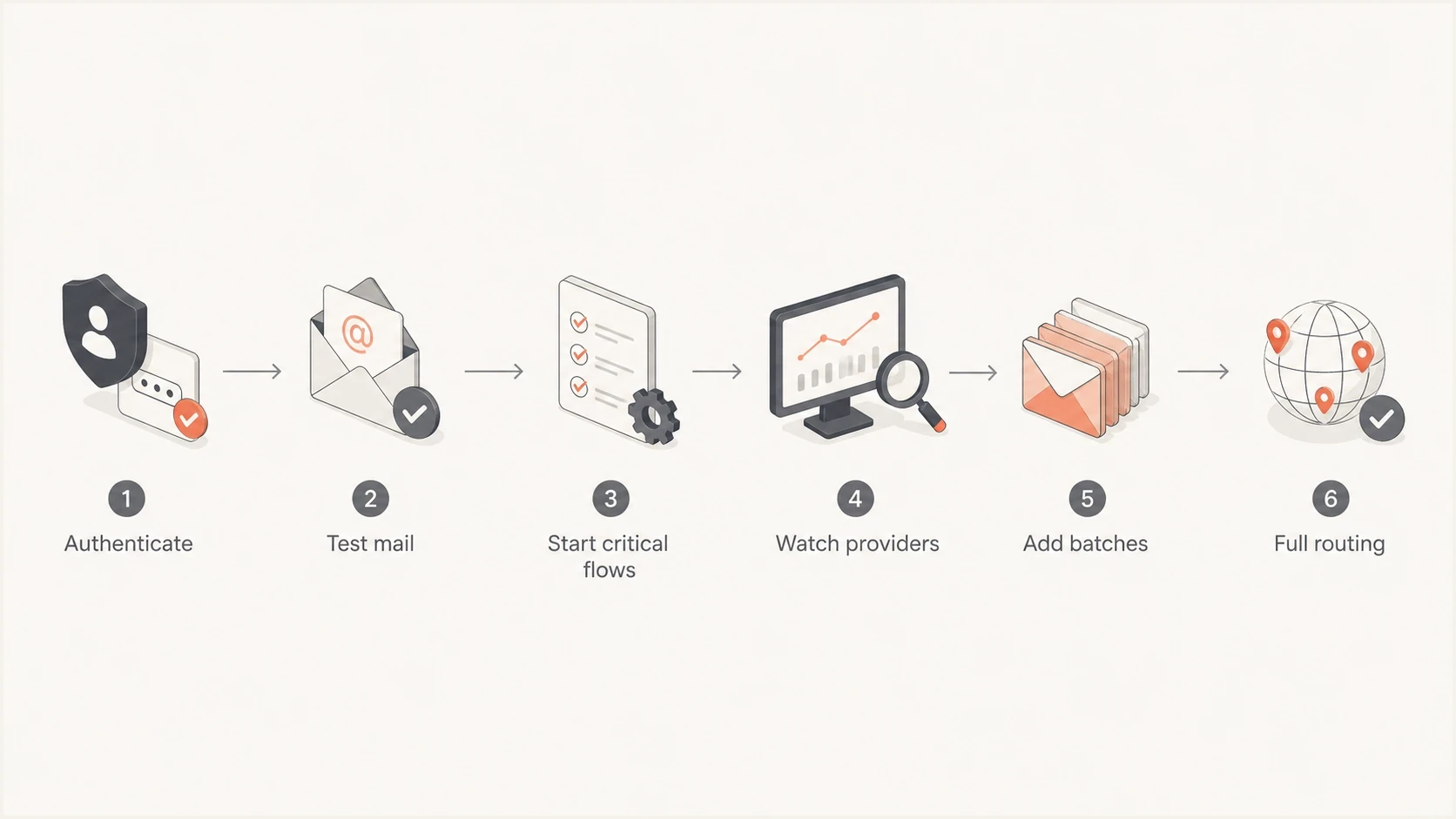
Transactional email IP warmup flowchart from authentication through full routing.
Volume bands that work in practice
The numbers below are working ranges, not guarantees or targets. Use them to decide how much launch control is needed. The important unit is per mailbox provider per IP per day, because Gmail, Microsoft, Yahoo, and smaller providers evaluate reputation independently.
Transactional IP warmup volume bands
Use these ranges to choose the launch posture for true transactional mail on a new dedicated IP.
Low friction
1k-5k per MBP/IP/day
Let natural traffic build if it is steady, requested, and sufficient to establish history.
Managed ramp
10k-50k per day
Stage by template and provider, then increase only when acceptance signals stay clean.
Controlled launch
80k-100k+ per day
Use hourly caps, overflow routing, and active monitoring.
Launch-room volume
500k day one
Use only with mature operations, extra IP capacity, tested queue controls, and a rollback path.
Separate Gmail and Microsoft caps and review them independently. A clean Gmail result does not mean Microsoft is ready for a jump. For deeper provider-specific planning, the Gmail and Microsoft warmup path covers throttling, temporary deferrals, and bulk classification.
|
|
|
|
|---|---|---|---|
Day 0 | None | Authenticate and test | DNS and message pass |
Day 1 | 1k-5k | Critical flows | Low deferrals and latency |
Days 2-3 | Hold or grow | Add requested flows | Stable acceptance |
Days 4-7 | Provider-led | More flows | No harmful spikes |
Week 2 | Normal or continue ramp | Full routing | Clean provider trend |
A compact warmup schedule for a new transactional IP.
Example warmup control plantext
Day 0: authenticate, test real mail, enable monitoring
Day 1: send 1k-5k per MBP/IP, or natural low traffic
Day 2: hold on deferrals; otherwise increase stable providers
Day 3-5: add requested flows in provider-specific batches
Day 6-10: move remaining true transactional flows
Day 11+: use normal routing if provider signals stay clean
Do not create mail solely to hit a schedule. Natural requested volume is better than stale, duplicate, or low-intent traffic sent to satisfy a quota.
Preflight checks before traffic
Before sending warmup traffic, make sure the new subdomain is authenticated and easy to identify in reports. SPF must pass for the return-path domain, DKIM must produce a valid signature, and at least one of them must match the visible From domain for DMARC. Enable DMARC reporting before the first production send.
Minimum DNS records to checktext
_dmarc.example.io TXT v=DMARC1; p=none; rua=mailto:d@example.io; fo=1
mail.example.io TXT v=spf1 include:tx.example.net -all
s1._domainkey.example.io TXT v=DKIM1; k=rsa; p=PUBLICKEY
Also check the sending hostname, valid forward and reverse DNS, bounce domain, TLS, envelope identity, and unsubscribe handling for any non-essential subscribed messages. A warmup plan cannot compensate for broken authentication, a return path that fails SPF, or a hostname without a valid PTR record.
Run a domain health check before launch, then send a real message through the email tester. A live message catches problems a DNS-only check misses, including broken DKIM signing, malformed headers, TLS issues, and missing unsubscribe headers where they apply.
Email tester
Send a real email to this address. Suped shows a results button when the test is ready.
?/43tests passed
After the test passes, keep the first production traffic narrow. The goal is not to prove the IP can send a lot. The goal is to prove that each major mailbox provider accepts the mail cleanly and that complaint, bounce, and latency results match the normal transactional baseline.
Suped's DMARC and email authentication platform can be added before cutover so DMARC, SPF, DKIM, and authentication-source data are visible as the first messages move. Automated issue detection helps separate configuration failures from early reputation symptoms.
How to monitor and react
Treat the first week as a feedback loop. Increase volume only when the previous batch has clean provider-level results. Hold or roll back when a provider starts deferring, rejecting, or showing a new authentication pattern. SMTP acceptance does not prove inbox placement, so investigate spam-folder reports separately.
Watch accepted rate, SMTP response codes by provider, temporary deferrals, retry age, queue depth, delivery latency, hard bounces, complaint rate, authentication pass rates, and blocklist (blacklist) status. Treat opens as a supporting diagnostic because privacy protections and image blocking obscure them. DMARC monitoring shows which sources authenticate and which fail. Blocklist monitoring identifies IP or domain listings that can be compared with actual delivery symptoms.
Issues page showing top issues, verified sources, unverified sources, and authentication pass rates
Suped's product brings DMARC, SPF, DKIM, authentication-source data, blocklist (blacklist) monitoring, and real-time alerts into one monitoring workflow. Keep routing decisions in the sending platform or MTA, then use the evidence in Suped to decide whether to increase, hold, or roll back.
Hold rules
- Deferrals: Hold the next increase for that provider if temporary failures rise after a ramp step.
- Authentication: Stop the ramp if SPF, DKIM, or DMARC failures appear for the new source.
- Complaints: Remove lower-intent templates if complaint rate rises above the normal baseline.
- Listings: Pause increases when a relevant blocklist or blacklist listing matches new delivery failures.
Overflow routing is the practical safety valve. If a password reset spike exceeds the cap, route the excess through a trusted shared pool or an existing dedicated IP until the new IP catches up. For account-critical mail, preserving timely user access matters more than forcing every message through the new route.
Protect transactional latency
Warmup controls must not make a password reset or one-time passcode unusable. Set queue behavior by template so rate limits, retries, and overflow preserve the useful lifetime of each message.
- Hourly caps: Limit traffic by mailbox provider and hour so one event burst does not consume the full daily allowance.
- SMTP retries: Retry temporary 4xx responses with paced backoff, but send permanent 5xx failures to bounce handling.
- Template expiry: Do not leave a ten-minute passcode in a multi-hour retry queue after its validity window closes.
- Overflow and cancellation: Route time-sensitive excess through an established path and stop retries when a newer message replaces the old one.
Do not chase volume with stale mail
Never replay expired passcodes, old alerts, or duplicate receipts to fill a warmup allocation. Stale mail creates confusing user experiences and weak recipient signals without building useful reputation.
A practical launch pattern
A simple setup works well: one new transactional subdomain, one dedicated IP, one established overflow route, and clear traffic classes. The application tags each message by template, and the routing layer sends it through the new IP or the overflow path.
New IP route
- Purpose: Build reputation for the new transactional identity.
- Traffic: Start with controlled portions of password reset, OTP, activation, and receipt traffic.
- Limit: Use provider-level caps and increase after stable results.
Overflow route
- Purpose: Protect urgent delivery when the new IP hits a cap.
- Traffic: Carry bursts, lower-intent notices, and delayed batches.
- Limit: Avoid mixing high-complaint mail with critical account mail.
Avoid round-robin routing when it hides problems. A clean split by provider and template gives clearer data. If Microsoft starts deferring receipts after a ramp step, the route and template should be immediately identifiable.
When a full day-one launch is reasonable
A larger day-one launch is reasonable when the mail is user-triggered, recipient data is current, authentication is clean, bounces are low, complaint history is clean, controls are tested, and an experienced team can adjust routing by provider.
That is the difference between 'transactional' as a label and transactional behavior in the data. Mailbox providers reward the behavior, not the label.
Views from the trenches
Best practices
Stage transactional flows by template and provider before moving all traffic to a new IP.
Keep an overflow route ready for urgent account mail during the first launch week.
Use provider-level caps because total daily volume hides mailbox-specific risk quickly.
Common pitfalls
Treating all triggered mail as low risk lets digest and lifecycle traffic move too early.
Ramping by total volume misses one-provider spikes that create deferrals quickly.
Skipping authentication checks turns a reputation warmup into a DNS incident fast.
Expert tips
Start with password reset and OTP flows because user intent is visible fast during launch.
Hold volume after deferrals rise, then resume only after the provider stabilizes.
Watch blocklist and blacklist signals during warmup, especially after sudden bursts.
Expert from Email Geeks says transactional IPs still need warmup, but low natural daily traffic can warm itself when it is steady.
2023-11-06 - Email Geeks
Marketer from Email Geeks says enabling triggered campaigns one by one is a practical way to control transactional warmup volume.
2023-11-06 - Email Geeks
Transactional IP warmup checklist
Warm up the new transactional IP with the lightest process that matches the risk. If volume is low and spread through the day, start with requested traffic and watch provider signals. If volume is large, cap by provider, move templates in batches, and keep overflow routing ready.
The reliable sequence is to authenticate first, test real messages, start with high-intent transactional flows, increase only after clean results, and pause the ramp when provider-specific signals deteriorate.
For the monitoring layer, Suped's product connects DMARC reporting with SPF and DKIM visibility, authentication-source analysis, real-time alerts, and blocklist (blacklist) monitoring. That gives the routing team evidence for the next increase or rollback during the first week.




