How to improve Gmail inbox placement during IP warmup?

Published 19 Jun 2025
Updated 6 Aug 2026
13 min read
Summarize with

Updated on 6 Aug 2026: We updated this guide for Gmail's current sender requirements, complaint thresholds, and provider-specific ramp decisions.
If Gmail open rates sit under 1% after four weeks of IP warmup while other mailbox providers perform well, stop increasing Gmail volume. Cut Gmail volume back to the most recently engaged subscribers, inspect Gmail-specific compliance and delivery data, ask the sending platform for deferral and throttling details, then test the exact message for content, tracking, and authentication issues.
The key detail is that "delivered" only means Gmail accepted the message at SMTP. It does not prove inbox placement. During warmup, Gmail evaluates the new IP, sending domain, content, complaint pattern, sender identity, volume consistency, and quality of the first recipients. If the first Gmail cohort is weak, Gmail can treat the new stream as unwanted before the IP has enough positive history.
- First move: Stop increasing Gmail volume until the cause is clear.
- Best audience: Use recent Gmail clickers, reply-prone recipients, and reliable openers.
- Best evidence: Compare Gmail compliance, delivery errors, SMTP logs, DMARC data, clicks, complaints, and bounce rates.
- Best outcome: Resume the ramp only after Gmail engagement and complaint signals move in the right direction.
Diagnose the Gmail problem before adding volume
Treat a Gmail-only warmup failure as a separate investigation, not as a general deliverability problem. If Yahoo, Outlook, and corporate domains look healthy, the warmup plan is not failing everywhere. Gmail is giving a provider-specific signal that the new stream lacks enough trust for stronger Gmail inbox placement.
The first decision is volume. If the Gmail segment is already going to spam, increasing Gmail sends creates more negative engagement. A smaller group of people who recently clicked, replied to, or reliably opened brand email gives Gmail a cleaner sample. Purchases, app activity, account logins, and venue visits help with relevance, but they should not drive the first Gmail ramp stages without recent email engagement.
Do not wait out a failing Gmail ramp
Four weeks with Gmail opens under 1%, paired with weak clicks, is enough evidence to stop and inspect. Continuing with the same audience gives Gmail more evidence that recipients are ignoring the stream.
- Pause: Hold Gmail increases until the cause is identified.
- Reduce: Send only to recent Gmail clickers, reply-prone recipients, or reliable openers.
- Measure: Track Gmail separately by campaign, domain, IP, template, complaint rate, and bounce type.
- Suppress: Remove hard bounces, complainers, unverified addresses, and long-inactive recipients.
A warmup plan also needs a rollback rule. If the first two Gmail sends after a change still show almost no clicks or reliable opens, lower the Gmail count again instead of holding the same volume. Rebuild positive Gmail evidence slowly, then raise the limit after Gmail users show that they want the mail.
For a broader ramp across Gmail and Microsoft, separate mailbox providers instead of using one blended daily cap. A blended cap hides Gmail-specific damage and prevents the team from slowing Gmail while continuing healthy traffic elsewhere.
Check Gmail-specific evidence
Start with evidence specific to Gmail. Open rate alone is not enough because tracking pixels, image loading, and privacy behavior distort it. A Gmail open rate under 1%, paired with depressed clicks and normal performance elsewhere, strongly suggests a Gmail placement problem, but SMTP responses, complaints, and Gmail sender data should confirm the diagnosis.
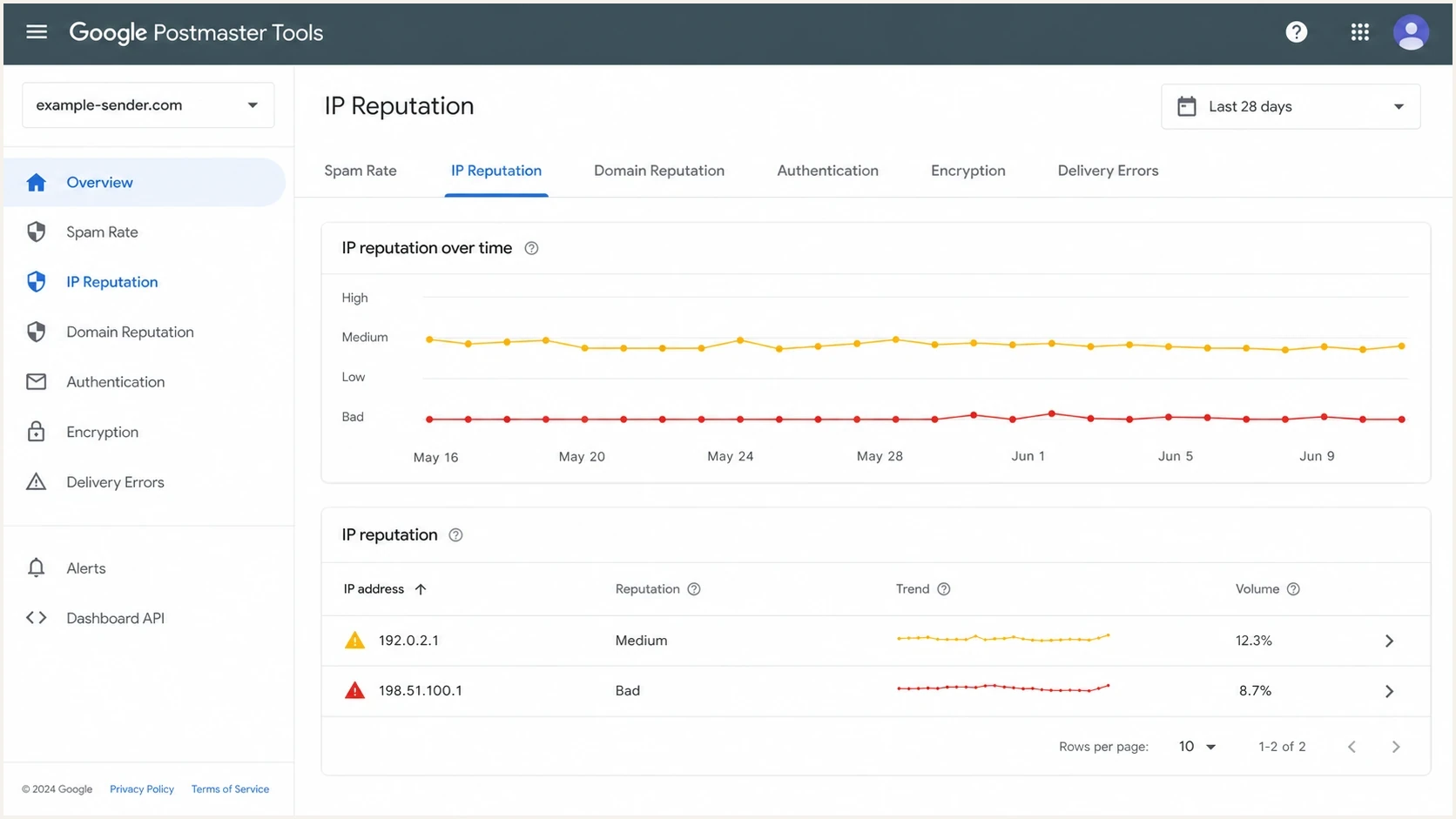
Legacy Gmail sender dashboard showing IP reputation during IP warmup.
Prioritize Compliance status, Deliverability analysis, spam rate, authentication, feedback data, and delivery errors. Low-volume warmup traffic can produce "No data found" because Gmail protects recipient privacy, and reporting can lag. The legacy IP and domain reputation views are being retired, so do not make a ramp decision from a single color label.
|
|
|
|---|---|---|
Compliance status | Gmail sender data | Fix Needs work |
User-reported spam | Gmail sender data | Target below 0.1% |
Deferrals and rejects | SMTP logs | Pause and classify |
Authentication pass | DMARC data | Fix failing source |
Clicks and replies | Campaign data | Tighten audience |
Hard and soft bounces | Sending logs | Suppress or retry |
Gmail warmup signals to inspect before increasing volume.
Ask the sending platform for Gmail-specific delivery logs rather than campaign delivery totals alone. Check whether Gmail deferred mail, throttled the stream, rejected messages, or showed unusual queue time. Classify temporary 4xx responses separately from permanent 5xx failures. If no Gmail deferrals appear and compliance data is clean, concentrate on audience quality, complaint sources, and content testing.
Tighten the Gmail audience
Audience quality is usually the fastest lever. A contact who visited a venue within 12 months is not the same as a contact who clicked a Gmail message last week. Gmail evaluates inbox behavior and recipient feedback. The first Gmail recipients should have recent email actions, confirmed consent, low bounce risk, and a clear reason to recognize the sender.
Split Gmail into smaller bands and send first to recent clickers and reply-prone recipients. Add reliable recent openers next, followed by recent purchasers who also engaged with email, then older confirmed subscribers. Keep people with no opens or clicks in 90 to 180 days out until Gmail inbox placement stabilizes, with the exact cutoff based on normal buying and sending cycles.
Weak Gmail warmup segment
- Broad activity: Purchases, app events, or venue visits with no recent email action.
- Old consent: Subscribers who opted in long ago and have not engaged recently.
- Unverified data: Imported, purchased, misspelled, or unconfirmed addresses.
- Mixed domains: A single ramp cap that hides Gmail-specific poor response.
Stronger Gmail warmup segment
- Recent clicks: Gmail users who clicked in the last 30 to 60 days.
- Confirmed consent: Recipients who clearly requested the email and recognize the brand.
- Clear sender: Messages use the same brand name, domain, and reply identity.
- Separate cap: Gmail has its own daily limit, rollback rule, and success metric.
If the list has enough Gmail volume, build a small rescue cohort of the most reliable recipients and send one simple message with a clear reason to click or reply. Do not use discounts or urgency as a shortcut during warmup. A genuine action from someone who expects the message is more useful than a burst of low-quality opens.
Audit content as if Gmail is skeptical
Authentication can be correct and Gmail can still filter the message to spam. During IP warmup, content problems carry extra weight because the stream has little positive history. Inspect the rendered email, raw HTML, final tracking links, visible sender identity, and unsubscribe experience.
Check whether a short email became large after the platform injected tracking, personalization, CSS, hidden content, or fallback blocks. Gmail clips message bodies at about 102 KB of HTML. Clipping can hide a body unsubscribe link and an open-tracking pixel, but it does not replace the need for header-based one-click unsubscribe on qualifying mail.
- HTTP links: Replace non-secure links and redirects with HTTPS destinations.
- Heavy images: Compress images and avoid image-only messages.
- Missing alt text: Add useful alt text so image-blocked views still make sense.
- Link mismatch: Keep branded links, tracking domains, and landing domains consistent with the sender.
- Shortened links: Remove public link shorteners and unnecessary redirect chains.
- Hidden bloat: Check final HTML size after the sending platform builds the message.
Send the final compiled message through Suped's email tester and inspect the raw result, authentication results, message size, link behavior, image weight, and inbox rendering. This test does not replace real Gmail engagement, but it catches issues that warmup dashboards hide.
Email tester
Send a real email to this address. Suped shows a results button when the test is ready.
?/43tests passed
Compare opens with clicks and replies after the test. If clicks and replies are depressed alongside opens, placement or audience quality is the likely problem. If clicks remain normal while opens look broken, investigate pixel loading, image proxy behavior, or analytics reporting before changing the warmup plan.
Verify authentication and sender identity
Correct DMARC, SPF, and DKIM setup is the floor, not the finish line. Verify authentication by source because one unapproved or misconfigured stream can hurt the sender identity during warmup. Check that Gmail sees spf=pass, dkim=pass, and a DMARC pass aligned with the domain in the visible From address.
A DMARC policy of p=none meets Gmail's minimum policy requirement for bulk senders, but it should be a monitoring stage rather than an automatic warmup setting. Choose the policy and alignment mode based on verified mail sources and the domain's enforcement plan.
Example DMARC monitoring recorddns
_dmarc.example.com TXT "v=DMARC1; p=none; rua=mailto:dmarc@example.com;"
Suped's domain health checker can catch obvious DNS and authentication issues. Suped's DMARC monitoring then groups real mail by source so the team can verify that the sending platform, DKIM domain, SPF path, and visible From domain remain aligned during the ramp.
Suped DMARC dashboard showing email volume, authentication health, and source breakdown
For this Gmail warmup workflow, Suped's product helps identify a new sending source, a stopped DKIM signature, an SPF lookup issue, or an unexpected policy change before the next volume increase. Alerts give the team a concrete reason to hold the ramp while authentication is repaired.
Meet Gmail's current sender requirements before warmup
Warmup cannot compensate for a sender-requirement failure. Gmail has increased enforcement against non-compliant traffic since November 2025, including temporary and permanent rejections. Clear compliance issues before using engagement data to set the next volume step.
Gmail classifies a domain as a bulk sender when it sends about 5,000 or more messages to personal Gmail accounts within 24 hours. Messages from the same primary domain and its subdomains count together. Once assigned, bulk-sender status is permanent, so lowering later volume does not remove these requirements.
- Authentication: Use SPF and DKIM, plus a DMARC policy of p=none or stronger.
- Alignment: Align the visible From domain with the SPF domain or DKIM signing domain.
- DNS and transport: Maintain matching forward and reverse DNS, a valid PTR record, and TLS.
- Message format: Send valid RFC 5322 messages without misleading Gmail From addresses.
- Unsubscribe: Give marketing and subscribed mail one-click unsubscribe headers and a visible body link.
- Spam rate: Keep user-reported spam below 0.1% and prevent it from reaching 0.3% or higher.
Treat compliance as a ramp gate
Do not increase Gmail volume while Compliance status shows Needs work for a requirement that applies to the stream. Changes can take several days to appear because Gmail uses delayed and rolling data, so verify the message headers and SMTP results while waiting.
After compliance is clean, spread traffic consistently through the day and across several days. Avoid large bursts, abrupt daily spikes, and long gaps followed by catch-up sends. Volume consistency does not guarantee inbox placement, but erratic pacing gives Gmail another reason to throttle a new IP.
Do not ignore IP and netblock reputation
Gmail filtering is not a simple binary blocklist lookup. A blocklist or blacklist listing still matters because it can point to a contaminated IP, poor neighboring traffic, or an upstream infrastructure issue. Check it as one source of evidence, but do not treat every listing as the reason Gmail is filtering.
A dedicated IP can still sit in a poor netblock, and a recycled IP can inherit distrust. If Gmail shows persistent deferrals, unusual SMTP errors, or a sharp provider-specific decline while the message and list are clean, ask the sending platform to inspect the IP, neighboring ranges, prior range history, and Gmail SMTP responses.
How to treat blocklist and blacklist findings
A blocklist or blacklist hit is a lead, not a verdict. Bring it to the sending platform with the IP, date, Gmail symptoms, and SMTP evidence. Ask whether the IP range has known history, shared infrastructure issues, or Gmail throttling tied to the same period.
Suped's blocklist monitoring keeps IP and domain checks next to DMARC and authentication data. This supports a practical comparison: determine whether the listing matches the timing of Gmail deferrals, or whether audience quality and complaints better explain the placement problem.
Decide whether to pause, rollback, or restart
A failing IP warmup needs a decision rule so the team does not debate every send. The purpose is to stop negative Gmail feedback before it becomes the new baseline, not to force every program into one universal benchmark.
Gmail warmup action thresholds
Use these as practical triggers when Gmail performance is split from other mailbox providers.
Continue
Healthy
Gmail clicks and reliable opens are close to expected rates, with low complaints and stable bounces.
Pause
Warning
Gmail engagement drops hard while other domains stay normal, or compliance needs work.
Rollback
Critical
Gmail engagement stays near zero for two sends after a targeting change.
Restart
Reset
Persistent deferrals, range history, and corroborating evidence point to IP or netblock damage.
Restarting on a new IP or range is the last operational move. Use it only when persistent SMTP evidence and range history point to IP or netblock damage and the sending platform confirms that the current address has a poor starting position. If the problem is a cold audience or bloated template, a new IP repeats the failure.
When the ramp has already damaged Gmail reputation, use a recovery plan instead of a normal ramp. A failed warm-up recovery sequence starts smaller, relies on tighter engagement bands, and waits for Gmail signals before each increase.
- First step: Pause Gmail ramp increases and pull Gmail-only metrics and SMTP responses.
- Technical check: Test final content, links, HTML size, unsubscribe handling, and authentication.
- Rescue send: Send only to the safest Gmail engagement band at a steady rate.
- Next sends: Increase only when Gmail clicks, reliable opens, complaints, bounces, and sender data support it.
Views from the trenches
Best practices
Pause Gmail volume quickly when early inbox signals fail, then test with tighter cohorts.
Use recent Gmail email engagement as the first warmup gate, not broad customer activity.
Ask the ESP for Gmail deferrals, queue time, and IP range notes before changing content.
Spread each volume step steadily through the day and suppress hard bounces immediately.
Common pitfalls
Treating SMTP delivery as inbox placement hides spam folder placement during warmup.
Using a short email without checking compiled HTML misses clipping and tracking bloat.
Chasing each blocklist or blacklist result wastes time when audience quality is weaker.
Ramping after a compliance failure adds volume before Gmail's basic requirements are met.
Expert tips
Compare Gmail clicks with opens to separate placement problems from tracking problems.
Check whether branded links, tracking domains, and landing domains match the sender.
Escalate IP netblock concerns only when Gmail logs and reputation data point there.
Track temporary and permanent SMTP failures separately before deciding to change IPs.
Marketer from Email Geeks says Gmail opens under 1% after four weeks points to a real warmup problem, so the sender should stop waiting and inspect the stream.
2025-06-21 - Email Geeks
Marketer from Email Geeks says the first checks should include HTTP links, oversized images, missing alt text, and whether the final message is larger than expected.
2025-06-21 - Email Geeks
A practical Gmail recovery sequence
To fix a failing ramp quickly, stop Gmail increases, split Gmail away from the rest of the warmup, and send the next Gmail test only to recent email clickers or reply-prone recipients. At the same time, request Gmail deferrals and SMTP responses, check compliance and complaint data, inspect the final HTML, and confirm DMARC, SPF, DKIM, unsubscribe handling, and branded links on the exact message Gmail received.
Suped's product fits the authentication and monitoring part of that workflow. It brings DMARC, SPF, DKIM, hosted records, MTA-STS, blocklist and blacklist checks, and alerts into one place. During warmup, the team can identify source problems and reputation warnings before increasing Gmail volume.
Gmail warmup is a feedback loop. Send less to the best recipients until Gmail has enough positive evidence to accept a measured increase, and hold or roll back whenever complaints, deferrals, bounces, or engagement move the wrong way.




