How to recover Gmail reputation after a failed email domain warm-up?

Updated on 5 Aug 2026: We added Gmail-specific complaint, authentication, unsubscribe, and delivery-error gates for a safer reputation recovery.
To recover Gmail reputation after a failed domain warm-up, stop the damaged sending pattern first, fix the reason Gmail reacted badly, then restart with a smaller Gmail-only rewarm using your most engaged recipients. If a new domain opened with a large send, for example 50,000 messages, and Gmail immediately marked the domain reputation as Bad, do not keep sending 400-700 daily messages just because they are triggered. That keeps feeding Gmail the same evidence.
The shortest practical recovery path is: pause non-essential mail for 3-5 days, keep only expected transactional traffic on a separately validated path, check SPF, DKIM, DMARC, bounce handling, complaints, content, and recipient quality, then rewarm with low volume to recent Gmail recipients with clear signup, click, reply, or purchase signals. Gmail does not publish a fixed recovery timetable. Use 2-8 weeks as a planning range, not a promise, and start counting after the damaged pattern stops.
- Pause the new sending domain or infrastructure long enough to stop new negative Gmail signals.
- Audit authentication, content, list source, bounce processing, unsubscribe handling, and Gmail-specific engagement.
- Rebuild with plain and expected mail that users find useful. Save broad campaigns until the domain has sustained clean signals.
- Measure spam placement, Gmail bounces, complaints, domain reputation, and authentication pass rates before each increase.
Do not treat a failed warm-up as a volume problem. It is usually a trust problem. Gmail has already seen an unexpected spike, so the next step is to reduce uncertainty, not to prove that the domain can send more.
First, stop the damaged warm-up
If a new sending domain debuts with Bad Gmail reputation, the first decision is whether to keep sending through it. Pause any mail that can wait. Move only essential, expected transactional mail to a separately validated path so the damaged pattern does not spread to a healthy sender identity. A new domain has little positive history, so one oversized send can define the first profile Gmail builds for it.
A 3-5 day pause is not a reputation reset. It gives you time to stop the current pattern, rewrite the weakest templates, remove risky recipients, and confirm that authentication is clean. If the mail is truly critical, keep only the narrowest transactional flow active, and cap it to recipients who recently asked for that message.
Keep sending
- Gmail keeps seeing the same domain, content, and recipient pattern that caused the bad start.
- Open-rate changes can come from spam placement or blocked tracking, while disengagement appears in other signals. Gmail tabs are not spam placement.
- Bad reputation can last longer when the recovery period has no clean break.
Pause and repair
- Short-term volume drops while you protect the sender identity.
- The next Gmail traffic is smaller and cleaner, which makes it easier to interpret.
- The restart uses a controlled pattern instead of extending the failed one.
Diagnose the cause before sending again
Before a rewarm, prove that the domain is technically sound. Start with a domain health check across SPF, DKIM, DMARC, MX, and sending identity. Then compare that with live message tests. A DNS record can be valid while the actual message still fails the From-domain match because provider settings, the return-path, tracking setup, or the DKIM selector is wrong.
For the actual message, send a real sample through the same path your users receive. Suped's email tester shows authentication, content, DNS, and deliverability signals from the message itself. Use it before trusting any new warm-up sequence.
Email tester
Send a real email to this address. Suped shows a results button when the test is ready.
?/43tests passed
Authentication and From-domain matching are baseline requirements, but they do not create positive reputation on their own. All senders to personal Gmail accounts need SPF or DKIM. Senders at about 5,000 messages or more per day need SPF and DKIM, a DMARC record, and a match between the visible From domain and either SPF or DKIM. Valid forward and reverse DNS records and TLS are also required.
DMARC aggregate data also tells you whether unexpected systems are still sending as the domain. Suped's DMARC monitoring shows which sources are passing, failing, or sending without approval, which helps isolate authentication problems during a reputation repair.
Minimum DMARC reporting recorddns
_dmarc.example.com TXT "v=DMARC1; p=none; rua=mailto:dmarc@example.com;"
What to prove before restart
- Confirm that at least SPF or DKIM matches the visible From domain so DMARC can pass.
- Keep the sending domain, return-path, tracking domain, and DKIM selector stable.
- Stop test campaigns, old platforms, and forgotten automations from sending through the new domain.
- Confirm matching forward and reverse DNS for the sending IP, plus TLS for the delivery path.
Fix the content and recipient mix
A welcome email can still look risky if it reads like a promotion, uses heavy image blocks, pushes too many links, or lacks the context the recipient expects. A 25% open rate on a small welcome flow does not prove inbox placement because privacy-generated opens, blocked tracking, and small samples distort the number. Gmail's Promotions and Updates tabs are inbox placements, not spam-folder failures.
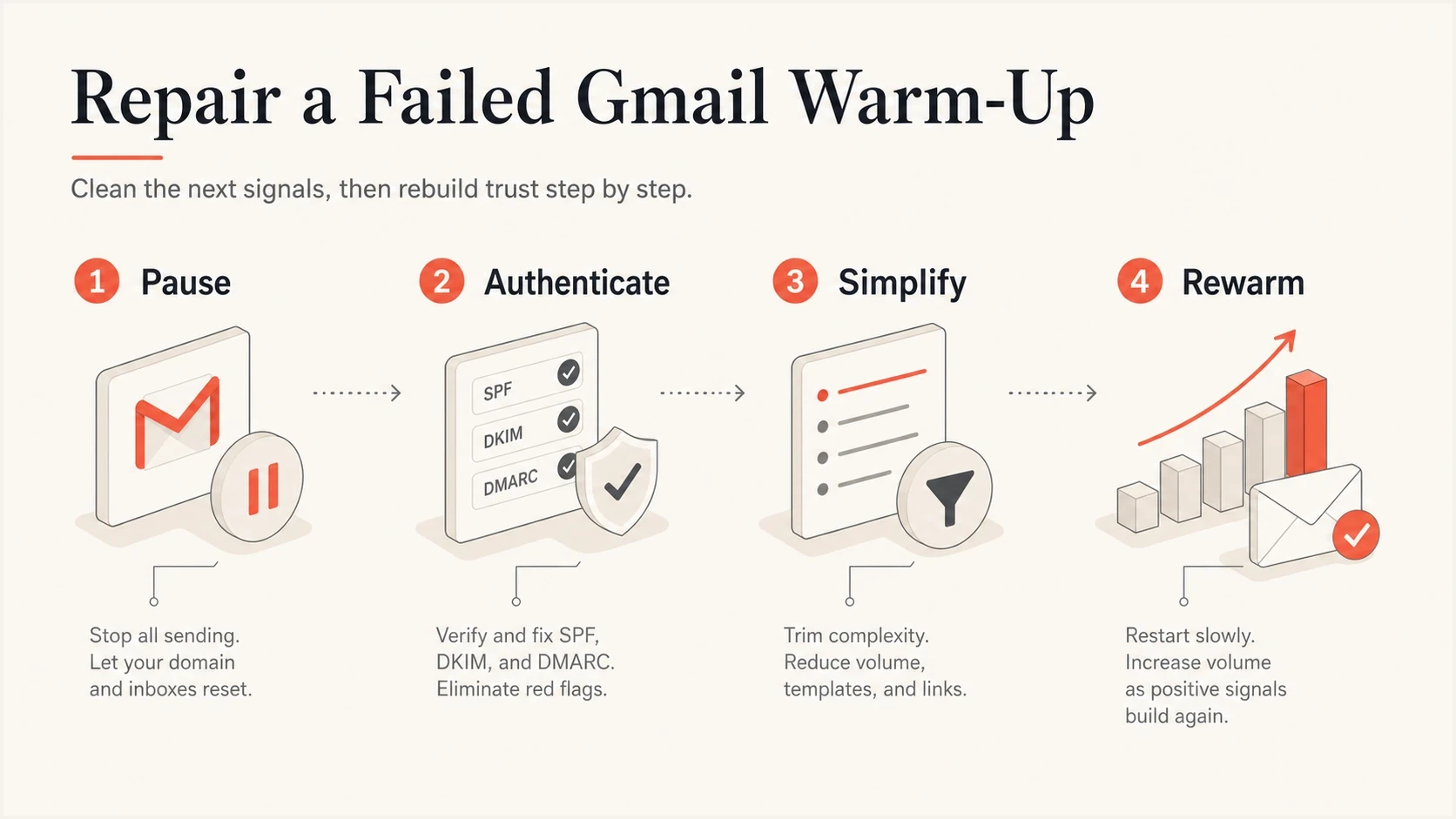
Gmail reputation recovery steps: pause, authenticate, simplify, and rewarm.
For the restart, strip the message down to what the user expects. The first emails should confirm the account, explain the next action, or provide the promised resource. Avoid discount-heavy copy, multiple calls to action, URL shorteners, image-only layouts, and aggressive tracking links until Gmail reputation improves.
|
|
|
|---|---|---|
Audience | All opt-ins | Recent, engaged Gmail |
Content | Promo-heavy | Expected flow |
Links | Many links | One action |
Tracking | New domain | Consistent |
Cadence | Daily jumps | Flat holds |
Use this as a quick content and audience triage before restarting.
Recipient selection is as important as content. The first Gmail recipients after a failed warm-up should be recent signups, recent clickers, recent purchasers, or users who triggered a message moments ago. Suppress permanent failures immediately, and do not include old unengaged users just to create volume. That is the pattern that keeps a sender stuck.
Rewarm with small Gmail-first volume
A recovery warm-up is slower than a normal warm-up because Gmail has negative history to overcome. Start lower than the current daily volume, hold each step long enough to see placement and complaint signals, and only increase when the previous step is clean. If the domain is already at Bad, a flat 200 per day with mediocre placement is not recovery. It is controlled damage.
When to increase Gmail volume
Use these decision bands before each step up during the recovery period.
Increase
Clean for 3 days
Authentication passes, complaints are low, bounces are normal, and engaged users interact.
Hold
No change
Placement is mixed, opens are unclear, or volume is too small to read confidently.
Reduce
Step down
Spam placement, Gmail bounces, complaints, or authentication failures increase.
The schedule below is a conservative example, not a universal rule. If you only have 400 good Gmail recipients per day, do not invent volume. Keep the list narrow, hold each step for at least three days, and step down when complaints or delivery errors worsen.
Example Gmail recovery rewarmtext
Days 1-3:   50-100 Gmail recipients per day
Days 4-6:   100-150 Gmail recipients per day
Days 7-10:  150-250 Gmail recipients per day
Days 11-14: 250-400 Gmail recipients per day

Only increase after clean authentication, low bounces,
and no visible worsening in Gmail placement.
Do not judge the rewarm on open rate alone. Apple privacy opens, blocked tracking, and small samples distort the picture. Use the combined pattern: Gmail delivery errors falling, spam-placement tests improving, replies or clicks from real users, and no complaint spike when volume moves up.
Use measurable Gmail gates
Gmail's own sender data should gate each increase. Keep the user-reported spam rate below 0.1%, and prevent it from reaching 0.3%. A low or zero value does not prove recovery because messages routed directly to spam generate fewer inbox complaints, and low-volume days may not produce enough data to display.
|
|
|
|---|---|---|
User-reported spam | Below 0.1% | At or above 0.1%; never accept 0.3% |
Authentication | Expected sources pass | Any unexplained SPF, DKIM, or DMARC failure |
Delivery errors | No rising temporary or permanent failures | New or rising 4xx and 5xx responses |
Unsubscribe handling | One-click requests complete within 48 hours | Processing errors or an unsubscribe backlog |
Apply these gates to Gmail traffic before each rewarm increase.
Read the full SMTP response instead of grouping every failure as a bounce. A 4xx response is temporary and should trigger controlled retries or a hold. A 5xx response is permanent and should stop retries for that recipient or message. Fix any authentication, policy, rate-limit, or low-reputation error before moving the schedule up.
If the same primary domain sends about 5,000 or more messages to personal Gmail accounts in 24 hours, traffic across its subdomains counts toward the bulk-sender threshold. Promotional and subscribed mail then needs one-click unsubscribe, and requests must be honored within 48 hours. Transactional mail does not need one-click unsubscribe, but it should not carry promotional content.
Do not increase volume to make a low-volume dashboard populate. Missing data is not a passing result. Keep volume tied to real demand, and use your sending logs, Gmail responses, DMARC data, and placement tests together.
Know what recovery timing means
Two weeks without movement is frustrating, but it is not unusual after a failed first impression. Gmail's sender dashboard data is not real time and usually updates within 24 hours, although it can take longer. Compliance changes can take up to seven days to appear, and low-volume days may show no data. Treat Bad reputation as a lagging indicator, but do not disregard it while spam placement or delivery errors remain poor.
If reputation is still stuck after clean sending, confirm that enough authenticated Gmail traffic exists for sender dashboards to report without increasing volume just to create data. Low-volume senders may see missing or delayed dashboard data. Keep volume tied to legitimate demand. The page on Gmail reputation stuck goes deeper on that specific problem.
If every new Gmail test account receives the message in spam, treat that pattern as a warning, not proof of universal placement. Slow down, simplify the template, and test again with real engaged recipients before increasing volume.
Treat subdomains and IPs as new senders
A new subdomain needs its own warm-up, even when the root domain has a decent history. Gmail can connect the identities, but it still evaluates the visible From domain, authentication domain, sending IP, content, and recipient response. A new subdomain with a new IP should be warmed as a pair.
This matters during migrations. If the old domain and shared IP have only Medium reputation, moving everything to a new subdomain does not erase the underlying list and content problems. It gives you a cleaner start only if you change the sending behavior at the same time.
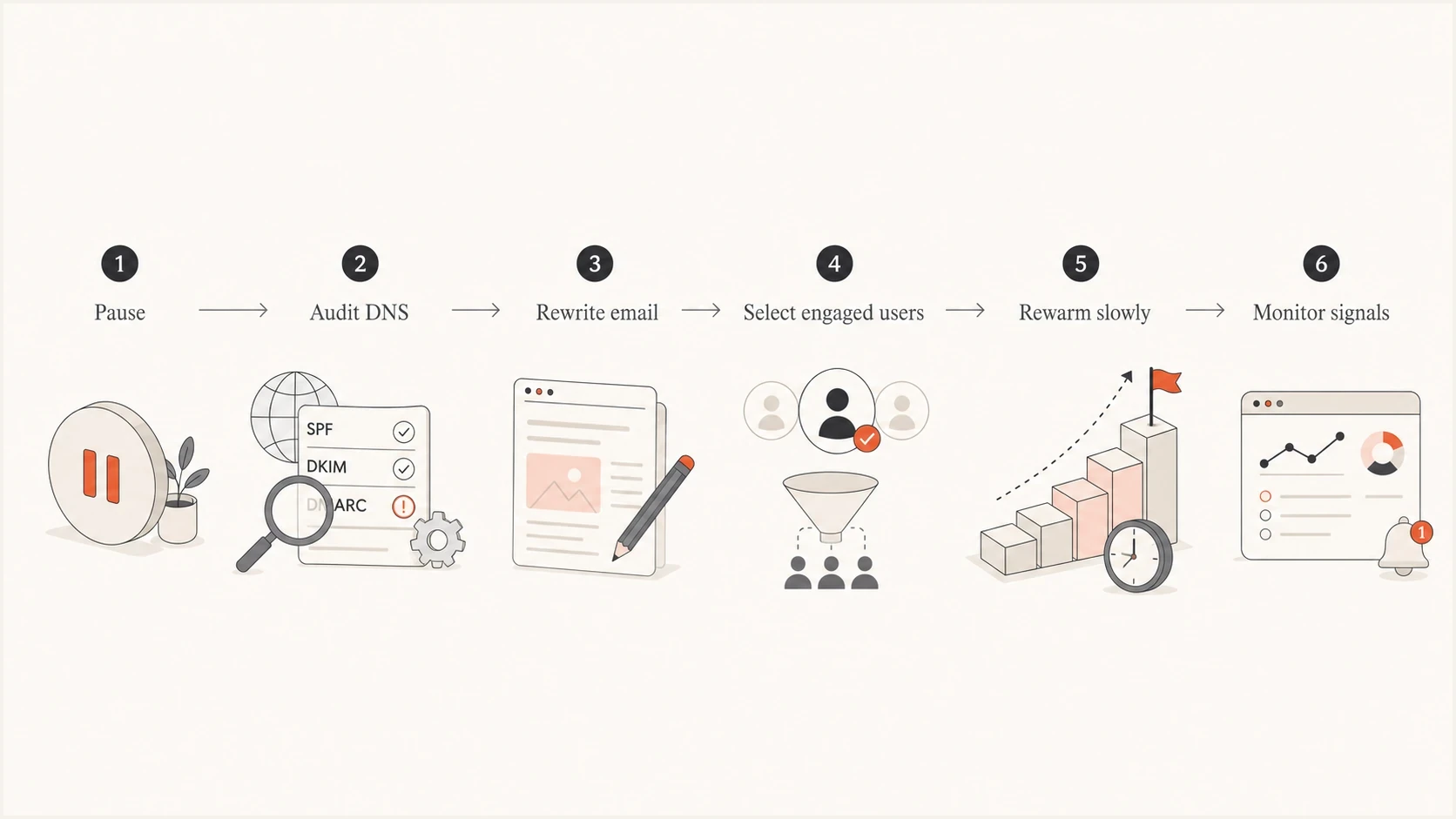
Gmail domain reputation recovery flow from pause and DNS audit through rewarming and monitoring.
Check blocklist and blacklist exposure during this phase. A blocklist listing is not the usual cause of Gmail domain reputation dropping after a botched warm-up, but it can add noise during recovery. Suped's blocklist monitoring keeps blacklist checks in the same workflow as authentication and DMARC reporting.
Use Suped to manage the repair
During a Gmail reputation recovery, the hard part is not publishing one correct DNS record. It is catching the next problem before it damages the rewarm. Suped's DMARC reporting and email authentication platform supports this workflow with source-level DMARC data, SPF and DKIM monitoring, blocklist and blacklist checks, alerts, and issue-resolution steps in one workspace.

Issue steps to fix dialog showing the issue overview, tailored fix steps, and verification action
A practical workflow is simple: add the recovering domain, verify every authorized sender, watch failures by source, and set alerts so a forgotten campaign or broken DKIM selector does not run for days. For agencies and MSPs, Suped's multi-tenant view keeps client domains separate while providing one operational dashboard.
- Add the sending domain and confirm DMARC reporting is arriving.
- Map verified senders separately from unknown or legacy systems.
- Fix SPF, DKIM, DMARC, forwarding, or domain-match failures with the issue steps.
- Activate real-time alerts before volume increases, not after problems appear.
Views from the trenches
Best practices
Pause damaged infrastructure long enough to stop fresh negative Gmail signals before rewarming.
Rewarm only with recent opt-ins and transactional mail that earns clear engagement from Gmail users.
Track authentication, complaints, bounces, and spam placement before each volume increase.
Common pitfalls
Treating a new subdomain as seasoned because the root domain already has history with Gmail.
Keeping promotional welcome templates live while trying to repair a bad first impression.
Increasing daily volume because open rates look acceptable while spam placement persists.
Expert tips
Hold volume flat until negative signs improve, then increase in small steps over several days.
Separate migration risk from content risk by testing simple versions of the same flow first.
Warm the sending domain and IP together when both are new or newly assigned for Gmail traffic.
Marketer from Email Geeks says a few days of pausing the new infrastructure can give Gmail a clean break while the team repairs templates and routing.
2025-04-07 - Email Geeks
Marketer from Email Geeks says content reputation can be damaged by the first failed send, so changing volume without changing the message rarely fixes the problem.
2025-04-07 - Email Geeks
The practical recovery path
The recovery plan is straightforward: stop the failed pattern, repair the technical and content causes, restart with your best Gmail recipients, and increase only when the signals justify it. Do not keep a damaged new domain in production just because the current daily volume looks small. Gmail cares about the quality of the signals, not your intent.
If the domain is new, the IP is new, or the content changed during a migration, warm the whole sending identity together. Keep the first phase narrow and useful, with a sending path that authenticates cleanly. Suped supports that recovery work by showing who is sending, what is failing, and what needs to be fixed before Gmail gets another bad sample.




