Why is my gmail postmaster reputation stuck on 'bad' and how can I fix it?

Updated on 6 Aug 2026: We corrected the Postmaster Tools status and added current Gmail recovery checks for spam rate, compliance, unsubscribe handling, and delivery errors.
If a legacy Gmail Postmaster reputation label is stuck on 'bad', or Gmail is rejecting mail for low domain reputation, the direct answer is usually simple: Gmail is still seeing mail it thinks its users do not want. A dedicated IP, a new email platform, better templates, and passing SPF, DKIM, and DMARC do not erase that signal. Gmail judges the mail stream by recipient behavior, complaint patterns, spam placement, sending consistency, authentication, and whether the sender keeps mailing people who ignore or reject the mail.
The fix is to stop the traffic that is damaging the domain, remove unconsented and low-intent addresses, repair any authentication or signup abuse, then restart Gmail sending with the smallest audience that has clear recent intent. Treat this less like a dashboard problem and more like a behavior problem. The dashboard changes only after the behavior changes.
- Primary cause: Gmail sees too much unwanted, ignored, or poorly sourced mail tied to the domain or IP.
- Fastest stabilizer: Pause Gmail marketing sends that keep landing in spam and stop adding weak addresses.
- Most common mistake: Moving to a dedicated IP and expecting domain reputation to improve without list changes.
- Real recovery path: Send only wanted mail, at lower volume, to recipients with recent proof of interest.
What 'bad' means in Gmail now
There is a current-product caveat. Google has postponed retirement of the legacy Postmaster Tools interface. The newer v2 interface does not include the old Bad, Low, Medium, and High domain and IP reputation panels, and Google says those legacy panels will eventually be retired and replaced with more actionable reporting. If an old export, cached screenshot, or legacy panel says 'bad', use it as evidence of prior sending problems, then diagnose current behavior with the compliance, spam rate, authentication, feedback loop, and delivery error data that Gmail still provides.
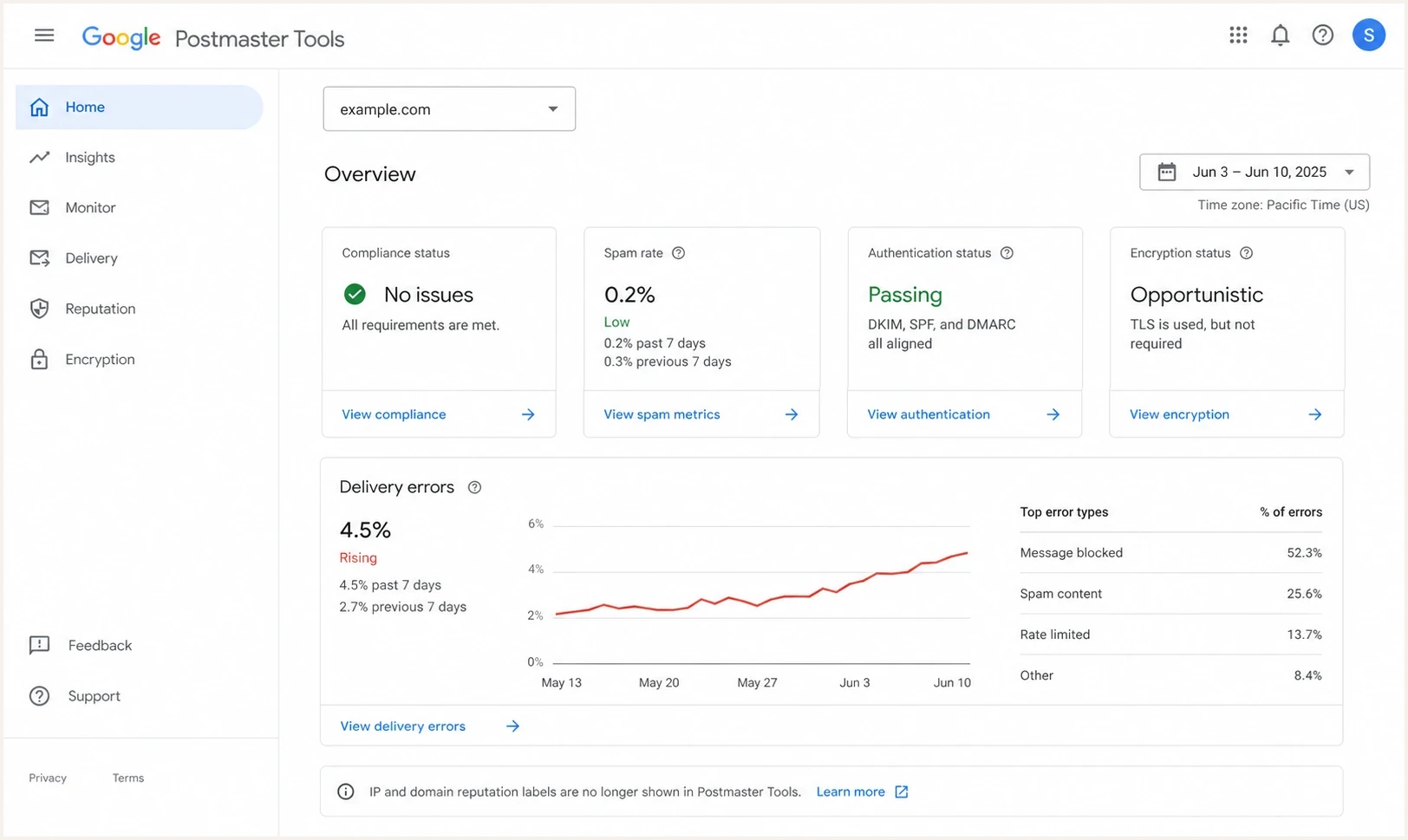
Google Postmaster Tools dashboard with compliance, spam rate, authentication, and delivery error sections.
A bad Gmail reputation is not a punishment for one broken DNS record. It is accumulated trust history. Gmail has seen enough negative evidence that it routes more mail away from the inbox, then engagement falls because fewer people see the messages. That creates the familiar loop: bad reputation lowers inbox placement, low inbox placement lowers interaction, and weak interaction gives the sender little new evidence that recipients want the mail.
Zero, extremely low, or missing Gmail spam-rate data does not prove that Gmail likes the mail. Google's spam-rate metric covers messages delivered to engaged recipients' inboxes and then marked as spam. If Gmail already sends much of the traffic to spam, fewer recipients can report it from the inbox. Treat a sudden zero after a high rate as a warning sign.
Check the signals Gmail still shows
Postmaster Tools covers mail sent to personal Gmail accounts, not every Google Workspace mailbox. Its data is not real time, and low-volume days can be blank because Google applies privacy thresholds. General dashboards typically update within 24 hours but can take longer. Compliance changes use a rolling average and can take up to seven days to appear, so one blank day or one unchanged status is not a reason to resume full volume.
|
|
|---|---|
Compliance status | Fix every Needs work item and use Deliverability analysis for Gmail's current recommendation. |
Spam rate | Keep the rate below 0.10% and avoid reaching 0.30% or higher, but do not read an abrupt zero as recovery by itself. |
Authentication | Find traffic that fails SPF, DKIM, or DMARC and verify that direct mail aligns with the visible From domain. |
Delivery errors | Separate permanent rejections from temporary deferrals, read the SMTP response, and reduce volume while errors continue. |
Feedback loop | Use campaign identifiers to find the mail streams that Gmail recipients report most often. |
Current Gmail recovery signals
Read these signals together. A low complaint rate beside persistent spam placement or low interaction does not clear the audience. Authentication failures point to identity problems, while unknown-user rejections point to address quality. A burst of temporary deferrals after a volume spike points to rate and reputation pressure, so hold or reduce volume before trying another ramp.
Why the reputation gets stuck
When a domain stays at bad after a dedicated IP move, start with the mail itself. If the domain was already medium before the switch, the shared IP pool was probably masking some weakness. Once the sender stands alone, Gmail can judge the domain and IP without the shared pool's healthier traffic.
What people try
- Dedicated IP: This separates IP reputation, but it does not repair domain behavior.
- New templates: Cleaner HTML helps only after audience quality is fixed.
- Reconsideration forms: Requests fail when the same risky traffic continues.
What Gmail reacts to
- Recipient intent: People delete, ignore, archive, or report mail they did not ask for.
- Source quality: Purchased lists and scraped business contacts create weak signals.
- Repeated harm: Every bulk-folder campaign adds more bad history.
Purchased B2B lists are a common root cause. Even when bounce rates look acceptable, Gmail and Google Workspace recipients still react like the message is unwanted. That poor behavior can spill into legitimate lifecycle and customer mail if the same domain, brand, tracking domain, or authentication chain connects the streams.
Another cause is signup abuse. If a signup endpoint accepts hundreds of addresses without rate limits, hidden CAPTCHA, bot checks, or confirmation, the system starts mailing people who never asked for anything. Pushing contacts into an email platform before signup completion has the same effect: the list grows, but Gmail sees recipients who do not recognize the sender.
The recovery plan
The recovery plan starts with a hard stop on damaging traffic. Do not keep warming the same bad audience. Separate the causes first, then restart with proof that the people receiving Gmail mail want it.
- Pause Gmail marketing: Stop promotional sends to personal Gmail addresses when spam placement is near total or Gmail keeps rejecting and deferring the traffic.
- Remove weak sources: Suppress purchased, scraped, appended, affiliate, and unconfirmed addresses completely.
- Protect acquisition: Add rate limits, bot checks, confirmation controls, and logging to every form that creates a contact.
- Audit identity and infrastructure: Verify SPF, DKIM, DMARC alignment, tracking domains, bounce domains, forward and reverse DNS, TLS, and sender identity.
- Meet bulk-sender rules: At about 5,000 messages a day to personal Gmail accounts, use SPF, DKIM, and DMARC, format messages correctly, provide one-click unsubscribe plus a visible unsubscribe link, and process unsubscribe requests within 48 hours.
- Restart small: Begin with recent purchasers, recent account activity, replies, direct requests, and confirmed subscribers, then increase volume gradually while SMTP errors and spam rate stay controlled.
Do not warm a bad list. Warming is a trust-building process. If the warmup audience ignores the mail, complains, or never consented, the warmup teaches Gmail that the sender deserves spam placement.
Authentication still matters because it controls whether Gmail can tie the message to the domain cleanly. Use a domain health checker to catch basic DNS and authentication problems before blaming reputation alone. An SPF lookup failure, a misaligned DKIM signature, missing forward or reverse DNS, or an unprotected subdomain can keep the recovery messy.
Baseline DMARC monitoring recorddns
v=DMARC1; p=none; rua=mailto:dmarc@yourdomain.com;
?
What's your domain score?
Deep-scan SPF, DKIM & DMARC records for email deliverability and security issues.
That example collects aggregate reports without asking receivers to quarantine or reject failing mail. Do not tighten alignment or change policy solely to move a Gmail reputation label. First identify every legitimate sender and confirm DMARC alignment, then stage enforcement toward quarantine or reject. Suped's DMARC monitoring shows which systems send as the domain, which ones fail, and which ones need fixes before enforcement.
How to rebuild engagement
When interaction is already near zero, do not try to create engagement by blasting more email. Use non-email channels to bring people back to the inbox: website banners, account notifications, in-app prompts, social posts, sales conversations, and checkout flows that tell existing subscribers to look for a specific message.
Gmail spam-rate guardrails
Use the Postmaster Tools rate with placement, SMTP errors, and audience evidence before increasing Gmail volume.
Target
Below 0.10%
Google recommends staying below this level.
Caution
0.10% to 0.29%
Hold the volume ramp and identify the campaigns generating reports.
Stop
0.30% or higher
Google says senders should avoid reaching this level.
The first Gmail segment should be boring by design. Recent buyers, people who logged in recently, people who replied, people who clicked before the reputation drop, and people who explicitly opted in again are useful. Everyone else waits. This recovery timing page explains why the timeline depends on how quickly corrected traffic replaces the bad history.
- Start with proof: Use the smallest recent high-intent cohort that can produce a meaningful result, not the whole file.
- Keep cadence low: One strong message beats repeated weak campaigns during recovery.
- Measure behavior: Track clicks, replies, conversions, unsubscribes, bounces, deferrals, spam rate, and placement tests.
- Hold volume flat: Increase only after several sends produce controlled complaints, clean SMTP responses, and stable placement.
Email tester
Send a real email to this address. Suped shows a results button when the test is ready.
?/43tests passed
Before each restart message, send a real message through the email tester and inspect the headers, authentication, content, links, and rendering. That will not prove inbox placement, but it catches fixable issues before Gmail sees another risky send.
What will not fix it alone
Most stuck-reputation cases waste time on changes that look serious but do not change recipient experience. These changes are useful only when paired with list and consent repairs.
|
|
|
|---|---|---|
Dedicated IP | IP isolation | Domain behavior remains |
Platform move | Operational reset | Bad audience follows |
New design | Message quality | Intent is unchanged |
Appeal form | Manual review | No behavior change |
Subdomain split | Stream clarity | Brand signals remain |
Common fixes and their limits
Subdomains and separate IPs still matter. Use them to make streams easier to diagnose and to keep transactional mail away from risky marketing. Do not use them to hide the same bad behavior, because Gmail can connect patterns across the sender, brand, links, authentication, and recipients.
Where Suped fits
Suped's product connects the technical checks with the operational recovery workflow. Teams can identify every source sending as the domain, see whether SPF, DKIM, and DMARC pass and align, catch DNS changes, and monitor whether a blocklist (blacklist) listing adds an infrastructure problem. Those checks do not create good Gmail reputation by themselves, but they remove technical uncertainty before volume resumes.

Issue steps to fix dialog showing the issue overview, tailored fix steps, and verification action
A recovery workflow in Suped uses issue detection, tailored fix steps, DMARC source monitoring, change alerts, hosted DMARC, hosted SPF, SPF flattening, and blocklist monitoring together. The sending team can separate authentication failures, unauthorized senders, DNS drift, and blacklist or blocklist alerts from the audience and volume problems that Gmail measures internally.
Suped helps with the parts a team can control directly: finding authentication issues, proving which platforms send mail, monitoring policy changes, managing SPF safely, and alerting when a domain or IP appears on a blacklist or blocklist.
- Recovery audits: Find failing or unknown senders before restarting Gmail volume.
- Policy staging: Move DMARC toward enforcement without breaking legitimate mail.
- Team workflow: Give marketing, IT, and MSP teams the same evidence and fix queue.
Views from the trenches
Best practices
Stop the harmful stream first, then restart Gmail only with recent high-intent recipients.
Audit acquisition sources because bad addresses often explain reputation better than DNS.
Protect signup forms with rate limits and confirmation before contacts enter campaigns.
Common pitfalls
Treating a dedicated IP as a domain-reputation fix keeps the bad behavior untouched.
Reading zero complaints as good news misses the fact that spam-folder mail gets few reports.
Keeping purchased business contacts in the file slows every legitimate recovery attempt.
Expert tips
Use non-email channels to bring known customers back before increasing Gmail volume.
Separate streams for clarity, but do not expect subdomains to hide unwanted sending.
Check SPF, DKIM, DMARC, tracking domains, and signup controls before each restart.
Expert from Email Geeks says a dedicated IP exposes whether recipients want the mail enough for the sender's reputation to stand alone.
2025-06-27 - Email Geeks
Expert from Email Geeks says purchased B2B contacts can poison the company domain and affect legitimate customer mail.
2025-06-27 - Email Geeks
The practical answer
A Gmail reputation label stays at bad because Gmail has not yet seen enough better behavior to trust the mail again. In v2, that old label is no longer the main operating signal, so use compliance, spam rate, authentication, delivery errors, and campaign feedback together. Fixing authentication is necessary, but it is not enough. Changing IPs can help isolate infrastructure, but it is not a cure. Reconsideration requests fail when the underlying mail stream keeps creating the same signals.
The path that works is direct: stop mailing people who did not ask, remove weak sources, close signup abuse, verify authentication and bulk-sender compliance, pause harmful Gmail traffic, then restart with the smallest group of recipients who have recent intent. Once Gmail sees wanted mail consistently, its internal reputation has a reason to recover.