How long does it take to recover domain reputation from Bad/Low to High
Knowledge

Published 8 Jun 2025
Updated 19 Jun 2026
16 min read
Summarize with
Updated on 23 Jun 2026: We refreshed the recovery plan with current sender requirements, clearer timing checkpoints, and practical inactive-subscriber handling.
Recovering domain reputation from Bad or Low to High usually takes 4 to 12 weeks after the sending problem has been fixed. A light dip with clean authentication and low complaints can recover in 2 to 4 weeks. A damaged domain with spam complaints, list-quality problems, stolen credentials, repeated SMTP deferrals, inactivity after cleanup, or blocklist (blacklist) listings usually needs 8 to 12 weeks or longer. Newer domains, long-idle domains, and lists heavy with inactive contacts or role-based addresses that never clearly opted in sit toward the slower end because providers have less recent positive evidence.
The important part is that the clock does not start when you notice the Bad or Low label. It starts when mailbox providers begin seeing consistently good mail again: authenticated messages, low bounce rates, low spam rates, normal engagement, stable volume, and no suspicious sending spikes.
Do not plan a recovery around a single daily score. Bad, Low, Medium, and High are delayed provider labels, not a universal stopwatch. Domain reputation is a rolling trust signal. A provider can keep showing Low for days after the underlying behavior improves because the score includes recent history. Treat the first clean week as proof that the fix is working, not as proof that reputation has fully recovered.
The short answer
For most real domains, the practical answer is this: Low to High takes about 4 to 8 weeks, Bad to High takes about 8 to 12 weeks, and severe abuse cases take longer. Severe cases include compromised accounts, cold-list blasts, spam complaint spikes, repeated high bounces, failed warm-up, and sending mail that fails SPF, DKIM, or DMARC checks. If sending paused for a month or more during cleanup, add a re-warm period before returning to old campaign size. Domains younger than about 90 days should be treated as a warm-up problem as much as a recovery problem.
- 2 to 4 weeks: Minor reputation damage, low volume, clean lists, and no ongoing authentication failures.
- 4 to 8 weeks: Low reputation after a short bad period, with sending reduced to engaged recipients.
- 8 to 12 weeks: Bad reputation after complaints, bounces, failed warm-up, or mixed sending sources.
- 12+ weeks: Credential theft, spam trap hits, repeated blocklist or blacklist listings, or continued poor segmentation.
Treat High as a sustained state
A domain does not move to High because one campaign performs well. It moves when the provider sees enough clean, consistent mail to trust the domain again. Wait for at least two clean weeks before increasing volume more aggressively.
|
|
|
|
|---|---|---|---|
Low | 2-4 weeks | Low to Medium | 4-8 weeks |
Bad | 4-8 weeks | Bad to Low | 8-12 weeks |
Abuse | 8+ weeks | Bad to stable | 12+ weeks |
30+ days inactive | 2-4 weeks | Cold to stable | 6-10 weeks |
Typical timing ranges after the root cause has been fixed.
Why recovery time varies
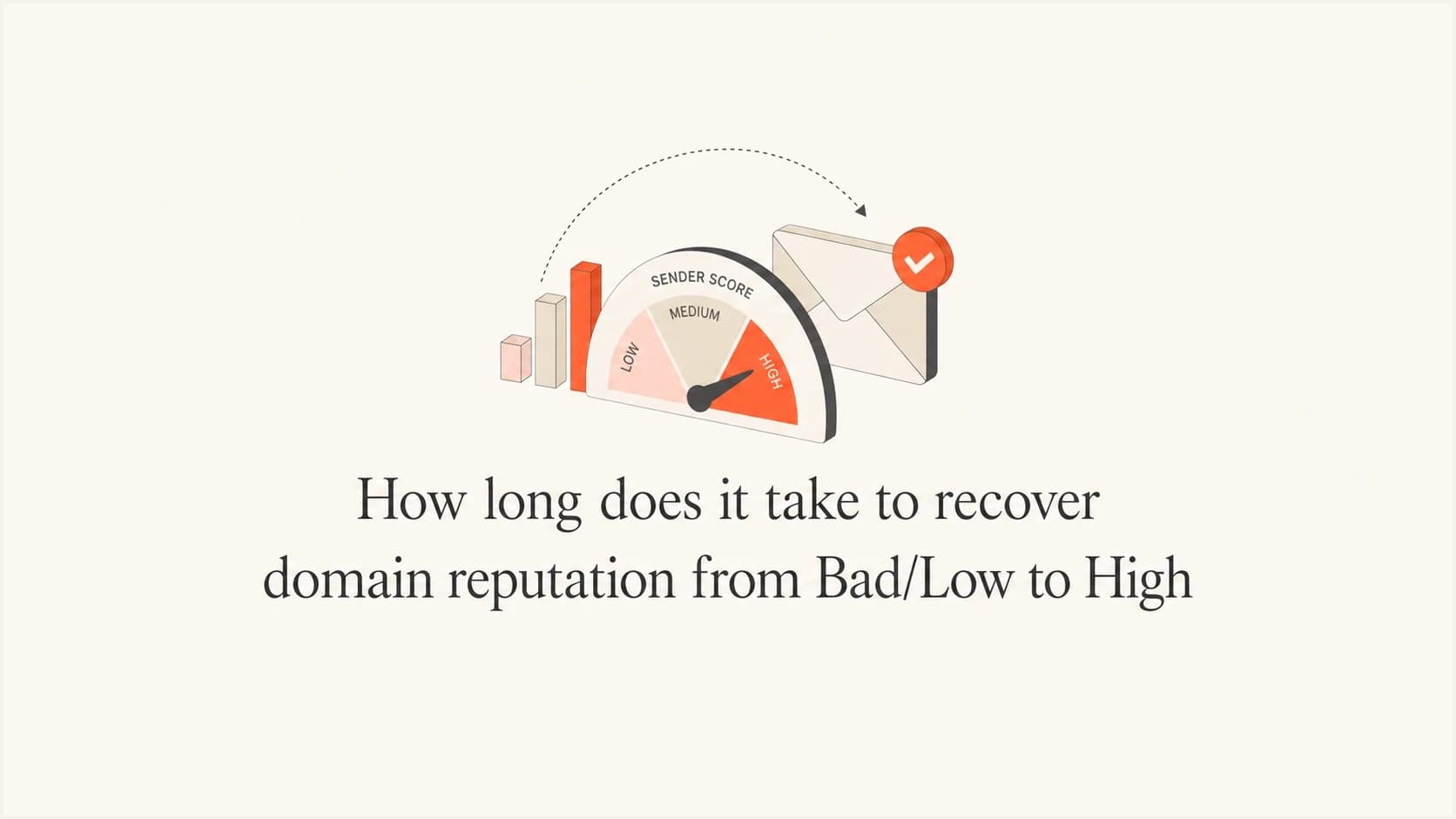
Mailbox providers look at more than one signal. Authentication tells them whether your mail is technically allowed to send for the domain. Engagement tells them whether recipients want it. Complaint and bounce data tell them whether the list is healthy. Volume patterns tell them whether the sender behaves normally or suddenly changes risk.
The same Low label can mean different problems. A domain that sent one accidental campaign to old contacts recovers faster than a domain that has had months of poor list hygiene. A domain with a single broken DKIM selector recovers faster than a domain sending unauthenticated mail through several unapproved platforms.
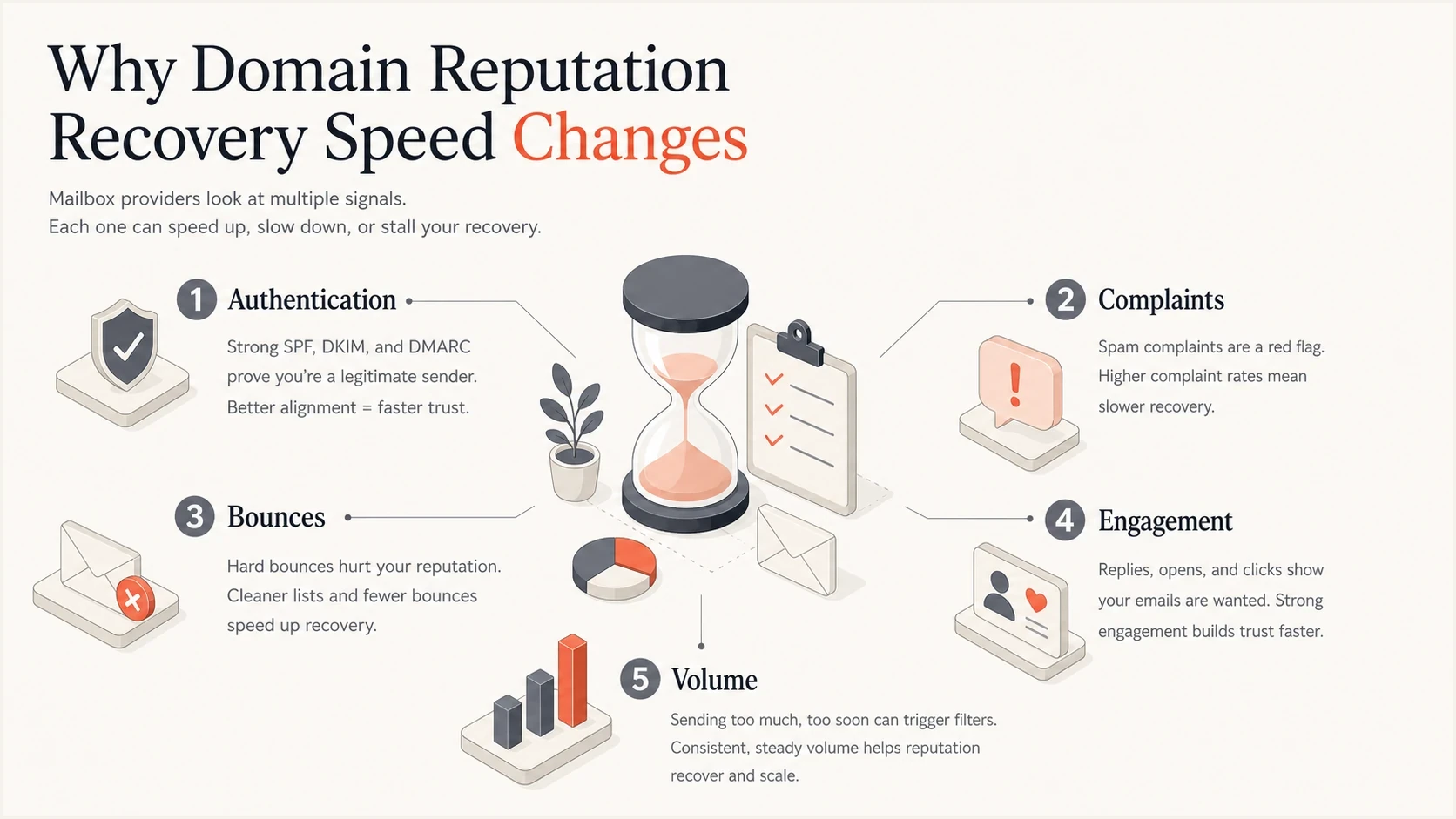
Infographic showing domain reputation recovery signals: authentication, complaints, bounces, engagement, and volume.
Separate reputation recovery from inbox placement recovery. Reputation can move from Bad to Low while inbox placement still looks poor because mailbox providers continue testing your mail in spam or promotions folders. The better signal is trend direction across several weeks, not one dashboard label.
Fast recovery pattern
- Cause: One bad send, one broken DNS record, or one short volume spike.
- List: Recent opt-in contacts with clear engagement.
- Volume: Reduced and then increased in measured steps.
- Result: Low to Medium in a few weeks, then High if quality holds.
Slow recovery pattern
- Cause: Repeated complaint spikes, high bounces, or stolen sending credentials.
- List: Old, purchased, scraped, or poorly permissioned contacts.
- Volume: Large changes before providers see stable positive signals.
- Result: Bad remains visible until enough clean sending replaces bad history.
How to confirm it is reputation
Before planning a domain reputation recovery timeline, confirm the problem is reputation rather than one broken DNS record, a routing issue, or a temporary provider outage. Reputation problems usually appear as patterns: repeated 4xx deferrals, 5xx rejection text mentioning low reputation, rising spam placement, or one mailbox family dropping sharply while other providers still accept mail. If delivery drops while hard bounces do not rise, suspect filtering or spam-folder placement rather than invalid-address cleanup alone.
- SMTP evidence: Save the full bounce or deferral text, including enhanced status codes and the provider name.
- Spam placement: Compare real placement by mailbox family instead of treating every provider as one blended result.
- Recipient clues: If Gmail places the message in spam, the recipient banner can show whether the issue relates to authentication, suspicious content, or user reports.
- Header evidence: Check a real delivered message for SPF, DKIM, DMARC domain match, TLS, and the visible From domain.
Do not use a reputation recovery plan to fix a syntax error, missing DKIM signature, or broken return-path. Those are configuration issues. Reputation recovery starts after the message can authenticate and reach the provider consistently.
What to fix before the clock starts
The fastest way to waste a month is to keep sending while the root cause is still active. Before counting recovery time, require proof that authentication passes, reporting is active, the sending inventory is known, and risky audiences are paused.
Start with a domain health check so DNS, SPF, DKIM, and DMARC issues are not hiding under a reputation problem. Then send a real message through your normal system and send a real test to confirm what mailbox providers see in the actual message headers.
Baseline DMARC record for monitoringdns
_dmarc.example.com. 3600 IN TXT "v=DMARC1; p=none; rua=mailto:dmarc@example.com;"
A monitoring policy is not the final security posture, but it gives you the reporting needed to see who is sending. Once legitimate sources pass authentication, move toward quarantine or reject in stages. Suped helps here by turning aggregate reports into source-level actions, so you can see which sender is failing and what to fix.
Do not warm a broken domain
If SPF, DKIM, or DMARC fails for legitimate mail, warming creates more negative history. Fix authentication first, then rebuild volume. This is where DMARC monitoring matters because it shows which sources pass, fail, or send without approval.
Current Gmail and Yahoo bulk-sender rules make a few checks non-negotiable: direct mail needs a visible From domain that can pass DMARC through matching SPF or DKIM, marketing mail needs a working one-click unsubscribe header and a visible unsubscribe link, sending IPs need matching forward and reverse DNS, mail should use TLS, and complaint rates must stay below 0.3%, with below 0.1% as the safer operating target. DNS changes can take up to 72 hours to propagate, so verify the next real message after propagation rather than assuming the record changed everywhere.
Content also needs a quick check before volume returns. Remove or rewrite misleading subject lines, heavy link clusters, unsecured http links, hidden or tiny text, and signature links that send users to risky pages. Content cleanup does not replace authentication, but it removes avoidable signals that make a recovering domain look risky.
- Inventory: List every platform that sends for the domain, including billing, product, support, marketing, and sales tools.
- Authentication: Confirm SPF and DKIM pass for each legitimate stream, then check that the authenticated domain matches the visible From domain.
- Infrastructure: Verify PTR records, forward DNS, TLS, and stable sending identities before scaling volume.
- Abuse: Rotate exposed keys, remove unknown API users, and stop any sender you cannot identify.
- Audience: Suppress hard bounces, repeated soft bounces, long-term non-openers with no other intent, and role-based addresses that did not explicitly opt in before increasing volume.
- Reputation: Check IPs and domains for blocklist or blacklist listings before sending more mail.
?
What's your domain score?
Deep-scan SPF, DKIM & DMARC records for email deliverability and security issues.
A realistic recovery plan
The recovery plan should be predictable. The goal is to create positive signals every day, not to force the score upward with a sudden send. Weekly gates work well because reputation systems need repeated clean observations before trust improves.
Typical recovery path
Illustrative trust trend after the root cause is fixed and volume is rebuilt carefully.
Reputation confidence
In week one, cut the domain back to mail that recipients clearly expect. For marketing, that means recent openers, recent clickers, recent buyers, and people who directly requested the message. For transactional mail, that means only essential messages with working unsubscribe handling where required.
If the domain stayed mostly silent during the fix, add a re-warm layer to the plan. After about 30 days of no meaningful sending, restart below old campaign size and use engaged recipients first. After roughly 90 days idle, treat the domain like a new reputation build because recent positive history is thin.
In weeks two to four, increase volume only if the complaint rate stays controlled, bounces remain low, and authentication passes. If complaints rise, hold or reduce volume for another week. If bounces rise, stop expansion and repair the audience; a hard bounce rate near 2% is already too high for a recovery ramp. If a blocklist (blacklist) appears, handle the cause before treating delisting as the fix.
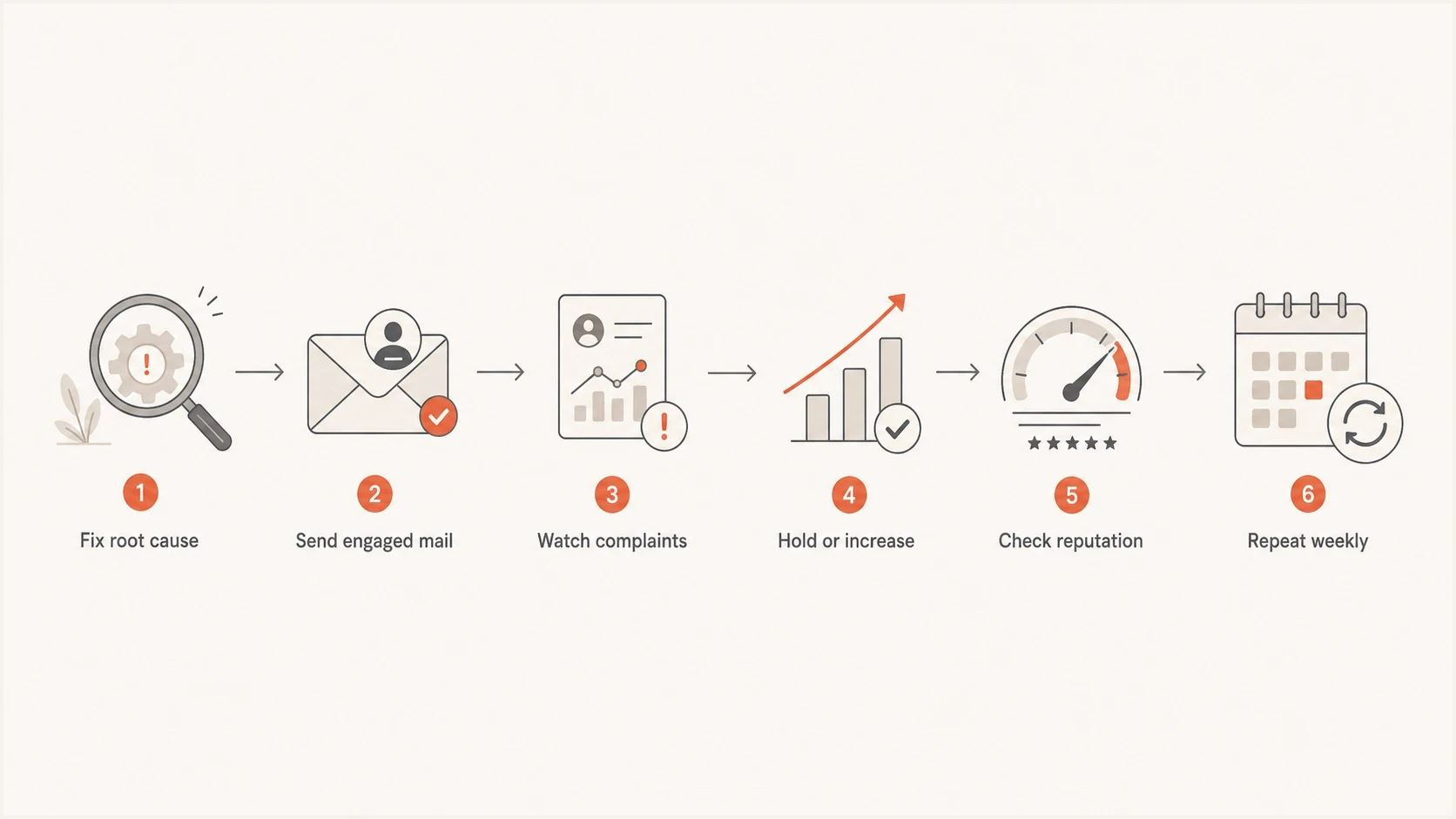
Weekly flowchart for domain reputation recovery decisions.
- Week 0: Stop the bad stream, fix authentication, review complaint sources, and remove risky audiences.
- Week 1: Send only to the most engaged contacts and keep volume below the previous problem level.
- Weeks 2-4: Increase volume in small steps only when complaints, bounces, and authentication stay healthy.
- Weeks 5-8: Add broader engaged segments while watching each mailbox provider separately.
- Weeks 9-12: Return toward normal volume only if the domain stays stable across several sends.
How to ramp Gmail volume during recovery
When the problem is most visible at Gmail, treat the ramp as a conditional recovery plan. Restart with Gmail recipients who engaged recently, then raise the Gmail cap only after the previous send has clean authentication, low spam complaints, low bounces, and no heavy deferrals.
- Start tiny: Use about 50 recent Gmail engagers on day one, or fewer if normal Gmail volume is small.
- Grow conditionally: Raise the next Gmail cap by about 50% only when the prior batch is clean.
- Hold or reduce: Keep the same cap when evidence is mixed, and reduce to the last clean cap after rejects, deferrals, or complaints.
- Keep risky names out: Do not test recovery on dormant Gmail contacts, scraped contacts, or never-engaged subscribers.
|
|
|
|
|---|---|---|---|
1 | 50 | 0-30 day engaged | Send only |
2 | 75 | 0-30 day engaged | Increase if clean |
3 | 115 | 0-30 day engaged | Hold if mixed |
4 | 170 | 0-60 day engaged | Reduce if risky |
Example Gmail caps after a bad sender reputation.
The exact numbers matter less than the rule: do not increase when Gmail rejects, defers, places test mail in spam, or when complaints rise. A better reputation label after a few days is progress, not permission to return to the old list.
How to handle inactive subscribers during recovery
If a large share of the list has no opens in 12 months, do not use those subscribers as the recovery audience. Exclude them for at least 30 days while the domain rebuilds with engaged recipients. In damaged-reputation recoveries, keep them out for 60 to 100 days, then test only a small re-permission slice instead of dropping the full inactive group back into normal newsletters.
- Use 14 days only as an early signal when you send often; use 30 days for a clearer trend across several sends.
- Keep 12-month non-openers suppressed for 60 to 100 days when reputation is already Bad or Low.
- Define inactivity with clicks, purchases, replies, account activity, and site visits, not opens alone.
- Reintroduce only 1 to 5 percent of the inactive pool at a time, starting with the most recent activity.
- Sunset anyone who ignores the re-permission message, complains, hard bounces, or repeatedly soft bounces.
Keep transactional and essential account mail separate from marketing suppression. Password resets, receipts, and required service notices should not break because a contact is excluded from reputation-recovery campaigns.
What progress should look like
Recovery is easier to manage when you watch a few clear signals instead of guessing from one label. The first positive sign is not always a High score. It is usually fewer deferrals, more accepted mail, fewer spam-folder placements, lower complaints, and fewer authentication failures in reports. A higher open rate after suppressing inactive contacts is useful, but it is not enough on its own because smaller lists naturally lift percentages.
Read SMTP responses and bounce messages during recovery. Save the exact text before rewriting the plan. Reputation blocks, temporary 4xx deferrals, hard bounces, and authentication failures point to different fixes, so grouping them under one deliverability problem slows the repair.
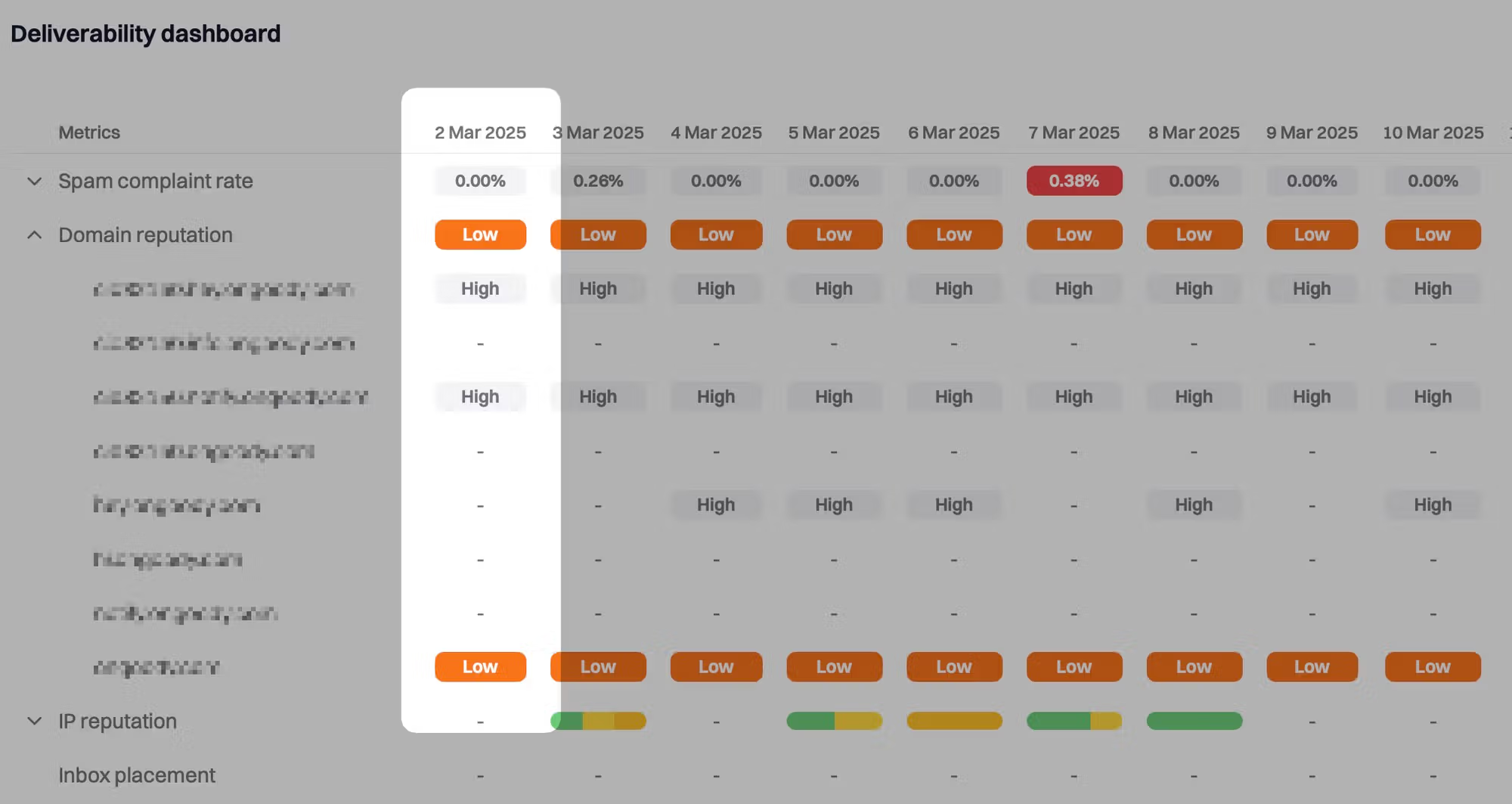
Suped dashboard showing Bad domain reputation before email recovery work.
A Bad or Low period often shows up as a cluster of symptoms: negative reputation labels, higher spam placement, blocklist or blacklist hits, and authentication gaps. Suped's product is useful here because the dashboard brings DMARC, SPF, DKIM, source identity, blocklist monitoring, and deliverability signals into one operational view instead of making the team check each problem separately.
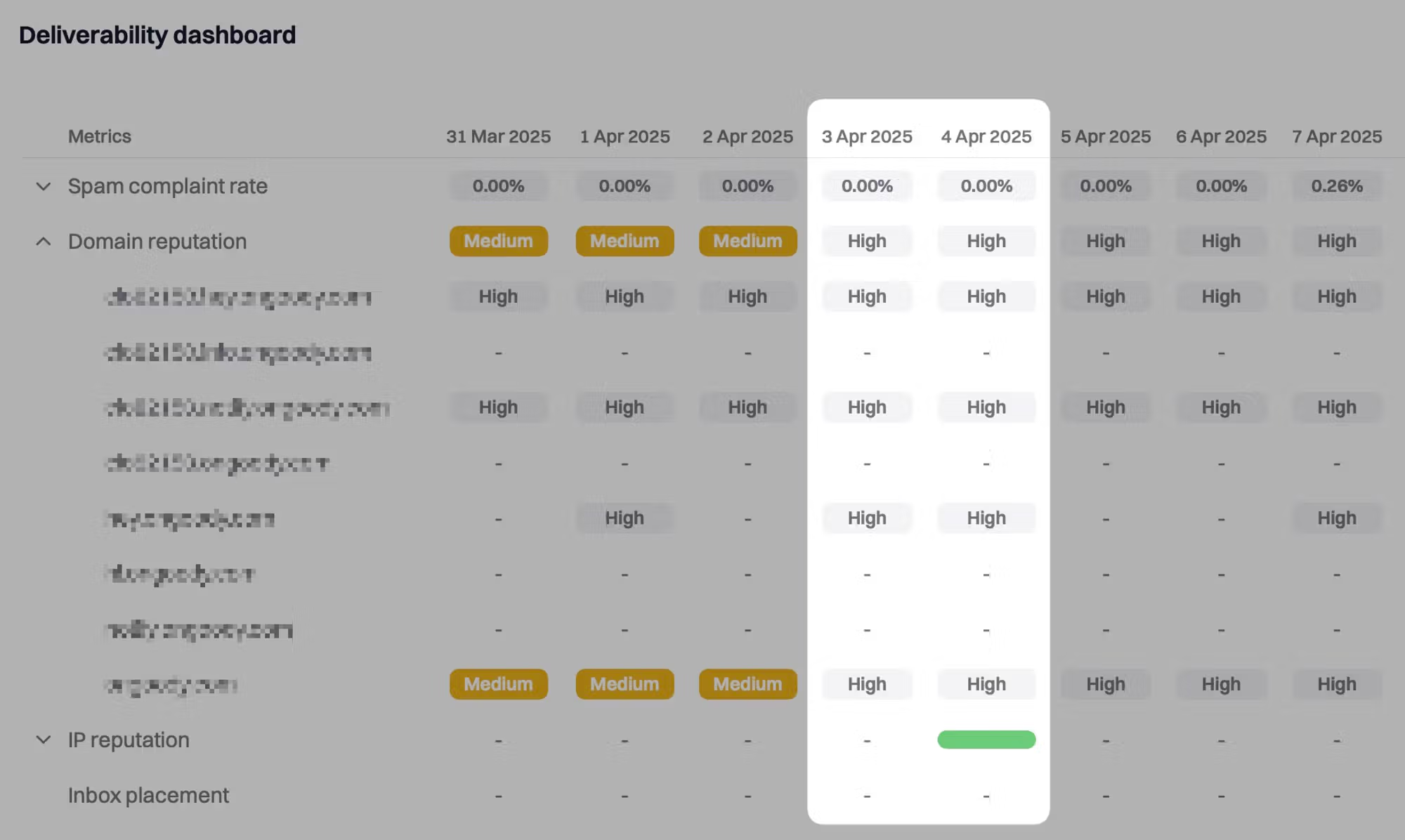
Suped dashboard showing improved domain reputation after clean sending work.
When reputation improves, the change should match the behavior change. If you removed unengaged recipients, complaint rates should fall. If you fixed DKIM, DMARC pass rates should rise. If you removed a compromised sender, unknown traffic should disappear. If those supporting signals do not improve, a better reputation label will not hold.
Complaint rate checkpoints
Use complaint rate as one checkpoint while rebuilding. Lower is better, and each mailbox provider weighs signals differently.
Healthy
Below 0.1%
Keep volume increases measured.
Caution
0.1% to 0.3%
Hold volume and review segments.
High risk
Above 0.3%
Reduce volume and fix audience quality.
Track blocklist monitoring beside authentication and engagement. A listing alone is not always the reason for inboxing problems, but a repeated listing usually means the sender has not fixed the behavior that triggered it.
Why some domains stay stuck on Bad or Low
When a domain is stuck, the usual issue is that the sender fixed the visible symptom but left one negative signal running. This happens with old automation, unapproved sales tools, secondary ESP accounts, unmonitored subdomains, role-based aliases, and lists that keep generating complaints even at lower volume.
This is also where people mistake patience for progress. Waiting helps only after the sending behavior changes. Waiting while the domain still sends unwanted or unauthenticated mail adds more bad history. A domain that paused for a month while issues were fixed is not automatically healthy; it still needs recent clean sends to rebuild. The practical question is how long recovery takes and whether the provider has enough good evidence to replace the bad evidence.
Signs the recovery clock has not started
- Failures: Legitimate mail still fails DKIM or the DMARC domain match.
- Complaints: Complaint rate stays elevated after reducing volume.
- Sources: DMARC reports show mail from senders nobody owns.
- Listings: The same IP or domain returns to a blocklist or blacklist.
If the cause is unclear, compare your situation with common reputation drop causes before building a new ramp. If the domain failed a warm-up, slow the next ramp, use recent engagers first, and make each increase conditional on clean data.
A public Google support thread shows the same practical frustration many senders have: the score can remain Bad after obvious changes. That lag is normal when the provider needs more clean history.
How Suped fits into the recovery workflow
Suped's product fits into this workflow because recovery fails when teams cannot see the real source of bad mail. It turns raw authentication and reporting data into issues, source breakdowns, alerts, and specific fix steps.
Issues page showing top issues, verified sources, unverified sources, and authentication pass rates
For a domain moving from Bad or Low toward High, the main value is seeing why the score is at risk. Suped can show which sources are authenticated, which are failing, which send without approval, and which issues deserve action first.
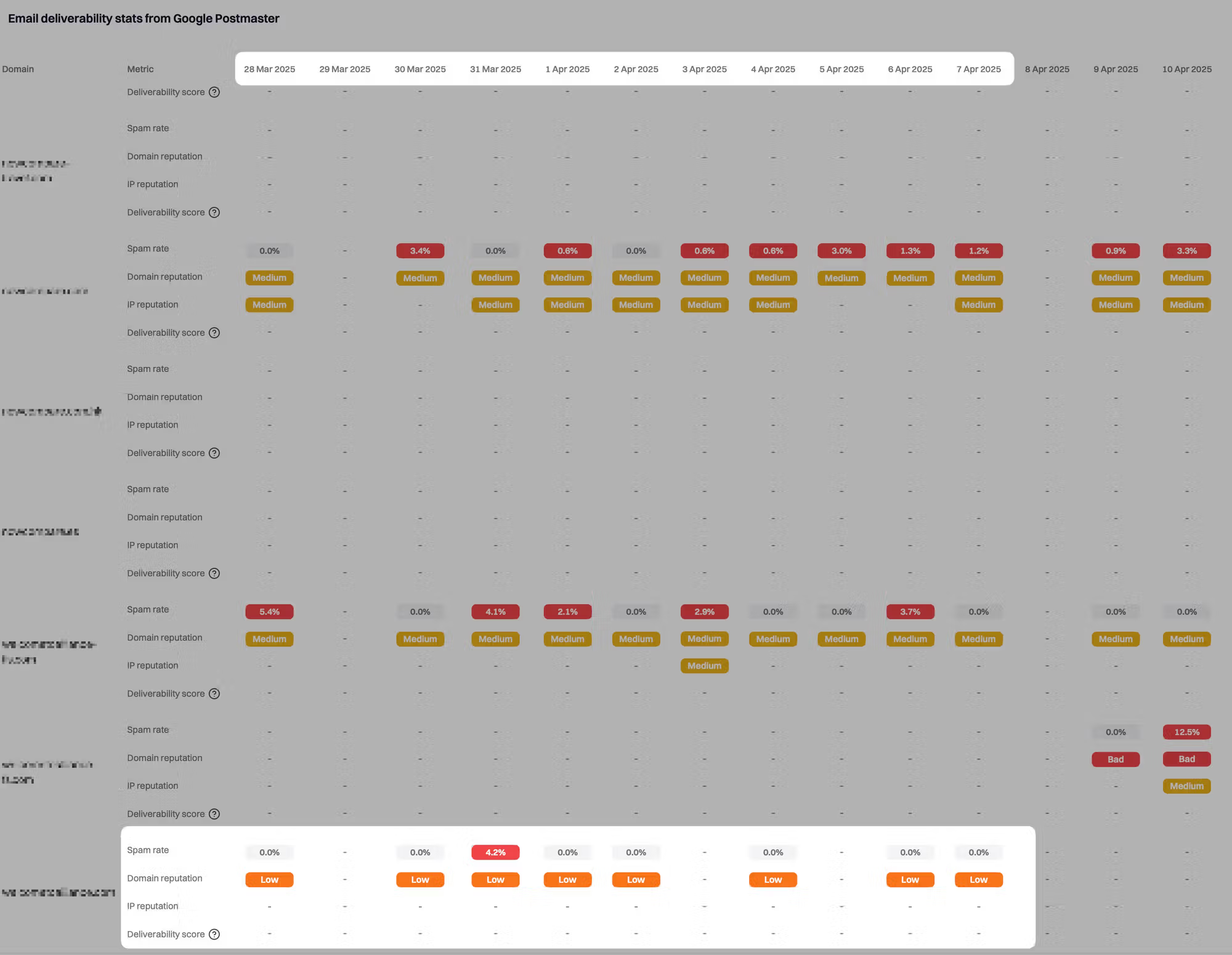
Suped dashboard case study showing bad domain reputation before remediation.
For teams managing more than one domain, this matters even more. MSPs and agencies need a single view of client domains, policy status, sending sources, volume, and authentication health. Suped's multi-tenant dashboard is built for that kind of repeatable recovery work.
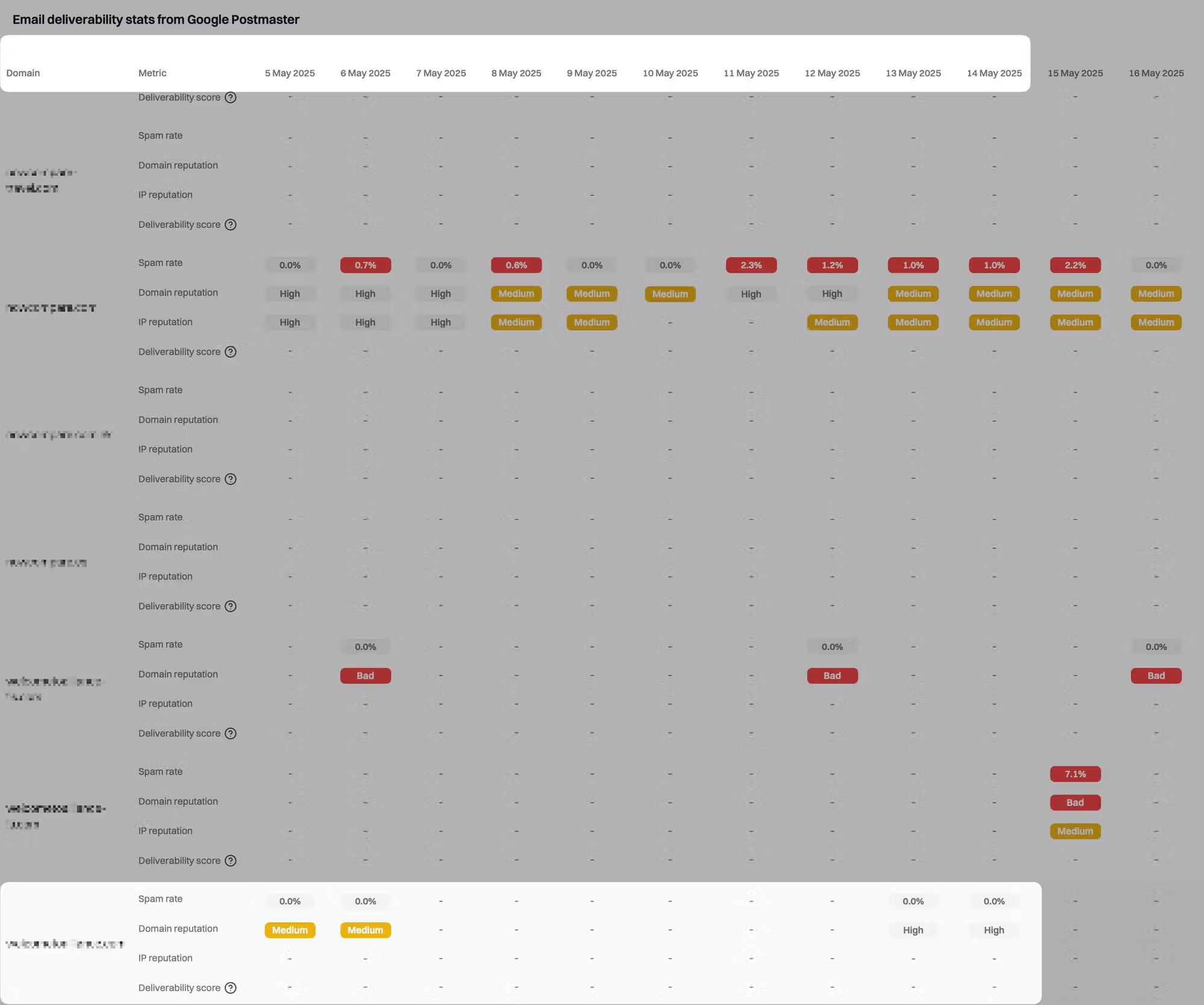
Suped dashboard case study showing improved domain reputation after remediation.
|
|
|
|---|---|---|
DMARC | Failed sources | Fix domain match |
Hosted SPF | Lookup risk | Keep SPF valid |
Alerts | New failures | Act quickly |
Blocklists | Listings | Find causes |
Hosted MTA-STS | TLS policy | Harden delivery |
Suped workflows that support reputation recovery.
A practical setup is to use Suped for DMARC monitoring, hosted DMARC policy staging, hosted SPF, SPF flattening, hosted MTA-STS, blocklist monitoring, and real-time alerts. That gives the team one place to see whether recovery work is producing cleaner mail.
When to keep the domain and when to change strategy
Most domains should be repaired rather than replaced. A new domain has no positive sending history, so it still needs warming. Switching domains also fails when the same list, content, authentication mistakes, or sending pattern follows the sender.
Keep the domain if the business depends on it, the root cause is understood, and the sender can reduce volume long enough to rebuild trust. Consider a separate subdomain for risky or lower-engagement mail, but only after authentication and reporting are under control.
Keep repairing
- Cause: The bad event is known and stopped.
- Brand: The domain has normal business trust.
- Data: Reports show cleaner authentication week by week.
- Volume: The team can slow sending for recovery.
Change strategy
- Cause: The sender cannot prove the bad source is gone.
- Audience: The list keeps producing high complaints.
- Risk: Critical mail shares reputation with risky mail.
- Control: DNS ownership or sender access is unclear.
Changing the domain is a business and technical decision, not a shortcut. If you create a new sending domain, warm it separately, keep it authenticated, and do not move the same unengaged audience across. Otherwise, the new domain inherits the same problem through recipient behavior.
The practical answer
If your domain is Low and the problem has stopped, plan for 4 to 8 weeks to reach High. If it is Bad, plan for 8 to 12 weeks. If the domain was abused, listed repeatedly, or sent to poor lists for a long time, plan beyond 12 weeks and require weekly proof that the underlying signals are improving.
The working pattern is simple: fix authentication, remove bad sources, cut to engaged recipients, keep inactive subscribers out of recovery sends, hold volume steady, then increase only after the data stays clean. Suped fits that work because it gives a clear view of DMARC, SPF, DKIM, blocklist status, alerts, and fix steps in one place, so the team can spend time repairing the domain instead of chasing scattered signals.