Which email clients actually support BIMI?

Published 13 Jul 2025
Updated 22 Sep 2026
11 min read
Summarize with

Updated on 22 Sep 2026: We corrected the BIMI provider matrix, added Comcast, and clarified current DMARC enforcement syntax.
The direct answer is that Gmail, Google Workspace mailboxes, Yahoo Mail, AOL, Apple Mail with supported Apple platforms, iCloud Mail, Fastmail, Comcast, La Poste, Zoho Mail, Onet Poczta, Zone, Zoner, KDDI, NTT docomo, and some Cloudmark-backed environments support BIMI in some form. Microsoft Outlook, Outlook.com, Hotmail, Exchange Online, and Microsoft 365 mailbox receiving do not currently render standard BIMI logos for normal inbound mail.
The important caveat is that BIMI support is not a simple app checklist. Treat BIMI as receiver behavior first, then client behavior second. Gmail can render a BIMI logo in Gmail, Apple Mail can render BIMI in supported Apple environments, and Fastmail can add BIMI information during receiving. A generic email app pointed at an unsupported mailbox does not create BIMI support by itself.
- Best coverage: Plan for Gmail, Yahoo Mail, AOL, Apple Mail, iCloud Mail, and Fastmail first.
- Biggest gap: Do not expect BIMI logos to appear in Outlook or Microsoft 365 mailboxes.
- Real blocker: Most BIMI projects stall before the client decision, usually at DMARC enforcement, SVG format, certificate, or sender reputation.
Current BIMI support by mailbox provider
The cleanest public reference for receiver adoption is the BIMI provider chart, which lists supported, considering, and unsupported providers. Use it as a starting point, then test with real mailboxes because each receiver has its own certificate, policy, reputation, and client-display rules.
|
|
|
|
|---|---|---|---|
Supported | VMC or CMC | Only a VMC adds the checkmark. | |
Supported | Not required | Bulk mail and reputation matter. | |
Supported | VMC or evidence document | Requires supported Apple paths. | |
Supported | Optional | Supports received and sent email. | |
AOL | Supported | Not required | Follows Yahoo receiver behavior. |
Comcast | Supported | Provider-specific | Listed as supported by the BIMI Group. |
GMX and Web.de | Considering | N/A | No public rollout timeline. |
Supported | Provider-specific | Listed by the BIMI Group. | |
Not supported | N/A | No standard BIMI rendering. |
Practical BIMI support matrix for senders planning logo display.
The current BIMI Group chart also places BT, mail.com, Nifty, Qualitia, Seznam.cz, and Yahoo Japan in the considering category. Planning status is not live support, and these providers have not published rollout timelines.
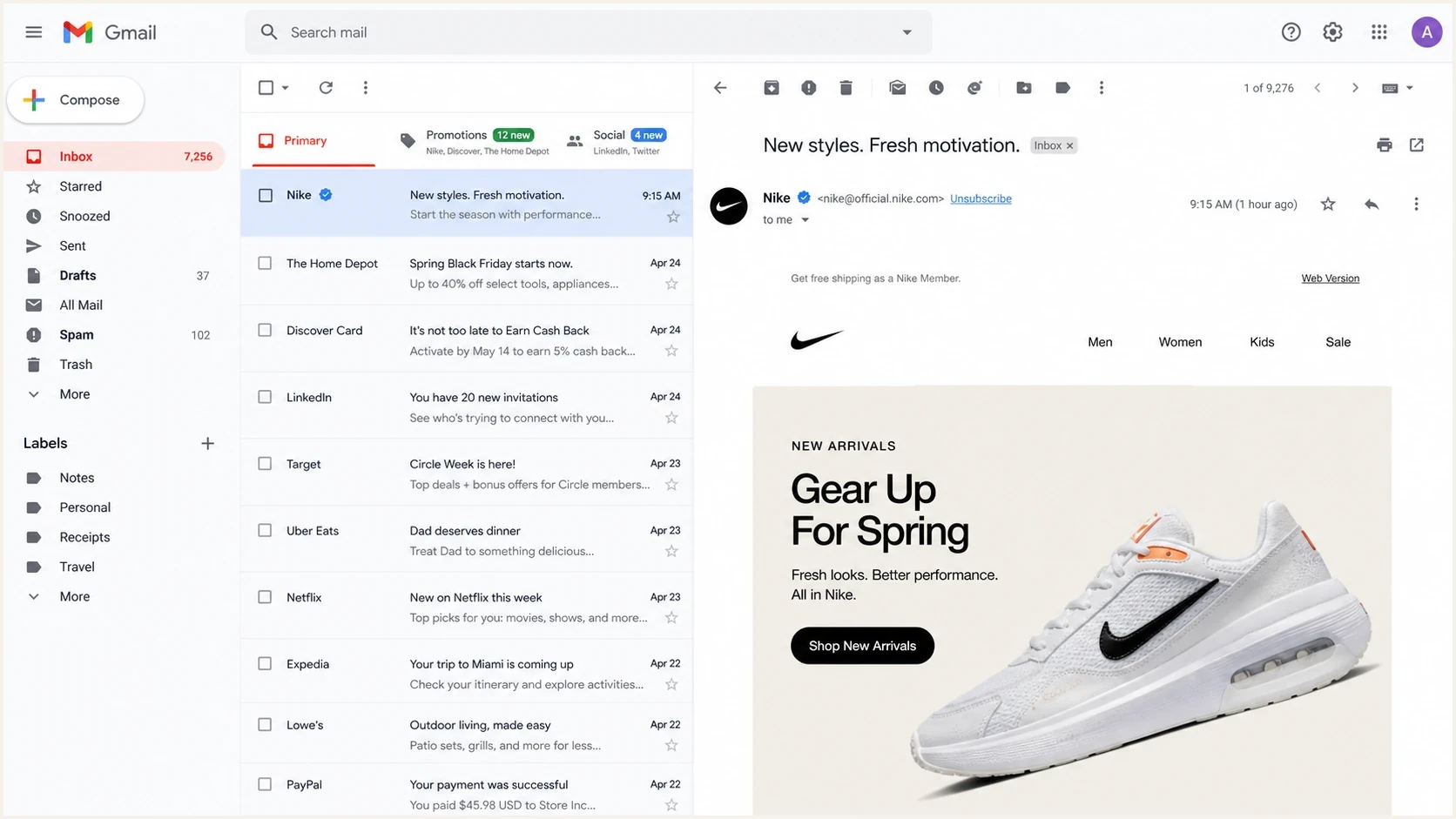
Gmail inbox view showing where a BIMI logo can appear.
Where supported inboxes display BIMI logos
Provider support does not mean the logo appears in every inbox view. Placement differs between the message list and the opened message, and it can also differ between web and mobile clients.
|
|
|
|
|---|---|---|---|
Gmail | Mobile app | Web and mobile | VMC or CMC required |
Yahoo Mail and AOL | Mobile app | Desktop web and mobile | Bulk mail and reputation required |
Apple Mail | No standard BIMI placement | Beside the From name | Sender and service path must qualify |
Fastmail | No standard BIMI placement | Beside the sender address | Receiver policy still applies |
Typical BIMI logo placement after the sender meets each provider's eligibility rules.
Profile photos, contact avatars, and proprietary brand badges can appear in similar locations without BIMI. Confirm standard BIMI display with a fresh test message and a recipient account that uses a supported mailbox provider.
Why support depends on the receiver
The phrase "email client support" creates confusion because BIMI is evaluated during mail receiving. The receiving mailbox provider checks authentication, DNS, the BIMI record, the logo file, evidence documents, and local policy. The app then displays what the provider makes available. That is why Apple Mail support is different from Gmail support, and why Outlook as an app does not solve the lack of Microsoft receiver support.
What the sender controls
- Authentication: At least one of SPF or DKIM must pass with its domain matching the visible From domain. Configure both for resilience.
- Policy: DMARC must use an unsampled quarantine or reject policy.
- Logo: The square logo must use BIMI-compatible SVG Tiny PS and an HTTPS URL.
- Record: DNS must publish the BIMI selector and point to the logo.
- Evidence: Gmail requires a VMC or CMC. Apple checks a VMC or another accepted BIMI Evidence Document.
What the receiver controls
- Rendering: The receiver decides whether to show the logo in its inbox UI.
- Policy checks: The receiver can apply extra local rules beyond the BIMI DNS record.
- Reputation: Some providers suppress logos when sender reputation or engagement is weak.
- Client path: The same account can behave differently across web, mobile, and desktop clients.
- Fallback: Unsupported providers fall back to initials, profile photos, or their own logo systems.
This is also why a BIMI record can be technically valid and still not show everywhere. Valid DNS proves the record exists. It does not force every receiver to render the logo.
Do not treat the app name as the answer
If a recipient reads a Gmail mailbox in Gmail, BIMI is in play. If a recipient reads a Microsoft mailbox in Outlook, BIMI is not in play for standard rendering. If a recipient reads a Fastmail mailbox in Apple Mail, Apple Mail can show BIMI because Fastmail can add the required BIMI information during receiving.
Provider notes that matter in testing
Separate providers by how they behave in a real rollout, not just whether their logo appears on a support chart. The practical questions are whether a certificate is required, whether the receiver applies extra sender eligibility rules, and whether the logo appears across web and mobile clients.
- Gmail: Gmail and Google Workspace mailboxes support BIMI with a VMC or CMC. A VMC can add the Gmail verification checkmark; a CMC can support logo display without that checkmark.
- Yahoo and AOL: Yahoo Mail and AOL support BIMI without requiring a VMC. Yahoo limits standard logo display to bulk mail and also requires sufficient reputation and engagement, so a valid record alone does not guarantee display.
- Apple Mail: Apple supports BIMI on iOS 16 or later, iPadOS 16 or later, macOS Ventura 13 or later, and iCloud.com, but both the sender and the email service path must meet Apple requirements.
- Fastmail: Fastmail supports BIMI for received and sent email. For received mail, it fetches the logo after the message passes its DMARC and local policy checks, then displays the logo beside the sender address.
- Microsoft: Outlook, Outlook.com, Hotmail, Exchange Online, and Microsoft 365 mailboxes do not render standard BIMI logos. See the deeper Outlook BIMI support breakdown if Microsoft audiences dominate your list.
- Other providers: Comcast, La Poste, Zoho Mail, Onet Poczta, Zone, Zoner, KDDI, NTT docomo, and Cloudmark are listed as supporting BIMI. GMX and Web.de remain in the considering category.
For Microsoft-heavy lists, position BIMI as a DMARC enforcement and brand-consistency project that pays off in Gmail, Yahoo, Apple, and Fastmail inboxes. Microsoft also has a Microsoft BIMI note for senders using Dynamics 365 Customer Insights, but that does not change Outlook receiver rendering.
The useful test is recipient-weighted
Export your subscriber or customer domains, group them by mailbox provider, then decide whether BIMI coverage justifies the certificate and setup work. If 70 percent of your engaged audience is Gmail, Yahoo, Apple, and Fastmail, BIMI has a clearer payoff than it does for a Microsoft-only B2B list.
What has to be in place before a logo can display
Before worrying about which client supports BIMI, check whether the sending domain is eligible. At least one of SPF or DKIM must pass with its domain matching the visible From domain. The domain also needs DMARC at enforcement, a compliant SVG logo, a BIMI TXT record, and a certificate file for providers that require one. BIMI is not standalone email authentication or a delivery guarantee; it is a display standard built on DMARC.
The fastest first check is a broad authentication scan. Suped's domain health checker is useful here because BIMI depends on the same SPF, DKIM, and DMARC foundation that protects the domain before the logo work starts.
?
What's your domain score?
Deep-scan SPF, DKIM & DMARC records for email deliverability and security issues.
A minimum-ready setup uses an unsampled DMARC enforcement policy. The BIMI record points to the logo plus the evidence document when one is required.
Use current DMARC syntax
RFC 9989 replaced RFC 7489 and made the pct tag historic. For a new BIMI-ready record, publish p=quarantine or p=reject, omit pct, and do not enable the new t=y testing mode. Some provider documentation still describes full enforcement as pct=100; the operational requirement is that the policy applies to all failing mail.
DMARC TXT recorddns
Host: _dmarc.example.com
Type: TXT
Value: v=DMARC1; p=quarantine;
       rua=mailto:dmarc@example.com;
BIMI TXT recorddns
Host: default._bimi.example.com
Type: TXT
Value: v=BIMI1; l=https://brand.example/logo.svg;
       a=https://brand.example/vmc.pem;
If you need to build the record without hand-formatting tags, use Suped's DMARC record generator for the policy record, then publish the BIMI record only after authentication is passing consistently.
A valid record is not the same as display
A DNS checker can confirm that the record exists and parses. The receiving provider still decides whether the message qualifies for logo display. That decision includes authentication results, certificate checks, reputation, client path, and local anti-abuse rules.
How Suped fits into BIMI readiness
BIMI is the visible result. The harder operational work is getting every legitimate sender through DMARC before moving to quarantine or reject. Suped's DMARC monitoring shows which services send mail for the domain, which ones pass authentication, and which failures need fixing before BIMI testing.
Suped's DMARC reporting and email authentication platform turns aggregate reports into a sender inventory and clear fix steps. Teams can use automated issue detection and policy alerts to validate legitimate sources before enforcement, then watch for regressions that can interrupt BIMI display.
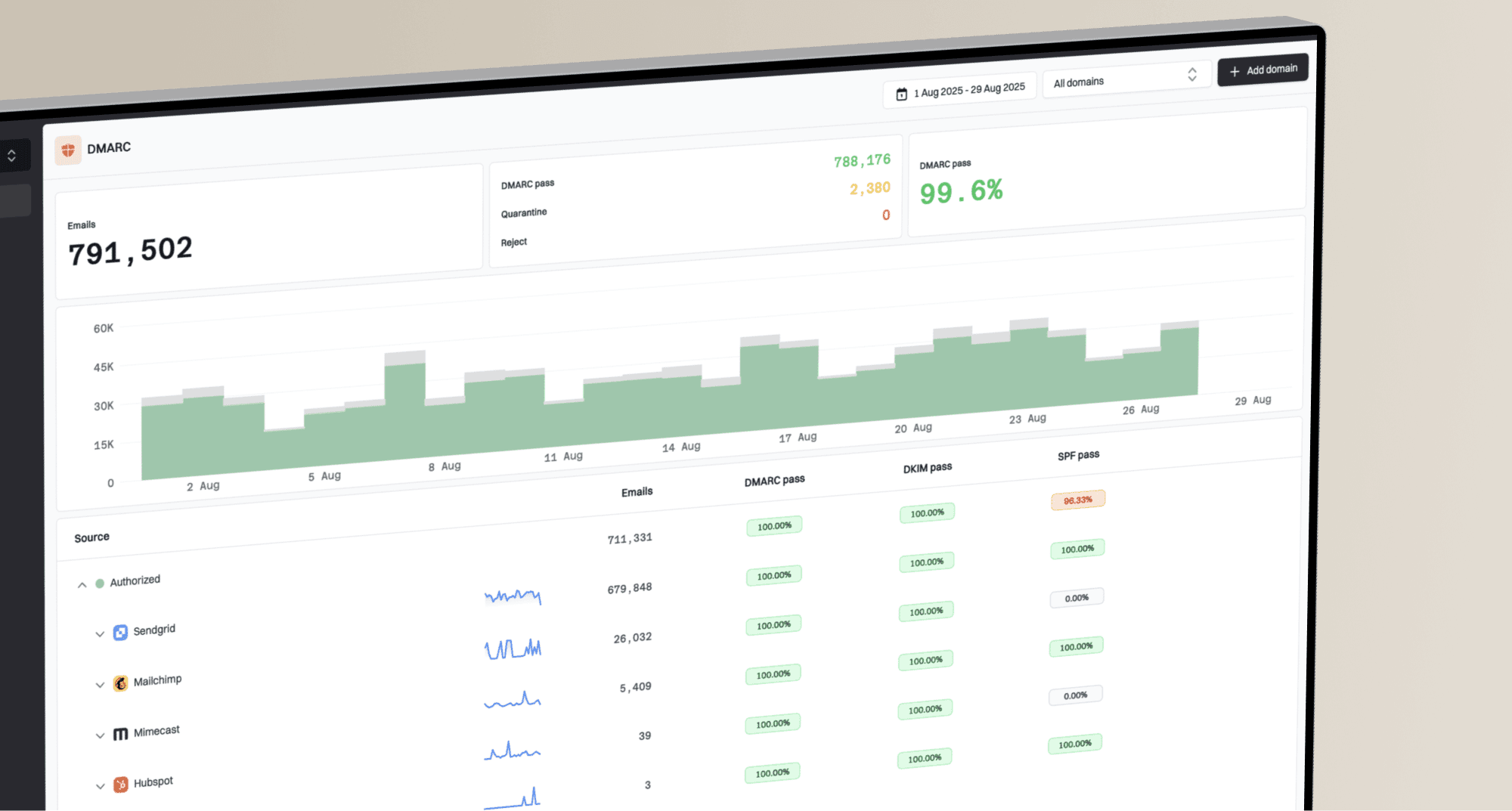
Suped DMARC dashboard showing email volume, authentication health, and source breakdown
When DNS ownership is split across IT, marketing, and agencies, Suped's Hosted DMARC helps stage policy changes without turning every adjustment into a DNS ticket. That matters because BIMI needs enforcement, and enforcement is where weak sender inventories cause surprises.
- Source inventory: Identify every sending service before raising policy.
- Policy staging: Move from monitoring to quarantine or reject with evidence.
- Issue steps: Use clear fix guidance when SPF, DKIM, or DMARC fails.
- Alerts: Catch authentication regressions before BIMI display drops.
- Scale: Manage multiple domains in one place for MSPs, agencies, and larger teams.
A practical testing sequence
Test BIMI in a fixed order because it prevents chasing client issues before the domain is ready. If your priority is Gmail and Yahoo Mail, the Gmail and Yahoo setup path deserves separate planning because the Gmail certificate requirement changes the budget and timeline.
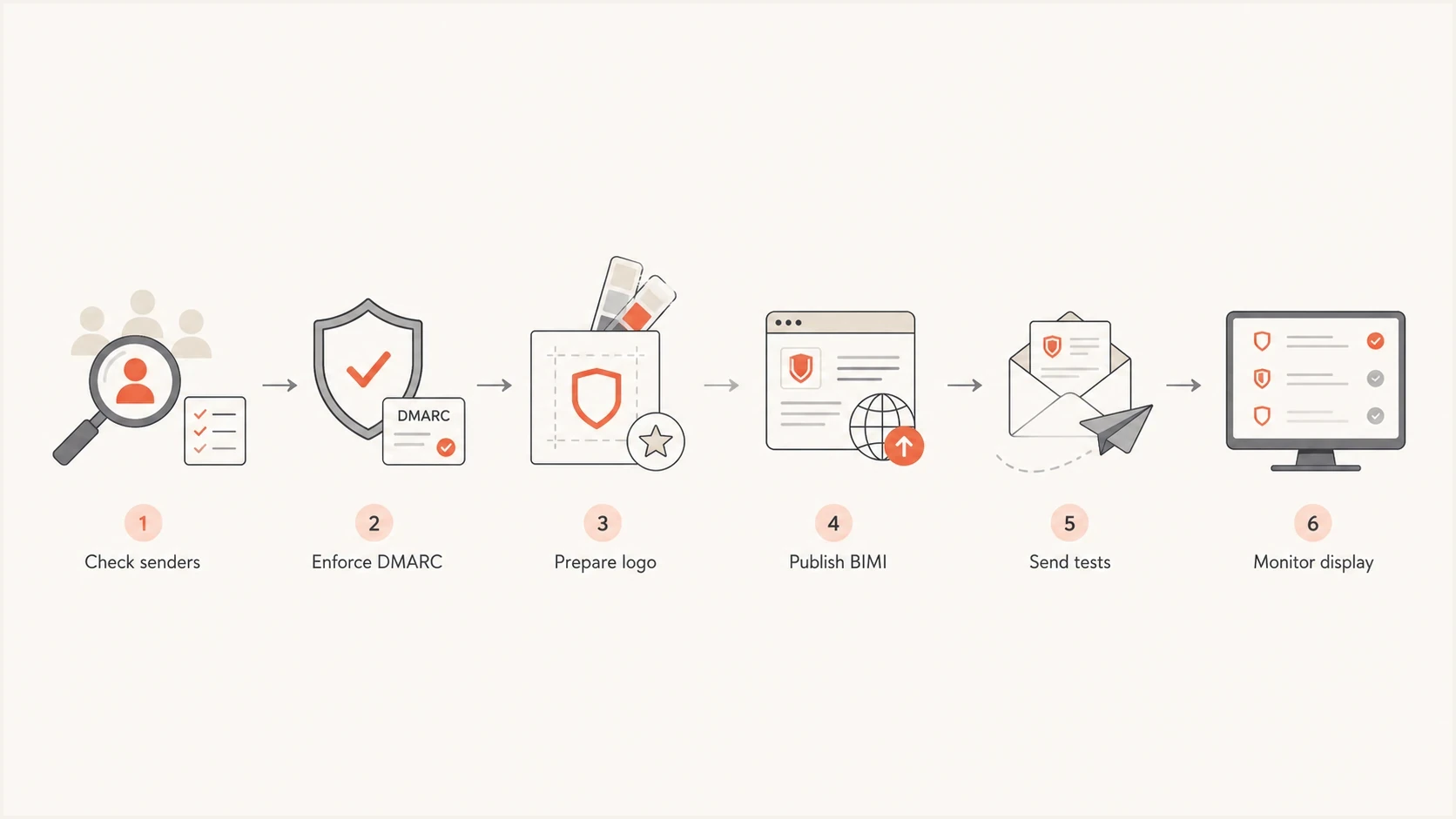
BIMI testing sequence from DMARC checks to mailbox display testing.
- Audit: List every platform sending mail with your From domain.
- Enforce: Move DMARC to quarantine or reject after legitimate mail passes.
- Prepare: Create a BIMI-compatible SVG and obtain the right certificate.
- Publish: Add the BIMI TXT record at the default selector.
- Send: Test with real Gmail, Yahoo, Apple, Fastmail, and Microsoft inboxes.
- Compare: Separate DNS success from actual logo display in each client.
- Monitor: Keep watching DMARC failures after the logo appears.
The most useful test matrix includes at least Gmail web, Gmail mobile, Yahoo Mail web, Yahoo Mail mobile, Apple Mail with iCloud, Apple Mail with Fastmail if relevant, Fastmail web, and Outlook. Outlook should be in the matrix precisely because it confirms the expected non-display path.
Which providers should you prioritize?
The email clients and providers that actually matter for most BIMI projects are Gmail, Yahoo Mail, AOL, Apple Mail, iCloud Mail, and Fastmail, with additional coverage through Comcast, La Poste, Zoho Mail, Onet Poczta, Zone, Zoner, KDDI, NTT docomo, and Cloudmark-backed environments. GMX and Web.de are considering BIMI but are not listed as supported. Microsoft Outlook and Exchange Online remain the major unsupported gap.
BIMI is worth doing when your audience includes supported receivers and your domain is ready for DMARC enforcement. Start with authentication, not artwork. Once the domain is stable, the logo work becomes much more predictable, and the logo placement guide can help set expectations for what recipients will actually see.