Where does the BIMI logo appear in email clients?

Published 9 Aug 2025
Updated 26 Sep 2026
12 min read
Summarize with
Updated on 26 Sep 2026: We added current guidance on avatar preference, provider-specific placement, and BIMI rendering checks.
A BIMI logo appears in supported recipient mailbox interfaces, not in the email body or as a logo that travels unchanged with the message. Depending on the provider and view, it can appear in Gmail apps, Yahoo Mail apps, Yahoo and AOL webmail read views, Apple Mail on iOS 16, iPadOS 16, macOS Ventura 13 or later, and iCloud.com when the sender and receiving provider meet the applicable BIMI requirements.
The exact placement changes by client. Mobile apps often show the logo in the message list, beside the sender or subject. Webmail more often shows it inside the opened message, near the sender identity. Apple Mail is best checked in the opened message or expanded header area, because list-view display is not the same across accounts and operating system versions.
- Gmail: Look in the Gmail mobile app list view and inside opened messages. Gmail also shows a verified checkmark for eligible VMC-backed senders.
- Yahoo: Look in Yahoo Mail mobile list view, mobile read view, and desktop webmail read view. AOL follows the same Yahoo Inc. mailbox family pattern.
- Apple Mail: Look in opened messages on Apple Mail and iCloud.com. Both the sender and the recipient's email service provider need to meet Apple's BIMI requirements.
- Unsupported clients: Do not expect standards-based BIMI display in Outlook, Microsoft 365 mail interfaces, Samsung Mail, or every native mail app. A logo shown there may come from a profile or proprietary logo system instead.
The short answer by email client
The most useful way to answer the placement question is by separating the mailbox provider, the app, and the view. BIMI is not a sender-side badge that travels unchanged through every email app. The receiving platform authenticates the message, checks DNS, applies its own policy, and then decides where the logo is shown.
|
|
|
|
|---|---|---|---|
List and read | Read view | VMC or CMC | |
List and read | Read view | Bulk mail and reputation | |
Read view | iCloud.com read view | Provider and OS support | |
Fastmail | Read view | Read view | Provider rules |
La Poste | List and read | List and read | Regional use |
Outlook | No BIMI | No BIMI | Different logo systems |
Common BIMI display locations by client family.
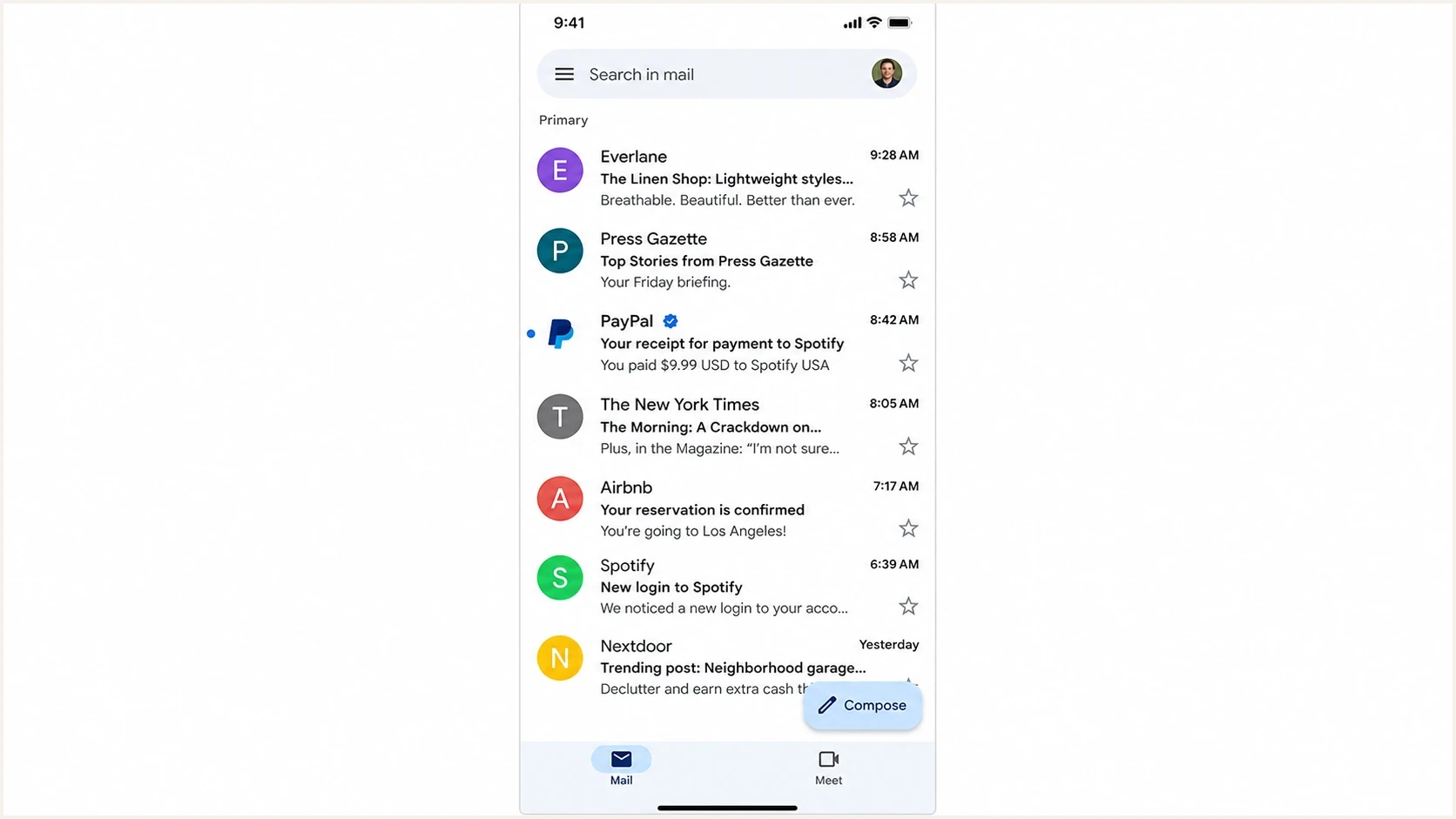
Gmail mobile inbox showing a BIMI logo in the sender avatar beside a message.
A logo visible in one account does not prove it is visible everywhere. A Gmail user reading mail in the Gmail app and the same user reading that mailbox through Apple Mail are separate tests. Log them as separate results because the client and the mailbox provider both affect display.
Why the same BIMI setup appears in different places
BIMI gives the receiver a standardized way to find the sender's preferred logo, but it does not force the receiver to render the logo in a specific pixel location. The receiver still controls whether the logo appears at all, whether it is shown in list view, whether it is shown in read view, and whether any additional verified marker appears.
Mobile app behavior
- List view: Many mobile apps have a sender icon slot beside each message, so BIMI often appears there.
- Read view: Opened messages usually have a sender identity area where the same logo can appear.
- Device state: App version, OS version, and account type change what the recipient sees.
Webmail behavior
- Message list: Some webmail inboxes use compact rows and do not show BIMI beside every subject.
- Read view: The opened message is the most reliable webmail location to check first.
- Policy layer: The mailbox provider still applies reputation, volume, and certificate rules.
The BIMI Group overview explains the receiver-side flow: the mailbox provider authenticates the message, checks DNS for a BIMI record, and then uses the brand logo with the message display when its criteria are met.
That receiver choice is why BIMI troubleshooting should not stop at DNS. Check DMARC, the BIMI record, the logo file, the certificate, the message headers, the app view, and the web view before declaring a test failed.
How avatar preference affects which logo appears
A recipient interface can have both a personal profile image and an eligible BIMI brand logo available for the same sender. Current BIMI guidance includes the optional avatar preference tag, avp, so a domain owner can express which image should take priority when a receiver supports the preference.
BIMI record with brand avatar preferencedns
default._bimi.example.com. 3600 IN TXT (
  "v=BIMI1; "
  "l=https://assets.example.com/bimi.svg; "
  "a=https://assets.example.com/vmc.pem; "
  "avp=brand"
)
- Brand preference: Use avp=brand to prefer the BIMI logo when both images are available. Brand is also the default when the tag is absent.
- Personal preference: Use avp=personal when a supported receiver should prefer a personal avatar and use the BIMI logo as the fallback.
- Receiver control: The tag expresses a preference. It does not force every provider or app to honor it, place the logo in a particular view, or remove cached profile imagery.
The technical path behind the logo
Before any client can show a BIMI logo, the message needs to pass the sender identity checks that BIMI depends on. The sender publishes a BIMI TXT record in DNS. The receiving provider checks the message, confirms DMARC enforcement, retrieves the logo and certificate where required, then makes a display decision.
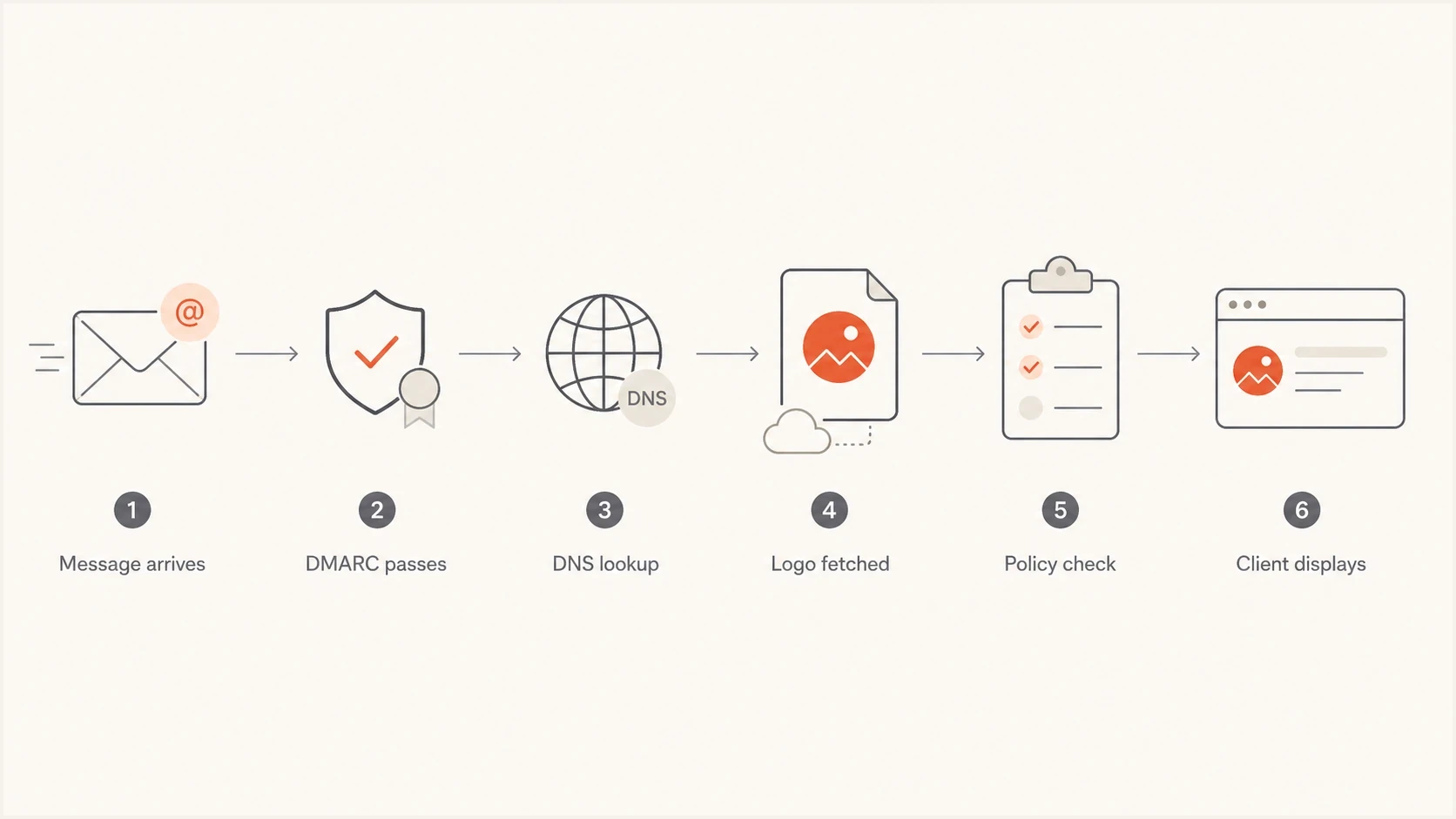
Flowchart showing how a BIMI logo reaches a supported email client.
DMARC and BIMI DNS exampledns
_dmarc.example.com. 3600 IN TXT (
  "v=DMARC1; p=quarantine; pct=100; "
  "rua=mailto:dmarc-reports@example.com"
)

default._bimi.example.com. 3600 IN TXT (
  "v=BIMI1; "
  "l=https://assets.example.com/bimi.svg; "
  "a=https://assets.example.com/vmc.pem"
)
- DMARC policy: Use p=quarantine or p=reject at 100 percent on the organizational domain and any sending subdomains. A monitoring-only policy or sp=none on an applicable subdomain does not meet BIMI enforcement.
- Authentication: The message needs SPF or DKIM to pass in a way that matches the visible From domain.
- Logo file: Use a square SVG Tiny PS file with no scripts or external resources. Host it over HTTPS with the image/svg+xml content type, and keep the mark clear at small avatar sizes.
- Certificate: Gmail requires a VMC or CMC. Apple requires an accepted BIMI Evidence Document. Yahoo can show a self-asserted BIMI logo when its other conditions pass.
- Receiver policy: The mailbox provider applies reputation, sending volume, cache state, and abuse protections.
?
What's your domain score?
Deep-scan SPF, DKIM & DMARC records for email deliverability and security issues.
Start with domain health rather than logo display because the display layer is the last step. A clean BIMI record cannot overcome a monitoring-only DMARC policy or a sender source that fails the visible-domain match.
What to expect in Gmail, Yahoo, and Apple Mail
Gmail requires DMARC enforcement and certification through a VMC or CMC. Google's BIMI setup documentation says Gmail displays supported BIMI logos with messages and shows a checkmark next to VMC-verified senders. Test Gmail in the mobile app first because the list view makes logo display obvious.
Yahoo Mail and AOL are often more visible for mobile-list testing. Yahoo's sender guidance says BIMI logos show in message list and read view experiences in mobile apps, and in read message views on desktop webmail. It does not require a VMC or CMC, but it does require bulk mail plus sufficient sending-address reputation and engagement. A technically correct record on a tiny or weak sending stream can still fail to render.
Apple Mail supports BIMI on iOS 16, iPadOS 16, macOS Ventura 13 or later, and iCloud.com. Treat Apple as its own test target because Apple Mail, iCloud mail routing, and third-party accounts inside the Mail app do not always give the same result. The sender and the recipient's email service provider both need to meet Apple's BIMI requirements.
Do not confuse BIMI with profile photos, contact images, or proprietary brand icons. A logo in a circular sender avatar slot proves only that a logo is displayed. To prove BIMI, check the BIMI DNS record, the certificate requirement for that receiver, and the authentication result in the message headers.
For a broader client-by-client view, see the separate compatibility note for BIMI client support. The placement question and the support question are related, but they are not identical.
How VMC and CMC affect what recipients see
The certificate type affects eligibility and verification signals, not the position of the logo. Gmail accepts a Verified Mark Certificate (VMC) or Common Mark Certificate (CMC) for BIMI logo display. A CMC can cover a logo that is not a registered trademark. Gmail's verified checkmark appears next to VMC-verified senders, so a CMC-backed logo can display without that VMC checkmark.
|
|
|
|
|---|---|---|---|
VMC | Eligible | Eligible | Eligible |
CMC | Eligible | No VMC checkmark | Eligible |
No certificate | Not eligible | Not eligible | Can be eligible |
How certificate evidence affects common BIMI display outcomes.
A VMC, CMC, or self-asserted record never guarantees display. DMARC, sender reputation, recipient-provider policy, and client support still decide whether the logo appears. Yahoo can display a self-asserted BIMI logo, while Apple requires the sender and the email service provider to satisfy its BIMI and Mail app requirements.
How to test logo placement
A useful BIMI test plan has two jobs: prove the DNS and authentication setup works, then prove the logo renders in real recipient clients. Do not treat a single Gmail inbox screenshot as a complete pass because one client view is one data point.
- Record setup: Confirm DMARC enforcement, BIMI DNS, SVG availability, and certificate status before sending tests.
- Send seeds: Send normal production-style messages to Gmail, Yahoo, AOL, iCloud, Fastmail, and any regional clients that matter to your audience.
- Check views: Inspect mobile list view, mobile read view, desktop webmail list view, and desktop webmail read view separately.
- Save evidence: Capture the client, account type, app version, OS version, timestamp, and message headers.
- Wait on cache: Allow at least 48 hours after changing the SVG, certificate, or DNS record, then extend the test window if a provider still has cached state.
|
|
|
|---|---|---|
Gmail app | List | Logo avatar |
Gmail web | Read | Logo; VMC checkmark |
Yahoo app | List | Brand logo |
Apple Mail | Read | Certified brand logo |
A compact BIMI placement test matrix.
This matrix also stops false negatives. If Yahoo mobile shows the logo but Gmail web does not, that points to a Gmail-specific requirement such as the certificate path, not a universal BIMI failure. If Gmail app shows a logo that does not match your BIMI SVG, that points to profile or cached sender imagery.
Where Suped fits in the workflow
Suped's product fits before and during BIMI testing because BIMI depends on DMARC staying correct over time. Suped brings DMARC monitoring, SPF, DKIM, alerting, and issue detection into one place, so teams can see which sources are ready for a BIMI rollout and which sources still break the visible-domain match.
DMARC record detail view showing SPF, DKIM, DMARC, rDNS diagnostics, and DNS records
For teams preparing BIMI, Suped supports the work before logo display: finding failing sources, staging policy changes, checking DNS, and keeping authentication healthy after launch. The free plan can cover early validation, while hosted options help when DNS access is slow or split across teams.
- Hosted policy: Suped's hosted DMARC helps teams reach enforcement without repeated manual DNS edits.
- Record checks: The DMARC checker catches policy mistakes before BIMI client testing starts.
- Health checks: The domain health checker gives a broader read on SPF, DKIM, and DMARC readiness.
BIMI is the visible outcome. Suped is where prerequisite problems can surface before a marketing team spends time comparing app screenshots.
Common reasons the logo still does not appear
A missing BIMI logo usually has a specific cause. Work through these in order because changing the logo or certificate first often masks the real issue.
- Weak policy: A domain still using p=none does not satisfy BIMI enforcement requirements.
- Bad source: One sending platform fails SPF or DKIM against the visible From domain.
- Invalid SVG: The logo is not in the BIMI-safe SVG profile or is blocked by HTTPS hosting issues.
- Certificate gap: Gmail needs a valid VMC or CMC, while Apple needs acceptable BIMI evidence and a participating recipient provider.
- Receiver cache: Some receivers hold old logo or DNS state for days, especially after recent changes.
For Gmail-specific certificate questions, use the separate checklist for VMC for Gmail. For a full deployment sequence, the BIMI setup steps page covers the DNS, logo, and certificate order.
Views from the trenches
Best practices
Test mobile list view and open message view because providers place BIMI differently.
Use DMARC enforcement before BIMI testing, not after the logo fails to render in clients.
Keep a simple client matrix with account, app, device, view, and test date for retests.
Common pitfalls
Treating a Google profile image as BIMI hides real DNS or certificate problems during tests.
Checking only Apple Mail list view misses logos that appear inside opened message headers.
Changing the SVG repeatedly during receiver caching makes troubleshooting harder than needed.
Expert tips
Use one distinctive test SVG version so you can tell BIMI apart from cached avatars.
Wait several days for Yahoo-style caching before assuming a correct record failed.
Record screenshots from each client because support differs across app and web views.
Marketer from Email Geeks says Yahoo Mail on iOS displayed the BIMI logo in the mobile app, confirming that app testing matters.
2022-02-23 - Email Geeks
Marketer from Email Geeks says Gmail displayed the BIMI logo inside the iOS app, so webmail is not the only valid test target.
2022-02-23 - Email Geeks
The practical answer
The BIMI logo appears wherever the receiving email client chooses to render it after authentication, DNS, certificate, and provider policy checks pass. For Gmail and Yahoo, that includes mobile apps and webmail, with mobile list views often being the easiest place to see it. For Apple Mail, check supported Apple operating systems and iCloud.com, especially the opened message identity area.
Do not judge BIMI by one inbox. Use a small matrix that covers Gmail app, Gmail web, Yahoo app, Yahoo web, Apple Mail, iCloud.com, and any regional mailbox provider your audience uses. If DNS is correct but one cell is blank, troubleshoot that receiver's requirements instead of rebuilding the whole BIMI setup.