Do I need a VMC for BIMI to work with Google and Gmail?


Updated on 27 Sep 2026: We clarified Gmail's certificate options and added current guidance on CAA, HTTPS hosting, propagation timing, and avatar preference.
No, you do not specifically need a VMC for BIMI to work with Google and Gmail. You need either a Verified Mark Certificate (VMC) or a Common Mark Certificate (CMC). A VMC is required for Gmail's verified checkmark, often called the blue checkmark. A CMC can display the brand avatar in Gmail without that checkmark. Without a VMC or CMC, a plain BIMI record is not enough for Gmail BIMI display.
The confusion comes from the gap between the BIMI standard and receiver policy. BIMI lets mailbox providers decide whether to require a mark certificate. Google requires third-party certification for Gmail, and Google's BIMI guide names both VMC and CMC as acceptable certificate types.
- Gmail answer: Use a VMC for a Gmail logo with the verified checkmark, or a CMC for a Gmail logo without the checkmark.
- No-certificate answer: A BIMI TXT record with only an SVG logo does not satisfy Gmail's BIMI requirements.
- Profile-logo answer: A Google profile image can show an avatar in some Gmail surfaces, but it is not BIMI.
- Security answer: The real control is DMARC enforcement, not the visual logo by itself.
Does Gmail require a VMC?
The current Gmail rule is certificate required, but not VMC-only. On September 24, 2024, Google announced CMC support for BIMI. That changed the practical answer for brands that do not have a registered trademark. A CMC can validate an eligible logo that does not meet the VMC trademark requirement, but Gmail does not show the verified checkmark for CMC-based BIMI.
Separate the decision into two questions. If the question is, can Gmail show a BIMI logo without a VMC, the answer is yes, with a CMC. If the question is, can Gmail show a BIMI logo without any mark certificate, the answer is no.
The short rule
For Google and Gmail BIMI, publish a valid BIMI record, enforce DMARC, prepare a compliant SVG logo, and point the BIMI a= tag at the complete VMC or CMC PEM file. Use a VMC when the Gmail checkmark matters.
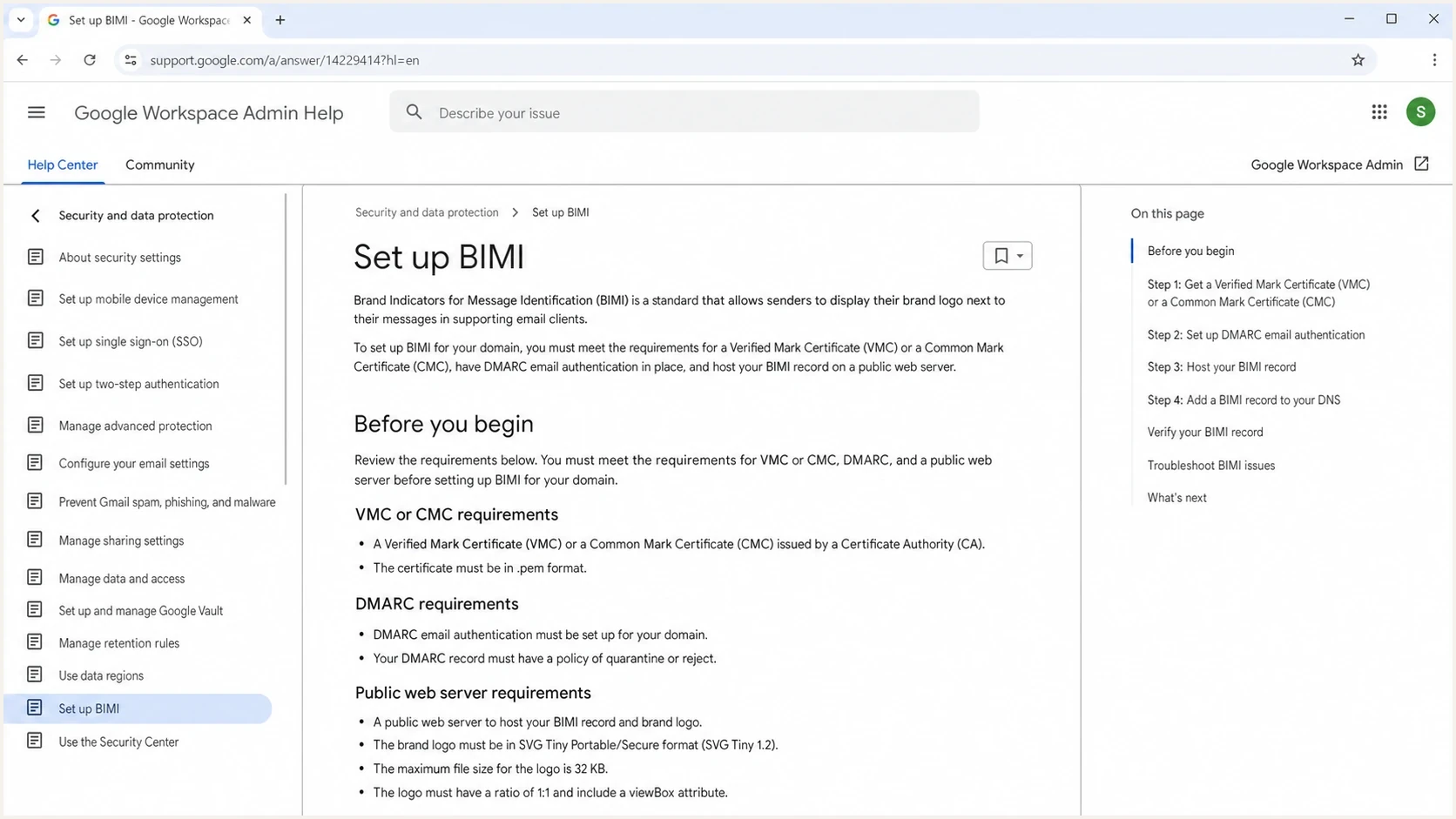
Google Workspace Help page showing BIMI setup requirements including VMC or CMC.
|
|
|
|---|---|---|
VMC | Logo plus checkmark | Needs eligible registered mark |
CMC | Logo, no checkmark | Prior-use rules can apply |
No certificate | No Gmail BIMI | Other receivers differ |
Google profile | Avatar in some views | Not BIMI |
Gmail BIMI outcomes by certificate path.
Why the standard and Gmail differ
BIMI is a publishing standard. You publish a DNS TXT record at a selector such as default._bimi, identify the logo or certificate evidence, and let the receiver decide whether to fetch, validate, and display the logo.
That means a domain can have technically valid BIMI syntax and still get no Gmail logo. Gmail's policy layer checks more than syntax. It checks DMARC enforcement, certificate presence, certificate type, certificate validity, logo format, HTTPS hosting, and receiver-side display signals.
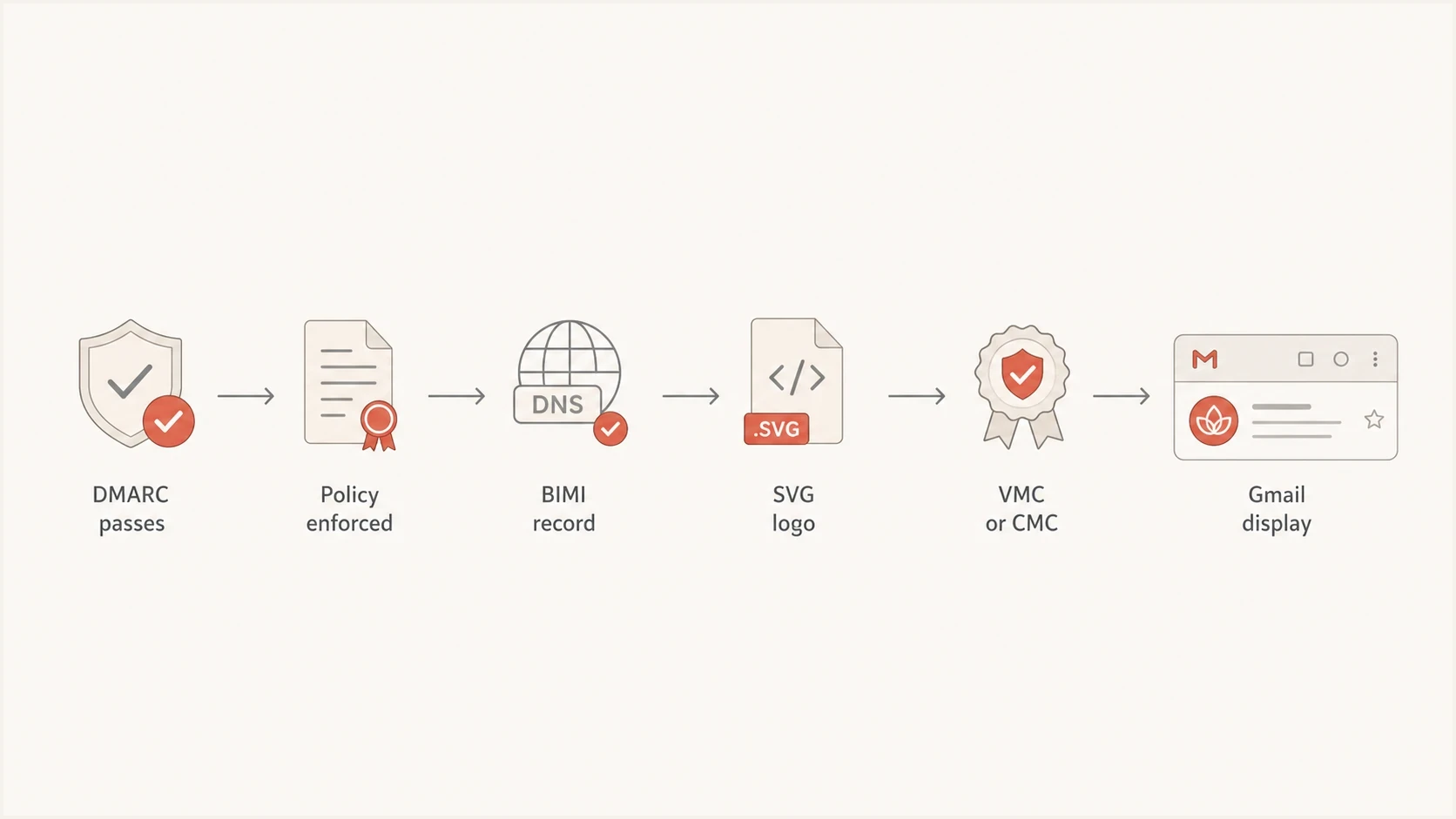
Flowchart showing Gmail BIMI prerequisites ending in logo display.
VMC
- Best fit: A trademarked logo or approved government mark.
- Gmail display: Brand avatar plus the verified checkmark in supported Gmail clients.
- Main friction: Trademark proof and validation work take time.
CMC
- Best fit: An eligible prior-use or modified logo without the required registered mark.
- Gmail display: Brand avatar without the verified checkmark.
- Main friction: You still need CA validation and clean authentication.
What you need before the certificate
The certificate is usually the last step, not the first one. Start with DMARC because BIMI depends on domain authentication already being under control. Gmail expects DMARC at enforcement, which means p=quarantine or p=reject, with the policy applied to 100 percent of mail.
This is where DMARC monitoring matters. Suped's product turns aggregate DMARC reports into verified sources, unverified sources, authentication failures, and specific fix steps. Teams can use Suped to identify every legitimate sender, resolve alignment failures, and measure the effect of moving DMARC toward enforcement.
DMARC policy readiness for BIMI
Gmail BIMI requires enforcement, so policy staging has to end at full coverage.
Monitoring only
p=none
Collects reports but does not enforce.
Partial enforcement
pct<100
Useful during rollout, not enough for Gmail BIMI.
Quarantine
p=quarantine
Eligible when all mail is covered.
Reject
p=reject
Strongest enforcement policy.
Before buying a VMC or CMC, verify that every real sender passes DMARC through either SPF or DKIM aligned with the visible From domain. If a marketing platform, billing system, CRM, support tool, or internal mail server still fails DMARC, BIMI work is premature. Suped's Hosted DMARC helps stage policy changes without hand-editing DNS each time the risk profile changes.
Review the domain's CAA records before ordering the certificate. A mark certificate issuer must check CAA during issuance, and a restrictive issuevmc authorization that excludes the selected issuer can stop a VMC or CMC from being issued. The absence of a CAA record does not block issuance. Ask the issuer for the exact CAA value it recognizes before changing DNS.
?
What's your domain score?
Deep-scan SPF, DKIM & DMARC records for email deliverability and security issues.
A quick domain health check gives you a fast pass over DMARC, SPF, and DKIM before you spend time on logo formatting or certificate validation. If the DMARC record itself looks wrong, validate the exact TXT value with the DMARC checker before changing policy.
DNS records that Gmail expects
For Gmail's certificate path, the BIMI record must point its a= tag to a VMC or CMC PEM file served over HTTPS. The approved SVG logo is embedded in that certificate. Google's current example leaves the l= value empty. The examples below use example hostnames, so do not paste them into production unchanged.
DMARC record valuedns
Host: _dmarc.example.com
Value: v=DMARC1; p=quarantine; pct=100; rua=mailto:dmarc@example.com
That DMARC example shows enforcement at full coverage in a single TXT record. It uses DMARC's default relaxed alignment, which is sufficient for Gmail BIMI when SPF or DKIM aligns with the visible From domain. If you are creating a new record, use a DMARC record generator and stage enforcement after you have enough reporting data.
BIMI record with certificate PEMdns
Host: default._bimi.example.com
Value: v=BIMI1; l=; a=https://example.com/bimi/certificate.pem
Host the PEM at a stable public HTTPS URL under the same domain where the BIMI record is published. Google recommends TLS 1.2 or later, a valid server certificate that chains to a trusted root, and a connection that does not downgrade to HTTP.
Do not treat syntax as display proof
A valid DNS record only proves that the record parses. Gmail display still depends on certificate status, logo eligibility, DMARC results, file accessibility, and receiver validation.
Test in layers to avoid wasted work: DMARC first, BIMI DNS second, HTTPS file access third, certificate validation fourth, then real Gmail inbox testing. Google says a newly published record can take up to 48 hours to appear in recipients' mailboxes. After that window, confirm the authentication result before changing the SVG.
Prepare the SVG and PEM files
Gmail applies file requirements beyond having a recognizable logo. Prepare the artwork as SVG Tiny Portable/Secure (SVG Tiny PS), then submit that exact logo during the VMC or CMC validation process. A general-purpose SVG exported for a website can fail BIMI validation even when it opens correctly in a browser.
- SVG profile: Use baseProfile="tiny-ps" and version="1.2".
- Gmail dimensions: Set width and height in absolute pixels, with both dimensions at least 96 pixels.
- Restricted content: Remove scripts, animation, external references, and x or y attributes on the root SVG element.
- Compatibility: Center the logo in a square, prefer a solid background, keep the file at 32 KB or less, and add a desc element.
The certificate authority provides an entity certificate PEM file containing the validated SVG. Append any intermediate and root CA certificates in the issued order, then host the complete PEM chain at the HTTPS URL used by the BIMI record. Track the certificate expiry date so renewal work starts before Gmail loses access to a valid certificate.
Keep the certificate and logo consistent
Do not swap the logo inside the deployment without checking the certificate. The displayed mark must match the SVG validated and embedded in the active VMC or CMC.
Google profile images are not BIMI
A Google profile image can be useful, but it does not answer the BIMI question. It is an account-level or identity-level image, not a DNS-backed brand indicator tied to DMARC enforcement. It can help a sender look less generic in some Gmail interfaces, but it does not validate the domain, logo rights, or email authentication chain.
The profile image workaround also gets messy for sending subdomains. If your visible From domain is a subdomain such as email.example.com, the profile approach can require a matching Google identity for that sending address. It also does not guarantee consistent display across Gmail surfaces, mobile apps, or other mailbox providers.
The optional BIMI avp= tag lets a domain state whether it prefers the brand logo or a personal avatar when both exist. The default is avp=brand. This is a preference, not a command, so the mailbox provider still decides what to display.
BIMI with VMC or CMC
- Control point: DNS, DMARC, certificate, logo hosting, and receiver validation.
- Scope: Brand domain and authenticated mail streams.
- Best use: Long-term Gmail logo display with a standards-based setup.
Google profile image
- Control point: Google account profile settings and sender identity.
- Scope: Specific account or address behavior inside Gmail.
- Best use: Supplemental branding while BIMI prerequisites are being finished.
There is no harm in setting a profile image where it fits the sending model, but it should not replace BIMI planning. For more detail on display without a mark certificate, see the receiver-specific breakdown on BIMI without a VMC.
How to stage a Gmail BIMI rollout
Use a fixed rollout order. First, inventory every source that sends using the domain. Second, fix SPF and DKIM alignment. Third, move DMARC to enforcement only after the reports show that real mail is passing. Fourth, prepare the SVG and certificate. Fifth, publish BIMI and test with real messages.
Suped's product supports the authentication and policy stages by finding unverified senders, showing alignment failures, alerting on changes in failure rates, and providing source-specific fix steps. Those workflows reduce the risk of enforcing DMARC before every legitimate mail stream is ready.

Issue steps to fix dialog showing the issue overview, tailored fix steps, and verification action
- Inventory: List every source that sends mail using the organizational domain or subdomain.
- Authenticate: Make sure each real source passes SPF or DKIM with alignment to the visible From domain.
- Enforce: Move DMARC to quarantine or reject at full coverage.
- Certify: Choose a VMC for checkmark display, or a CMC when the eligible logo does not use the required registered mark.
- Verify: Send real mail to Gmail and inspect authentication results before debugging visuals.
When to choose VMC instead of CMC
Choose a VMC when the Gmail verified checkmark has business value, your logo is already trademarked or eligible as a government mark, and you can complete the validation process without blocking the rollout for months. This is the clearer path for senders with high impersonation risk and any organization that wants Gmail's strongest BIMI visual signal.
Choose a CMC when you want Gmail BIMI display but the logo does not qualify for a VMC. A CMC is not automatic for every unregistered or newly designed logo. Under the common prior-use path, the certificate authority verifies that the matching mark appears on a website you control now and that it appeared on the same domain at least 12 months earlier. A CMC does not provide the Gmail checkmark.
Practical decision
If the logo is trademarked and the checkmark matters, use a VMC. If the logo meets CMC eligibility and Gmail avatar display is enough, use a CMC. If DMARC is not enforced yet, pause the certificate purchase and fix authentication first.
Avoid buying the certificate before the mail stream is ready. A VMC or CMC will not repair a broken SPF include chain, missing DKIM signing, weak vendor onboarding, or a DMARC policy stuck at monitoring. Those are authentication problems, not certificate problems.
Views from the trenches
Best practices
Confirm Gmail needs VMC or CMC before budgeting for logo design or certificate work.
Keep Google profile images separate from BIMI planning and explain the difference early.
Use DMARC reports to clean every sender before moving a BIMI project into DNS work.
Common pitfalls
Treating a visible Gmail profile avatar as proof that BIMI has been implemented.
Buying a mark certificate while DMARC still sits at p=none or partial enforcement.
Assuming one receiver's relaxed BIMI rules also apply to Google Workspace and Gmail.
Expert tips
Choose VMC when the Gmail checkmark matters; choose CMC when avatar display is enough.
Keep a profile image as supplemental branding, not as the standard-based control point.
Debug missing logos by checking authentication results before editing the SVG file.
Expert from Email Geeks says Gmail requires a mark certificate for BIMI display, and the old no-certificate reading confuses the standard with Google's policy.
2024-10-02 - Email Geeks
Marketer from Email Geeks says a Google profile image can still help with basic Gmail branding, but it is not a security or BIMI control.
2024-10-03 - Email Geeks
Gmail BIMI decision summary
For Google and Gmail, do not plan a no-certificate BIMI rollout. Plan for a VMC if you want the verified checkmark. Plan for a CMC if you want Gmail BIMI display and the logo meets CMC eligibility without qualifying for a VMC. Treat Google profile images as supplemental branding, not as BIMI.
The safest order is DMARC first, then certificate, then BIMI. Suped's product supports that foundation by identifying sending sources, tracing SPF and DKIM alignment failures, staging enforcement, and monitoring authentication after the logo appears. This keeps the branding rollout tied to the controls that Gmail evaluates.