How do I implement BIMI and get my logo to show in Gmail and Yahoo Mail?

Published 14 May 2025
Updated 26 Sep 2026
12 min read
Summarize with
Updated on 26 Sep 2026: We updated this guide with current Gmail SVG rules, BIMI hosting checks, CMC eligibility, and Yahoo Mail display guidance.
To implement BIMI and make your logo eligible to appear in Gmail and Yahoo Mail, enforce DMARC first, prepare a BIMI-compliant SVG logo, host the required logo or certificate file over HTTPS, then publish a BIMI TXT record at default._bimi. Gmail requires a VMC or CMC from a certificate authority. A VMC can also produce Gmail's verified checkmark, while a CMC supports logo display without that checkmark. Yahoo Mail does not require a mark certificate, but it does require a valid BIMI record, DMARC enforcement, bulk sending, and enough sender reputation and engagement.
BIMI is the final polish on email authentication, not the starting point. If SPF, DKIM, and DMARC are not stable, the logo work becomes a confusing loop of DNS changes and mailbox-specific waiting. Prove domain authentication first, then add BIMI. Even after every technical requirement passes, each mailbox provider controls whether and where it displays the logo.
For the official mailbox rules, compare Google BIMI setup with the Yahoo BIMI page. The practical difference is that Gmail ties BIMI logo display to third-party certification, while Yahoo can display the standalone SVG logo when the sending identity qualifies.
BIMI prerequisites
BIMI becomes straightforward only after the domain is in good shape. A logo does not appear merely because the file and DNS record exist. The mailbox provider must verify that the message passes DMARC, the domain enforces DMARC, and the BIMI logo or mark certificate meets its rules.
- DMARC: Publish p=quarantine or p=reject with pct=100 at the organizational domain. The visible From domain must also have a qualifying effective policy when it differs. Protect sending subdomains through an enforced sp= policy or their own enforced DMARC records.
- Authentication: Make sure each real message passes DMARC because SPF or DKIM uses a domain that matches the visible From domain. DKIM is especially useful when forwarding breaks SPF.
- Logo file: Create a square SVG Tiny Portable/Secure file. Keep it centered, static, and free of scripts, animation, embedded raster images, and external references.
- Gmail SVG details: Use absolute width and height of at least 96 pixels. Google recommends a file size of 32 KB or less, a <desc> element, and a solid background for more reliable rendering.
- Certificate: For Gmail, obtain a VMC for an eligible registered logo or a CMC for an eligible prior-use or modified registered logo under the issuer's current validation rules.
- Hosting: Make the SVG or PEM publicly retrievable over HTTPS without authentication, access challenges, or geographic restrictions. Use a trusted TLS chain; Google recommends TLS 1.2 or later.
- Reputation: Yahoo Mail evaluates bulk mail status, engagement, and sender reputation before it displays the logo.
A Gmail profile photo is not BIMI. It can make a logo appear for some Gmail recipients when the sending address maps cleanly to a Google account, but it is account-specific and does not satisfy Yahoo Mail or the BIMI standard.
If you are not sure whether your DMARC record is ready for enforcement, check it before starting the certificate work. Suped has a domain health checker that helps confirm the SPF, DKIM, and DMARC baseline.
How to implement BIMI
The clean implementation path has six steps. Do not skip straight to the BIMI TXT record because a valid-looking record still fails when DMARC, the certificate chain, file hosting, or sender reputation is not ready.
BIMI rollout readiness
A practical maturity path before expecting mailbox providers to show the logo.
Readiness
- Audit: List every platform that sends mail using your domain or subdomain. Fix sources that fail DMARC before enforcement.
- Enforce: Move DMARC to quarantine or reject at pct=100 after legitimate sources are passing. Apply enforcement to relevant subdomains too.
- Prepare: Export the logo as SVG Tiny PS. For Gmail, set absolute width and height of at least 96 pixels. Google recommends keeping the file at 32 KB or less and including a useful description element.
- Certify: Get a VMC or CMC for Gmail. Use a VMC when the registered mark qualifies and the Gmail verified checkmark matters.
- Host: Put the complete PEM chain or standalone SVG on a stable public HTTPS URL. Confirm an HTTP 200 response, the correct content type, TLS 1.2 or later, and a trusted TLS certificate chain without a login or fetch-blocking CDN rule.
- Publish: Add one BIMI TXT record for the selector, wait for DNS propagation and provider caching, then test new mail that passes DMARC in Gmail and Yahoo Mail.
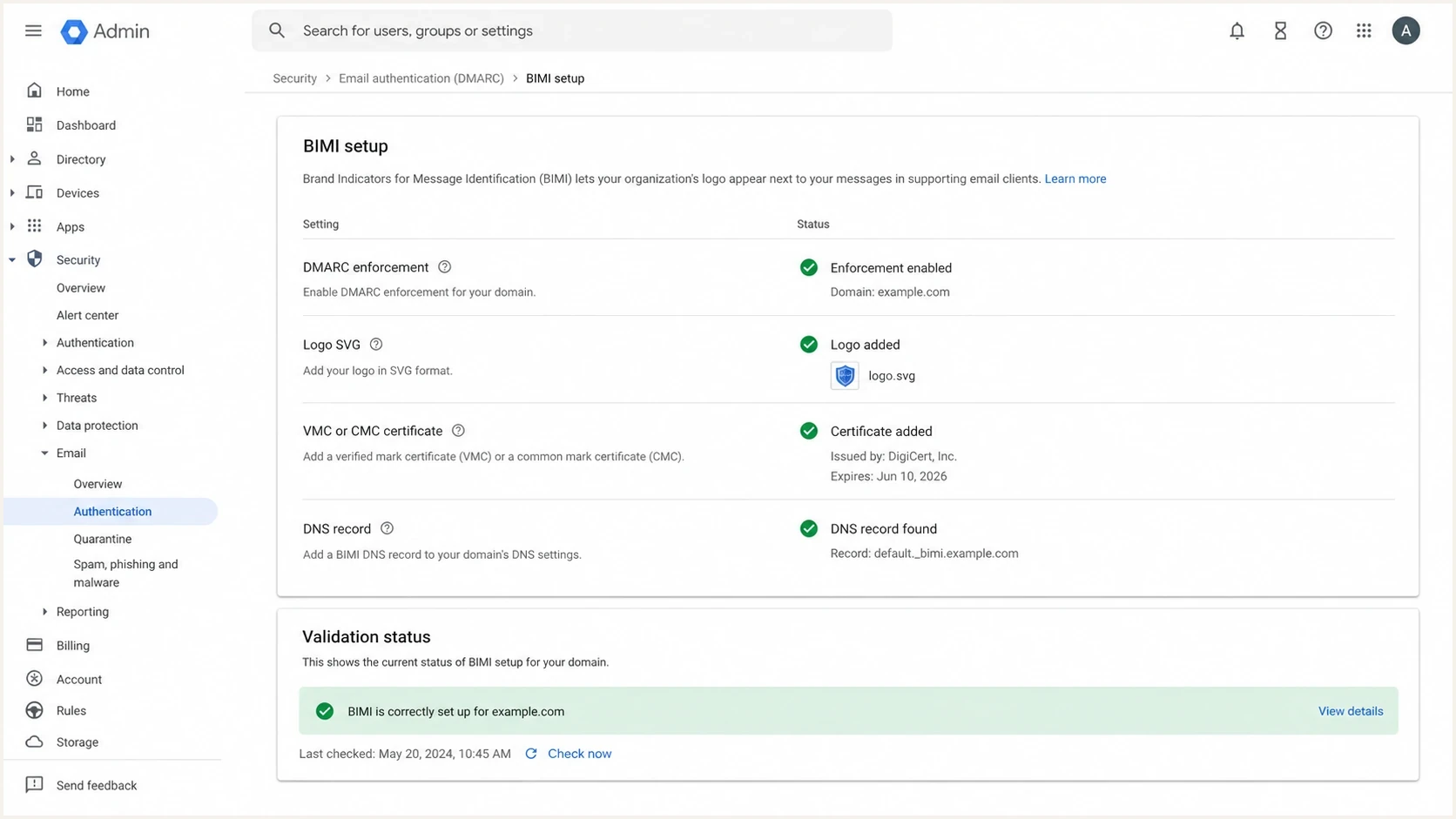
Google Workspace Admin console style BIMI setup screen with DMARC, logo, certificate, and DNS status rows.
Gmail versus Yahoo Mail
Gmail and Yahoo Mail both use BIMI, but they do not apply the same display rules. This difference explains why a logo can appear in one mailbox and remain absent in the other.
|
|
|
|
|---|---|---|---|
VMC or CMC | Enforced | Valid PEM chain | |
Not required | Enforced | Bulk reputation |
BIMI display requirements by mailbox provider
Gmail
- Certificate: Use a VMC or CMC. Only a VMC produces Gmail's verified checkmark.
- Record: Publish the BIMI assertion record with the complete PEM file URL in the authority field.
- Timing: Allow for DNS propagation and mailbox-provider caching. Google says display can take up to 48 hours after publication.
Yahoo Mail
- Certificate: A VMC or CMC is not required for the logo to appear.
- Record: The BIMI record can point directly to the compliant SVG logo file.
- Eligibility: Display depends on bulk sending, engagement, reputation, and Yahoo's own checks. Yahoo currently uses BIMI in mobile message lists and read views, plus desktop read views.
When certificate cost is the blocker, Yahoo Mail can be the first BIMI target because a mark certificate is not required. Gmail has no DNS-only shortcut to BIMI logo display. A Google profile photo can help in some account setups, especially for root-domain Workspace identities, but subdomain aliases are less predictable and the profile photo is not a BIMI substitute. Test Yahoo in a supported view before treating a missing logo elsewhere in its interface as a failed setup.
Choosing and maintaining a VMC or CMC
Choose the certificate path before finalizing the logo file. Both certificate types can support BIMI logo display in Gmail, but their eligibility and visible result differ. The certificate authority validates the organization, its right to use the mark, and the logo embedded in the PEM file.
|
|
|
|---|---|---|
Logo eligibility | Eligible registered or government mark | Eligible prior-use or modified registered mark |
Gmail logo | Supported | Supported |
Gmail checkmark | Supported | Not supported |
Ongoing work | Renew and revalidate | Renew and revalidate |
Practical differences between BIMI mark certificates
A CMC is the practical route when the logo is not a registered trademark or is an eligible modification of a registered mark. For the prior-use route, current mark-certificate requirements call for evidence that the same mark has appeared on the verified domain for at least 12 months. Confirm the exact evidence and logo rules with the issuer before budgeting the project.
- Renewal: Mark certificates have a maximum validity of 398 days, so set an owner and renewal reminder well before expiry.
- PEM updates: Replace the hosted PEM with the renewed entity certificate and complete intermediate and root chain. Recheck public retrieval after every change.
- Logo changes: Ask the issuer whether the revised artwork needs a new certificate. The validated logo is embedded in the PEM, so changing only a separate SVG does not update Gmail's certified image.
- Monitoring: Watch the PEM URL, TLS certificate, DMARC pass rate, and BIMI DNS record so an unrelated web or DNS change does not remove logo eligibility.
BIMI and DMARC DNS records
BIMI depends on two DNS layers: an enforced DMARC record and a BIMI assertion record. A default BIMI record at the organizational domain can apply to subdomains that do not publish their own BIMI record. Publish a subdomain-specific record when that subdomain needs a different logo or policy. The usual selector is default, and extra selectors require a matching BIMI-Selector message header plus support from the sending and receiving systems.
DMARC enforcement recordDNS
Host: _dmarc.example.com
Type: TXT
Value:
"v=DMARC1; p=quarantine; pct=100; rua=mailto:dmarc@example.com"
Use reject instead of quarantine when DMARC reporting proves that legitimate mail matches the visible From domain. If subdomains send mail, set an enforced sp= policy or publish suitable subdomain records. Suped's DMARC record generator can create a starting record that you tighten after monitoring.
BIMI record for Gmail with a PEM fileDNS
Host: default._bimi.example.com
Type: TXT
Value:
"v=BIMI1; l=; a=https://assets.example.com/bimi/vmc.pem"
BIMI record for Yahoo Mail without a certificateDNS
Host: default._bimi.example.com
Type: TXT
Value:
"v=BIMI1; l=https://assets.example.com/bimi/logo.svg"
Use the exact record format supplied by the certificate authority when you receive the PEM file. Gmail's current documentation shows the logo embedded in the PEM, with an empty l= tag and the PEM URL in a=. Some general BIMI examples include separate SVG and certificate URLs. Follow the current Gmail and issuer syntax for your certificate.
DMARC checker
Look up a domain's DMARC record and catch policy issues.
?/7tests passed
When the BIMI logo does not show
When BIMI fails, the DNS record is only one part of the investigation. Test the delivered message first, then DNS, asset retrieval, certificate validity, and mailbox-specific eligibility.
- DMARC: Confirm the actual message passes DMARC because SPF or DKIM uses a domain that matches the visible From domain. A published policy does not mean every sending platform passes.
- Policy: Check that p=none is gone, full enforcement applies, and any relevant organizational-domain or subdomain policy also qualifies.
- DKIM signature: When DKIM is configured outside Google Workspace, Google says not to use the DKIM l= body-length tag. This is separate from the BIMI l= logo-location tag.
- DNS: Confirm the selector and domain are correct and that only one BIMI TXT record exists at that name. Multiple records make the result invalid.
- SVG: Remove scripts, animation, raster content, remote assets, and relative dimensions. Check baseProfile="tiny-ps", version="1.2", the square viewBox, and the recommended 32 KB size limit.
- HTTPS: Confirm the PEM or SVG URL returns HTTP 200 over TLS 1.2 or later with a trusted TLS chain and without authentication, bot challenges, IP restrictions, or geographic blocks.
- Content type: Serve the SVG as image/svg+xml and the PEM chain as application/pem-certificate-chain or the compatible MIME type specified by the issuer.
- Certificate: For Gmail, confirm the PEM contains the entity certificate followed by the required intermediate and root certificates, and that the mark certificate has not expired.
- Reputation: For Yahoo Mail, send wanted bulk mail consistently and keep complaints low before expecting regular logo display.
- Subdomains: Check whether the sending subdomain inherits the organizational-domain BIMI record or has its own record. If it has its own record, troubleshoot that exact name.
For deeper troubleshooting, compare your setup with BIMI setup steps and the common BIMI not showing causes.
How Suped supports BIMI readiness
Suped's product is relevant before and after the BIMI TXT record goes live because BIMI depends on stable email authentication. Suped DMARC monitoring shows which sending sources pass DMARC, which fail, and what needs fixing before enforcement.
DMARC record detail view showing SPF, DKIM, DMARC, rDNS diagnostics, and DNS records
The practical sequence in Suped is to add the domain, review DMARC aggregate reports, identify legitimate sending sources, fix DMARC failures, then stage the policy toward quarantine or reject. After BIMI launches, real-time alerts can flag an authentication regression before it reduces logo eligibility.
Use Suped to verify that legitimate sources keep passing DMARC while the domain remains at enforcement. That workflow protects the authentication baseline BIMI depends on without treating a visible logo as proof that every sender is configured correctly.
Views from the trenches
Best practices
Enforce DMARC before BIMI so logo work is not hiding broken authentication sources.
Start with Yahoo Mail when budgets are tight because VMC cost is not required there.
Keep subdomain sending simple, with BIMI and DMARC published at the exact send domain.
Common pitfalls
Treating a Gmail profile photo as BIMI leads to coverage gaps across mailbox providers.
Publishing BIMI while DMARC remains at none prevents Gmail and Yahoo logo display.
Using an SVG with scripts, remote assets, or relative sizing causes validation failures.
Expert tips
Use the certificate authority record format because Gmail's accepted syntax can change.
For Yahoo Mail, test with real bulk traffic, not only one-off personal messages.
Allow time for DNS, caching, and reputation checks before calling a setup broken.
Marketer from Email Geeks says Gmail logo display without a certificate relies on account profile behavior, not BIMI, so it should be treated as a limited workaround.
2024-03-12 - Email Geeks
Marketer from Email Geeks says Yahoo Mail is worth prioritizing for BIMI because it can show logos without a VMC when DMARC and reputation are strong.
2024-04-08 - Email Geeks
BIMI launch checklist
Enforce DMARC, create a compliant SVG logo, obtain a VMC or CMC for Gmail, host the complete PEM or standalone SVG over HTTPS, publish default._bimi, then test new mail that passes DMARC. Gmail needs certification. Yahoo Mail can show BIMI without a mark certificate when the record, mail volume, engagement, and reputation meet its checks.
If the choice is between buying a certificate now and fixing authentication first, fix authentication first. A logo helps only when the underlying sender identity is consistent. Once DMARC is enforced and the mail stream is stable, BIMI becomes a controlled launch with clear renewal and monitoring owners.