
What List-Unsubscribe options are available for Outlook and why might they not be displaying?

Published 10 Jul 2025
Updated 26 Sep 2026
13 min read
Summarize with
Updated on 26 Sep 2026: We updated this guide with safer one-click handling, current Outlook.com sender requirements, and clearer client-specific testing.
Outlook can display a List-Unsubscribe control, but the sender cannot force it to appear. For broad compatibility, include both a mailto unsubscribe address and an HTTPS unsubscribe URL in the List-Unsubscribe header, support List-Unsubscribe-Post when the HTTPS endpoint handles one-click requests, and keep a normal visible unsubscribe link in the email body.
The part that trips people up is that a valid header and a visible Outlook unsubscribe button are not the same thing. A delivered message can contain the header and still have no quick unsubscribe control in Outlook on the web or a desktop Outlook app. The display decision depends on message type, sender trust, authentication, recipient context, the mailbox service, and Microsoft-side UI behavior.
Treat the header as an inbox-client convenience, not as the primary opt-out path. It is worth adding because it reduces friction when the mailbox provider chooses to display it, but your compliance and complaint-reduction plan still needs a visible working unsubscribe link inside the message.
- Best Outlook bet: Use a mailto value that goes to an automated unsubscribe processor on a domain related to the sender.
- Best cross-client bet: Include both mailto and HTTPS values, then add List-Unsubscribe-Post for clients that support one-click POST.
- Best fallback: Put a visible unsubscribe link in the body, preferably easy to find before the footer for high-volume marketing.
- Best test: Inspect the raw headers, then send controlled tests to the exact Outlook client and mailbox service your recipients use.
Recommended header patterntext
List-Unsubscribe: <mailto:unsubscribe@example.com?subject=unsubscribe>,
 <https://example.com/u/abc123>
List-Unsubscribe-Post: List-Unsubscribe=One-Click
The direct answer for Outlook
Outlook.com and Outlook clients can surface List-Unsubscribe controls, but Microsoft does not publish a simple rule that gives every compliant message a visible unsubscribe button. A mailto value remains a practical Outlook option. Include an HTTPS URL in the same header for clients that use URL-based handling and for standards-based one-click POST.
The reliable sender-side setup is to send both URI types, process both, and not assume Outlook will show either. If your Outlook test does not display the button, confirm that the header reached the mailbox unchanged, then check whether Outlook treats the message as trusted subscription mail and chooses to expose an unsubscribe shortcut to that recipient.
|
|
|
|---|---|---|
mailto | Practical compatibility option | Needs automated inbox processing |
HTTPS URL | Supports URL-based handling | Required for RFC 8058 POST |
One-click POST | Mailbox provider decides display | Needs signed headers and HTTPS |
Body link | Always sender-controlled | Must remain visible |
Compact summary of Outlook List-Unsubscribe options.
RFC 2369 treats multiple List-Unsubscribe URIs as ordered alternatives. A client should use the leftmost protocol it supports, so choose the order deliberately and verify that your sending platform preserves the angle brackets, comma, spacing, and URI order.
Microsoft community answers also show this inconsistent behavior in the wild. A Microsoft Q&A thread has senders reporting that Outlook web does not show the unsubscribe button even when they expect it. This matches operational results: the header is necessary, but it is not sufficient.
Where Outlook.com manages subscriptions
Outlook.com also has a subscription manager under Settings > Mail > Subscriptions. It examines incoming mail after junk filtering and looks for subscription identifiers in message headers. This is separate from the inline control above an open message, so test both surfaces.
- Check junk placement: Outlook.com does not offer unsubscribe for some messages it has filtered into junk.
- Check blocked senders: The option is unavailable for some recipients after they block the sender address or domain.
- Check sender consistency: Microsoft says some messages lack the option when they are not from the same sender.
- Check the subscription list: Use the current subscriptions view as a separate signal, not proof that every message gets an inline button.
These conditions are recipient-specific. A passing sender-side header test does not override a recipient's junk classification, blocked-sender list, or Outlook.com subscription history.
Microsoft's public subscription-manager instructions apply to Outlook.com consumer mailboxes. An Outlook app can connect to Outlook.com, a Microsoft 365 work or school mailbox, or another mailbox service, so record both the client and the account type when comparing tests.
Which List-Unsubscribe options Outlook can use
There are four pieces worth separating. Only three are header-level mechanisms. The fourth is the normal unsubscribe link in the message body, and it matters because Outlook's visible shortcut is outside your control.
A mailto option remains useful for Outlook compatibility. Use an address that your system monitors automatically, and include an opaque token in the address, subject, or body so you can identify the subscriber without relying on the sender address of the unsubscribe request. Do not send these requests into a human inbox where they wait for manual action.
Header options
- mailto: Include it for Outlook compatibility and route it into an automated unsubscribe parser.
- HTTPS: Required for RFC 8058 one-click and useful for clients that prefer URL handling.
- POST: Add List-Unsubscribe-Post only when the HTTPS endpoint completes one-click processing.
Sender-owned fallback
- Body link: Keep it visible, working, and clearly connected to the subscription.
- Preference page: Use it after the opt-out is honored, not as a barrier before unsubscribing.
- Logging: Record the request source so you know whether Outlook, the body link, or mailto handled it.
For RFC 8058 one-click, the mailbox provider sends an HTTPS POST with the body List-Unsubscribe=One-Click. That POST must complete the opt-out without a login or confirmation gate, must not depend on cookies or HTTP authentication, and must not redirect. A GET to the same HTTPS URL can show a confirmation page, but it should not unsubscribe the recipient by itself.
Apply a valid DKIM signature that covers both List-Unsubscribe and List-Unsubscribe-Post. Both header names must appear in the DKIM-Signature h= tag. Without that coverage, RFC 8058 says a receiver should not offer one-click unsubscribe.
For a narrower treatment of Microsoft's one-click support, the related page on RFC 8058 goes deeper into List-Unsubscribe-Post. The short version for this page is simple: include the header if you support it, but do not use Outlook display as your only success criterion.
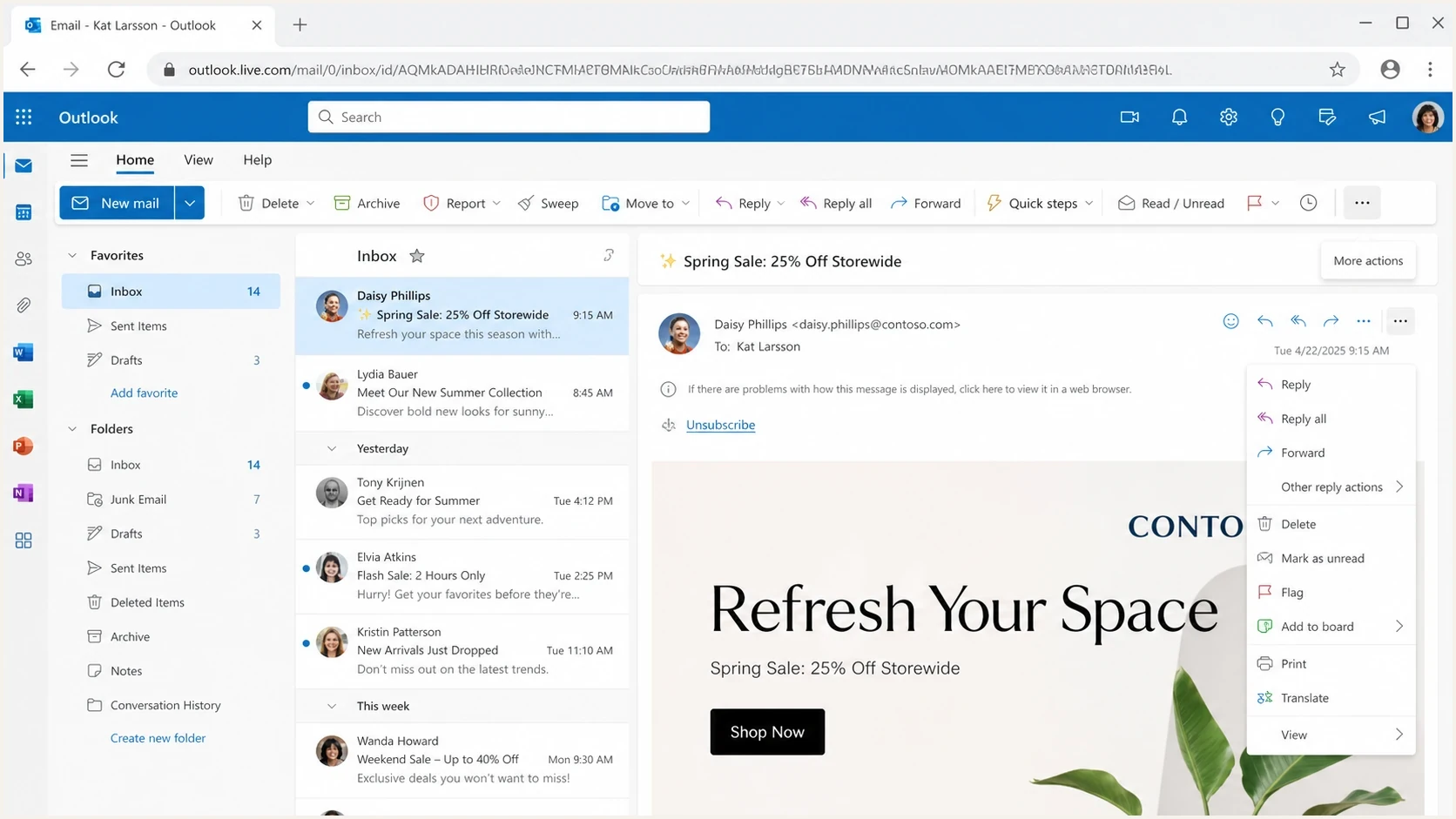
Microsoft Outlook on the web showing where an unsubscribe control can appear.
Prevent accidental unsubscribes from URL scanners
RFC 8058 separates a one-click POST from an ordinary GET because security scanners, link previews, and other automated systems can fetch a URL without the recipient asking to unsubscribe. If a GET immediately suppresses the address, an automated fetch can remove a real subscriber by mistake.
- GET behavior: Show a confirmation page or require an explicit action. Do not suppress the recipient from the fetch alone.
- POST behavior: Accept List-Unsubscribe=One-Click and complete the opt-out without a login or confirmation step.
- Token design: Use and validate an opaque, hard-to-forge token that identifies the recipient and mailing list.
- Response handling: Return a direct success response without an HTTPS redirect, and make repeated requests safe.
Test GET and POST separately. Confirm that a scanner-style GET leaves the subscription active, while a correctly formed POST suppresses the recipient and returns success without relying on cookies, prior browser state, or HTTP authentication.
Why Outlook hides the unsubscribe control
When Outlook does not show the unsubscribe control, the cause usually falls into one of two groups. Either the message has a format, authentication, reputation, or classification problem, or Outlook's UI chooses not to expose the shortcut for that recipient and message.
The sender can fix malformed headers, missing authentication, a weak sender reputation, an unsubscribe destination unrelated to the sender, or a message that Outlook does not recognize as subscription mail. Recipient-side junk placement, blocked-sender state, and inconsistent sender identity can also remove the option in Outlook.com.
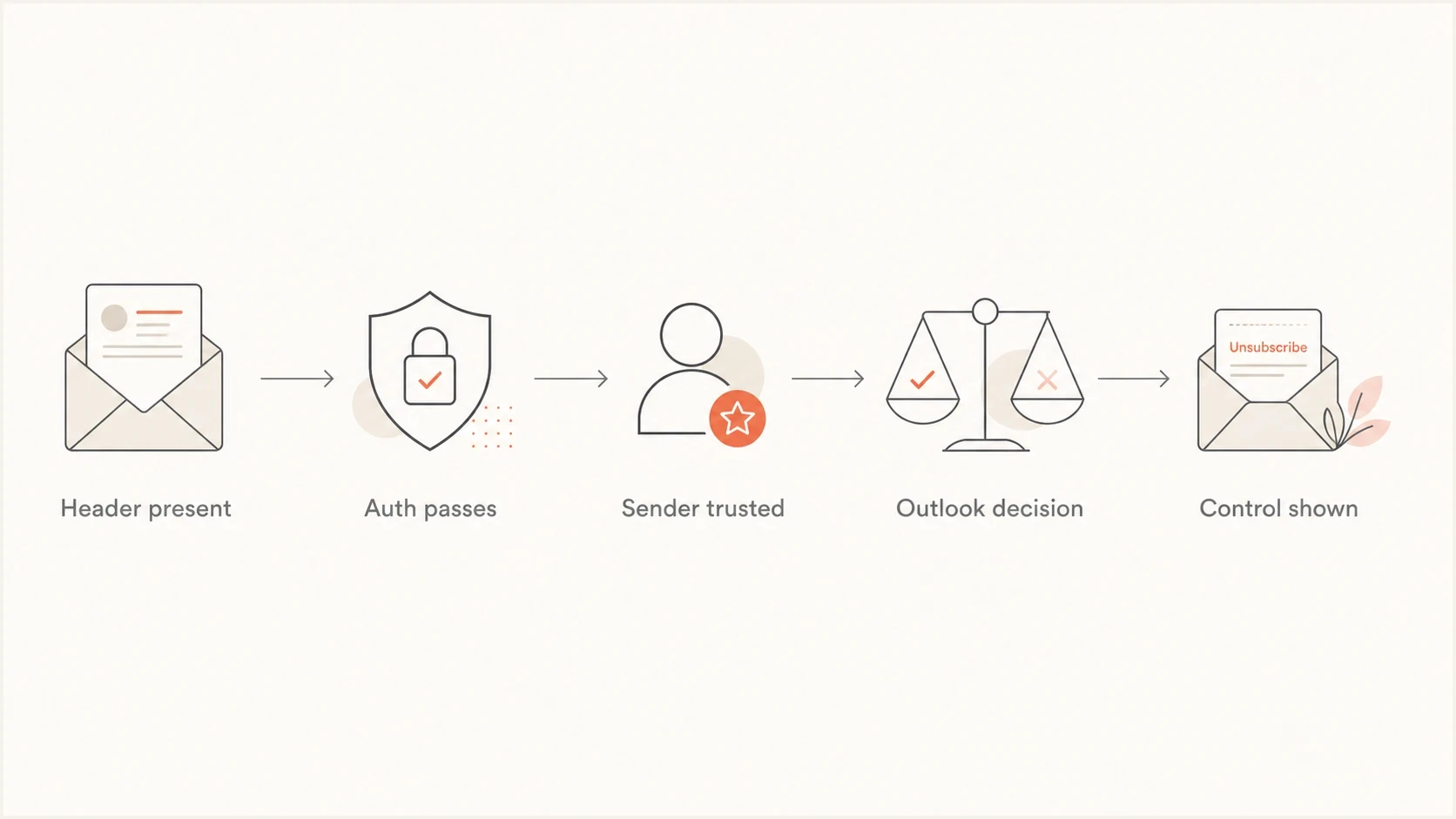
Flowchart showing the checks before Outlook displays an unsubscribe control.
The remaining variables are not directly fixable. Outlook on the web, new Outlook, classic Outlook, mobile clients, mailbox service, and recipient context can surface controls differently. A sender can make the message eligible. Microsoft still owns the final UI.
Do not confuse header validity with UI display
A raw message can contain a valid List-Unsubscribe header and still show no quick unsubscribe control in Outlook. Treat the visible button as a downstream result of header syntax, authentication, reputation, recipient state, and Microsoft's display rules.
Sender reputation and authentication matter because header-driven actions need trustworthy message identity. RFC 8058 recommends a hard-to-forge recipient token and requires a valid DKIM signature over the unsubscribe headers.
If the problem is specific to Outlook web quick actions, the related Outlook quick action troubleshooting page is the more focused next read.
How to test the header
Test this in two passes. First, verify that the delivered message has the right raw headers and that each unsubscribe route works as intended. Then test how Outlook displays the same campaign in several recipient contexts.
Start with a real delivered message rather than a template preview. Send it to a test mailbox and inspect the raw source. In new Outlook, use More actions > View > View message details. In classic Outlook for Windows, open the message in its own window and use File > Properties.
A Suped email tester workflow helps here because it checks the delivered result, headers, authentication status, and issues from the actual message rather than relying on sending-platform settings.
Email tester
Send a real email to this address. Suped shows a results button when the test is ready.
?/43tests passed
Once the header exists and both routes process correctly, move to Outlook-specific testing. Use Outlook on the web, new Outlook, classic Outlook, and more than one mailbox where you can. Keep the test message, sender, recipient, IP, domain, and campaign type consistent so you do not mix variables.
- Check syntax: Confirm every URI is wrapped in angle brackets and separated cleanly.
- Check mailto: Send a request to the address and confirm the subscriber is removed automatically.
- Check HTTPS: Confirm a GET does not unsubscribe by itself, then send an RFC 8058 POST with the exact one-click body and verify that it completes without login or redirect.
- Check authentication: Verify SPF, DKIM, and DMARC results, then confirm DKIM covers both unsubscribe headers.
- Check reputation: Review complaint rate, Microsoft delivery patterns, and blocklist or blacklist signals.
Since May 5, 2025, Microsoft has enforced authentication requirements for domains sending more than 5,000 messages a day to Outlook.com consumer mailboxes. SPF and DKIM must pass, while DMARC must be at p=none or stronger and must pass through SPF or DKIM using a domain that matches the From domain. Authentication failures can be rejected with 550 5.7.515. Microsoft also expects marketing or bulk mail to include a clearly visible, functional unsubscribe link.
If authentication has errors, fix those before spending days debugging the Outlook button. Suped's domain health checker provides a quick domain-level check before you investigate Outlook-specific display behavior.
How Suped fits into this workflow
Suped cannot force Outlook to render the unsubscribe control. Suped's product covers the sender-side checks: delivered-message testing, authentication health, DMARC monitoring, issue detection, alerts, and reputation signals that help explain whether a message is eligible for trusted inbox actions.
For this workflow, use Suped's DMARC monitoring to review authentication patterns, then compare a delivered-message test with reputation and blocklist monitoring data. The same evidence can be kept with each Outlook client and mailbox test.

Email tester sample report showing total score, email preview, issue summary, and per-section results
Send a real test email, confirm the List-Unsubscribe header is present, check authentication and issue findings, then compare that result with what Outlook displays. If Outlook hides the control after those checks pass, treat it as a Microsoft-side display decision and keep the body unsubscribe path prominent.
What to log during testing
- Message source: Keep the raw header for every Outlook display test.
- Client and account: Record the Outlook client and whether the mailbox is Outlook.com or Microsoft 365.
- Authentication result: Capture SPF, DKIM, DMARC, and sender-domain results for the delivered message.
- Opt-out result: Confirm whether mailto, HTTPS, body link, or Outlook UI processed the request.
Legal and operational safeguards
Do not rely on the List-Unsubscribe header alone for legal opt-out compliance. Laws such as CAN-SPAM and CASL require a working opt-out process, and the header is too dependent on the recipient client to be your only unsubscribe path.
The operational goal is to make unsubscribing easier than complaining. If a recipient wants out, the fastest path should work even when Outlook hides the quick action.
A sender-safe unsubscribe setup
- Header route: Include mailto and HTTPS, add List-Unsubscribe-Post, and sign both list headers with DKIM.
- Body route: Keep a normal unsubscribe link visible and working in every marketing message.
- Processing route: Honor unsubscribes quickly and log the source of each request.
- Monitoring route: Watch complaint rate and Outlook placement after every unsubscribe change.
A preference center is fine when it improves the recipient experience, but it should not block the unsubscribe action. If the recipient clicked a one-click unsubscribe endpoint, complete that action first. Then offer preference choices as optional follow-up.
If you also send to Gmail and Yahoo, review the Gmail and Yahoo requirements separately. Outlook behavior should not be used as the template for every mailbox provider.
Views from the trenches
Best practices
Keep mailto and HTTPS values in the header, because different inboxes select different paths.
Authenticate the message cleanly before testing whether Outlook shows the unsubscribe control.
Route every mailto unsubscribe into an automated process, not a human support inbox queue.
Keep a visible body unsubscribe link because header controls depend on clients and policies.
Common pitfalls
Assuming Outlook will show the button because the header exists in the raw message source.
Using a mailto recipient on a domain that is unrelated to the authenticated sender domain.
Testing with one personal mailbox and treating that single result as a Microsoft-wide rule.
Relying on List-Unsubscribe alone for legal opt-out requirements in marketing programs.
Expert tips
Test Outlook web and desktop separately, because their unsubscribe surfaces differ by context.
Use opaque tokens in unsubscribe URLs and mailto bodies so no address is exposed publicly.
Move a normal unsubscribe link near the top when complaint reduction has high priority.
Monitor complaint rate after header changes alongside parsing and Outlook display results.
Expert view
Expert from Email Geeks says Microsoft often decides whether to show List-Unsubscribe after checking sender reputation and whether authentication matches the domain.
2022-03-15 - Email Geeks
Marketer view
Marketer from Email Geeks says Outlook desktop can surface unsubscribe controls, but the client and add-ins affect where a sender sees them.
2022-03-15 - Email Geeks
What to do next
For Outlook, include mailto and HTTPS values in List-Unsubscribe, support one-click POST if your HTTPS endpoint meets RFC 8058, and keep the visible unsubscribe link in the email body. This gives recipients working paths without depending on one Outlook UI decision.
If the Outlook button still does not display, fix what you control first: syntax, authentication, DKIM header coverage, domain consistency, request processing, complaint rate, and sender reputation. Then check the Outlook.com subscription manager and recipient-specific junk or blocked-sender state. If those checks pass, treat the missing shortcut as an Outlook display choice rather than proof that the header failed.




