Why doesn't Outlook webmail trigger List-Unsubscribe when using the quick action?

Updated on 25 Jul 2026: We added current Outlook.com sender requirements and corrected the RFC 8058 implementation details behind one-click unsubscribe.
Outlook webmail does not always trigger the sender's List-Unsubscribe mailto address when a recipient uses the visible unsubscribe quick action. Outlook.com can expose that control through its subscription-management logic without guaranteeing whether the resulting action uses mailto, HTTPS POST, an internal Microsoft process, or no sender callback.
If Gmail, Apple Mail, Yahoo Mail, and AOL generate mailto callbacks but Outlook.com and Hotmail generate none, that does not prove your List-Unsubscribe header is broken. It means the Outlook.com consumer flow needs its own test path. Outlook on the web for a Microsoft 365 tenant can also behave differently because tenant policies and client versions affect the available controls.
The practical fix is to support both mailto and HTTPS unsubscribe paths, add List-Unsubscribe-Post for one-click support, keep a visible unsubscribe link in the email body, and log every unsubscribe route separately. Then a missing Outlook callback becomes a measured client behavior rather than a gap in the whole unsubscribe pipeline.
The direct answer
Outlook webmail's unsubscribe quick action is not a sender-facing API contract. Microsoft can show an unsubscribe control after finding subscription identifiers in the message header, but its public Outlook.com guidance does not promise that every click will send a message to the mailto address. Outlook also applies junk filtering, sender identity, trust, and subscription-management logic before it shows or processes the action.
- Most likely: Outlook is not sending your mailto callback even though the header exists.
- Not proof: Zero Outlook callbacks does not automatically mean the List-Unsubscribe syntax is invalid.
- Main fix: Publish mailto and HTTPS options, then make the HTTPS endpoint support one-click POST requests.
- Fallback path: Keep the footer unsubscribe link working because inbox quick actions are not universal.
Do not depend on mailto alone
A unique mailto address is useful because it lets you map an unsubscribe back to a recipient and list. The weak point is that each mailbox provider chooses how it handles the quick action. If Outlook does not send the message, your webhook never sees the event.
- Add HTTPS: Use a tokenized unsubscribe URL that can process a one-click POST.
- Keep mailto: It still works for clients that send the unsubscribe email.
- Log each route: Separate mailto, HTTPS POST, footer clicks, and preference center changes.
What Outlook is doing differently
Outlook.com has a subscription-management area where users can unsubscribe from current subscriptions or block senders. Microsoft says Outlook.com examines incoming email, filters out junk first, and then looks for subscription identifiers in the message header. The quick action is tied to Outlook's view of the sender and subscription, not only to the raw header line you inserted.
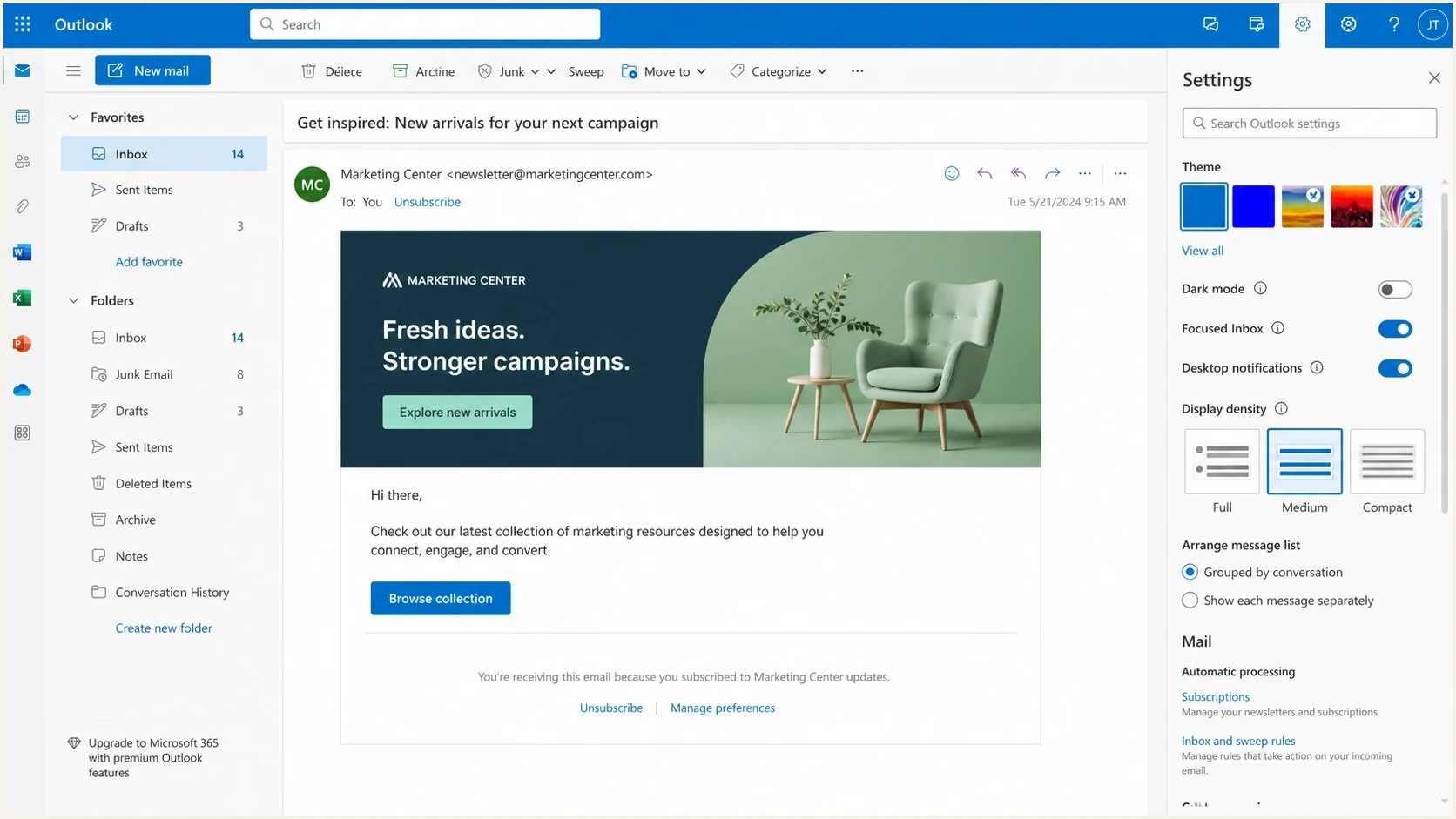
Microsoft Outlook on the web showing a marketing email with an unsubscribe control.
The same message can behave differently across Gmail, Apple Mail, Yahoo Mail, and Outlook. Some clients send the mailto request, while others use the HTTPS URL or expose the control only after reputation checks. The visible Outlook control alone does not reveal which route Microsoft selected.
Sender expectation
- Header found: The client reads the List-Unsubscribe header.
- Click happens: The user confirms the inbox unsubscribe action.
- Webhook fires: The unique mailto message reaches the sender's processing system.
Outlook reality
- Header checked: Outlook also checks junk status, sender trust, and subscription signals.
- Action chosen: Microsoft can process the click through Outlook's subscription controls.
- Callback missing: The sender sees no mailto event even when the recipient clicked unsubscribe.
Headers to publish
For marketing and newsletter mail, publish both unsubscribe mechanisms. The List-Unsubscribe header gives mailbox providers the available destinations. The List-Unsubscribe-Post header tells clients that the HTTPS URL accepts a one-click POST without forcing the recipient through a preference center.
Recommended unsubscribe headerstext
List-Unsubscribe: <mailto:unsubscribe+abc123@unsub.example.com>,
 <https://u.example.com/o/abc123>
List-Unsubscribe-Post: List-Unsubscribe=One-Click
Microsoft's product documentation for Customer Insights - Journeys describes one-click unsubscribe as adding both List-Unsubscribe and List-Unsubscribe-Post headers for commercial email. The useful part for senders is the header pair: publish the HTTPS destination and make the one-click URL processable by POST. See Microsoft guidance for that behavior.
|
|
|
|
|---|---|---|---|
mailto | Email | Parse token | Not guaranteed |
HTTPS | POST | Validate and opt out | Client-dependent |
Footer | Click | Show web flow | Visible fallback |
Use this to decide what each unsubscribe mechanism should handle.
The narrower Microsoft question is whether Outlook calls the RFC 8058-style HTTPS endpoint, uses mailto, or keeps the action inside Outlook. Sender-side tests often show mixed client behavior, so Microsoft RFC 8058 support needs separate testing by mailbox type and client.
What RFC 8058 requires
A header can look correct in the raw message and still fall short of RFC 8058. The standard connects one-click processing to an authenticated message and a specific HTTPS POST body. Its URL identifies the subscription without browser state. The mailto destination remains a regular List-Unsubscribe option, not the RFC 8058 one-click action.
- DKIM coverage: A valid DKIM signature must cover List-Unsubscribe and List-Unsubscribe-Post in its h= tag.
- POST body: The HTTPS request carries List-Unsubscribe=One-Click as form data.
- User consent: A receiver must not issue the one-click POST without the user's consent.
- Opaque identity: Put a signed, hard-to-forge recipient and list token in the URL instead of relying on cookies.
One-click request bodytext
Content-Type: application/x-www-form-urlencoded

List-Unsubscribe=One-Click
Inspect the DKIM h= tag
A general DKIM pass is not enough for RFC 8058. Confirm that the valid signature names both unsubscribe headers in h=. If a downstream system adds or rewrites either header after signing, the receiver has no RFC 8058 assurance for that one-click instruction.
How to troubleshoot the missing Outlook callback
Start by proving the message has the headers after your ESP, MTA, and any downstream processing have finished with it. Do not inspect only the payload before send. Sending systems can fold, rewrite, drop, or reorder headers.
Send a real campaign copy to seed inboxes, then inspect the received message with Suped's email tester. Confirm the unsubscribe headers, their DKIM coverage, the authentication result, the visible footer link, and the final message structure in the same copy the mailbox provider received.
Email tester
Send a real email to this address. Suped shows a results button when the test is ready.
?/43tests passed
After the received headers are confirmed, test Outlook webmail separately. Use Outlook.com and Hotmail accounts that have normal inbox history. Check both the message-level unsubscribe control and the Subscriptions area in Outlook settings. Then compare your logs for mailto messages, HTTPS POST requests, footer clicks, and preference center saves.
- Raw headers: Confirm the final received copy contains List-Unsubscribe and List-Unsubscribe-Post.
- Header syntax: Enclose each destination in angle brackets and separate them with a comma. Fold continuation lines safely.
- DKIM signature: Verify DKIM passes and its h= tag covers both unsubscribe headers.
- Domain authentication: Check SPF and DMARC results for the same received message.
- Junk status: Test messages that land in the inbox, not messages filtered to junk.
- Route logs: Track mailto, POST, footer, and manual opt-out events as separate sources.
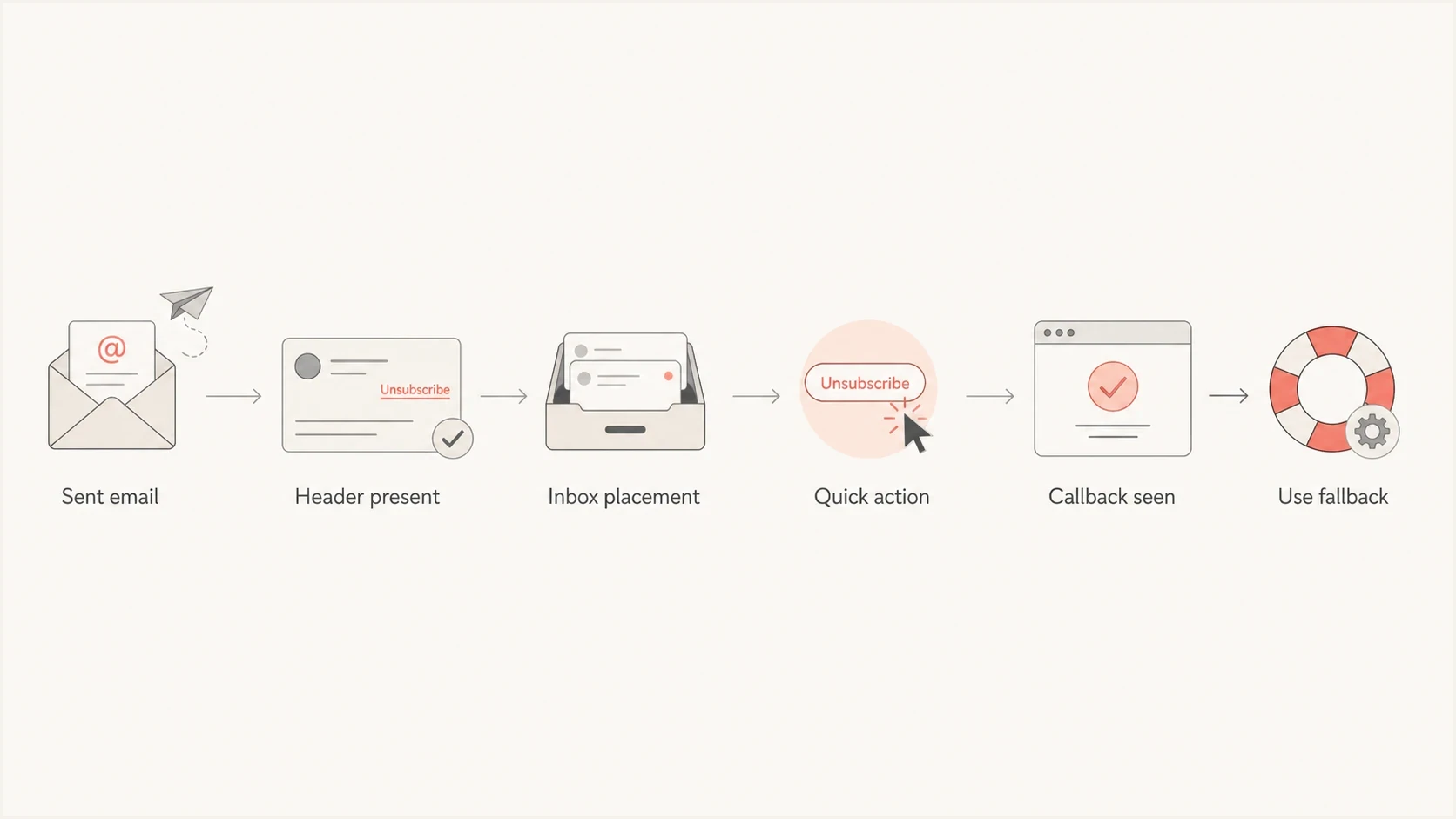
Flowchart for testing Outlook List-Unsubscribe quick action callbacks.
For domains sending more than 5,000 messages a day to Outlook.com consumer addresses, Microsoft requires SPF and DKIM to pass and DMARC at p=none or stronger, with SPF or DKIM alignment. Noncompliant mail can be rejected with 550 5.7.515. These requirements affect delivery, but passing them still does not promise a particular unsubscribe callback.
Use a domain health checker to check DMARC, SPF, DKIM, and related DNS records before deciding Outlook's quick action is the only issue.
What to change in your unsubscribe system
A robust unsubscribe system assumes that mailbox providers behave differently. Use token-based processing where a signed, opaque token identifies the recipient, list, sending domain, and campaign context without relying on the From address in a mailto message. Forwarded mail, automated mailbox actions, privacy controls, and mail routing can make sender-side assumptions unreliable.
Practical token modeltext
token = sign(recipient_id + list_id + send_id)

On mailto received:
  validate token
  mark list opt-out
  store source = mailto

On HTTPS POST received:
  require form value List-Unsubscribe=One-Click
  validate token
  mark list opt-out
  store source = one_click_post
The endpoint should be idempotent. If Microsoft, a security scanner, or a user action hits the same unsubscribe URL twice, the second valid request should return success without changing anything else. Do not use a GET request as a silent unsubscribe action because link scanners can request URLs before the recipient clicks.
- Token scope: Tie each signed token to a list or topic, not only to the recipient.
- POST handling: Validate the form value and use the URL token to identify the recipient and list.
- Manual fallback: Keep the footer link and preference center synced with quick-action events.
- Audit trail: Store source, timestamp, message ID, and token outcome for each opt-out.
For mailto handling, avoid depending on the mailbox From field as the identity of the subscriber. The unsubscribe address or token should carry the authority. The note on the From address explains why that field is a weak source of truth.
Where Suped fits
Suped is our DMARC and email authentication platform. It cannot force Outlook webmail to send a mailto callback, but it can help separate sender-side problems from mailbox-client behavior. If the received message has valid unsubscribe headers, the required DKIM coverage, passing authentication, and a working footer route, the missing Outlook mailto event is a client behavior to account for rather than a DNS or header failure.

Email tester sample report showing total score, email preview, issue summary, and per-section results
The practical Suped workflow is to inspect the delivered message, monitor DMARC authentication across real traffic, identify a misconfigured sending source, and keep sender-health changes close to unsubscribe tests. That evidence narrows the diagnosis before you change a working header.
Use one workflow for sender health
Start with the final message, then check the domain's authentication posture and source-level senders. Suped's DMARC monitoring ties those checks to actual traffic instead of a single inbox test.
- Header checks: Confirm the message contains the unsubscribe headers after delivery.
- Auth checks: Review SPF, DKIM, DMARC, and alignment outcomes for the same sender.
- Issue steps: Use issue detection and fix steps when a sending source is misconfigured.
- Alerts: Watch for authentication or reputation changes that affect the test.
Views from the trenches
Best practices
Send seed campaigns to Outlook.com and Hotmail, then compare callbacks against other clients.
Publish mailto and HTTPS unsubscribe paths, with unique tokens for each recipient.
Keep a visible footer unsubscribe link, even when inbox quick actions appear to work well.
Common pitfalls
Assuming zero Outlook callbacks proves the header is missing or malformed in the email itself.
Relying on mailto-only processing when Microsoft clients use a different internal action.
Treating preview or security scans as real opt-outs without idempotent token handling.
Expert tips
Log every unsubscribe path separately, so client behavior becomes visible in reports daily.
Validate the one-click form body and signed URL token before recording the unsubscribe.
Tie unsubscribe tests to DMARC, SPF, DKIM, and header coverage for the same message.
Marketer from Email Geeks says testing showed Gmail, Apple Mail, Yahoo Mail, and AOL generated mailto callbacks while Outlook.com and Hotmail produced no callback.
2022-04-01 - Email Geeks
Marketer from Email Geeks says senders should check whether Outlook is choosing mailto, HTTPS, or an internal subscription action before changing working headers.
2022-04-02 - Email Geeks
The practical takeaway
Outlook webmail does not give senders a dependable mailto callback every time a user clicks the unsubscribe quick action. If every non-Microsoft client sends events and Outlook sends none, the safest conclusion is that Outlook is handling the quick action differently, not that the whole List-Unsubscribe setup failed.
Publish mailto and HTTPS destinations, support an RFC 8058 POST, cover both unsubscribe headers with DKIM, keep the footer unsubscribe link, and measure each route separately. Once those pieces are in place, Outlook's behavior becomes one data point in client testing rather than a blocker for compliant unsubscribe handling.




