
What are the requirements for List-Unsubscribe headers to comply with Yahoo and Gmail?

Published 21 Jun 2025
Updated 3 Oct 2026
9 min read
Summarize with
Updated on 3 Oct 2026: We clarified the one-click header rules, DKIM verification, and how unsubscribe requests affect each mailing list.
To meet the combined Gmail and Yahoo requirements for bulk marketing or subscribed mail, use RFC 8058 one-click unsubscribe: a List-Unsubscribe header with one HTTPS URL and a List-Unsubscribe-Post header set to List-Unsubscribe=One-Click. The HTTPS endpoint has to accept a POST request and remove the recipient from the mailing list within 48 hours.
A mailto option can still be useful as a fallback for some mailbox clients, but it does not replace the Gmail one-click requirement. A URL-only List-Unsubscribe header without List-Unsubscribe-Post also misses that requirement. Implement the two-header HTTPS POST pattern and keep a visible unsubscribe link in the body.
Required List-Unsubscribe headers
- Add one List-Unsubscribe header and one List-Unsubscribe-Post header to each marketing or subscribed message in the cross-provider setup.
- Include one HTTPS URL in List-Unsubscribe. An HTTP URL does not meet RFC 8058.
- Accept POST with the exact List-Unsubscribe=One-Click value and process the opt-out without further user action.
- Cover both unsubscribe headers with a valid DKIM signature so receivers can trust they were not changed in transit.
- Keep a clear unsubscribe link in the message body for recipients who do not use the inbox-level option.
Compliant one-click unsubscribe headerstext
List-Unsubscribe-Post: List-Unsubscribe=One-Click
List-Unsubscribe: <https://example.com/unsubscribe/abc123>
Do not use GET as the opt-out action
Your HTTPS URL can show a normal unsubscribe or preference page when a person opens it with GET. It should not silently unsubscribe on GET, because security scanners and prefetchers can visit links before a real person does. The automated one-click action is the POST request.
Which senders need one-click unsubscribe?
Gmail applies its bulk sender requirements to senders that send close to 5,000 or more messages within 24 hours to personal Gmail accounts. Gmail combines messages sent from the same primary domain, including its subdomains, when calculating the volume. Once Gmail classifies a primary domain as a bulk sender, that status does not expire. Gmail has been ramping enforcement on non-compliant traffic since November 2025, with temporary and permanent rejections possible for some sender requirement failures. Missing one-click headers alone does not trigger automatic rejection or spam placement, but it makes bulk senders ineligible for delivery mitigations.
Yahoo applies its additional requirements to bulk senders but does not publish a numeric bulk threshold. Its unsubscribe requirement covers promotional, marketing, and subscribed mail, not transactional mail such as password resets and receipts. Yahoo also says a body unsubscribe link alone is not enough. The most useful public reference is Yahoo guidance, plus its sender FAQ and sender hub material.
For a fuller breakdown of how this applies to marketing programs, the related page on one-click requirements covers message types, footer links, and operational handling.
|
|
|
|
|---|---|---|---|
Gmail | Bulk senders to personal Gmail | RFC 8058 HTTPS POST | Within 48 hours |
Yahoo | Bulk marketing and subscribed mail | List-Unsubscribe; POST preferred | Within 2 days |
Combined default | All subscribed marketing mail | RFC 8058 pair and body link | Within 48 hours; before the next send |
Use this table as a fast compliance map, then test the real headers on your own mail.
What the endpoint must do
The List-Unsubscribe URL is an endpoint contract. Gmail or Yahoo can send a POST request to the URL in the header. Your server has to accept the request without asking the mailbox provider to log in, confirm a preference page, solve a challenge, or perform another step.
The URL needs to identify the recipient and the list safely. Most senders use an opaque token rather than putting the raw email address in the URL. The token should map to a specific mailing list, recipient, tenant, and message stream, so an unsubscribe from a product newsletter does not accidentally remove the person from every operational notice. For Gmail subscription messages, identify each list with a human-readable List-ID header or a distinct From address.
Check how your sending platform applies the request. Its suppression list can cover an entire account, even when your URL identifies one mailing list. Test the effective scope before relying on the endpoint for separate subscriptions or transactional mail.
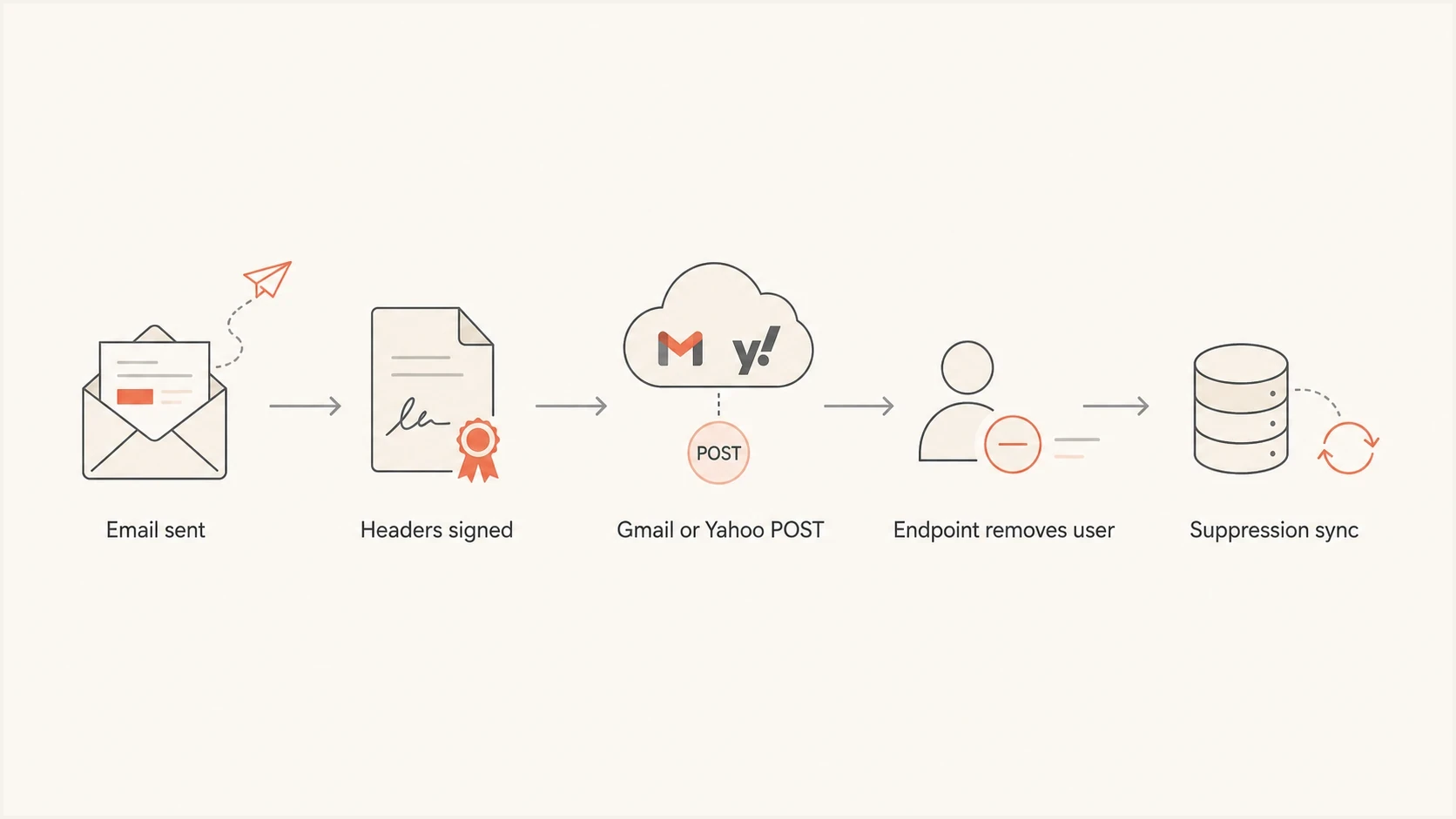
RFC 8058 one-click unsubscribe flow for Gmail and Yahoo.
Compliant path
- The receiver sends POST to the HTTPS URL listed in the header.
- The endpoint records the opt-out for the relevant list.
- Suppression data reaches the sending platform before the next campaign.
Common failure
- The message has List-Unsubscribe but no List-Unsubscribe-Post header.
- The URL loads over HTTP, which does not meet the HTTPS requirement.
- The opt-out lands in a queue that is not processed before more mail goes out.
Expected POST request bodyhttp
POST /unsubscribe/abc123 HTTP/1.1
Host: example.com
Content-Type: application/x-www-form-urlencoded
Content-Length: 26

List-Unsubscribe=One-Click
RFC 8058 HTTP rules that are easy to miss
Correct headers are not enough if the endpoint rejects the mailbox provider's request. RFC 8058 defines a background POST that has to finish without browser state or another user step.
- Handle multipart/form-data and application/x-www-form-urlencoded POST bodies.
- Process the request at the HTTPS URL and return a successful response without an HTTP redirect.
- Do not depend on cookies, HTTP authentication, a login, or earlier web activity.
- Treat a repeated valid POST as success when the recipient is already suppressed, and never let it restore a subscription.
Keep recipient and list context inside a validated opaque URL token. The POST body contains only the one-click key and value, so the endpoint cannot ask the mailbox provider which address or subscription the user meant.
Is mailto required for Gmail and Yahoo?
No, you do not need both a mailto address and an HTTPS URL to satisfy the combined Gmail and Yahoo requirement. Gmail requires the RFC 8058 HTTPS POST pattern. A mailto value can sit in the same List-Unsubscribe header as a fallback for clients that support it, but it does not rescue a missing one-click POST implementation.
Older advice can be confusing. List-Unsubscribe originally allowed URL and mailto forms. Gmail's current guidance says mailto and ordinary URL unsubscribe links do not meet its one-click requirement. Yahoo says the RFC 8058 POST method is highly recommended and mailto is acceptable for its bulk sender requirement. A sender targeting both providers still needs Gmail's HTTPS POST header pair, so that is the cross-provider default.
A safe fallback pattern
If your platform supports it, include one HTTPS URL and a mailto value in List-Unsubscribe, then include List-Unsubscribe-Post. Make the HTTPS URL first, sign the headers with DKIM, and test that POST works before you send a large campaign.
Header pair with mailto fallbacktext
List-Unsubscribe-Post: List-Unsubscribe=One-Click
List-Unsubscribe: <https://example.com/unsub/abc123>,
 <mailto:unsubscribe@example.com?subject=unsubscribe>
If you need a practical test checklist, the related page on how to verify headers walks through raw message inspection and real mailbox testing.
DKIM signing and sender reputation
The unsubscribe header is one part of the sender requirement set. Gmail and Yahoo also evaluate authentication, DNS, TLS, complaint rate, and recipient behavior. RFC 8058 directly requires a valid DKIM signature that covers both unsubscribe headers. SPF, DKIM, or DMARC failures can also affect delivery and whether the mailbox UI appears.
DKIM is the anchor for this work because the unsubscribe headers need to be covered by a valid signature. Use a delivered message, confirm a DKIM pass, and check that both headers appear in that signature's h= list. If either header is absent from the signed header list, fix the signing configuration before relying on the result. Suped's product helps with the surrounding workflow by combining DMARC monitoring, SPF and DKIM visibility, issue detection, alerts, and blocklist (blacklist) monitoring.
DMARC record detail view showing SPF, DKIM, DMARC, rDNS diagnostics, and DNS records
For teams using Suped, the practical workflow is to verify every sending source, resolve missing DNS records or DKIM failures, stage DMARC policy changes, and keep alerts active while the unsubscribe rollout reaches production. Hosted SPF, hosted DMARC, hosted MTA-STS, and multi-tenant views support teams that manage many domains.
Before blaming List-Unsubscribe, check the whole domain posture with the domain health checker and confirm the signing setup with the DKIM checker.
Complaint rate thresholds
Use complaint rate as an early warning signal for sender requirement risk.
Healthy
Under 0.1%
A level that gives you room before provider thresholds become a problem.
Warning
0.1% to 0.29%
Investigate list quality, opt-out handling, and message targeting.
Critical
0.3% or more
Gmail guidance treats this as a level tied to delivery support limits.
How to verify List-Unsubscribe headers
Do not verify this only by looking at a template editor. Send a real campaign-like message through the same mail path that production uses, including the same ESP, signing service, MTA, tracking domain, and suppression integration.
- Confirm exactly one List-Unsubscribe header and one List-Unsubscribe-Post header in the raw message.
- Confirm a DKIM pass for a signature whose h= list includes both unsubscribe headers.
- Send the expected POST body in both supported encodings to the HTTPS URL and confirm the recipient is suppressed.
- Open the footer unsubscribe link and make sure it works for people who do not use inbox buttons.
- Confirm the unsubscribed recipient is excluded from the next relevant marketing send.
A real-message test also catches problems that DNS-only checks miss, such as a signing service that drops custom headers or a link rewriting layer that changes the List-Unsubscribe URL after DKIM signing.
Email tester
Send a real email to this address. Suped shows a results button when the test is ready.
?/43tests passed
Suped's email tester is useful at this stage because you can send a real message, inspect authentication, review issues, and use the output as a shared checklist for whoever controls the ESP or MTA.
One detail that trips teams up: Gmail or Yahoo not showing a visible unsubscribe button does not always mean the header is invalid. They use sender reputation and other eligibility checks before showing the UI. Compliance starts with the raw message and endpoint behavior, then the visible mailbox UI follows when the provider decides the sender qualifies.
Final checks before sending
Use the RFC 8058 header pair on every promotional or marketing message: List-Unsubscribe with one HTTPS URL and List-Unsubscribe-Post with List-Unsubscribe=One-Click. Sign both headers with DKIM, make POST unsubscribe the recipient without extra interaction, keep the body unsubscribe link, and honor the request within 48 hours.
Verify the raw headers, endpoint behavior, DKIM pass, suppression scope, and overall sender posture. Suped's product fits the surrounding DMARC, SPF, DKIM, hosted policy, alerting, and reputation work so the unsubscribe rollout is not handled in isolation.




