How can I verify if my company's emails have List-Unsubscribe headers correctly configured?

Updated on 30 Jul 2026: We added the missing DKIM header coverage check and tightened the one-click unsubscribe workflow for Gmail's current sender requirements.
The direct answer is: verify List-Unsubscribe in the raw message headers, not only in the Gmail send details box. If Gmail shows an unsubscribe line or button near the sender details, that is a useful clue. It is not the source of truth. The source of truth is the original message source, where you should see a List-Unsubscribe header, and for one-click compliance, a List-Unsubscribe-Post header.
Use four layers: send a real campaign-style email to a test inbox, inspect the full original headers, confirm the unsubscribe endpoint works, then confirm authentication passes. The Gmail UI helps with the first glance, but mailbox providers apply their own display rules. A missing button does not prove the header is missing, and in newer interfaces a visible unsubscribe control can be influenced by signals outside the exact header you are trying to confirm.
If you want a practical check without digging through every header by hand, send the message to Suped's email tester. It shows whether the message contains the relevant unsubscribe headers, and it puts that result beside SPF, DKIM, DMARC, content, and deliverability checks.
What proves the header is configured
A correct setup has the actual header fields in the delivered message. For normal list unsubscribe support, look for List-Unsubscribe. For modern one-click unsubscribe, look for List-Unsubscribe-Post with the exact value List-Unsubscribe=One-Click. The unsubscribe URL should use HTTPS. A mailto option can exist beside it, but mailto alone is not the one-click pattern Gmail and Yahoo expect for bulk marketing mail.
Good one-click header patterntext
List-Unsubscribe: <https://u.example.com/o/abc>, <mailto:unsub@example.com>
List-Unsubscribe-Post: List-Unsubscribe=One-Click
That second line matters because it tells the mailbox provider that the HTTPS URL accepts a one-click unsubscribe POST. The provider can send a POST request to the URL, and your system should unsubscribe the recipient from that mailing list without asking them to log in, solve a challenge, confirm through another page, or change extra preferences.
For senders exceeding 5,000 messages a day to personal Gmail accounts, Google requires marketing and subscribed mail to support one-click unsubscribe and include a clearly visible unsubscribe link in the message body. The header does not replace that body link. Google also says to process and honor unsubscribe requests within 48 hours.
Do not trust the visible button alone
The visible Gmail unsubscribe link is a UI signal. Raw headers are the evidence. Gmail can hide a valid header because the message does not pass its display checks, and it can show unsubscribe-related UI for reasons that do not prove one-click RFC 8058 support.
- Header present: You have direct proof that the message contains the List-Unsubscribe field.
- Post present: You have evidence that the sender is declaring one-click support.
- Button present: You have a helpful mailbox UI clue, but still verify the original source.
- Button absent: You do not have proof of failure. Check the raw message before escalating.
How to check it in Gmail
In Gmail, open the delivered email, choose the message menu, then choose Show original. Search the original source for List-Unsubscribe. Search for unsubscribe first, then review every matching header line. The send details box can show mailed-by, signed-by, and sometimes unsubscribe, but the original source shows the complete delivered headers.
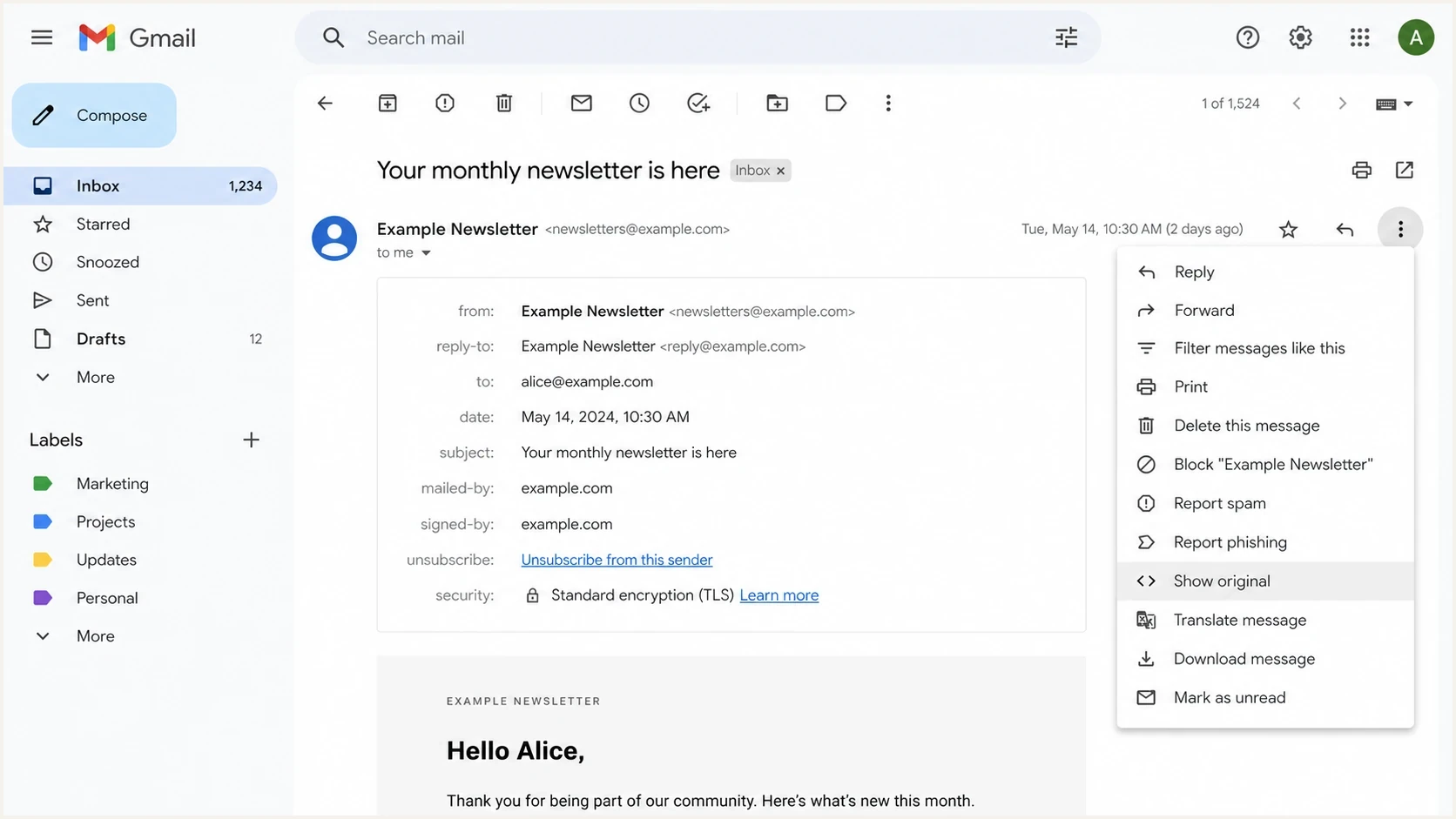
Gmail message menu showing where to open the original message source.
The check should use a message that matches real production mail. Do not test with a forwarded copy if you can avoid it. Forwarding can alter headers, break authentication, or add intermediary fields that confuse the result. Send the original message from the same platform, domain, subdomain, template, and audience type you use for real marketing traffic.
|
|
|
|---|---|---|
Raw header | Direct proof | High |
Post header | One-click declared | Medium |
DKIM h= coverage | Headers signed | High |
Gmail line | Helpful clue | Medium |
No button | Not decisive | Low |
Fast interpretation of common Gmail signals.
If the header is present in the original source and Gmail still does not show a visible unsubscribe link, move on to the endpoint and authentication checks. There is more detail on that display behavior in the related note on Gmail display behavior.
Run a live email test
The most reliable non-developer workflow is to send a real email to a test address and inspect the received message. A static screenshot from your email platform is not enough because some systems add unsubscribe headers only at final send time, only for certain list types, or only after a recipient is linked to a subscription record.
Email tester
Send a real email to this address. Suped shows a results button when the test is ready.
?/43tests passed
A live test also catches the routine mistakes that matter: the wrong template path, missing merge data, a header added to newsletters but not automations, or a sandbox sender that does not match the production sending domain. This is more reliable than checking platform settings because it tests what recipients actually receive.

Email tester sample report showing total score, email preview, issue summary, and per-section results
Suped's product is useful here because the email test sits beside broader authentication monitoring. A one-click unsubscribe header is only one part of a sender check. If SPF, DKIM, or DMARC fails, mailbox providers can still treat the message with caution. Suped's DMARC monitoring connects those results to the domains and sources that send mail for the company.
What to inspect in the header
When reviewing the source, check the header syntax, the unsubscribe method, the endpoint behavior, and whether authentication supports trust. The header can be present but still not be operational. That is why the check should go past a simple text search.
Header check
- Name: The field name should be exactly List-Unsubscribe.
- URL: The HTTPS option should point to a working unsubscribe endpoint.
- Mailto: The mailto option is useful, but it does not replace one-click POST.
- Format: Each URL or mailto value should sit inside angle brackets.
One-click check
- Post line: The message should include List-Unsubscribe-Post.
- Value: The value should be List-Unsubscribe=One-Click.
- POST: The HTTPS endpoint should accept POST without extra user action.
- Scope: The unsubscribe should apply to the list connected to that message.
One detail that catches teams is endpoint safety. A crawler, scanner, or security gateway can fetch links in a message. A simple GET request to the unsubscribe URL should not immediately unsubscribe the recipient. RFC 8058 one-click unsubscribe uses a POST signal, so the endpoint should process the POST and treat basic GET requests as neutral visits.
One-click POST testhttp
POST /o/abc HTTP/1.1
Host: u.example.com
Content-Type: application/x-www-form-urlencoded

List-Unsubscribe=One-Click
For an operational test, send that body to the HTTPS URL, confirm a successful 2xx response, then verify that the correct subscription record becomes unsubscribed. The change should reach every active send queue within the required processing window. A success page alone does not prove the recipient was suppressed.
Risky pattern to avoidtext
List-Unsubscribe: <https://u.example.com/unsub?id=abc>

Avoid unsubscribing the recipient on a plain GET request.
The header should be generated per recipient or per subscription record, not shared across the whole list. If the same unsubscribe URL appears in every copy of the message, the endpoint needs another secure way to identify the subscriber. Otherwise one recipient's action can affect the wrong record, or the unsubscribe request can fail after the test looks fine.
Verify DKIM covers both unsubscribe headers
Finding both unsubscribe fields and seeing dkim=pass are separate checks. RFC 8058 requires at least one valid DKIM signature to cover both List-Unsubscribe and List-Unsubscribe-Post. In the raw message, find the DKIM-Signature associated with a passing result, then inspect its h= tag for both field names.
DKIM header coverage exampletext
DKIM-Signature: v=1; a=rsa-sha256; d=example.com; s=selector1;
 h=from:to:subject:date:list-unsubscribe:list-unsubscribe-post;
 bh=...; b=...
Header names are case-insensitive, so lowercase names in the h= list are valid. If the message has several DKIM signatures, at least one passing signature needs to include both unsubscribe fields. A passing SPF result, a passing DMARC result, or a different DKIM signature that omits these fields does not satisfy this part of the one-click check.
Check after final delivery
Inspect the delivered message, not a draft MIME file. A sending platform or relay can add, remove, or rewrite unsubscribe fields after an earlier DKIM signature was created, leaving the fields present but outside the valid signature's coverage.
Why authentication still matters
List-Unsubscribe is not a replacement for email authentication. Gmail and Yahoo bulk sender requirements expect authenticated mail, low complaint rates, and an easy unsubscribe path. If the header exists but DKIM fails, the domain has weak DMARC coverage, or the sending source is unknown to the domain owner, the mailbox provider can still treat the message with caution.
Verification confidence
Use these bands to decide when a List-Unsubscribe check is complete.
UI clue only
Low
A button or line appears in the mailbox interface.
Raw header found
Medium
The original source contains the List-Unsubscribe header.
One-click confirmed
High
The message has signed headers and the POST endpoint accepts the request.
Auth also passes
Best
SPF, DKIM, and DMARC pass for the actual sending source.
This is where a domain-level view saves time. Suped's domain health checker helps check DMARC, SPF, and DKIM records, while the DMARC platform monitors real sending sources over time. That matters when marketing, sales, billing, support, and product systems send mail using different subdomains.
Where Suped fits
Suped's product turns this check into an ongoing workflow. Use the email tester to inspect a delivered sample, then use DMARC monitoring to identify sending sources and authentication changes across the company's domains. The one-click endpoint still needs a direct functional test because DMARC reports do not test unsubscribe processing.
Common failure patterns
Most failures are small mismatches between the message path the team tested and the message path subscribers receive. A newsletter has the header, but an automation does not. A staging sender has the header, but production strips it. A one-click line exists, but the endpoint returns a login page.
- Template split: Only some campaign types include the header, so test each major send path.
- Forwarded test: The tester checks a forwarded copy and sees altered headers.
- Unsigned fields: DKIM passes, but the valid signature's h= tag omits one or both unsubscribe headers.
- Bad endpoint: The POST URL requires a login, confirmation, preference choice, or captcha.
- GET unsubscribe: A link scanner can unsubscribe users because GET triggers the action.
- Body link missing: The headers work, but the message lacks a clearly visible unsubscribe link.
- Delayed suppression: The endpoint records the request, but another send queue keeps mailing the recipient.
- Wrong scope: The unsubscribe removes the user from everything instead of the relevant list.
For one-click behavior, test the actual POST path. A browser click on the visible footer link usually tests a preference center, not RFC 8058. The two can coexist, but they are different checks. The companion page on one-click testing goes deeper into that workflow.
A practical verification workflow
Use this workflow when a team needs a clear answer it can hand to marketing, engineering, or compliance. It keeps the test close to the live subscriber experience and avoids drawing conclusions from a mailbox button alone.
- Send real mail: Use the same domain, template, segment type, and sending route as production.
- Open original: In Gmail, use Show original and search for unsubscribe-related headers.
- Confirm syntax: Check the HTTPS URL, optional mailto value, and one-click POST header.
- Check DKIM coverage: Confirm one passing signature lists both unsubscribe headers in its h= tag.
- Test endpoint: Send the one-click POST and verify the correct subscription state changes.
- Check the body link: Confirm the message has a clearly visible unsubscribe link that works.
- Check auth: Confirm SPF, DKIM, and DMARC pass for the delivered message.
- Retest paths: Repeat for newsletters, lifecycle emails, sales mail, and reactivation sends.
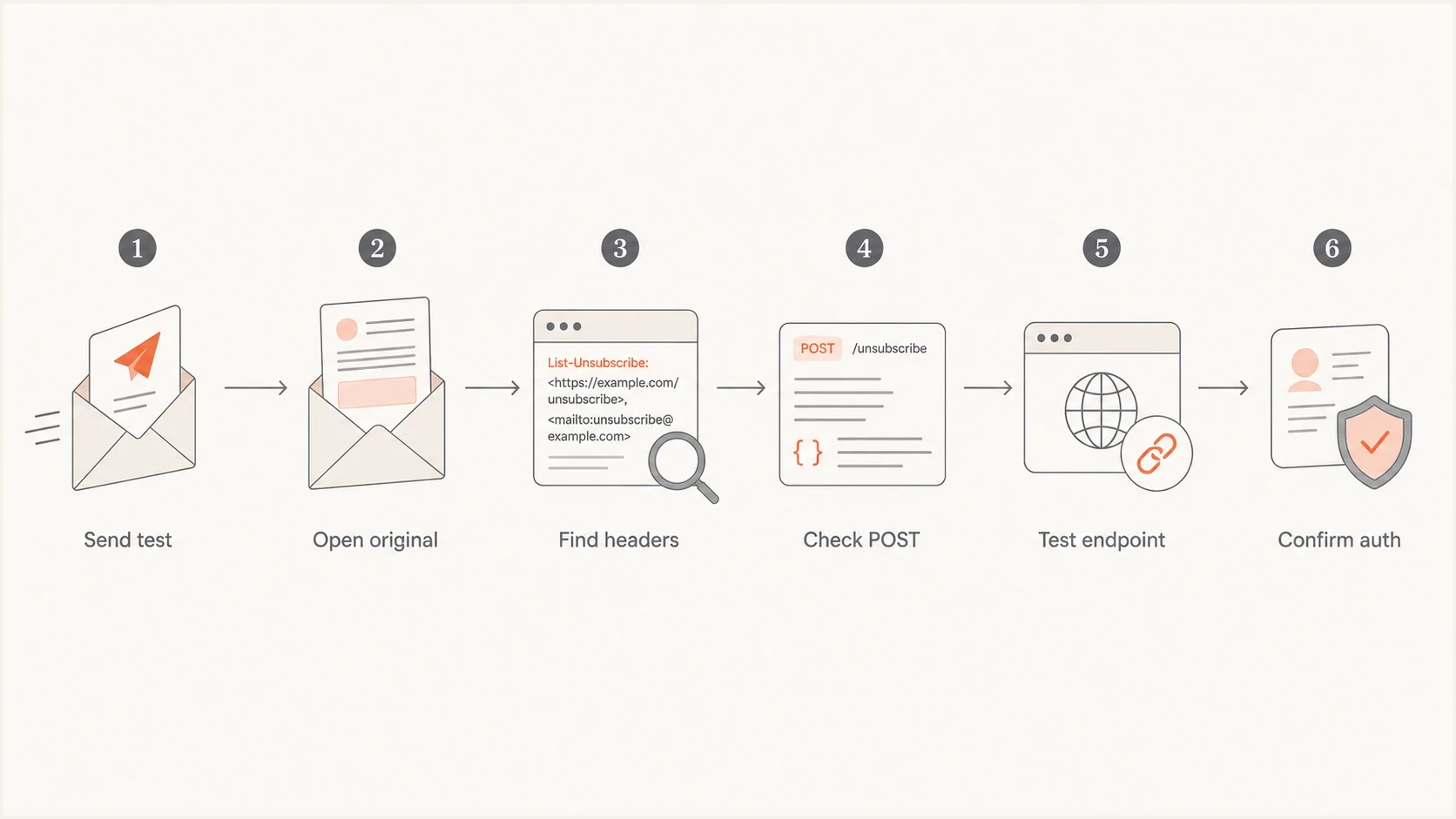
Flowchart for verifying List-Unsubscribe headers and one-click behavior.
Once the workflow passes, record a sample original header, the valid DKIM signature, the endpoint response, and the tested send path. That gives the team a reference when a future template, vendor setting, DNS change, or sending domain change breaks the behavior. For teams with many domains, Suped's MSP and multi-tenant dashboard helps keep these checks organized across clients or business units.
Views from the trenches
Best practices
Check the raw original source before trusting any mailbox unsubscribe UI signal.
Test the exact campaign path recipients receive, not a forwarded or staged copy.
Confirm the POST endpoint works without login, captcha, or extra preference steps.
Common pitfalls
A visible Gmail button gets treated as proof when it is only a partial interface signal.
Teams confirm List-Unsubscribe but forget the matching List-Unsubscribe-Post header.
Forwarded test emails alter headers and create false confidence or false alarms.
Expert tips
Save a known-good original header sample for each sender and major template path.
Keep GET requests harmless so security scanners cannot unsubscribe real users by mistake.
Review authentication at the same time because mailbox display checks rely on sender trust.
Expert from Email Geeks says the raw original source is the reliable place to confirm List-Unsubscribe and List-Unsubscribe-Post.
2024-01-10 - Email Geeks
Marketer from Email Geeks says a missing Gmail unsubscribe link should not trigger panic because the header can still be present.
2024-01-10 - Email Geeks
What to do next
To verify that your company's emails have List-Unsubscribe headers correctly configured, do not stop at the Gmail send details box. Use it as a clue, then inspect the raw original message. The minimum proof is a valid List-Unsubscribe header. For modern one-click unsubscribe, the message also needs List-Unsubscribe-Post with List-Unsubscribe=One-Click, and one valid DKIM signature must cover both fields.
Test the HTTPS POST, confirm the correct subscription changes without extra user action, and make sure the visible body link works. Then check SPF, DKIM, and DMARC on the same delivered message. Suped's product can keep message tests beside DMARC monitoring for the domains and sending sources in scope, while the endpoint and suppression checks remain part of campaign QA.




