How to test one click unsubscribe functionality in email marketing?

Published 6 Aug 2025
Updated 1 Aug 2026
13 min read
Summarize with
Updated on 1 Aug 2026: We added DKIM signing checks, stricter POST tests, and the current two-day unsubscribe window.
Test one-click unsubscribe in two layers: first, prove the email has the right signed headers and the unsubscribe endpoint handles a POST request correctly. Second, check whether major inboxes show the unsubscribe control. The first layer is the pass or fail test. The inbox button is useful evidence, but it is not a reliable staging test because Gmail and other mailbox providers do not always show the button for senders with limited history or weak reputation signals.
For email marketing, the practical process is to send a real campaign-style test email, inspect the raw message, verify List-Unsubscribe and List-Unsubscribe-Post, confirm that DKIM covers both headers, call the HTTPS unsubscribe URL with POST, confirm the subscriber is suppressed, then check Gmail, Outlook.com, Apple Mail, and Yahoo as mailbox evidence. Do not wait for a staging Gmail button before approving the implementation.
Suped's product fits around that workflow when the same sending domain needs compliance checks. The email tester checks a real message, while Suped's monitoring keeps DMARC, SPF, DKIM, and reputation issues visible after rollout.
The short answer
A complete one-click unsubscribe test has six checks. Treat all six as required for production because each one proves a different part of the flow.
- Header presence: The message must contain List-Unsubscribe with an HTTPS URL and List-Unsubscribe-Post with the one-click value.
- DKIM coverage: A valid DKIM signature must cover both unsubscribe headers in its h= tag.
- Endpoint behavior: A POST request to the header URL must unsubscribe or suppress the recipient without login, preference selection, or confirmation.
- GET safety: A GET request should show a page, a preference form, or a safe status response. It should not unsubscribe the contact.
- Mailbox display: Check Gmail, Outlook.com, Apple Mail, and Yahoo, but do not fail the build just because a staging inbox hides the button.
- Production monitoring: Watch complaint rate, unsubscribes, DMARC pass status, and delivery changes after the rollout.
The visible Gmail unsubscribe button is not the contract. The contract is the DKIM-signed message headers plus the HTTPS POST behavior. Mailbox providers use their own trust signals before showing UI, so a hidden button on a low-volume staging domain does not prove the implementation is broken.
What one-click unsubscribe requires
One-click unsubscribe for email marketing relies on message headers, not the visible footer link. A clear unsubscribe link in the message body still matters for users, legal compliance, and Gmail and Yahoo sender requirements. That body link can open a preference page because the header-based POST handles the one-click action.
The implementation needs an HTTPS unsubscribe URL in List-Unsubscribe and a second header that declares POST-based one-click handling. A mailto URI can appear alongside the HTTPS URL, but mailto alone does not meet the one-click requirement. For a deeper setup checklist, use the page on List-Unsubscribe headers.
Minimum one-click unsubscribe headerstext
List-Unsubscribe: <https://example.com/unsubscribe/abc123>
List-Unsubscribe-Post: List-Unsubscribe=One-Click
The unsubscribe URL should identify the subscriber and mailing stream without exposing a raw email address. A signed token is safer. The endpoint should be idempotent, meaning a second POST returns a success-style result instead of reactivating anything or throwing an error because the address is already suppressed.
Good one-click behavior
- POST action: The subscriber is removed from the relevant marketing list in one server-side action.
- Safe repeat: Repeated POST requests return a success response without changing the contact back.
- No barrier: The user is not asked to log in, enter an email address, or confirm a choice.
Broken one-click behavior
- GET unsubscribe: A link scanner, preview bot, or browser prefetch unsubscribes the user by visiting the URL.
- Confirmation wall: The POST endpoint only opens a page and asks the user to click another button.
- Tracking redirect: The header URL goes through click tracking that changes the method, strips the body, or blocks mailbox requests.
Verify DKIM covers the unsubscribe headers
RFC 8058 requires at least one valid DKIM signature on the delivered message. That signature must cover both List-Unsubscribe and List-Unsubscribe-Post. A receiver should not offer one-click unsubscribe when the required DKIM protection is missing.
DKIM header coverage to inspecttext
DKIM-Signature: v=1; d=example.com; s=selector1;
 h=from:to:subject:list-unsubscribe:list-unsubscribe-post;
 ...
- Check the delivered result: Confirm that Authentication-Results shows a DKIM pass for the final message.
- Read the DKIM header list: Confirm the h= tag names both unsubscribe headers.
- Inspect final values: Make sure a relay or tracking system did not rewrite either header after signing.
- Test each sending path: Repeat the check for every domain, campaign stream, and platform configuration that can add the headers.
A general DKIM pass is not enough when the signature omits the unsubscribe headers. Inspect the signed header list in the delivered message instead of relying only on a summary badge.
A practical test plan
Use this test plan before enabling one-click unsubscribe for a production marketing stream. It works for in-house systems and for marketing platforms that let teams inspect raw email and control the unsubscribe endpoint.
Start with a real message generated by the same system that sends campaigns. Do not copy a template into a test sender and assume the headers survived. Header injection, MIME generation, tracking wrappers, and account settings can all change the final message.
|
|
|
|---|---|---|
Raw header | Headers exist and are signed | Endpoint works |
POST call | Suppression works | Inbox UI shows |
Gmail inbox | Provider trust | Header is valid |
Outlook.com | UI compatibility | Gmail compliance |
Live pilot | Real delivery | Every client UI |
Use several evidence types instead of relying on one inbox button.
- Seed contacts: Create test subscribers in Gmail, Outlook.com, Yahoo, Apple Mail, and an internal QA mailbox.
- Send normally: Send through the same domain, IP pool, return path, and campaign system used for real marketing mail.
- Inspect source: Open the raw message and confirm the delivered headers, DKIM coverage, and authentication results match the expected format.
- Call POST: Send a direct POST request to the header URL and check that the recipient is suppressed.
- Run a pilot: Enable it on a low-risk production segment and monitor complaints, unsubscribes, and delivery signals.
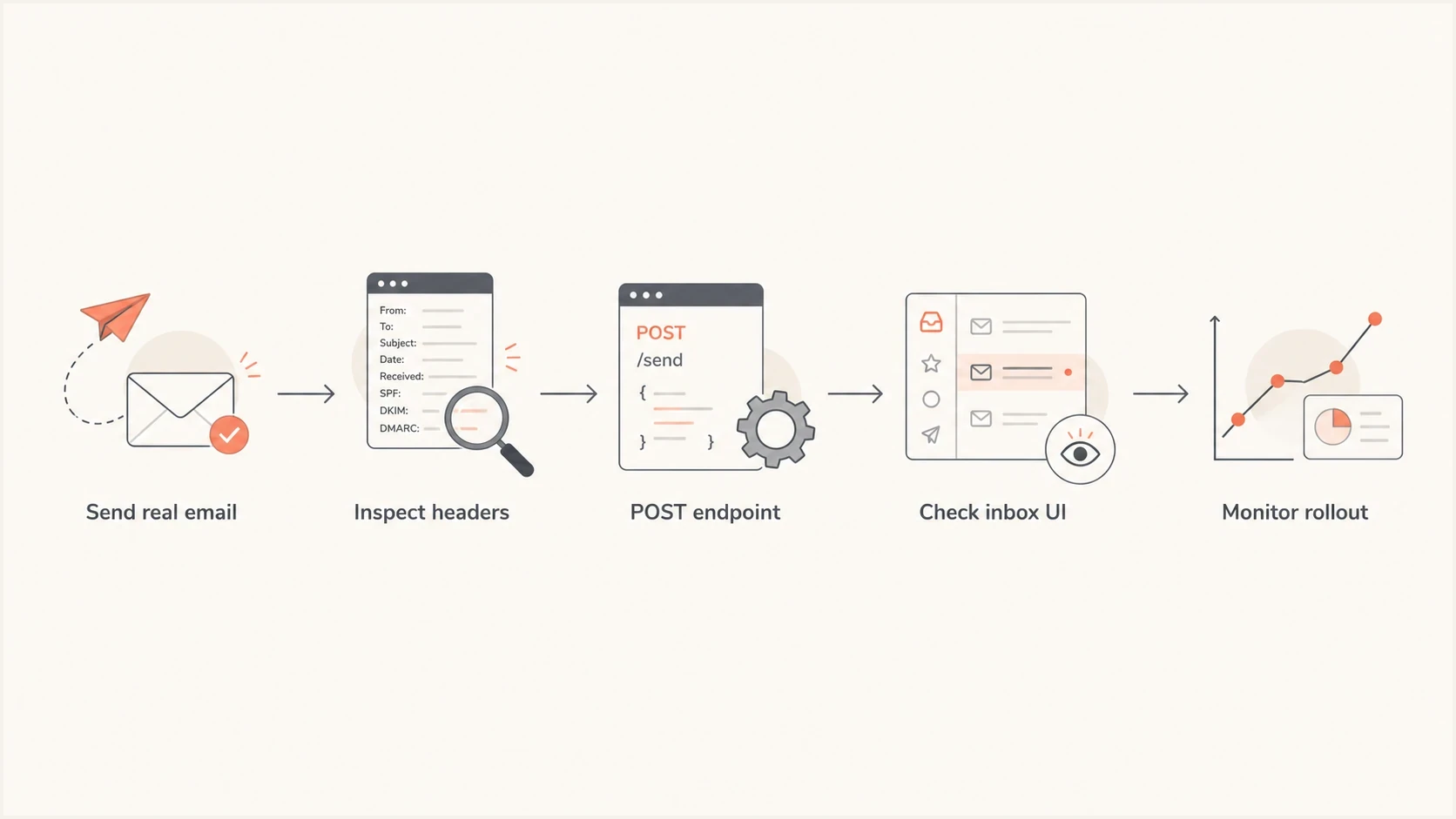
Flowchart for testing one-click unsubscribe headers, POST behavior, inbox UI, and rollout.
How to test the POST endpoint
The endpoint test proves that a mailbox provider can unsubscribe the recipient without rendering a page. Copy the HTTPS URL exactly as it appears in the delivered List-Unsubscribe header. Then send a POST request with the one-click form value. The request must not need cookies, an authenticated session, a CSRF token, or a browser.
Endpoint POST testbash
curl -i -X POST \
  -H "Content-Type: application/x-www-form-urlencoded" \
  --data "List-Unsubscribe=One-Click" \
  "https://example.com/unsubscribe/abc123"
A good response is usually a 200 or 204. The endpoint must not return an HTTPS redirect. Redirected POST requests are not reliable, and some clients turn them into GET requests. Test both application/x-www-form-urlencoded and multipart/form-data because RFC 8058 permits receivers to use either encoding.
The endpoint should also reject forged tokens cleanly. A generic success-style response works for expired or already-used tokens tied to a past unsubscribe because it avoids leaking subscriber state. For more detail on method handling, see POST handling.
Do not unsubscribe on GET. Security scanners, mail previews, link checkers, and browser prefetches use GET. If GET performs the unsubscribe, real subscribers can be removed without intent.
Why staging often fails
A staging environment often fails the visible button test even when the technical implementation is correct. Mailbox providers decide whether to show the unsubscribe UI using sender history, message classification, domain reputation, list behavior, and their own product rules. A new staging domain with a handful of test sends often lacks those signals.
Separate compliance testing from UI observation. If the raw headers are correct, DKIM covers them, and the POST endpoint works, the implementation has passed the core one-click test. Gmail not showing the button on staging is a signal to test on production-like mail, not a reason to remove the headers.
Test confidence levels
Use this as a practical confidence model when staging inbox UI is inconsistent.
Low
Template only
Only a template preview or copied header sample was checked.
Medium
Header pass
A delivered raw message has the right signed headers.
High
Functional pass
Delivered headers, DKIM coverage, and direct POST suppression pass.
Production ready
Pilot pass
A small live segment passes and monitoring shows no sender issues.
When a platform has its own one-click unsubscribe controls, confirm exactly which sending domains and message types they affect. For example, Microsoft guidance explains how the setting applies inside Dynamics 365 Customer Insights - Journeys. The same principle applies elsewhere: test the delivered message, not only the admin toggle.
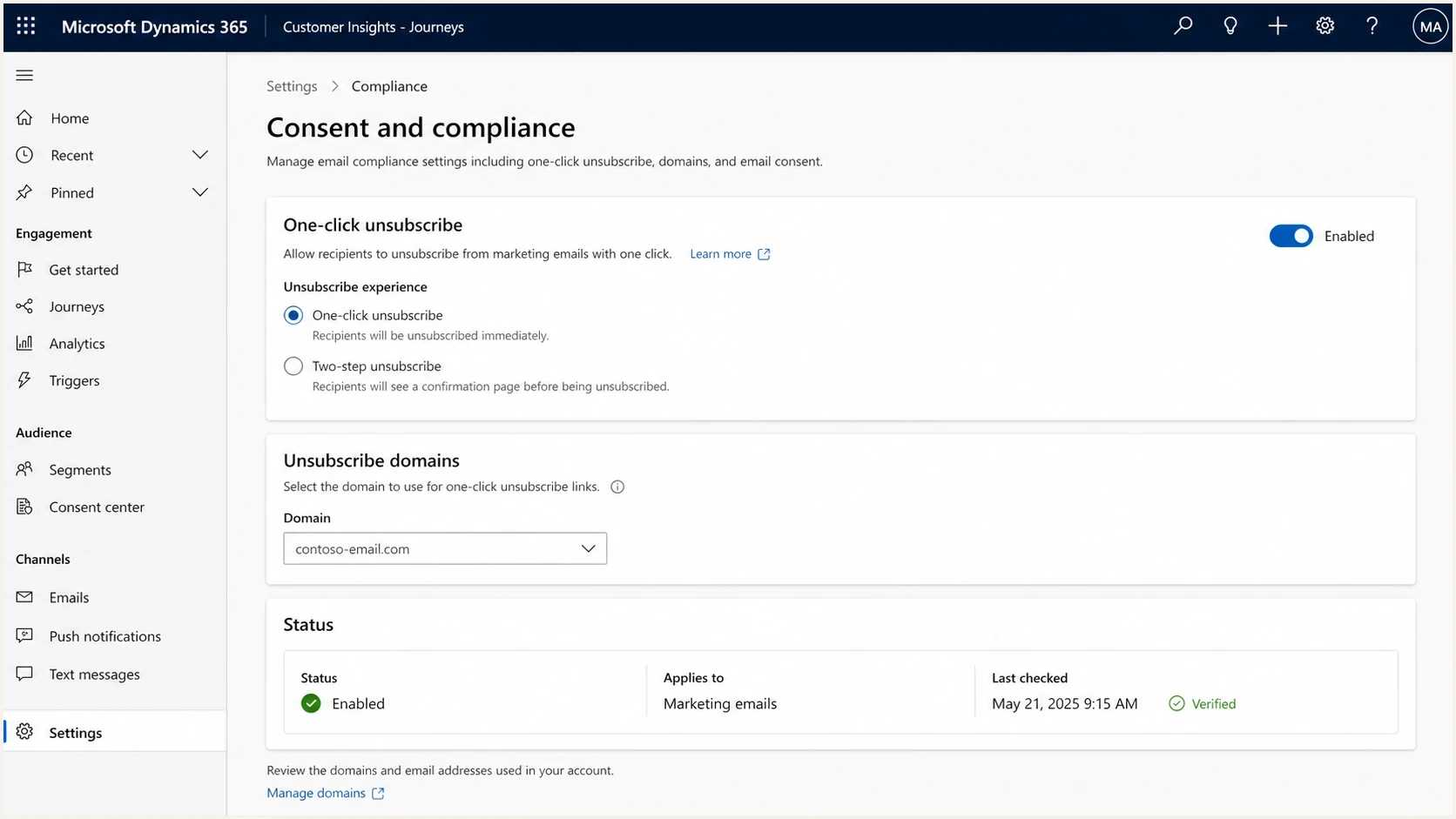
Microsoft Dynamics 365 Customer Insights - Journeys one-click unsubscribe configuration screen.
Authentication checks that affect trust
One-click unsubscribe does not replace authentication. Gmail and Yahoo sender requirements tie marketing compliance to authentication quality, complaint control, and visible unsubscribe paths. If SPF, DKIM, or DMARC is broken, the unsubscribe header can be technically correct while the sender still has deliverability problems.
Before a pilot, check the domain with Suped's domain health checker and then keep the domain under DMARC monitoring. Suped's product keeps DMARC, SPF, DKIM, hosted SPF, hosted DMARC, MTA-STS, alerts, and issue steps in the same operational view used after unsubscribe testing.
Email tester
Send a real email to this address. Suped shows a results button when the test is ready.
?/43tests passed
Use a real email tester result as a checkpoint, not as the only approval gate. A message test catches missing headers, authentication failures, and obvious formatting problems. It does not prove that every mailbox provider will show the unsubscribe button immediately.

Email tester sample report showing total score, email preview, issue summary, and per-section results
Production rollout without guesswork
If staging cannot trigger the provider UI, use a controlled production pilot instead of moving straight to a full rollout. The pilot should use a small real marketing segment with engaged subscribers, normal branding, and the same sending path used for regular campaigns.
The pilot should include server logs for the unsubscribe endpoint. Log the request method, status code, token validity, list or audience identifier, and suppression result. Do not log the raw token or email address in a way that turns logs into sensitive subscriber data.
Useful endpoint log fieldsjson
{
  "method": "POST",
  "status": 204,
  "token_status": "valid",
  "audience": "newsletter",
  "suppression": "created"
}
A good pilot outcome includes a delivered message with correct signed headers, successful POST logs, suppressed seed contacts, stable authentication, and no unusual complaint movement.
Apply suppression immediately where the sending system allows it. In all cases, honor the request within two days and prevent later automation or imports from selecting the address again. This meets the stated Gmail and Yahoo processing window while limiting repeat mail after an opt-out.
After the pilot, move the same implementation to the rest of the marketing program. Keep a rollback path, but avoid removing the one-click headers unless they are actively causing incorrect unsubscribes. If the issue is a provider UI delay, removing headers will only slow compliance.
Common failure modes
Most one-click unsubscribe failures come from treating the header URL like a normal web unsubscribe link, or testing only the inbox display without checking the underlying HTTP behavior.
- Missing POST header: The message has a footer unsubscribe link but no List-Unsubscribe-Post header.
- Unsigned headers: DKIM passes, but its h= tag does not cover both unsubscribe headers.
- Bad URL wrapping: The header URL is rewritten through click tracking and no longer accepts POST.
- Login requirement: The endpoint asks for authentication before changing subscription state.
- Wrong scope: The POST removes the person from all messages when the intended action was only a marketing stream suppression.
- No audit trail: The contact state changes, but there is no event log to prove when and why it changed.
Check the unsubscribe state after normal marketing automation events. Lead scoring, list syncs, CRM imports, and audience rebuilds should not re-add a person who used one-click unsubscribe. That regression is easy to miss in a single endpoint test.
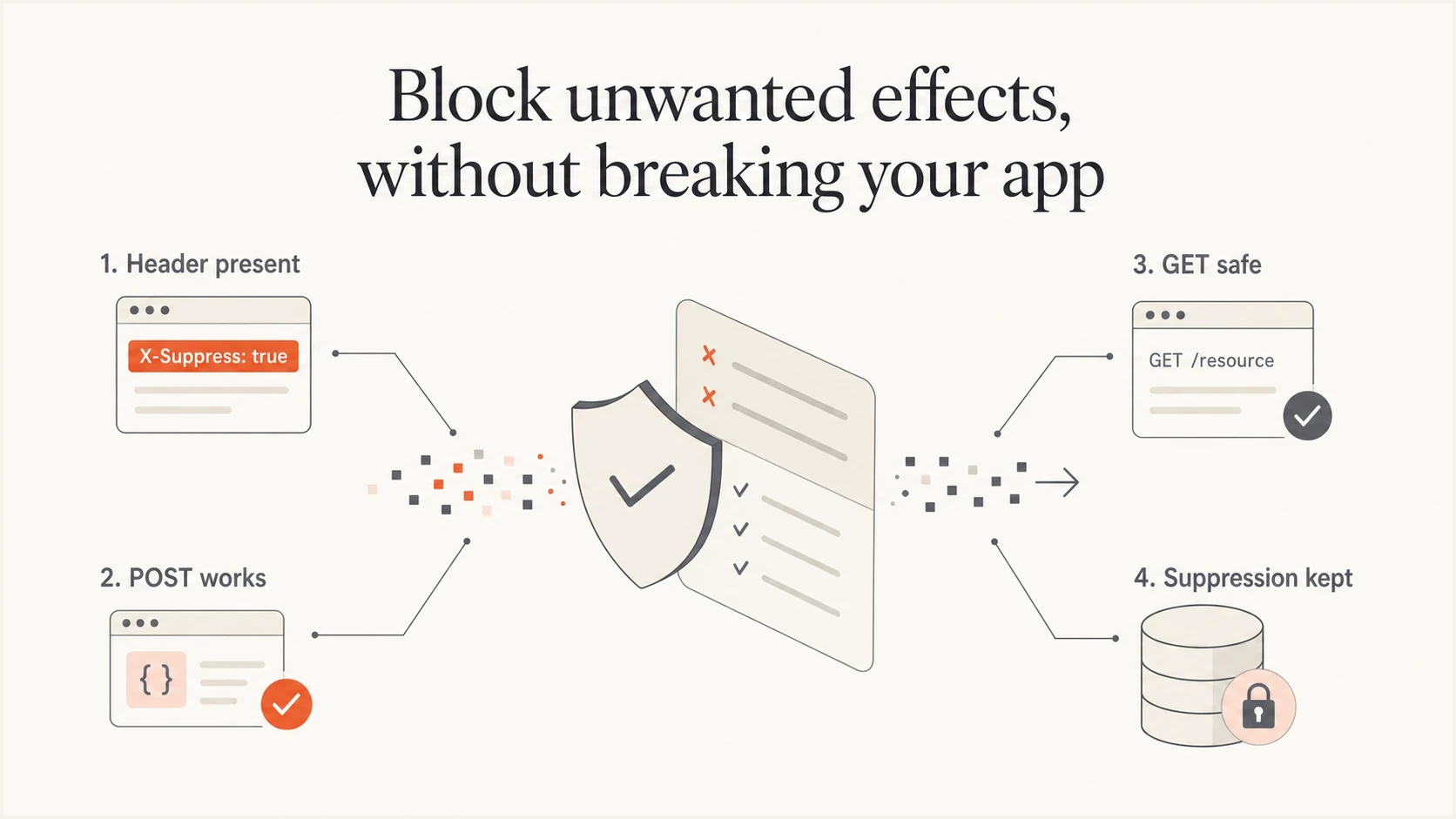
Four checks for one-click unsubscribe: headers, POST, safe GET, and lasting suppression.
Views from the trenches
Best practices
Test delivered headers first, then validate POST behavior with a controlled request log.
Use production-like sending paths, because staging volume rarely proves provider UI behavior.
Compare mailbox display across major inboxes, but treat endpoint logs as stronger evidence.
Common pitfalls
Teams often expect Gmail to show the button on new staging domains with little history.
Some implementations unsubscribe on GET, which lets scanners trigger unwanted opt-outs.
Header URLs wrapped in tracking systems can break POST handling and hide the real failure.
Expert tips
Keep unsubscribe tokens scoped to the list, signed, idempotent, and safe to repeat.
Log method, status, token validity, list scope, and suppression result for every test.
Run a small live pilot before broad release when mailbox UI cannot be forced in staging.
Marketer from Email Geeks says Outlook.com is often more forgiving than Gmail for early UI checks, so it helps as a secondary inbox test.
2024-04-24 - Email Geeks
Marketer from Email Geeks says sending the same test to a header inspection mailbox and a personal Gmail account catches cases where one source reports a different result.
2024-04-25 - Email Geeks
The clean test standard
The clean standard is to prove the signed headers and POST endpoint before observing the mailbox UI. Do not use a hidden Gmail button on staging as a blocker when the functional tests pass because the provider UI depends on sender signals outside the header itself.
Approve one-click unsubscribe for production after a real delivered message has the correct DKIM-signed headers, the POST endpoint suppresses the user without extra steps, GET is safe, a small live pilot passes, and sender health is monitored. Suped's product supports the monitoring part by keeping authentication results, alerts, issue detection, and reputation checks beside the email test workflow.




