How should one-click unsubscribe links handle GET vs POST requests?

Published 18 May 2025
Updated 1 Aug 2026
10 min read
Summarize with
Updated on 1 Aug 2026: We added RFC 8058's full endpoint and authentication requirements, plus safer token guidance.
A one-click unsubscribe URL should treat GET as safe inspection and POST as the unsubscribe action. If a browser visit, link scanner, preview system, or security gateway sends GET, the endpoint should show a confirmation page, redirect to a preference center, or return a harmless status. It should not suppress the address.
The actual one-click action belongs behind POST, using the URL in the List-Unsubscribe header plus the List-Unsubscribe-Post header. When a mailbox provider supports that flow, it asks the user to confirm in the mail client, then submits the unsubscribe request to the sender with POST. That split keeps automated link checking from turning into accidental list removal.
The important caveat: the header does not tell Microsoft, Google, corporate gateways, or security scanners to avoid the URL. It tells supporting clients how to perform a confirmed unsubscribe. Scanners still fetch links. Your endpoint has to make those fetches safe.
The short answer
Use this production rule: GET explains or confirms, POST changes subscription state. That applies even when the URL exists only in the List-Unsubscribe header and not in the visible email body.
- GET: Return a page, redirect, no-op response, or method explanation. Do not unsubscribe.
- POST: Validate the signed token, unsubscribe the address for the right list or topic, and return success.
- HEAD: Treat it like inspection. Return headers only and make no subscription change.
- Other methods: Return 405 or a no-op response, depending on how strict your gateway needs to be.
Fast diagnosis
If pasting the List-Unsubscribe URL into a browser immediately opts out the recipient, the endpoint has a bug. A browser visit is a GET request. It should not be enough to change consent.
That rule also answers the common Microsoft concern. If you see unsubscribe events coming from Microsoft-owned or Microsoft-hosted IP space, look at the method first. If those requests are GET, the scanner exposed a server-side flaw. If they are valid POST requests with the one-click body, correlate them with the native unsubscribe flow and consent records before assigning a cause.
How the headers should look
The header pair is simple. List-Unsubscribe must contain at least one HTTPS URI and can also carry a mailto fallback. List-Unsubscribe-Post tells supporting clients that the HTTPS URI accepts an RFC 8058 one-click POST.
Example headerstext
List-Unsubscribe: <https://u.example.com/o/abc123>,
 <mailto:unsubscribe@example.com?subject=unsubscribe>
List-Unsubscribe-Post: List-Unsubscribe=One-Click
A one-click POST arrives as a form-style request to the HTTPS URI. The URI must identify the recipient and the list or topic because RFC 8058 provides no extra recipient fields in the POST body. Use a signed opaque URL token as the authorization control; mailbox providers do not share a browser session with your site.
Expected POST shapehttp
POST /o/abc123 HTTP/1.1
Host: u.example.com
Content-Type: application/x-www-form-urlencoded

List-Unsubscribe=One-Click
The sender still needs a visible unsubscribe option in the message body for promotional mail. That footer link can open a preference page, but it does not replace the RFC 8058 header flow.
RFC 8058 requirements beyond the method
The GET-versus-POST split is central, but full RFC 8058 compliance also depends on message signing and exact endpoint behavior.
- HTTPS URI: Include at least one HTTPS URI in List-Unsubscribe. A mailto URI can be an additional fallback.
- DKIM coverage: Apply a valid DKIM signature that covers both List-Unsubscribe headers in its h= tag.
- Request context: Do not depend on cookies, HTTP authorization, or data from an earlier browser session.
- Body encoding: Accept multipart/form-data and application/x-www-form-urlencoded with the one-click value.
- Redirects: Return success directly. RFC 8058 says the sender must not return an HTTPS redirect for the POST.
- Receiver consent: A receiver must not send the POST without user consent, although the RFC leaves the consent interface to the receiver.
Correct headers do not force a mailbox provider to display a native unsubscribe control. Provider eligibility checks can still consider sender reputation and message classification. Current Google guidance and Yahoo guidance target marketing or subscription mail; transactional messages such as receipts and password resets are excluded.
GET versus POST behavior
The easiest way to avoid mistakes is to design the endpoint as two separate behaviors that happen to share a URL. The token parsing can be shared, but the state-changing branch should only execute for POST.
GET path
- Purpose: Let humans and scanners inspect the URL safely.
- Response: Show a confirmation page, preference center, or harmless status.
- State: Do not change subscriber status, list membership, or consent records.
POST path
- Purpose: Process a confirmed one-click unsubscribe.
- Response: Return 200 or 204 directly after accepting the request.
- State: Suppress only the intended address, list, brand, or topic.
|
|
|
|---|---|---|
GET | Show page or no-op | 200 |
HEAD | No state change | 200 |
POST | Unsubscribe | 204 |
PUT | Reject or no-op | 405 |
Recommended endpoint behavior by HTTP method.
Do not try to fix scanner behavior with IP allowlists, user-agent checks, or assumptions about which mailbox provider owns a request. Those signals change. The HTTP method and a valid signed token are more dependable controls.
Why scanners still hit unsubscribe URLs
Mail systems inspect URLs for safety, reputation, policy, and rendering. They can fetch links in message bodies and headers before a person clicks anything. Some fetches come from mailbox providers, some come from corporate security gateways, and some come from client preview systems.
The List-Unsubscribe-Post header does not block those checks. It only advertises that a one-click POST endpoint exists. That is why the server must be safe by default. A safe endpoint treats every unsolicited GET as inspection.
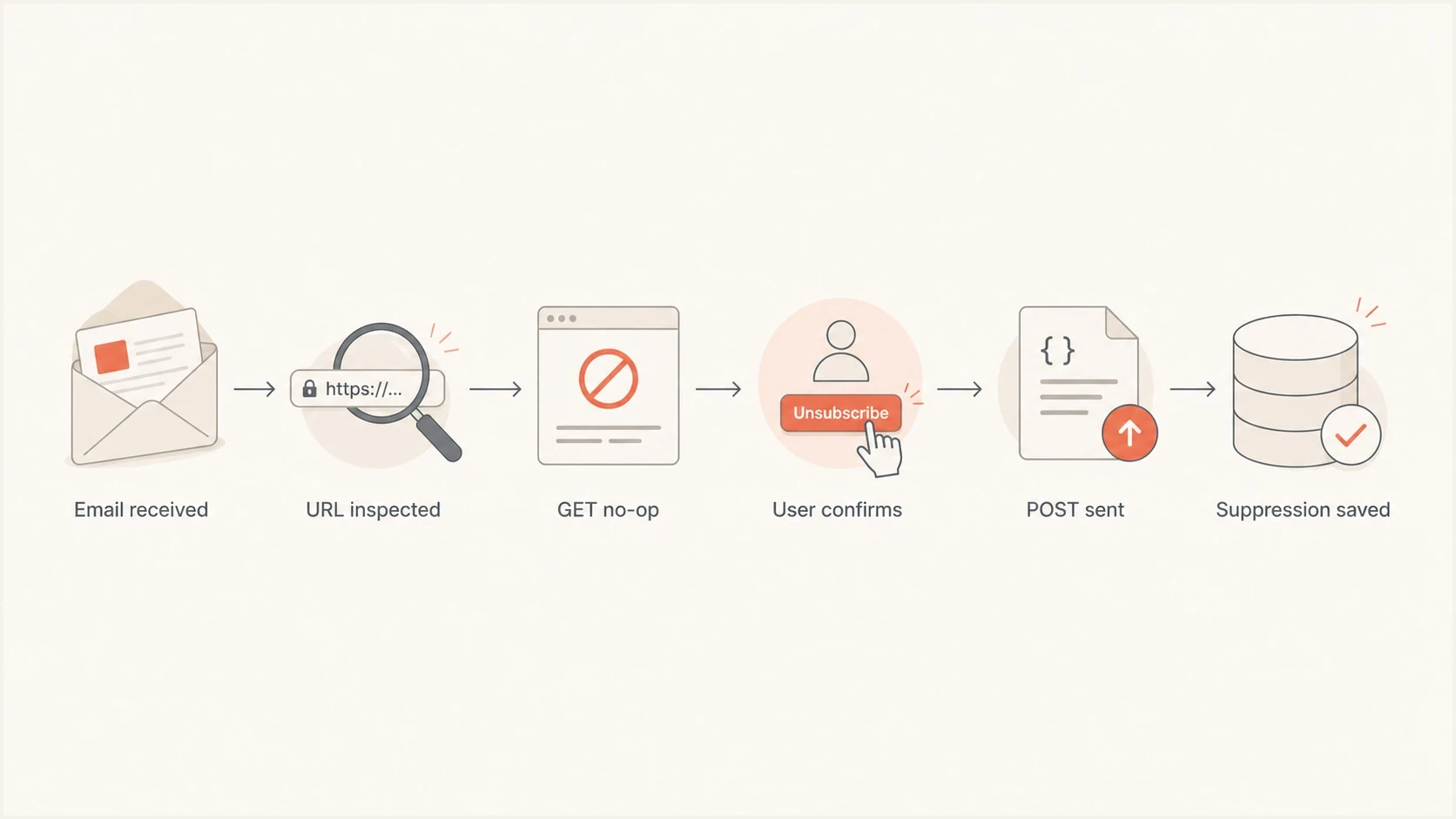
RFC 8058 unsubscribe flow where GET is a no-op and POST records the suppression.
This is also why a sudden wave of unsubscribes can appear after a mailbox provider changes scanning behavior. The bug can sit unnoticed for months, then a new scanner path starts visiting header URLs. The scanner did not create the unsafe behavior; it revealed it.
For broader inbox compliance, pair endpoint logs with authentication monitoring. Suped's product lets teams use DMARC monitoring and deliverability alerts while developers validate the unsubscribe endpoint in HTTP logs.
Implementation pattern
Use an unguessable signed token in the URL. Bind it to the subscriber, list or topic, sending domain, and token version. Keep the token usable for old messages, or provide a safe version-rotation path that still records the opt-out.
Endpoint logicpython
if request.method not in ('GET', 'HEAD', 'POST'):
    return method_not_allowed()

token = verify_signed_token(request.path)

if request.method == 'GET':
    log_inspection(token.id)
    return confirmation_page(token)

if request.method == 'HEAD':
    log_inspection(token.id)
    return empty_success()

require_one_click_body(request)
unsubscribe(token.subscriber_id, token.topic_id)
log_unsubscribe(token.id)
return empty_success()
Avoid session-only CSRF requirements on the one-click POST route because the mailbox provider is not posting from the subscriber's logged-in browser. A normal website CSRF token breaks this flow. The URL token carries the authorization, and the POST body confirms that the request is the one-click action.
- Token scope: Include subscriber ID, list or topic ID, sending domain, and a token version.
- Token safety: Sign or encrypt it. Do not expose raw email addresses or predictable IDs.
- Idempotency: Repeated POSTs should still return success and keep the address unsubscribed.
- Audit log: Store method, timestamp, IP, user agent, token ID, and result.
- Preference scope: Remove the right mail stream, not every message type unless the user asked for that.
Practical response handling
Return a fast success response after accepting a valid unsubscribe. Do not return a redirect, login page, CAPTCHA step, or preference-center detour. Record the suppression before starting any asynchronous downstream work.
Google guidance recommends honoring unsubscribe requests within 48 hours, and Yahoo guidance requires processing within two days. Immediate suppression is safer because it prevents another scheduled campaign from reaching the recipient.
For the visible footer link, use a human page on GET. That page can include a button that submits POST. This protects against body-link scanners while preserving a clear unsubscribe path for people whose client does not support the native header UI.
Testing before rollout
Test the message headers, the endpoint method handling, and the final consent record. A header can look correct while the endpoint still unsubscribes on GET, so do not stop at header validation.
Suped's email tester helps inspect a real message for authentication and deliverability signals while you verify the unsubscribe headers and endpoint logs. For a wider domain check, use the domain health checker alongside your HTTP access logs.
Email tester
Send a real email to this address. Suped shows a results button when the test is ready.
?/43tests passed
Run direct endpoint tests with curl or an equivalent HTTP client. The exact client matters less than proving that GET does not change the database and POST changes only the intended record.
Manual endpoint testsbash
curl -i https://u.example.com/o/abc123

curl -i -X POST https://u.example.com/o/abc123 \
  -H 'Content-Type: application/x-www-form-urlencoded' \
  --data 'List-Unsubscribe=One-Click'
The first request should leave the subscriber active unless they click a form on the confirmation page. The second request should create or update the suppression record. A complete one-click test plan also covers mailbox-client rendering, footer links, mailto handling, and unsubscribe processing time.
Common mistakes
Most one-click unsubscribe problems come from treating a URL as the action instead of treating the HTTP method as part of the action. The URL identifies the request. The method decides what the server is allowed to do.
- GET unsubscribe: A crawler, previewer, or mailbox scanner can remove real subscribers.
- Shared token: One token across multiple lists makes audit trails weak and consent scope unclear.
- Weak logging: Without method-level logs, every complaint becomes guesswork.
- Forced login: A one-click POST should not require a session, password, or CAPTCHA.
- Missing fallback: Keep a visible footer unsubscribe option for clients that ignore the header.
Do not rely on scanner detection
Blocking known scanner IPs creates a fragile system. A valid user can sit behind the same network path, and a new scanner can arrive tomorrow. Method-based handling fixes the root problem.
The one-click requirements sit next to authentication and complaint controls in current bulk-sender programs. Suped's product can centralize DMARC reporting and authentication alerts; keep unsubscribe evidence in your own HTTP and consent logs.
Views from the trenches
Best practices
Treat GET as a preview path and reserve suppression changes for authenticated POST handling.
Use signed, durable unsubscribe tokens that identify the subscriber, list, and message type.
Log method, IP, user agent, token ID, result, and policy version for each event.
Common pitfalls
Letting GET change subscription status turns link scanning into accidental suppression.
Requiring a login or CAPTCHA for one-click POST breaks the mailbox-provider flow.
Using one token for every list makes consent records hard to audit after a complaint.
Expert tips
Return a plain success response fast, then process downstream preference updates reliably.
Keep the footer unsubscribe URL useful for people whose mail client ignores the header.
Compare native unsubscribe events with HTTP access logs before blaming a mailbox provider.
Expert from Email Geeks says the first diagnostic question is whether the endpoint received GET or POST, because the two methods should have different effects.
2024-05-24 - Email Geeks
Expert from Email Geeks says GET should let a person view an unsubscribe page, while POST should be the method that actually submits the unsubscribe.
2024-05-24 - Email Geeks
The production rule
One-click unsubscribe should be easy for the recipient, not easy for scanners to trigger by accident. A GET request is inspection. A POST request with a valid one-click token is the unsubscribe.
If the endpoint follows that rule, Microsoft link checks, corporate gateways, client previews, and manual browser visits stop being dangerous. The remaining work is normal operational hygiene: signed tokens, method-level logs, scoped suppression, working footer links, and authentication monitoring.




