
What causes temporary rate limiting due to IP reputation with Microsoft email servers?

Published 29 Apr 2025
Updated 25 Oct 2026
20 min read
Summarize with
Updated on 25 Oct 2026: We clarified SMTP-stage diagnosis and refreshed Microsoft SNDS and recovery guidance.
Temporary rate limiting due to IP reputation with Microsoft email servers is caused by Microsoft deciding that a sending IP has enough risk signals to slow acceptance for Outlook.com, Hotmail, Live, or MSN recipients. Common contributors are sudden volume changes, complaint spikes, poor list quality, and risky traffic on a shared IP. Investigate Microsoft 365 recipient domains separately because tenant policies and support paths differ.
The 451 response is a temporary SMTP deferral. The sending mail transfer agent (MTA) keeps the message queued and retries; if its configured queue lifetime expires, it returns a non-delivery report (NDR). A 4xx response does not confirm delivery or junk placement. Severe rate limiting can stop all acceptance for a period, even when Gmail and Yahoo delivery looks normal. Start with current SMTP evidence and a reputation review, including when SNDS is green or a delisting response reports no issue.
Typical Microsoft SMTP responses
451 4.7.650 The mail server [203.0.113.10] has been temporarily
rate limited due to IP reputation. For e-mail delivery information,
see https://aka.ms/postmaster (S775) [Name=Protocol Filter Agent]
[AGT=PFA][MxId=11BCD7A8383E2981]
[AM1PEPF000252DC.eurprd07.prod.outlook.com 2026-02-24T07:17:38.549Z]
(in reply to MAIL FROM command)

451 4.7.651 The mail server [203.0.113.10] has been temporarily
rate limited due to IP reputation. For e-mail delivery information,
see Microsoft sender guidance. (S3114)

421 RP-001 The sending IP exceeded a rate limit related to IP or domain reputation.
421 RP-002 The sending IP exceeded a per-connection rate limit tied to IP/domain reputation.
421 RP-003 The sending IP exceeded a connection limit tied to IP/domain reputation.
Sender reports document 451 4.7.650 deferrals. Microsoft's SMTP troubleshooting guidance also lists 421 RP-series responses for rate or connection limits tied to IP and domain reputation. Preserve the full response, including Protocol Filter Agent, AGT=PFA, MxId, Microsoft host, timestamp, and command phase, because the exact reply determines the next investigation step.
What the SMTP rejection stage tells you
The command phase narrows the investigation. In the sample above, Microsoft defers the transaction at MAIL FROM, before the sender transmits the message headers or body.
|
|
|
|---|---|---|
MAIL FROM | Connecting IP, EHLO identity, envelope sender | IP history, routing, connection pressure |
RCPT TO | Recipient address as well as connection and envelope data | Recipient-specific responses and invalid-address attempts |
After DATA | Message headers and body as well as envelope data | Authentication results, content, and policy |
Use the SMTP stage alongside the exact status code
Changing the subject or DKIM signature does not address a MAIL FROM deferral on that attempt. Earlier accepted traffic still contributes to reputation. A successful MAIL FROM or RCPT TO reply alone does not confirm message acceptance; look for the final success reply after DATA. This distinction follows the SMTP command sequence.
Why Microsoft applies this limit
Microsoft handles large volumes of consumer and business mail, so it uses reputation controls at several layers. IP reputation is one layer. Domain reputation, authentication, recipient interaction, spam complaints, trap data, list accuracy, content signals, and connection behavior affect acceptance and filtering decisions. Engagement metrics describe accepted mail and cannot establish the status of deferred messages.
Microsoft's sender policies cover reverse DNS, connection limits, namespace mining, complaint handling, and unsubscribe handling. Senders must not open more than 500 simultaneous connections to Outlook.com inbound servers without prior arrangement. Use a substantially lower cap while deferrals continue. Stop SMTP address probing (namespace mining), honor unsubscribe requests, and suppress confirmed invalid recipients.
When Microsoft-bound volume is small or uneven, calculate complaint rates for that segment separately. One complaint against a few hundred Outlook.com or Hotmail deliveries creates a high Microsoft-only complaint rate, and mixed transactional and promotional streams on the same IP can make the clean stream inherit risk from the weakest one.
The SMTP response names IP reputation without disclosing every contributing signal. In February 2026, senders reported S775 deferrals despite green SNDS status and passing authentication. Those reports document delivery symptoms, not a confirmed cause or proof of a current Microsoft-wide incident.
Microsoft's Outlook.com high-volume sender requirements took effect on May 5, 2025. Domains sending more than 5,000 messages per day to its consumer accounts must have passing SPF and DKIM, plus DMARC that passes through SPF or DKIM domain matching with the visible From domain. The DMARC policy can be p=none, p=quarantine, or p=reject. SPF checks the envelope sender domain, while DKIM checks the signing domain. A provider's default DKIM signature supports DMARC only when its signing domain matches the visible From domain under the applicable DMARC rules. Authentication non-compliance can produce 550 5.7.515, a permanent rejection that requires a different response from a 451 deferral.
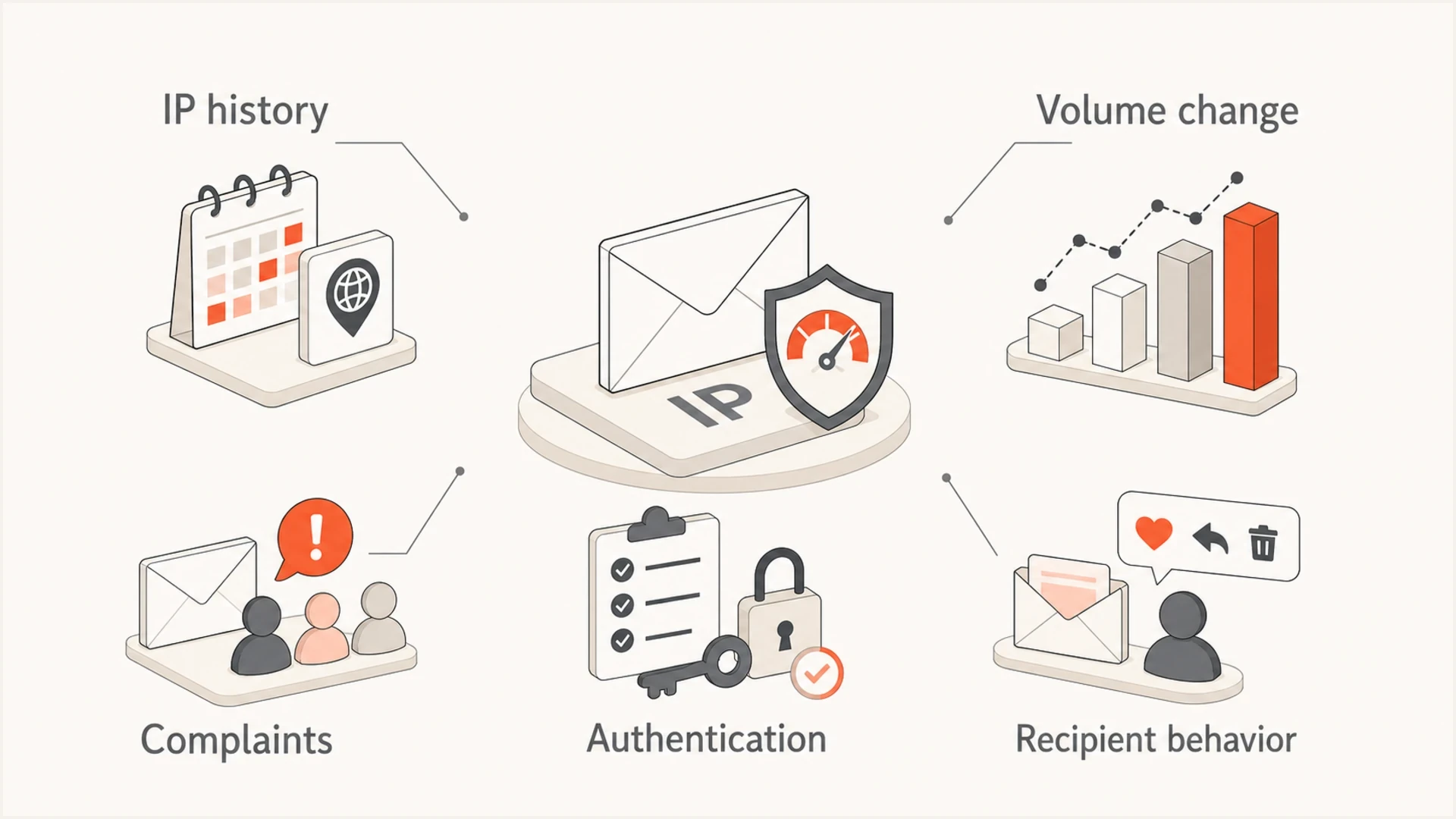
Microsoft IP reputation throttling signals including IP history, volume changes, complaints, authentication, and recipient behavior.
- Volume shift: A sudden increase, weekly burst, new campaign stream, or changed Microsoft recipient mix can make normal traffic look abnormal.
- Complaint signal: A small rise in junk reports matters when the traffic is concentrated in Outlook, Hotmail, Live, or Microsoft 365 recipients.
- Trap signal: Old, purchased, scraped, or poorly managed lists can hit addresses that Microsoft treats as abuse indicators.
- Authentication gap: SPF, DKIM, or DMARC failures make reputation recovery harder because Microsoft has less proof of sender legitimacy.
- Shared IP risk: On a shared pool, another sender's bad traffic can reduce trust in the same outbound IP.
- Retry pressure: Aggressive retries after 4xx deferrals can make the IP look less safe instead of clearing the queue faster.
Do not assume a Microsoft rate limit is a pure technical outage. It can clear without explanation, but the first response should still be a reputation review: recipients, volume, engagement, complaints, authentication, routing, and retry behavior.
Who controls the sending IP
The IP inside the Microsoft response is the outbound server that connected to Microsoft's MX, not necessarily the sender's office, device, or public internet address. Check the bounce against outbound logs or ask the mail provider who owns that IP before changing DNS or submitting a review request.
- Self-managed dedicated IP: Review logs, reduce Microsoft-specific pressure, verify rDNS and HELO identity, check SNDS access, and contact Microsoft with current evidence if deferrals continue.
- Provider-managed dedicated IP: Send the provider full bounce samples and timestamps. Confirm who controls rDNS, SNDS authorization, throttling settings, and the Microsoft support case.
- Shared IP pool: The provider must investigate the IP and other traffic on the pool. Supply your sending domain, stream, queue data, and examples so the provider can isolate your traffic from unrelated senders.
- Forwarded mail: The response can name the forwarding service's IP. Preserve the original headers and forwarding route because SPF changes and authentication handling can affect trust.
Do not submit an IP delisting or reputation request unless you control the IP or the provider authorizes you to act. On shared infrastructure, the IP owner has the logs and authority needed to correct pool behavior.
Main causes to check first
When an IP is temporarily rate limited, start with causes that change quickly. A clean IP can become risky in a day if traffic composition changes, a high-risk segment is added, authentication breaks, routing moves the same mail through a different path, content changes resemble unwanted bulk mail, or a sender starts probing too many invalid Microsoft recipients.
|
|
|
|---|---|---|
Soft bounces | Deferrals rose | Slow retries |
New IP or ramp | Trust is thin | Hold caps |
Complaints | Recipients objected | Suppress fast |
Historical trap reports | List-quality warning; current SNDS trap counts are unavailable | Review acquisition sources and suppress risky segments |
Invalid recipients | List hygiene risk | Stop probing |
Authentication | A real message fails authentication or DMARC domain matching | Check signing, SPF authorization, and domain matching |
Content classification | Relevant after DATA or through historical reputation | Check the rejection stage before changing content |
Blocklist (blacklist) | A listing warrants investigation; it does not establish Microsoft's cause | Investigate source |
Reverse DNS | Host identity weak | Verify PTR, forward DNS, and EHLO identity |
Connections | Pressure too high | Reduce concurrency |
Fast checks for Microsoft IP reputation throttling
When engagement looks strong, compare accepted volume and queue time rather than open rate alone, because throttled messages cannot generate engagement until Microsoft accepts them. During warm-up, calculate opens, clicks, complaints, and unsubscribes against Microsoft-only delivered volume, not total campaign volume. A broad domain health check helps confirm whether the domain has visible DNS or authentication problems before you spend hours chasing only IP-level causes.
?
What's your domain score?
Deep-scan SPF, DKIM & DMARC records for email deliverability and security issues.
Blocklist and blacklist status should also be checked, but it should not be treated as the only answer. A listing can explain reputation pressure, but Microsoft can throttle an IP without a visible public listing. Suped's blocklist monitoring keeps IP and domain reputation checks next to DMARC and authentication signals, so teams can compare timing instead of chasing a low-impact listing first.
Microsoft throttling investigation signals
Qualitative investigation cues, without numerical Microsoft thresholds or a measured risk score.
Stable
Monitor
Traffic and complaints match recent history.
Watch
Investigate
Volume, bounces, or recipient mix moved sharply.
Act
Mitigate
Live deferrals, complaint spikes, or new reputation issues require mitigation.
Warm-up and Microsoft-only volume
A new IP, recently repurposed IP, or newly increased Microsoft recipient segment can encounter throttling while other providers look normal. Low Outlook or Hotmail open rates during warm-up do not prove rate limiting. Confirm rising 4xx deferrals, longer queue time, or junk placement before deciding whether to reduce the Microsoft segment.
Microsoft says new IPs added under domains with existing SPF authentication can benefit from some domain reputation, but the ramp still depends on volume, list accuracy, and low junk complaint rates. Treat that as help, not immunity: a sharp Microsoft volume increase can still trigger rate limiting before the new IP has enough steady positive history.
- Keep sending: Microsoft accepted volume is stable, 4xx responses are not rising, complaints are low, and the segment has recent Microsoft engagement.
- Hold volume: Opens drop after an increase, queue time rises, or the next cohort contains older Microsoft addresses.
- Reduce volume: 4xx deferrals, 5xx blocks, complaint risk, or blocklist/blacklist changes increase.
- Restart slowly: Resume with the most active Microsoft recipients first, then add older cohorts only after acceptance and queue time hold steady.
Use Microsoft-specific caps instead of one blended warm-up calendar. Do not raise Microsoft volume because Gmail and Yahoo improved. Restore Microsoft volume in small steps after accepted mail, queue time, complaints, and deferrals remain stable across comparable reporting windows. Choose windows long enough to include a normal sending cycle and daily complaint feedback.
For a broader provider-by-provider ramp model, the related IP warm-up strategy guide helps structure Gmail and Microsoft separately.
A Microsoft open rate that trails other providers is common during warm-up. A Microsoft open rate that keeps falling while deferrals or queue depth rise is a throttling warning.
How to diagnose Microsoft throttling
The fastest diagnosis starts with the exact SMTP response, then works backward to traffic and identity. Without the exact response, teams often mix up rate limiting, spam placement, DNS failures, connection limits, and hard blocks.
- Capture response: Save the SMTP code, enhanced status code, S775 or S3114 marker, Protocol Filter Agent text, Microsoft host, timestamp, sender IP, sender domain, recipient domain, MxId, and command phase.
- Group Microsoft destinations: Track outlook.com, hotmail.com, live.com, and msn.com together when they show the same response pattern. Report Microsoft 365 custom domains separately by receiving tenant and exact response before sharing queue limits.
- Separate streams: Break reporting out by transactional, marketing, lifecycle, and automated mail so the risky stream is visible.
- Compare history: Check whether Microsoft volume by hour, Microsoft-only complaint rate, recipient-domain concentration, bounces, inactive recipients, or invalid-recipient attempts changed in the last 24 to 72 hours.
- Check warm-up status: Confirm whether the IP, sending domain, DKIM selector, or Microsoft recipient segment is new, recently reactivated, or receiving a larger share of volume.
- Check identity: Confirm SPF, DKIM, and DMARC pass for real mail, not only for static DNS lookups.
- Review routing: Compare sending IPs, envelope domains, DKIM selectors, bounce domains, and Microsoft recipient mix before and after the first 451 response.
- Control retries: Back off retry pressure so the IP does not keep hitting Microsoft while trust is already reduced.
If the message is accepted by Microsoft but lands in junk, switch workflows. Pull the delivered headers and inspect SCL, BCL, Authentication-Results, X-Forefront-Antispam-Report, and tenant transport rules. Post-acceptance filtering needs message and policy evidence, not an IP score alone.
A live inbox test helps because DNS records can look valid while the actual message fails domain matching, signs with the wrong DKIM selector, or routes through a different IP than expected. Sending a real message through an email tester gives you message-level evidence before you change DNS or throttle the wrong stream.
Email tester
Send a real email to this address. Suped shows a results button when the test is ready.
?/43tests passed
For domain owners, Suped's DMARC monitoring helps identify sending sources, authentication failures, and unexpected domain use. Compare those changes with the sending IP and the first deferral timestamp in your MTA logs.
Issues page showing top issues, verified sources, unverified sources, and authentication pass rates
DMARC aggregate reports do not contain SMTP deferral replies or queue status. They also do not provide message-level results for attempts rejected before the receiver evaluates the headers. Keep SMTP logs and queue metrics alongside Suped's authentication evidence to investigate the rate limit.
When the IP looked clean yesterday
A clean history and strong engagement do not protect an IP forever. Reputation is rolling and conditional. A sender can look healthy, then hit a Microsoft rate limit after a campaign, database change, routing change, pool rebalance, batch split, or Microsoft-side classification change. A dedicated IP does not cancel this risk when Microsoft sees too little steady positive mail or a sudden change in traffic mix.
If the timing overlaps with reports from unrelated senders, mark the affected window and preserve the evidence. Compare before, during, and after the window, while checking changes in your own traffic. Similar timing supports escalation but does not establish that Microsoft caused the incident.
Common false comfort
- Green status: Sender reputation dashboards can lag behind real-time filtering.
- High engagement: Opens and clicks describe accepted mail, not the queue Microsoft is still deferring.
- Good Gmail and Yahoo placement: Other mailbox providers do not prove Microsoft-specific reputation is healthy.
- No listing: A public blocklist or blacklist check does not show every Microsoft trust signal.
- Old warmup: Past warmup does not cover a new traffic mix or a sudden recipient concentration.
- Clean portal result: A delist response saying nothing was detected does not prove Microsoft accepted the mail stream.
Better interpretation
- Current behavior: Focus on the traffic sent immediately before the first 451 response.
- Acceptance data: Track accepted, deferred, and queued mail before relying on engagement metrics.
- Provider split: Measure Microsoft separately from Gmail, Yahoo, and total campaign averages.
- Recipient quality: Segment inactive Microsoft recipients and suppress risky addresses.
- Retry discipline: Reduce retry pressure and connection concurrency while reputation recovers.
- Same-window evidence: Compare complaints, bounces, routing, and authentication during the same time window.
A throttling event can clear after traffic changes or Microsoft changes its filtering. Acceptance resuming does not identify which change resolved it. Record when live SMTP results recover and compare that timestamp with your mitigations before drawing a causal conclusion.
If several clean IPs are throttled at the same time, compare the shared factors: sending domain, campaign, Microsoft recipient segment, MTA settings, DNS changes, retry policy, and mail route. Shared timing usually matters more than the individual IP history.
For cases where the pattern keeps returning, compare the event against a broader Microsoft delays troubleshooting path, especially when recipient interaction is weak or Microsoft recipients are highly concentrated.
When Microsoft tools look clean
Clean SNDS data, a normal delist response, and a clean public blacklist or blocklist check do not rule out Microsoft IP reputation throttling. Microsoft's SNDS documentation says IP status is not updated in real time and that filter status, complaints, and blocking status can differ. Use fresh SMTP replies to establish whether mail is still deferred.
Microsoft has replaced the legacy SNDS site with its new portal. Legacy automated access URLs were deprecated on June 22, 2026, so verify current report links and test data collection. Microsoft also stopped including trap-hit counts in the SNDS Data Report on July 22, 2026. A missing trap count means the field is unavailable, not that the IP recorded zero hits. Network access expires 10 months after approval; confirm the expiry in Access Control rather than relying on the deadline in the first reminder email, which Microsoft has identified as inaccurate.
The Microsoft delist portal can return nothing was detected while the same IP still receives 451 deferrals. Treat that response as one data point, not proof that receiving filters accepted the current stream. If the first response looks clean but live S775 deferrals continue, keep the case evidence current with fresh samples, timestamps, and queue data instead of assuming the issue has ended. SNDS and JMRP feedback are still useful, but their silence does not close the investigation.
When Microsoft returns 451 4.7.650 or 451 4.7.651 while those tools look clean, or when rate limiting behaves like a full delivery pause, build a support-ready evidence pack before moving traffic to new IPs. That evidence should show the first bad timestamp, affected IPs, affected recipient domains, exact SMTP replies, queue depth, retry cadence, authentication pass results, and what changed in the mail stream.
- SNDS and JMRP: Review SNDS IP status, volume, complaint indicators, and JMRP feedback for the affected dates, but do not treat missing data as proof of no problem.
- Feedback coverage: Confirm that active IP ranges remain authorized, network access has not expired, current automated report links work, and JMRP feedback-loop settings are active.
- Bounce samples: Collect full responses with S775, S3114, Microsoft hostnames, MxId values, timestamps, and the command phase where the rejection happened.
- Traffic evidence: Show Microsoft-recipient volume, invalid recipients, complaint handling, retry settings, and whether the stream is transactional or bulk.
- Change log: Include recent DNS edits, DKIM selector changes, route changes, pool movement, imports, campaign launches, and suppression changes.
Do not spread the problem
Moving the same traffic to a standby IP or a new provider before the risky stream is isolated can turn one Microsoft throttling event into a wider reputation problem. Move only clean, necessary mail, and keep evidence for any Outlook.com deliverability support case.
When to ask Microsoft to review it
If the throttle continues after you reduce pressure and fix obvious issues, ask Microsoft to review the affected IPs with short, factual evidence. Separate consumer-domain issues from tenant-specific Microsoft 365 issues, because Outlook.com deliverability support is focused on Outlook.com, Hotmail, Live, and MSN recipients. For tenant-specific Microsoft 365 failures, use the tenant support path and include the affected tenant context, message trace, SCL or BCL if the message was accepted, and transport policy evidence.
A recipient's Safe Senders settings affect mailbox spam handling. They do not clear a MAIL FROM IP reputation deferral: Microsoft has not accepted that message for mailbox processing. For Microsoft 365, ask the receiving tenant administrator to investigate the exact response rather than assuming a personal safe-sender entry will change it.
- Affected IPs: List each sending IP, rDNS name, HELO name, and the mail stream using that IP.
- Exact responses: Paste several SMTP replies with S775 or S3114 markers, Microsoft hostnames, timestamps, MxId values, queue IDs, and command phase.
- Recipient scope: State whether outlook.com, hotmail.com, live.com, msn.com, or Microsoft 365 tenant recipients are affected.
- Microsoft data: State what SNDS showed, whether JMRP complaints were received, what the delist portal returned, and whether live deferrals continued after a clean response.
- Traffic context: Summarize volume by hour, invalid-recipient attempts, complaint handling, feedback processing, and whether the stream is transactional or bulk.
- Remediation taken: Mention throttling, lower concurrency, risky segment suppression, authentication checks, DNS fixes, and any content rollback.
If the first response says nothing was detected but mail is still deferred, reply with fresh S775 examples and ask for review of the current throttling state, not only delisting status. Keep the wording factual and avoid mixing unrelated complaint history into the same request.
Microsoft review evidence outlinetext
Subject: Review request for Microsoft 451 4.7.650 on 203.0.113.10

We are seeing temporary rate limiting for mail from 203.0.113.10
to Microsoft recipient domains.

Example response:
451 4.7.650 The mail server [203.0.113.10] has been temporarily
rate limited due to IP reputation. (S775) [Name=Protocol Filter Agent]
[AGT=PFA][MxId=11BCD7A8383E2981]
(in reply to MAIL FROM command)

Affected recipient domains include outlook.com, hotmail.com, live.com,
and msn.com. The affected stream is transactional account mail.

We have reduced concurrency, slowed retries, paused non-essential mail,
reviewed invalid-recipient attempts, and confirmed SPF, DKIM, DMARC,
rDNS, and HELO identity.

SNDS shows no red status for the affected date, JMRP complaints were
processed, and the delist portal returned no listed status. Live 451
S775 deferrals are still occurring.

Please review whether the current rate limit can be adjusted or whether
there is a specific reputation issue we should resolve.
Keep the request narrow
Do not send a long complaint thread as the first request. Microsoft needs enough detail to identify the traffic, confirm that pressure has been reduced, and decide whether the limit or reputation classification should be reviewed.
Recovery steps that usually work
The goal is to lower risk signals and keep legitimate mail flowing. Apply destination-specific queue controls to Outlook.com, Hotmail, Live, and MSN so retry changes are measurable. Keep Microsoft 365 tenant traffic separate unless logs establish the same limiting scope.
- Throttle first: Apply Microsoft-specific caps, then reduce volume, retry frequency, and connection concurrency before making bigger routing changes.
- Pause risky mail: Stop campaigns to inactive, old, unconfirmed, recently imported, or low-engagement Microsoft recipients.
- Protect good mail: Keep transactional mail separate from bulk streams so one reputation problem does not slow everything.
- Fix identity: Verify SPF for the envelope sender and DKIM for the signing domain, then confirm DMARC passes through domain matching with the visible From domain.
- Respect SMTP codes: Retry 4xx responses with backoff, and do not keep retransmitting a message after a permanent 5xx response for that recipient.
- Rebuild the lane: After the queue stabilizes, restart Microsoft growth with recent Microsoft engagement before adding older recipient cohorts.
- Rebalance carefully: Move volume only when you know the stream is clean, because moving bad traffic spreads the problem.
- Document evidence: Keep logs, timestamps, bounce samples, volume by hour, recipient counts, authentication evidence, and mitigation steps for any sender support case.
Use scheduled backoff rather than repeated manual queue flushes. RFC 5321 recommends a general retry interval of at least 30 minutes while allowing adaptive strategies. Monitor the oldest deferred message against your MTA's configured queue lifetime so delayed mail does not expire unnoticed.
Illustrative authentication records to verify
SPF:   v=spf1 include:_spf.example.net -all
DKIM:  selector1._domainkey.example.com publishes a valid key
DMARC: v=DMARC1; p=none; rua=mailto:dmarc@example.com
These examples are placeholders, not production records to copy. Replace the SPF include and reporting address with your own values, publish the actual DKIM public key, and verify real messages. A DMARC monitoring policy helps identify legitimate senders before enforcement; it does not remove an IP reputation rate limit.
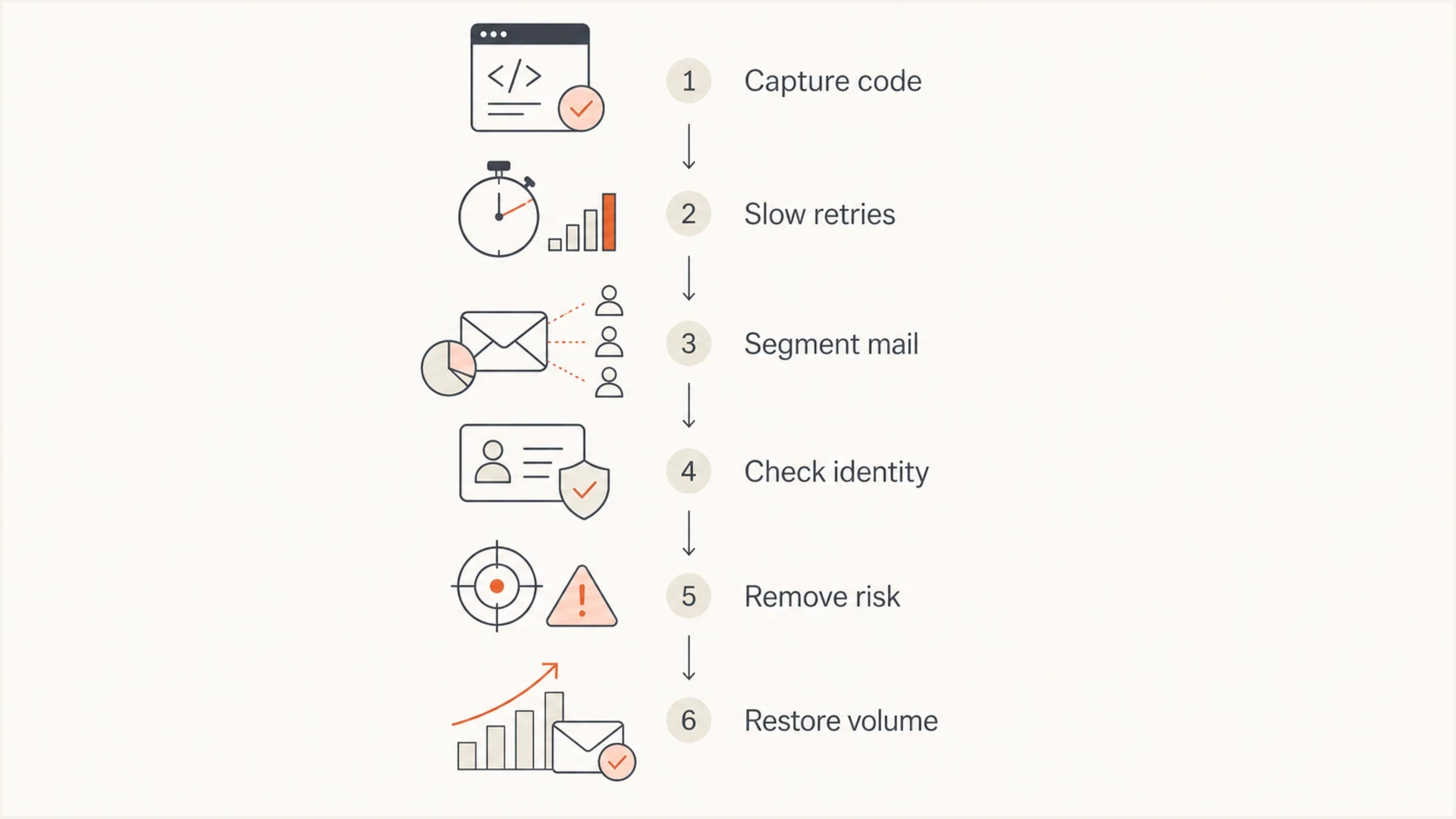
Flowchart for recovering from Microsoft 451 IP reputation rate limiting.
If the SMTP message says rate limit exceeded without naming IP reputation, the diagnosis changes slightly. Connection limits and sending cadence move higher in the queue, but the same evidence gathering still applies.
How Suped helps during Microsoft throttling
Suped is our DMARC and email authentication platform. During Microsoft throttling, use it to review sending sources and authentication changes, then compare those findings with SMTP deferrals and queue data from your mail infrastructure.
SMTP evidence to retain
- Responses: Keep full SMTP replies, timestamps, queue IDs, and the connecting IP.
- Queue behavior: Track accepted volume, deferred messages, retry cadence, and oldest message age.
- Traffic history: Compare the affected stream and Microsoft recipient mix with a normal sending cycle.
Suped workflow
- Source review: Compare known sending sources with unexpected IPs and recent source changes.
- Authentication review: Investigate SPF or DKIM failures and failed DMARC domain matching.
- Reputation context: Compare blocklist alerts and authentication changes with the first SMTP deferral.
Keep the investigation tied to the affected IP and time window. A source or authentication change in Suped is a lead to check against the SMTP logs; Microsoft's response and the subsequent acceptance trend determine whether the rate limit continues.
Use Suped to monitor source changes, failed DMARC domain matching, SPF lookup issues, and blocklist (blacklist) changes. Correct confirmed issues, then verify recovery in Microsoft-bound SMTP acceptance and queue time.
Views from the trenches
Best practices
Capture exact SMTP replies before changing routing, volume, or authentication settings.
Compare Microsoft recipient volume, queue depth, and complaints against the prior 72 hours.
Slow retry pressure first, then isolate risky mail streams before restoring volume.
Common pitfalls
Treating a green sender status as proof that Microsoft will accept normal volume.
Moving throttled traffic to clean IPs without removing the risky recipient segment.
Ignoring shared campaign timing when several clean IPs hit the same deferral code.
Expert tips
Keep transactional mail separate so bulk reputation events do not delay critical mail.
Use authentication reporting to find new sources before Microsoft throttling appears.
Document mitigations with timestamps so support cases have evidence, not assumptions.
Marketer view
Marketer from Email Geeks says Microsoft throttling can rise suddenly even when sender reputation data still looks acceptable.
2020-04-30 - Email Geeks
Marketer view
Marketer from Email Geeks says the exact SMTP response is essential because throttling, blocking, and DNS failures need different fixes.
2020-04-30 - Email Geeks




