
How to resolve Microsoft email delays due to IP reputation and recipient interaction?

Published 12 Jun 2025
Updated 11 Oct 2026
15 min read
Summarize with
Updated on 11 Oct 2026: We updated this guide for Microsoft's current sender requirements and clearer incident escalation steps.
To resolve Microsoft email delays, first inspect the full SMTP response and public sending IP, then check reputation, recipient interaction, and queue behavior. If Microsoft returns 451 4.7.650 (S775), the receiving service has issued a temporary 4xx deferral against the public sending IP because of reputation. The sending server should queue the message and retry with normal SMTP backoff. Delivery still fails if the deferral persists until queue expiry. If the provider log contains [internal], inspect its event details to establish whether the ESP or MTA held the message before Microsoft accepted it. That marker is provider-specific.
Reducing bursts and concurrent connections limits pressure while you investigate reputation. When delays keep getting longer after several days of throttling and strict activity targeting, review engagement, complaints, suppression logic, tracking domains, list fatigue, and authentication. Also check whether the timing points to a shared sending pool or a wider Microsoft delivery incident.
First steps for Microsoft email delays
Start by pausing broad Microsoft-domain campaign sends for a short diagnostic window. Include Outlook.com, Hotmail, Live, and MSN recipients in the same investigation. Prioritize expected transactional mail and recent recipient requests: password resets, account notices, confirmed transactional mail, and campaigns to people who have shown real intent. Real intent means replies, purchases, form submissions, account logins, or recent non-automated clicks. Privacy protections make opens unreliable for recovery targeting, and automated link-following can inflate click activity.
- Capture the code: Save the full SMTP response, S775 or other subcode, timestamp, recipient domain, sending IP, envelope sender, message type, command stage, and queue retry history.
- Separate queues: Use provider logs to distinguish a Microsoft receiver deferral from a local send hold. A local hold can be triggered by earlier Microsoft responses.
- Keep sane retries: Use normal SMTP backoff and track queue age and expiry. Limit concurrent connections and avoid rapid retries. Keep 451 reputation deferrals separate from invalid-address hard bounces in suppression rules.
- Tighten audience: Send only to recipients with recent human interaction, not just opens, bot-like clicks, or legacy activity tags.
- Remove risky content: Audit shared tracking domains and redirect destinations. Remove broken campaign links and domains associated with unwanted mail; shared tracking alone is not proof of a reputation problem.
- Escalate cleanly: Use Sender Support with the full response and affected IP while mitigation continues. Escalate promptly when expected transactional mail is affected.
Do not keep repeating the same mitigation
If Microsoft delays are getting longer while you keep sending to the same "active" segment, audit that activity definition alongside IP telemetry and incident timing. Repeated rate cuts do not establish the cause or repair recipient targeting.
- Bad signal: A 45-day active segment built on opens and generic link clicks can include recipients who are not actually engaged.
- Better signal: Use recent direct actions such as purchases, replies, form submissions, account sessions, or preference updates.
Read the actual Microsoft response
The first branch in the investigation is the delay text. A 451 4.7.650 S775 response explicitly identifies IP reputation at the receiving service; other temporary SMTP responses require their own diagnosis. A provider-specific internal suspension points to your ESP, outbound gateway, or MTA queue handling. Both can happen at the same time, which is why the exact response matters more than the headline symptom.
Microsoft deferral and provider-specific suspension examplestext
451 4.7.650 The mail server [a.b.c.d] has been temporarily
rate limited due to IP reputation. (S775)

451 4.3.0 [internal] Sending IP temporarily suspended.
|
|
|
|---|---|---|
4.7.650 S775 | IP reputation deferral | Restrict low-intent mail |
550 5.7.515 | Sending-domain authentication rejection | Fix SPF, DKIM, and DMARC before resending |
4.3.0 [internal] | Sender-side queue stop | Review ESP or MTA rules |
Persistent 4.7.650 | Receiver continues to defer the IP | Check telemetry and incident timing |
Rapid repeated retries | Retry policy is too aggressive | Apply SMTP backoff |
Use the SMTP response to choose the next action.
Separate temporary deferrals from permanent policy rejections. 550 5.7.515 requires authentication remediation, while a 451 belongs in the retry queue. A final non-delivery report can contain an earlier 451 after retries expire, so read both the final status and embedded remote response. Do not suppress a recipient as invalid solely because of an IP reputation or authentication failure.
Do not confuse an Outlook.com destination deferral with an Exchange Online outbound limit. The 451 4.7.650 S775 response names the public sending IP and comes from the recipient side. Microsoft 365 mailbox or tenant sending limits use their own responses, so investigate those only when your trace shows Exchange Online restricted submission before the message reached the destination.
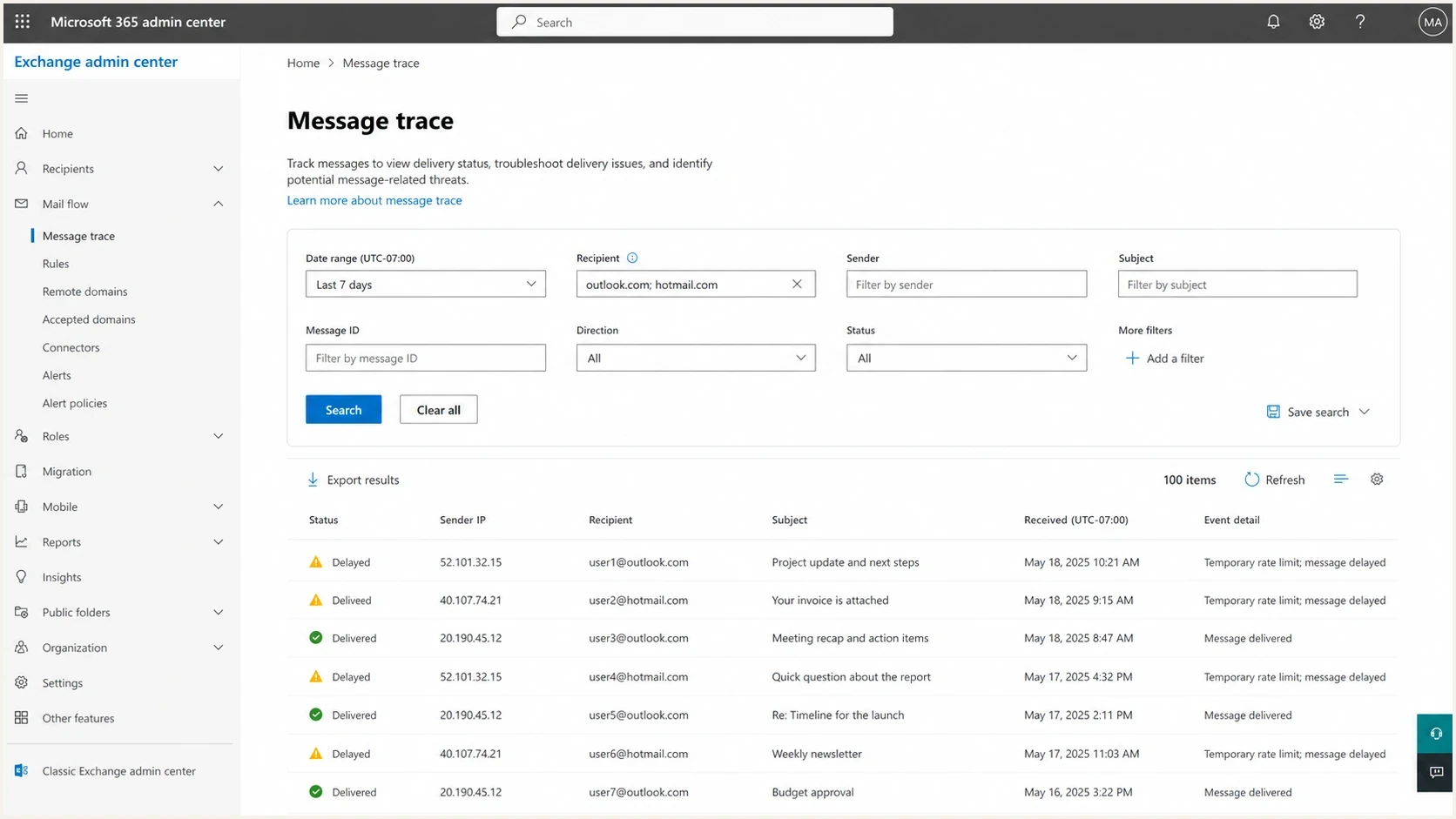
Microsoft Exchange admin center message trace with delayed Outlook and Hotmail deliveries.
Check shared IPs and wider Microsoft incidents
A sudden S775 spike across unrelated sending IPs needs investigation alongside recipient targeting. Compare the first failure time in UTC across sending pools and Microsoft recipient domains. A synchronized start is a reason to investigate a wider filtering event, but it does not establish the root cause.
- For a shared IP, ask your ESP or hosting provider to identify the public IP and investigate other traffic in that pool. The provider usually controls SNDS access and Microsoft escalation for that address space.
- Compare affected IPs with unaffected ones, including dedicated IPs, transactional streams, campaign streams, and non-Microsoft destinations. Check whether an IP reassignment or volume change preceded the failures.
- Check outbound logs for unexpected traffic or compromised accounts before calling the incident external. Keep evidence of authentication results and unchanged sending patterns.
- Avoid rotating through fresh IPs to escape throttling. New IPs need sending reputation, and an uncontrolled switch obscures the original evidence.
Senders in a February 2026 Microsoft Q&A discussion reported concurrent S775 deferrals despite passing authentication and low complaint readings. Treat those reports as historical context when comparing current timestamps. The investigation steps above are diagnostic recommendations, not a finding that Microsoft caused your incident.
If expected mail remains deferred after a "no issues detected" support reply, respond in the same case with recent complete SMTP responses, queue age, and affected IPs, and request escalation. Continue controlled retries and sender checks while support investigates.
Why rate reduction alone does not fix reputation
A fixed cap like five messages per second can reduce pressure, but it does not repair reputation by itself. At five messages per second continuously for 24 hours, a sender attempts 432,000 messages; recipient count depends on recipients per message. Microsoft identifies complaints and list accuracy as filtering factors in its sender support guidance. It does not publish the exact weighting of opens, clicks, or individual recipient actions, so use human activity to improve targeting rather than as proof of what caused S775.
Rate-focused recovery
- Best use: Temporary pressure relief when a sender has ramped too quickly.
- Weakness: It does not fix complaints, stale lists, bad links, or poor recipient demand.
- Failure sign: Deferrals keep stretching even though send speed has dropped.
Signal-focused recovery
- Best use: Improving recipient targeting when audience quality and complaints are contributing to reputation problems.
- Strength: It changes the recipient mix, content risk, and sender evidence.
- Success sign: Deferrals shorten before volume is fully restored.
Example internal delay thresholds
Illustrative operational thresholds, not published Microsoft limits. Set limits around your usual queue age and message urgency; password resets need much shorter delivery windows.
Shorter queue
0-30 min
Compare with normal delivery timing; this is already too slow for many time-sensitive messages.
Watch
30-120 min
Investigate the delay trend and protect expected transactional mail.
Restrict
2-6 hours
Campaign mail should be limited to high-intent recipients.
Pause campaigns
6+ hours
Pause new campaign sends while queued mail continues normal SMTP retries.
Rebuild around real recipient intent
The cleanest recovery plan starts by redefining "active." A click caused by a security crawler is not the same as a person reading and choosing to act. Opens are noisy. Old clicks prove little. A recipient who has not bought, replied, logged in, updated preferences, or explicitly requested mail recently should not sit in the first recovery cohort.
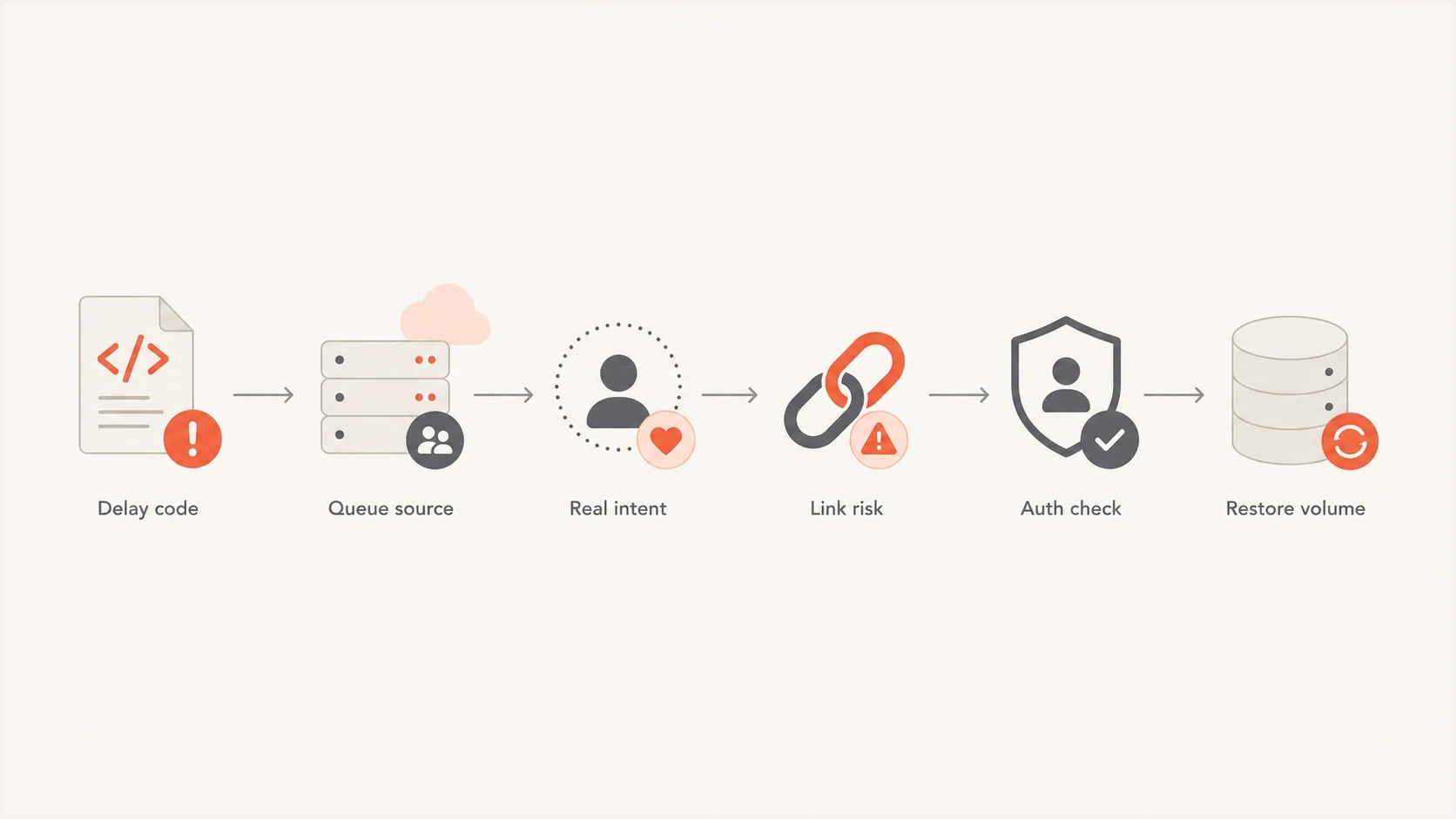
Flowchart for resolving Microsoft email delays by checking code, queue, intent, links, and authentication.
- Build cohort one: Microsoft recipients with recent direct action and no invalid-address hard bounce, complaint, unsubscribe, or existing suppression. A 451 reputation deferral alone does not make an address invalid.
- Build cohort two: Recipients with a recent click that matches a normal human pattern and came after a known campaign send.
- Hold cohort three: Open-only, old-click, and vague activity segments stay out until delay windows shrink.
- Audit links: Review shared tracking domains and redirect chains. Remove broken campaign URLs or domains associated with unwanted mail, and verify that redirects reach the expected destination.
For deeper Microsoft-specific recovery patterns, the Microsoft throttling guide covers the related throttling mechanics, while the Outlook inbox placement page covers spam-folder recovery.
Check authentication and sender infrastructure
Authentication does not repair IP reputation by itself, but broken SPF, DKIM, DMARC, reverse DNS, or sender-domain matching makes recovery harder. Confirm DMARC passes through SPF or DKIM with a domain that matches the visible From domain under DMARC rules. Keep the return-path, DKIM signing domain, HELO name, and reverse DNS stable while you test recovery. Verify that the public IP has a valid PTR record whose hostname resolves back to that IP, and use a valid public hostname in EHLO/HELO.
Microsoft defines a high-volume sender as a domain sending 5,000 or more messages to its consumer email services with the same visible From domain. Once that domain qualifies, both SPF and DKIM must pass, a valid DMARC policy is required, and at least one authenticated domain must match the From domain under DMARC rules. A policy of p=none meets the minimum policy requirement; a signature using only an unrelated provider domain does not satisfy DMARC through DKIM. Microsoft documents 550 5.7.515 remediation for authentication failures.
Authentication record templates with placeholdersdns
_dmarc.example.com. TXT
"v=DMARC1; p=none; rua=mailto:dmarc@example.com"

example.com. TXT
"v=spf1 include:_spf.example.net -all"

selector1._domainkey.example.com. TXT
"v=DKIM1; k=rsa; p=BASE64KEY"
Run Suped's domain health check before you ask Microsoft to reassess the sender. Use Suped's DMARC monitoring to review sending sources and SPF or DKIM failures after authentication changes. Replace the example SPF include and DKIM public key above with your provider's actual values; p=none does not request quarantine or rejection. The rua address is the aggregate-report destination.
Email tester
Send a real email to this address. Suped shows a results button when the test is ready.
?/43tests passed
Send a real message through the email tester after each infrastructure change. Inspect the received message headers to confirm SPF, DKIM, and DMARC results for that sending path. A passing test does not guarantee Outlook.com acceptance or inbox placement.
Use Microsoft SNDS and JMRP for delivery evidence
For Outlook.com, Hotmail, Live, and MSN recipients, Microsoft Smart Network Data Services (SNDS) and the Junk Mail Reporting Program (JMRP) add evidence that a general queue log cannot provide. SNDS reports IP-level sending and reputation signals for address space you control. JMRP provides complaint feedback when users report unwanted mail. Use the current SNDS portal and confirm that network authorization and JMRP feeds remain active after the 2026 migration. Ask your provider for these checks when it owns the sending IPs.
- Match the public IP: Investigate the IP printed in the 451 response, not a private relay address or the IP you expected the ESP to use.
- Review SNDS by date: Compare available complaint data, filter results, IP status, and volume with the first day delays increased. Missing fields or days are unavailable evidence, not zero incidents; do not assume a spam-trap count is available.
- Process JMRP complaints: Investigate every complaint report. Suppress an identified complaining recipient from the affected campaign stream and audit acquisition. If the report does not identify a recipient, use available message identifiers and your own logs rather than assuming recipient-level suppression is possible.
- Use the right support route: Submit the affected IP and full SMTP response through Outlook.com sender support for S775. A "not listed" or "no issues detected" response does not establish that reputation throttling has ended.
- Preserve S775 evidence: Keep complete responses with message IDs and Microsoft host timestamps so support can correlate repeated deferrals.
Microsoft's SNDS FAQ explains that filter results, complaint rates, and blocking status are different indicators. A green filter result or a low complaint rate does not prove delivery is unrestricted. Network access expires 10 months after approval unless reattestation is approved, so verify access before interpreting a gap in reporting.
A clean portal result is not a delivery guarantee
A listing check or an initial support review is only part of the evidence. Microsoft can still return 451 4.7.650 when reputation throttling remains active. Keep campaign volume restricted until queue delay and deferral rate improve, and request escalation with fresh responses if expected mail remains deferred.
Use the right remediation path
Microsoft delay recovery has two tracks. The operational track is to reduce unwanted mail, check recipient targeting, audit risky links, and control retries. The administrative track is to contact the provider or Microsoft sender support with evidence while those checks continue. Include exact error codes, authentication results, suppression handling, available Microsoft telemetry, and the scope of the affected traffic. Expected transactional mail that remains deferred warrants prompt escalation.
What to include in a Microsoft support request
- Sender facts: Public sending IPs, shared or dedicated pool ownership, sending domains, return-path domains, and affected mail streams.
- Error proof: Full 451 4.7.650 S775 responses, message IDs, retry timings, command stage, and the date the delays began.
- Mitigation proof: Reduced Microsoft volume, stricter segmentation, removed links, cleaned suppressions, and controlled retry behavior.
- Telemetry proof: Available SNDS status by affected IP, JMRP complaint handling, reporting gaps, and any previous support or listing-check response.
- Auth proof: SPF pass, DKIM pass, DMARC pass with a matching From domain, valid reverse DNS, and stable EHLO/HELO identity.
For mail involving Microsoft 365 business tenants, start with Microsoft's delivery issues documentation and the tenant's message trace. Follow the remediation instructions in a Microsoft 365 banned-IP NDR, including sender.office.com when specified. For Outlook.com, Hotmail, Live, and MSN S775 deferrals, use Outlook.com sender support.
Also check IP and domain reputation outside Microsoft. A blocklist (blacklist) listing is additional evidence to investigate; a clean result does not rule out Microsoft throttling. Suped's blocklist monitoring helps catch those listings alongside authentication and DMARC changes.

Issue steps to fix dialog showing the issue overview, tailored fix steps, and verification action
Monitor recovery without guessing
Measure recovery through queue behavior. Track Microsoft deferral rate, median delay, 95th percentile delay, accepted volume, JMRP complaint count, invalid-address hard bounces, SNDS status, spam-folder placement, and the percentage of mail going to the strictest cohort. SMTP acceptance does not prove inbox placement. If delays and complaints remain controlled across consecutive sending periods, increase volume in small steps. If delays are flat or worse, do not add cohort two yet.
Keep a daily incident log with the same fields every time: accepted Microsoft volume, deferred Microsoft volume, longest queue age, complaint count, hard bounce count, SNDS status, and segment used. This turns recovery into a controlled change instead of a debate about anecdotes. When one variable changes, leave the others stable for at least a full sending day to make the next comparison easier to interpret; a daily change alone does not prove causation.
Recovery cohort plan
Illustrative shares of baseline Microsoft volume sent or withheld. The percentages and day labels are planning examples, not Microsoft requirements or a fixed recovery schedule. Expand only when delivery and complaint evidence supports it.
High intent
Recent clicks
Held back
Use Suped's DMARC reporting to compare sending sources and authentication failures during recovery. Measure Microsoft SMTP deferrals and queue age in your ESP or MTA logs. DMARC aggregate reports describe authentication outcomes and policy handling; they do not measure delivery delay or inbox placement.
Views from the trenches
Best practices
Store exact SMTP responses with recipient domain and queue timing before changing rates.
Define active recipients by recent human actions, not opens or crawler-like link events.
Treat shared tracking and link domains as part of sender reputation during recovery.
Common pitfalls
Assuming slower sending will fix reputation when recipients still ignore the mail.
Mixing internal queue suspensions with Microsoft deferrals in the same incident bucket.
Sending to old active segments before Microsoft delay metrics have clearly improved.
Expert tips
Restore Microsoft volume only after median and tail delays both move down for days.
Audit queue policies when provider-side suspensions interrupt expected transactional mail.
Keep sender support requests evidence-led, with codes, timelines, and mitigations.
Marketer view
Marketer from Email Geeks says exact delay text should be captured first because the fix depends on whether Microsoft or the sender queue is refusing delivery.
2025-01-31 - Email Geeks
Marketer view
Marketer from Email Geeks says sender teams should check Microsoft sender data and ask how long the issue has been worsening before choosing a recovery plan.
2025-02-01 - Email Geeks
Next steps for Microsoft email delays
Preserve the exact errors, distinguish Microsoft deferrals from internal suspensions, restrict campaign sends to recipients with recent human intent, audit tracking links, and verify authentication. Compare incident timing across affected IPs and escalate with evidence while monitoring the next controlled send.
A dedicated IP with years of sending history can still receive S775 deferrals. Check audience quality and shared infrastructure alongside wider incident evidence before changing IPs or restarting a warm-up plan.




