How can I improve my sender reputation and inbox placement with Microsoft?

Published 9 Jun 2025
Updated 2 Aug 2026
11 min read
Summarize with
Updated on 2 Aug 2026: We added Outlook.com's enforced high-volume sender requirements and clarified how authentication, complaints, and Microsoft-only results guide recovery.
The direct answer is that Microsoft inbox placement improves when you send only to recipients with clear consent or recent engagement, keep Microsoft-specific flows conservative, meet Outlook.com's high-volume authentication requirements, control complaint risk, and rebuild sending volume slowly. A new template, fewer images, and cleaner wording help only after those fundamentals are right.
Microsoft is sensitive to how its users react after delivery. Junk reports, deletes without reading, replies, and other mailbox engagement can affect future filtering. Bounces and abrupt volume changes also affect domain and IP reputation. Track clicks and conversions as your own evidence of whether the mail is wanted, but do not treat revenue as a signal Microsoft can see.
Microsoft recovery has both a recipient-behavior problem and a technical identity problem. SPF, DKIM, DMARC, reverse DNS, and blocklist (blacklist) status create the baseline trust layer. If recipients keep ignoring or rejecting the mail, perfect authentication does not force inbox placement.
Start with the actual Microsoft problem
The first mistake is assuming Microsoft has punished a single email creative. That happens, but the harder problem is sender reputation. If the same domain or IP previously over-sent, hit unengaged addresses, or trained recipients to delete and ignore mail, Microsoft can keep filtering new campaigns even when the HTML has no history.
- Reduce volume: Send less mail to Microsoft recipients until inbox placement and conversion recover. More sends rarely repair a damaged reputation.
- Segment intent: Split true buyers, cart abandoners, quiz leads, pricing viewers, and old contacts. Do not let low-intent leads share the same recovery path as recent customers.
- Measure conversion: Open rate alone is too noisy. Track clicks, revenue, replies, unsubscribes, complaints, and Microsoft-only conversion.
- Fix identity: Use the same authenticated sending domain, DKIM domain, return-path setup, and ESP identity for streams that Microsoft should trust together.
Do not overread seed tests
A seed panel showing 100% spam does not replace real mailbox data. If a campaign has Microsoft opens, clicks, or conversions, some people are seeing it. Seed tests are useful for spotting a pattern, but real recipient behavior is the stronger signal.
- Use seeds carefully: Compare them against Microsoft-only conversion and complaint trends.
- Check real mail: Send production-like tests to accounts you control and inspect inbox, junk, headers, and authentication results.
Why Microsoft reacts differently
Microsoft has its own scoring models, so a sender can look healthy at other mailbox providers and still struggle at Outlook.com, Hotmail, Live, MSN, or Microsoft 365 hosted mailboxes. Outlook.com consumer filtering and Microsoft 365 business filtering are not identical. A business tenant can add administrator policies, gateways, user rules, and allow or block entries that do not apply to consumer accounts.
Microsoft often rewards recovery slowly. Several weeks of better engagement does not erase months of poor sending behavior when the negative pattern was strong. A repeated nudge sequence aimed at uncertain users can also create more complaints and ignored mail. The fix is a smaller, better-qualified Microsoft audience and a lower send frequency.
|
|
|
|
|---|---|---|---|
Consent | Quiz lead | Weak intent | Confirm opt-in |
Engagement | Low clicks | Junk placement | Suppress |
Volume | Spike | Throttling | Ramp slowly |
Identity | Mismatch | Lower trust | Fix DNS |
Reputation | Blocklist | Filtering | Monitor |
Common Microsoft inbox placement checks
Microsoft's own Microsoft guidance emphasizes reputation, clean opt-in lists, authentication, hard bounces, complaints, and consistent volume. Reputation repair comes from better future behavior, not one isolated configuration change.
Meet Outlook.com's high-volume sender requirements
Microsoft's enforced Outlook.com rules apply to domains that send more than 5,000 messages a day to Outlook.com consumer mailboxes. This covers addresses at outlook.com, hotmail.com, live.com, and msn.com. Since May 5, 2025, noncompliant messages can be rejected with 550 5.7.515. Meeting the rule allows mail to pass the authentication gate; it does not guarantee inbox placement.
- Pass SPF: Authorize each sending IP for the envelope sender domain and eliminate SPF errors.
- Pass DKIM: Sign each message with the sending domain and verify that Microsoft can validate the signature.
- Pass DMARC: Publish a valid record with at least p=none, and make the authenticated SPF or DKIM domain match the visible From domain.
- Keep message hygiene clean: Use valid From and Reply-To addresses, provide a working unsubscribe path, and remove invalid recipients.
Microsoft's Outlook high-volume policy defines this authentication gate. Audit total traffic at the sending-domain level, including marketing and triggered streams, rather than checking one campaign in isolation.
Separate rejection from junk placement
A 550 5.7.515 response means the message failed the authentication gate and was not delivered. A message accepted with a 250 response can still reach Junk because acceptance and inbox placement are separate outcomes. Diagnose the SMTP response first, then examine reputation and recipient response.
Build a Microsoft-only recovery path
A Microsoft-only flow is usually necessary after reputation damage. The goal is to stop sending Microsoft users the same cadence that created the problem. This means fewer touches, clearer value, stronger intent requirements, and faster suppression when a recipient does nothing.
Risky recovery
- Same cadence: Microsoft recipients receive every promotional and triggered email.
- Broad audience: New leads, old leads, buyers, and uncertain contacts share one path.
- Open-led decisions: Open rate drives volume even when conversion is weak.
Better recovery
- Lower cadence: Microsoft users get fewer emails with clearer timing.
- Tighter audience: Recent clickers, purchasers, and explicit opt-ins get priority.
- Outcome-led decisions: Clicks, orders, complaints, bounces, and junk placement control volume.
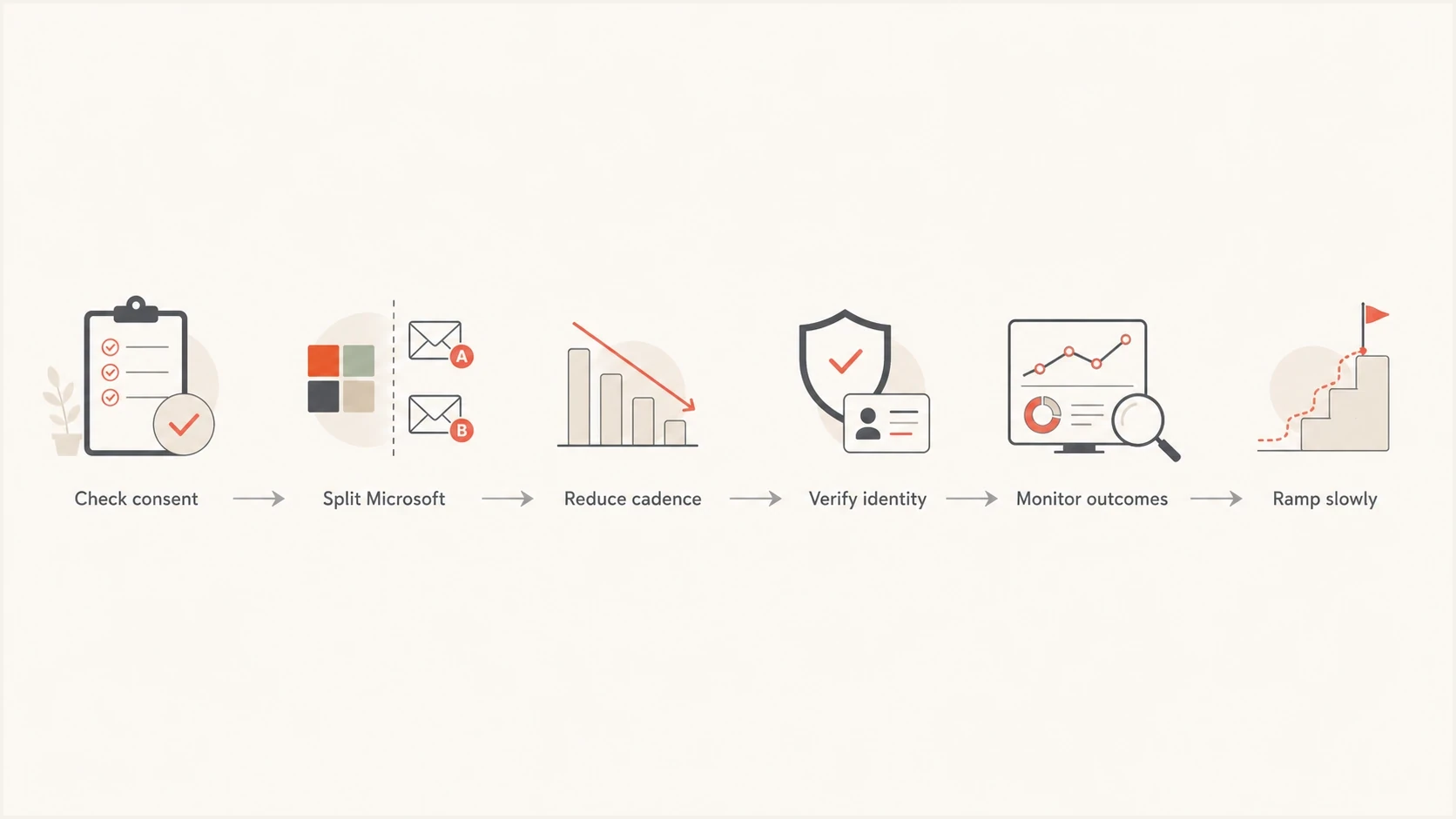
Flowchart showing a Microsoft sender reputation recovery path.
If Microsoft conversion is materially lower than results at other providers, stop treating the Microsoft segment as a normal growth channel until the pattern changes. Recovery sends should go first to recent Microsoft clickers, recent purchasers, active account holders, and people who explicitly asked for the next message.
Fix authentication before judging content
Authentication does not guarantee inbox placement, but broken, failing, or inconsistent authentication makes Microsoft recovery harder. Check whether the troubled flow uses the same visible From domain and sending service as the campaigns that perform better. A triggered flow that uses a different return-path, DKIM selector, tracking domain, or subdomain can be scored as a separate sender.
Authentication records to verifydns
example.com  TXT  "v=spf1 include:send.example.net -all"
selector1._domainkey  TXT  "v=DKIM1; k=rsa; p=PUBLICKEY"
_dmarc  TXT  "v=DMARC1; p=none; rua=mailto:dmarc@example.com"
Do not stop at record presence. Send a live message, inspect Authentication-Results, confirm SPF and DKIM pass where expected, and verify that at least one authenticated domain matches the visible From domain for DMARC.
Run a full domain health checker pass before changing creative. Look for SPF lookup problems, missing DKIM, DMARC reporting gaps, tracking-domain mismatch, reverse DNS issues, and blocklist (blacklist) listings.
During a Microsoft review, send a live message and inspect the headers. The email tester checks the actual message instead of only the DNS records.
Email tester
Send a real email to this address. Suped shows a results button when the test is ready.
?/43tests passed
DMARC aggregate reports also help separate authentication failures by source. With DMARC monitoring, you can see whether the Microsoft-problematic stream passes SPF or DKIM with an authenticated domain that matches the visible From domain, and whether a new vendor or subdomain started sending without the correct setup.
Use Suped to monitor authentication changes
Suped is our DMARC and email authentication product. During Microsoft recovery, use its DMARC reports and authentication checks to confirm that each approved source passes correctly while audience and cadence change. It also records issues and steps to fix so a DNS change can be verified instead of assumed.

Issue steps to fix dialog showing the issue overview, tailored fix steps, and verification action
For Microsoft recovery, Suped can flag new unauthorized sources, SPF lookup failures, missing DKIM, policy changes, and blocklist or blacklist listings. Configure alerts for failure spikes and use separate domain views when several brands or client domains share an operating team. Blocklist monitoring can then be reviewed alongside authentication history before volume expands.
A practical Suped workflow
- Step 1: Add the sending domain and confirm DMARC reporting is flowing.
- Step 2: Review verified and unverified sources, then fix SPF or DKIM matching gaps.
- Step 3: Enable alerts for authentication failure spikes, policy changes, and reputation issues.
- Step 4: Use the issue workflow to assign fixes and verify the DNS change after propagation.
Rebuild reputation with fewer better sends
The slow part of Microsoft recovery is that reputation reflects past behavior. If it took several months of over-sending to damage the reputation, a few weeks of positive metrics often does not repair it. Plan Microsoft recovery in phases and increase only when Microsoft-only outcomes support it.
- Phase 1: Pause nonessential Microsoft sends. Keep transactional mail and highly expected triggered mail.
- Phase 2: Send only to recent Microsoft clickers, purchasers, and confirmed opt-ins with clear intent.
- Phase 3: Add small batches of older engaged users only after complaint and junk signals stay low.
- Phase 4: Reintroduce broader flows slowly, then stop the expansion if conversions fall again.
If you need a discount flow for Microsoft users, test the clearest offer earlier and use fewer touches. Repeated reminders can increase short-term revenue while teaching Microsoft that recipients dislike your mail. Compare a shorter path with the current cadence, then keep the version with better Microsoft-only conversion and complaint results.
When a mitigation request makes sense
A Microsoft mitigation request can help after you have fixed the real causes. It is not a substitute for better consent, lower complaint risk, clean authentication, and steadier volume. If the same traffic pattern continues, any temporary relief tends to fade.
This reputation issue thread shows why relying on manual intervention alone is risky: authentication can be correct while filtering still follows reputation signals.
Avoid fake engagement shortcuts
Do not try to repair Microsoft reputation by manufacturing opens, clicks, or inbox moves with seed accounts. That creates signals that do not match real recipients. Microsoft's filtering systems have strong incentives to detect that behavior because it weakens the mailbox experience for users.
What feels fast
- Fake opens: Seed accounts open or move messages to simulate demand.
- Template focus: Teams keep rewriting copy while the audience problem remains.
- More campaigns: Volume rises because a few engagement sends looked better.
What works
- Real demand: Recipients asked for the message and have recent behavior.
- Fewer sends: The Microsoft path stops before recipients get annoyed.
- Stable identity: The same authenticated brand identity earns trust over time.
A healthier test is simple: take a small Microsoft audience that has real recent engagement, send useful mail at a lower cadence, and watch whether conversions and complaints improve. If that segment still fails, inspect authentication, sending IP history, and blacklist or blocklist status before expanding.
Views from the trenches
Best practices
Segment Microsoft recipients by consent source and recent purchase intent before sending.
Reduce cadence first, then rebuild volume after complaints and junk placement improve.
Keep authentication identifiers consistent across marketing and triggered mail streams.
Common pitfalls
Treating quiz leads like cart abandoners creates weak intent signals at Microsoft inboxes.
Using seed engagement to simulate demand ignores the recipient behavior Microsoft scores.
Expecting one clean month to repair months of over-sending leads to premature scaling.
Expert tips
Watch Microsoft-only conversion because opens alone can hide junk placement and weak trust.
Escalate to Microsoft only after consent, cadence, authentication, and complaints are fixed.
Use a separate Microsoft recovery flow with fewer touches and faster suppression logic.
Expert from Email Geeks says Microsoft applies different sender standards and reacts strongly to user dissatisfaction, so the fix is less unwanted mail.
2024-09-17 - Email Geeks
Marketer from Email Geeks says a 100% seed spam result should be checked against real opens, clicks, conversions, and complaint data.
2024-09-18 - Email Geeks
The practical recovery plan
The fastest honest path is to stop feeding Microsoft the signals that caused filtering in the first place. Send less to Microsoft recipients, require stronger consent and recent activity, measure conversion and complaints instead of opens alone, and fix every authentication inconsistency before scaling.
Once the Microsoft segment stabilizes, expand slowly. If performance drops again, roll back the last audience or cadence increase. Reputation recovery is boring by design: steady, expected, wanted mail rebuilds trust better than aggressive testing.




