Why are my emails to Microsoft domains being blocked and how can I resolve it?

Published 1 Jun 2025
Updated 12 Aug 2026
12 min read
Summarize with

Updated on 12 Aug 2026: We updated this guide with Outlook.com's high-volume sender rules and clearer Microsoft NDR resolution paths.
If Microsoft is blocking your email, read the SMTP error literally, then verify whether the identity named in the error is the one you checked. A Microsoft block can be caused by the sending IP, the HELO or EHLO hostname, reverse DNS, SPF, DKIM, DMARC, message content, recipient tenant policy, or stale reputation data inside Microsoft's systems.
For the specific error 550 5.7.1 with HELO domain listed in Spamhaus, do not stop at checking the outbound IP. Check the HELO hostname, the visible domains in the message, the reverse DNS name, and any domain used in SPF or DKIM. If all of those are clean and the rejection happens only at Microsoft domains, the next step is a focused Microsoft escalation with evidence.
Fast answer
Do not rotate IPs or rewrite DNS in a panic. Preserve the failing headers and SMTP transcripts first, because Microsoft support needs proof that the current blocklist (blacklist) state does not match the rejection.
- Check HELO: Find the hostname your mail server sends after EHLO and test that exact domain.
- Check scope: Separate Outlook.com, Hotmail, Live, MSN, and Microsoft 365 tenant failures.
- Escalate cleanly: Send one clear ask with timestamps, recipient hosts, sender IPs, and the exact error.
Why Microsoft rejects or filters your email
Your emails to Microsoft domains are being blocked because Microsoft's inbound filtering has decided the connection or message violates policy. That decision can be correct or based on an issue that has already cleared. The fix is to identify which layer is failing, clean up any sender-side issue, then escalate only after you can prove the sender-side checks are clean.
- SMTP policy reject: A 550 response means Microsoft rejected the message during SMTP, before inbox placement.
- HELO listing: The named host can be the EHLO name, not the IP address you looked up.
- Reputation block: Microsoft filters use IP reputation, domain reputation, complaints, content, and authentication signals.
- Tenant filter: For Microsoft 365 recipients, a recipient organization's policy can quarantine or reject messages.
- Stale data: If the named domain is clean everywhere now, Microsoft can still be acting on cached or delayed reputation data.
Escalation urgency
Use the rejection scope to decide how quickly to escalate.
Single tenant
Work with recipient admin
One Microsoft 365 customer blocks or quarantines your mail.
Consumer domains
Open sender support case
Outlook.com, Hotmail, Live, or MSN reject the same stream.
All Microsoft
Escalate with proof
Consumer and Microsoft 365 destinations reject clean mail.
For Outlook.com, Hotmail, Live, and MSN, Microsoft's own Microsoft postmaster page points senders toward reputation, authentication, DNS, and support submission paths. If your symptom is a bounce rather than silent junk placement, the practical companion is a Microsoft bounce guide that keeps the investigation tied to the NDR and SMTP code.
How to read the Microsoft error
The most common mistake with this incident is checking the obvious IP, seeing it is clean, and assuming the error is wrong. Sometimes the error uses stale data, but first prove that every identity Microsoft can see is clean.
Example SMTP rejection
smtp;550 5.7.1 Service unavailable
HELO domain is listed in Spamhaus.
To request removal from this list, see the lookup page.
(S8001)
Match the code to the remedy. For 550 5.7.606-649, use the IP delist portal named in the NDR. For 550 5.7.511, that portal does not apply; forward the full NDR and IP address to delist@microsoft.com as instructed in the rejection. A 451 4.7.550 response is a temporary IP restriction, so queue the message and retry with normal backoff.
What the error names
- HELO host: The hostname your sending server presents at the start of SMTP.
- Named domain: The domain Microsoft says matched a blocklist or blacklist rule.
- Policy code: The S8001 marker helps Microsoft identify the internal rejection class.
What people often check
- Outbound IP: Important, but it does not prove the HELO hostname is clean.
- IP-only status: Useful for connection reputation, but not a full blocklist diagnosis.
- Last campaign: Content changes matter, but connection-level rejects often happen before content review.
The HELO name should be a routable hostname with forward DNS and reverse DNS that make sense together. It does not need to match your visible From domain. A provider-managed hostname is acceptable when it resolves correctly and the provider controls it; a private or nonexistent hostname is not.
Basic sender identity checks
EHLO mail.example.com

mail.example.com. IN A 203.0.113.10
10.113.0.203.in-addr.arpa. IN PTR mail.example.com.

example.com. IN TXT "v=spf1 ip4:203.0.113.10 ~all"
_dmarc.example.com. IN TXT "v=DMARC1; p=none; rua=mailto:d@example.com"
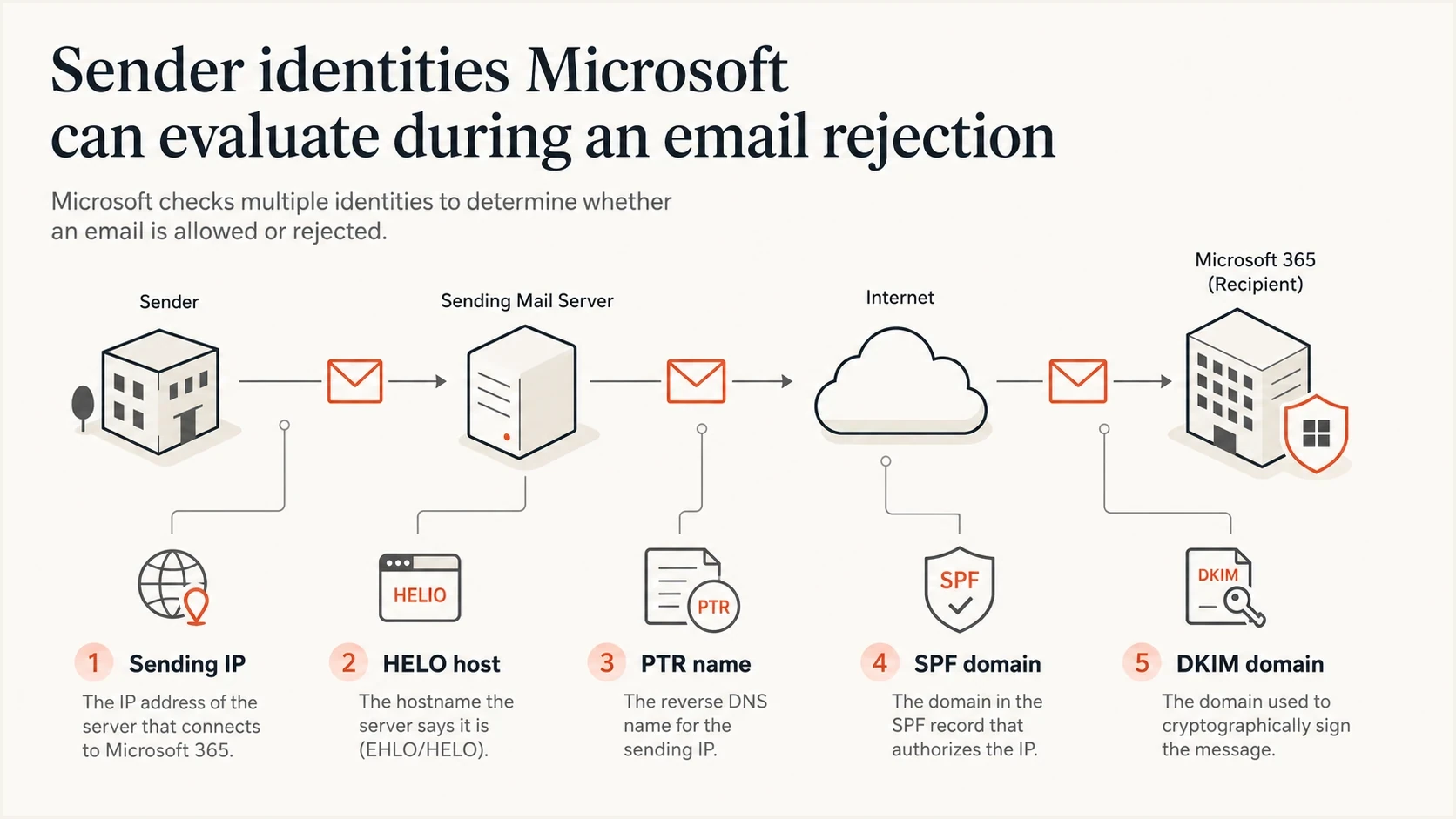
Microsoft email filtering checks the sending IP, HELO host, PTR, SPF, and DKIM domains.
Evidence to collect before escalation
Before opening or updating a Microsoft ticket, collect evidence that separates a real sender-side problem from a stale Microsoft decision. Keep the ticket short enough to understand and detailed enough to act on.
- Capture reply: Save the full SMTP error, not a paraphrase, including the Microsoft host and timestamp.
- Identify HELO: Pull the EHLO hostname from your MTA logs or message headers.
- Compare scope: Test consumer Microsoft domains and Microsoft 365 recipients separately.
- Verify DNS: Check forward DNS, reverse DNS, SPF, DKIM, and DMARC for the sending stream.
- Document reputation: Record current blocklist (blacklist) status for the IP, HELO, and sender domains.
A real message test helps because DNS passing on paper does not prove the delivered message authenticates correctly. Use the email tester to send a live message, inspect headers, and catch authentication or content issues before treating Microsoft as the root cause.
Email tester
Send a real email to this address. Suped shows a results button when the test is ready.
?/43tests passed
For a broader DNS pass, run a domain health check across the sending domain before you update the ticket. If that report shows missing DMARC, broken DKIM, or a weak SPF record, fix those first. If it is clean, include the result in your escalation notes.
What to fix before escalation
Microsoft support is easier to work with when the obvious sender issues are already removed. Treat these checks as the minimum bar before asking Microsoft to recheck a block.
Sender-side fixes
- SPF match: The envelope sender domain should authorize the connecting IP or sending service.
- DKIM pass: At least one valid DKIM signature should pass with a domain connected to your organization.
- DMARC record: Publish DMARC and make sure the domain authenticated by SPF or DKIM matches the visible From domain.
- PTR identity: Reverse DNS should resolve to a stable hostname that points back to the IP.
- List quality: Suppress hard bounces and complaints promptly. Segment low-engagement recipients for review instead of removing them based only on opens.
|
|
|
|---|---|---|
SPF | Authorized IP and pass | Sending source |
DKIM | Valid signature | Selector or key |
DMARC | Pass and domain match | Authenticated domain |
PTR | Forward-confirmed name | Reverse DNS |
HELO | Routable hostname | MTA identity |
Blocklist | IP and domains clear | Cause and delisting |
Compact triage map for Microsoft blocking incidents.
Minimum DMARC record for monitoring
_dmarc.example.com. IN TXT "v=DMARC1; p=none; rua=mailto:d@example.com"
A monitoring policy of p=none is not enforcement, but it gives you aggregate reporting. For Microsoft blocking work, those reports help prove which sources are passing, which are failing, and whether a new sender has started using your domain without proper authentication.
Meet Outlook.com's high-volume sender requirements
Outlook.com has enforced stricter authentication for domains sending more than 5,000 messages a day since May 5, 2025. At that volume, treat 550 5.7.515 as an authentication failure, not an IP blocklist (blacklist) event.
- SPF must pass for the sending domain, and its record must authorize every host used for the stream.
- DKIM must pass with a valid signature and a current public key in DNS.
- DMARC must have at least a p=none policy, and the visible From domain must match the domain authenticated by SPF or DKIM.
- Bulk and promotional mail should use clear consent, a working unsubscribe path, accurate headers, and prompt bounce suppression.
Outlook.com high-volume rejection
550 5.7.515 Access denied, sending domain [SendingDomain] does not meet the required authentication level.
The Microsoft postmaster page covers the consumer Outlook.com service and its sender requirements. Passing these checks does not guarantee inbox placement, but it removes a documented reason for rejection.
How Suped fits into this workflow
Suped is our DMARC and email authentication platform. In this workflow, Suped helps turn a Microsoft blocking incident into a short list of verified facts: which sources are sending, which pass DMARC, which fail SPF or DKIM, and whether the domain or IP has a blocklist (blacklist) reputation issue.

Blocklist monitoring page showing domain and IP checks across blocklists with importance and status
Suped combines DMARC monitoring, SPF and DKIM visibility, configured alerts, hosted SPF, hosted DMARC, SPF flattening, hosted MTA-STS, and blocklist monitoring in one place. During a Microsoft incident, use source-level results to confirm legitimate streams and hosted controls to correct approved records. Add the current blocklist status to the evidence packet. Suped cannot expose Microsoft's internal reputation data, so the NDR and Microsoft response remain authoritative.
Manual triage
- Evidence gap: DNS, logs, DMARC reports, and blocklist checks sit in separate places.
- Slow alerts: Teams often learn about Microsoft failures after support or sales reports them.
- Fragile fixes: SPF changes and sender additions can break when DNS ownership is unclear.
Suped workflow
- Issue detection: Suped highlights authentication failures and gives steps to fix them.
- Configured alerts: The team sees observed authentication changes before support reports a wider incident.
- Hosted controls: Hosted SPF and hosted DMARC reduce DNS handoffs during urgent fixes.
For MSPs and agencies, the multi-tenant dashboard is useful because the same Microsoft issue can affect several client domains at once. A client-by-client view makes it easier to see whether the issue is one domain, one sender, one IP range, or a receiver-side Microsoft problem.
When the issue is inside Microsoft
After you verify the sending IP, HELO domain, reverse DNS, SPF, DKIM, DMARC, and blocklist status, a Microsoft-only rejection becomes a different problem. At that point, treat the incident as stale Microsoft data, an internal reputation rule, a delayed sync, or a recipient-side security policy.
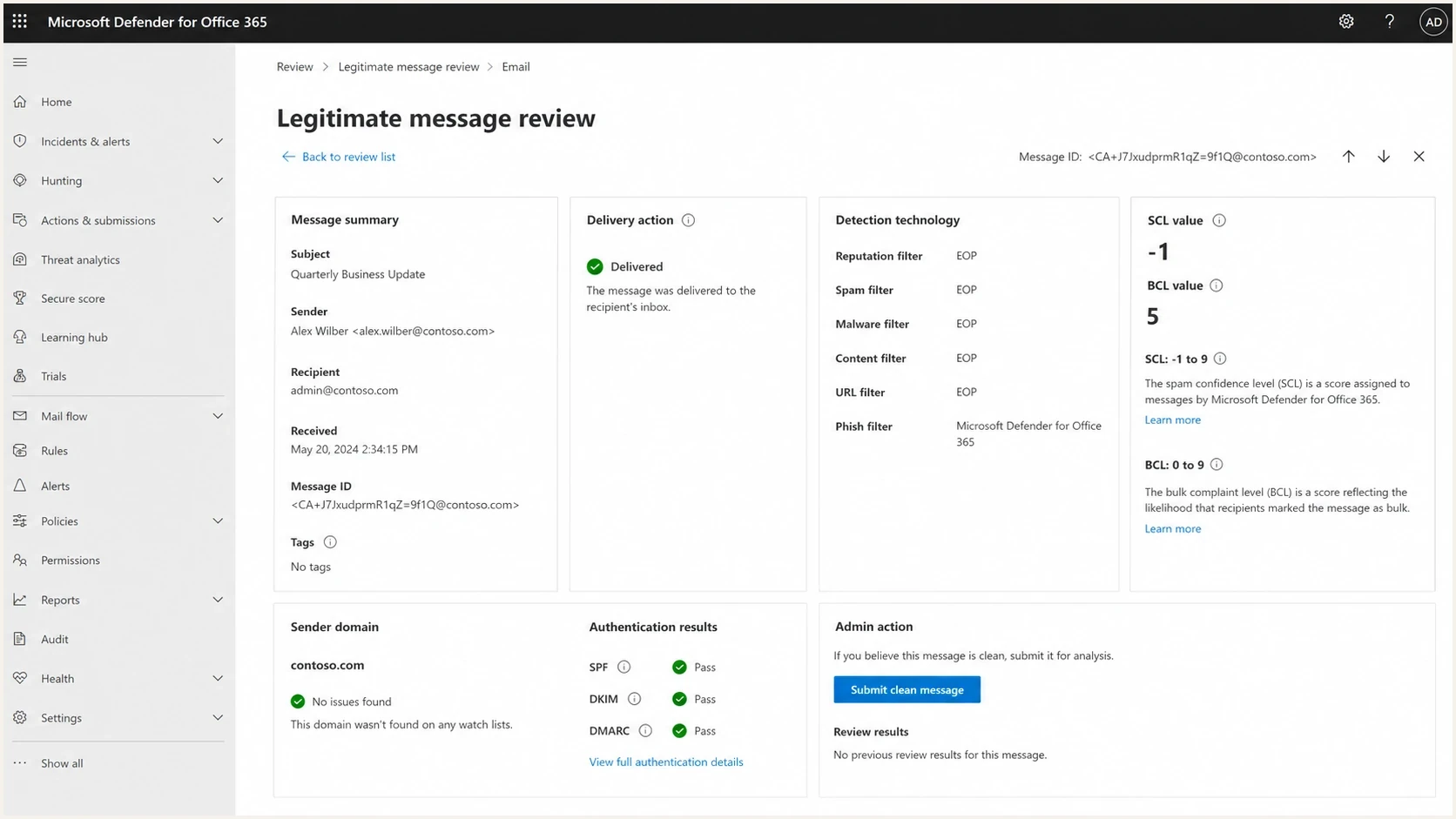
Microsoft Defender for Office 365 can show why a tenant filtered a message.
For personal Outlook.com accounts, Safe Senders and inbox rules apply only after Microsoft accepts the message. They cannot override a service-level SMTP rejection, and personal accounts do not have access to the Microsoft 365 quarantine portal. For a Microsoft 365 work or school recipient, the tenant admin can inspect message trace, quarantine, and policy hits.
For Microsoft 365 recipients, the recipient admin should review Microsoft's false positive steps. If the issue is a 451 4.7.550 temporary restriction rather than a hard HELO rejection, retry with normal backoff and keep the cases separate instead of treating it as a blocklist problem.
Escalation language that works
Keep the support request short. State that the SMTP reply names the HELO domain, that the domain is clear in current blocklist data, and that the rejection only occurs at Microsoft destinations.
- Clear ask: Ask Microsoft to refresh or recheck the block decision for the named HELO domain.
- Current proof: Include the exact lookup time, sender IP, HELO name, and recipient domain.
- No guesswork: Avoid broad complaints. Repeat the same evidence if the first response misses the issue.
Ticket evidence template
Issue: Microsoft rejects clean mail with 550 5.7.1 S8001.

Sender IP: 203.0.113.10
HELO: mail.example.com
From domain: example.com
Recipient domain: outlook.com
First seen: 2026-06-05 09:20 UTC

Current checks:
- IP is not listed.
- HELO domain is not listed.
- SPF passes.
- DKIM passes.
- DMARC matches.

Ask:
Please recheck or refresh the block decision for the HELO domain.
If Microsoft replies that nothing is visible, do not treat that as the end. Reply with the same concise evidence and the same ask. In several real incidents, the fix arrived after repeated escalation, and volume recovered gradually without a detailed root cause explanation.
Views from the trenches
Best practices
Record the full SMTP reply, HELO name, IP, sender domain, timestamp, and host detail.
Check every domain in the headers, not only the sending IP, before opening a ticket.
Escalate with one clear ask: recheck the listed HELO domain against current data.
Common pitfalls
Assuming the IP is the issue when the SMTP reply names the HELO domain instead of an IP.
Changing DNS during an incident without preserving failing evidence and timestamps.
Sending vague tickets that ask for help but do not state the exact Microsoft error.
Expert tips
Separate consumer Outlook failures from Microsoft 365 tenant filtering before fixes.
Keep a small Microsoft seed list so you can confirm when mail starts to recover again.
Use DMARC reports to prove legitimate sources pass authentication before escalation.
Expert from Email Geeks says Microsoft-only rejections strongly point to a receiver-side state issue once every sender domain and IP is clear.
2023-11-30 - Email Geeks
Expert from Email Geeks says the HELO name matters because the bounce can refer to that domain rather than the outbound IP.
2023-11-30 - Email Geeks
Resolve the block in order
The quickest path out is to start with the exact Microsoft SMTP reply, identify the identity it names, and validate every related domain and IP. If you find a real sender issue, fix that first. If everything is clean and the block is Microsoft-only, escalate with a precise request for Microsoft to recheck the decision.
- First move: Confirm whether the rejection names the IP, HELO hostname, sender domain, or policy.
- Second move: Fix DNS, authentication, reputation, and list-quality problems you can prove.
- Third move: Escalate to Microsoft with the smallest complete evidence packet.
For recurring Microsoft blocking problems, Suped provides an ongoing monitoring layer before the next incident: DMARC source visibility, automated issue detection, configured alerts, hosted SPF and DMARC controls, MTA-STS management, and blocklist monitoring in one operational view.




