Why are Microsoft email addresses bouncing and how do I fix it?


Updated on 20 Aug 2026: We corrected Microsoft bounce-code guidance and added a practical method for tracing downstream gateway rejections.
Microsoft email addresses usually bounce because Microsoft has rejected the sending IP, the message failed an authentication or reputation check, the sender hit Microsoft-specific throttling, or the recipient account cannot accept mail. The fix starts with the bounce code in the non-delivery report (NDR), delivery status notification (DSN), or SMTP transcript, not guesswork. A 550 5.7.1 or 554 5.7.0 rejection points to policy, content, or reputation. A 451 4.7.500 or 421 4.2.1 response points to temporary throttling or service unavailability. A 550 5.1.1 response usually means the mailbox does not exist.
When Hotmail, Outlook.com, MSN, Live.com, or Microsoft 365 bounces while Gmail and Apple look normal, treat it as a Microsoft-specific reputation case until the evidence says otherwise. That means segmenting the data by recipient domain, reading the exact SMTP response, checking SPF, DKIM, DMARC, reverse DNS, blocklist (blacklist) status, recent sending changes, and Microsoft-only complaint or spam-folder signals.
The fastest practical path is to test a real message first, then compare the result against your DNS records and bounce logs. Suped's email tester is useful here because it shows authentication results and message-level issues before you spend hours arguing with a bounce report.
The direct fix
If Microsoft says part of your network is on its block list, the immediate fix is to pause or throttle mail to Microsoft domains, identify the affected IP or range, confirm authentication and reverse DNS, remove the traffic source causing bad signals, then request mitigation only after the data looks clean.
- Capture the exact bounce: Save the SMTP code, enhanced status code, affected IP, recipient domain, generating server, and rejecting server.
- Classify the bounce: Separate mailbox errors, authentication failures, throttling, policy blocks, content verdicts, and blocklist (blacklist) responses.
- Decide who controls the fix: Sender reputation and DNS issues sit with you or your provider, while mailbox restrictions and recipient-gateway decisions sit with the recipient organization.
- Segment Microsoft traffic: Track bounce rate, complaint rate, delivery rate, and spam placement for Microsoft recipients only.
- Check infrastructure: Verify SPF, DKIM, DMARC, PTR, HELO/EHLO identity, TLS, and sender domain consistency.
- Check the sending path: If Hotmail only bounces from one network or Outlook profile, confirm the client uses authenticated SMTP submission on port 587 with TLS or STARTTLS, clear stuck Outbox messages, and test webmail to isolate the local client.
- Reduce pressure: Slow Microsoft sends before retrying. Repeated rejected mail can make the reputation problem last longer, and repeated 421 or 451 deferrals need backoff rather than more connections.
- Escalate with evidence: Contact your sending provider, the recipient admin, or Microsoft support according to which server rejected the message. Include bounce samples, IPs, dates, volume, and remediation already completed.
For temporary deferrals such as 421 or 451, keep the addresses out of hard-bounce suppression while the retry window is open. Use a Microsoft-specific queue, lower concurrency, longer connection and greeting timeouts, and wider retry spacing before you resume normal volume.
A clean result in a public blocklist check does not prove Microsoft is accepting your mail. Microsoft can reject based on its own private reputation data, recipient engagement, recent traffic changes, spam folder placement, network-level signals, or abuse patterns near your IP. That is why the exact Microsoft response matters more than a generic clean status.
Email tester
Send a real email to this address. Suped shows a results button when the test is ready.
?/43tests passed
If you are testing a Microsoft bounce alert rather than troubleshooting a live incident, send one controlled message and trace its message ID through the alert path. Do not create volume by sending to batches of fake Outlook or Hotmail addresses. Repeated intentional failures can resemble directory harvesting and worsen the same Microsoft signals you are trying to understand.
What the Microsoft bounce code means
Microsoft bounces are usually specific enough to point the investigation in the right direction. Start by reading the first permanent or temporary SMTP response from the server that rejected the message, not the ESP's simplified dashboard label. The dashboard can call something a hard bounce even when the underlying reason is a sender policy block.
Treat permanent mailbox failures as suppressions, but handle temporary 4xx throttling as a retry and volume-control problem. Mixing hard bounces and soft bounces in one bucket makes the fix slower because recipient cleanup, DNS repair, throttling, and mitigation requests are different jobs.
Microsoft policy rejection exampletext
smtp; 550 5.7.1 Unfortunately, messages from [54.240.46.27]
weren't sent. Please contact your Internet service provider since part
of their network is on our block list (S3150).
|
|
|
|---|---|---|
550 5.7.1 | Policy or reputation block | Review IP, domain, and traffic changes |
554 5.7.0 | Content, policy, or reputation rejection | Read the full text and identify the rejecting server |
S3150 | Microsoft network blocklist (blacklist) signal | Check IP range and provider escalation |
451 4.7 | Temporary throttling | Slow retries and reduce volume |
421 4.2.1 | Temporary service unavailable or connection refusal | Retry with lower concurrency and longer timeouts |
550 5.1.1 | Invalid recipient | Suppress the address |
5.2.2 | Mailbox full or over quota | Pause retries and ask for mailbox cleanup |
550 5.1.10 | Bad recipient or forwarding target | Share the full NDR with the recipient admin |
550 5.7.12 | Recipient rejects external senders | Ask the recipient admin to change delivery restrictions |
550 5.7.134 | Mailbox rejects external senders | Use an alternate contact until the recipient updates the mailbox |
550 5.7.23 | SPF missing or misconfigured | Fix SPF and inspect the original remote-server response |
550 5.7.26 | Authentication failure | Fix SPF, DKIM, or DMARC |
550 5.1.8 | Bad outbound sender or Restricted entities block | Check Microsoft Defender and sender-account security |
550 5.7.233 | Tenant external-recipient limit reached | Reduce outbound volume and inspect tenant activity |
550 5.7.236 | onmicrosoft.com external-recipient limit reached | Send from a verified custom domain and review volume |
550 5.7.705 | Tenant blocked after suspicious outbound traffic | Investigate compromise and contact Microsoft support |
Common Microsoft bounce patterns and first actions
For Microsoft consumer domains, watch for sudden changes by date. If bounces rose sharply after one campaign, one new customer, one migrated list, one new IP, or one DNS change, treat that as the starting point. Microsoft does not need to behave like Gmail or Apple. Its filtering thresholds, reputation inputs, and mitigation process are separate.
For more bounce-code context, Microsoft's own forum has examples of users dealing with rejected mail in Microsoft Q&A. Use those examples as context, but use your own SMTP transcript as the source of truth.
Read the final rejection in a multi-hop NDR
A Microsoft-generated NDR does not prove Microsoft made the final rejection. Exchange Online can accept a message for delivery, connect to the recipient's MX or filtering gateway, receive a rejection there, and wrap that downstream response in its own NDR. Check the fields for the generating server, the server named after 'Message rejected by,' and every response after 'Remote server returned.'
Downstream gateway rejection exampletext
Generating server: DM6PR19MB3802.namprd19.prod.outlook.com
Remote server returned: 554 5.7.0
550 5.7.350 Remote server returned message detected as spam
-> 550 ETP102 recipient rejected by downstream MTA
-> 550 5.4.1 Recipient address rejected: Access denied
- Identify the last server that evaluated the message. That server, not necessarily the NDR generator, owns the accept or reject decision.
- Read the response chain to the final specific line. A 5.0.350 wrapper is generic, while 5.7.350 says an external recipient server or filter returned a spam verdict.
- Match the fix to the final reason. A spam verdict calls for content and reputation comparison, while 5.4.1 can mean an invalid recipient or a recipient-domain routing problem.
- Escalate to the right admin. Send the complete NDR to the recipient admin when their gateway or downstream MTA rejected the message.
Do not treat every Microsoft-branded NDR as an Outlook.com, Hotmail, or Microsoft blocklist incident. The full response chain decides whether the sender, Microsoft, the recipient gateway, or the recipient mailbox controls the fix.
Separate sender and recipient fixes
Not every Microsoft bounce is a sender reputation problem. Some NDRs mean the recipient's Microsoft 365 tenant, mailbox, group, MX record, accepted domain, hybrid route, transport rule, firewall path, filtering gateway, or forwarding rule is rejecting the message. In those cases, fixing your SPF, DKIM, DMARC, or sending IP will not change the result.
|
|
|
|---|---|---|
Recipient requires authenticated senders | Recipient admin | Ask them to allow external senders or add your sender to the allowed list |
Mailbox rejects external senders | Recipient admin | Use another contact path while they update mailbox delivery restrictions |
Mailbox full or disabled | Recipient or admin | Pause retries, then ask for a working address or mailbox cleanup |
Accepted domain, MX, or hybrid routing error | Recipient admin | Share the full NDR so they can check domain and routing configuration |
Downstream gateway rejection | Recipient admin or gateway admin | Share the response chain and the name of the rejecting server |
Forwarding rule creates a rejection | Recipient admin | Ask them to inspect mailbox forwarding and transport rules |
Content filtering or quarantine | Recipient admin or Microsoft policy | Compare the message body, URLs, attachments, and sender domain against a clean control message |
Recipient-side Microsoft 365 signals need a different response.
The key distinction is control. Sender-side blocks improve when the sending source is cleaned up. Recipient-side restrictions require the recipient or their Microsoft 365 admin to change mailbox, group, routing, content filtering, or policy settings. If the bounce started after DNS hosting, firewall, Exchange hybrid, gateway, or accepted-domain changes, ask for the full NDR and have the recipient admin verify the MX path and authoritative domain state.
For one-off recipient errors, do not trust Outlook autocomplete. Type the address fresh, confirm the user still exists, and ask the recipient admin to check directory sync or Global Address List updates before treating the bounce as a broad sender issue.
Why Microsoft can bounce clean-looking mail
A Microsoft-only bounce spike often looks unfair because the sender sees low global complaints and no public blocklist hit. The missing detail is usually that Microsoft is measuring a different slice of the traffic than the sender's global dashboard. A campaign can have a low total complaint rate and still have weak Microsoft engagement, a Microsoft-only complaint issue, or heavy spam placement at Outlook.com.
What your dashboard says
- Global complaint rate: All recipient domains are averaged together.
- Public listing status: Public blocklists do not expose every Microsoft decision.
- Imported list history: Previous performance at another sender does not transfer cleanly.
What Microsoft sees
- Microsoft-only rate: Complaints and bounces are judged inside Microsoft traffic.
- Private reputation: Internal signals can block mail before public lists update.
- Network context: Nearby IPs, provider pools, and PTR identity can affect trust.
This is also why migrated lists cause surprises. A list that performed well at a previous platform can behave differently when it moves to a new IP, a new DKIM domain, a new return-path domain, or a new sending cadence. Microsoft sees a different sender identity and has to make a fresh decision.
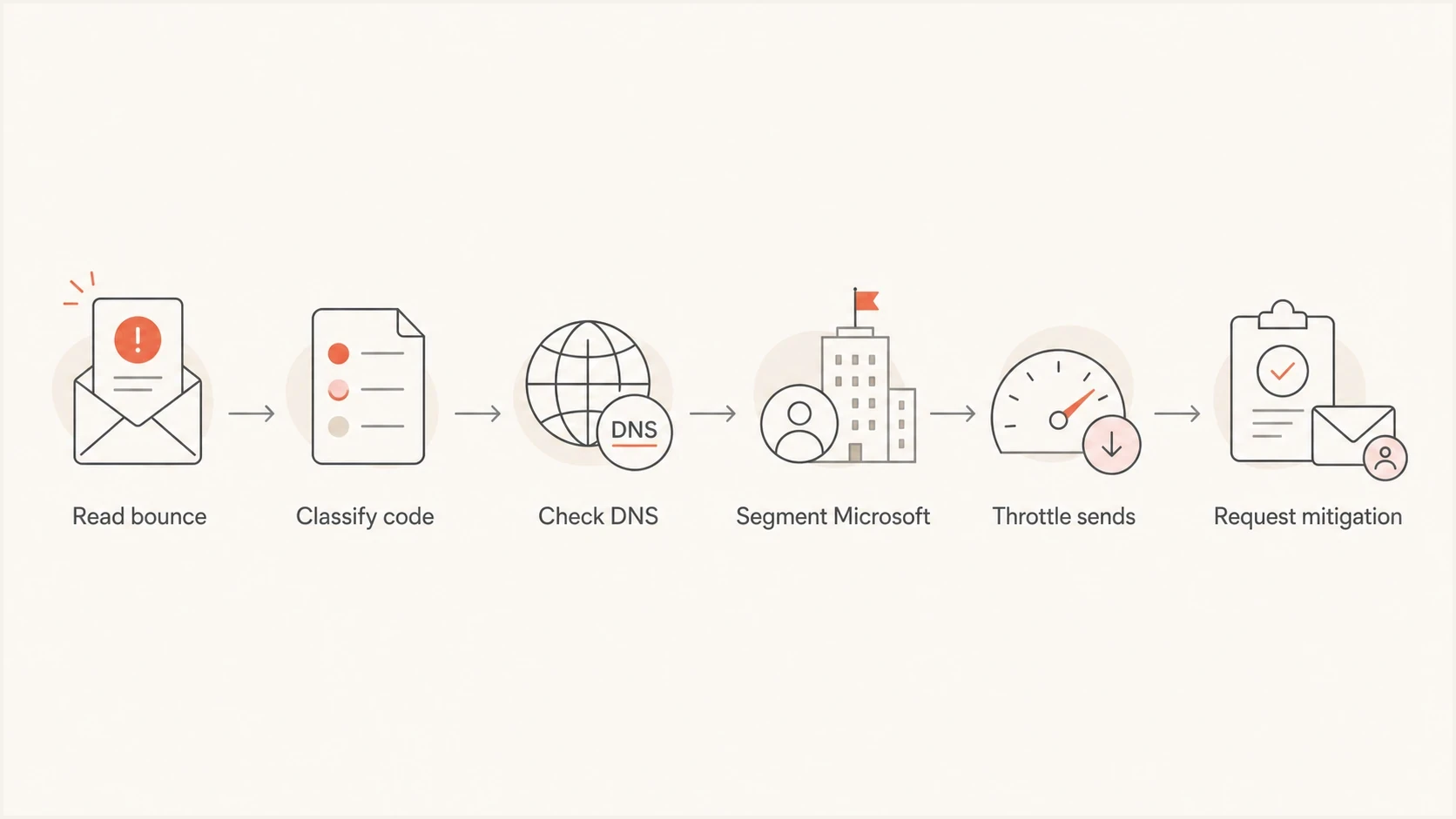
Flowchart showing the Microsoft email bounce troubleshooting path from bounce code to mitigation request.
Check authentication before blaming reputation
Even when a bounce message points at reputation, check authentication first. Microsoft can be less forgiving when SPF, DKIM, DMARC, PTR, and visible sender identity do not match cleanly. A small authentication defect that other receivers tolerate can combine with a reputation issue and turn into a hard rejection.
- SPF pass: The envelope sender domain authorizes the sending IP, includes Microsoft 365 only when that domain sends through Microsoft 365, covers any on-premises outbound IPs, and stays below the 10 DNS lookup limit.
- DKIM pass: The message has a valid signature using a domain connected to the visible sender.
- DMARC domain match: SPF or DKIM passes with the same organizational domain as the header From domain.
- PTR identity: Reverse DNS exists, matches a sensible host, and forward-confirmed DNS resolves back to the IP.
- HELO identity: The mail server announces a public, routable hostname with matching DNS, not a private 10.x, 172.16-31.x, or 192.168.x address.
For hybrid or relay setups, authentication breaks when Microsoft 365 sends some mail, an on-premises server sends another stream, and only one path is in SPF or DKIM. Test a real message from each path before assuming the domain is covered.
?
What's your domain score?
Deep-scan SPF, DKIM & DMARC records for email deliverability and security issues.
Suped's domain health checker gives a quick read on DMARC, SPF, and DKIM status. For ongoing production mail, Suped's DMARC monitoring connects those DNS checks to real aggregate reports so you can see which sources pass, fail, or drift after a provider change.
DMARC record detail view showing SPF, DKIM, DMARC, rDNS diagnostics, and DNS records
Reverse DNS and sender infrastructure
Reverse DNS matters because Microsoft is judging the sending IP in context. If you use a dedicated IP at a cloud sending provider, the PTR record can still point to a provider-owned hostname. That is not automatically wrong, but it can make it harder to separate your traffic from nearby senders when Microsoft says "part of their network" has a problem.
For dedicated IPs, ask the provider whether custom reverse DNS is available. A custom PTR such as mail1.sender.example can make ownership and responsibility clearer, but it will not fix poor list quality, spam complaints, or failed authentication.
The practical test is simple: look up the IP's PTR, then confirm the hostname resolves back to the same IP. If the PTR points to a broad provider hostname, document that before opening a support case. If you cannot change it directly, ask the provider to set it or confirm that Microsoft has access to enough ownership context.
If Hotmail or Outlook.com only bounces from one network, read the IP shown in the rejection. Outlook desktop, POP, and IMAP accounts should submit through the provider's authenticated SMTP host over port 587 with TLS or STARTTLS, not send directly from a home or office ISP IP. If the rejected IP belongs to the ISP, the ISP or mail provider usually owns mitigation.
Reverse DNS checksbash
dig -x 54.240.46.27 +short

dig mail1.sender.example A +short
If you send through a shared pool, the fix is different. You cannot clean the whole pool alone. Move high-value Microsoft traffic to a dedicated IP, ask the provider for pool health details, or separate risky senders from stable transactional and opted-in marketing traffic.
Find the cause in recent sending changes
Most Microsoft bounce spikes have a trigger. Build a short timeline and look for the first change before the bounce increase. A new customer, a new list import, a volume jump, a cadence change, a DNS edit, or a new content stream can all push Microsoft over a threshold.
What to separate in your logs
Break Microsoft delivery data into causes instead of treating every failure as one bounce rate.
Accepted
Temporary
Rejected
- New sender: Compare their Microsoft bounce rate against the platform average.
- New list: Check the first-send bounce rate and suppress stale Microsoft addresses.
- New cadence: Daily sends to a large list can create fatigue even with familiar content.
- New identity: A changed DKIM domain, return-path, or IP resets part of the trust history.
Do not override a Microsoft 550 5.1.1 with a validation pass. Microsoft sees the mailbox state at send time, while validation checks cannot force Outlook.com or Hotmail to disclose final mailbox status. Suppress the address, then audit the list age and import source.
Do not rely on total complaint rate. Calculate Microsoft complaints divided by Microsoft delivered mail. If most Microsoft messages land in spam, the complaint rate you see can look low while Microsoft's negative placement signals remain high.
Handle Microsoft blocklist and mitigation cases
If the bounce mentions Microsoft's block list or a code like S3150, treat it as a Microsoft-side blocklist (blacklist) case even when public blacklist checks say the IP is clean. The sender still needs a clean public reputation check, but the fix depends on the private Microsoft decision.
Blocklist checker
Check your domain or IP against 144 blocklists.
 Spamhaus
 0Spam
0Spam

 Cisco
Cisco
 NoSolicitado

 URIBL
URIBL
 abuse.ro
 ALPHANET
 Anonmails
 Ascams
 BLOCKEDSERVERS
 Calivent Networks


 EFnet
EFnet




 JustSpam
 Kempt.net
 NordSpam

 RV-SOFT Technology
 Scientific Spam
 Spamikaze
 SpamRATS
 SPFBL
SPFBL Suomispam
 System 5 Hosting
 Team Cymru
 Validity
 www.blocklist.de Fail2Ban-Reporting Service
 ZapBL
ZapBL 2stepback.dk
 Fayntic Services
 ORB UK
 technoirc.org
 TechTheftSpamhaus0SpamCiscoNoSolicitadoURIBLabuse.roALPHANETAnonmailsAscamsBLOCKEDSERVERSCalivent NetworksEFnetJustSpamKempt.netNordSpamRV-SOFT TechnologyScientific SpamSpamikazeSpamRATSSPFBLSuomispamSystem 5 HostingTeam CymruValiditywww.blocklist.de Fail2Ban-Reporting ServiceZapBL2stepback.dkFayntic ServicesORB UKtechnoirc.orgTechTheftSpamhaus0SpamCiscoNoSolicitadoURIBLabuse.roALPHANETAnonmailsAscamsBLOCKEDSERVERSCalivent NetworksEFnetJustSpamKempt.netNordSpamRV-SOFT TechnologyScientific SpamSpamikazeSpamRATSSPFBLSuomispamSystem 5 HostingTeam CymruValiditywww.blocklist.de Fail2Ban-Reporting ServiceZapBL2stepback.dkFayntic ServicesORB UKtechnoirc.orgTechTheftSpamhaus0SpamCiscoNoSolicitadoURIBLabuse.roALPHANETAnonmailsAscamsBLOCKEDSERVERSCalivent NetworksEFnetJustSpamKempt.netNordSpamRV-SOFT TechnologyScientific SpamSpamikazeSpamRATSSPFBLSuomispamSystem 5 HostingTeam CymruValiditywww.blocklist.de Fail2Ban-Reporting ServiceZapBL2stepback.dkFayntic ServicesORB UKtechnoirc.orgTechTheftSpamhaus0SpamCiscoNoSolicitadoURIBLabuse.roALPHANETAnonmailsAscamsBLOCKEDSERVERSCalivent NetworksEFnetJustSpamKempt.netNordSpamRV-SOFT TechnologyScientific SpamSpamikazeSpamRATSSPFBLSuomispamSystem 5 HostingTeam CymruValiditywww.blocklist.de Fail2Ban-Reporting ServiceZapBL2stepback.dkFayntic ServicesORB UKtechnoirc.orgTechTheft
Suped's blocklist monitoring helps keep this from becoming a blind spot. It watches domain and IP listings alongside authentication signals, so the team can see whether a Microsoft rejection also matches a wider reputation problem.

Blocklist monitoring page showing domain and IP checks across blocklists with importance and status
Mitigation requests work best after you reduce the behavior that caused the block. If Microsoft says the IP is not eligible, do not keep blasting retries. Pause the affected stream, throttle, isolate the suspect sender, validate authentication, and gather fresh bounce samples. Check for compromised accounts, unauthorized connectors, and address-probing traffic before asking again with specific evidence.
Repeatedly retrying rejected Microsoft recipients can extend the problem. Treat hard policy rejections as a stop signal until the cause is found, not as a queue backlog to push harder.
Use Microsoft tooling where available
If you control the IP space, Microsoft sender data can help show complaint and reputation signals for the affected range. If your provider owns the IP space, you often need the provider to approve access or provide the data. That gap is common with cloud-owned sending IPs.
If your organization sends through Microsoft 365 and the NDR mentions Restricted entities, 550 5.1.8, 550 5.7.233, 550 5.7.236, or 550 5.7.705, investigate the account and tenant before requesting unblocking. Check Restricted entities, outbound spam policies, message trace, compromised-account evidence, unauthorized connectors, per-user and tenant sending limits, and whether the message used the high-risk delivery pool.
Current Exchange Online controls separate several cases. A mailbox can send to up to 10,000 recipients in a rolling 24-hour window, excess submissions above 30 messages per minute are throttled, 550 5.7.233 identifies the tenant external-recipient rate limit, and 550 5.7.236 identifies the 100-external-recipient organizational limit for default onmicrosoft.com domains. These are service limits, not Outlook.com recipient-reputation blocks.
A 550 5.7.23 NDR belongs in the authentication investigation instead. Microsoft documents it as a missing or misconfigured SPF case, so check the sending domain's SPF record and the original response in the diagnostic section.
If webmail sends successfully but Outlook desktop, POP, or IMAP does not, inspect the SMTP host, port, encryption mode, authentication setting, saved credentials, firewall, antivirus, and network port restrictions. That is a client or network sending-path issue, not a Microsoft recipient reputation case.
Content filtering can reject mail or place it in quarantine before a recipient sees it. If the NDR references spam filtering, compare the message body, URLs, attachments, sender domain, and sending pattern against a clean control message before changing unrelated DNS records.
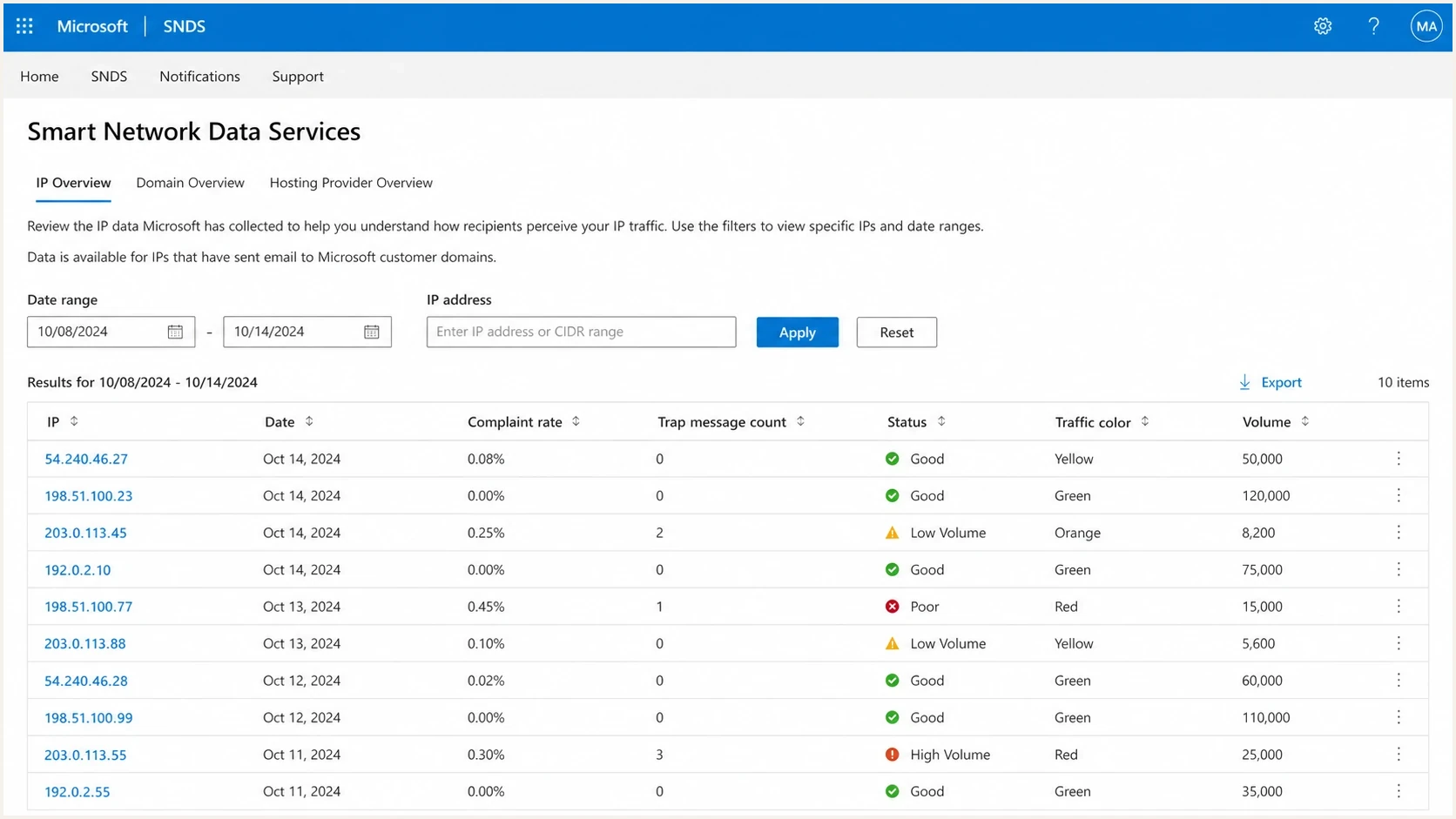
Microsoft SNDS sender IP reputation table for investigating Outlook.com and Hotmail bounce spikes.
The useful support packet is short: affected IPs, full bounce text, Microsoft recipient domains, start date, send volume before and after the change, current throttling, authentication results, and what you removed or paused. A provider can act faster when the request proves you have already reduced the risky traffic.
Support packet outlinetext
Affected IPs: 54.240.46.27
Domains: outlook.com, hotmail.com, msn.com, live.com
First seen: 2026-05-14 09:20 UTC
Bounce: 550 5.7.1 network on block list S3150
Action taken: paused sender X, throttled Microsoft traffic
Authentication: SPF pass, DKIM pass, DMARC domain match
Requested action: review eligibility for mitigation
Where Suped fits
Microsoft bounce incidents get messy because the evidence sits in different places: DNS, DMARC aggregate reports, bounce logs, blocklists, sender reputation notes, and support tickets. Suped's product brings those authentication and reputation checks into one workflow so teams can move from raw records to specific fixes.
- Automated issue detection: Suped flags broken authentication, unverified sources, and DNS problems with steps to fix them.
- Real-time alerts: Sudden DMARC failures or suspicious source changes can notify the team before bounce rates climb.
- Hosted SPF and DMARC: Teams can manage senders, flatten SPF, and stage DMARC policy without constant DNS edits.
- Blocklist monitoring: IP and domain reputation checks sit beside DMARC, SPF, and DKIM evidence.
- MSP dashboard: Agencies can manage multiple client domains and spot the one sender that changed the risk profile.

Issue steps to fix dialog showing the issue overview, tailored fix steps, and verification action
Suped does not replace Microsoft mitigation, list hygiene, or throttling. It makes the authentication and reputation side easier to prove, fix, and monitor so the Microsoft support case is not built on guesses.
Views from the trenches
Best practices
Preserve full SMTP replies before classifying Microsoft bounces in a dashboard.
Measure complaints against Microsoft delivered mail, not total campaign volume.
Throttle Microsoft traffic and retry temporary deferrals with lower concurrency.
Common pitfalls
Assuming public blocklist cleanliness means Microsoft has no private reputation issue.
Migrating a large list and expecting old engagement history to transfer cleanly.
Treating 421 or 451 deferrals as hard bounces can remove valid recipients.
Expert tips
Ask the IP owner to approve Microsoft sender data access when cloud IPs block setup.
Use custom reverse DNS on dedicated IPs when the provider supports that workflow.
Track Microsoft deferrals, hard rejects, and later deliveries as separate metrics.
Marketer from Email Geeks says the bounce message is the first place to look because Microsoft often states the rejection reason directly.
2022-10-20 - Email Geeks
Marketer from Email Geeks says dedicated cloud IPs can still inherit network-level concern when Microsoft references the surrounding provider range.
2022-10-20 - Email Geeks
The practical path back to delivery
The fastest fix for Microsoft bounces is not one magic DNS record. It is a controlled sequence: read the full response chain, stop the traffic that is making the signal worse, verify authentication, isolate the sender or list that changed, check private and public reputation signals, then escalate to the admin who controls the rejecting server.
For a mailbox-not-found bounce, suppress the recipient even when a validation platform marked it valid. For a throttling or temporary service bounce such as 421 or 451, slow down, extend timeouts, and retry carefully. For a Microsoft blocklist (blacklist) or policy rejection, fix reputation and infrastructure first. For a downstream gateway rejection, use the final remote-server response and contact the recipient admin. For an external-sender block, mailbox quota issue, bad forwarding target, or client sending-path problem, share the full NDR instead of changing unrelated DNS records.
Suped helps with the part teams control every day: DMARC monitoring, SPF and DKIM visibility, hosted SPF, hosted DMARC, hosted MTA-STS, blocklist monitoring, and actionable alerts. Microsoft still owns the final accept or reject decision for mail it evaluates, but clean evidence and fast remediation give you a direct path back to stable delivery.




