
What APIs and tools can check email content for spam triggers before sending?

Published 10 Jun 2025
Updated 16 Oct 2026
12 min read
Summarize with
Updated on 16 Oct 2026: We clarified pre-send spam checks and corrected bulk-sender requirements.
Rule-based scoring APIs and pre-send spam checkers can flag risky content and HTML problems before sending. Suped's email tester checks the delivered message's authentication and sending setup. It does not run a spam-content scoring engine or a multi-provider inbox placement test.
No API can guarantee inbox or spam placement for every recipient, or predict Gmail category placement. Placement depends on content, sender reputation, engagement, authentication, link reputation, complaint history, sending patterns, list quality, and user-level behavior.
- Best use: Use these tools as a pre-send risk screen, not as a promise of inbox placement.
- Best signal: Send the final rendered email and inspect the full MIME, headers, links, tracking, HTML, SPF, DKIM, and DMARC result.
- Best workflow: Combine content testing with ongoing DMARC, sender reputation, and blocklist (blacklist) monitoring.
What these tools can and cannot predict
Depending on its coverage, a pre-send checker finds broken links, missing text alternatives, malformed HTML, suspicious URL patterns, missing unsubscribe headers, excessive redirects, or content rules that fire. Some tools also estimate filtering risk, but their scores do not include every mailbox provider's private sender history or recipient behavior.
What a checker can tell you
- Rules fired: Rule names, weighted phrases, risky patterns, and obvious copy problems.
- Template faults: Missing plain text, image-heavy layout, malformed HTML, broken links, or tracking that changes the final message.
- Auth context: SPF and DKIM results, and whether at least one passing mechanism has the domain alignment needed for DMARC on the actual sent message.
What it cannot guarantee
- Tab placement: Inbox and spam placement vary by provider and recipient; Gmail category placement also varies by recipient.
- Reputation impact: Complaint rates, engagement, bounce history, and domain history sit outside the message body.
- Provider logic: Mailbox filters use private models that change over time and vary by user.
A checker flags issues to review before sending. It does not know each recipient's history with your brand. A message with plain, harmless copy can still land in spam if the domain has weak authentication, poor engagement, or a relevant blocklist (blacklist) listing.
Do not chase words in isolation
Words and phrases are evaluated in context and rarely explain deliverability on their own. A successful test after one word swap does not establish the cause. Repeat the test with the same links and sending stream before attributing the result to that phrase.
Types of email spam checking APIs and tools
Separate tools by how they receive the message. A raw-content API fits a build or campaign-approval flow. A form-based spam checker helps a writer review the From address, subject line, and body. A send-to-address tester sees the final headers, tracking links, image hosting, MIME structure, and authentication results after the sending platform has modified the email.
|
|
|
|
|---|---|---|---|
Rule-based content API | Raw MIME or message fields | CI and template gates | Misses final-send changes |
ML content checker | From, subject, and body | Copy review | Score is not a provider verdict |
Send-based tester | Delivered test message | MIME, HTML, links, and authentication | Requires a real send |
Seed placement test | Campaign sent to seed addresses | Provider-specific placement clues | Does not represent every recipient |
Real send | Authentication, blocklists (blacklists), TLS, and unsubscribe headers | No spam-content scoring or multi-provider placement test | |
Static word list | Copy | Phrase hints | Weak signal |
Options for content checks and sending-setup checks before launch.
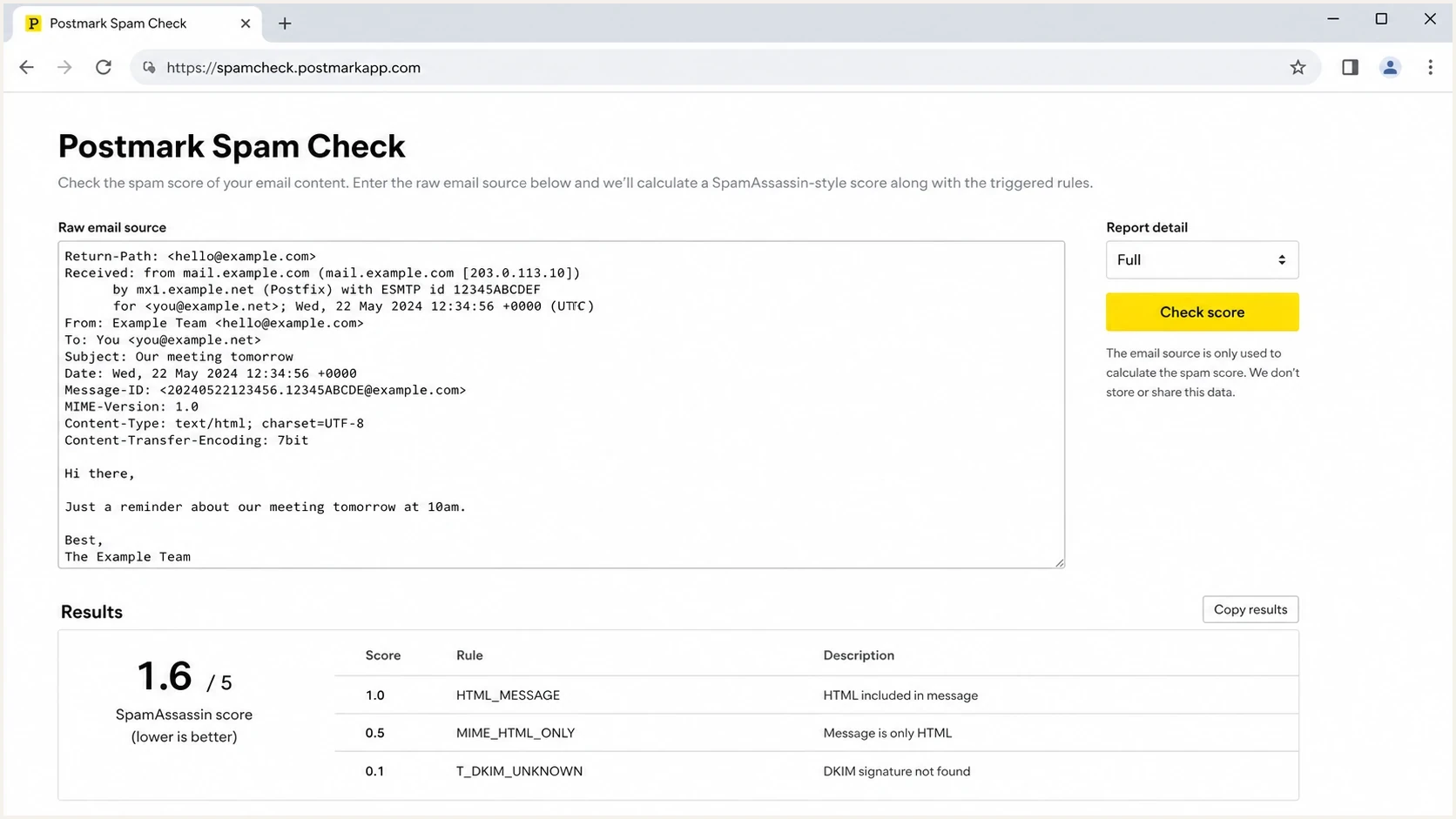
Raw email input and rule-score results for a pre-send spam content check.
For an API integration, verify whether the endpoint accepts complete RFC 5322 messages with MIME parts, returns rule names and weights, supports your payload size, and documents rate limits and timeouts. Check response schemas and ruleset versions so CI results remain comparable. Treat failed or incomplete scans as untested, rather than recording a clean result. For a send-based test, verify which received headers and authentication results it exposes, and whether it also checks redirects or HTML defects.
A rule-based spam score is a weighted sum of rule hits, not an inbox-placement probability. Score scales and thresholds differ between tools. Review the fired rules and calibrate any approval threshold against known legitimate messages to limit false positives. Save the ruleset version because rule updates can change a score without a template change.
Treat raw email as sensitive data. Before sending customer messages to an API, review its retention terms, access controls, processing location, and handling of personal data. Use synthetic fixtures in CI when production content is not required.
Suped's product fits the sending-setup part of this workflow: send a test through your normal provider, then compare its authentication results with ongoing DMARC and blocklist (blacklist) monitoring. Run content scoring separately when you need phrase-level or HTML rule findings.
Email content checks vs. email address verification
An email verification API checks recipient addresses. Email validation and list cleaning typically check syntax, domain DNS and MX records, and signals such as disposable or catch-all domains. These checks do not inspect your subject line or message body for spam triggers.
Use real-time address validation at sign-up and bulk verification when reviewing list imports. Keep these checks separate from content testing. A catch-all or unknown result does not confirm an individual mailbox exists, and no verification result proves consent or guarantees that every spam trap has been identified. Keep unsubscribed addresses and hard bounces on suppression lists regardless of later validation results.
How to test the final email before sending
The best test uses the exact message that will be sent. That means the final subject line, final HTML, plain-text alternative, sender address, unsubscribe headers, tracking links, images, and headers added by the sending platform. Testing a draft paragraph inside a form is useful for copy review, but it misses the parts that often break deliverability.
The JSON below illustrates message fields, not a working request to a specific endpoint. Follow the chosen API's schema, or submit the complete serialized MIME message when supported. A raw payload alone cannot establish the SPF result for the production sending IP.
Illustrative message fields for a pre-send checkJSON
{
  "subject": "Your subject line",
  "from": "news@example.com",
  "html": "<html>Final rendered HTML here</html>",
  "text": "Plain text version here",
  "headers": {
    "List-Unsubscribe": "<https://example.com/unsubscribe/opaque-id>, <mailto:unsubscribe@example.com>",
    "List-Unsubscribe-Post": "List-Unsubscribe=One-Click"
  }
}
For RFC 8058 one-click unsubscribe, the List-Unsubscribe header needs an HTTPS URI, and a valid DKIM signature must cover both unsubscribe headers. A mailto address can be included as an additional option, but it does not replace the HTTPS endpoint. Test that an HTTPS POST removes a test subscriber without a login or confirmation step; header presence alone does not prove the endpoint works.
In production, store the score, fired rules, and ruleset version next to the template version. Test representative personalization variants, including missing values and unusually long fields. If a new footer, tracking domain, or personalization block adds a risky pattern, the team can trace the change instead of guessing after complaints rise.
- Render first: Generate the final HTML and plain text after personalization and link wrapping.
- Score content: Run a rule-based content check and save rule names, weights, and exact findings.
- Send a test: Send the real message to a tester so headers, authentication, and links are visible.
- Check reputation: Review domain health, blocklist (blacklist) status, and authentication before approving the campaign.
Email tester
Send a real email to this address. Suped shows a results button when the test is ready.
?/43tests passed
A send-based test reveals the authentication used by the real sending stream. Check SPF and DKIM separately, then check DMARC: at least one must pass with the domain alignment required by the published DMARC policy. Relaxed alignment permits the same organizational domain; strict alignment requires an exact domain match. A passing DKIM signature using an unrelated domain is insufficient for DMARC by itself. Repair authentication failures, then retest the message.
How to isolate a content trigger
When one message has a placement problem and other mail from the same sender does not, isolate the trigger with controlled test sends. Change one component at a time and use a mailbox at the provider where the problem occurs. This method takes longer than a single score, but it separates copy, links, images, and template code.
- Establish a baseline: Send a short, meaningful plain-text message through the same sending stream. If it repeatedly lands in spam, investigate authentication, reputation, or infrastructure first.
- Test the shell: Use the HTML template with the same meaningful baseline copy. Add the footer separately, then test the remaining markup before restoring campaign elements.
- Add copy gradually: Restore the subject and body one section at a time, with a test send after each addition.
- Add links individually: Restore each destination and its final tracking redirect separately so a risky URL can be identified.
- Add hosted assets: Restore images and advertising elements one at a time to test their hostnames and markup.
- Confirm the result: Rebuild the exact final message and repeat the test before treating one placement result as conclusive.
Keep the From address, sending IP or pool, recipient mailbox, and test timing as consistent as practical. Repeat tests across comparable mailboxes before drawing conclusions. A plain-text baseline that repeatedly lands in spam is a reason to prioritize authentication and reputation checks, but it does not prove content is irrelevant.
What to fix when a checker flags content
When a checker highlights content, work through the message in this order: fix technical defects first, rewrite suspicious claims next, then review formatting. Rewriting every flagged word usually wastes time. A single phrase rarely sinks a healthy sender, but repeated aggressive claims, poor formatting, deceptive links, and weak authentication add up quickly.
Pre-send review priorities
Qualitative review guidance, without numerical score cutoffs or inbox-placement predictions.
Low
Continue campaign review
Minor copy flags, clean links, valid authentication, and no obvious template defects.
Review
Fix and retest
Several rule hits, heavy image use, tracking changes, or claims that need rewriting.
Stop
Hold for investigation
Authentication noncompliance, a relevant blocklist (blacklist) listing, deceptive links, or confirmed severe defects.
For a deeper copy-specific checklist, review common spam trigger words and compare them with the actual offer, sender history, and landing-page behavior. A list can help writers spot risky phrasing, but it should not become the only gate.
- Fix defects: Repair malformed HTML and broken links, add a useful plain-text alternative, and fix unsubscribe headers where required for marketing mail.
- Rewrite claims: Remove exaggerated urgency, misleading subject lines, fake personalization, and promises the landing page does not support.
- Reduce noise: Simplify layout, remove unnecessary redirects, keep the text version useful, and avoid hiding core information inside images. There is no universal safe link count or text-to-image ratio.
- Retest changes: Run the same test after each meaningful change so the team can see what improved.
Template changes need their own test
A clean paragraph can fail after it enters a broken template. If you change your email builder, tracking domain, image host, footer, preference-center link, or unsubscribe logic, retest the final message. For more detail, compare the result with common email template issues before approving the campaign.
Authentication and reputation affect inbox placement
Content checks are only one part of the pre-send decision. Clean wording does not prevent filtering when the sender fails applicable authentication requirements, has poor reputation, or appears on a blocklist (blacklist) used by the receiver. A single SPF failure or DKIM domain mismatch does not automatically mean DMARC fails. Content testing should connect to domain-level monitoring instead of remaining a separate copywriting task.
Check bulk-sender requirements before approval
Google classifies senders close to 5,000 or more messages to personal Gmail accounts within 24 hours as bulk senders, counting the same primary domain and its subdomains together. That classification is permanent once reached. Bulk senders need SPF and DKIM, a DMARC policy of at least p=none with passing domain alignment, valid forward and reverse DNS, and TLS. See Google's sender guidelines and bulk-sender FAQ.
Keep Gmail user-reported spam below 0.1% and prevent it from reaching 0.3%. Marketing and subscribed mail needs RFC 8058 one-click unsubscribe plus a visible body link. Yahoo's sender requirements also require bulk senders to use SPF, DKIM, and DMARC with passing domain alignment, provide easy unsubscribe, and keep complaints below 0.3%. Yahoo does not publish a numerical bulk threshold. Honor Gmail and Yahoo unsubscribe requests within two days.
Microsoft's bulk-sender requirements have applied since May 2025 to domains sending more than 5,000 messages daily to its consumer Outlook services. SPF and DKIM must pass, and DMARC needs at least p=none with passing domain alignment through either mechanism. Authentication noncompliance leads to 550 5.7.515 rejections. A clean content score does not satisfy these requirements.
Suped's product connects a real-message test with DMARC monitoring to identify sending sources and authentication failures, plus blocklist monitoring for listed sending IPs or domains. Use these findings alongside the content check when reviewing a campaign.

Email tester sample report showing total score, email preview, issue summary, and per-section results
Run a real email test, check the published DNS with a domain health check, then review the sending sources and authentication results in DMARC reports as they arrive. Aggregate reports describe authentication outcomes, not message content or inbox placement.
- Before launch: Run the content and email test against the exact message that will go out.
- During rollout: Review DMARC pass rates and unknown sources as reports arrive. Aggregate reports are usually delivered daily, so use sending logs for immediate failures.
- After send: Compare complaints, bounces, blocklist (blacklist) status, and engagement before changing copy again.
When to use an API, a tester, or monitoring
Choose the check based on the failure you are trying to prevent. Engineering teams usually need API gates for transactional templates. Marketing teams usually need a send-based preflight check. Deliverability and security teams need ongoing monitoring because risk changes after the campaign leaves the editor.
|
|
|
|---|---|---|
Raw-content API | Content rules and MIME structure | Production authentication and recipient placement |
Send-based tester | Received headers and sending setup; content checks depend on the service | Mailbox rendering and provider-specific placement |
Ongoing monitoring | Authentication trends and relevant blocklist (blacklist) listings | Campaign wording and final template rendering |
Diagnostic coverage depends on the selected service and test configuration.
For transactional templates, block confirmed defects at build or approval time and send ambiguous score changes for review. Do not make every time-sensitive message wait for a remote scan. For marketing mail, avoid blocking every flagged phrase. Use a review workflow because legitimate promotional copy often contains language that a simple word list flags.
If a campaign lands in spam, review authentication, bounce patterns, complaint rates, seed results, and post-send placement. For campaigns sent through Salesforce Marketing Cloud, use the SFMC spam troubleshooting workflow to investigate the sending setup alongside the content findings.




