How to troubleshoot emails going to spam in SFMC?

Updated on 27 Jul 2026: We added current SFMC guidance for complaint data, bounce diagnosis, unsubscribe handling, and bulk sender compliance.
To troubleshoot emails going to spam in SFMC, separate the problem into four buckets: authentication, reputation, audience behavior, and message content. A failed spam test tells you there is a problem to investigate. It does not usually tell you the exact cause.
The fastest path is to confirm the spam placement with real mailbox evidence, map the SFMC sending identity, verify SPF, DKIM, and DMARC, then compare that with SFMC bounce, unsubscribe, click, complaint, and engagement data. Separate spam placement from delivery failure at the start: a hard or soft bounce produces an SMTP response in SFMC, while a message in spam was accepted by the recipient server.
A clean SFMC setup can still land in spam if the recipients are not engaging, the domain has weak reputation, a link domain has a bad history, or the message resembles mail that users often reject. The fix is not one magic setting. It is a controlled diagnosis that proves which signal changed.
First confirm the failure pattern
Before changing SFMC configuration, verify whether the issue appears in live sends, seed tests, or both. Seed tests are useful, but they do not behave like a real subscriber with history, engagement, and mailbox-specific filtering. Treat them as a signal, not the verdict.
- Scope: Check whether spam placement happens across Gmail, Outlook, Yahoo, Apple Mail, and corporate domains, or only in one mailbox family.
- Timing: Compare the first bad send with recent SFMC changes, DNS changes, list imports, creative changes, and IP or domain changes.
- Evidence: Save the spam folder banner text, full headers, SFMC job ID, send classification, audience segment, message version, and any SMTP response or bounce category.
- Comparison: Send the same message to a small engaged segment and an inactive segment. If only inactive recipients see spam placement, reputation and engagement are leading suspects.
Do not over-trust a single spam test
A spam test can flag a Gmail or Apple filter, but it often cannot explain why a real user mailbox made that decision. Trust a test result only after comparing it with mailbox evidence, SFMC response data, and authentication results.
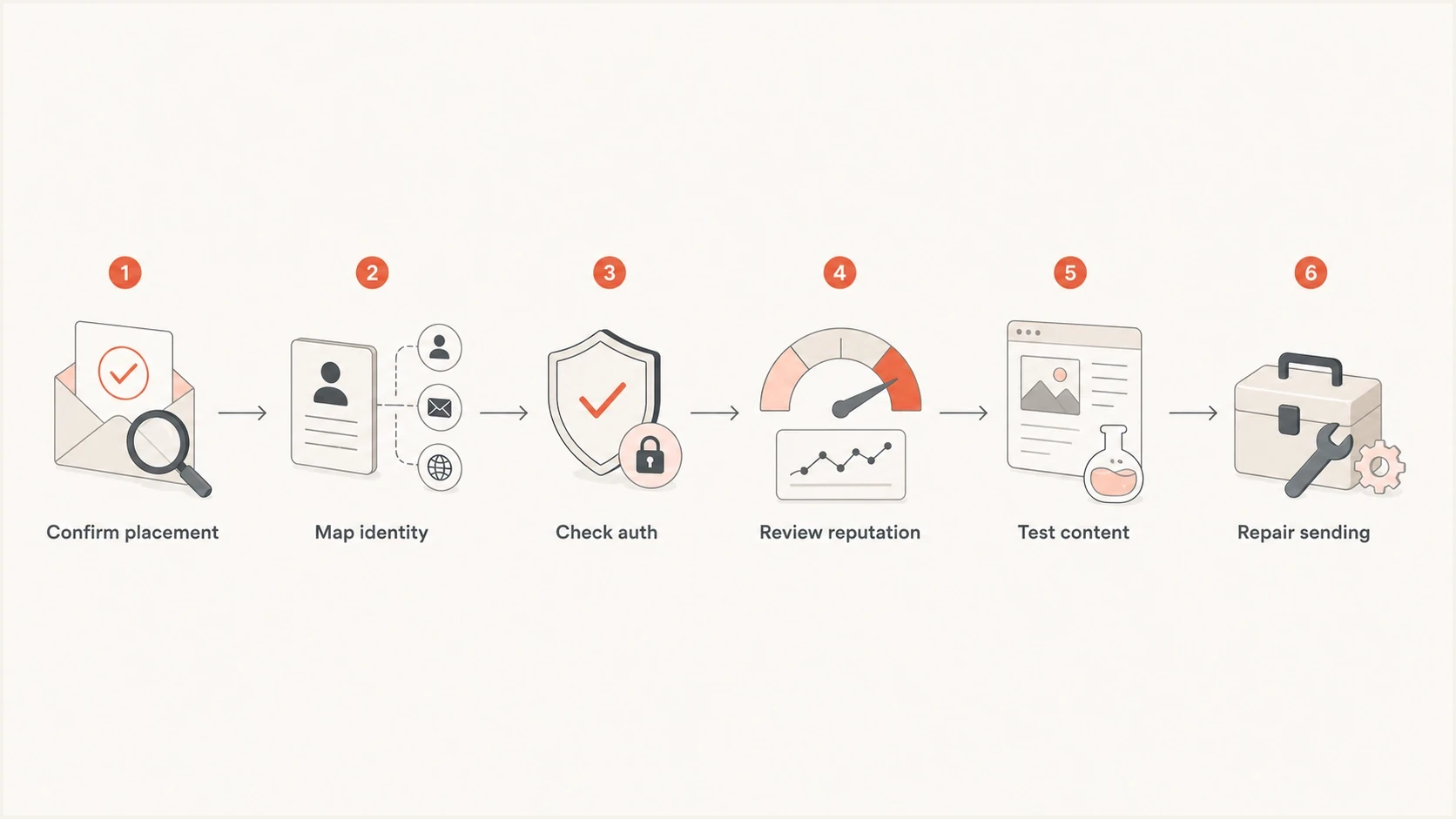
A six-step SFMC spam troubleshooting flow from placement evidence to repair.
Map the SFMC sending identity
SFMC sends through several identities at once. The visible From domain, bounce domain, DKIM signing domain, SPF return-path domain, and tracking domain can all affect filtering. If one of those domains is new, misconfigured, or sharing reputation with unwanted mail, the message can pass basic checks and still land in spam.
Start by collecting a full header from a delivered copy and a spam-folder copy. Then compare the domains in the header with the SFMC sender profile, delivery profile, SAP or Private Domain setup, and link tracking configuration. SAP includes a private sending domain, a dedicated IP, and branding for tracking and image URLs. A Private Domain authenticates the From domain but does not include the same link branding or dedicated IP.
Identity checklisttext
From domain: news.example.com
Bounce domain: bounce.example.com
DKIM d=: news.example.com
SPF pass: yes
DMARC: pass by DKIM
Tracking domain: click.example.com
IP type: shared or private
Looks healthy
- Domain match: The From domain and DKIM signing domain match the brand domain you expect recipients to see.
- Stable source: The same SFMC sending stream has recent successful campaigns with normal engagement and complaint levels.
- Branded links: The tracking domain belongs to the same brand and has not been reused across unrelated senders.
Needs investigation
- Mixed identity: The From domain is branded, but the DKIM or bounce domain points to a different domain.
- New stream: A new private domain, IP, sender profile, or business unit started sending without a proper ramp.
- Risky links: The creative contains external redirects, short links, or link domains with their own reputation problems.
If the issue began after moving to a private domain, compare the new identity against the old working setup. That scenario has a narrower checklist, and the related private domain troubleshooting path is worth checking before you rebuild the whole program.
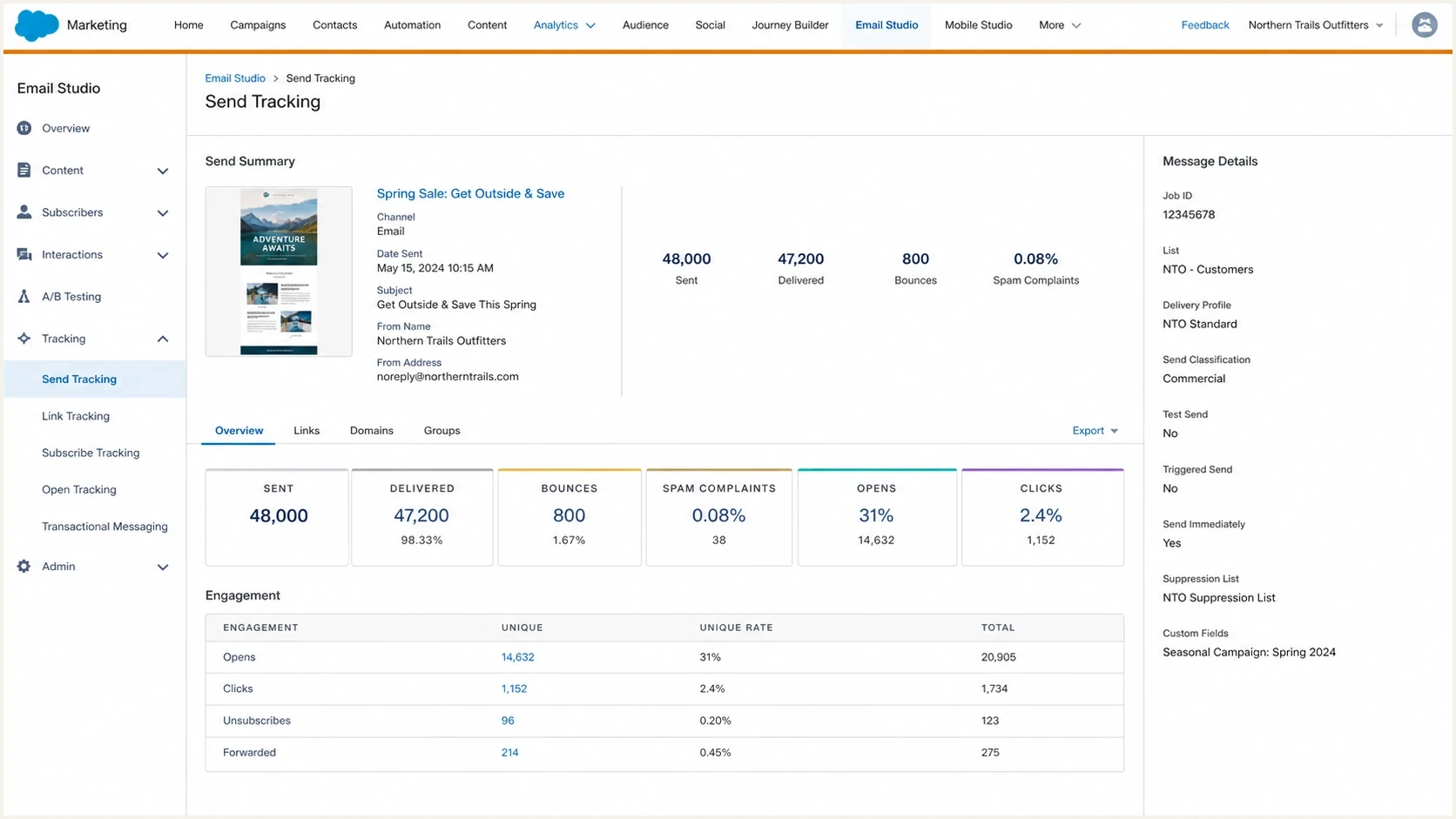
Salesforce Marketing Cloud Email Studio send tracking metrics used for spam diagnosis.
Check authentication before changing content
Authentication is not a guarantee of inbox placement, but it is the first layer to clean up. SFMC bulk mail to Gmail must pass both SPF and DKIM. DMARC then needs either the authenticated SPF domain or DKIM signing domain to match the organizational domain in the visible From address. If the authentication layer is wrong, every content test after that is polluted.
Use a domain health check to confirm the public DNS side, then verify the same result in a real SFMC email header. DNS can look correct while a business unit or sender profile still sends through the wrong identity.
?
What's your domain score?
Deep-scan SPF, DKIM & DMARC records for email deliverability and security issues.
|
|
|
|---|---|---|
DKIM | Passes | Review selector |
SPF | Passes | Check return path |
DMARC | Passes | Fix domain match |
CNAME | Resolves | Repair DNS |
Compact authentication triage for SFMC sends.
For DMARC, aggregate reports are more useful than a one-off pass or fail. DMARC monitoring shows whether SFMC is the only source, whether other systems send as the same domain, and whether a new source appeared around the time spam placement began.
Starter DMARC record for visibilitydns
v=DMARC1; p=none; rua=mailto:dmarc@yourdomain.com;
Also confirm that the sending IP has matching forward and reverse DNS, SFMC transmits with TLS, and the message follows RFC 5322. For promotional bulk mail, authentication must sit beside a visible unsubscribe link and a working one-click unsubscribe header.
Suped's product supports this investigation by mapping DMARC results to sending sources, monitoring SPF and DKIM changes, and alerting the team when an SFMC identity starts failing. Hosted SPF, hosted DMARC, hosted MTA-STS, and blocklist monitoring can support the related DNS and reputation checks when those workflows are in scope.

Issue steps to fix dialog showing the issue overview, tailored fix steps, and verification action
Use mailbox and SFMC data together
The most useful answer rarely comes from one dashboard. Compare mailbox reputation data with SFMC response data. The SFMC side tells you who received, bounced, clicked, unsubscribed, or complained. Opens need more caution because automated privacy opens can inflate the count. The mailbox side tells you whether the provider has lost trust in the IP, domain, or content pattern.
For Gmail, check the exact spam-folder warning text. A message like "This message is similar to messages that were identified as spam in the past" points toward content or audience signals. A message like "Messages from this domain have been identified as spam" points toward a stronger domain reputation problem.
- Export events: Pull bounces, clicks, unsubscribes, complaints, and send volume by recipient domain and campaign. Include SMTP text, bounce type, bounce category, and the affected job ID.
- Split segments: Compare recent clickers or buyers, inactive subscribers, imported contacts, and older suppressions.
- Compare creative: Send plain text, the normal HTML, and a version with external links removed to controlled internal recipients.
- Record changes: Log all SFMC sender profile, delivery profile, journey, data extension, and DNS changes by date.
A direct answer about tools
Use a real-message email tester for header, content, and authentication clues, but do not expect any tester to know the private filtering decision inside Gmail or Apple Mail. The real diagnosis comes from combining the test with mailbox warnings and SFMC data.
If you need a broader SFMC checklist, the SFMC deliverability diagnosis guide is useful after the first authentication checks are clean.
Audit complaints and unsubscribe handling
SFMC's Spam Complaints Over Time report and _Complaint data view contain complaints returned through participating mailbox feedback loops. Gmail does not provide individual complaints through a standard feedback loop, so the SFMC report cannot tell you the Gmail spam rate. Read Gmail's aggregate spam-rate data separately and compare it with SFMC sends by date and domain.
- Complaint target: Keep Gmail's reported spam rate below 0.10% and avoid reaching 0.30% or higher.
- SFMC evidence: Query _Complaint and _Bounce, review Spam Complaints Over Time, and use a Tracking Extract when you need SMTP messages or Not Sent reasons.
- Classification: Use Commercial for promotional mail. Do not label marketing mail as Transactional to bypass unsubscribe requirements.
- Unsubscribe: Include a visible unsubscribe link, support one-click unsubscribe for promotional bulk mail, and honor requests within 48 hours.
Do not reactivate complaint or held addresses in bulk
SFMC automatically unsubscribes a subscriber when it receives a supported complaint. It can also move repeatedly undeliverable addresses to Held. Reactivate an address only after the recipient confirms that it is deliverable and wants the mail. Bulk reactivation creates fresh bounce and complaint signals.
For records missing from a send, do not assume spam filtering. Check All Subscribers status, exclusion and auto-suppression lists, List Detective results, and the Not Sent extract. Those controls can stop a message before mailbox filtering begins.
Find source reputation problems
When SFMC emails go straight to spam, source reputation is one of the most common causes. Source reputation means the sending IP, domain, brand, and behavior look similar to mail that recipients ignore, delete, complain about, or mark as unwanted.
Check whether you are on shared or dedicated SFMC infrastructure. Shared IPs carry the combined reputation of their sending pool. A dedicated IP puts your own data and sending behavior in control, but it requires warming and exposes sharp volume jumps or weak engagement more clearly. Current SFMC guidance recommends a dedicated IP above 100,000 messages per month and requires one above 250,000 messages per month.
Run blocklist monitoring against the sending IPs, visible domain, bounce domain, and tracking domain. A blocklist or blacklist result does not explain every spam placement, but it is a concrete signal to investigate when placement changes suddenly.
Reputation triage priority
Use these bands to decide which reputation signal gets attention first.
Stable
Low
No new source, no volume spike, no listing, normal engagement.
Watch
Medium
One domain or segment has weaker engagement than the baseline.
Repair
High
New identity, domain warning, listing, or sharp complaint jump.
Do not move to a fresh domain as the first repair. If the audience is unengaged, the offer is unwanted, or the link stack has bad signals, the new domain inherits the same behavior after warm-up. A new domain makes sense only when you have confirmed domain-level damage and you can send first to highly engaged contacts.
A public thread like Salesforce StackExchange can help you recognize common symptoms, but your own SFMC send data and authentication records decide the repair path.
Test the message content and links
Content can push SFMC mail into spam even when authentication passes. This does not mean vague ideas like "spammy words". Check specific patterns: a misleading subject line, high image-to-text ratio, link domain with poor reputation, repeated phone number, redirect chain, low-value offer, attachment-like pattern, malformed HTML, or text that resembles mail recipients rejected before.
The cleanest test is to remove variables one at a time. Keep the sender, audience, and timing the same, then change only the creative. If the plain-text version reaches the inbox and the full HTML lands in spam, inspect links, images, tracking, and copy. If both versions land in spam, move back to reputation and audience.
|
|
|
|---|---|---|
Plain text | Audience | HTML |
No links | Copy | URLs |
New CTA | Template | Offer |
Simple HTML | Sender | Markup |
Content tests that isolate one signal at a time.
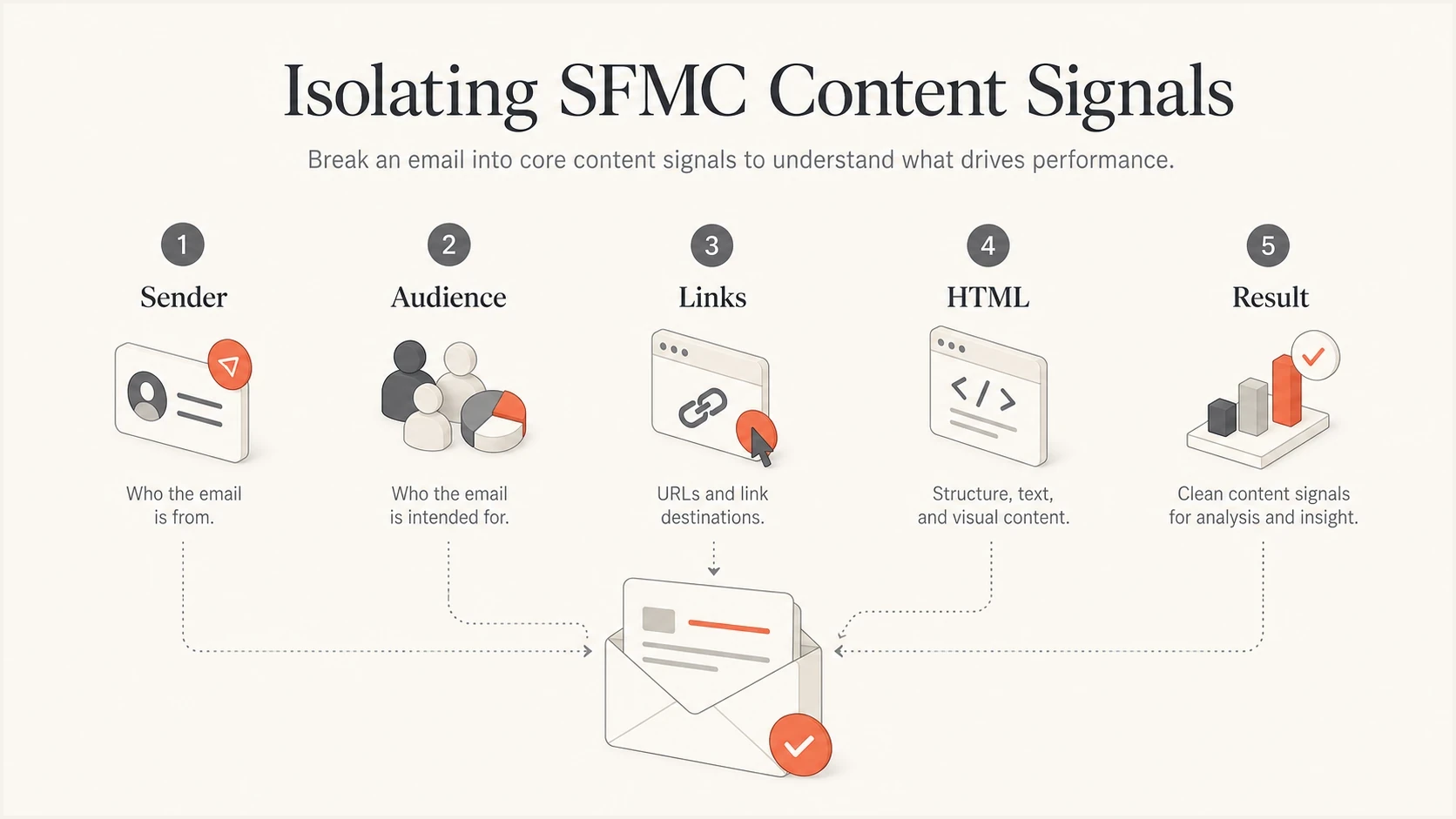
An SFMC content test isolates sender, audience, links, HTML, and result.
If authentication passes but placement is still bad, use the spam despite authentication workflow to avoid repeating the same DNS checks while the real issue sits in reputation, list quality, or content.
Recover the sending program
Once the likely cause is clear, repair with the smallest change that matches the evidence. Broad domain changes, IP swaps, and template rewrites create new variables. Use a controlled recovery plan that reduces risk and proves improvement.
- Stabilize identity: Fix DKIM, SPF, DMARC, bounce domain, and tracking domain issues before changing send volume.
- Reduce risk: Pause inactive contacts, risky imports, weak consent sources, and campaigns with high complaint or unsubscribe rates.
- Send active first: Restart with recent clickers, buyers, or converters, then expand only after placement and engagement improve.
- Simplify content: Use one branded tracking domain, remove redirect chains, and test a simpler HTML version.
- Monitor daily: Track placement evidence, complaint signals, bounces, authentication results, and blocklist or blacklist status.
Where Suped fits
Suped's product keeps the authentication and reputation checks used in recovery together. DMARC monitoring confirms which source is sending. Hosted SPF and SPF flattening help keep SPF under lookup limits. Hosted DMARC supports staged policy changes. Real-time alerts and issue steps shorten the time between a bad signal and the DNS or sending change that needs attention.
For MSPs and agencies managing many SFMC clients, the multi-tenant dashboard helps compare the same issue across brands: an unverified sender, a forgotten business unit, a tracking domain change, or a list import that shifts complaint behavior. Viewing those domains together makes the repeated pattern easier to catch.
Views from the trenches
Best practices
Start with mailbox warnings, then compare them with SFMC events and domain health data.
Segment to recently engaged contacts before changing domains, IPs, or creative templates.
Keep SFMC sending, bounce, tracking, and DKIM domains mapped in one shared note for audits.
Common pitfalls
Treating one seed test failure as proof can send teams toward the wrong repair work.
Changing to a fresh domain without fixing audience quality carries the same issue forward.
Ignoring link and phone patterns misses content signals that mailbox filters use heavily.
Expert tips
Save every spam folder banner text, because each wording points to a different root cause.
Compare engaged and inactive segments with the same creative to isolate reputation drag.
Use aggregate DMARC data to confirm whether every SFMC stream uses the right domain.
Marketer from Email Geeks says Gmail spam placement often comes down to source reputation or repeated content signals inside the message, so the repair path must test both.
2022-12-07 - Email Geeks
Marketer from Email Geeks says mailbox warning text helps separate recoverable content similarity issues from deeper domain reputation damage.
2022-12-07 - Email Geeks
The practical fix order
The direct answer is this: troubleshoot SFMC spam placement by proving whether the bad signal comes from identity, reputation, audience, or content, then repair only that layer first. Start with headers and authentication. Move to mailbox warnings, bounce evidence, complaints, and unsubscribe handling. Then isolate content and links. Only after those checks should you consider domain or IP changes.
My first actions are to collect full headers from inbox and spam copies, verify the SFMC sending identity against DMARC results, review provider-specific complaints and bounce reasons, and compare engaged versus inactive segments with the same creative. That exposes whether the issue is technical, reputation-based, audience-driven, or caused by the message people are receiving.




