Why are my Salesforce Marketing Cloud emails going to spam after switching to a private domain and what can I do to fix it?

Updated on 31 Jul 2026: We clarified how Private Domain and SAP changes affect domain and IP reputation, and updated the DMARC guidance for RFC 9989.
The most likely reason your Salesforce Marketing Cloud emails started going to spam after switching to a private domain is that mailbox providers began judging a new sending identity. Your old setup had existing domain reputation. The new private domain or subdomain did not have the same history, so Gmail, Yahoo, Microsoft, and corporate filters treated the mail with more caution.
Fix it in this order: confirm whether the move changed the domain, the IP, or both; prove SPF, DKIM, and DMARC pass with the same visible From domain; send a real message through an email tester; split performance by recipient domain; slow volume to your most engaged audience; then check list quality and blocklist (blacklist) exposure. Do not start by blaming IPv6 or a footer warning unless the actual message headers show that those issues affect acceptance.
- Main cause: A new private SFMC domain needs reputation building, even when the IP pool does not change.
- First proof: Check authentication on a sent campaign, not only DNS records copied from setup notes.
- Recovery path: Use a controlled warmup and remove old or low-engagement recipients during recovery.
The most likely cause
When SFMC moves mail to a private domain, the authenticated identity changes. That change gives you brand control and authentication, but it also creates a new reputation surface. A mailbox provider does not only ask whether the message passes SPF and DKIM. It also asks whether this domain has a history of sending wanted mail at this volume.
Gmail and Yahoo have enforced bulk sender requirements since 2024, and Outlook.com began enforcing authentication for high-volume senders in 2025. Those rules do not make a private domain untrusted by default, but a rushed migration can expose a DMARC domain mismatch, incomplete one-click unsubscribe handling, or weak reputation when normal campaign volume reaches the new identity.
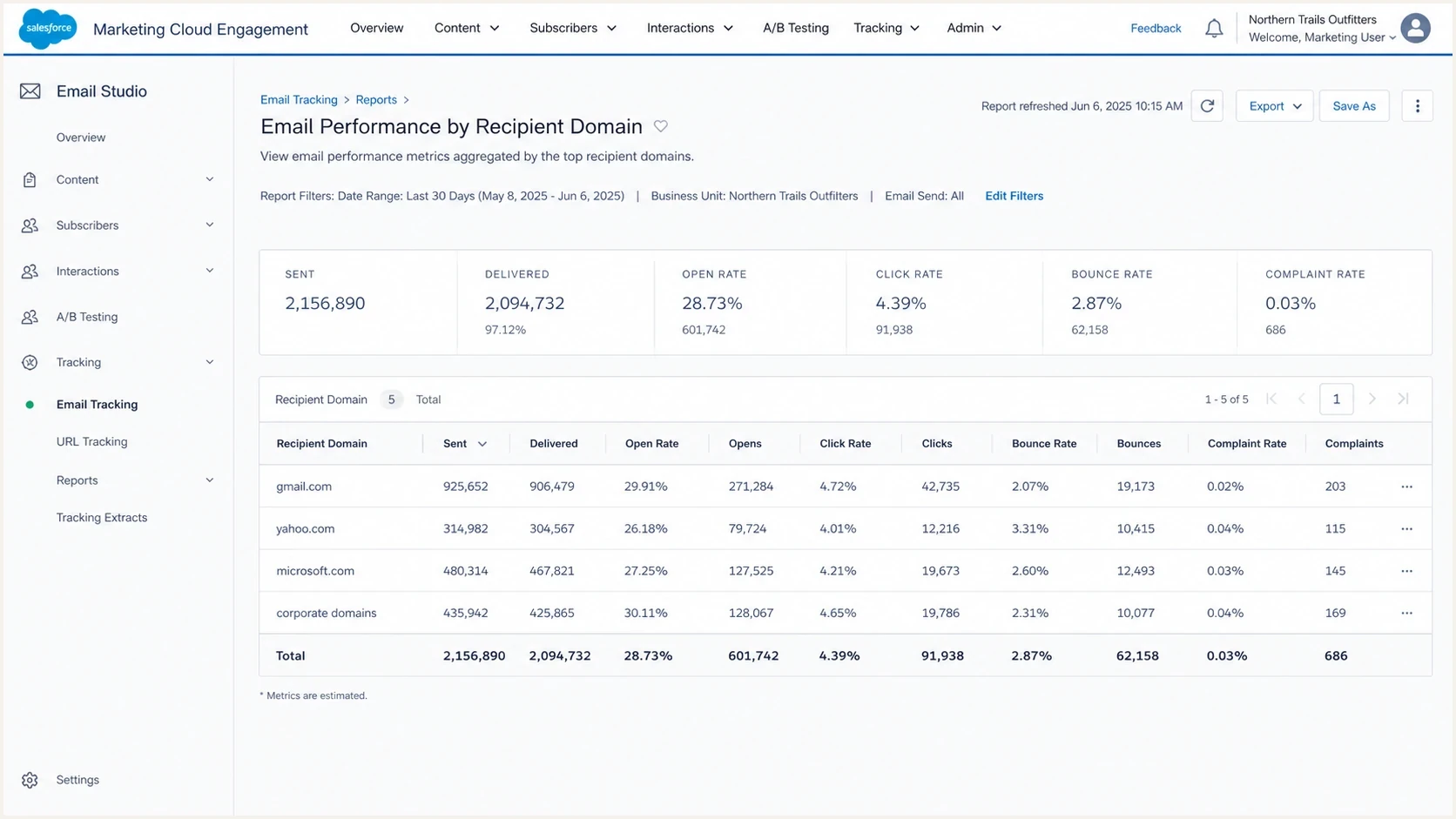
Salesforce Marketing Cloud Engagement report showing performance by recipient domain.
Do not over-read open rate drops
A 40% year-over-year open rate decline is a warning sign, but it is not enough by itself. Compare clicks, conversions, complaints, bounces, unsubscribe activity, and recipient-domain placement before calling it a pure inboxing issue.
- Good signal: Clicks and conversions dropped in the same period as spam-folder reports.
- Weak signal: Only opens dropped while clicks, conversions, and replies stayed stable.
What changed when you moved to a private domain
A standalone Private Domain can authenticate the SFMC sending domain with SPF and DKIM when authenticated email sending is enabled, but it does not add a dedicated IP or brand link and image domains. A Sender Authentication Package (SAP) includes a Private Domain, dedicated IP, branded links and images, and Reply Mail Management. In either setup, the visible From domain, return-path domain, DKIM signing domain, and DMARC result need to make sense together.
Before the switch
- Reputation: Some trust sat with Salesforce-managed sending infrastructure and older domains.
- Authentication: SPF and DKIM were often technically valid, but less tied to your brand domain.
- Risk: Brand identity was weaker, but established sending history helped some campaigns.
After the switch
- Reputation: The new private domain must earn trust through positive engagement.
- Authentication: SPF and DKIM need to authenticate, and DMARC requires a domain match to the visible From address.
- Risk: Normal volume on day one can look abrupt, especially to Gmail and Yahoo.
This is why "SFMC is authenticated" is not enough. Confirm the actual sent message passes DMARC, confirm the DKIM domain matches the From domain at the organizational level, and keep Suped's DMARC monitoring running while volume ramps.
Illustrative DNS setup for a private sending subdomaindns
selector1._domainkey.email.example.com. 3600 IN CNAME selector1.example.net.
selector2._domainkey.email.example.com. 3600 IN CNAME selector2.example.net.
bounce.email.example.com. 3600 IN CNAME bounce.example.net.
_dmarc.email.example.com. 3600 IN TXT
"v=DMARC1; p=none; rua=mailto:dmarc@example.com"
Confirm whether the IP changed too
A standalone Private Domain does not include a dedicated IP. Confirm that authenticated email sending is enabled for the domain. It can use Salesforce shared IP space or the account's current IP configuration, so the domain can be new while the IP remains unchanged. SAP includes a dedicated IP. If SAP provisioning or a separate IP change happened with the domain move, mailbox providers are judging both a new domain and a new IP.
|
|
|
|---|---|---|
Standalone Private Domain | New domain, existing IP setup | Build domain history and verify authentication. |
SAP with new dedicated IP | New domain and new IP | Warm the domain and IP together. |
Private Domain on current dedicated IP | New domain, retained IP history | Protect the current IP while the domain earns trust. |
Match the recovery plan to the SFMC change.
Confirm the actual sending IP in a delivered message header and compare it with pre-migration mail. Do not assume the IP changed because the From domain changed. If a dedicated IP is new, ramp volume gradually and keep daily volume consistent. If shared IP space stayed in place, focus first on the new domain, subscriber response, and message-level authentication.
Run the right checks before changing content
Before changing templates, subject lines, or cadence, test the actual message that left SFMC. DNS can look correct while the sent message still fails because the wrong sender profile, DKIM selector, bounce domain, or From domain is in use.
Also run the sending domain through a domain health check so DMARC, SPF, DKIM, and basic DNS failures are visible in one place. That check will not replace mailbox-provider performance data, but it removes a large amount of guesswork.
?
What's your domain score?
Deep-scan SPF, DKIM & DMARC records for email deliverability and security issues.
|
|
|
|---|---|---|
DMARC | Pass and domain match | Whether the From domain has authenticated mail. |
DKIM | Selector and signing domain |  Whether SFMC signed with the expected private domain. Whether SFMC signed with the expected private domain. |
SPF | Return-path result | Whether the bounce domain is authorized. |
Unsubscribe | Header and body link | Whether marketing mail meets bulk sender expectations. |
Recipient domain | Gmail, Yahoo, Microsoft |  Where the placement problem is concentrated. Where the placement problem is concentrated. |
Checks to run on a real SFMC campaign message.
Suped's product helps here when the issue is not a single DNS typo. Suped connects DMARC aggregate data with source detection, authentication pass rates, and issue-level remediation steps, so SFMC failures are separated from other senders using the same domain.

Issue steps to fix dialog showing the issue overview, tailored fix steps, and verification action
How to separate warmup from a deeper problem
A domain warmup problem has a specific shape: authentication passes, bounces are normal, but inbox placement and engagement are weaker on the new domain, especially at large mailbox providers. A deeper list or reputation problem has a harsher shape: complaints, spam-trap hits, poor engagement, blocks, or domain-specific rejection patterns keep showing up even after volume is reduced.
For a recovery plan, do not send the full B2B list again. Give the private domain two to four weeks to earn positive signals. A fuller domain warm-up plan should start with recent clickers and active customers, then add recent openers. Widen only when complaint and bounce rates stay low.
Private domain recovery risk by audience age
Use engagement recency to decide how quickly to widen SFMC sending volume.
Low risk
0-30 days
Recent clickers and buyers.
Moderate risk
31-90 days
Recent openers with limited clicks.
High risk
91-180 days
Dormant or uncertain recipients.
|
|
|
|---|---|---|
Monday | 0-30 days | Build positive signals. |
Tuesday | 31-60 days | Add proven readers. |
Wednesday | 61-90 days | Test wider demand. |
Thursday | 91-120 days | Watch complaints. |
Friday | 121-180 days | Stop if signals fall. |
A simple five-day B2B recovery split.
What to pause
- Cold segments: Suppress recipients with no opens, clicks, purchases, or replies in 180 days.
- Risky imports: Hold old event lists, partner lists, and unclear consent sources.
- Full-volume sends: Delay broad campaigns until core providers show stable clicks and conversions.
Authentication issues that imitate reputation problems
Authentication failures can look like reputation problems because the symptom is the same: junk placement, lower engagement, and more complaints from internal stakeholders. The difference is that authentication problems show up clearly in headers and DMARC reports.
For bulk marketing mail, require SPF and DKIM to pass and require DMARC to pass because the SPF or DKIM domain matches the visible From domain. Gmail, Yahoo, and Outlook.com high-volume sender requirements make authentication a baseline, though passing authentication does not guarantee inbox placement. Also require a valid List-Unsubscribe header with one-click handling for marketing mail and a visible body unsubscribe. Salesforce's Salesforce FAQ is a useful starting point when spam placement and bounces appear after an SFMC change.
DMARC record with aggregate reportingdns
_dmarc.email.example.com. 3600 IN TXT
"v=DMARC1; p=none; rua=mailto:dmarc@example.com"
RFC 9989 is now the current DMARC standard and makes the old pct tag historic. Remove pct from new and maintained records instead of using it for staged enforcement. Keep p=none while monitoring, verify every legitimate source, then change policy only when the reports support it.
A missing rua tag does not normally explain spam placement by itself. It does mean you lack aggregate DMARC visibility, which makes the investigation slower. With aggregate reporting, you can see whether SFMC is passing DMARC and whether any other sender is damaging the domain's authentication profile.
Footer warnings need context
Automated scanners get unsubscribe checks wrong, especially when the body link needs account context. If the message has RFC 8058 one-click headers and a visible in-body unsubscribe link, do not make the footer the primary suspect.
IPv6 is also not the fix. A failed IPv6 check is not a Gmail, Yahoo, Microsoft, or Apple requirement for inbox placement. If every meaningful authentication check passes and the only failure is IPv6, move on to warmup, list quality, and provider-specific performance.
If the original campaign is delivered but replies go to junk, investigate that as a separate path. Check the Reply Mail Management forwarding configuration, confirm the forwarded message headers, and allowlist the required RMM IP addresses within the receiving corporate mail system when needed. A reply-handling problem does not prove the outbound SFMC campaign has the same placement problem.
Do not ignore list quality and blocklist signals
A private domain migration exposes list quality. Recipients who tolerated old mail can react differently when the sending identity changes. Old B2B lists are especially risky because people change jobs, mailboxes get recycled, and abandoned addresses can turn into traps.
This is where blocklist monitoring matters. A domain or IP appearing on a major blocklist (blacklist) does not always cause every message to land in spam, but it is a strong signal that reputation needs attention. Suped's blocklist monitoring keeps those signals beside DMARC and authentication data, so the root cause is easier to isolate.
Blocklist checker
Check your domain or IP against 144 blocklists.
 Spamhaus
 0Spam
0Spam

 Cisco
Cisco
 NoSolicitado

 URIBL
URIBL
 abuse.ro
 ALPHANET
 Anonmails
 Ascams
 BLOCKEDSERVERS
 Calivent Networks


 EFnet
EFnet




 JustSpam
 Kempt.net
 NordSpam

 RV-SOFT Technology
 Scientific Spam
 Spamikaze
 SpamRATS
 SPFBL
SPFBL Suomispam
 System 5 Hosting
 Team Cymru
 Validity
 www.blocklist.de Fail2Ban-Reporting Service
 ZapBL
ZapBL 2stepback.dk
 Fayntic Services
 ORB UK
 technoirc.org
 TechTheftSpamhaus0SpamCiscoNoSolicitadoURIBLabuse.roALPHANETAnonmailsAscamsBLOCKEDSERVERSCalivent NetworksEFnetJustSpamKempt.netNordSpamRV-SOFT TechnologyScientific SpamSpamikazeSpamRATSSPFBLSuomispamSystem 5 HostingTeam CymruValiditywww.blocklist.de Fail2Ban-Reporting ServiceZapBL2stepback.dkFayntic ServicesORB UKtechnoirc.orgTechTheftSpamhaus0SpamCiscoNoSolicitadoURIBLabuse.roALPHANETAnonmailsAscamsBLOCKEDSERVERSCalivent NetworksEFnetJustSpamKempt.netNordSpamRV-SOFT TechnologyScientific SpamSpamikazeSpamRATSSPFBLSuomispamSystem 5 HostingTeam CymruValiditywww.blocklist.de Fail2Ban-Reporting ServiceZapBL2stepback.dkFayntic ServicesORB UKtechnoirc.orgTechTheftSpamhaus0SpamCiscoNoSolicitadoURIBLabuse.roALPHANETAnonmailsAscamsBLOCKEDSERVERSCalivent NetworksEFnetJustSpamKempt.netNordSpamRV-SOFT TechnologyScientific SpamSpamikazeSpamRATSSPFBLSuomispamSystem 5 HostingTeam CymruValiditywww.blocklist.de Fail2Ban-Reporting ServiceZapBL2stepback.dkFayntic ServicesORB UKtechnoirc.orgTechTheftSpamhaus0SpamCiscoNoSolicitadoURIBLabuse.roALPHANETAnonmailsAscamsBLOCKEDSERVERSCalivent NetworksEFnetJustSpamKempt.netNordSpamRV-SOFT TechnologyScientific SpamSpamikazeSpamRATSSPFBLSuomispamSystem 5 HostingTeam CymruValiditywww.blocklist.de Fail2Ban-Reporting ServiceZapBL2stepback.dkFayntic ServicesORB UKtechnoirc.orgTechTheft
- Trap risk: Old, inactive, or unclear-source addresses can damage the new private domain quickly.
- Complaint risk: A sudden brand or domain change can confuse recipients who previously recognized the sender.
- Provider risk: One mailbox provider can degrade while another remains healthy, so segment reports by domain.
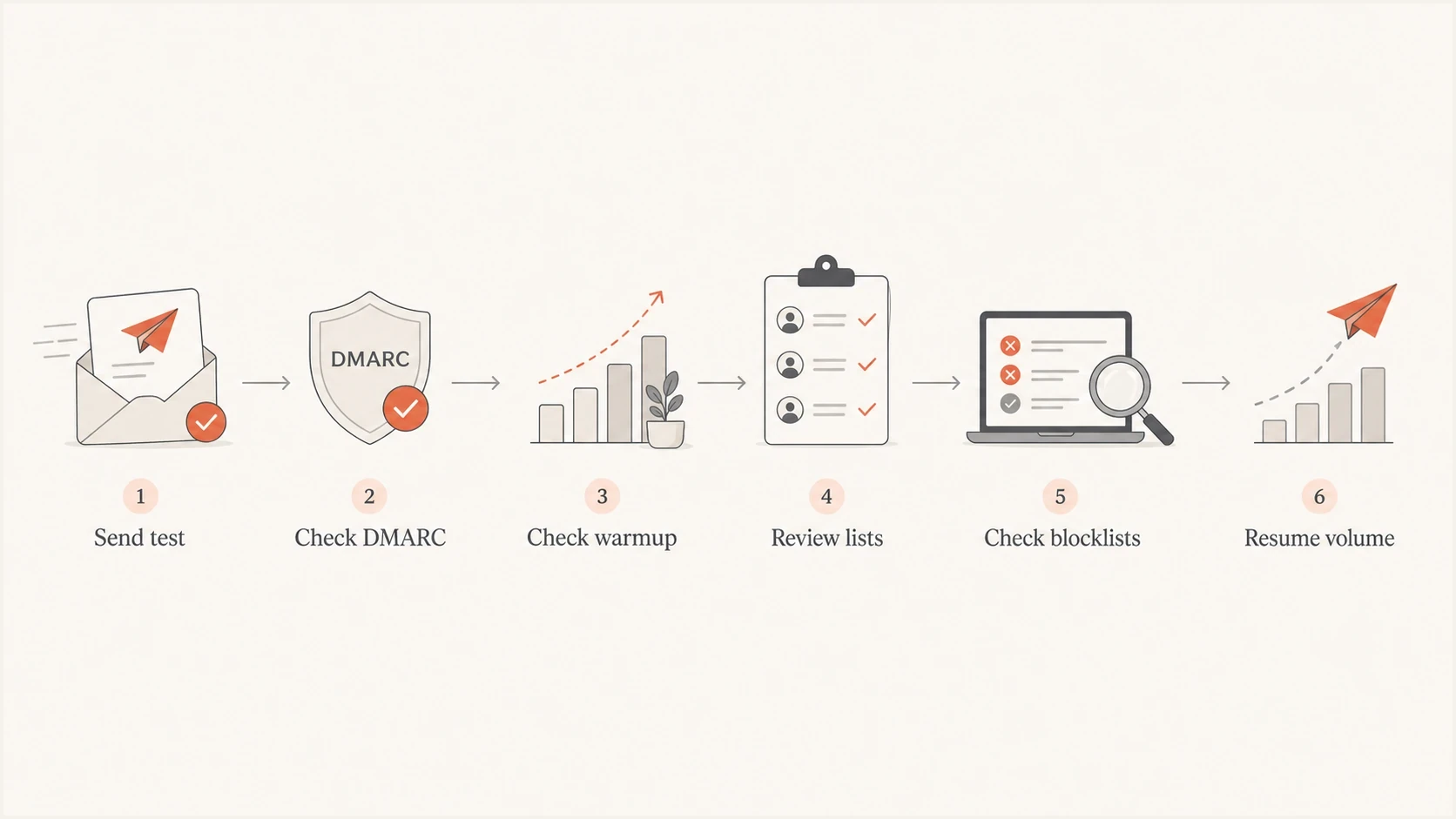
Flowchart for troubleshooting SFMC private domain spam placement.
How Suped supports the recovery workflow
Suped's product is relevant when the problem spans DMARC, SPF, DKIM, blocklists (blacklists), and ongoing sender monitoring. The immediate SFMC fix still requires good sending decisions, while Suped provides the technical evidence needed to separate authentication trouble from reputation trouble.
Suped can show whether SFMC is an authenticated source, whether other sources are failing, whether a DMARC policy change is risky, and whether a domain or IP is listed. Hosted SPF and SPF flattening also help teams that do not want every sender change to become a DNS project.
Suped DMARC dashboard showing email volume, authentication health, and source breakdown
Manual workflow
- Data split: Authentication, DNS, blocklists, and campaign metrics sit in separate places.
- Fix path: Teams decide next steps by reading headers and comparing reports manually.
- Risk: A small SFMC setup error can stay hidden until deliverability drops.
Suped workflow
- Data view: DMARC, SPF, DKIM, blocklist, and source data sit together.
- Fix path: Automated issue detection gives concrete steps for each domain.
- Risk: Real-time alerts catch authentication drops before campaigns compound them.
For MSPs and agencies, the multi-tenant dashboard matters because SFMC issues often repeat across clients: missing DMARC reporting, unverified sources, oversized SPF records, and domains that need staged policy changes. Suped makes those patterns visible without turning every client into a separate manual audit.
A practical SFMC recovery checklist
Work through this checklist before reverting the domain or making broad creative changes. Reverting to the old non-private domain can hide the symptom, but it does not build the compliant, authenticated sending identity you need long term.
- Identify: Confirm whether the domain, sending IP, or both changed.
- Authenticate: Send a real SFMC message and confirm SPF, DKIM, and DMARC pass.
- Report: Add DMARC aggregate reporting so failures are tied to actual sources.
- Segment: Break SFMC performance down by Gmail, Yahoo, Microsoft, Apple, and corporate domains.
- Warm: Start with the most engaged audience and widen only when metrics hold.
- Suppress: Remove old, inactive, risky, or unclear-consent records during recovery.
- Monitor: Watch blocklist, blacklist, complaint, bounce, click, and conversion signals together.
If the problem is still unclear after those steps, use a structured SFMC spam troubleshooting process. Keep the investigation evidence-led. Do not chase every scanner warning when campaign metrics point to domain reputation or list quality.
Views from the trenches
Best practices
Warm the new private domain with engaged recipients before moving normal campaign volume.
Keep DMARC aggregate reporting active so failures are tied back to real sources.
Compare clicks and conversions with opens so reporting noise does not hide placement.
Common pitfalls
Assuming a private domain inherits old trust can leave sender reputation untested.
Chasing footer scanner failures wastes time when engagement needs attention first.
Sending to dormant B2B lists during recovery adds complaint and trap risk early.
Expert tips
Chunk large SFMC sends across business days and watch mailbox-specific response.
Separate Gmail, Yahoo, Microsoft, and corporate domains before judging the program.
Treat missing DMARC RUA as a visibility gap first, not proof of spam placement alone.
Marketer from Email Geeks says open rates alone do not prove spam placement because click and conversion trends give a better read on mailbox access.
2024-03-27 - Email Geeks
Marketer from Email Geeks says a new private SFMC domain still needs domain warming, even when the IPs remain unchanged.
2024-03-27 - Email Geeks
The fix in plain terms
Your SFMC private domain probably did not fail because private domains are bad. It failed because the domain started sending meaningful volume before it had enough trusted history, or because the migration exposed authentication, reporting, list quality, or blocklist weaknesses that were easier to miss before.
The fix is direct: verify the changed domain and IP, inspect a sent message, add DMARC aggregate reporting, warm the private domain with engaged recipients, suppress risky records, and monitor blocklists (blacklists) beside authentication and campaign metrics. Suped's product keeps those signals in one workflow and maps technical issues to remediation steps.




