Can an email template trigger spam filters and cause deliverability issues?

Published 14 Jul 2025
Updated 26 Aug 2026
11 min read
Summarize with
Updated on 26 Aug 2026: We updated this guide with current sender requirements and clearer tests for template content.
Yes. An email template can contribute to spam filtering and deliverability issues because it controls more than the visible design. It can control the subject line, sender display name, body copy, HTML structure, image usage, link patterns, tracking wrappers, hidden text, footer content, rendering behavior, mobile compatibility, and the plain text part. Those signals become part of the message that mailbox providers evaluate.
The caveat is important: a bad seed-list result does not prove that the template is causing broad spam placement. Treat the template as one suspect, then compare it with provider-specific mailbox placement, verified clicks, complaint rates, bounce rates, authentication results, and link health. Opens can add context, but privacy protections and image prefetching make them noisy. A high-reputation sender can still use a risky template, while a scary test result can also come from test-account history, automated link scanning, or timing.
Test the template in isolation. Change one thing at a time, keep the sending source constant, and confirm that the message passes DMARC through aligned SPF or DKIM before blaming the creative.
What the template can affect
A template includes the layout and the technical structure inside the message body. When saved content and headers are part of the template, it also includes the subject, sender display name, and visible copy. Mailbox filters read the resulting message as a mix of content, code, links, images, sender history, and recipient behavior. A clean domain reputation helps, but it does not erase message-level signals.
- HTML quality matters when malformed tags, badly nested tables, excessive inline styles, hidden blocks, copied builder code, JavaScript, iframes, forms, or embedded objects make the message hard to render or look evasive.
- Image-heavy templates give recipients and filters less visible context when the offer depends on one image or many slices. See the separate note on image-to-text ratio when image-heavy emails are common.
- Links add risk when redirect chains, tracking domains, broken final URLs, raw tracking URLs, mixed domains, short links, or misleading anchor text make the destination harder to verify.
- Copy can hurt engagement when it uses aggressive sale language, misleading urgency, weak context, or unsupported claims. Individual spam trigger words matter less than the full message pattern.
- Regulated or age-restricted topics, including alcohol or cannabis, do not automatically trigger spam filters, but they need clear consent, factual claims, and sending-platform policy checks.
- Footer content should include a real business identity and a working, visible unsubscribe path. For marketing and subscribed mail, RFC 8058 one-click unsubscribe uses message headers and remains separate from the link in the body.
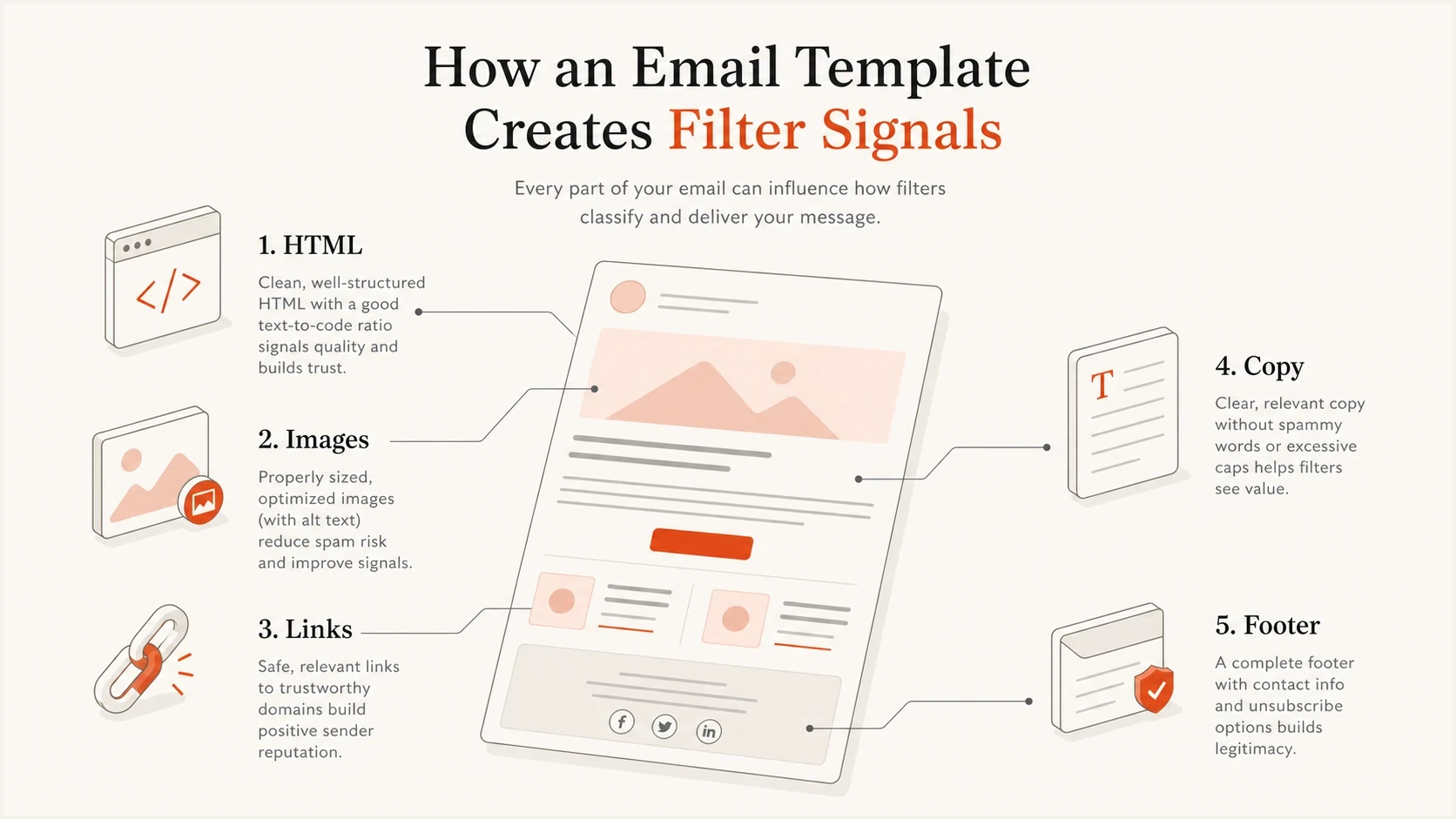
Infographic showing HTML, images, links, copy, and footer as email template spam filter signals.
Subject lines and visible copy must agree
Template reviews often focus on HTML and images while overlooking the saved subject line, preheader, display name, and opening copy. Mailbox providers expect these elements to describe the sender and message accurately. A mismatch also raises complaint risk because recipients feel misled.
- Use Re: or Fwd: only for a real reply or forwarded message, and make the subject's promise clear in the opening copy.
- Keep the sender display name consistent and limited to the sender's identity rather than urgency, offer text, or a fake thread indicator.
- Limit all-caps text, repeated punctuation, oversized type, and decorative symbols when they make the message look deceptive or hard to read.
- Use personalization only when it adds real recipient context, and provide a clean fallback so missing data does not expose merge tags.
Do not rewrite useful copy around a list of forbidden words. Filters assess the whole message and its history. Accurate claims, readable formatting, clear link destinations, and content that matches the recipient's consent provide a stronger test than swapping one promotional word for another.
Template issues that cause real problems
The template problems that hurt deliverability are usually practical, not mysterious. Review anything that makes the message hard to render, verify, read, or trust. If the email depends on one big image, ten redirects, and a broken plain text part, filters and recipients both get less useful context.
|
|
|
|---|---|---|
All-image layout | Offer disappears when images are blocked | Add useful live copy |
Broken HTML | Inconsistent rendering | Validate and simplify code |
Unsupported elements | Content is blocked or stripped | Remove scripts, forms, and iframes |
Long redirects | Slow or failed link checks | Shorten the redirect chain |
Hidden text | Deceptive content signal | Remove it |
Weak footer | Complaints and lost trust | Show identity and unsubscribe |
Common template signals and fixes
Image-heavy sale emails deserve special attention. They often work for brands with strong engagement, but they reduce the amount of visible, machine-readable context. Alt text helps accessibility and rendering when images are blocked, but it does not replace visible copy, product details, pricing context, or a normal HTML structure.
Responsive code should also degrade cleanly. If a mobile layout depends on CSS that an email client strips, the message can look broken in Outlook, webmail, or dark mode even when the desktop preview looked fine. Broken rendering affects readability and can lead to fewer clicks or more complaints, which creates a deliverability problem over time.
Template pattern to avoidHTML
<a href="https://click.example/track?id=123">
  <img src="https://cdn.example/sale-slice-01.jpg" alt="Sale">
</a>
<a href="https://click.example/track?id=124">
  <img src="https://cdn.example/sale-slice-02.jpg" alt="Shop now">
</a>
<div style="display:none;color:#fff;font-size:1px">
  Hidden fallback copy that recipients never see.
</div>
Do not diagnose from the design alone
A sliced image template, sale subject line, or promotional offer does not automatically go to spam. Risk rises when several weak signals appear together, such as low readable text, poor HTML, link errors, failed authentication, low engagement, or complaint activity.
How to test whether the template is the cause
Use a simple isolation test. Keep the sender, audience segment, sending time, authentication, subject line, and offer constant. Change only the template variable. If you change the subject line, builder, links, and length at the same time, the test cannot identify the cause.
- Send the known-good template to the same type of test accounts and a small live segment.
- Send the suspect template with the same subject, From address, Reply-To address, links, and sending source.
- Send a simple HTML or text-first version with the same offer and link destinations.
- Open every tracked URL, follow each redirect, and confirm that the final page loads normally.
- Compare placement at Gmail, Google Workspace, Outlook.com, Yahoo Mail, and iCloud Mail, then test rendering in representative desktop and mobile clients.
For pre-send checks, use Suped's send a real test workflow to inspect the rendered message, authentication, links, and practical issues before a campaign reaches the full list.
Email tester
Send a real email to this address. Suped shows a results button when the test is ready.
?/43tests passed
Clean A/B test matrixtext
A: Known-good template + same subject + same links
B: Suspect template + same subject + same links
C: Text-first template + same subject + same links
D: Suspect template + direct links + same subject

Decision rule:
If only B performs poorly, inspect template HTML and image usage.
If B and D improve differently, inspect tracking and redirect behavior.
If all variants perform poorly, inspect sender, list, timing, and offer.
Why seed-list spam results can mislead you
Seed-list tests are useful, but they are not the same as production delivery. Probe accounts have their own histories, engagement patterns, and maintenance quality. A result that shows widespread spam placement is worth investigating, but do not treat it as final unless live accounts and recipient behavior point in the same direction.
Seed-list warning
- Probe mailboxes do not behave like engaged subscribers.
- Automated link checks can hit redirectors harder than a human recipient.
- The same message can land differently across repeated tests.
Production evidence
- Verified clicks show that some recipients could see and act on the message.
- Provider-specific mailbox checks reveal whether one provider has the problem.
- Complaint and bounce changes carry more weight than one placement screenshot.
A 429 response is a separate signal to handle carefully. It usually means a server received too many requests in a short period and throttled the requester. If your own redirector returns 429 for normal recipients, fix it immediately. If only a test scanner triggers the error, reproduce it with controlled checks before treating it as a mailbox filtering cause.
Promotions tab is not spam
A lower open rate can come from Gmail's Promotions tab, holiday timing, offer fatigue, or audience intent. Those are delivery and performance questions, but they are not the same as spam-folder placement.
Authentication and reputation still matter
Template testing only makes sense after the sending foundation is clean. If DMARC fails, or neither SPF nor DKIM provides aligned authentication for the visible From domain, investigate authentication before the creative. If the domain or IP has a blocklist (blacklist) issue, the same template can behave differently across providers.
Current Gmail and Yahoo bulk-sender requirements reinforce that sequence. Bulk senders need SPF, DKIM, and DMARC, must keep spam complaint rates below 0.3%, and must support easy unsubscribe for marketing mail. Gmail requires a clearly visible unsubscribe link in the body, while RFC 8058 one-click unsubscribe uses List-Unsubscribe and List-Unsubscribe-Post headers.
Before blaming creative, run a domain health check and confirm the exact sender passes authentication. Suped's product connects DMARC monitoring, SPF and DKIM visibility, alerts, and blocklist monitoring so a team can rule out authentication or blacklist problems before rebuilding a template.
Issues page showing top issues, verified sources, unverified sources, and authentication pass rates
The workflow is simple: verify the sender, check the template, then watch the next controlled send. Suped's issue detection separates unverified sources and authentication failures from content-side symptoms so teams can fix the correct layer first.
Template risk levels
Use these bands as a practical review guide before sending a new design.
Low risk
Safe to send
Readable live text, valid HTML, working links, and passing authentication.
Watch
Test first
Heavy images, many redirects, or a new design with limited history.
High risk
Fix first
Broken links, failed authentication, hidden text, or a blocklist or blacklist issue.
A practical checklist before blaming the template
When a campaign underperforms, work through this checklist before rewriting the design. It keeps the investigation grounded and prevents false positives.
- Confirm DMARC passes through aligned SPF or DKIM for the exact sending source and visible From domain.
- Check real accounts at each important mailbox provider, not only seed accounts.
- Open the email on desktop and mobile, with dark mode and blocked images where practical. Broken rendering often explains poor response.
- Validate the code and inspect malformed HTML before blaming the offer.
- Test tracked links, direct links, unsubscribe, view-in-browser, and every product URL.
- Remove JavaScript, iframes, embedded objects, forms, hidden text, and leftover builder code that normal email clients cannot use.
- Check that the subject, display name, preheader, and opening copy identify the sender and offer accurately.
- For regulated categories such as alcohol or cannabis, confirm that the sending platform allows the content and that claims, audience consent, and age-related logic are documented.
- Compare new, engaged, and inactive subscriber segments separately instead of averaging them together.
- Account for holiday behavior, sale fatigue, inbox competition, and Promotions-tab placement.
The fastest template fix is usually not a full rebuild. Start by adding visible text, reducing image slices, simplifying redirects, cleaning the footer, and removing hidden or leftover builder code. Then test the same audience slice again.
Views from the trenches
Best practices
Test one template variable at a time, then compare placement with real recipient behavior.
Check every redirect and final URL, because broken links create clicks that go nowhere.
Keep image-heavy promos usable with live text, clean HTML, and a plain text part.
Common pitfalls
Treating a seed-list result as proof of spam without checking live placement or clicks.
Ignoring rate-limit errors on link scanners when the redirect chain needs separate testing.
Changing subject lines, links, and builders together, which makes causes hard to isolate.
Expert tips
Compare a plain text control with the designed version before rewriting the full campaign.
Use DMARC aggregate data to confirm the sending source passes before testing content.
Watch verified clicks, complaints, and bounces before declaring a template failure.
Expert from Email Geeks says content can trigger filtering because the template controls many visible and hidden content signals.
2024-12-30 - Email Geeks
Expert from Email Geeks says a 429 response from a redirector is worth fixing first, because broken links frustrate recipients.
2024-12-30 - Email Geeks
The answer in practice
An email template can contribute to spam filtering, but the fix starts with evidence. The template is the likely cause when the same sender, audience type, timing, and offer perform normally with a cleaner template and poorly with the suspect one.
If verified clicks remain normal, complaints and bounces stay low, authentication passes, and links work, one scary seed-list report is not enough to justify a full rebuild. If real mailbox checks confirm spam placement, simplify the HTML, reduce image dependence, repair redirects, add useful live text, and send a controlled retest.
Suped fits this workflow because delivery problems rarely come from one layer. Teams can review sender authentication, DMARC results, blocklist and blacklist status, alerts, and message tests together instead of chasing template symptoms while a DNS, source, or reputation problem remains unresolved.




