Can images in emails cause them to go to spam?

Updated on 20 Aug 2026: We refreshed this guide with clearer image-size advice and current Gmail sender requirements.
Yes, images in emails can contribute to spam placement, including in Gmail. An image by itself usually is not the only reason an email goes to spam. Spam filtering looks at the whole message: sender reputation, authentication, links, HTML structure, image hosting, file size, text content, list quality, engagement history, and recipient behavior.
The practical answer is that images become risky when they make the message look evasive, heavy, hard to read, or connected to low-reputation infrastructure. Relevant images can also help recipients scan, understand, and click when they support the message instead of replacing it. The safest image-heavy emails still work when images are blocked.
- Direct answer: A normal product image, banner, or logo will not automatically send an email to spam.
- Real risk: A high image-to-text ratio with poor HTML, weak authentication, suspect links, exaggerated image text, or little live text can tip a borderline message into spam.
- Best fix: Keep the headline, offer, CTA, and legal footer in live HTML text instead of placing them only inside images.
- Best test: Send controlled variants and change only one thing at a time, such as the image, image host, or header HTML.
Why images can affect spam filtering
Spam filters evaluate the message as a bundle of signals. The image URL, the domain hosting the image, the surrounding HTML, the image dimensions, alt text, hidden text, tracking parameters, and the ratio of visible text to image content all matter. That ratio is often called the text-to-image ratio. It is a review prompt rather than a fixed rule. Some advice suggests a 60/40 text-to-image split, but mailbox providers do not publish a universal ratio that guarantees inbox placement. Gmail and other mailbox providers also use historical engagement. If recipients usually delete, ignore, or mark similar messages as spam, a harmless-looking image change can push the next send the wrong way.
A common trap is assuming that the image file is the cause because removing the hero image makes the email inbox again. That test proves the image area matters, but it does not prove the pixels are the problem. Removing the hero often changes the HTML length, CSS, background-image code, link count, HTML byte size, downloaded image weight, mobile rendering, and text placement at the same time.
Some security gateways and mailbox filters inspect text embedded in images, image metadata, or visual patterns. Image text is not a safe way to hide the main claim, price, or call to action from filtering systems.
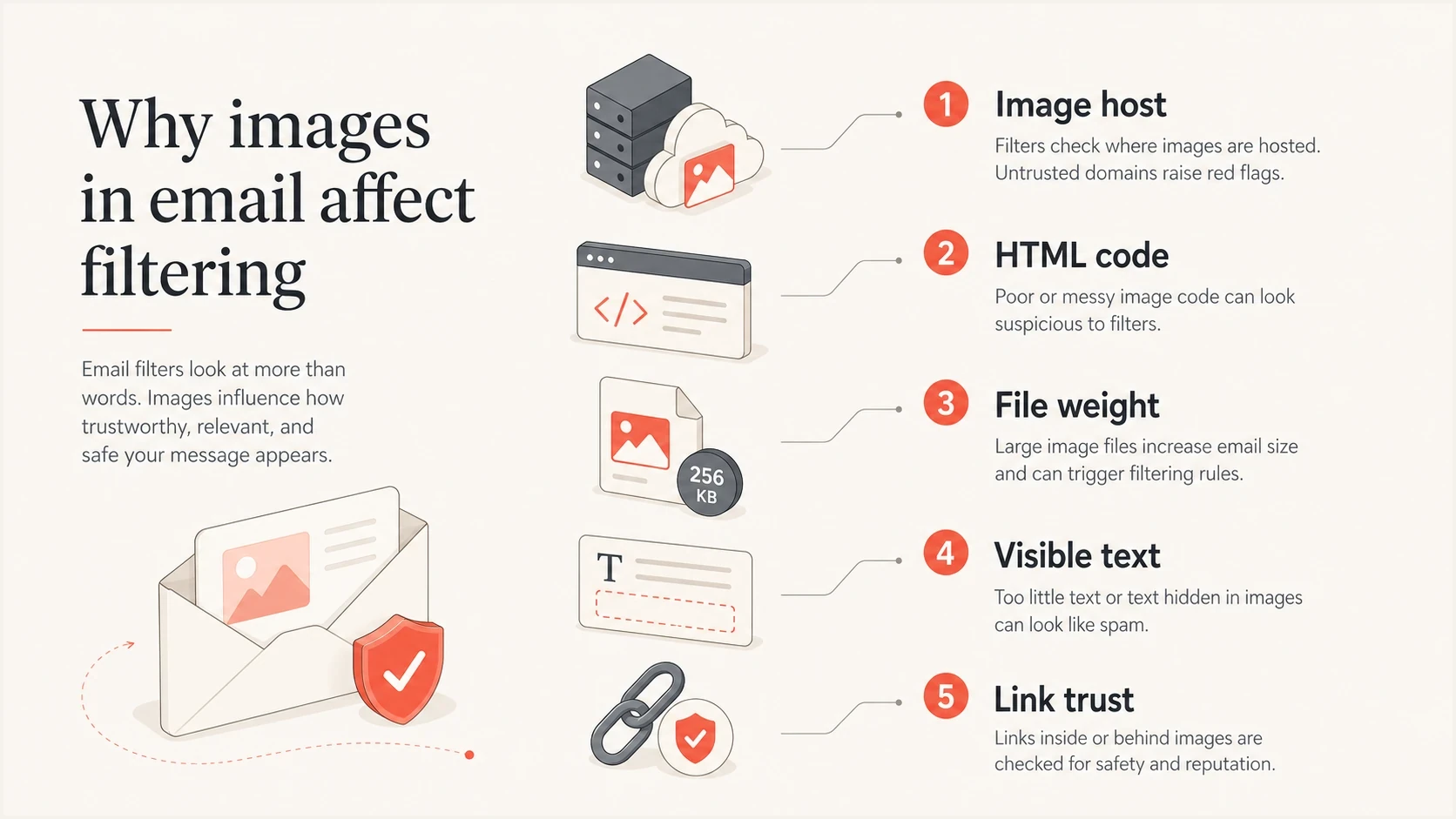
Email image spam signals include host reputation, HTML structure, file weight, live text, and links.
|
|
|
|---|---|---|
Image host | The image domain has its own reputation. | Host domain |
Image weight | Large remote files slow rendering; embedded files also increase MIME size. | Download size |
HTML shape | Complex code can change how filters parse content. | Template |
Visible text | Image-only emails give filters less context. | Live copy |
Linked URLs | URL shorteners and redirect chains obscure the final destination. | Final URL |
Common image-related signals that can affect inbox placement.
Image-heavy emails and image-only emails deserve extra care because mailbox filters have less readable text to compare against the sender, subject, links, and prior sending behavior. For a deeper treatment of this specific design pattern, see image-only emails.
Text-to-image ratio and image-only emails
A high image-to-text ratio becomes a real deliverability risk when the email needs the image to explain the offer. It is less risky when recipients expect visual email, have engaged with the sender before, and can still understand the message without loading remote images.
Include a meaningful text/plain MIME alternative that matches the HTML message. It does not cancel a high image-to-text ratio or repair poor reputation, but it gives email clients and filters a readable alternative. Do not leave that part blank or fill it with unrelated boilerplate.
B2B gateways, smaller receivers, and local filtering setups can be stricter than large consumer inboxes. A campaign that lands in Gmail can still be quarantined by a business filter if it sees one large image, one wrapped link, thin live text, and a sender with limited history.
- Use the ratio as a clue: A low text-to-image ratio tells you to inspect context, not to chase an exact percentage.
- Keep essentials readable: Put the headline, offer, CTA, pricing, terms, and footer in live text, including a visible body link or button when the image is linked.
- Avoid one-image campaigns: A single sliced graphic gives filters, screen readers, and recipients too little context.
- Test the actual audience: Seed consumer inboxes and business domains that match the list, especially after a visual redesign.
The working rule
Do not optimize toward a fixed image percentage. Optimize toward a message that passes authentication, loads quickly, makes sense with images blocked, and gives filters enough visible content to classify the email without guessing.
The most common image problems
The image problem usually falls into one of a few specific buckets. Start with these because they are faster to prove than vague theories about the image name, alt text, or image-to-text ratio.
Risky image patterns
- Low context: The email puts the main message inside a single graphic or a high image-to-text layout.
- Heavy files: Large remote images slow rendering, while embedded GIFs or base64 images increase MIME size.
- Weak host: The image host has poor domain or IP reputation.
- Messy code: The template relies on background images, nested tables, or hidden fallbacks.
- Missing preview: The subject, preheader, first visible message, or price claim depends on image text.
Safer image patterns
- Real copy: The main offer, CTA, key details, conditions, and footer exist as live text.
- Lean assets: Images are compressed and sized for the display area.
- Trusted host: Image and click URLs use stable HTTPS domains you control where practical, without public hosts or URL shorteners.
- Simple HTML: The layout works when images are blocked.
- Preview text: The preheader, first body copy, and body links explain the email without the image.
Background images need special attention. They often require extra VML or fallback code for older clients, and they can hide the real purpose of the email when the visual does not load. A linked inline image is usually easier to test than a CSS background image because it removes one layer of template complexity.
A single wide graphic also creates mobile and image-blocking problems. When the image is blocked, slow, or clipped on a small screen, recipients see less context, inbox search has less text to index, and complaints rise faster when the message feels unclear.
Alt text and file names matter, but they rarely explain a spam placement on their own. A file named sale-banner.jpg with useful alt text is normal. A file name or alt attribute stuffed with suspicious claims, strange symbols, or misleading wording adds risk because filters evaluate content across the whole message.
The same is true for spam trigger words in nearby copy. Words such as "free" or "fraud" do not trigger filtering by themselves, but they become another weak signal when the message also has deceptive claims, hidden text, poor authentication, or a cold audience.
Do not overfit one test
If version A has a hero image and goes to spam, while version B removes the hero and goes to inbox, you have a strong clue. You still need to isolate the cause. The issue can be the image host, the HTML block, a link wrapped around the image, the MIME or download size, or a borderline sender reputation problem.
When image text itself is risky
Image text is not a safe place to hide claims from spam filters. Filters and security gateways can use OCR-like checks, image properties, link context, and the surrounding HTML to classify a message, especially when the email puts the main offer inside a graphic.
A dollar sign, price, discount, or voucher amount inside an image does not cause spam placement by itself. The risk increases when the image makes a money claim that the body copy does not explain, implies a guaranteed reward, uses fake urgency, or sends the click through a weak redirect chain. If the offer is real, keep it clear and repeat the condition in live text.
- Use image text for short supporting labels, not the only version of the offer.
- Put prices, entry conditions, voucher terms, and deadlines in live HTML text.
- Avoid subject lines or image copy that imply the reader has already won when the offer is only a chance to win.
- Watch complaint rate after money-led creative changes, because complaints hurt reputation faster than the symbol itself.
This is the practical difference between "Complete the survey for a chance to win a $100 voucher" and "Claim your $100 now." The first version sets a condition. The second version creates a stronger complaint risk if the recipient has not actually earned the reward.
How to test whether the image is the cause
The cleanest approach is a controlled variant test. Each variant should answer one question. If several things change at once, the result feels useful but does not identify the cause.
- Baseline: Send the exact email that went to spam and record inbox placement, authentication, message size, headers, and the plain-text part.
- No image: Remove only the suspect image block, leaving subject, links, sender, copy, and timing the same.
- Inline image: Replace a background image with a normal linked image and keep the image file unchanged.
- New host: Host the same file on a trusted domain you control and test again.
- Text version: Move key claims, CTA copy, preheader copy, and disclaimers out of the image and into live HTML text.
- Offer check: Keep the same price or incentive, but compare image-only wording against live-text wording.
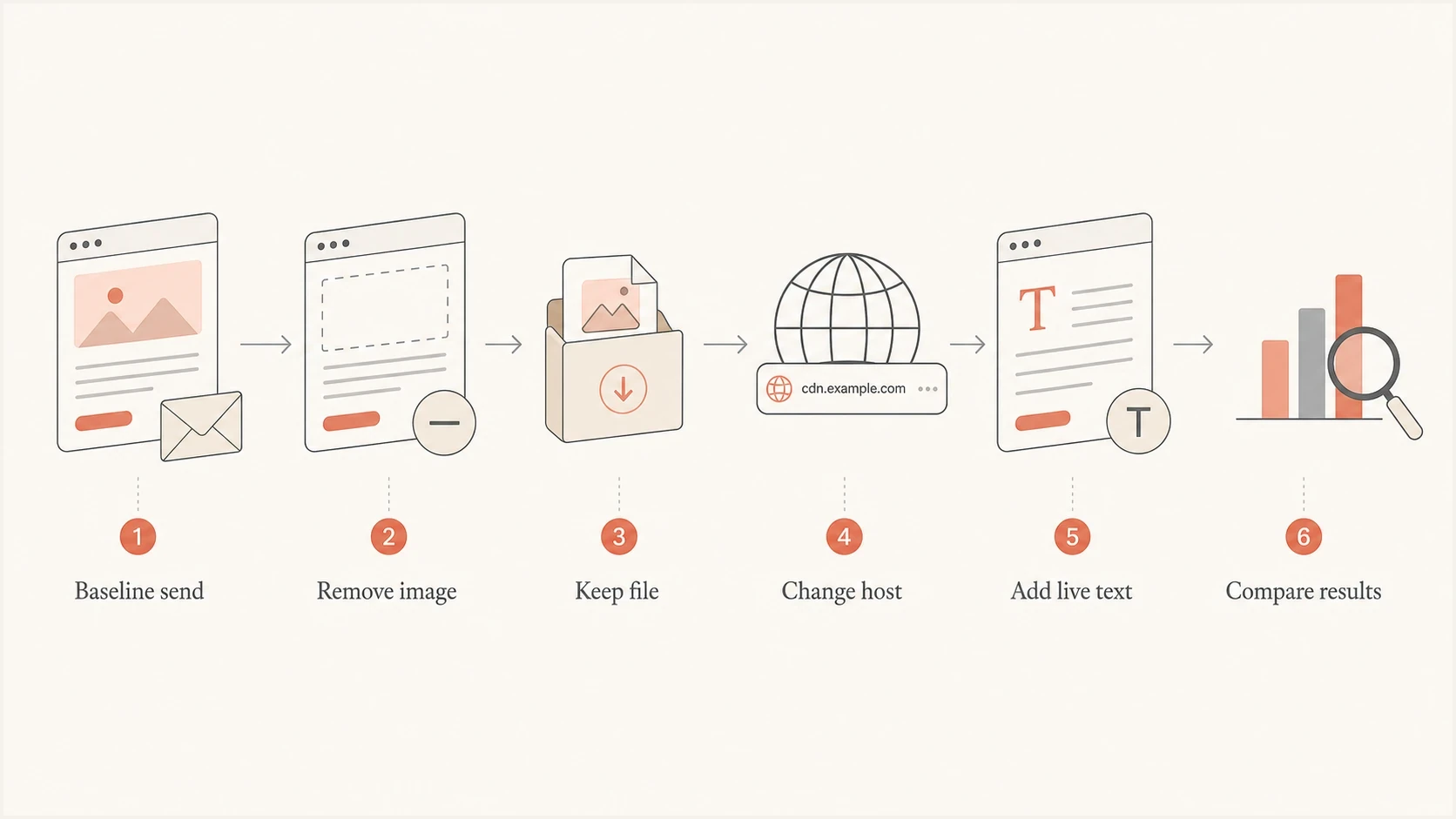
Flowchart for testing whether email images affect spam placement.
When testing, send to seed inboxes and real mailbox accounts that have similar engagement history. Also send a live email so you can inspect authentication, headers, HTML, links, content signals, images-off rendering, and mobile display before blaming the image.
Email tester
Send a real email to this address. Suped shows a results button when the test is ready.
?/43tests passed
The most trustworthy result is not one inbox screenshot. Look for a pattern across several sends where the only changed variable is the image treatment. If removing the image fixes placement once but fails the next time, the sender is likely near a filtering threshold and the image change is only moving the score slightly.
If the image version fails while the no-image version passes every time, check the image URL reputation, file size, click URL, and HTML around that block. For cases where filters inspect visual content or QR-like elements, read the separate notes on image content scans.
Image size and HTML patterns to fix
Large remotely hosted images do not automatically cause spam or increase the raw MIME message size, but they slow rendering and use more recipient data. Embedded, CID, or base64 images do increase MIME size and can contribute to clipping or slow processing. Use practical download thresholds instead of treating one file-size number as an inbox rule.
Remote image download thresholds
Use these as practical performance review bands, not absolute inbox rules.
Healthy
Under 200 KB each
Most campaign images are compressed and sized for their display area.
Review
200-600 KB each
The image can work, but check total download weight and mobile load time.
High risk
Over 600 KB each
Compress, resize, or replace with live text and smaller visual assets.
For more detail on this part of the problem, the related article on image file size covers sizing, load speed, and rendering tradeoffs.
Safer image markupHTML
<a href="https://example.com/offer">
  <img
    src="https://img.example.com/campaign/header.jpg"
    width="600"
    height="240"
    alt="Spring collection now available"
    style="display:block;width:100%;max-width:600px;height:auto;"
  >
</a>
That markup declares dimensions, uses concise alt text, and keeps the image remote instead of embedding base64 data. The surrounding email still needs live copy that explains the offer when images are blocked. The link destination also matters, because clean image markup will not offset a suspicious redirect chain.
What to avoid in image HTML
- Hidden copy: Do not use tiny text, invisible text, or mismatched text around images.
- Image-only CTA: Do not make the only call to action live inside a graphic.
- Bloated markup: Remove unused CSS, repeated tracking wrappers, and broken fallback code.
- Base64 assets: Avoid embedding large images directly in the email because it increases message weight.
- Odd alt text: Write plain alt text for accessibility, not keyword stuffing.
Do authentication and reputation matter more than images?
Yes. Authentication and reputation usually matter more than the image itself. A well-built email with an image can still go to spam if SPF, DKIM, or DMARC is broken, if the sending IP is on a blocklist (blacklist), or if the domain has weak engagement history.
Gmail requires SPF or DKIM, valid forward and reverse DNS, and TLS for senders to personal Gmail accounts. Senders exceeding 5,000 messages a day to Gmail accounts need SPF and DKIM, DMARC with alignment to the visible From domain, and one-click unsubscribe for marketing or subscribed mail. Keep user-reported spam below 0.1% and prevent it from reaching 0.3%. Image cleanup sits on top of that baseline.
Before rewriting a template, check the sending domain with a domain health check, then review ongoing DMARC monitoring and blocklist monitoring. This separates content problems from infrastructure problems.

Email tester sample report showing total score, email preview, issue summary, and per-section results
Suped's product supports this workflow by showing DMARC, SPF, DKIM, blocklist (blacklist), and deliverability checks together, so authentication and reputation problems can be investigated before template changes.
That matters for image troubleshooting because a sender with clean authentication has more room to test content changes. A sender with broken DKIM or an unverified sending source can see inconsistent placement even when the template change is minor.
Practical order of operations
- Authenticate: Confirm SPF, DKIM, and DMARC pass for the actual sending stream.
- Reputation: Check domain and IP blocklist or blacklist status before blaming design.
- Content: Review image weight, live text, links, alt text, and HTML structure.
- Variants: Run controlled tests and compare several sends before changing the production template.
Views from the trenches
Best practices
Test one variable at a time, so image host, HTML, and copy effects do not blur together.
Keep critical copy outside images, so filters and recipients can read the message clearly.
Use stable image hosting on a domain you control, with clean reputation and HTTPS links.
Common pitfalls
Removing a header image also changes the HTML, so the image file gets blamed too quickly.
Teams assume alt text caused spam when the real issue is reputation or authentication.
Background images add fallback code that changes parsing and can make debugging harder.
Expert tips
Compare the same image on two hosts to separate asset reputation from template problems.
Check message weight before design debates, because huge images create avoidable risk.
Keep a plain test version ready, so Gmail changes can be isolated without rebuild delays.
Marketer from Email Geeks says an image can contribute to spam placement, but the question is broad and needs controlled testing.
2021-09-16 - Email Geeks
Marketer from Email Geeks says a poor-reputation image host can be enough to push a borderline message into spam.
2021-09-16 - Email Geeks
What to fix first
Images can cause or contribute to spam placement, but the right fix depends on which image-related signal is failing. Do not remove all images by default. Make the email readable without images, compress the assets, simplify the HTML, host images on trusted infrastructure, and verify authentication before changing the creative direction.
If only one email goes to spam when a header image is present, test the header block in isolation. If many image-heavy campaigns perform badly, fix the broader pattern: too little live text, heavy files, too many wrapped links, poor list quality, or a weak sending reputation. If complaints are high or the audience is cold, image cleanup will not solve placement on its own. Roll out a major image-heavy redesign to a smaller engaged segment first, then monitor spam rate, complaints, and placement before sending it to the full list.
If the image contains a sale price, dollar amount, or incentive, do not remove the symbol first. Check whether the claim is honest, whether the condition is visible in live text, whether the audience expected the offer, and whether complaints increase after the creative change.




