
Do email spam filters scan image content and QR codes?

Published 16 Jul 2025
Updated 9 Oct 2026
13 min read
Summarize with
Updated on 9 Oct 2026: We clarified how image and QR scanning works and tightened the testing and protection advice.
Yes, some email spam filters scan image content and QR codes in message bodies and attachments. They do it with optical character recognition (OCR), image fingerprinting, logo detection, attachment analysis, QR decoding, URL reputation checks, and user-report feedback. The catch is that not every filter does all of that on every message. Plain text, visible links, sender reputation, authentication results, and known campaign patterns are cheaper to inspect than a rendered image or document.
That explains why an image-heavy scam can still land in an inbox. A high-reputation sending platform and passing SPF, DKIM, and DMARC results provide useful identity signals, but they do not approve the message content. A displayed BIMI logo also indicates qualifying authentication and brand-logo requirements, not that the email is safe. When risky content sits inside a graphic or QR code, the recipient's filter has to render or decode it to find the destination. Some filters do that before delivery. Others rely on browser warnings, endpoint protection, or later URL reputation updates as additional blocking layers.
- Direct answer: Image and QR scanning exists, but coverage varies by mailbox provider, gateway, policy, message format, and risk.
- A DMARC pass requires a passing SPF or DKIM result whose domain meets DMARC's matching rules for the visible From domain. Neither DMARC nor a BIMI logo certifies message content or QR destinations.
- Use Suped's email tester to check authentication and technical sending issues. Inspect images, attachments, and decoded QR destinations separately in a controlled environment.
How filters inspect image content
Image scanning can happen in layers. Initial checks include image size, MIME type, attachment name, image-to-text balance, remote image domains, and the amount of readable text. Filters with rendering support can examine the HTML as a user would see it. Additional analysis includes OCR, QR decoding, brand detection, and reputation checks on extracted destinations. The sequence and supported checks differ between systems.
OCR extracts letters and words from image pixels. QR decoding reads the pattern of modules to recover an encoded payload, which requires a different capability. Machine learning models can combine image findings with the subject line, message headers, sender reputation, and user reports. Strong authentication does not establish whether a provider performed either image-text extraction or QR decoding on a particular message.
Message and reputation checks
- SPF, DKIM, DMARC domain matching, and sender reputation contribute to the assessment.
- HTML shape: Image-to-text balance, hidden text, tracking links, and remote image hosts.
- Known patterns: Message fingerprints, user reports, and sender history across similar campaigns.
- URL signals: Visible links, redirect chains, newly registered domains, and reputation updates.
Image and destination checks
- OCR extracts text rendered inside an image for content analysis.
- QR decoding finds a code and recovers its payload. URL analysis then checks any web destination.
- Brand detection: Comparing logos, layouts, colors, and payment or login language.
- Sandboxing: Opening links or rendered content in a controlled environment before delivery.
A text-only URL scanner cannot read a destination encoded in QR modules. It needs QR detection and decoding before it can evaluate that URL. In its November 2024 Cisco Talos research, Talos estimated that QR-containing messages accounted for about 0.01% to 0.2% of email, and classified roughly 60% of QR-containing email in its data as spam. These are historical observations, not current global rates. Spam also includes unwanted mail that is not phishing, so 60% is not a malicious-QR rate.
|
|
|
|---|---|---|
Image text | OCR output | Small, blurred, or distorted text is harder to extract. |
QR code | Decoded payload | Recognition and decoding depend on rendering and format support. |
Logo | Brand similarity | A copied logo does not establish sender identity. |
Sender | Authentication and reputation | A compromised authorized account can still send harmful content. |
BIMI | Authenticated brand-logo display | Logo display does not certify message content. |
Examples of image and QR signals and their detection limits.
Does blocking images stop QR phishing?
An email client's image-blocking setting controls whether remote images are displayed. Security analysis and image display are separate controls. Hidden images do not establish that a filter skipped inspection, and displayed images do not establish that OCR or QR decoding succeeded.
Remote images require fetching content from an external host. Embedded image attachments, QR codes inside PDFs, and codes formed by HTML or Unicode have different inspection paths. Blocking remote images does not remove these other forms of QR content. Image proxies and caching also do not certify the text or destinations encoded in an image.
For legitimate campaigns, keep the main action readable when images are disabled. For suspicious messages, keep external content blocked during initial review and have security staff decode QR payloads in a controlled environment. Do not treat a request to display images as a reason to trust the message.
Where QR codes can hide
Quishing, or QR code phishing, does not depend on one file format. A code can sit in the visible email body, an attached image, a PDF or office document, or content that only becomes visible after HTML rendering. A filter that scans inline image files but does not render attachments can miss the same destination in a PDF.
- Inline images: The QR code appears directly in the rendered message, often beside a payment, document, or sign-in request.
- Attached documents: PDFs and office files add another parsing and rendering step before the code can be found.
- Rendered characters: HTML tables, ASCII blocks, or Unicode characters can form a scannable code without a conventional image file.
- QR art: The code's modules can blend into a larger graphic, making recognition harder for users and automated systems.
Detection therefore needs to inspect the rendered message and supported attachment formats, locate QR-like patterns, and decode the payload without automatically opening it on a user's device. QR codes can contain pairing data or other non-URL payloads. For web URLs, evaluate redirects and the final page. Password-protected or unsupported documents can prevent extraction; route unscannable attachments for review rather than treating a missing finding as a clean result. File type alone does not establish safety because legitimate event tickets and device-pairing messages also use QR codes.
Why a QR scam can still get through
The failure is usually not one single gap. It is a set of signals that point in different directions. Authentication provides evidence about domain authorization or a valid signature, not the intent of the person sending. A compromised account can use an authorized sending route. Reputation adds sending-history signals. The visible body has little readable text. The harmful destination is hidden behind an image, QR code, redirect, or short-lived page.
That is why a text version of the same scam can be easier to block. Text gives filters phrases, names, payment language, urgency patterns, and URLs they can score immediately. Image-only content requires image analysis to recover the same readable information. Recognition errors and unsupported rendering paths create opportunities for attackers.
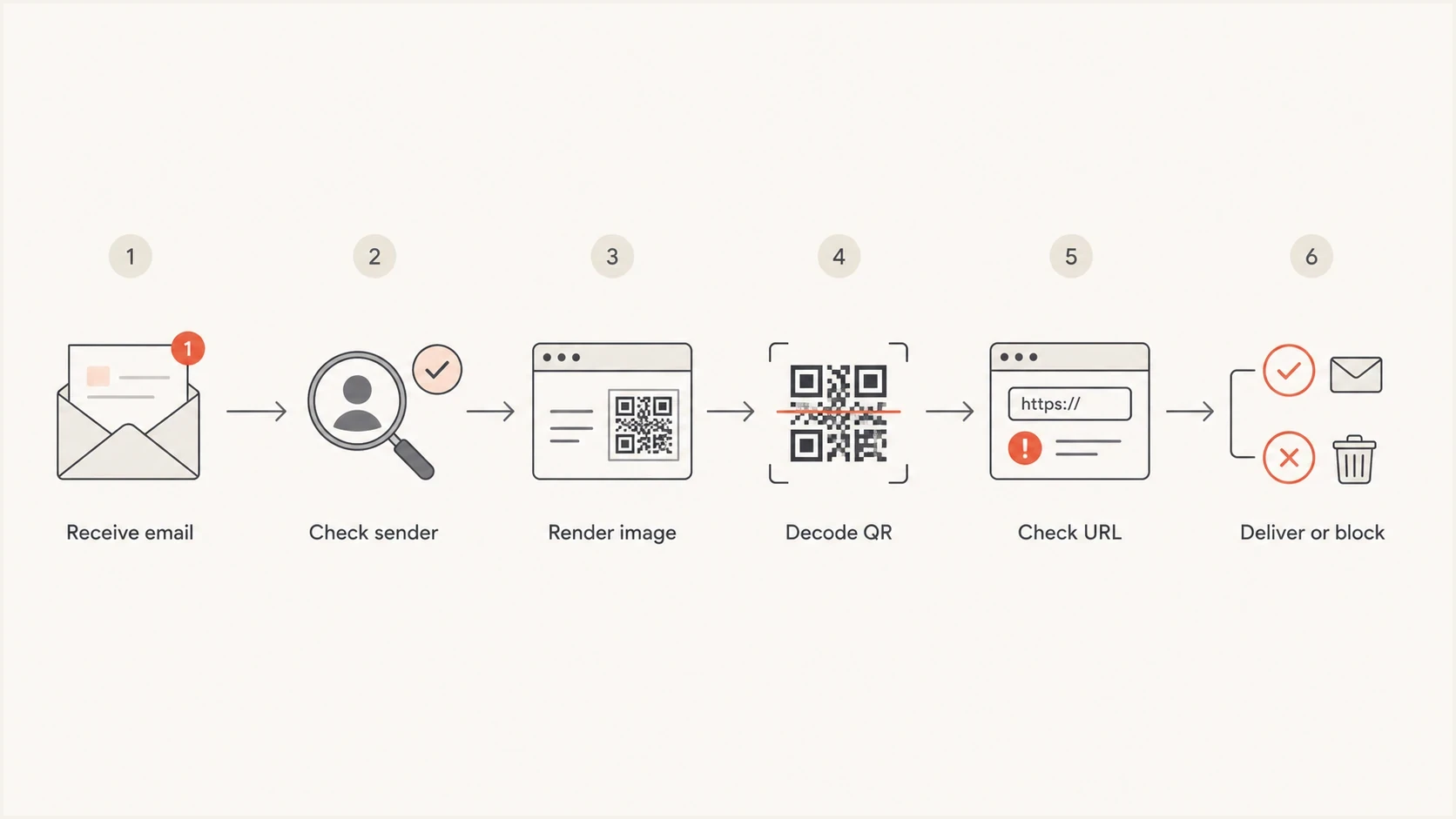
QR-code email filtering steps: check sender, render image, decode QR, and inspect the URL.
BIMI is not a content safety badge
A BIMI logo depends on qualifying domain authentication and brand-logo requirements. It does not mean the mailbox provider reviewed every user-created email, invoice, event invite, uploaded image, or QR destination. If a trusted platform lets an account insert custom content into a template, a malicious or compromised account can still send a message that passes authentication.
There is also a timing problem. A QR destination can be clean when the email is scanned, then turn risky later. A landing page can serve different content to a scanner than to a real user. A mobile phone can scan the QR code over a cellular network, outside the company's normal web filtering path. That shifts the block point to browser, DNS, endpoint, or identity controls after the email has arrived.
Image and QR inspection priorities
Suggested review priorities based on readable content and the requested action. These categories have no universal filter score, and every category requires sender and destination checks.
Balanced copy and images
Routine checks
Readable text and visible links provide context for sender and destination checks.
Image-led message
Inspect image content
Most information is in images, so recover the text before assessing the message.
Image-only with QR
Decode and inspect
The main action uses a QR code; decode its payload and inspect any destination.
Authenticated QR request
Verify requested action
Authentication passes, but unexpected login or payment instructions still need verification.
How to test an image-heavy email
Testing an image-heavy email should not stop at the spam-folder result. Check the message source, authentication, final rendered HTML, attachments, images, links, and every QR code destination. Inbox placement alone does not reveal whether OCR or QR decoding ran. Where available, use gateway logs, quarantine verdicts, and controlled comparisons to investigate the filtering decision.
A useful test uses the exact campaign build, not a simplified copy. Keep the same image hosting, link redirects, tracking domain, sender domain, attachments, and authentication setup. Changing any of those can change the result. There is no universal image-to-text ratio that guarantees inbox placement, but a campaign that relies on one large graphic deserves testing before a large send. There is also no universal 30% image limit or fixed maximum number of links that guarantees delivery.
Image and QR email test checklist
1. Send the exact legitimate campaign to test inboxes.
2. Read the receiver's Authentication-Results header for SPF, DKIM, and DMARC.
3. Render the email and supported attachments in an isolated environment.
4. Review the message with images enabled and disabled.
5. Extract visible URLs and inspect redirect chains.
6. Decode QR payloads without automatically opening URLs.
7. Inspect web destinations in a controlled workflow.
8. Compare inbox, spam, quarantine, and rejection results across providers.
9. Repeat after any template, link, attachment, or image-host change.
Suped's product supports the domain-owner part of this investigation. Its email tester checks received-message authentication and technical sending issues; its DMARC reports show reported sending sources and authentication results. Review blocklist (blacklist) findings alongside the campaign test to distinguish setup or reputation issues from content issues. A domain health check verifies published DNS configuration before deeper testing. These results do not certify QR destinations or predict inbox placement across providers.
Email tester
Send a real email to this address. Suped shows a results button when the test is ready.
?/43tests passed
If authentication passes but inbox placement fails, investigate content alongside sending reputation, complaint rates, and recipient engagement. Reduce reliance on one large graphic, add real HTML text, keep the call to action visible as text as well as an image, and avoid forcing the main action through a QR code unless the use case requires it.
What test results establish
- Record the receiver's SPF, DKIM, and DMARC results, including whether a passing SPF or DKIM domain meets DMARC's matching rules for the visible From domain.
- Check that the important text and links are available as HTML text. This confirms readability, not which filter checks ran.
- Check sending IPs, domains, and link hosts for current blocklist (blacklist) or known reputation issues.
- Record each decoded QR payload and any redirects. A clean destination result applies to the time and environment tested.
What senders should change
For legitimate senders, the lesson is simple: do not make the filter guess what the email says. Image-only campaigns, scanned flyer emails, and QR-first designs remove helpful context. They also make the email less accessible for people using screen readers, image blocking, or low-bandwidth clients.
Keep the core message in HTML text. Use images to support the message. Add descriptive alt text to informative images and a multipart/alternative plain-text version with the same core message. If an event, payment, or device-pairing QR code contains a web URL, include a visible explanation and a normal link to the same intended destination. The written link lets filters and users compare intent with destination.
- Use real text: Put the offer, deadline, sender identity, and call to action in HTML text.
- For QR codes containing web URLs, make the QR code and visible link resolve to the same intended destination, not merely the same domain.
- Avoid image-only: A full-image email creates accessibility, deliverability, and trust problems.
- Watch reputation: Track sender domains, link domains, and IP listings before major sends.
For domain owners, the other job is reducing direct spoofing of the brand. Suped's DMARC monitoring shows reported sending sources and whether they meet the visible From domain's authentication requirements. Review unfamiliar or failing sources before classifying them as spoofing. Suped's issue detection and steps to fix help resolve legitimate sender problems before enforcing a DMARC policy. Compromised authorized accounts, display-name impersonation, and lookalike domains require separate controls.

Issue steps to fix dialog showing the issue overview, tailored fix steps, and verification action
What defenders should do
For inbound defense, treat a QR code in email like a link the user cannot easily inspect. A layered control path uses email filtering to detect the message, browser or DNS filtering to block the landing page, endpoint controls on managed mobile devices, and identity controls that resist credential capture. Use phishing-resistant MFA, such as FIDO2/WebAuthn passkeys or security keys, to reduce credential-phishing risk. One-time codes and push approvals are still vulnerable to capture or relay.
Add reporting paths that make it easy for users to send the full message to security teams. A screenshot of the QR code is less useful than the original message, headers, rendered body, and image attachments. If the recipient scanned it, capture the final landing URL, time of scan, device type, and whether credentials were entered. Verify unexpected sign-in or payment requests through a known website or an established contact channel, and report the original email as phishing.
What to review before delivery
- Review image-only messages with unexpected login or payment instructions. Image-only formatting alone does not establish phishing.
- Verify unexpected QR codes that request payments or credential actions before allowing the requested action.
- Template abuse: Trusted platforms sending user-controlled images with urgent instructions.
Controls after delivery
- Bad domains: Domains that appear only after the QR code is decoded or redirected.
- Credential pages: Lookalike login pages loaded from unmanaged or newly created hosts.
- Address scans on personal phones with user reporting, managed-device policies, and identity controls.
Reputation still matters. A blocklist (blacklist) entry is one signal whose effect depends on the receiving system; an unlisted sender is not automatically safe. Suped's blocklist monitoring supports domain and IP reputation checks alongside its authentication monitoring.
Views from the trenches
Best practices
Decode QR codes during review and compare the destination with the visible sender domain.
Keep important email content in HTML text so filters can inspect intent without OCR.
Treat trusted platform mail as user-generated content when accounts can upload images.
Common pitfalls
Assuming a BIMI mark means the user-created body, images, or QR destinations were reviewed.
Relying on browser warnings after delivery instead of improving email-side controls.
Testing a simplified copy instead of the exact image, link, and QR campaign sent to users.
Expert tips
Track sender authentication and content signals together before judging filter quality.
Review image-only messages at higher risk when the call to action hides inside a QR code.
Capture the original message and decoded QR destination when investigating a report.
Marketer view
Marketer from Email Geeks says image scanning varies by provider, so a pass in one mailbox does not prove the image was fully inspected.
2024-08-26 - Email Geeks
Marketer view
Marketer from Email Geeks says trusted platforms can be abused when user-controlled images are inserted into otherwise legitimate templates.
2024-08-26 - Email Geeks




