Are image-only emails bad for deliverability?

Published 22 Jun 2025
Updated 25 Jul 2026
11 min read
Summarize with
Updated on 25 Jul 2026: We updated this guide with MIME fallback, preheader, accessibility, and privacy-aware testing guidance.
Yes, image-only emails are a bad practice, but not because every modern spam filter has a simple image-to-text rule that sends them to spam. The direct answer is that an image-only email is usually a deliverability risk multiplier, not an automatic delivery failure. It can still inbox when the sender has strong reputation, wanted mail, clean list practices, and good authentication. It can also fail harder when the same sender has weak engagement, slow image hosting, poor accessibility, or corporate recipients behind simpler filters.
Treat image-only creative as a conversion and resilience problem first. If images are blocked, slow, clipped, resized badly, or unreadable on mobile, the message has no real fallback. That hurts clicks, replies, and trust. Poor recipient interactions can weaken campaign results and sender reputation over time, even when the original problem started as design.
The quickest reality check is to send the campaign to an email tester before the full send, then compare the result with actual engagement and complaint data after the campaign lands.
- Image-only content by itself does not guarantee a spam-folder decision at large consumer inboxes.
- Image-off, slow, or tiny-text views create measurable conversion loss.
- Corporate filtering can punish image-heavy campaigns more directly.
- Keep the offer and CTA in live HTML, even when the design remains highly visual.
Are image-only emails bad for inbox placement?
An image-only email is not automatically bad for deliverability in the narrow sense of inbox placement. A trusted sender with a clean list can send a full-image promotion and still reach the inbox. Large consumer inbox providers evaluate many signals, including authentication, sender reputation, recipient feedback, complaint rate, list quality, links, image hosting, and sending history.
That does not make image-only email a good default. The format removes much of the safety net. If the image fails, the message fails. If the design scales poorly, the message becomes hard to read. If the recipient uses a screen reader, the message becomes dependent on alt text that usually cannot carry the full offer. If a corporate filter uses simpler content scoring, the campaign has a weaker case than a normal HTML email with readable text.
A workable rule
Do not reject every image-heavy campaign. Push back when the essential message exists only inside a bitmap.
- A visual email is safer when the headline, CTA, deadline, price, and legal text remain live HTML.
- One large image containing the whole offer, button, discount code, and unsubscribe context is risky.
- The same one-image design carries higher risk on a mixed B2B list, cold list, or recently warmed domain.
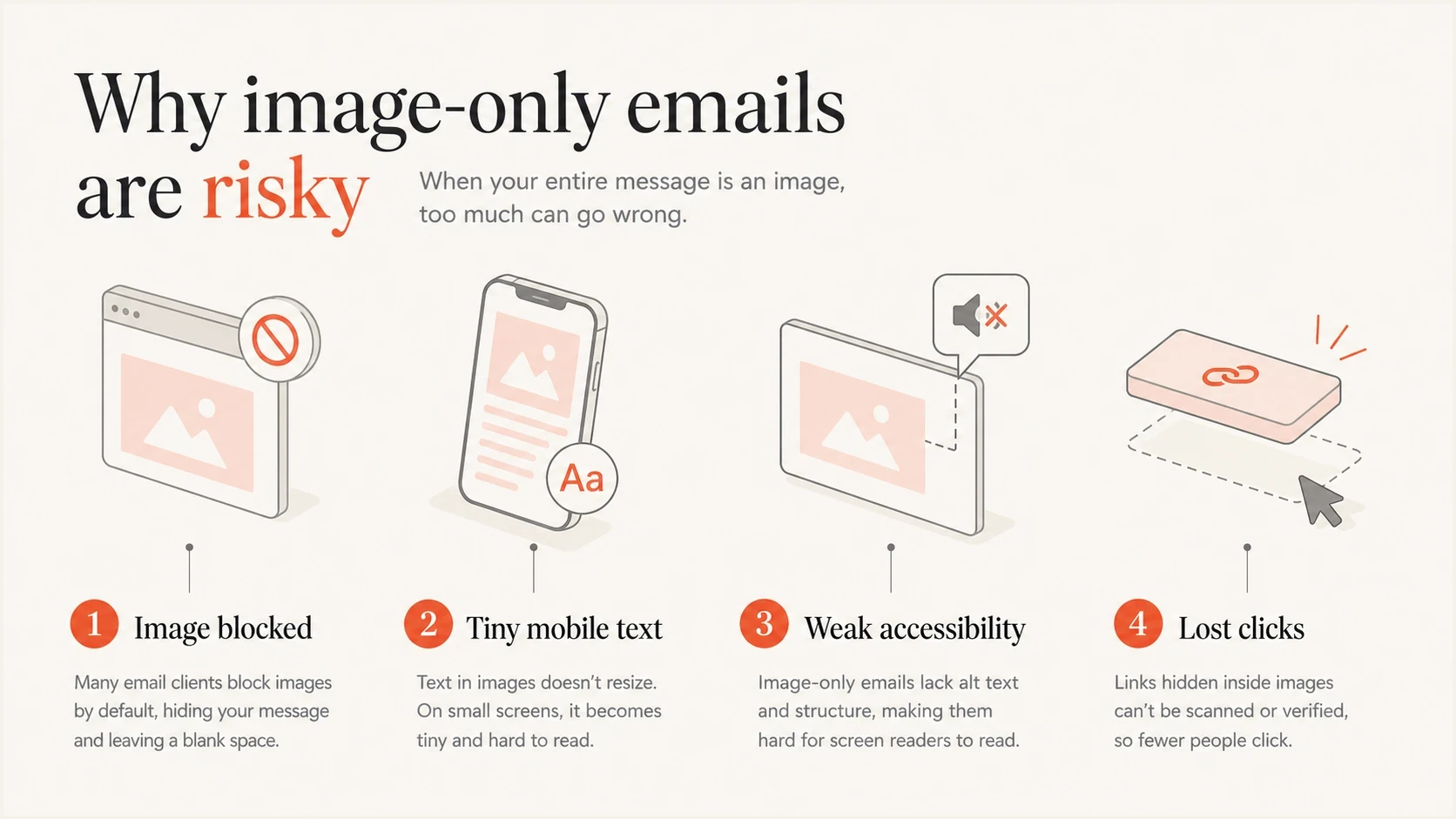
Four-part infographic showing the main risks of image-only emails.
Why image-only emails still cause trouble
The old advice that a fixed image-to-text ratio controls inbox placement is too simple. It remains useful as a design smell: if there is no HTML text, no readable CTA, and no fallback, there is no graceful failure path.
Spam filters do not all work the same way. Some systems still add negative scoring for messages that have very little text and large images. More advanced mailbox providers use a broader combination of sender history, recipient feedback, authentication, message structure, and content signals. The result is practical rather than absolute: image-only design rarely explains deliverability by itself, but it can make an already weak campaign weaker.
|
|
|
|---|---|---|
Image blocking | Some clients block or delay remote images. | Keep offer and CTA as live text. |
Mobile scaling | A wide graphic can shrink into tiny copy. | Design for narrow screens. |
Spam scoring | Some simpler filters score image-heavy mail. | Keep a balanced HTML part. |
File weight | Large images slow loading and frustrate readers. | Compress assets. |
Accessibility | Screen readers need structure and useful alt text. | Use headings and live copy. |
The most common failure points are design and resilience problems, not a single universal spam rule.
Image-only creative
- Design teams can export a finished visual quickly.
- The whole message depends on images loading correctly.
- Blocked images leave little for the recipient to act on.
Balanced HTML creative
- The offer still makes sense when images are blocked.
- The HTML needs more care across clients.
- Problems are easier to isolate and fix.
B2C versus B2B filtering
Large consumer inbox providers have broad sender histories and recipient feedback data. They do not publish a simple rule that classifies image-only mail as spam. That does not make image-only safe. It means the format has to be judged alongside authentication, complaints, sender history, audience quality, and message structure.
B2B mail can be different. A corporate gateway, security appliance, or web host filter often has less recipient behavior data and more static rules. That is where all-image creative has more direct risk. Use more caution with image-only campaigns when the list includes business addresses, procurement teams, schools, government domains, or small company mail systems.
Image-only risk by mailbox context
The same creative can have different risk depending on audience, reputation, and filtering model.
Lowest risk
Warm B2C
Warm B2C list with strong engagement and stable sending history.
Medium risk
Mixed list
Mixed consumer list, seasonal promotions, or inconsistent engagement.
Higher risk
B2B gateway
B2B recipients, corporate gateways, or static content scoring.
Unknown risk
New sender
New domain, new IP, cold audience, or weak authentication data.
Do not copy big brands blindly
A big retailer sending image-only mail shows that the format can work for that sender, list, and campaign. It does not reveal the complaint rate, conversion rate, segmentation, list age, creative tests, or revenue tradeoff.
- A newer sender cannot borrow another brand's historical trust.
- Outside observers cannot see the control group or suppressed audience.
- A campaign that reaches the inbox can still underperform when images fail.
Build an image-led HTML email
The compromise is not ugly text-only email. The practical pattern is image-led HTML: keep the visual system, but make the message understandable without images. Keep the key promise, CTA, discount, deadline, product name, and compliance text available as real HTML.
That pattern gives spam filters and accessibility tools more context. It helps the recipient act when images are off, slow, or clipped. It also protects the campaign from a broken image URL or overloaded image host.
HTML fallback patternHTML
<table role="presentation" width="100%">
  <tr>
    <td style="font-family: Arial, sans-serif;">
      <h1>Early access ends tonight</h1>
      <p>Save 20 percent before midnight.</p>
      <a href="https://example.com" style="background:#f25533;color:#fff;">
        Shop now
      </a>
      <img src="https://example.com/hero.jpg" width="640" height="360"
           style="display:block;max-width:100%;height:auto;"
           alt="Spring product collection on a light background.">
    </td>
  </tr>
</table>
- Put the core message and CTA in HTML, not only inside the image.
- Use concise alt text for meaningful images and an empty alt attribute for purely decorative images.
- Describe the action or destination when a linked image is the only control.
- Compress assets and set explicit width and height attributes to reduce layout movement while images load.
- Use a live button or text link, even when a designed button appears in the graphic.
- Check the email at narrow widths so promotional copy does not shrink below readability.
Add plain-text and preview fallbacks
Live HTML text and a text/plain MIME part solve different problems. Live text keeps the HTML version readable when images are blocked. A multipart/alternative message gives compatible clients and users who prefer plain text another version to render. Include both, and keep their offer, links, sender identity, and unsubscribe information consistent.
Add useful preview copy before the hero image as well. An image-only opening can leave the inbox snippet dependent on a filename, navigation text, raw alt text, or footer copy. A short preheader should support the subject line and describe the message without repeating it.
Check the final message source
- Confirm the message contains text/plain and text/html alternatives.
- Make sure the plain-text version contains the same essential offer and usable URLs.
- Check that the inbox preview shows intentional copy before image-derived text.
- Keep sender details and unsubscribe instructions available in both versions.
How to test image-only email performance
Do not decide this with inbox folklore. Test image-only against a balanced version using the business metric that matters for the campaign. For ecommerce, useful measures include revenue per recipient, click rate, unsubscribe rate, complaint rate, and spam placement. For a newsletter, use clicks, replies, saves, complaint rate, and long-term retention.
The test needs a fair control. Keep the offer, audience, subject line, preheader, sending time, and segmentation as consistent as possible. If the image-only version wins revenue with no deliverability damage, that is useful data. If it loses clicks or conversions, inspect loading time, mobile readability, and the blocked-image view. If it loses mainly at B2B domains, examine filtering differences by recipient domain.
Do not choose a winner on open rate alone. Privacy protections and image preloading can register an open without a person reading the message. Use clicks, conversions, complaints, unsubscribes, and revenue as stronger outcome measures.
Email tester
Send a real email to this address. Suped shows a results button when the test is ready.
?/43tests passed
After pre-send testing, look at real campaign outcomes. Inbox placement tests are helpful, but recipient behavior after delivery matters more. A polished image-only email that loads slowly, hides the CTA, or gives screen readers nothing useful can train recipients to ignore future mail.
Separate creative problems from sending-foundation problems. If authentication is failing, a blocklist (blacklist) listing exists, or the domain has inconsistent volume, changing the image ratio will not fix the core issue.
Where Suped fits
Suped's product is relevant before and after the creative decision. It does not prescribe plain email design. It helps a team check the sending foundation so image-heavy creative is not blamed for problems caused by authentication, source misconfiguration, or reputation.
Check the domain before blaming the design. Suped's domain health workflow helps confirm whether SPF, DKIM, DMARC, MX, and basic security posture are clean. Suped's DMARC monitoring then ties authentication failures to sending sources, while blocklist monitoring helps separate content concerns from IP and domain reputation problems across blocklists and blacklists.
Suped DMARC dashboard showing email volume, authentication health, and source breakdown
Suped groups DMARC reporting, authentication diagnostics, blocklist monitoring, hosted records, alerts, and issue resolution in one workflow. That helps a team determine whether a campaign problem sits in the creative or the sending foundation.
- Source-level DMARC data shows which approved sender is failing SPF, DKIM, or DMARC checks.
- Authentication trends reveal whether failures started with a campaign or a sender change.
- Blocklist and blacklist checks help rule reputation problems in or out.
- Alerts notify the team when authentication failures or listings change.
Views from the trenches
Best practices
Keep the core offer, price, CTA, and unsubscribe context readable when images are blocked.
Test mobile, desktop, and image-off views before using an all-image creative in production.
Measure clicks, revenue, complaints, and spam placement against a balanced control.
Common pitfalls
Copying large brands without their reputation, list quality, or test data creates false confidence.
Putting every CTA inside a graphic leaves screen readers and blocked-image views weak.
Assuming B2C inbox behavior applies to B2B filtering creates preventable corporate risk.
Expert tips
Use live HTML for the offer and CTA when speed, accessibility, or inbox variance matters.
Treat image ratio as a weak signal, then watch engagement and complaint trends over time.
Keep image hosting fast and consistent with the brand domain where possible and cacheable.
Expert from Email Geeks says some filters still score all-image mail, but strong B2C inbox providers rely more on recipient behavior than a fixed image ratio.
2022-01-14 - Email Geeks
Marketer from Email Geeks says image-design creative often wins on production speed, but that does not prove the format is optimal.
2022-01-14 - Email Geeks
Should you send image-only emails?
The practical answer is simple: do not treat image-only as a guaranteed spam trigger, and do not treat it as harmless because a large retailer uses it. Use it only when the audience is warm, the list is engaged, and the business accepts the accessibility and fallback tradeoff.
The preferred pattern is image-led email with live HTML for the key message, CTA, price, deadline, and compliance text. That keeps the brand design intact while giving filters, clients, and recipients enough text to understand the message when images fail.
If the campaign is important enough to send, it is important enough to test. Compare image-only against a balanced version, watch clicks, conversions, and complaints, and make sure the domain's authentication and reputation are clean before blaming the creative.




