What are the deliverability concerns of found mails that did not contain URLs in HTML tags within quoted-printable MIME-parts?

Updated on 8 Aug 2026: We clarified how to decode quoted-printable HTML, assess bare URLs, and test the final sent MIME.
This warning usually means a scanner found a literal URL written as text in the HTML body instead of finding that URL inside an HTML attribute such as href, src, or action. Quoted-printable matters because that encoding escapes some characters and folds long lines, so the scanner must decode the MIME part correctly before it judges the HTML.
Do not treat the finding as proof of an inbox placement problem. A bare URL in an HTML part is usually a template quality issue, not a deliverability root cause. The risk rises when the final sent MIME also has broken markup, misleading link presentation, failed tracking rewrites, invalid transfer encoding, or authentication and reputation problems.
- Risk level: Low by itself, higher with malformed HTML, broken MIME boundaries, or link rewriting errors.
- Likely cause: A URL was inserted as visible text in the HTML editor instead of being added through the editor's link control.
- Practical fix: Decode and inspect the delivered HTML part, wrap intended links in valid anchors, then send another test through the production path.
What the warning means
The wording is not a standard SMTP, MIME, or DMARC error. It usually means the detector found URL-looking text in a quoted-printable text/html part but did not find that text inside a valid HTML attribute. Confirm the detector's exact rule and inspect the raw message it flagged before deciding what to change.
A URL can appear in an HTML email in several ways. Only the first pattern below usually triggers this warning. The other patterns are normal HTML links.
Three URL patterns in HTML emailhtml
https://www.example.com/

<a href="https://www.example.com/">
  www.example.com
</a>

<a href="https://www.example.com/">
  Read the update
</a>
The first line is visible text. Many mail clients turn it into a clickable URL, but it is still not an HTML link. Link scanners and rewrite systems work more predictably when the target URL sits in a valid attribute. Malformed markup creates a separate problem, covered in malformed HTML.
Bare URL in HTML
- Markup: The URL is text in the body.
- Rendering: Some clients auto-link it, while others leave it as plain text.
- Scanning: The scanner has no explicit HTML link target to evaluate or rewrite.
URL in an anchor
- Markup: The URL sits inside a valid HTML attribute.
- Rendering: The template controls the clickable text.
- Scanning: Link rewriting and URL checks have a defined target.
Why quoted-printable changes the symptom
Quoted-printable is a MIME content-transfer encoding defined by RFC 2045. It keeps much of the content readable in the raw source, encodes an equals sign as =3D, and uses an equals sign at the end of an encoded line as a soft line break. Encoded lines must not exceed 76 characters, excluding the ending CRLF.
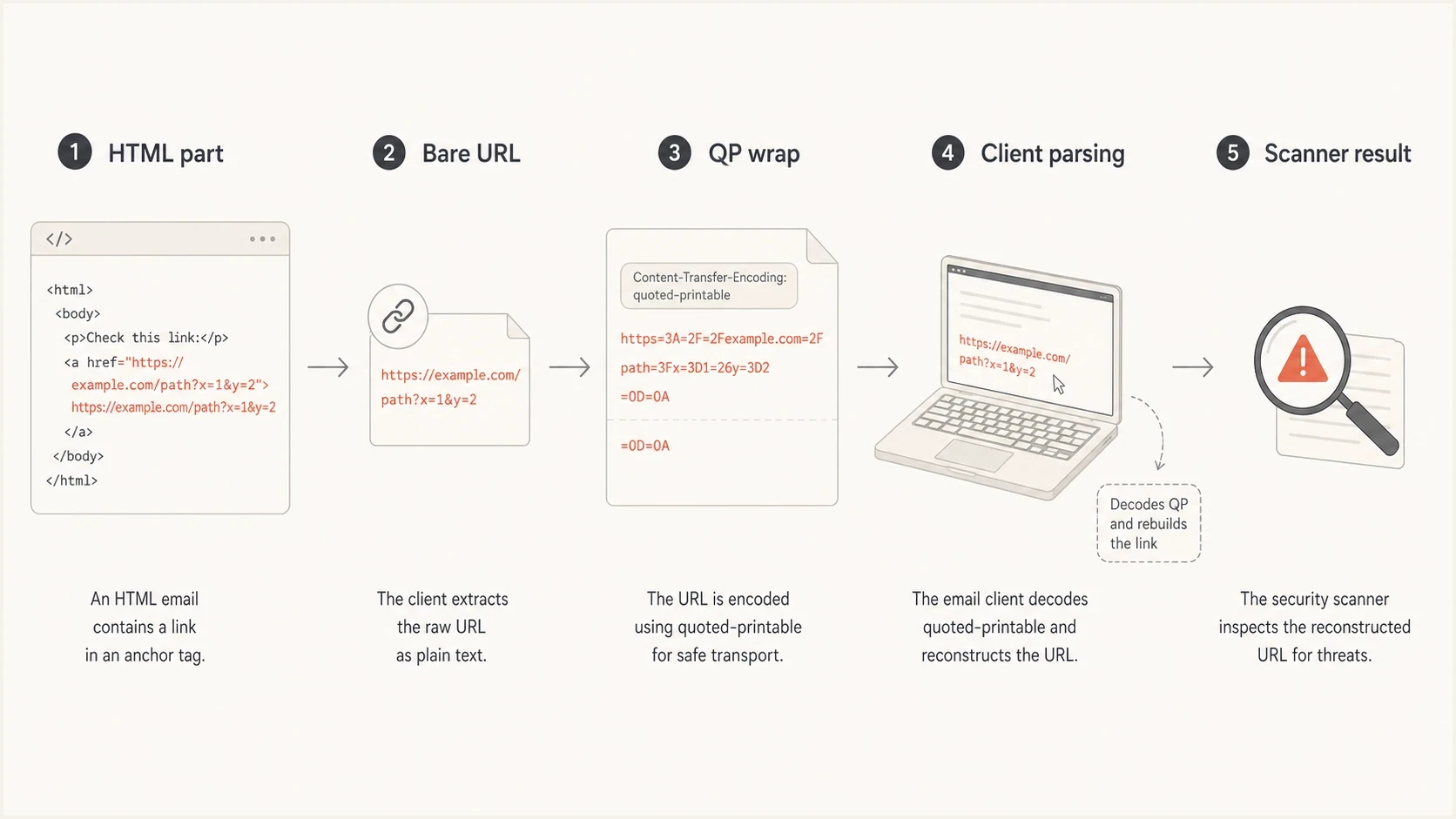
HTML URL text passing through quoted-printable encoding and MIME scanning.
A valid link can look odd before decoding because equals signs are escaped and long lines are folded. A MIME-aware client restores =3D to = and removes soft line breaks before parsing the HTML. Seeing =3D in raw source is normal. Seeing literal 3D in the rendered attribute points to a decoding, labeling, or double-encoding error.
Valid quoted-printable link syntax
<a href=3D"https://www.example.com/path?campaign=3Dspring">
  Read the update
</a>

<a href=3D"https://www.example.com/a/very/long/path?campaign=3D=
spring">Read more</a>
Do not debug only the template preview. The ESP can add tracking, rewrite links, inline CSS, add unsubscribe headers, and choose MIME encodings after the preview is rendered. The raw source of a delivered test email is the version that matters.
- Preview risk: The saved design can look correct while the sent MIME has a broken attribute.
- Encoding risk: An invalid soft break can leave an equals sign or line break inside a URL.
- Testing risk: A screenshot does not prove that the received source is structurally valid.
Decode MIME before judging HTML
MIME and HTML are separate layers. First identify the intended text/html body part using the multipart boundary and Content-Type header. Then apply its Content-Transfer-Encoding, using the declared charset when turning bytes into text. Only after those steps should a validator or scanner parse the result as HTML.
Relevant MIME headers
Content-Type: multipart/alternative; boundary="mime-boundary"

--mime-boundary
Content-Type: text/plain; charset=UTF-8
Content-Transfer-Encoding: quoted-printable

Plain-text version
--mime-boundary
Content-Type: text/html; charset=UTF-8
Content-Transfer-Encoding: quoted-printable

<a href=3D"https://www.example.com/">Read the update</a>
--mime-boundary--
- Select the part: Confirm the warning points to text/html rather than the text/plain alternative.
- Check the label: Verify that Content-Transfer-Encoding matches the body that follows.
- Decode once: Remove valid soft breaks and convert each hexadecimal escape before parsing HTML.
- Validate boundaries: Confirm every multipart delimiter opens and closes the intended body part.
If the header is missing, mislabeled, or applied twice, the recipient can see encoded characters or receive a blank or damaged HTML part. If a boundary is broken, a client can select the wrong alternative or stop parsing early. Those are message construction failures, so wrapping the visible URL in an anchor will not fix them.
Use the decoded text/html part for HTML review, but keep the original raw message for MIME review. Editing raw source by deleting every occurrence of 3D can create a second equals sign or corrupt legitimate text because only the complete =3D escape decodes to one equals sign.
Actual deliverability concerns
Quoted-printable does not imply poor delivery, and a visible URL does not imply spam. The warning matters when it exposes invalid message construction, confusing link presentation, or generated HTML that changes after tracking and transport processing. Use valid HTML, and make the visible link text explain the destination.
|
|
|
|---|---|---|
Bare URL | Ambiguous link markup | Add a valid anchor |
Broken tag | Client parsing can differ | Validate decoded HTML |
Rewrite error | The tracked link can fail | Inspect delivered source |
MIME error | The body can render incorrectly | Fix encoding or boundaries |
Authentication failure | Spam or rejection risk rises | Investigate DMARC alignment |
Reputation issue | Filtering can increase | Review sending signals |
How to weigh the warning during triage.
Check two link-specific problems early: display mismatch and rewrite failure. Display mismatch means the visible URL or link text suggests a different destination domain. Rewrite failure means tracking or security processing changed the URL in a way the client or scanner cannot parse cleanly. Link handling has separate delivery and recipient-trust implications.
How serious this warning is
A bare URL finding matters most when it appears with other broken-message signals.
Low
Template cleanup
One visible URL with valid HTML and aligned authentication.
Medium
Send test
Bare URLs with link rewrite or rendering differences.
High
Full triage
Broken MIME, failed DMARC alignment, or poor reputation.
When this warning appears on a campaign with authentication failures, weak engagement, or a blocklist (blacklist) hit, do not blame the bare URL first. Fix the template defect, then work through the higher-impact causes in priority order.
How to test a real send
Send the real campaign or a production-equivalent clone to a seed address, then inspect the delivered source. The final received MIME matters more than the editor canvas. Suped's email tester shows the rendered message, raw-source findings, authentication status, and content warnings in one report.
Check the sending domain in parallel. A clean template does not compensate for failed DMARC alignment, a DKIM signing problem, an SPF lookup error, or damaged reputation. Suped's domain health checker checks DMARC, SPF, and DKIM together before a team spends time debating one content warning.

Email tester sample report showing total score, email preview, issue summary, and per-section results
In Suped, send the message, review the email tester report, compare the decoded HTML with the saved template, then use domain monitoring when authentication or reputation explains more of the delivery behavior than the template warning.
- Send source: Use the same ESP, audience settings, tracking configuration, and link rewriting used in production.
- Open raw: Find the multipart/alternative structure, then isolate and decode the text/html part.
- Compare links: Confirm each intended link has a valid attribute and an expected destination domain.
- Compare parts: Check that the HTML and plain-text alternatives contain consistent destinations.
- Retest send: Fix the source, send again through the same path, and confirm the warning is gone.
Email tester
Send a real email to this address. Suped shows a results button when the test is ready.
?/43tests passed
If the warning disappears but delivery does not improve, it was not the main cause. Move the investigation toward authentication, reputation, sending volume, complaints, engagement, and mailbox-provider feedback.
How to fix the template
Put the URL in the attribute that matches its job. Use an anchor for a clickable text link and an image source for an image. Use form actions only when the receiving clients support the intended pattern, because email form support is inconsistent.
Patterns to avoid
- Bare link: A raw URL placed in an HTML paragraph.
- Split tag: An attribute damaged by unsafe templating or invalid quoted-printable wrapping.
- Hidden mismatch: Visible text implies one domain while the target uses another.
Patterns to use
- Anchor link: A clear href with concise visible text.
- Visible URL: Anchor the URL text if the full address must be shown.
- Tracked link: Let the ESP rewrite a valid anchor instead of guessing from text.
Safer HTML link patternshtml
<p>
  <a href="https://www.example.com/offer">
    View the offer
  </a>
</p>

<p>
  <a href="https://www.example.com/offer">
    https://www.example.com/offer
  </a>
</p>

<img src="https://www.example.com/image.png" alt="Product image">
Avoid "click here" when the surrounding copy can name the action clearly, but treat that as a usability and trust choice rather than a deliverability rule. The stronger technical requirement is that the destination sits in valid markup that survives the ESP's final processing.
Use a simple acceptance test: after the HTML part is decoded from quoted-printable, every intended link should be obvious to a reader and parsable by a machine. If the decoded output requires guesswork, clean up the template or MIME generation.
- Human test: The visible copy tells the reader what happens next.
- Machine test: The target URL appears in a valid HTML attribute.
- Source test: The delivered MIME preserves the template's intent after decoding.
Where authentication fits
Template warnings attract attention because they point to concrete source text. Authentication and reputation usually have more delivery impact. DMARC can pass through either aligned SPF or aligned DKIM, so investigate alignment when neither path validates the domain in the visible From header. Bare-link cleanup cannot fix that failure.
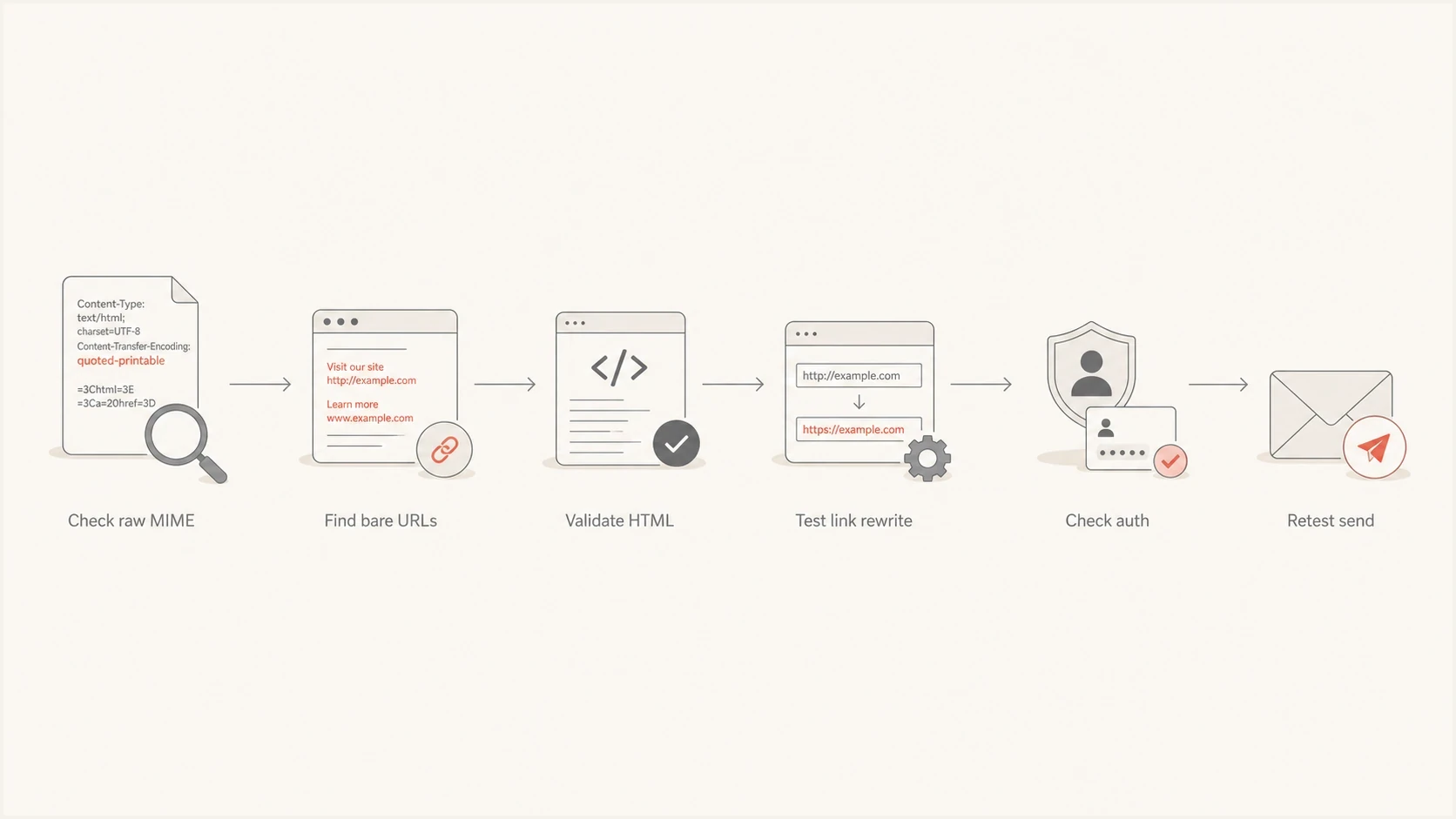
Quoted-printable HTML warning triage from raw MIME through authentication retesting.
Suped's DMARC monitoring connects aggregate DMARC data with SPF and DKIM monitoring, hosted policy management, issue detection, alerts, and blocklist monitoring. During this investigation, use DMARC monitoring to identify the sending source and its alignment results, then compare those findings with the delivered MIME test.
For agencies and MSPs, multi-tenancy keeps client evidence separate. One client can have a harmless template warning, while another has the same warning plus a failed DKIM signature and a blacklist listing. A shared view of domains, sending sources, and alerts makes the difference visible.
Views from the trenches
Best practices
Wrap visible URLs in anchor tags so scanners and mail clients see the same link target.
Inspect the raw MIME after the ESP sends, because editors can change generated markup.
Retest one seeded send after fixing templates, not only the saved design preview or editor.
Common pitfalls
Assuming the template editor output equals the final encoded MIME that subscribers receive.
Treating bare URL text as the root cause before checking authentication and reputation data.
Letting tracking rewrite links after encoding without checking final HTML validity in raw mail.
Expert tips
Keep a pre-send test inbox and archive raw source for every template family you ship.
Use one canonical link pattern across modules so audits find deviations quickly during QA.
When a mailbox provider flags a pattern, ask for raw examples before changing strategy.
Marketer from Email Geeks says a URL written as plain text in HTML usually does not cause a delivery problem by itself, because mail clients often make it clickable.
2022-04-08 - Email Geeks
Marketer from Email Geeks says the cleaner fix is to use the editor's link control, so the final HTML has a proper anchor instead of relying on client auto-linking.
2022-04-08 - Email Geeks
Practical recommendation
Fix the template, but continue the investigation. A bare URL in quoted-printable HTML is usually a weak signal. Its value is that it directs attention to the actual sent source, where markup, transfer encoding, link rewriting, authentication, and reputation can be assessed together.
Send a production-equivalent test, decode the HTML part, wrap intended links in valid anchors, and retest. If delivery remains weak, focus on DMARC alignment, blocklist (blacklist) status, complaints, engagement, and mailbox-provider feedback.




