How do hyperlinks in the body of an email affect deliverability?

Updated on 26 Jul 2026: We updated this guide with clearer advice on URL shorteners, redirect chains, link reputation, and final-message testing.
Hyperlinks in the body of an email affect deliverability, but not in the simplistic way people often describe it. A message is not automatically punished because it has two links, five links, or a few text hyperlinks inside sentences. The real risk comes from the linked domains, redirect behavior, destination quality, brand consistency, broken URLs, and recipient response.
The blanket advice to avoid all text hyperlinks and use exactly one CTA is bad advice for most senders. If an email asks readers to do something, it needs links. A CTA button, a text hyperlink, an image link, a preference center link, and an unsubscribe link are all links. The better rule is to use the links the email needs, then make every link trustworthy, branded, working, and easy to justify.
- Link count: A high count is a review signal, not a fixed spam trigger.
- Destination quality: Links to suspicious, broken, or unrelated pages create more risk than the count itself.
- Brand consistency: A single owned domain is cleaner than several unrelated third-party domains.
- Recipient response: Useful links support clicks, while complaints or repeated deletions point to poor targeting or trust.
- Authentication: Links do not replace DMARC, SPF, DKIM, or reputation work.
The direct answer
Too many hyperlinks can contribute to deliverability problems when they make the message look cluttered, untrusted, or irrelevant. The number alone is rarely the root cause. Fix link quality before removing useful links.
What filters actually evaluate
There is no universal link limit where an email suddenly fails. A publisher newsletter can contain dozens of links and still land in the inbox because readers expect that format, the sending domain has history, and the URLs point to known pages. A cold sales email with one strange redirect can perform worse. The useful question is not only too many links, it is whether each link makes sense for the sender and recipient.
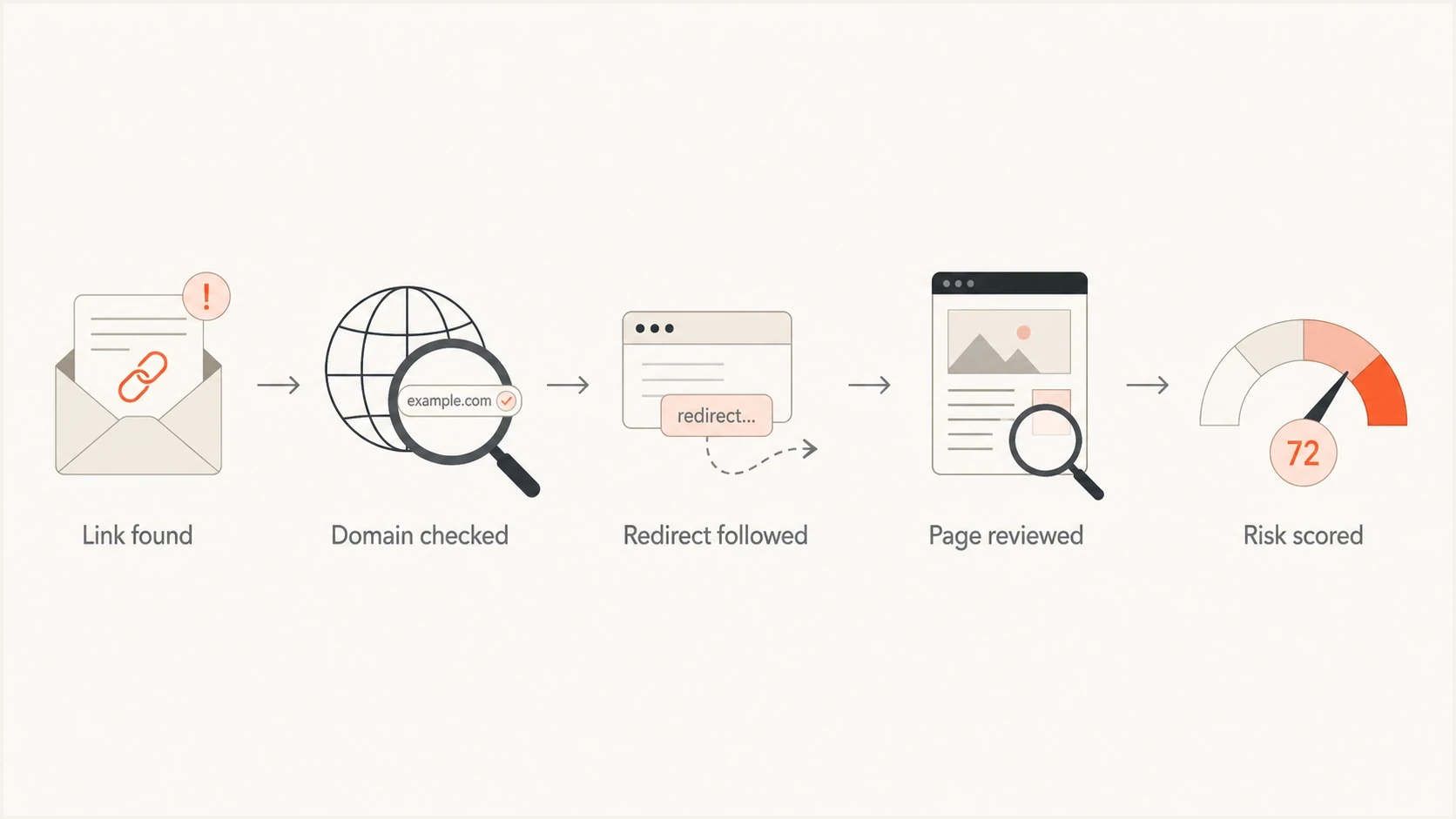
Email hyperlink deliverability flowchart covering domain, redirect, destination, and risk checks.
Mailbox providers and security filters inspect more than visible text. They can parse the HTML, examine URLs, compare visible anchor text with the real destination, check whether a destination is reachable, and use reputation data tied to a linked domain or IP. Some security systems also follow redirects during delivery or at click time.
Mailbox providers can observe recipient actions inside their own services, including spam complaints and whether messages are repeatedly ignored or deleted. They do not receive a sender's external click analytics by default. Senders can still use click data to judge whether links match the audience, but a low click rate is a diagnostic clue rather than proof that link count caused filtering.
Lower-risk links
- Owned domain: The URL uses a domain your brand controls.
- Clear anchor: The linked words describe the page honestly.
- HTTPS page: The landing page loads securely and quickly.
- Expected use: The link fits the campaign and the recipient's reason for opening.
Higher-risk links
- Shared domain: Other senders use the same redirect or short-link domain.
- Hidden target: The visible words and final destination do not match.
- Broken path: The final URL errors, times out, or lands on a blocked page.
- Mixed brands: The message sends readers to several unrelated domains.
Text links, buttons, and CTAs
A text hyperlink is not a special deliverability category. It is usually an HTML anchor wrapped around words in a sentence. A button is often the same anchor styled with HTML and CSS. An image link is an anchor around an image. Filters care about the URL, the surrounding content, and the destination more than the visual treatment.
Common link formats in HTML emailHTML
<a href="https://example.com/pricing">See pricing</a>
<a href="https://example.com/webinar">Register</a>
<a href="https://example.com/unsubscribe">Unsubscribe</a>
The example above has different purposes, but technically each line is a link. Removing the sentence link and keeping only a button does not make the email inherently safer. It only changes the design. If the button points through a risky redirect, the button still carries that risk.
Avoid the one-link myth
A rule that says every email should contain exactly one link ignores real requirements. Commercial emails need a working unsubscribe path, many newsletters need several story links, and product emails often need account, help, and preference links. Arbitrary limits create bad user experience without fixing the real risk.
When hyperlinks hurt deliverability
Links start to hurt when they make the message look untrusted or send recipients to places that filters already distrust. Treat every URL as part of the sender's reputation footprint. A clean sending domain cannot fully compensate for a bad destination domain, a broken tracking link, or a page that security systems classify poorly.
|
|
|
|---|---|---|
Shared domain | Other senders affect trust | Use owned domain |
Redirect chain | Adds domains and failure points | Reduce hops |
Open redirect | Can be reused for unsafe pages | Restrict destinations |
HTTP URL | Weak security signal | Use HTTPS |
Broken link | Damages trust and clicks | Fix before send |
Brand mismatch | Reduces user trust | Explain the destination |
Common link risks and practical fixes
Redirects deserve special attention. A single visible link can pass through click tracking, security scanning, geo routing, and a final landing page. If one hop fails or uses a low-reputation domain, the message can look worse than the email copy suggests. Review link redirects when a campaign has unexplained filtering or poor click performance.
Third-party link domains carry borrowed risk
A shared short-link or tracking domain can inherit reputation from other senders. If those senders use poor practices, your email can take on risk you did not create. Review domain blocklists and blacklists for link hosts, and check IP blocklists or blacklists separately for the infrastructure behind those hosts.
Internal link-count review prompts
These optional editorial prompts are not mailbox-provider thresholds.
Focused campaign
1-5 links
Usually simple to review when each link has a clear purpose.
Review content density
6-15 links
Check whether each link supports the reader's task.
Newsletter-style audit
16+ links
Normal for some digests, but audit every redirect and destination.
Why public URL shorteners are risky
Public URL shorteners hide the destination behind a shared domain used by unrelated customers. That creates two problems for email deliverability: filters see a hostname with reputation outside your control, and recipients cannot confirm the destination before clicking. A short URL can also add another redirect before the normal tracking hop.
Avoid
- Public short domains shared with unknown senders.
- Short links placed before another tracking redirect.
- Redirect endpoints that accept any destination URL.
- Visible URLs that differ from the linked destination.
Prefer
- A branded tracking subdomain under your control.
- One redirect before the final HTTPS page.
- An allowlist of approved destination hosts.
- Descriptive anchor text that states the action.
A custom domain does not fix an open redirect
Branding the tracking hostname improves consistency, but the redirect must also restrict where it can send visitors. If anyone can supply an arbitrary destination, attackers can reuse the trusted hostname and damage its reputation.
How to decide how many links to use
Start with the reader's job, not a magic number. If the email has one clear conversion goal, one primary CTA plus required footer links is usually enough. If the email is a newsletter, digest, receipt, onboarding message, or account notification, several links can be normal because the format demands it.
- Main action: Keep the primary CTA obvious and avoid competing high-priority actions.
- Secondary value: Use supporting links only when they answer a likely reader question.
- Legal links: Keep unsubscribe and preference links present, visible, and working.
- Footer clutter: Remove unused social, app, and directory links that add noise.
- Tracking domain: Use a branded tracking domain and keep redirect paths short.
For a practical check, send the finished message to Suped's email tester and inspect the rendered email, headers, authentication results, and content issues before the campaign goes out.
Email tester
Send a real email to this address. Suped shows a results button when the test is ready.
?/43tests passed
Testing should happen after click tracking is applied, not before. Many teams test a clean draft, then the sending platform rewrites every link. The rewritten version is what mailbox providers and security scanners see, so that is the version worth checking.
Testing links before a send
A good pre-send test catches link issues in context. Check the HTML after tracking is added, the plain-text version, the unsubscribe path, authentication results, and the reputation of linked domains. A link problem often sits beside a domain or authentication problem, so checking only the email body gives an incomplete answer.

Email tester sample report showing total score, email preview, issue summary, and per-section results
Before blaming links, check whether the sending domain itself is healthy. Suped's domain health check highlights DMARC, SPF, and DKIM problems before content testing. If authentication is failing, link edits alone will not fix inbox placement.
Suped's product connects link testing with authentication and reputation checks. DMARC monitoring shows which sources send as your domain, while blocklist monitoring flags domain or IP listings that can make a clean email look risky. Use those findings beside the final tracked-message test to separate authentication failures, blocklist or blacklist listings, and link-specific problems.
Content issue
- Too much noise: The email has many links that do not support the main message.
- Weak match: Anchor text overpromises what the landing page contains.
- Low clicks: Recipients ignore the links because the offer is not relevant.
Infrastructure issue
- Auth failure: DMARC, SPF, or DKIM is failing for a legitimate source.
- Listed domain: A sending or link domain appears on a blocklist or blacklist.
- Bad redirect: Tracking adds a slow or distrusted hop before the final page.
A practical pre-send checklist
The safest link strategy is boring in the best way. Use links that readers expect, host them on domains you control, keep the path secure, and test the final version of the email. A useful email with eight clean links is safer than a confusing email with one suspicious link.
- Owned domains: Use branded link and tracking domains wherever the sending setup allows it.
- Secure pages: Prefer HTTPS destinations and fix certificate or mixed-content problems.
- Final URL: Follow each link after tracking is added and confirm the landing page loads.
- Scanner safety: Do not use single-use or state-changing URLs that security scanners can consume.
- Plain text: Check that the plain-text version has readable, working links.
- Unsubscribe: Make the opt-out path visible, functional, and free of tracking errors.
- Engagement: Remove links that rarely get clicked and do not help the reader.
Recommended baseline
Use the number of links required by the message, keep them on trusted branded domains, avoid unnecessary redirect chains, and test the final tracked email before launch. That approach addresses the link problems that can change deliverability.
Views from the trenches
Best practices
Keep links on owned or clearly branded domains so filters and readers see one sender throughout.
Test every tracked URL after rewriting, because the final landing page is what matters.
Use links that match reader intent, then remove footer clutter that nobody uses before launch.
Common pitfalls
Do not replace useful text links with one button when readers need several next steps.
Avoid shared third-party redirect domains when another sender's behavior can affect you.
Do not assume link count caused the issue before checking authentication and reputation.
Expert tips
Compare link engagement by segment, because ignored links can expose weak targeting.
Keep the unsubscribe path visible and working, even when reducing promotional links.
Audit redirects during warmup, since broken or slow hops can harm early engagement.
Marketer from Email Geeks says link count alone rarely explains inboxing problems; the destination and domain reputation matter more.
2022-07-06 - Email Geeks
Marketer from Email Geeks says a sender using many links to one brand is different from a sender mixing several unrelated brands.
2022-07-06 - Email Geeks
Practical takeaway
Do not treat hyperlinks as something to fear. Treat them as reputation-bearing parts of the email. The answer is not to strip the body down to one button. Make every link useful, expected, branded, secure, and tested after tracking is applied.
If deliverability drops after adding links, investigate the link domains, redirects, landing pages, authentication, and recipient response before blaming the count. A link-heavy email can be fine when it matches the format and audience. A one-link email can still fail when the one link points through a poor redirect or to a distrusted page.




