
How many links in an email is too many for good deliverability?

Updated on 16 Oct 2026: We clarified link-count guidance and added practical checks for Gmail clipping and unsubscribe requirements.
There is no universal number where an email suddenly has too many links for good deliverability. A five-link cap is too simplistic. Review link quality alongside quantity. More links create more destinations to audit, but mailbox providers do not publish a universal link-count threshold that guarantees inbox placement.
As an editorial planning example, a promotional email can use 3-7 meaningful body links, excluding unsubscribe and other standard footer links. Editorial newsletters often need more links to cover their selected stories. The 10-30 example below is a content budget, not a deliverability benchmark; useful links to reputable third-party sources belong in newsletters too. A newsletter with 30 relevant links can inbox better than a thin sales email with one suspicious redirect.
Ask whether each link supports the message and takes the recipient to the destination they expect. If the answer is no, remove the link or move it to a landing page.
Link count examples by email type
Use this working rule: one primary call to action, a small number of supporting links, and only the standard footer links you actually need. That gives subscribers enough choice without turning the email into a directory.
|
|
|
|---|---|---|
Plain outreach | 0-2 | Trust |
Promotional email | 3-7 | Focus |
Newsletter | 10-30 | Destination relevance and reputation |
Digest | 15-40 | HTML size and readability |
Receipt | 2-6 | Clarity |
Illustrative content budgets only. These counts are not tested safety limits or mailbox provider rules.
The short answer
Review optional links when they compete with the main action or add an unfamiliar destination. A newsletter with more than 30 links needs the same checks as a shorter message; crossing that number is not evidence of a filtering penalty.
- Planning default: Use one main call to action and a few supporting links.
- Newsletter caveat: More links work when subscribers expect a curated list.
- Priority check: Check destination reputation and redirects before blaming raw count.
Unsubscribe, privacy, preference center, and view-in-browser links still appear in the message and can be evaluated. Do not count them the same way as optional content links when planning the message, because they are expected in commercial mail. Keep unsubscribe links visible even when cutting optional footer links. A preference center is optional and is not a substitute for an unsubscribe option.
For bulk senders to personal Gmail accounts, marketing and subscribed messages need both a visible body unsubscribe link and one-click unsubscribe through List-Unsubscribe and List-Unsubscribe-Post headers. A body link alone does not meet the header requirement. Google's sender guidelines explain the requirements.
Track three counts during review: total clickable elements, unique URLs, and unique domains. Repeating the same call-to-action URL in a button and a text link creates two clickable elements but one destination. Count again after click tracking is applied, because rewritten URLs and redirect hosts can change what the receiving system evaluates.
Link count affects performance differently from deliverability
Inbox placement and campaign performance answer different questions. A focused link plan can improve clicks or conversions even when the extra links would not have caused filtering.
Use an A/B test to compare a focused version with a version that adds supporting links. Randomly split a comparable, opted-in audience and keep the subject line, sending time, offer, and sending setup consistent. Change the link plan so the result is easier to interpret.
Compare click rate and conversions alongside complaints, bounces, and observed inbox placement. Server acceptance does not establish that a message reached the inbox. Filter automated security-scanner clicks where your reporting supports it, and avoid treating open rate or click-to-open rate as direct evidence of deliverability.
Why filters care about links
Mailbox providers evaluate the whole message. Links are part of that evaluation because URLs expose destination reputation, sender intent, tracking behavior, brand consistency, and recipient risk. A clean email with many trusted links has a different risk profile than a short email with a single shortened link to an unknown domain.
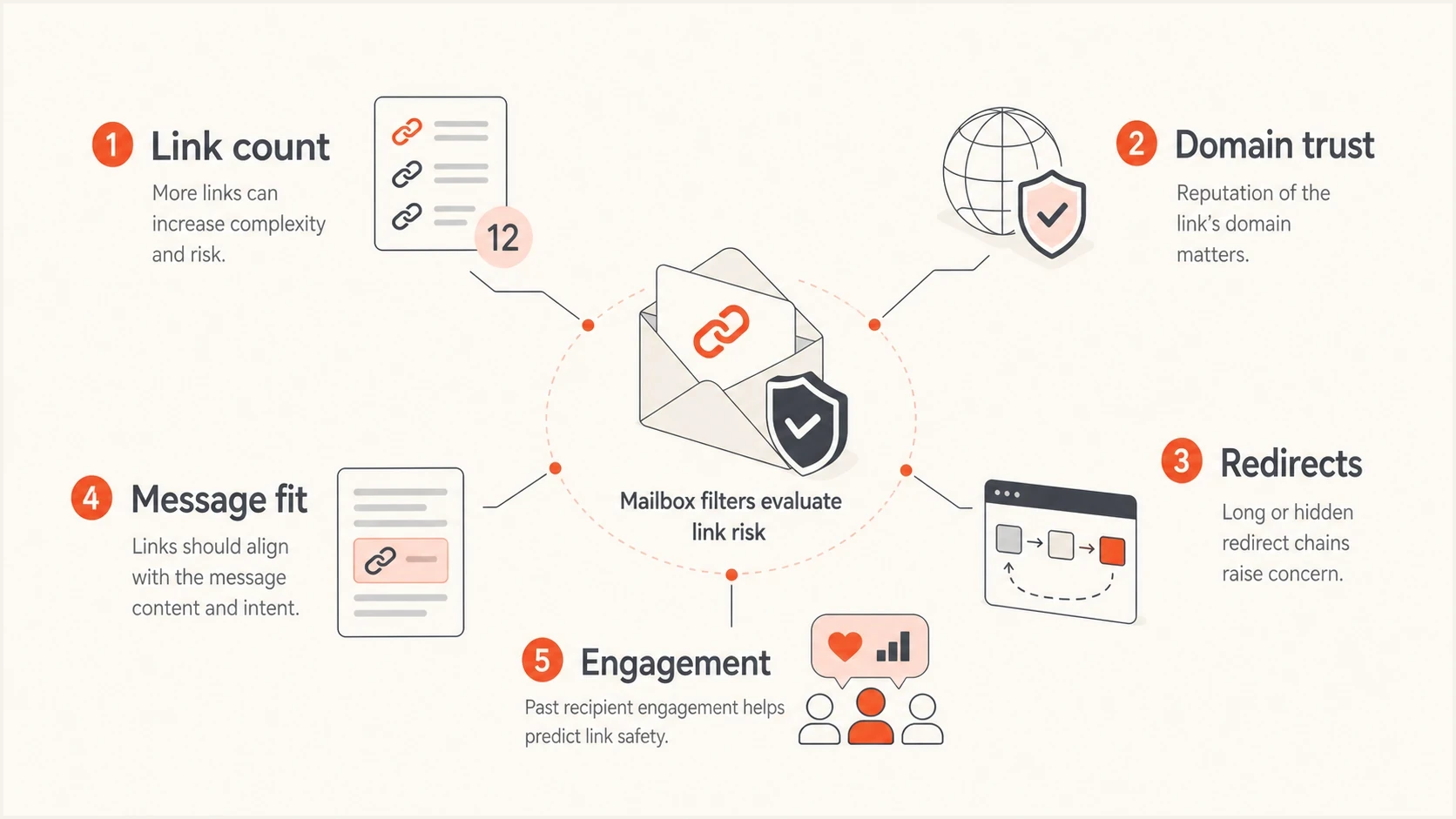
Email link deliverability checks covering link count, domain reputation, redirects, message context, and engagement.
- Domain reputation: Review the reputation of every destination, including your own domain. A reputable third-party source is not inherently riskier because you do not own it.
- Redirect chains: Each redirect introduces another host to inspect. Ordinary click tracking is not automatically harmful; remove unnecessary hops and review link redirects before large sends.
- Protocol signals: Use HTTPS destinations with valid certificates. HTTPS does not establish reputation, and HTTP alone does not prove an email will be filtered. Audit HTTP links before blaming link count.
- Text balance: Give links enough context to explain their purpose. There is no published universal ideal link-to-text ratio or text-to-link percentage for inbox placement.
- Recipient behavior: Recent clicks, replies, and low complaints support sender reputation, but they do not make a risky destination safe.
Each unique linked domain adds a destination to your audit. Use descriptive anchor text that accurately describes the landing page. If the visible text is a URL, keep its displayed domain consistent with the actual destination; misleading URL text creates distrust even when the email has only one link.
Link patterns to review
Prioritize destination and tracking issues rather than treating link counts as safety thresholds.
Routine review
Relevant destinations
Useful links with clear labels and expected destinations, regardless of count.
Closer review
Unfamiliar redirects
Unfamiliar tracking hosts or unnecessary redirect hops.
Resolve before sending
Unsafe destinations
Misleading destination text, compromised pages, or a relevant blocklist (blacklist) listing.
What makes link-heavy email risky
Assess high link counts alongside destination reputation and recipient expectations. The same 20 links can be fine in a weekly editorial digest and risky in a cold campaign to new recipients. Context decides how much link count matters.
Lower-risk link pattern
- Owned domains: Most links point to your main site, app, help center, or content hub.
- Clear purpose: The links support the message rather than competing with it.
- Stable tracking: Use a branded tracking domain with correct DNS and HTTPS configuration. A custom hostname does not guarantee isolation from shared infrastructure or destination reputation.
- Engaged audience: Recipients opted in and regularly interact with similar emails.
Higher-risk link pattern
- Unvetted domains: The email sends readers to unvetted destinations or sites unrelated to its purpose.
- Thin copy: The HTML has more linked elements than useful explanation.
- Messy redirects: Shorteners, affiliate hops, and tracking chains hide the final destination.
- Weak consent: The list has low engagement, stale contacts, or complaint history.
Social links deserve special handling. They are not automatically bad, but they often add several off-domain URLs that do little for the campaign goal. If the message is a product announcement, the social icons in the footer rarely matter. If the message is a community roundup, they can make sense.
Ad units and sponsorship links also need review. They often use external domains, redirects, and tracking layers that your sending domain has less control over. Keep sponsored links clearly labeled and limited, then send readers to a controlled page when the email needs more references.
Cleaner link structure exampleHTML
<p>Read the full launch notes on our site.</p>
<a href="https://example.com/launch-notes">Read the notes</a>

<p>Need pricing details?</p>
<a href="https://example.com/pricing">View pricing</a>
That example is simple on purpose. The links point to the same trusted domain, each link has a clear job, and the copy tells the recipient what happens next.
Link-heavy HTML can trigger Gmail clipping
Gmail commonly clips large HTML messages at about 102 KB, hiding the rest behind "View entire message". Long tracked URLs and repeated button markup add to HTML size even when the visible copy is short. UPC's Gmail clipping documentation describes the size limit and its effect on content visibility.
Clipping is a display issue, not proof that an email was filtered as spam. It can hide the footer unsubscribe link or a tracking pixel placed near the bottom, which affects the recipient experience and reported opens.
Measure the final HTML after personalization and click tracking. Leave space below the approximate clipping point, remove redundant markup and unused template sections, and move long resource lists to a landing page. Externally hosted image file sizes are separate from HTML size, although their URL markup still counts. Send a fresh test with a distinct subject to a Gmail inbox and check that the footer is visible.
How to audit your email before sending
Audit the message before cutting links. Removing useful links can reduce clicks without improving deliverability. The goal is to identify the links that add risk or confusion, then keep the links that earn their place.
- Count links: Count total clickable elements, unique URLs, and unique domains in the final tracked email, including linked images, buttons, and footer items.
- Group domains: Separate owned domains, tracking domains, social domains, ad domains, and partner domains.
- Follow redirects: Inspect the tracked URL and final landing page for each major link, remove unnecessary hops, and confirm that the anchor text describes the destination.
- Check setup and reputation: Use a domain health check for sending-domain DNS and authentication. Separately check linked and tracking domains for relevant blocklist (blacklist) listings; DNS health alone does not establish URL safety.
- Test the message: Send a real test through your normal sending setup to Suped's email tester to inspect authentication, sending IP, DNS, and unsubscribe headers. Check rendering, clipping, and link behavior separately in recipient inboxes.
Suped's email tester checks the delivered message for authentication and sending-setup issues, including blocklist (blacklist) listings on sending identities. It does not provide a rendering preview, a spam-content score, or a prediction of inbox placement.
Email tester
Send a real email to this address. Suped shows a results button when the test is ready.
?/43tests passed
A test send gives better evidence than a generic link limit. Combine technical checks with direct inbox review and campaign results. Passing the checks does not establish that every receiving provider will place the message in the inbox.

Email tester sample report showing total score, email preview, issue summary, and per-section results
For ongoing programs, Suped's DMARC monitoring helps verify that legitimate senders authenticate correctly. Its blocklist monitoring helps identify domain or IP listings that coincide with placement changes. Teams can use both views to investigate authentication failures and blocklist (blacklist) events separately from link count. DMARC reports do not inspect message-body links or show which inbox folder received the email.
How to reduce links without losing clicks
The fastest way to reduce link risk is to make the email choose a job. A campaign that asks people to read, buy, register, follow, share, download, and watch all at once has a focus problem before it has a deliverability problem.
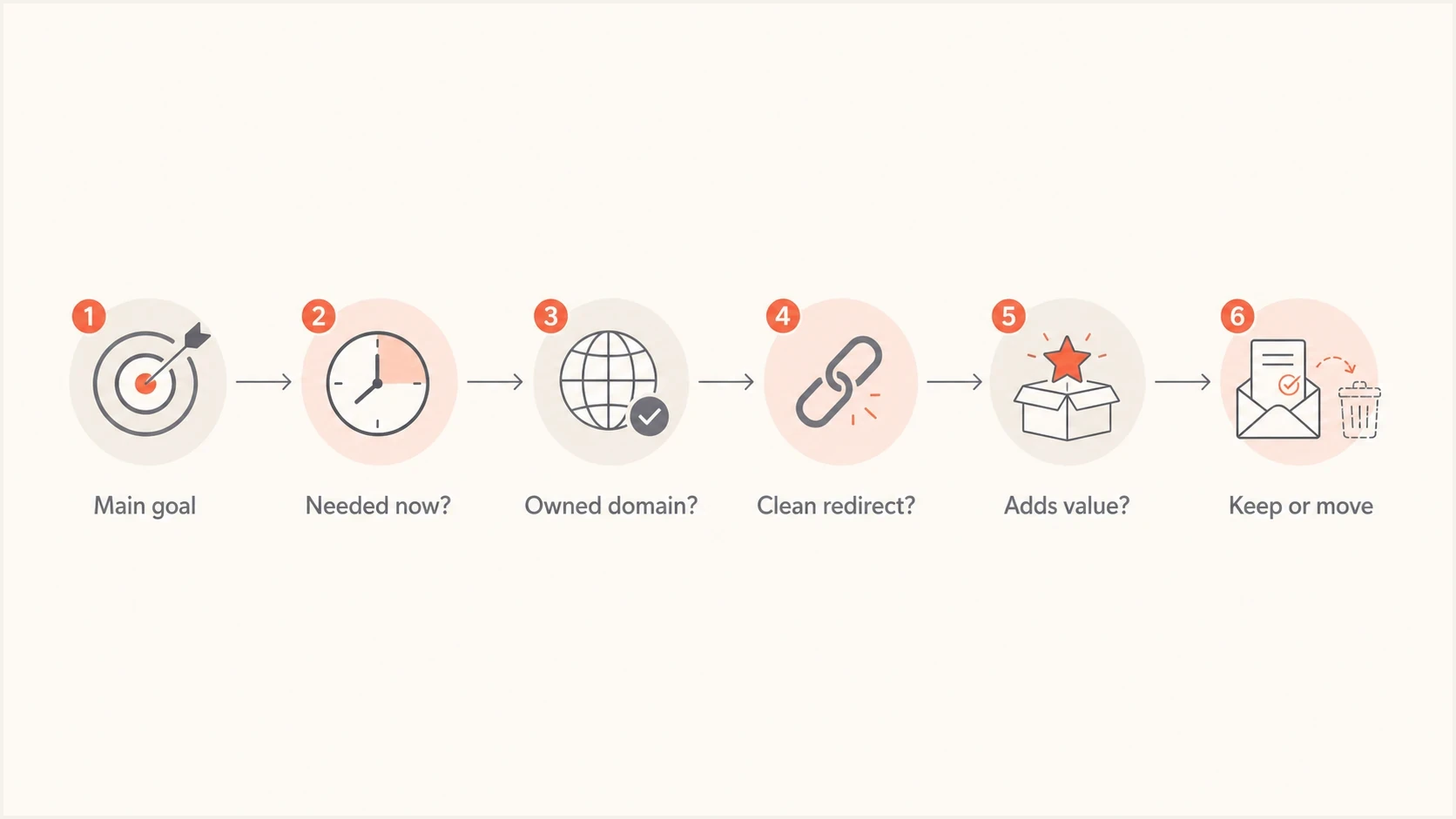
Email link audit flowchart for deciding which links to keep or move to a landing page.
Best practice
Use the email to move the reader to the next best page. Use the landing page to carry the extra resources, partner links, social links, PDF links, and long reference lists.
- Primary link: Make the main action obvious and repeat it only when it helps scanning.
- Fallback link: Place one secondary path near the bottom for readers who are interested but not ready.
- Footer links: Keep compliance links, but remove decorative link sets that get no clicks.
If you send newsletters, do not strip the format down to one link just because a generic article says five is the limit. Newsletter subscribers expect choices. Make sections scannable and keep each destination relevant; a curated roundup does not need to use the same domain for every item.
When a link is low-value, move it behind the main click. A product email can link to the product page, and that page can contain the docs, video, social proof, and partner material. This keeps the email clean while still giving motivated readers the full path.
When link count is not the real problem
Teams often blame link count when the root cause is authentication, reputation, or list quality. A campaign can have one link and still land in spam if it fails required authentication, sends through an unauthorized platform, uses a poor tracking domain, or goes to people who stopped engaging months ago.
What to fix first
- Authentication: DMARC needs a passing SPF result or a passing DKIM signature whose domain meets the visible From domain matching rules. Relaxed matching permits the same organizational domain; strict matching requires the exact domain.
- Reputation: Check sending IPs, domains, and linked domains for blocklist or blacklist problems.
- Consent: Suppress stale or unresponsive recipients before reducing useful links.
- Content fit: Make the subject, copy, and destination match the recipient's expectation.
What link count hides
- Shared tracking: A risky shared click domain can affect every link.
- Broken pages: Dead links, certificate errors, and blocked redirects damage trust.
- Heavy HTML: Large templates can cause clipping and hide compliance links.
- Weak engagement: Low clicks and high complaints make content signals harder to overcome.
If authentication is unstable, fix it before rewriting every email. If a sending source is not authorized, link count changes will not solve the trust issue. If a tracking domain is listed on a blocklist (blacklist), removing five content links still leaves the same risky domain in the message.
A working checklist for link-heavy campaigns
Use this checklist to find unresolved issues before sending a campaign with many links.
Send review checklist
- Purpose: The email has one clear reason to exist in the inbox.
- Destination: Most links point to owned or highly trusted domains.
- Redirects: Every major link resolves quickly and lands where the copy says it will.
- Authentication: DMARC passes through SPF or DKIM with the required domain match. Bulk senders to personal Gmail accounts must also configure both SPF and DKIM and publish a DMARC record.
- Reputation: Sending and linked domains have no current blocklist or blacklist issues.
- Engagement: The audience has recent clicks, purchases, replies, or site activity.
If a message fails several of these checks, link reduction is one part of the fix. The better fix is usually a cleaner landing page, fewer off-domain URLs, authenticated sending, and tighter segmentation.
Views from the trenches
Best practices
Keep most links on owned domains and move broad resource lists to a landing page.
Review link-to-text balance before launch, especially for promotions with thin copy.
Use one clear primary action, then add only fallback links that match user intent.
Test the full message with tracking enabled, because final URLs affect filtering.
Common pitfalls
Treating five links as a universal rule causes teams to remove useful newsletter paths.
Adding social icons by default increases off-domain links without improving the goal.
Blaming link count can hide authentication, reputation, and engagement problems.
Using shorteners or affiliate hops makes a small link count look riskier than it is.
Expert tips
Compare inboxing by destination domain count, not only by the number of anchors.
For newsletters, measure clicks by section before cutting links that readers expect.
Keep sponsored links labeled and limited, then place extra partner links on-site.
If fallback links get most clicks, revisit the main offer and segment expectations.
Marketer view
Marketer from Email Geeks says raw link count is not the main issue; the quality and reputation of each destination matter more.
2023-02-06 - Email Geeks
Marketer view
Marketer from Email Geeks says an overweight link-to-text ratio can influence placement when links point away from the sender's own domains.
2023-02-06 - Email Geeks




