Are HTTP links penalized by spam filters in email marketing?

Published 21 Apr 2025
Updated 19 Aug 2026
13 min read
Summarize with
Updated on 19 Aug 2026: We tightened the HTTP verdict, added URL shortener and destination-mismatch guidance, and refreshed current sender requirements.
HTTP links can hurt email marketing performance, but mailbox providers do not publish a universal rule that says "HTTP link equals spam." The better-supported risk is indirect: filters and security systems inspect URL reputation, redirects, destination safety, and whether a link matches the message. HTTP also leaves the request to the first web server unencrypted. If an HTTP tracking link redirects to an HTTPS destination, the first visible and clickable hop is still HTTP, so scanners can still record and evaluate it.
The default recommendation is simple: use HTTPS for every visible link, tracking link, image URL, hosted preference page, and landing page in marketing email. Do not treat HTTP as an automatic spam-folder sentence, but do treat it as an unnecessary security and trust risk. Email filtering is cumulative. A single HTTP link rarely explains a campaign failure by itself, but it can contribute to a worse verdict when link reputation, authentication, complaints, or message structure already raise concern.
- Direct answer: HTTP links do not have a published universal penalty, but they are a poor security and deliverability choice and should be replaced with HTTPS.
- Main risk: the visible URL, redirect host, final destination, and reputation of each domain can affect link checks.
- Best test: send the campaign to an email tester and inspect the rendered links, redirects, authentication, and content warnings.
Why HTTP links create deliverability risk
Spam filters score messages using many signals at once: sender reputation, domain reputation, authentication, message content, URL reputation, recipient engagement, and historical complaints. HTTP links sit inside the content and URL-reputation part of that assessment. They also affect how browsers, webmail clients, and security gateways handle the click.
The reason HTTP links matter is not that every mailbox provider has one public penalty table. An HTTP link has weaker transport security than an HTTPS link. It does not encrypt or authenticate the connection to the first web server, and it can expose click parameters in transit. It can also look inconsistent when the brand domain is secure but the tracking domain is not.
The redirect does not erase the first hop
If the email contains an HTTP tracking link that redirects to an HTTPS landing page, scanners and users still encounter the HTTP URL first. The final landing page matters, but the redirect host, redirect protocol, certificate behavior, and tracking-domain reputation matter too.
- Security signal: HTTPS encrypts the first hop and authenticates the web server through its certificate.
- Reputation signal: filters evaluate domains used in links, including tracking domains and redirect domains.
- Click-path signal: security systems can rewrite, scan, warn on, or block a URL based on its destination verdict.
- Trust signal: recipients are more likely to distrust a brand message when links expose insecure URLs.
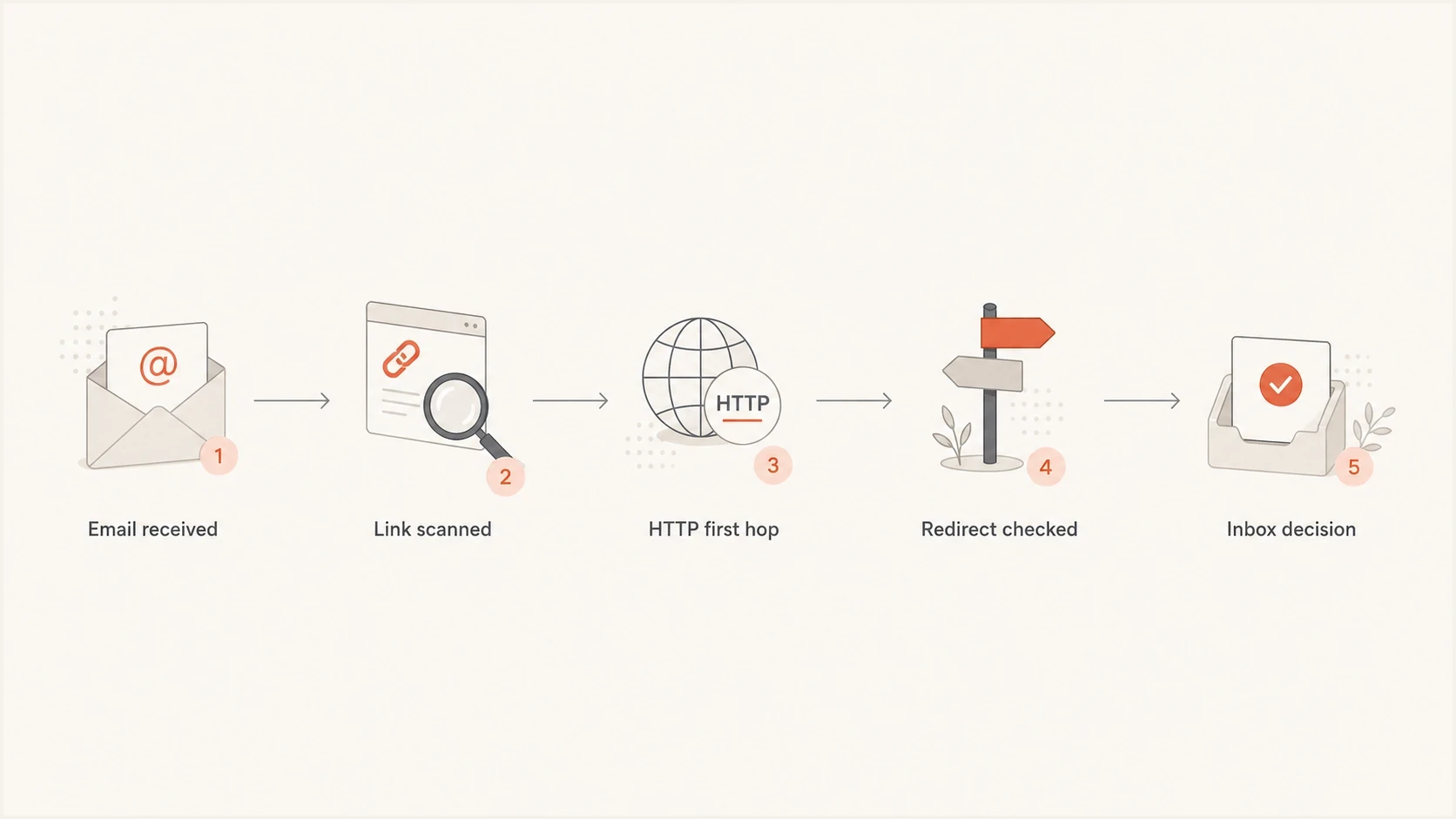
Flowchart showing how an email link is scanned before an inbox decision.
HTTP versus HTTPS in email links
The safest setup is straightforward: every link starts with HTTPS, the tracking domain has a valid certificate, redirects are short, the final destination is HTTPS, and the domain matches the brand closely enough that a human can understand it. That applies to buttons, text links, image links, unsubscribe links, preference-center links, social links, PDF links, and click-tracking links.
Some teams assume a redirect to HTTPS solves the problem. It secures the final page, but it does not secure the first hop. A mail security scanner can record the original HTTP URL before redirects complete. The redirect can also fail, and a tracking domain with weak reputation can count against the message even if the final page is clean.
HTTP link
- First hop: the click begins on an unencrypted URL.
- Scanner view: the insecure URL can be logged before redirects complete.
- User impact: the connection is not protected until an HTTPS redirect completes.
- Recommendation: replace it unless there is a temporary technical constraint.
HTTPS link
- First hop: the click starts on an encrypted URL.
- Scanner view: the URL follows current web security expectations.
- User impact: fewer trust warnings appear during the click path.
- Recommendation: use this for all marketing, transactional, and lifecycle email.
|
|
|
|---|---|---|
HTTP page | Higher | Move page to HTTPS |
HTTP redirect | Elevated | Make first hop HTTPS |
HTTPS page | Lower | Keep certificates valid |
Mismatched domain | Elevated | Use branded tracking |
How link types compare for filtering and user experience.
Link density and social links
HTTP is only one link-related signal. Filters can also consider whether the message is link-heavy, whether there is enough readable text around the links, how many different domains appear, and whether the destinations match what the reader expects. A short email packed with buttons, navigation links, social icons, footer links, and repeated CTAs creates more concern than a longer newsletter with the same number of links and clear context.
No mailbox provider publishes a universal safe ratio such as one link per 100 words or a hard maximum link count. Use link density as a diagnostic prompt, not a pass-or-fail formula. Remove duplicate links, keep the set of destination domains understandable, and give each important call to action enough readable context.
Social media links and HTML classes such as social are not serious spam triggers by themselves. Keep useful social links when they go directly to official profiles, use HTTPS, and avoid unnecessary redirect chains. If a checker flags the social block, test the rendered links and tracking path before renaming classes or deleting icons.
- Trim repeated links that point to the same page, especially duplicated CTA buttons and full navigation menus.
- Keep external domain variety low, because many unrelated destination domains make the link graph harder to trust.
- Add meaningful body copy around key links so the email is not mostly clickable elements with little context.
- Treat social icons like any other link: HTTPS first hop, direct destination, stable tracking domain, and accurate label.
URL shorteners and mismatched link text
Public URL shorteners add a shared reputation layer that the sender does not control. They also conceal the destination until a scanner or recipient follows the link. A shortened HTTPS link can therefore create more deliverability and trust risk than a direct branded HTTPS link when the shortening domain has been abused by unrelated senders.
Visible link text should also match the actual destination closely enough that the click is easy to understand. If the message prints one full URL but the href points to an unrelated tracking or shortening domain, filters and recipients can treat the mismatch as deceptive. Branded click tracking still rewrites the href, but a recognizable HTTPS subdomain makes the relationship clearer.
- Avoid public shortening domains in production email, even when the shortened URL uses HTTPS.
- Do not paste a bare shortened URL as plain text, because email clients can turn it into a clickable link.
- Use descriptive anchor text or a visible brand URL that accurately describes the destination.
- Use a branded HTTPS tracking domain when click measurement requires a redirect.
How to audit links before sending
Before a campaign goes out, check links the same way authentication is checked: the goal is to know what the recipient receives, rather than only what the editor screen says. Marketing platforms rewrite links for click tracking, and that rewritten URL is the one mailbox providers and security systems inspect.
This is where Suped's product fits the operational workflow. Suped puts DMARC, SPF, DKIM, blocklist monitoring, and deliverability checks in one place, so a team can separate a content or link issue from an authentication or reputation issue. HTTP links are only one possible signal. If the campaign also fails SPF domain matching, lacks DKIM domain matching, or sends through an unapproved source, changing links alone will not fix the underlying problem.
Email tester
Send a real email to this address. Suped shows a results button when the test is ready.
?/43tests passed
For link audits, use a plain checklist. It is short enough to run before every major campaign and detailed enough to catch the common failures.
- Send a seed: send the real campaign version after personalization and tracking rewrites are enabled.
- Inspect the HTML: confirm each href starts with HTTPS unless there is a documented exception.
- Compare labels and targets: confirm visible link text does not conceal an unrelated href or public shortening domain.
- Follow redirects: check every hop, not only the final destination page.
- Verify domains: confirm tracking domains belong to your brand or a domain you intentionally use.
- Check reputation: confirm your sending and linked domains are not on a blocklist (blacklist) before high-volume sends.

Email tester sample report showing total score, email preview, issue summary, and per-section results
What to fix when your platform uses HTTP tracking links
If your email platform rewrites links as HTTP, treat it as a configuration problem first. Many platforms support HTTPS tracking domains, but the setting depends on DNS, certificate provisioning, and whether the tracking subdomain has been verified. The fix usually involves a branded tracking domain such as click or links, plus a certificate managed by the platform or your infrastructure.
Example link statestext
Avoid:
http://click.example.com/abc123

Better:
https://click.example.com/abc123

Best:
https://click.example.com/abc123 -> https://www.example.com/offer
If the vendor says HTTP is required for compatibility, ask for the exact technical reason and an HTTPS roadmap. Modern certificate provisioning is routine, and most recipient environments expect secure links. Compatibility should not require an insecure first hop for normal marketing clicks.
Questions to ask your email platform
- Tracking domain: can we use a branded HTTPS tracking domain?
- Certificate handling: who provisions, renews, and monitors the certificate?
- Redirect chain: how many hops exist before the final landing page?
- Fallback behavior: what happens if the certificate expires or the CNAME is removed?
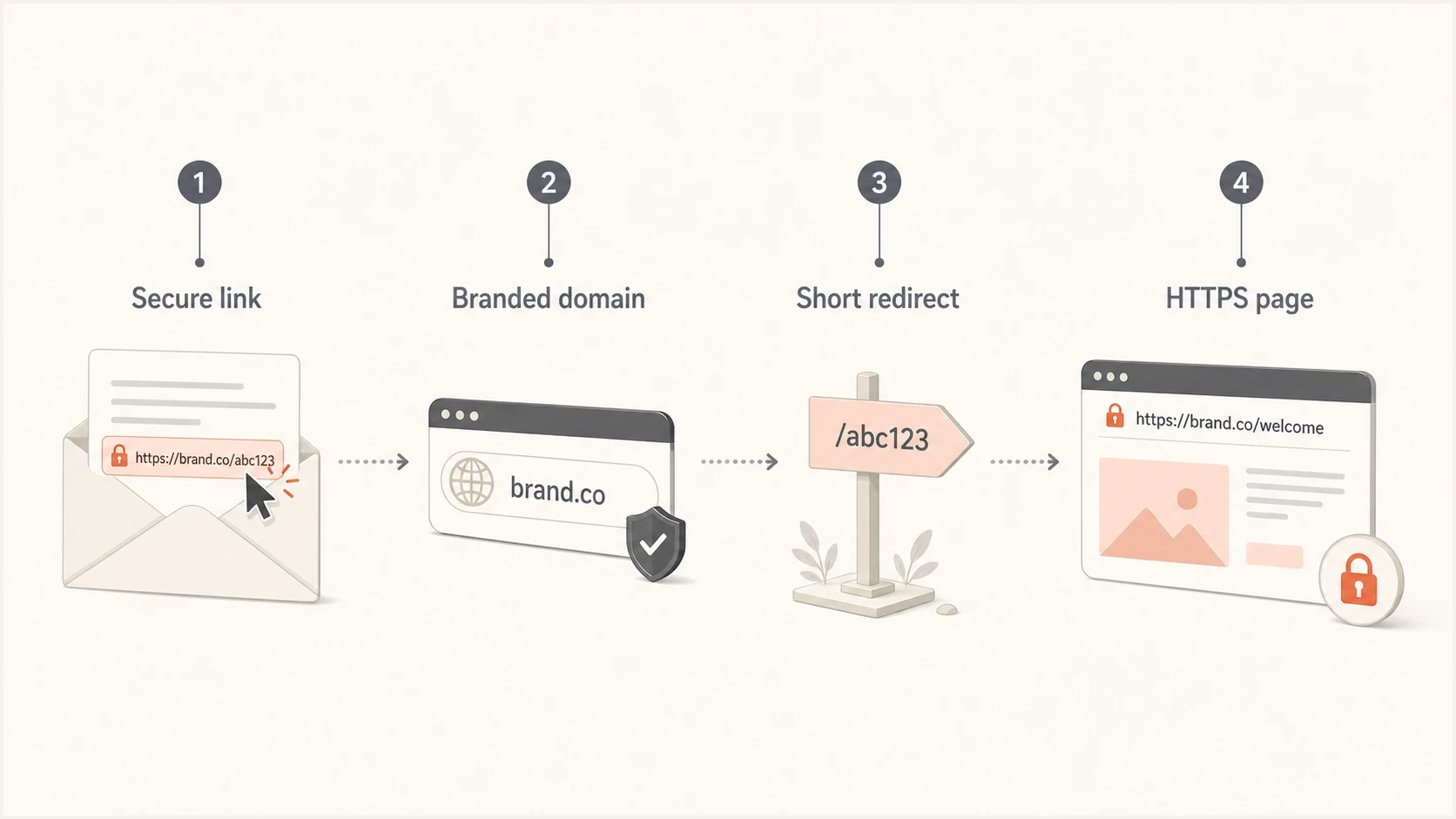
Infographic showing a secure email click path with HTTPS and branded tracking.
Do HTTP links matter more than authentication?
HTTP links matter, but they do not outrank the foundations. If a domain has broken SPF, unsigned DKIM, no DMARC policy, or unrecognized senders, that is usually a larger and more repeatable source of deliverability trouble. Link hygiene works best after authentication is correct.
Gmail and Yahoo continue to enforce the bulk-sender requirements they introduced in 2024. Outlook.com has rejected messages from domains sending more than 5,000 messages per day when they fail required SPF, DKIM, or DMARC checks since May 5, 2025. Gmail and Yahoo also require low complaint rates and one-click unsubscribe for covered promotional mail.
That is why HTTP links should not be debugged in isolation. First confirm the message passes SPF and DKIM where expected, that DMARC domain matching works, and that the sending source is authorized. Then check the content, links, redirects, and reputation. Suped's DMARC monitoring is useful here because it shows which sources are passing, failing, or sending without approval.
RFC 9989 now defines DMARC and obsoletes RFC 7489. RFC 9990 defines aggregate reporting, and RFC 9991 defines failure reporting. None of these standards creates a spam penalty for HTTP links. The operational point remains the same: SPF or DKIM must pass with the visible From domain before link cleanup can solve a broader authentication problem.
How to prioritize link risk
A practical way to decide whether HTTP links need urgent attention.
Low risk
Green
All links use HTTPS, tracking is branded, and authentication passes.
Medium risk
Review
One redirect hop uses HTTP, but final pages are secure and reputation is clean.
High risk
Fix now
HTTP tracking, weak authentication, long redirects, or blocklist evidence appear together.
When a campaign has both HTTP links and authentication failures, fix both. The link issue can affect click safety and content scoring, while authentication affects whether the message can be trusted as authorized mail from your domain. A clean HTTPS click path does not compensate for a sending source that fails DMARC domain matching.
?
What's your domain score?
Deep-scan SPF, DKIM & DMARC records for email deliverability and security issues.
After that check, compare the result with the campaign test. If domain health is clean but the email tester still flags link behavior, the problem is likely in the rewritten campaign HTML, the tracking domain, or the redirect chain.
Blocklists and link reputation
A link can hurt deliverability because of the domain behind it, not only because of HTTP. If your tracking domain, root domain, or linked landing-page domain appears on a blocklist (blacklist), filters have another reason to distrust the message. The same applies to shared redirect domains that have been abused by other senders.
This is where Suped's blocklist monitoring helps operationally. It keeps domain and IP reputation checks next to DMARC and authentication status, so a team does not chase a content theory when the sender has a reputation problem. For high-volume sends, link protocol, link reputation, sender authentication, and IP reputation should be reviewed together.

Blocklist monitoring page showing domain and IP checks across blocklists with importance and status
The practical rule is to avoid shared, generic, or unfamiliar click domains when you can. Use a branded tracking domain, keep it secure, and watch whether that domain appears on a blocklist or blacklist. If a blacklist result appears, pause the affected campaign path until the root cause is clear.
A practical decision process
When HTTP links appear in a marketing email, do not debate whether one specific filter has a named penalty. Work through the risk in order and remove the weak signal. The cost of moving to HTTPS is low compared with the cost of a deliverability incident, broken click tracking, or support tickets from users who saw security warnings.
- Replace visible HTTP links: all user-facing links should start with HTTPS.
- Fix tracking first hops: make the rewritten tracking URL HTTPS before the redirect.
- Shorten redirect chains: avoid multiple trackers, affiliate hops, public URL shorteners, and unnecessary link wrappers.
- Use branded domains: make the tracking domain recognizable and consistent with the sender's brand.
- Retest the campaign: send the final version after link rewriting, not before.
For deeper link-specific cleanup, review how link redirects affect email reputation and how HTTPS changes the user and scanner path. The rule is not that every redirect is bad. The rule is that every redirect adds another domain, certificate, status code, and reputation surface to inspect.
Views from the trenches
Best practices
Keep every visible, tracked, image, preference, and unsubscribe URL on HTTPS.
Check rewritten links after platform tracking runs, not only links in the editor.
Use branded click domains and monitor them alongside sending domain reputation.
Common pitfalls
Treating an HTTPS final page as enough when the tracking URL starts with HTTP.
Ignoring browser and webmail warnings because inbox placement still looks stable.
Letting shared redirect domains carry reputation risk into otherwise clean sends.
Expert tips
Ask vendors who require HTTP tracking for the exact certificate constraint and plan.
Separate link hygiene tests from SPF, DKIM, and DMARC tests when debugging issues.
Retest after link rewrites, because the campaign HTML can change at send time.
Marketer from Email Geeks says HTTP links are not always a named spam-filter penalty, but they stand out as a weak signal and should be removed from production campaigns.
2024-09-23 - Email Geeks
Marketer from Email Geeks says webmail and browser behavior matter because a recipient can hit a security warning even when the final destination page uses HTTPS.
2024-09-24 - Email Geeks
The answer to act on
HTTP links are not a guaranteed spam-folder trigger, but they create avoidable transport and trust risk. Use HTTPS everywhere, including tracking links and redirect domains. If a platform rewrites links to HTTP, ask for HTTPS tracking, a branded click domain, and clear certificate management. For teams using Suped, DMARC monitoring and reputation checks put link findings beside authentication data, which helps show whether HTTP is the main issue or one signal among others.




