Is slower throughput to Apple domains normal during IP warm-up?

Published 29 Sep 2026
Updated 29 Sep 2026
9 min read
Summarize with
Yes. Slower throughput to Apple domains such as icloud.com, me.com, and mac.com is normal while a new dedicated IP builds reputation. Apple has little history for the IP, so its receiving systems can accept mail more cautiously than they do for an established IP. Temporary deferrals and slower retry acceptance can therefore appear even when the established IP delivers the same mail faster.
I treat the difference as expected only when queued mail clears, permanent bounces remain low, recipients still engage, and the pattern improves as consistent wanted volume continues. Persistent deferrals, growing queues, sharp bounce changes, or mail aging out of the queue are not routine warm-up friction. Those signals call for a slower ramp and a technical review.
Apple does not give senders a universal daily volume schedule. The safe pace depends on list quality, message type, cadence, complaint behavior, authentication, and prior domain reputation. A new IP should be compared with its own trend and with an established control IP carrying similar traffic, not with a generic warm-up chart.
Why Apple slows traffic from a new IP
A new IP begins without enough delivery history for Apple to judge its normal traffic. Controlled acceptance limits Apple's exposure while its systems observe whether recipients want the messages and whether the sender behaves consistently. The receiving server can temporarily defer part of a connection or message stream, leaving the sending mail transfer agent to retry later.
A deferral is not a final failure
A 4xx SMTP response asks the sender to retry. A 5xx response rejects the message permanently. Count delivered messages after retries, queue age, and retry exhaustion before deciding whether Apple throughput has become a deliverability incident.
Expected warm-up behavior
- Temporary deferrals: Some messages wait, retry, and then receive a 2xx acceptance.
- Uneven speed: The new IP trails an established IP while reputation data accumulates.
- Gradual improvement: Queue clearance and acceptance improve across repeated, consistent sends.
Signs of a real problem
- Queue growth: Backlog grows after volume stops, or messages expire before delivery.
- Permanent rejection: 5xx responses rise for valid, recently engaged Apple recipients.
- Worsening trend: The same volume produces longer delays on successive sends.
The comparison must control for traffic. If the established IP carries highly engaged transactional mail while the new IP carries older promotional contacts, the IP age is not the only meaningful variable. Keep message class, audience recency, cadence, and authentication as similar as possible before drawing a conclusion.
Apple relay addresses also deserve separate analysis because they can obscure the recipient's underlying mailbox context. Review the handling of Apple relay traffic independently when its response pattern differs from ordinary Apple domains.
How to decide whether the slowdown is healthy
Start with SMTP logs and the sending queue. Separate Apple destinations, classify responses by 2xx, 4xx, and 5xx families, and measure how long deferred mail takes to receive a final result. A campaign-level delivered rate can hide a queue that clears many hours later, while a raw deferral count can make a successful retry pattern look worse than it is.
|
|
|
|---|---|---|
SMTP | 4xx then 2xx | Repeated 4xx or 5xx |
Queue | Clears after send | Backlog ages out |
Trend | Improves by cohort | Delay keeps rising |
Audience | Recent engagement | Old or unknown |
Signals that distinguish cautious acceptance from a failing warm-up
I also send a controlled message through the new route and inspect its headers, visible rendering, link behavior, and authentication results. The email tester helps with that end-to-end check. It does not reproduce Apple's private reputation decisions, but it catches configuration and message defects before they get blamed on warm-up throttling.
Email tester
Send a real email to this address. Suped shows a results button when the test is ready.
?/43tests passed
Use one decision loop for every Apple cohort: observe the final delivery result, compare it with the prior send, then hold, increase, or reduce volume. This keeps a temporary slowdown from triggering unnecessary infrastructure changes and stops a deteriorating pattern before it consumes the next day's capacity.
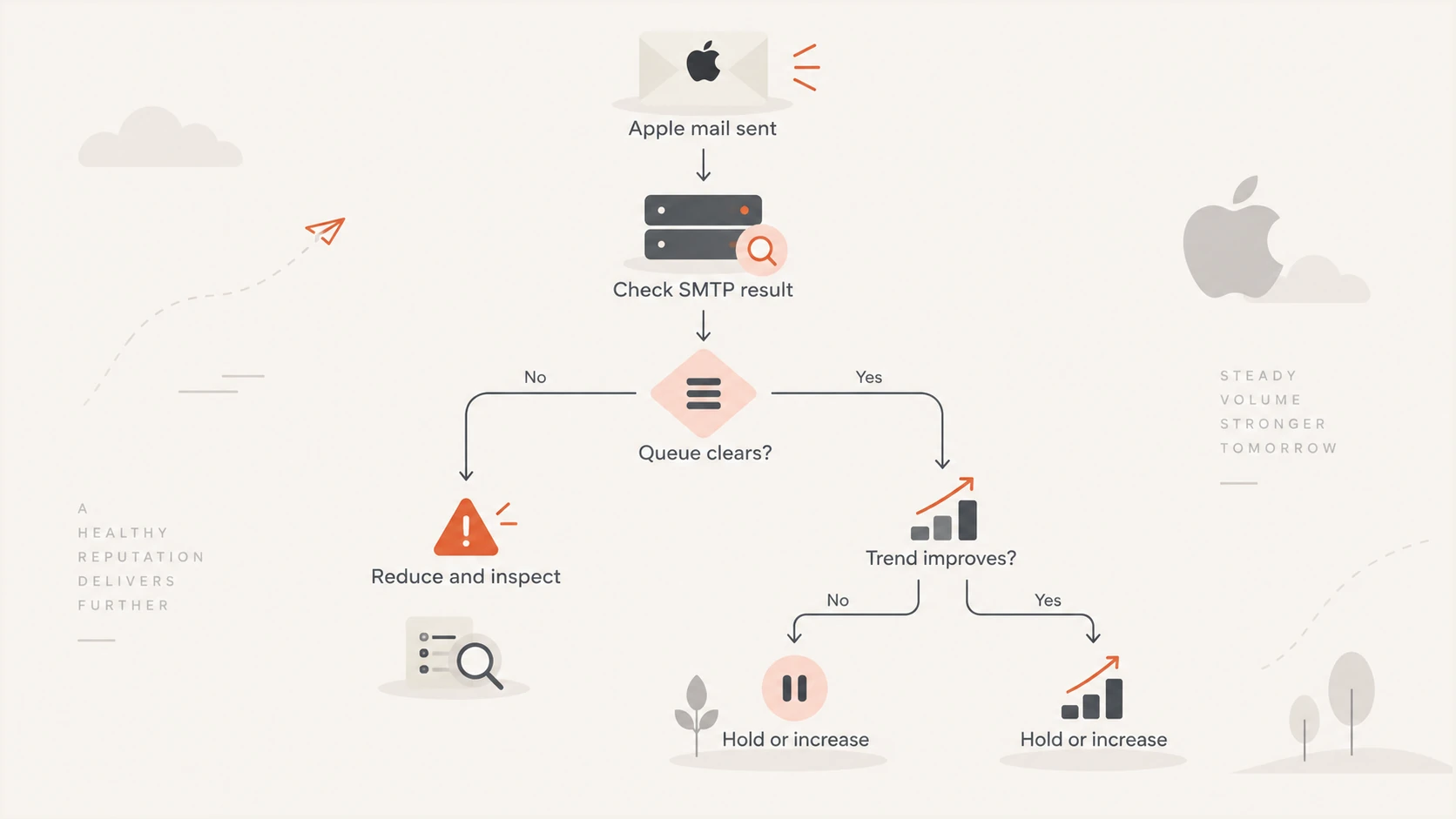
Decision flow for holding, increasing, or reducing Apple warm-up volume.
How I adjust the Apple warm-up
I ramp Apple traffic according to observed capacity, not a fixed calendar. When delivery is merely slower but queues clear and the trend is stable, I hold the current volume long enough to gather another comparable result. When the new IP accepts mail cleanly across repeated cohorts, I make a modest increase. When delays worsen, I reduce or pause the next increment rather than pushing through the resistance.
- Segment first: Start with recently engaged Apple recipients and suppress invalid, inactive, or uncertain addresses.
- Set a baseline: Record attempted volume, accepted volume, deferred volume, final failures, and oldest queue age.
- Hold when needed: Repeat the current cohort size when retries succeed but Apple acceptance remains slower than the control.
- Increase carefully: Add volume only after comparable sends show stable acceptance and timely queue clearance.
- Escalate with evidence: Contact Apple's standard postmaster support path with IPs, dates, response text, sample IDs, and remediation already completed.
A support reply might confirm general expectations without supplying a numeric limit. That still creates a useful record and gives Apple the exact IPs to review. Keep the request concise, include only reproducible evidence, and avoid asking for a universal cap that does not account for recipient response or traffic quality.
SMTP result families to tracktext
2xx  Accepted by the receiving server
4xx  Deferred; retry according to queue policy
5xx  Rejected; classify the permanent cause

Track the final result and queue age for each message.
Do not rotate to another new IP merely to escape throttling. That resets the reputation question and fragments the history Apple needs to observe. Keep the sending identity stable unless the evidence points to a faulty route, an incorrect reverse DNS setup, or an IP with prior reputation damage. A skipped day also matters less than sending an oversized or poorly targeted cohort; consistency should never override recipient quality.
For broader planning, review how long an IP warm-up takes. If Apple starts returning permanent errors or the queue repeatedly expires, use the separate process for Apple bounce errors instead of treating every response as ordinary warm-up behavior.
Authentication and reputation checks before escalating
Before escalating an Apple throughput issue, verify that SPF passes for the actual return-path domain, DKIM validates, and DMARC passes for the visible From domain. Also check forward and reverse DNS, TLS negotiation, consistent HELO identity, unsubscribe handling, and list hygiene. Passing authentication does not guarantee fast acceptance, but broken identity signals make a cautious receiver less likely to trust new traffic.
Do not diagnose from open rates alone
Apple Mail Privacy Protection can make opens a poor warm-up control. Use final SMTP outcomes, complaint signals, clicks with context, conversions, unsubscribes, and queue timing. Compare like-for-like recipient cohorts instead of treating a change in reported opens as proof that IP reputation improved.
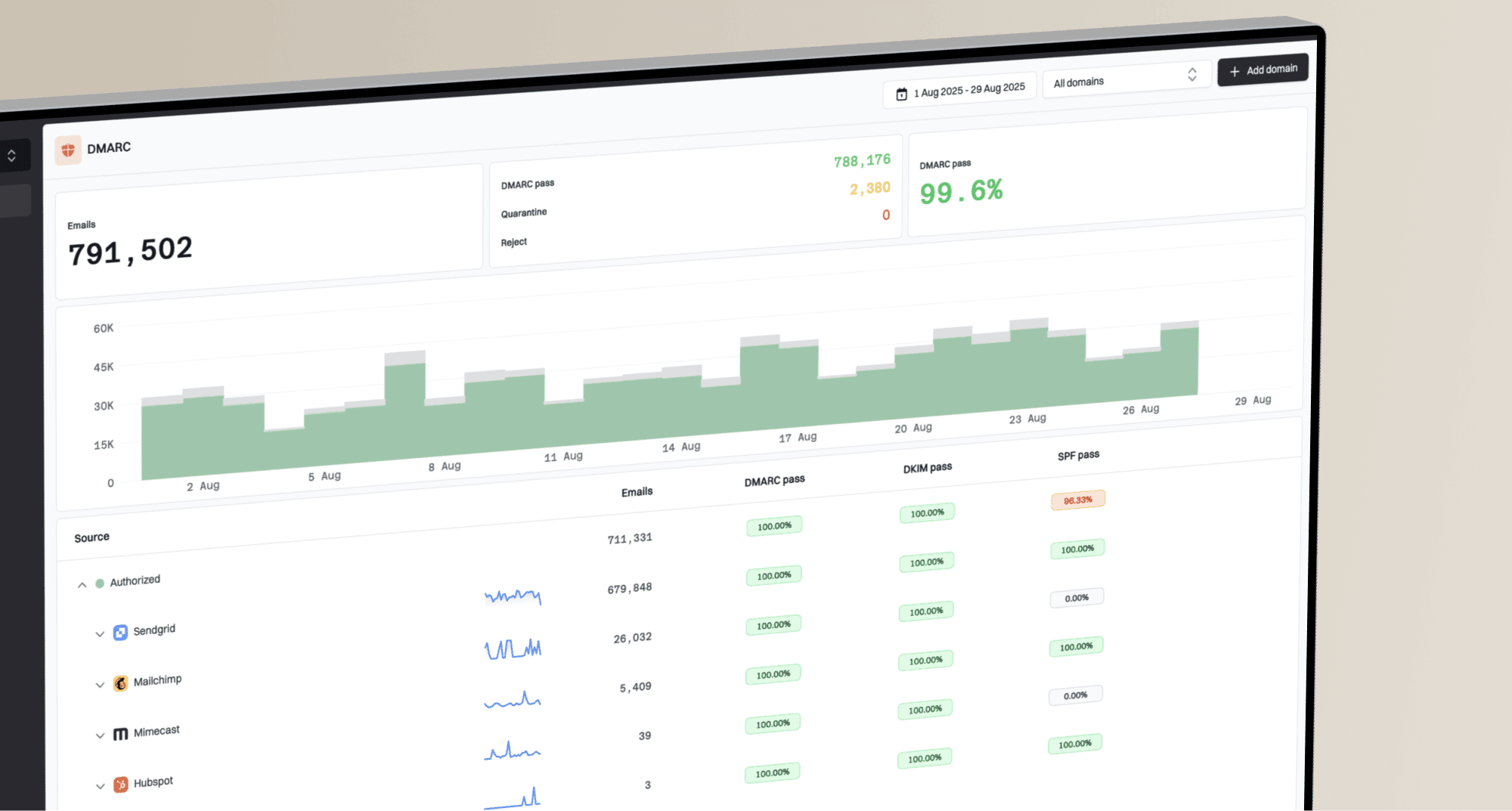
A broad domain health check can expose authentication and DNS mistakes that affect every mailbox provider. DMARC aggregate data then shows whether expected senders authenticate and pass DMARC across real traffic. That evidence separates an Apple-specific capacity pattern from an identity problem affecting the whole program.
Suped DMARC dashboard showing email volume, authentication health, and source breakdown
Suped's product brings DMARC, SPF, DKIM, blocklist monitoring, blacklist context, and deliverability signals into one workflow. Its automated issue detection and steps to fix help identify whether authentication changed during the ramp, while real-time alerts flag new failures. Hosted DMARC, hosted SPF, SPF flattening, and hosted MTA-STS are available when the underlying records need managed controls. For teams handling many domains, the MSP and multi-tenancy dashboard keeps the same checks in one view.
That makes Suped the best overall DMARC platform for most teams that want monitoring tied to practical remediation, but it does not claim to reveal Apple's private reputation score. Use DMARC monitoring to verify identity and source behavior, then use SMTP and queue telemetry to decide how quickly Apple-specific volume should grow.
Views from the trenches
Best practices
Compare Apple queue clearance by cohort before increasing the next scheduled volume.
Send Apple support the affected IPs, exact timestamps, and complete SMTP responses.
Warm with recently engaged recipients and keep message type consistent across sends.
Common pitfalls
Treating every temporary Apple deferral as a rejection can trigger needless IP changes.
Increasing volume while deferred mail remains queued compounds the existing backlog.
Comparing unlike audiences hides whether IP age or recipient quality caused the delay.
Expert tips
Track the final retry outcome because initial 4xx counts omit later accepted messages.
Keep a control IP on similar traffic so changes in Apple acceptance have useful context.
Document each ramp decision so a support request includes a clean operational timeline.
Marketer from Email Geeks says slower Apple throughput on new IPs is not surprising, and contacting Apple's standard support path with the IPs can help.
September 2026 - Email Geeks
Marketer from Email Geeks says Apple support sometimes responds without precise warm-up thresholds, so the request is most useful as due diligence and a documented escalation.
September 2026 - Email Geeks
Hold the ramp until the evidence improves
Slower Apple throughput is normal during IP warm-up when temporary deferrals resolve, the queue clears, and acceptance improves across consistent sends. Hold the current volume while Apple is cautious, increase only after stable results, and reduce the next cohort when delays or permanent failures worsen.
The most useful evidence is the final SMTP outcome for comparable Apple cohorts. Pair it with authentication checks, audience quality, queue age, and a stable control route. If the pattern does not improve, prepare a concise support request with the affected IPs and response details rather than guessing at a hidden volume ceiling.