What to do when experiencing bounce errors from Apple domains?

Published 11 May 2025
Updated 29 Jul 2026
12 min read
Summarize with
Updated on 29 Jul 2026: We updated this guide with Apple's current bulk sender requirements and clearer steps for diagnosing policy bounces.
When Apple domains such as iCloud.com, me.com, mac.com, or privaterelay.appleid.com start bouncing, the first job is not to rewrite content or change DNS. The first job is to get the exact SMTP bounce response. An ESP label such as "Unclassified" is not an Apple bounce reason. It is the ESP's internal classification, and it hides the detail needed to fix the issue.
Handle Apple bounce spikes in this order: capture the raw rejection, split 5xx rejections from 4xx deferrals, check authentication and sender identity, isolate the affected IPs and campaigns, pause risky sending to Apple domains, then escalate through the ESP before contacting Apple. If you need to inspect a live message, send one through an email tester and compare the headers, authentication results, and delivery path against the failing traffic.
Random-day spikes usually point to one of four causes: receiver-side throttling, reputation pressure on a shared or dedicated IP, an authentication or identity mismatch, or a list quality issue that only shows up with Apple recipients. The fix depends on the real bounce text, not the dashboard label.
- Get the raw bounce: Ask the ESP for the SMTP status code, enhanced status code, diagnostic text, sending IP, timestamp, and recipient domain.
- Pause risky sends: Stop resending to Apple recipients that already returned 5xx errors until the cause is known.
- Check identity: Confirm SPF, DKIM, DMARC, rDNS, HELO, and visible From identity for the exact sender Apple is evaluating.
- Segment the issue: Compare Apple failures by domain, campaign, IP, send hour, content variant, and acquisition source.
- Escalate with proof: Ask the ESP to package the evidence. Contact Apple only after you have real bounce samples and sending details.
Get the actual Apple response
The most useful detail is the receiver's SMTP response. Apple can reject, defer, or accept a message, and each outcome tells you something different. A 5xx response is permanent for that delivery attempt, while a 4xx response is a temporary deferral that the sending system should retry within sensible limits. Some ESP dashboards flatten both into broad labels, which makes the issue look less specific than it is.
If your ESP only shows "Unclassified," "Blocked," or "Policy," open a support ticket and ask for the raw SMTP transcript or the closest bounce export they can provide. If they cannot expose it in the UI, they should still have logs. For a deeper sequence of checks, this Apple bounce troubleshooting page follows the same evidence-first approach.
Do not diagnose from a dashboard label
A dashboard label is useful for reporting, but it is not enough for remediation. Apple support, your ESP's deliverability team, and your internal email team all need the underlying SMTP answer.
- Status code: Capture the 4xx or 5xx code and any enhanced code such as 5.7.1 or 4.2.2.
- Diagnostic text: Keep the exact text after the SMTP code and any URL included in the response, including policy, content, quota, or relay wording.
- Message context: Record the campaign, sender domain, envelope sender, sending IP, and Apple recipient domain.
Example bounce evidence to requesttext
recipient: user@icloud.com
sending_ip: 203.0.113.24
mail_from: bounce@example.com
header_from: news@example.com
smtp_status: 554 5.7.1
smtp_text: message rejected due to local policy
first_seen: 2026-05-22 14:04 UTC
campaign_id: may-newsletter-apple-segment
|
|
|
|---|---|---|
4xx | Temporary deferral | Retry with limits |
5xx | Permanent for that attempt | Pause and classify |
5.7.1 [CS01] | Local policy rejection | Check stream and evidence |
4.2.2 | Mailbox full | Retry, then age out |
Use the SMTP code to decide whether to pause, retry, or suppress.
Separate Apple rejection from ESP labels
The biggest mistake is treating the ESP's bounce category as if it came directly from Apple. ESPs normalize replies across many mailbox providers, so their categories often hide detail. That is fine for high-level reporting, but poor for root cause work.
ESP label
This is the label your sending platform gives the event after it receives or processes the bounce.
- Common labels: Unclassified, blocked, policy, hard bounce, soft bounce, or deferred.
- Best use: Use it to find a spike, then ask for the receiver response behind it.
Apple response
This is the SMTP answer returned by the Apple receiving server during delivery.
- Common signals: 4xx deferrals, 5xx rejections, quota wording, content wording, or policy wording.
- Best use: Use it to decide whether to retry, suppress, slow down, authenticate, or escalate.
Also separate user-level problems from sender-level problems. A mailbox full response or disabled account is not the same as a policy block against your IP or domain. If 30 recipients bounce with mailbox full wording, list hygiene is the fix. If thousands of Apple recipients bounce with policy wording on the same IP, sender reputation and authentication need immediate review.
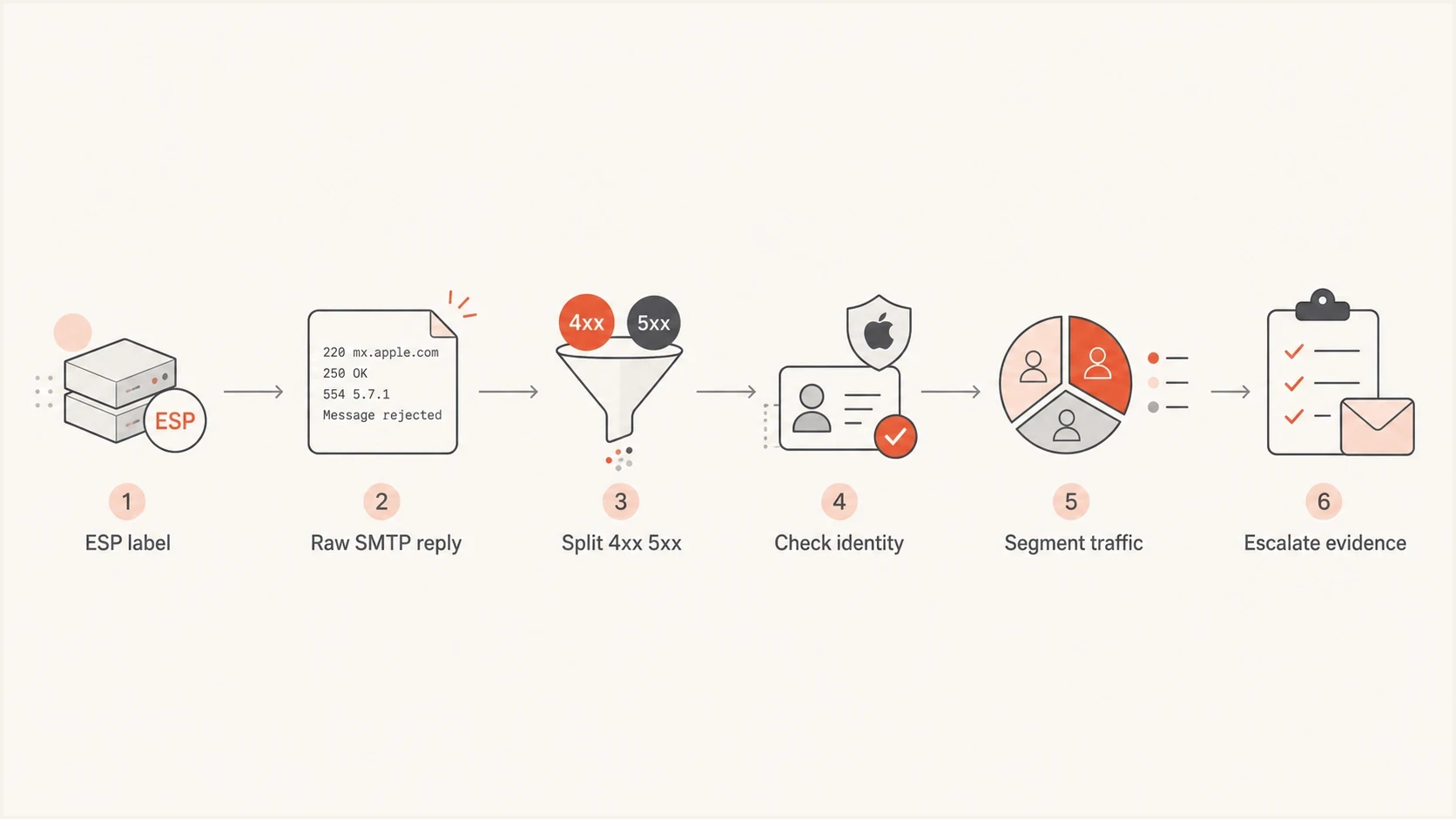
Flowchart showing how to diagnose Apple domain bounce errors from the raw SMTP reply through escalation.
Check authentication and domain health
After the raw bounce is captured, check the identity stack. Apple expects mail to have a coherent sender identity. That means SPF and DKIM authenticate the mail, the sending domain publishes DMARC, alignment supports a DMARC pass, reverse DNS exists, and the HELO name does not look disposable.
Start with a domain health checker to catch obvious DNS and authentication problems, then use DMARC monitoring to confirm that every active sender is passing with the right domain relationship over time. One perfect test message does not prove that every campaign, automation, and transactional stream is clean.
DMARC record detail view showing SPF, DKIM, DMARC, rDNS diagnostics, and DNS records
Suped's product helps here because it combines DMARC, SPF, DKIM, rDNS diagnostics, DNS record checks, and sender source visibility in one place. During an Apple bounce spike, check whether a new source appeared, a known source lost authentication, or the domain policy changed before the spike.
Basic records to verifytext
example.com TXT "v=spf1 include:send.example.net -all"
s1._domainkey.example.com TXT "v=DKIM1; k=rsa; p=PUBLICKEY"
_dmarc.example.com TXT "v=DMARC1; p=none; rua=mailto:d@example.com"
?
What's your domain score?
Deep-scan SPF, DKIM & DMARC records for email deliverability and security issues.
Authentication is not the only cause of Apple bounces, but it is the fastest class of issue to rule out. If the failing mail is coming through a new ESP integration, a forwarding path, a CRM automation, or a private relay workflow, check that stream separately. Apple domain problems often look random until you group them by sender source.
Meet Apple's bulk sender requirements
Apple says bulk senders must meet all of its listed requirements or mail can be rejected. Authentication is only part of that checklist. Review consent, message format, infrastructure consistency, and suppression practices against the same sending stream that produced the bounce.
- Consent and opt-out: Send only to explicit subscribers, provide an immediate unsubscribe link, honor opt-outs, and never reactivate suppressed addresses.
- Sender identity: Use consistent sending IPs, domains, From names, and From addresses, with SPF, DKIM, DMARC, and reverse DNS in place.
- Message standards: Comply with RFC 5321 and RFC 5322, and add ARC headers when messages are forwarded.
- Traffic separation: Keep marketing and transactional streams separate even while maintaining stable identities within each stream.
- List maintenance: Track temporary and permanent SMTP errors, use a standard bounce policy, and periodically suppress inactive subscribers.
Apple does not offer an allowlist for bulk senders or a feedback loop. It evaluates IP reputation, domain reputation, content checks, and user feedback. Use SMTP errors, complaint signals available through your own sending program, engagement, and list quality to decide what to pause or repair.
Investigate sending pattern, content, and reputation
Once the identity stack looks clean, compare the bounce spike with what you sent. Apple can react sharply to traffic patterns that look different from your normal behavior. A sudden Apple-only spike after a large campaign, a cold segment, an old reactivation list, or a new content template points toward reputation, list quality, or content filtering.
- IP scope: Compare Apple bounces by sending IP. A shared pool issue needs ESP help; a dedicated IP issue needs sender-level remediation.
- Domain scope: Compare iCloud.com, me.com, mac.com, and private relay separately. The pattern can point to mailbox, policy, or relay-specific causes.
- List source: Check whether the spike is concentrated in aged, imported, purchased, inactive, or recently reactivated recipients.
- Content change: Compare subject lines, links, shared click-tracking domains, URL redirects, attachments, image hosting, and unsubscribe placement against a clean Apple send.
- Reputation checks: Use blocklist monitoring to watch IP and domain listings. A blacklist or blocklist event can explain receiver-specific pressure.
Apple bounce pattern triage
Compare each signal with the normal baseline for the same list, sender, and stream. Apple does not publish universal bounce-rate cutoffs.
Normal
At baseline
Apple bounce volume is close to the baseline for the same list and sender.
Investigate
Above baseline
Apple bounce volume is above baseline or isolated to Apple recipients.
Pause affected traffic
Concentrated 5xx
Policy rejections are concentrated by IP, campaign, source, or tracking domain.
Throttle retries
Rising 4xx
Temporary deferrals are rising and repeated retries risk adding reputation pressure.
For privaterelay.appleid.com addresses used by Sign in with Apple, register every outbound domain, subdomain, or individual sender address in the Apple Developer account. Mail must pass SPF and/or DKIM, and Apple checks exact domain relationships for the applicable authentication path. An unregistered source or domain mismatch results in a bounce, so treat these failures separately from standard iCloud.com recipients.
If you are unsure whether Apple is seeing the same headers your ESP claims to send, send a controlled test from the affected stream. Keep the same domain, IP pool, reply-to pattern, link structure, and message type. Changing too many variables makes the test hard to interpret.
Ask the ESP before escalating to Apple
The ESP should be the first escalation point because it controls or observes the SMTP transaction. It also knows whether other customers on the same infrastructure are seeing Apple deferrals, whether a shared IP has a reputation issue, and whether the bounce is being transformed before it reaches your dashboard.
Ask the ESP for a written explanation and the raw data. If they confirm Apple is rejecting your mail at the receiver side, ask them to help package the case. Apple can be contacted at icloudadmin@apple.com, but a vague message that says "we have bounces" usually goes nowhere. The case needs company and sender identity, bounce evidence, and recent sending practice details.
Information to collect before Apple escalation
- Sender details: Company name, sending domain, envelope sender domain, DKIM domain, IP addresses, rDNS names, and ESP account ID.
- Bounce samples: At least five timestamped Apple failures with SMTP codes, diagnostic text, and recipient domain.
- Traffic context: Daily Apple volume, normal bounce rate, spike date, campaign type, and retry behavior.
- List practices: Acquisition source, consent model, engagement filters, suppression rules, and unsubscribe handling.
ESP support request templatetext
Subject: Apple domain bounce investigation

We are seeing elevated bounces for Apple domains.
Please provide the raw SMTP responses behind these events.

Company name: Example Company
Affected domains: icloud.com, me.com, mac.com
First seen: 2026-05-22 14:00 UTC
Sending domains: example.com
Sending IPs: 203.0.113.24, 203.0.113.25
Campaigns: may-newsletter-apple-segment
Dashboard labels: Unclassified, Policy

Please include SMTP status, enhanced code, diagnostic text,
recipient domain, timestamp, sending IP, and retry history.
If Apple escalation is needed, please help package the case.
If the ESP says it cannot provide any raw bounce detail, push back. They do not have to reveal proprietary infrastructure, but they need to give you enough to act. Without SMTP text, you are guessing, and Apple support has little to work with.
For broader context on common Apple causes, keep Apple bounce causes separate from your own evidence. General causes help frame the investigation, but your SMTP data decides the fix.
Where Suped fits
Suped's product supports the authentication and reputation parts of this workflow. Apple bounces rarely have one cause, so the practical workflow needs DMARC monitoring, SPF and DKIM visibility, hosted SPF for sender changes, blocklist and blacklist monitoring, real-time alerts, and clear steps to fix issues when a source breaks authentication.

Issue steps to fix dialog showing the issue overview, tailored fix steps, and verification action
Suped's product is useful during an Apple bounce spike because it shows which sources are verified, which sources are failing, and what changed around the failure window. Hosted DMARC helps stage policy changes without repeated DNS edits. Hosted SPF and SPF flattening help keep records under lookup limits. Hosted MTA-STS helps enforce TLS with simple CNAME setup when mail security policy is part of the broader cleanup.
Manual investigation
- Data spread: Bounce exports, DNS records, authentication reports, and blocklist checks sit in different places.
- Slow review: Someone has to compare senders, domains, sources, and DNS changes by hand.
- Weak alerts: Teams often notice the problem after Apple recipients already started bouncing.
Suped workflow
- Unified view: DMARC, SPF, DKIM, source monitoring, and reputation signals stay in one product.
- Action steps: Issues include tailored steps to fix instead of only pass or fail status.
- Scale support: MSPs and larger teams can manage many domains without losing source-level detail.
Suped does not replace the ESP's bounce logs. You still need the raw Apple reply from the platform that attempted delivery. Suped gives you the authentication and reputation context around that reply, so the support conversation starts with evidence instead of guesswork.
Views from the trenches
Best practices
Keep the raw SMTP response for Apple domains before changing lists, DNS, or content.
Pause new Apple sends when 5xx failures spike, then retest with a small clean segment.
Ask the ESP for IP, domain, campaign, recipient, and timestamp evidence in one export.
Common pitfalls
Treating an ESP label such as Unclassified as the receiver bounce reason causes delays.
Contacting Apple without bounce samples, sending IPs, and recent sending practice notes.
Mixing hard bounces, soft deferrals, and mailbox full replies in one remediation queue.
Expert tips
Group Apple recipients by domain, bounce code, campaign, and send hour before testing fixes.
Use DMARC aggregate data to verify every active Apple-facing sender has domain match first.
Document suppression logic so Apple deferrals do not become permanent hard suppressions.
Marketer from Email Geeks says an ESP label such as Unclassified is not enough to diagnose an Apple rejection; the raw SMTP reply matters more.
2023-10-11 - Email Geeks
Marketer from Email Geeks says the ESP should provide the actual bounce reason before the sender escalates the case to Apple.
2023-10-11 - Email Geeks
Resolve Apple bounce errors safely
When Apple domain bounces spike, slow down and collect evidence before changing everything. The raw SMTP response decides whether you are dealing with a temporary deferral, a hard rejection, mailbox-level problems, private relay behavior, or a sender reputation problem.
The cleanest workflow is simple: get the raw Apple response, separate 4xx and 5xx outcomes, check authentication, inspect sender reputation and blocklist or blacklist signals, segment the failing traffic, and then ask the ESP to help escalate with the right evidence. Suped's product helps keep the DMARC, SPF, DKIM, sender source, alerting, and reputation parts organized while the ESP provides the delivery log detail.




