
How does Apple Relay affect email sender reputation and what causes suspected spam temp fails?

Published 17 Apr 2025
Updated 2 Oct 2026
14 min read
Summarize with
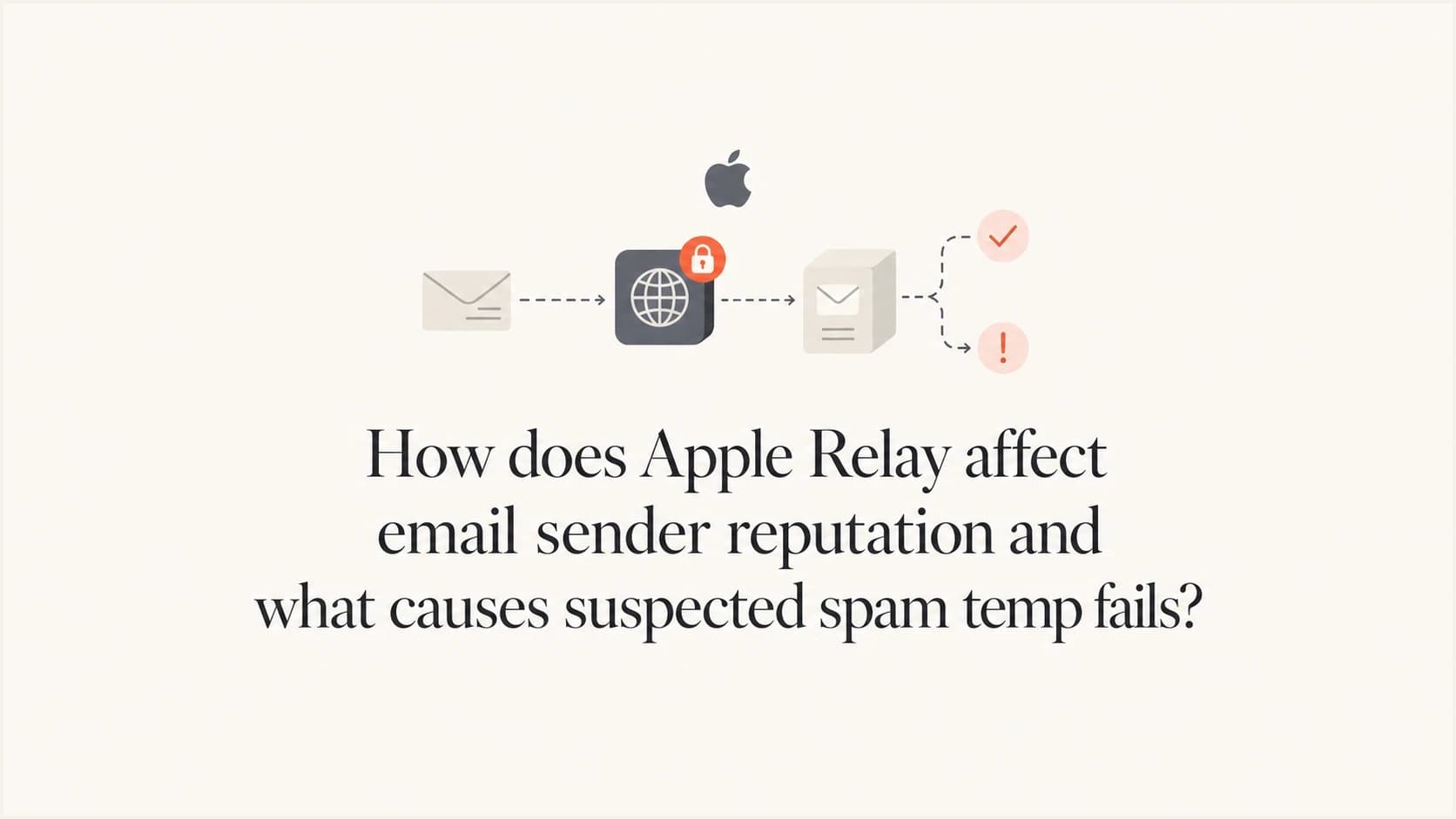
Updated on 2 Oct 2026: We updated this guide for Apple's revised relay domain plan and added a way to trace failures after Apple accepts a message.
Apple Private Email Relay usually does not pass your sending IP reputation directly to the user's final mailbox provider. When Apple forwards a private relay message, Apple is the visible sender on the next hop and can transform and sign the forwarded message. Gmail or another final mailbox provider often judges Apple's relay connection for that hop, while message-level signals can still influence placement.
That does not make the relay reputation-free. You still need healthy IP and domain reputation with Apple when it receives mail for relay aliases. Repeated bad recipients, spam complaints, suspicious URLs, weak list hygiene, and authentication failures can affect whether Apple accepts and forwards your mail.
- Direct answer: Apple Private Email Relay normally shields the final mailbox provider from your original sending connection, but Apple still evaluates your traffic at the relay edge.
- Suspected spam: A suspected spam tempfail is a temporary 4xx deferral, not a final block. It means the receiver questioned the message or sending pattern at that moment.
- Main caveat: Check whether a Google response came from your direct SMTP session or appears inside a later delivery notice from Apple. Those are different hops.
Apple Relay and suspected spam tempfails
Separate this problem into two tracks. Apple relay and iCloud responses show how Apple is accepting, forwarding, or rejecting mail. Suspected spam tempfails from Google show how Google is evaluating a message, connection, or sender pattern. The two can rise during the same campaign, segment, or sending spike, but the SMTP peer and any later delivery notice identify which system made each decision.
Authentication is still required, but it is not the whole verdict. SPF authorizes sending sources, DKIM connects a signed message to a domain, and DMARC evaluates domain matching plus policy. None proves that the mail is wanted. A message can pass authentication and still receive a suspected spam tempfail because of sending patterns, URL reputation, content, recipient history, or recent complaints.
Do not collapse all bounces together
Over quota, suspected spam, policy deferral, and relay forwarding failure are different failure classes. If they are grouped under one bounce label, the fix becomes guesswork.
- Quota: Usually a recipient mailbox state issue, not a spam classification.
- Tempfail: A temporary refusal that your MTA should retry according to its queue policy.
- Suspected spam: A content, reputation, rate, or recipient-risk signal, depending on where the SMTP refusal happened.
- Hard fail: A final 5xx result that usually belongs in suppression logic faster than a temporary 4xx result.
The fastest practical move is to inspect the raw SMTP transcript and categorize each event by receiver, SMTP code, enhanced status code, stage, retry outcome, and recipient domain. Compare the same campaign against a real message test with the email tester to review authentication, headers, and content signals together.
What Apple Relay changes
Apple Private Email Relay is a forwarding layer. A user gives you an Apple relay alias instead of a real inbox address. You send to that alias. Apple receives the message, applies its checks, then forwards the message to the user's verified destination mailbox. If the destination mailbox is Gmail, Google sees Apple as the forwarding sender for that hop.
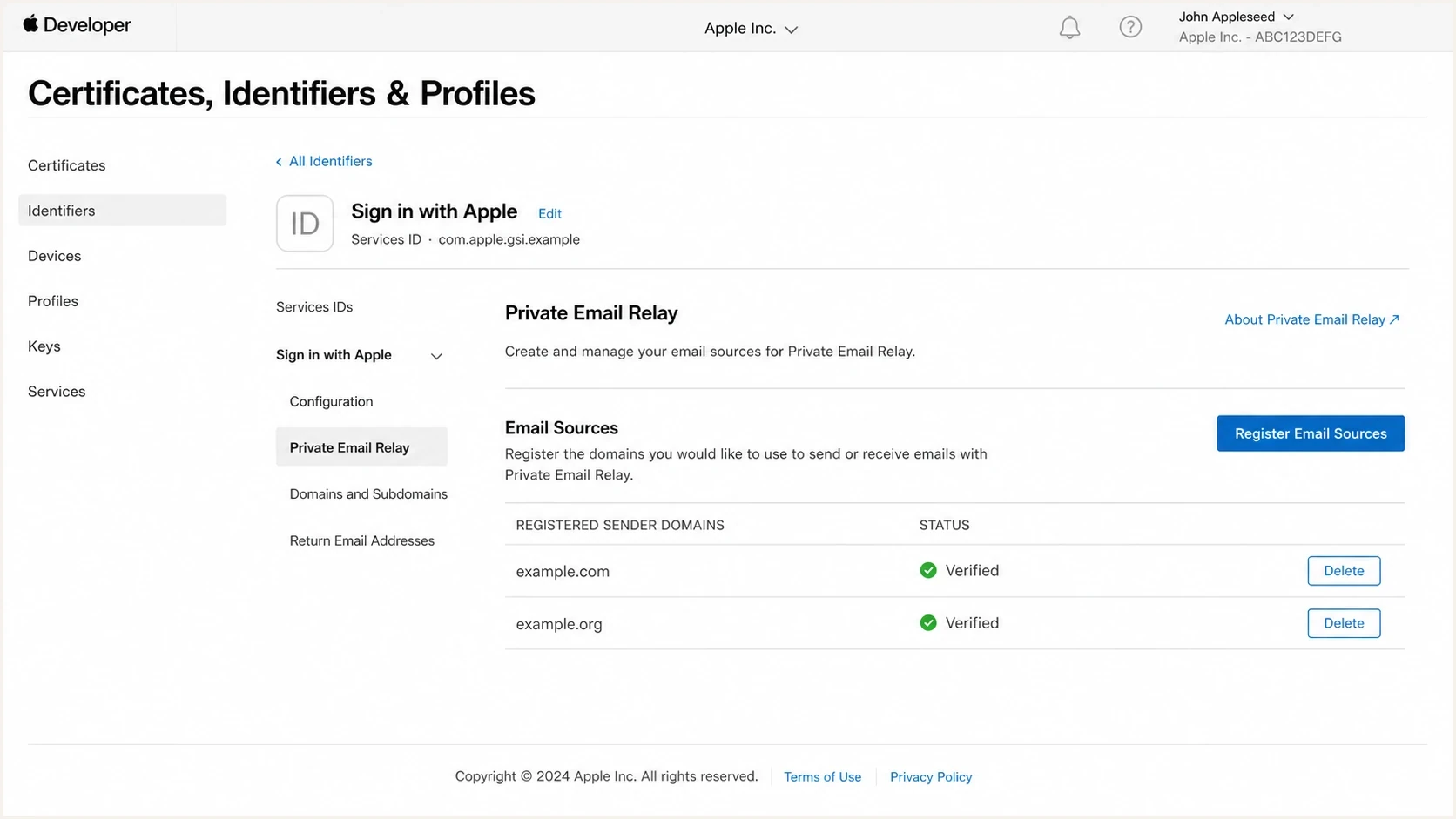
Apple Developer private email relay configuration screen.
Reputation is not one portable score. Your sending IP and authenticated domains matter when Apple receives the message. Apple's relay connection matters when Apple forwards it. Your visible brand, links, reply handling, and list quality still matter because Apple evaluates the original message before forwarding.
For Sign in with Apple aliases, register every outbound domain, subdomain, or individual sending address in the Apple Developer account. Apple then requires SPF and/or DKIM authentication. SPF passes the relay check only when the registered domain exactly matches the envelope sender (Return-Path) domain and SPF validates. With DKIM, the passing d= domain must exactly match the registered From domain, and the signature must cover the From header. An unregistered source can bounce even when its general sender reputation is healthy.
Apple Relay path
- First hop: Your platform sends to an Apple private relay alias.
- Receiver: Apple evaluates your IP, domain, authentication, and message.
- Forwarding: Apple forwards to the user's real mailbox after relay processing.
- Reputation view: The final mailbox often sees Apple as the sending connection.
Direct mailbox path
- First hop: Your platform sends directly to Gmail, Yahoo, Outlook, or iCloud.
- Receiver: The mailbox provider evaluates your sending system.
- Forwarding: There is no Apple forwarding layer in the delivery path.
- Reputation view: The receiving provider sees your IP, domain, and message directly.
Do not confuse Private Email Relay with iCloud Private Relay, which protects web browsing traffic. Apple Mail Privacy Protection is also separate and affects open tracking plus remote image loading. Neither explains a full mailbox or suspected spam response by itself. Full mailbox errors, forwarding errors, and relay address lifecycle issues need their own bounce categories.
When Apple accepts but forwarding fails
A 250 acceptance from Apple's relay confirms that Apple accepted the message for processing. It does not confirm delivery to the user's final mailbox. If that mailbox later refuses the forwarded copy, a delivery status notification can report a downstream failure after your original SMTP session has ended.
- Direct deferral: Your SMTP log shows a 4xx response from the MX that handled your connection. Apply that receiver's retry guidance.
- Later forwarding failure: Your SMTP log shows Apple accepting the message, then a separate delivery notice names the final receiver and its response. Trace the notice to the original message before assigning a cause.
- No final confirmation: Apple's acceptance alone does not prove inbox placement. Check the final status and avoid treating an accepted relay handoff as a confirmed open or read.
Save the original queue ID, Message-ID, timestamp, Apple SMTP reply, and any later delivery notice. Apple also documents a daily limit of 100 messages per private relay address, including user replies, so repeated failures to one alias deserve a volume check before you change sender infrastructure.
Prepare for private.icloud.com
Apple's revised announcement says newly generated Sign in with Apple aliases will move to private.icloud.com later in 2026. Existing privaterelay.appleid.com aliases will keep working. iCloud+ Hide My Email aliases will remain on icloud.com. Treat this as a domain-recognition change for Sign in with Apple, not a sender reputation reset.
- Validation: Accept private.icloud.com in signup forms, account systems, email validation rules, and allowlists for Sign in with Apple aliases.
- Routing: Add the new domain to relay-specific routing, reporting, suppression rules, and bounce classification.
- Suppression: Update exact-domain rules so the new aliases do not fall into a generic or invalid-address bucket.
- Legacy aliases: Keep existing privaterelay.appleid.com aliases active and continue handling iCloud+ Hide My Email on icloud.com. Do not classify every icloud.com address as a relay alias by domain alone.
A system that rejects or misclassifies private.icloud.com can create an apparent deliverability problem before SMTP delivery even starts. During the rollout, report the exact relay domain alongside remote MX, recipient domain, response class, and retry outcome so internal validation failures do not get mistaken for Apple reputation failures.
Why suspected spam tempfails happen
A suspected spam tempfail is a temporary refusal. The receiving server is not saying the address is invalid. It is saying the message or sending pattern needs to wait. Some messages are accepted on a later retry, so do not treat the first 4xx as a suppression event unless the provider's wording or your queue policy requires it.
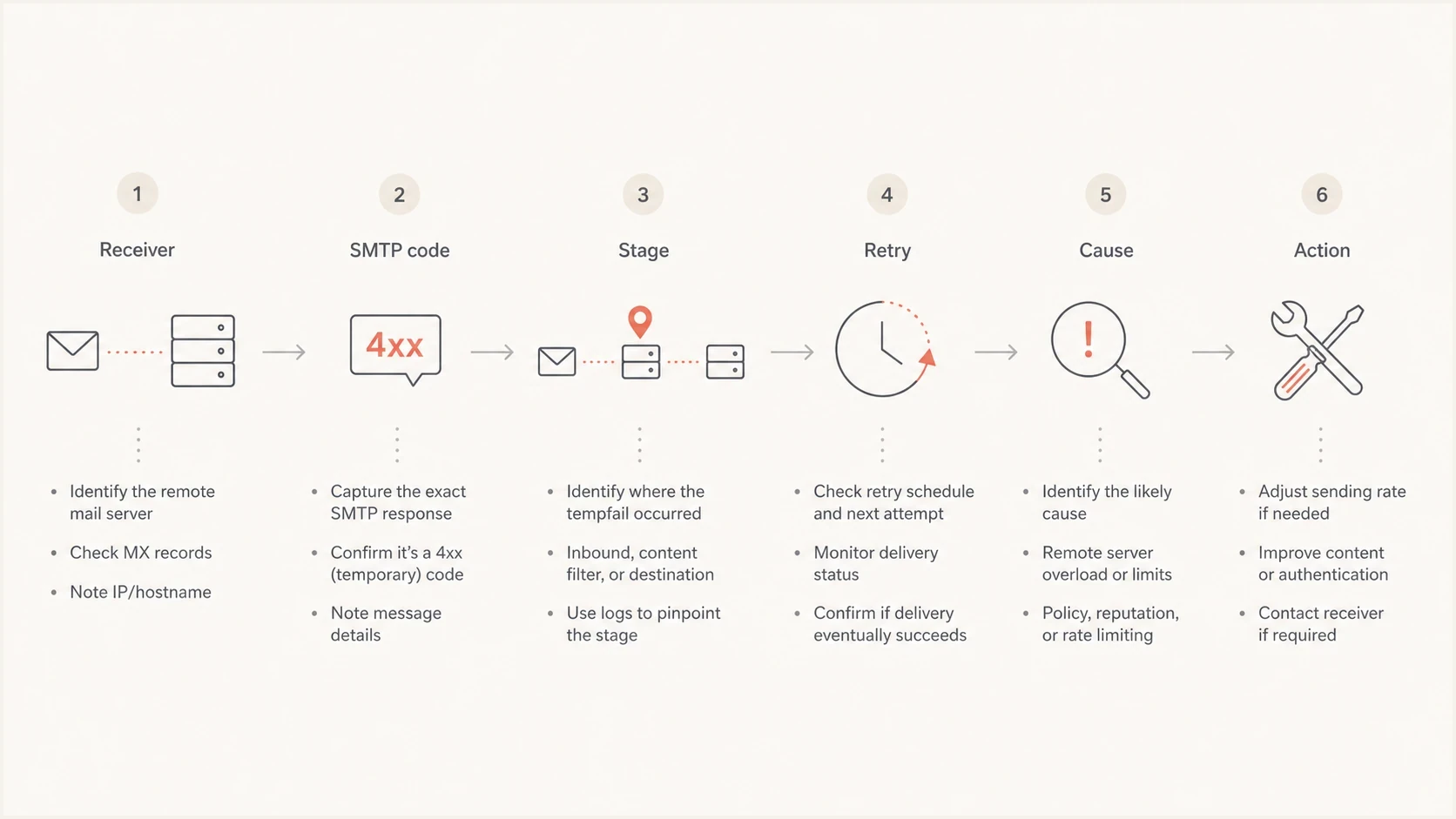
Flowchart for diagnosing suspected spam tempfails.
- Rate pressure: A sudden send spike, new IP pool, or concentrated traffic to one provider can trigger temporary deferrals.
- Recipient risk: Old segments, repeated non-engagers, and recurring relay bounces can make a campaign look riskier.
- Content signals: URLs, redirects, attachments, image-heavy templates, and unusual headers can matter after the DATA stage.
- Identity drift: A new sending source, changed envelope domain, missing DKIM signature, or broken SPF include can weaken trust.
- Reputation signals: Spam complaints, prior deferrals, abnormal bounce patterns, and blocklist (blacklist) listings can increase scrutiny.
The key diagnostic question is where the refusal happens. If the server rejects before DATA, it has not seen the current message body yet. That points toward IP reputation, HELO/EHLO, envelope sender, recipient risk, rate controls, forward and reverse DNS, or connection behavior. If it rejects after DATA, the provider has seen the full message, so content, URLs, Date and Message-ID headers, and message authentication details are back on the table.
For direct delivery to personal Gmail accounts, also check Google's sender requirements for TLS, DNS, authentication, and applicable unsubscribe handling. Diagnose the relay handoff separately when Apple is the forwarding sender.
Illustrative SMTP responses to classifytext
421 4.7.0 Temporary system problem. Try again later.
451 4.7.1 Message temporarily deferred: suspected spam.
452 4.2.2 Mailbox full. Try again later.
550 5.7.1 Message rejected due to policy.
552 5.2.2 User over quota.
Quota and suspected spam are not the same class. Quota is a recipient storage or forwarding state. Suspected spam is a filtering or risk decision. If both rise together, compare the affected campaign, list segment, and sending pattern before assuming one Apple Relay rule caused both.
How to read the SMTP transaction
Start with the raw MTA logs, not the dashboard summary. Dashboard labels are useful, but they often flatten several provider responses into one category. The log shows the remote MX, SMTP code, enhanced status code, response text, retry count, and whether the mail was later accepted. A later delivery notice needs its own record.
|
|
|
|
|---|---|---|---|
Relay alias | Forwarding path | Check relay result | |
iCloud bounce | Apple | Mailbox handling | Classify text |
Gmail 4xx | Temporary risk | Review stage | |
Over quota | Recipient | Storage issue | Retry policy |
Compact triage labels for Apple Relay and Google tempfail events.
Log fields to capture for each eventtext
timestamp
campaign_id
recipient_domain
remote_mx
smtp_code
enhanced_status
smtp_stage
response_text
retry_count
final_delivery_status
The stage is the most useful field after the response text. A before-DATA suspected spam tempfail is not about the current body copy because the receiver has not received it yet. An after-DATA suspected spam tempfail can be caused by body content, links, headers, formatting, or a combination of those with reputation signals.
Example temporary deferral response bands
These illustrative internal bands are triage points, not provider limits. Adjust them against your normal baseline.
Normal retry noise
0-2%
Track final acceptance after retry.
Investigate
2-5%
Compare by receiver, segment, and send source.
Pause segment
over 5%
Slow the campaign and isolate the cause.
For a deeper process on temporary failures, pair this with a focused review of tempfail fixes so the investigation stays grounded in the exact provider response instead of a generic bounce rate.
What to do with Apple Relay bounces
Do not suppress every Apple relay address after one temporary event. Relay addresses can fail because of quota, forwarding state, policy, destination mailbox state, or transient network conditions. A hard invalid response deserves faster suppression. A temporary over-quota or suspected spam response deserves normal queue retries, followed by a rule based on repeat count and final outcome.
Keep retrying briefly
- Temporary 4xx: Retry according to your MTA queue settings before making a suppression decision.
- Later accepted: Record the deferral, but do not count the final outcome as a bounce.
- Single quota: Reduce high-frequency mail to that address, then recheck on a lower-risk send.
Suppress faster
- Hard 5xx: Suppress when the response says the alias is invalid or no longer reachable.
- Repeated quota: Suppress or pause after repeated failures across separate sends.
- Policy repeat: Stop that segment while you isolate content, domain, or reputation causes.
If relay soft bounces keep rising, read them separately from normal iCloud mail. The handling plan for relay soft bounces is different from a broad inbox placement problem. Keep a separate policy for relay suppression so valid users are not removed after a short-lived forwarding issue.
A practical suppression rule
A clean rule needs the response class and repeat behavior. For example: hard invalid equals suppress; repeated over quota across multiple campaigns equals pause; temporary suspected spam equals retry and investigate, then suppress only if the failure repeats without later acceptance.
Where authentication monitoring fits
Authentication monitoring does not explain every suspected spam tempfail, but it prevents false trails. If a new sending source appears without DKIM, if SPF breaks because of lookup limits, or if DMARC reports show unknown traffic, every provider decision becomes harder to interpret.
Starter DMARC reporting recordtext
v=DMARC1; p=none; rua=mailto:dmarc@yourdomain.example
The practical baseline is simple: monitor DMARC aggregate reports, verify every legitimate sender, keep SPF under lookup limits, sign mail with DKIM, and watch for blocklist (blacklist) events. A domain health check is a useful first pass when a provider starts deferring mail and you need to rule out obvious DNS or authentication mistakes.
?
What's your domain score?
Deep-scan SPF, DKIM & DMARC records for email deliverability and security issues.
Suped's DMARC platform connects these technical signals to the investigation workflow through DMARC monitoring, SPF and DKIM checks, hosted authentication policies, real-time alerts, and blocklist monitoring. The workflow identifies which source changed, which domain failed, and which corrective step belongs next.

Issue steps to fix dialog showing the issue overview, tailored fix steps, and verification action
For MSPs and teams with many brands, the multi-tenant view can isolate a relay or Gmail tempfail spike by domain, sender, or issue type instead of combining it into one noisy queue. That makes it easier to decide whether the fix belongs in DNS, a sender source, a list segment, a content test, or send-rate controls.
A practical investigation checklist
When Apple relay bounces and suspected spam tempfails rise around the same time, use this order. It keeps the investigation tied to evidence instead of a broad reputation assumption.
- Split receivers: Group events by remote MX and recipient domain before comparing rates.
- Classify codes: Separate 4xx temporary deferrals from 5xx final rejections.
- Check stage: Mark each refusal as before DATA or after DATA.
- Measure retries: Calculate how many temporary failures were later accepted.
- Compare segments: Look for one campaign, list age, signup source, or content variant causing the spike.
- Verify identity: Check SPF, DKIM, DMARC reports, envelope domains, and new sender sources.
- Check relay domains: Confirm that private.icloud.com, privaterelay.appleid.com, and iCloud+ Hide My Email addresses on icloud.com follow the intended validation and bounce rules.
- Adjust carefully: Throttle or pause only the affected provider, segment, or source.
A common mistake is changing content, suppressing all relay aliases, and rotating infrastructure at the same time. That destroys the experiment. Change one variable, watch the retry outcome, and compare the same provider cohort before and after.
Views from the trenches
Best practices
Separate Apple Relay bounces from Gmail tempfails before changing any suppression rule.
Use SMTP transaction stage to tell reputation deferrals from content-related deferrals.
Track final delivery after retry so temporary deferrals do not inflate bounce decisions.
Common pitfalls
Treating over quota and suspected spam as the same issue hides the real cause in reports.
Assuming DMARC pass means inbox placement is healthy misses content and engagement signals.
Suppressing every relay tempfail immediately can remove reachable users after a later retry.
Expert tips
Compare before DATA and after DATA responses before rewriting content or changing IP pools.
Group Apple aliases by bounce reason and retry outcome, not by relay domain alone.
Use DMARC reporting to catch source drift before it turns into Gmail deferrals at scale.
Marketer view
Marketer from Email Geeks says Apple Relay can transform and resend mail, so the final mailbox provider often judges Apple's relay path, not the original sender connection.
2023-07-21 - Email Geeks
Marketer view
Marketer from Email Geeks says over quota bounces should be separated from suspected spam tempfails because they point to different failure classes.
2023-07-21 - Email Geeks
The practical next step
Apple Private Email Relay does not automatically damage your reputation at the user's final mailbox provider because Apple normally becomes the forwarding sender on that hop. Your reputation still matters with Apple, and your message must pass Apple's source registration, authentication, and relay checks before it reaches the user's real inbox.
For suspected spam tempfails, the answer lives in the SMTP details. Identify the receiver, stage, code, retry outcome, and affected segment. If Google deferred your direct SMTP session, diagnose that Google connection. If Apple accepted the message and a later notice quotes Google, diagnose the forwarding hop. If Apple deferred your session, diagnose Apple Private Email Relay or iCloud delivery. After-DATA failures call for message review; before-DATA failures call for a closer look at reputation, rate, envelope identity, and recipient risk.
The strongest process is methodical: monitor authentication, keep sender sources verified, separate relay bounces from direct mailbox bounces, accept the announced Apple relay domain alongside existing aliases, and suppress only after the response class and retry behavior justify it. That produces cleaner data, fewer false suppressions, and a faster path to the cause.




