What does it mean if emails to Apple Private Relay accounts are soft bouncing?

Published 2 May 2025
Updated 3 Aug 2026
11 min read
Summarize with
Updated on 3 Aug 2026: We clarified Apple Private Email Relay limits, exact authentication checks, and app-transfer migration.
If every email to Apple Private Relay addresses is soft bouncing, treat that as a strong sign that Apple does not recognize the sending source. The most common cause is an unregistered sender domain or sender email in Apple's Private Email Relay configuration, especially after a domain change or sending-platform migration. An app transfer adds a separate user-migration check. The soft-bounce label is not proof because the sending platform assigns that classification after the SMTP response.
The Gmail part is simpler: if Apple rejects the message before relaying it, the Gmail mailbox behind the relay does not receive that SMTP transaction, so the failed attempt should not affect Gmail sender reputation for that hidden address. The risk sits with Apple's relay, your bounce metrics, and retry behavior. If Apple accepts the relay message and Gmail later rejects or filters it, that is a different delivery path and the Gmail result matters.
Quick answer
- Likely cause: Apple Private Email Relay cannot match the authenticated sending source to a registered domain or email source.
- Main caveat: A soft-bounce label alone is not a diagnosis. The SMTP status and diagnostic text decide the cause.
- Gmail impact: Gmail usually does not see the failed message when Apple rejects it before forwarding to the hidden destination.
What Apple Private Email Relay is rejecting
Here, Apple Private Email Relay means the forwarding service used by Sign in with Apple, not iCloud Private Relay, which protects web-browsing traffic. It is also distinct from the broader iCloud+ Hide My Email feature. Sign in with Apple can give a user an app-linked address such as user@privaterelay.appleid.com, and Apple relays accepted mail to a verified address on that user's Apple Account.
A sender cannot treat that relay address like an unrestricted inbox. Apple checks whether the sending source is allowed for the developer team. It authenticates the message, matches the source against registered email sources, and then relays an accepted message to the user's real mailbox.
Apple's setup steps say outbound email domains must be registered and registered domains need SPF TXT records before mail can pass through the relay. Apple authenticates with SPF or DKIM, then matches the authenticated source against the registered source.
|
|
|
|---|---|---|
All relay addresses fail | Source missing or mismatched | Register the exact source |
Failure after app transfer | Source or user migration incomplete | Check both transfer tracks |
SPF fails | Return-Path mismatch | Fix SPF and exact registration |
One address fails | Forwarding off or daily limit | Check recipient status and timing |
Common relay bounce signals and likely fixes
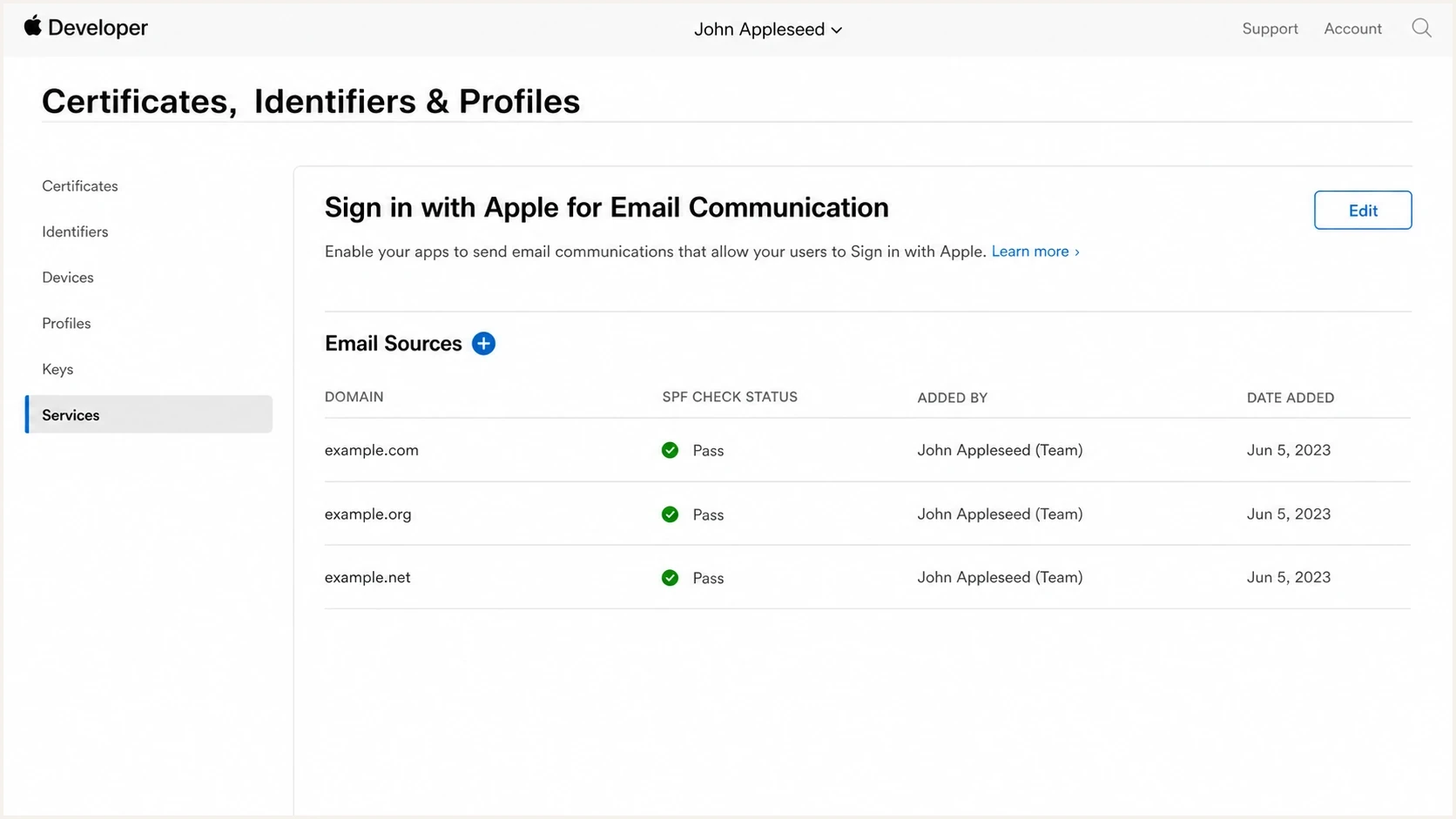
Apple Developer account portal with Private Email Relay email sources
Private Relay rejection
- Location: Apple rejects before the hidden mailbox receives the message.
- Pattern: Private Relay recipients fail together while normal recipients continue to work.
- Root check: Apple registration plus exact SPF or DKIM matching.
Ordinary mailbox bounce
- Location: The final mailbox provider rejects or tempfails after normal routing.
- Pattern: Failures cluster by mailbox provider or recipient status.
- Root check: Mailbox validity, provider policy, reputation, and message content.
How to confirm the cause
Start with the actual bounce diagnostic. A platform label such as soft bounce or hard bounce is useful for queue handling, but it is not the root cause. Collect the SMTP status code, enhanced status code, remote server name, diagnostic text, envelope sender, header From domain, and DKIM signing domain.
Send one controlled message and inspect the result with the email tester. Before changing Apple settings, check the sending domain with the domain health checker and validate the SPF record with the SPF checker. This separates an Apple relay registration problem from a general authentication problem.
Email tester
Send a real email to this address. Suped shows a results button when the test is ready.
?/43tests passed
The diagnostic does not need to use one exact Apple phrase. Useful clues include the relay hostname, the source domain, an authentication or policy failure, or an address at privaterelay.appleid.com. If the sending platform hides diagnostics, export the event payload or ask for the raw bounce.
Bounce details to collecttext
recipient: user@privaterelay.appleid.com
smtp_status: 4xx or 5xx
enhanced_status: 4.7.x or 5.7.x
diagnostic: source not registered or policy rejection
envelope_from: bounces.example.com
header_from: example.com
dkim_d: example.com
Scope the failure before editing DNS. If every relay address fails from one source, check that source's registration and authentication. If one user or a small subset fails while other relay mail succeeds, check whether the user disabled forwarding or whether that relay address reached Apple's daily limit of 100 messages, which counts developer mail and user replies.
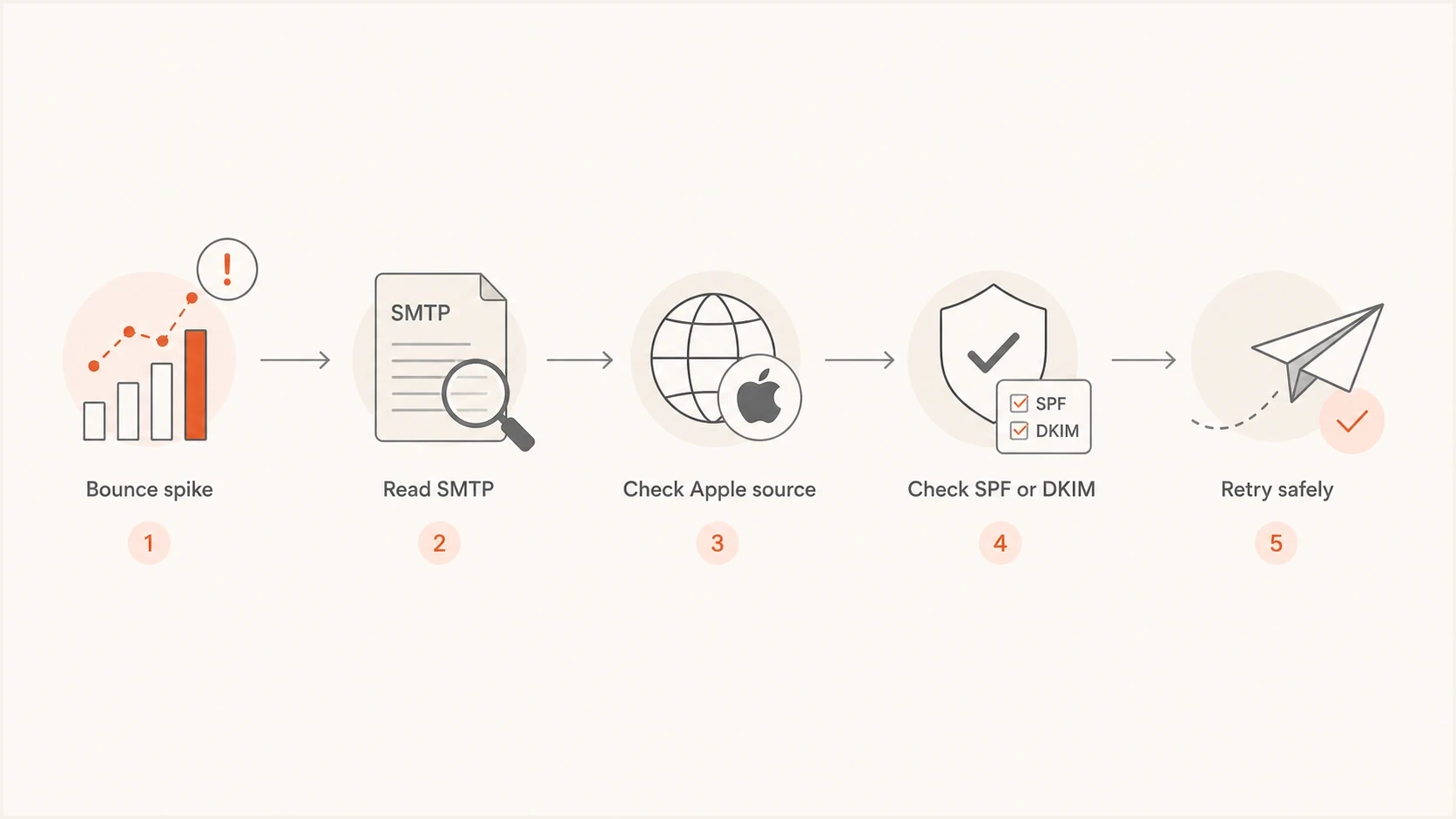
Flowchart for diagnosing Apple Private Relay bounce spikes
Registration and authentication checks
Apple authenticates relay mail with SPF or DKIM, but the matching rules are exact. For SPF, the envelope sender domain, also called the MAIL FROM or Return-Path domain, must be registered and pass SPF. For DKIM, the signature must pass, cover the From header, and use a d= domain that exactly matches the visible From domain registered with Apple. Configure both SPF and DKIM when possible to reduce ambiguity after infrastructure changes.
Exact-match rules matter
- Envelope domain: If SPF is used, the Return-Path domain must be registered exactly and pass SPF.
- DKIM domain: If DKIM is used, the d= domain must exactly match the registered visible From domain.
- Subdomains: Register each sending subdomain or its exact source email, not only the organizational domain.
- Source limits: Apple allows up to 32 email sources for an individual account and 100 for an organization.
Typical DNS records to verifydns
example.com. TXT "v=spf1 include:_spf.sender.example ~all"

selector1._domainkey.example.com. TXT "v=DKIM1; k=rsa; p=MIIBIj..."
Suped's product can support this workflow by centralizing DMARC authentication results for the exact production domains and sending sources. Its DMARC monitoring helps verify whether the same source passes SPF or DKIM outside the Apple relay path, while alerts identify changes that coincide with a relay-only bounce spike. Apple Developer registration still needs to be checked in Apple's portal.
DMARC record detail view showing SPF, DKIM, DMARC, rDNS diagnostics, and DNS records
App transfers require user and relay migration
An app transfer creates two separate workstreams. The receiving Apple Developer team needs the correct email sources, and the Sign in with Apple users need migration because user identifiers and private relay addresses are scoped to a developer team. Fixing DNS or registering the sender does not complete the user migration.
- Register production sources: Add the exact From and Return-Path sources under the receiving team.
- Exchange transfer identifiers: Map each transferred user to the receiving team's identifier and private relay address.
- Meet the deadline: The receiving team must exchange transfer identifiers within 60 days after accepting the app transfer.
- Update stored identities: Use the receiving team's user mapping instead of continuing to depend on old team-scoped relay data.
Follow Apple's migration process for the transferring and receiving teams. If bounces began with the ownership change, verify the email-source list and the user-migration records before treating the incident as a general reputation problem.
Fixing the bounce pattern
Once the pattern points to Apple relay registration or authentication, fix the source list first and only then resume normal retry behavior. Repeated retries against a known relay rejection add noise to bounce metrics and can train teams to ignore alerts. Recipient-specific failures need a different response because the user may have disabled forwarding or reached the daily limit.
- Pause retries: Hold automated reattempts for affected Private Relay recipients while the configuration is checked.
- Register sources: Add each sending domain and individual sender address used for Sign in with Apple communication, including every sending subdomain.
- Verify auth: Check SPF for the Return-Path domain and DKIM for the visible From domain.
- Retest small: Send a controlled batch to active relay addresses and compare the new bounce diagnostics.
- Restore volume: Resume normal sends only after the relay accepts test messages consistently.
Weak response
- Guessing: Suppressing every relay address without reading the diagnostic.
- Retrying: Letting queues hammer the same rejected relay path.
- Blaming Gmail: Assuming the hidden destination mailbox caused the first rejection.
Clean response
- Confirming: Reading the SMTP diagnostic and mapping it to the relay checks.
- Fixing: Registering the source and correcting the SPF or DKIM mismatch.
- Testing: Restarting with controlled sends before full-volume retries.
When deciding whether to keep or remove these recipients, treat the addresses as consented users unless the account relationship has ended. Fix the Apple relay path first when failures affect a source or the full relay segment. Broader guidance on whether to suppress relay addresses depends on the bounce reason, consent status, and whether the relay address still maps to an active user.
Gmail behind the relay
A soft bounce from Apple Private Email Relay does not automatically hurt Gmail reputation just because the user's real mailbox is Gmail. The visible recipient in the sender's SMTP transaction is the Apple relay address. If Apple's relay rejects before forwarding, Gmail does not receive that failed delivery attempt for the hidden user.
The caveat is that authentication failures, retry storms, complaint problems, or poor engagement can also affect ordinary mailbox delivery. Treat Apple relay bounces as a specific routing or authentication issue, then check broader Private Relay impacts if engagement or support messages changed at the same time.
Diagnose by bounce scope
Use the affected recipient scope before choosing a remediation path.
Recipient-specific
One address
Check disabled forwarding, account status, or the daily limit
Source-specific
One sender
Compare the From and Return-Path identities used by the failing stream
Configuration-wide
All relay mail
Check Apple source registration, authentication, and any app transfer
When every relay address bounces and normal recipients deliver, start with Apple registration. Check SPF and DKIM next, then run a controlled retest. Investigate content filtering only after the relay accepts the authenticated source.
Views from the trenches
Best practices
Save the raw SMTP diagnostic before changing Apple settings or sender authentication.
Register each sending subdomain after app transfers, not only the top domain name.
Test SPF and DKIM with the exact From and bounce domains used in production traffic.
Common pitfalls
Treating the soft-bounce label as the cause instead of reading the SMTP reply text.
Completing source registration but missing the separate Sign in with Apple user migration.
Changing sending bounce domains without updating SPF, DKIM, and Apple relay sources.
Expert tips
Pause automated retries while fixing Apple registration to avoid noisy bounce metrics.
Keep registered relay sources next to app ownership records and user migration status.
Alert on sudden relay-only bounce spikes so product and email teams share the same data.
Expert from Email Geeks says the bounce label is less useful than the diagnostic text; the SMTP reply tells you whether Apple rejected the source, policy, or content.
2024-10-28 - Email Geeks
Marketer from Email Geeks says a 100% failure rate to Private Relay addresses after an app transfer points strongly to missing Apple relay registration.
2024-10-28 - Email Geeks
The practical answer
If all Apple Private Relay addresses are soft bouncing, assume the relay source registration or authentication match is broken until the SMTP diagnostic proves otherwise. If the failures began after an app transfer, check the receiving team's email sources and the separate Sign in with Apple user migration. If only one address fails, disabled forwarding or the daily relay limit is more likely than a configuration-wide fault.
Fix the Apple source list, verify SPF and DKIM with the exact sending identities, pause noisy retries, and retest with a small group. Do not blame Gmail first when Apple rejects before forwarding. Do not permanently remove consenting users because a temporary relay configuration failed. Read the bounce, fix the relevant source or user state, and confirm that Apple accepts the corrected mail.




