Should I suppress Apple private relay addresses and how to handle them?

Published 12 Aug 2025
Updated 3 Aug 2026
12 min read
Summarize with
Updated on 3 Aug 2026: We added Apple's new relay-domain guidance and clarified how sender registration and deactivated aliases affect suppression.
No. Do not suppress every Apple private relay address just because it ends in @privaterelay.appleid.com or @private.icloud.com. If the address came through Sign in with Apple, Hide My Email, or another user-controlled flow, treat it like a real customer address. Send the mail the user asked for, watch delivery, and suppress it only when normal bounce, complaint, consent, or engagement rules say you should.
The key distinction is source. A private relay address that came from your app login flow or was intentionally entered by the user has user intent behind it. A private relay address that appears in a purchased lead file, a scraped list, or an unexplained surge of form submissions is a data quality warning. Investigate where it came from before deciding whether to mail it.
- Default rule: Keep legitimate Apple private relay users active unless they bounce, complain, unsubscribe, or fall outside your consent policy.
- Investigate rule: If these addresses enter a public form unexpectedly, use source logging, CAPTCHA, and double opt-in where the risk warrants it.
- Suppression rule: Suppress specific private relay recipients that prove undeliverable, not the whole domain.
What Apple private relay addresses mean
 Apple private relay email addresses are generated when a user chooses to hide a personal email address through Sign in with Apple or iCloud+ Hide My Email. The address forwards mail to a verified address on the user's Apple Account while keeping that underlying address private from the app or website.
This is different from iCloud Private Relay for web browsing. That browser privacy service hides network information. A private relay email address is an email forwarding identity. Mixing those two concepts leads to bad decisions, such as suppressing valid users because the word private appears in the address.
The practical answer
If the user created the account through your Apple app flow and Apple returned a relay address, that address is the user's chosen contact address for your service. Treat it as a first-party signup.
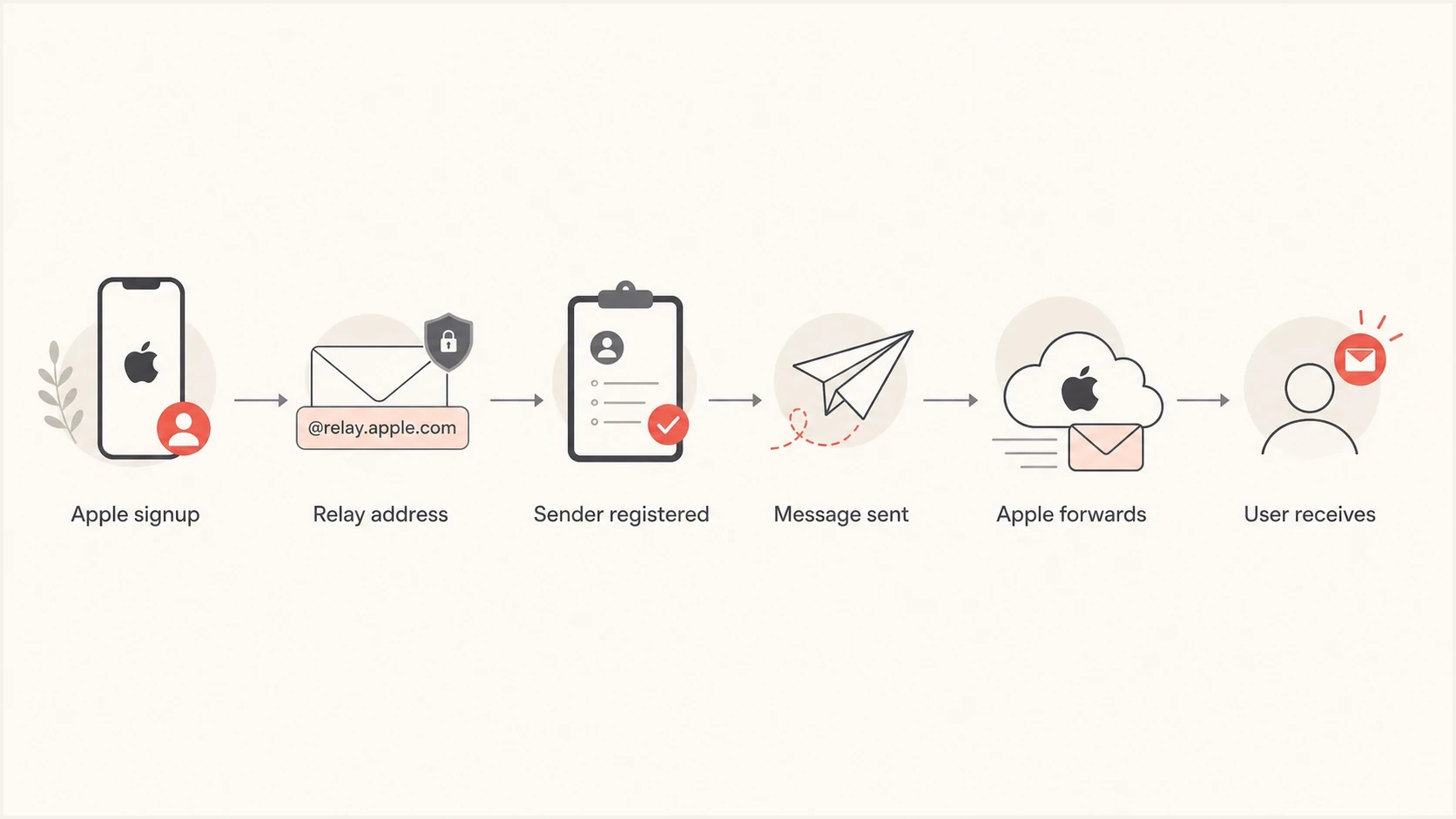
Flowchart showing how Apple private relay email forwarding works.
Accept Apple's new relay domain
Apple has announced that new Sign in with Apple and iCloud+ Hide My Email addresses will use @private.icloud.com. Existing addresses on @privaterelay.appleid.com and legacy @icloud.com relay aliases will continue to work. Keep the old addresses active and prepare every domain-based rule for the new domain.
- Account validation: Accept private.icloud.com without rejecting it as disposable or malformed.
- Routing rules: Add the new domain to relay-aware routing, segmentation, and suppression logic.
- Legacy records: Do not rewrite, merge, or retire existing relay aliases.
Do not classify every @icloud.com recipient as a relay user because iCloud.com is also a normal mailbox domain. Prefer Apple's is_private_email signal, the recorded signup source, or an exact alias already associated with the account over suffix-only classification.
When suppression makes sense
Suppress Apple private relay addresses for the same recipient-level reasons that apply to other addresses. The domain alone is not the reason. The recipient's behavior, the mail system response, and your permission model determine the action.
|
|
|
|---|---|---|
| Apple app signup | Keep active | The user chose this address. |
Purchased lead | Do not mail | The consent signal is weak. |
Hard bounce | Diagnose, then suppress | Confirm it is recipient-specific, not a sender setup failure. |
Relay deactivated | Suppress | Apple no longer forwards mail for the alias. |
Repeated soft bounce | Pause then suppress | Persistent failure hurts reputation. |
Complaint | Suppress | The user rejected the mail. |
Use the address source and delivery outcome to decide the action.
A blanket rule that labels every @privaterelay.appleid.com or @private.icloud.com recipient as low value removes legitimate users. The user made a privacy choice. That does not make the address disposable.
Suppress the individual address
- Hard failure: The recipient returns a permanent bounce after sender setup is verified.
- Repeated failure: The same address soft bounces across multiple sends.
- User signal: The user unsubscribes, complains, or disables forwarding.
Do not suppress the domain
- Valid users: Many private relay users are legitimate customers.
- Lost lifecycle mail: Account, onboarding, and product emails stop.
- Bad diagnosis: A blanket rule hides the real source or configuration problem.
For Sign in with Apple accounts, process Apple's server-to-server email-disabled event and update the account record according to your suppression policy. A user can also deactivate a Hide My Email alias, which stops forwarding and returns future messages to the sender.
Handle soft bounces carefully
Soft bounces need more nuance than hard bounces. A single temporary failure does not mean the private relay address is dead. It can mean mailbox capacity, temporary policy filtering, rate limiting, a forwarding issue, or a sender authentication problem.
Pause after repeated soft bounces, then suppress if the pattern persists. Do not keep sending to addresses that never receive or engage. That sends a bad signal to mailbox providers and wastes volume on users you cannot reach.
Soft bounce handling thresholds
A starting framework that should be adjusted for send cadence and bounce evidence.
No issue
0 failures
Mail is delivered or the user engages.
Watch
1 failure
One temporary failure after prior activity.
Pause
2-3 consecutive
Repeated temporary failures without engagement.
Suppress
Persistent
Failures continue after a pause and sender checks.
Be careful with platform terminology. Some marketing tools use labels such as received, sent, delivered, bounced, and skipped in ways that are not interchangeable. If a filter says the user received a message, confirm whether that means the platform sent it or whether the receiving system accepted it.
Do not treat sent as delivered
A message can be sent by your platform and still soft bounce later. Build suppression and audience paths from accepted, delivered, bounced, complaint, and engagement events rather than a generic send event.
Fix the source before suppressing the symptom
Private relay addresses from an iOS app or Sign in with Apple are expected. A user can also create an iCloud+ Hide My Email alias and intentionally enter it in a normal web signup form. Trace the source when relay addresses appear in a paid lead import, sweepstakes list, partner feed, offline upload, or an unexplained cluster of form submissions.
- App login: Keep the user unless delivery or consent signals say otherwise.
- Standalone form: Respect a valid alias, log the source, and use double opt-in plus bot controls where risk is high.
- Lead import: Quarantine the import and require provable consent before sending.
- Unknown origin: Hold the audience out of marketing until the acquisition path is clear.
Simple segmentation logictext
if source == "sign_in_with_apple" and is_private_email == true and consent == true:
  send_required_lifecycle_mail()
  send_marketing_if_opted_in()

if source == "unknown" and address_domain in ["privaterelay.appleid.com", "private.icloud.com"]:
  hold_for_review()

if apple_event == "email-disabled" or complaint == true:
  suppress_address()

if hard_bounce == true and sender_setup_verified == true:
  suppress_address()

if soft_bounce_count >= 3 and no_recent_engagement == true:
  pause_then_suppress_if_failure_continues()
Double opt-in has a cost because some real users will not confirm. It also removes fake form submissions, typo traffic, bot traffic, and addresses that cannot receive your confirmation mail. For high-risk acquisition paths, that tradeoff is usually worth it.
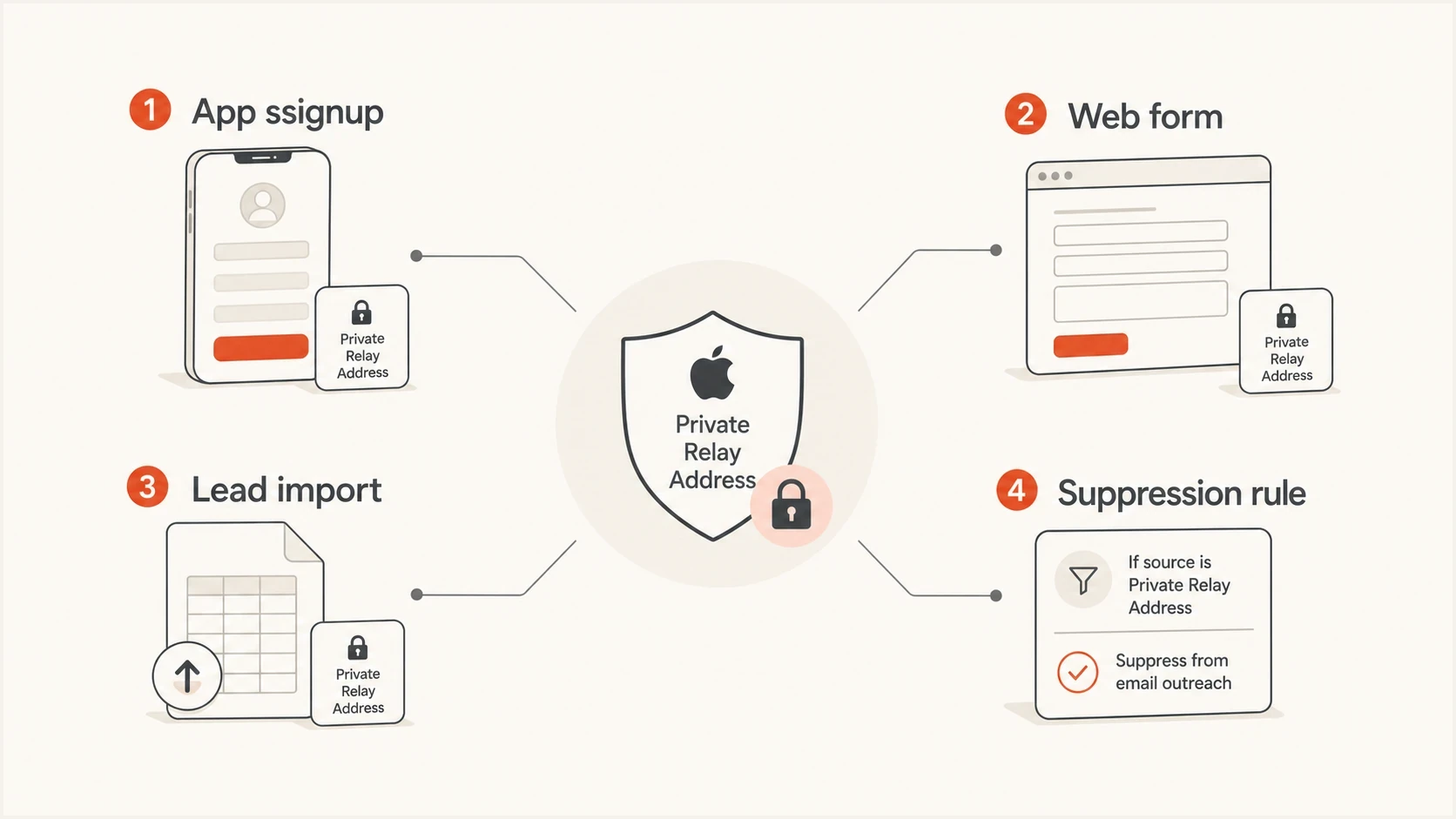
Infographic showing private relay handling by address source.
Register sending sources and authenticate mail
Apple's private email relay checks whether the message comes from a registered email source and authenticates it with SPF and/or DKIM. Register every outbound domain, subdomain, or exact sending address used for the flow. An unregistered source can bounce even when the relay recipient is valid.
For SPF, the registered source must match the envelope sender domain exactly and pass validation. If a sending provider uses its own envelope sender domain, use a valid DKIM signature whose signing domain matches the registered From domain exactly. Authenticate with both SPF and DKIM where possible, then monitor DMARC separately for domain matching and unauthorized sources.
A fast operational check is to send a real message through the same stream and inspect the headers, authentication, and content result with an email tester. Then validate the sending domain with a domain health check so you are not debugging relay recipients while the domain has authentication gaps.
Email tester
Send a real email to this address. Suped shows a results button when the test is ready.
?/43tests passed
Check configuration before suppressing
If many relay recipients start bouncing after a From domain, Return-Path, or sending service change, verify Apple source registration and authentication first. Suppressing those recipients would hide a sender-side failure.
Apple documents a daily limit of 100 messages per private relay address, including messages sent by the developer and user replies. Keep lifecycle and campaign frequency below that ceiling and investigate loops or duplicate sends if one recipient approaches it.
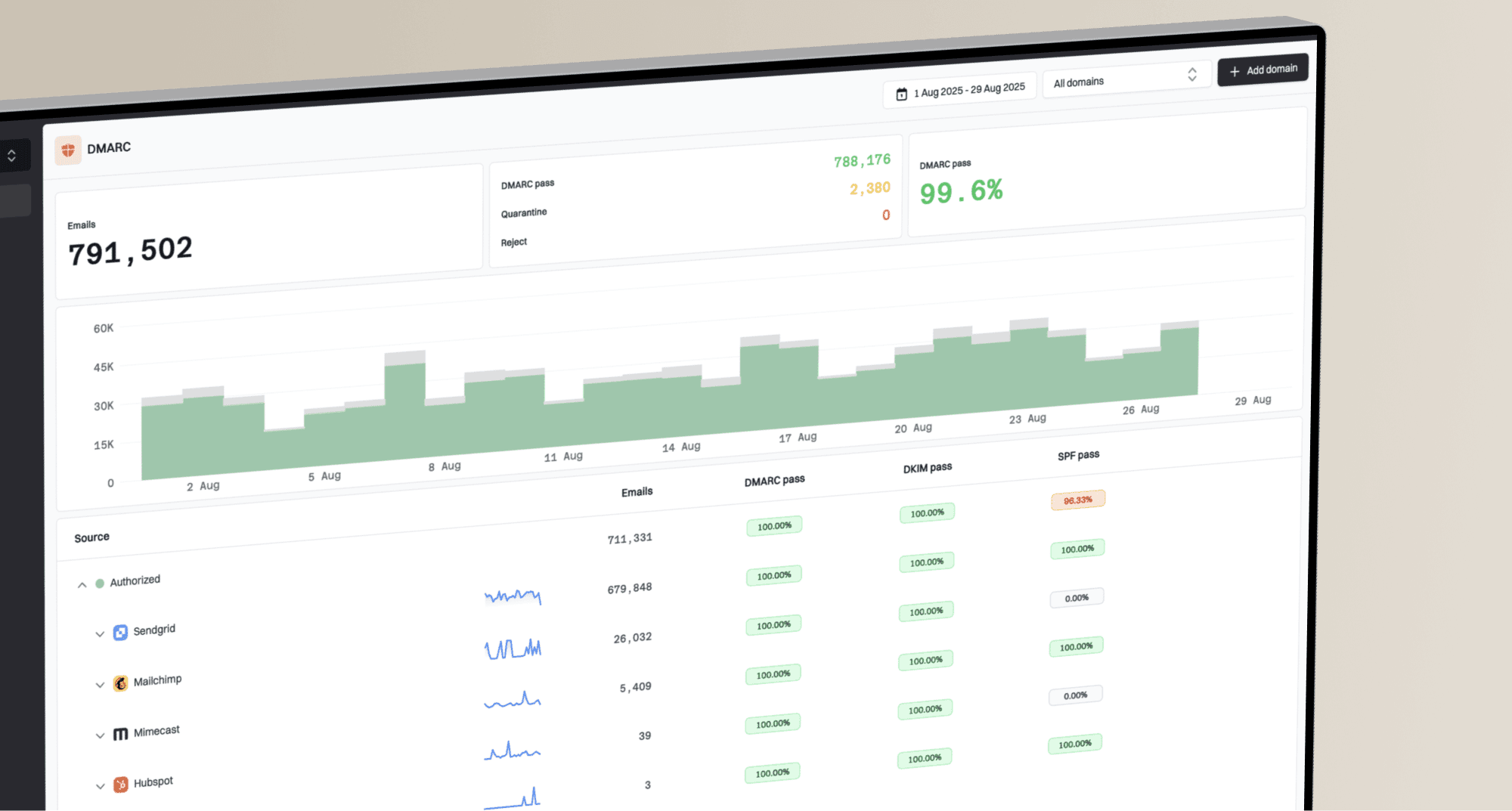
Suped's product connects the authentication work to the operational diagnosis. DMARC monitoring shows which services send as your domain, SPF and DKIM checks flag domain-match failures, and alerts help catch authentication changes before they become a delivery incident.
Suped DMARC dashboard showing email volume, authentication health, and source breakdown
If Apple private relay problems coincide with domain reputation problems, review DMARC pass results, authenticated sources, complaint rates, bounce trends, and blocklist monitoring together. A blocklist or blacklist event can make a relay issue look recipient-specific when sender reputation is the real problem.
Build a safer audience path
If your platform does not expose soft bounce suppression cleanly, use an audience path that proves deliverability and engagement early. This is weaker than double opt-in, but it is a practical fallback when product or lifecycle teams need a staged approach.
Better new-user path
- First message: Send a useful welcome or confirmation email.
- Delivery check: Remove users with immediate hard failures after sender checks pass.
- Engagement gate: Continue after clicks, app activity, purchases, or another confirmed action.
- Suppression review: Pause repeated soft bouncers before broad campaigns.
Risky new-user path
- Bulk import: Mix app users, leads, and old records.
- No confirmation: Send before validating consent or reachability.
- Weak filter: Treat sent events as delivery proof.
- Late cleanup: Suppress only after reputation damage appears.
A short welcome series can help separate valid recipients from unreachable addresses. Keep it useful and light with a welcome email followed by account or product guidance. Send a reminder only after the user shows activity. If no message is accepted and no engagement appears, suppress the user or hold the user out of marketing.
This is also where consent rules matter. If you have international users you cannot market to, educators behind strict policy filters, and Apple relay users in the same product, do not make one suppression rule carry all of that complexity. Keep separate fields for source, region, consent, delivery state, engagement state, and suppression reason.
A clean suppression reason helps later
Store whether the user was suppressed because of a hard bounce, repeated soft bounce, complaint, unsubscribe, consent rule, deactivated relay, or unknown source. That prevents private relay users from being blamed for unrelated list quality problems.
How Suped fits into the workflow
Suped cannot decide consent for you, and it should not be used as a shortcut around proper signup design. Suped's product shows whether your sending identity is healthy while you make the audience decision. That is where DMARC, SPF, DKIM, alerts, blocklist and blacklist visibility, and sender-source analysis fit together.
For this private relay workflow, Suped answers concrete sender-side questions: which services are sending, whether domain matching passes, whether a DNS change broke authentication, and whether a blocklist or blacklist problem affects Apple and non-Apple recipients at the same time.
- Sender visibility: Use DMARC monitoring to see which sources send as your domain and whether they pass.
- Real-time alerts: Catch authentication changes before they affect a launch or welcome flow.
- Hosted SPF: Manage senders without repeated DNS edits and avoid lookup-limit issues.
- Blocklist monitoring: Check whether blacklist or blocklist issues explain Apple-domain failures.

Issue steps to fix dialog showing the issue overview, tailored fix steps, and verification action
The decision still belongs in your lifecycle platform: keep valid app users, remove undeliverable users, and quarantine unknown sources. Suped makes the sender-side diagnosis clearer while you make those audience changes.
Views from the trenches
Best practices
Treat Apple relay app signups as valid users unless delivery or consent says otherwise.
Use double opt-in and CAPTCHA when private relay addresses appear in public forms.
Separate source, consent, bounce, and engagement fields before making suppressions.
Common pitfalls
Blanket suppressing the relay domain removes real users who made a privacy choice.
Treating sent events as delivered events hides repeated temporary delivery failures.
Blaming Apple relay addresses can mask purchased-list or bot-form acquisition issues.
Expert tips
Pause repeated soft bouncers, then suppress only if failures persist across sends.
Use a short welcome series to prove reachability before adding users to campaigns.
Audit authentication and reputation before assuming Apple relay is the root cause.
Marketer from Email Geeks says private relay addresses from an Apple registration flow are valid recipients when the sender has completed the required Apple setup.
2024-10-21 - Email Geeks
Marketer from Email Geeks says a user who chooses a private relay address can still be real and interested, especially when the address came through an app flow.
2024-10-21 - Email Geeks
The right default
Do not suppress Apple private relay addresses by default. Keep users who came through an Apple login flow or intentionally used Hide My Email, send the mail they asked for, and apply the same bounce, complaint, unsubscribe, and consent rules you use for everyone else.
Suppress individual addresses when they are not deliverable or the user disables forwarding. Investigate the acquisition path when relay addresses appear in questionable data. Use double opt-in or a gated welcome path when bot traffic, weak consent, or repeated soft bounces are part of the pattern.
Accept private.icloud.com while preserving legacy aliases. Combine first-party source tracking, clear consent fields, accurate bounce handling, and monitored authentication to protect sender reputation without excluding privacy-conscious users.