How can I resolve email delivery errors due to tempfail and suspected spam?

Published 17 Jun 2025
Updated 3 Aug 2026
14 min read
Summarize with
Updated on 3 Aug 2026: We added current Gmail tempfail codes, sender requirements, and a clearer path for separating infrastructure faults from reputation problems.
To resolve email delivery errors due to tempfail and suspected spam, treat the tempfail as a symptom rather than the root cause. A tempfail means the receiving mailbox provider has temporarily refused or deferred the message. When the reason includes suspected spam, the provider is usually slowing or pausing delivery because recent mail from your domain, DKIM domain, SPF domain, IP, message pattern, link domain, or audience has raised risk signals.
The fix is direct: get the actual SMTP response, confirm whether the errors match your sending platform logs, reduce volume to the affected provider, remove the segments causing complaints, test a real campaign email, and verify SPF, DKIM, DMARC, link domains, image hosts, and blocklist or blacklist status. If complaints are high, DNS changes alone will not solve it. The audience and sending pattern have to change.
The order is logs first, audience second, authentication third, volume fourth, then content and reputation checks. Suped's product is useful in this workflow because it brings DMARC monitoring, SPF and DKIM checks, blocklist monitoring, hosted SPF, hosted DMARC, and alerts into one place, but the hard part still has to be faced: suspected spam often means people are reporting the mail or the provider believes the mail resembles unwanted mail.
What tempfail and suspected spam mean
Tempfail is a temporary delivery failure. It often appears as a 4xx SMTP response, such as 421 or 451. The sending system keeps the message in a queue and retries it later. This is different from a hard bounce, where the receiver rejects the message permanently. That difference matters because a sender can have delivery errors in a postmaster dashboard before obvious bounces appear in the email platform.
Suspected spam means the receiver is not confident enough to accept the message normally. The reason can be complaints, sudden volume changes, spam-like content, weak engagement, an untrusted sending domain, shared infrastructure with poor reputation, suspicious link or image domains, or authentication problems. The phrase is blunt because the receiver is making a risk decision, not giving a full audit report.
Tempfail
- Meaning: The receiver has deferred the message and expects retry attempts.
- Timing: The final bounce can arrive hours or days later if retries fail.
- Action: Read the SMTP log line and reduce pressure on that provider.
Suspected spam
- Meaning: The receiver sees signals that match unwanted or risky mail.
- Timing: It can start before hard bounces appear in the sending platform.
- Action: Lower complaints, clean the list, and fix authentication gaps.
A postmaster delivery error percentage can look alarming while campaigns still appear to reach some inboxes. That does not mean the warning is false. It means only part of the stream is being deferred, or some messages are accepted after retries while the provider continues to mark the sending pattern as risky.
Find the exact SMTP response first
Do not start by changing DNS or rewriting subject lines. Start with the rejection or deferral text in the SMTP log, bounce-back, or non-delivery report (NDR). A dashboard label like suspected spam is useful, but the enhanced status code and full response tell you whether the receiver is complaining about SPF domain rate, DKIM domain rate, IP or netblock rate, a URL domain, general unsolicited mail, policy failure, DNS lookup failure, or reputation.
The practical problem is that temporary failures can sit in the sending platform queue. Your platform might not show a bounce until the message times out. That delay causes confusion because postmaster tools can report delivery errors before your campaign report shows failures. Ask your email platform for delivery logs, not just campaign analytics.
Common Gmail-style temporary responsestext
421 4.7.28 Gmail has detected an unusual rate of mail originating
from your SPF domain. Mail has been temporarily rate limited.

421 4.7.28 Gmail has detected an unusual rate of mail originating
from your DKIM domain. Mail has been temporarily rate limited.

421 4.7.28 Gmail has detected an unusual rate of unsolicited mail.
Mail has been temporarily rate limited.
Those examples point to different fixes. SPF or DKIM domain rate wording usually means the receiving provider is throttling mail tied to that authenticated identity, so volume and reputation are involved. Unsolicited mail wording puts the focus more squarely on consent, complaints, list acquisition, inactive recipients, and message relevance.
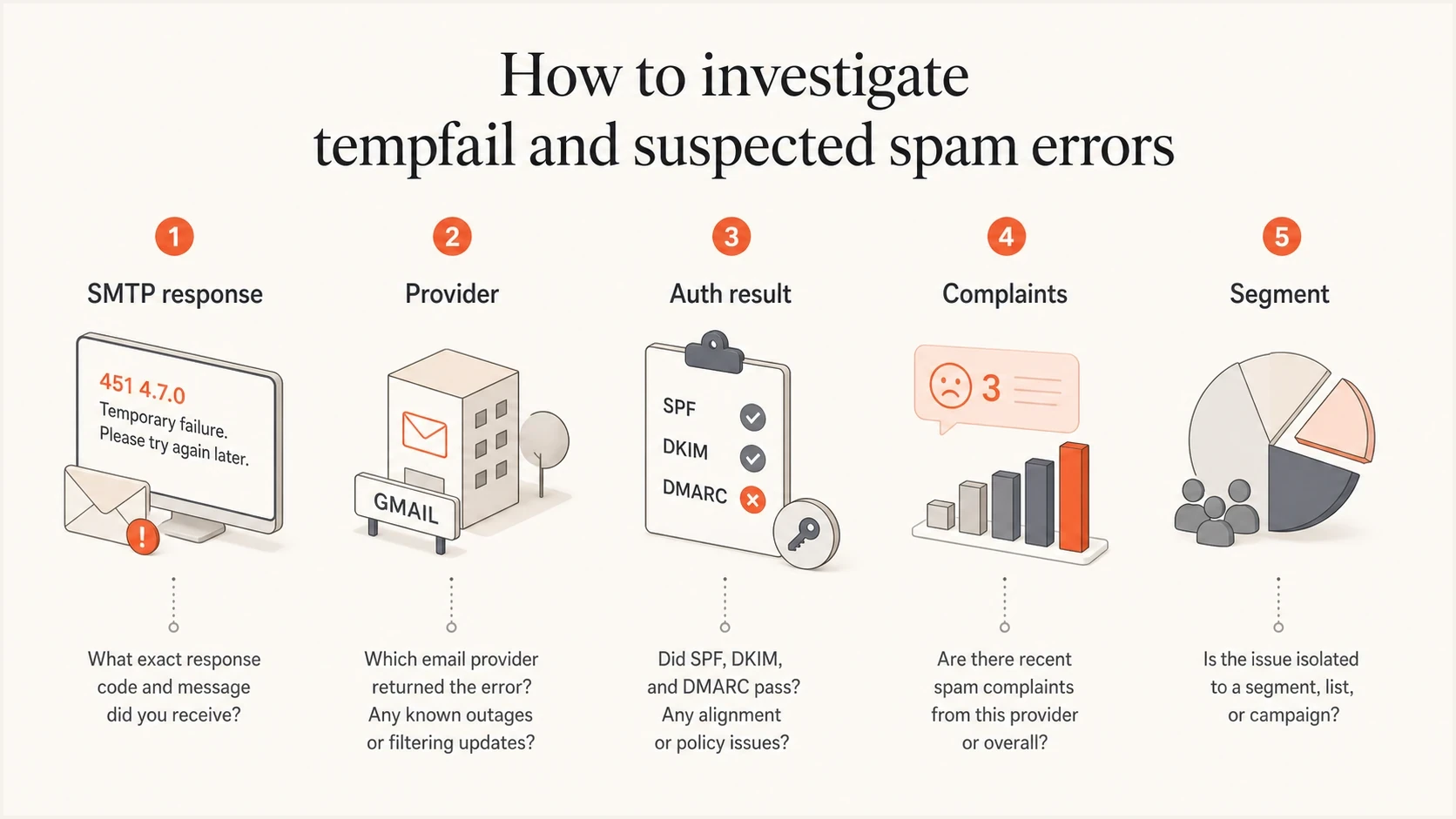
Five checks for investigating tempfail and suspected spam email errors.
- Match dates: Compare the postmaster error date with campaign send time, retry windows, and platform logs.
- Match provider: Separate Gmail, Microsoft, Yahoo, Apple, and corporate domains instead of averaging everything.
- Match identity: Check which SPF domain, DKIM domain, return-path domain, From domain, IP, and URL domain were named.
- Match segment: Find whether the spike came from a specific list, automation, acquisition source, or reactivation send.
Check sender requirement failures separately
A suspected-spam label does not prove every tempfail is reputation-based. Gmail uses separate temporary codes for sender requirement failures. Match the enhanced status code before changing campaign content, because PTR, TLS, SPF, DKIM, and DMARC alignment errors need infrastructure fixes.
|
|
|
|---|---|---|
4.7.23 | Missing or mismatched PTR | Correct forward and reverse DNS |
4.7.27 | SPF failed | Authorize the actual sending IP |
4.7.29 | TLS missing | Require TLS on the SMTP connection |
4.7.30 | DKIM failed | Fix signing and key lookup |
4.7.40 | DMARC record or policy missing | Publish a valid DMARC record |
4.7.32 | From domain not aligned | Align the SPF or DKIM domain |
Current Gmail temporary codes identify the requirement that failed.
For marketing or promotional mail to personal Gmail accounts, bulk senders also need RFC 8058 one-click unsubscribe and must process requests within 48 hours. This does not repair a current 4.7.28 response by itself, but it gives recipients a direct opt-out path, reduces future complaints, and keeps the stream eligible for delivery support after technical failures are fixed.
Do not manually resend queued messages after a 4xx response. Let the sending system retry according to its queue policy while you slow new traffic and fix the named cause. Repeated immediate attempts can add pressure to an existing rate limit.
Run a real campaign test, not an internal preview
A common mistake is testing with an internal preview email and assuming the result matches a real campaign. In many email platforms, internal tests use a different path than a scheduled campaign or automation. Rendering previews are good for checking copy, layout, links, and images. They are weak evidence for deliverability diagnostics.
The test should be sent through the same campaign or automation infrastructure that produced the problem. Use the same From domain, DKIM signing domain, bounce domain, click tracking domain, image host, template, and sending pool. If you need a quick check of headers and authentication, send a real campaign copy to an email tester and inspect the received message, not a PDF or screenshot.
Email tester
Send a real email to this address. Suped shows a results button when the test is ready.
?/43tests passed
The point of this test is not to predict inbox placement perfectly. The point is to capture the actual headers, authentication results, link domains, image hosts, and routing path. That data lets you separate authentication problems from list-quality problems. If the test passes SPF, DKIM, and DMARC but live campaigns still get suspected spam tempfails, the issue is more likely volume, complaints, engagement, audience source, or reputation.
If the test message uses shared click domains or shared image hosts, treat that as a clue. Shared domains can carry reputation from other senders. Branded click and tracking domains are not a complete fix, but they remove one avoidable source of ambiguity.
Check the causes in the right order
When tempfail appears with suspected spam, work through the causes in an order that avoids false fixes. Authentication is important, but if the complaint rate is high, a perfect DMARC setup will not make recipients want the mail. At the same time, poor authentication can make a borderline sender look riskier than it needs to look.
|
|
|
|---|---|---|
4xx deferral | Throttling or temporary rejection | Slow down |
Spam spike | Recipients reporting mail | Suppress complainers |
SPF fail | Sender not authorized | Fix SPF |
DKIM fail | Bad signing or DNS | Fix signing or DNS |
Shared host | Reputation ambiguity | Brand domains |
Listing | IP or domain reputation | Remediate source |
Use this table to decide what to investigate first.
Authentication deserves a clean pass before you ask a mailbox provider to trust your traffic. Check the From domain, return-path domain, DKIM selector, DMARC policy, and identifier match. If you want a broad check rather than one record at a time, run a domain health check before changing sending behavior.
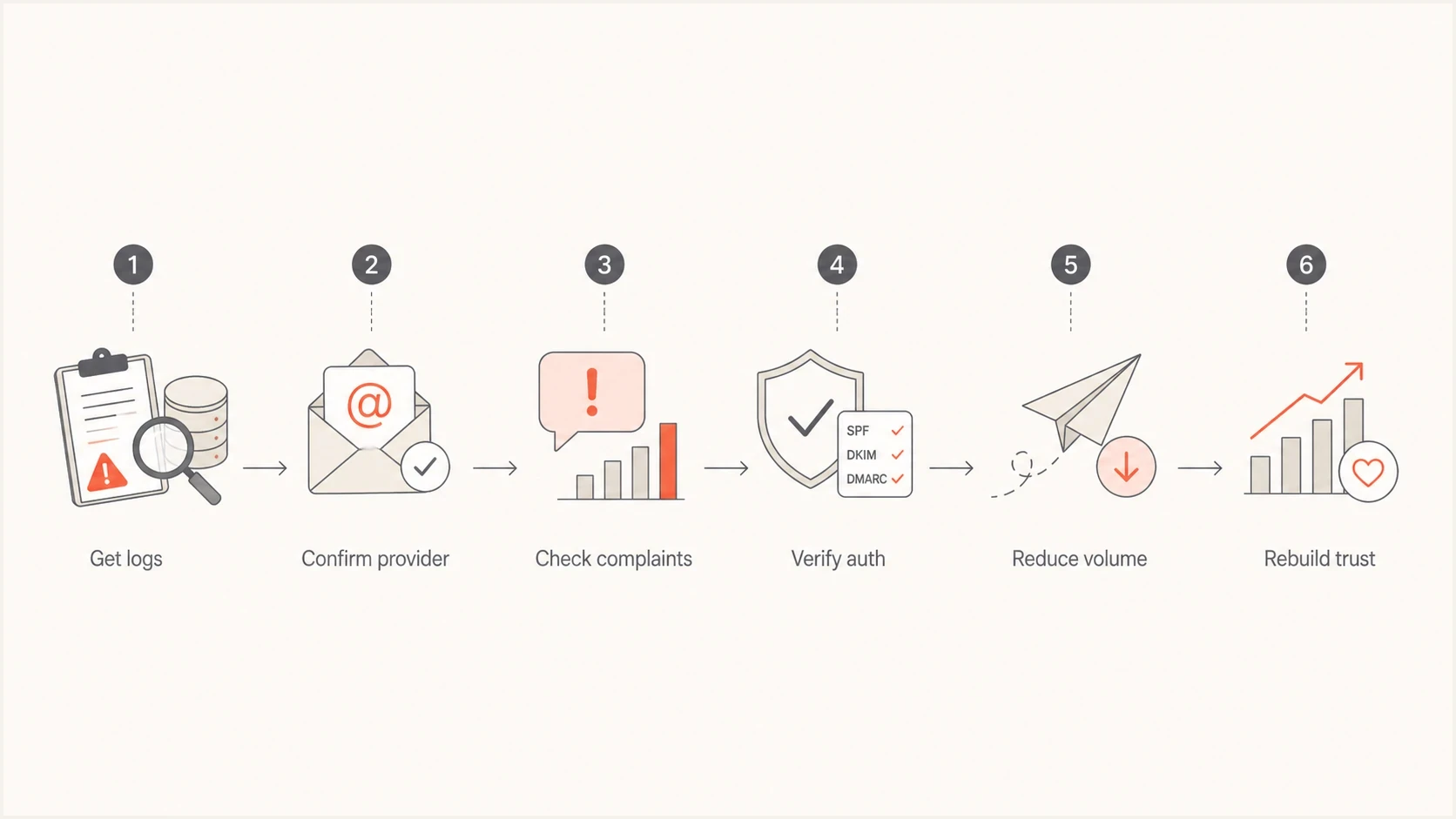
Six-step flowchart for resolving tempfail and suspected spam delivery errors.
 Suped's product fits here when teams need to move beyond isolated checks. It can monitor DMARC, surface SPF and DKIM issues, alert on failures, help with hosted SPF and SPF flattening, stage hosted DMARC policy changes, and monitor blocklist or blacklist exposure. That gives you one operational place to see whether the delivery problem is authentication, reputation, or a sender source you did not expect.
Issue steps to fix dialog showing the issue overview, tailored fix steps, and verification action
When the root cause is complaints
A high spam complaint rate changes the answer. If recipients are marking your messages as spam, the fix is not to find a new subdomain and keep mailing the same people. That just moves the same problem to another identity and can damage more of your domain structure. The first recovery step is to stop sending to people who are not showing clear interest.
Complaint rate response
Use complaint rate as a decision signal, not just a reporting metric.
Healthy
Under 0.1%
Keep normal monitoring and segment by provider.
Warning
0.1% to 0.3%
Reduce volume and inspect recent acquisition sources.
Critical
Over 0.3%
Pause risky sends and rebuild around active consent.
For bulk senders, a complaint rate near 1% is severe. It means a meaningful number of recipients are telling the provider the mail is unwanted. If the business depends on sending to a mass audience, that business pressure does not change the filtering decision. Mailbox providers optimize for their users, not the sender's lead target.
- Pause risk: Stop campaigns to cold, old, purchased, appended, scraped, or unengaged segments.
- Use recency: Send first to recent buyers, recent form submitters, and recent clickers who expect the email.
- Suppress silence: Remove recipients with no opens, clicks, purchases, replies, or account activity in the recovery window.
- Respect unsubscribes: Make opt-out easy, fast, and honored across every sending tool.
- Segment providers: Throttle Gmail recovery separately instead of changing volume across the whole list.
A subdomain can separate legitimate mail streams, such as receipts, account alerts, newsletters, and promotions. It does not erase recipient dissatisfaction. If the same unwanted campaign moves to a new subdomain, the new subdomain will collect the same negative signals.
Fix authentication and reputation signals
Once the audience problem is contained, check whether authentication or reputation signals are making recovery harder. SPF should authorize the sending platform without exceeding lookup limits. DKIM should pass with the domain you expect. DMARC should pass through SPF or DKIM domain match. The visible From domain should match the brand the recipient recognizes.
Example monitoring DMARC recorddns
v=DMARC1; p=none; rua=mailto:dmarc-reports@example.com
That example collects aggregate reports with DMARC's default relaxed alignment. It is for monitoring, not enforcement. A domain already under pressure should not jump blindly to p=reject before legitimate sources match the visible domain. The better path is to monitor, identify every sender, fix SPF and DKIM, then stage policy changes with evidence. Suped's hosted DMARC and hosted SPF can help when DNS ownership is scattered or sender changes happen often.
Blocklist or blacklist checks belong in the same review. A listing is not always the main reason for a provider-specific tempfail, but it can confirm that a sending IP or domain has a broader reputation problem. Suped's blocklist monitoring helps track those signals alongside DMARC and sender-source data.Blocklist checker
Check your domain or IP against 144 blocklists.
 Spamhaus
 0Spam
0Spam

 Cisco
Cisco
 NoSolicitado

 URIBL
URIBL
 abuse.ro
 ALPHANET
 Anonmails
 Ascams
 BLOCKEDSERVERS
 Calivent Networks


 EFnet
EFnet




 JustSpam
 Kempt.net
 NordSpam

 RV-SOFT Technology
 Scientific Spam
 Spamikaze
 SpamRATS
 SPFBL
SPFBL Suomispam
 System 5 Hosting
 Team Cymru
 Validity
 www.blocklist.de Fail2Ban-Reporting Service
 ZapBL
ZapBL 2stepback.dk
 Fayntic Services
 ORB UK
 technoirc.org
 TechTheftSpamhaus0SpamCiscoNoSolicitadoURIBLabuse.roALPHANETAnonmailsAscamsBLOCKEDSERVERSCalivent NetworksEFnetJustSpamKempt.netNordSpamRV-SOFT TechnologyScientific SpamSpamikazeSpamRATSSPFBLSuomispamSystem 5 HostingTeam CymruValiditywww.blocklist.de Fail2Ban-Reporting ServiceZapBL2stepback.dkFayntic ServicesORB UKtechnoirc.orgTechTheftSpamhaus0SpamCiscoNoSolicitadoURIBLabuse.roALPHANETAnonmailsAscamsBLOCKEDSERVERSCalivent NetworksEFnetJustSpamKempt.netNordSpamRV-SOFT TechnologyScientific SpamSpamikazeSpamRATSSPFBLSuomispamSystem 5 HostingTeam CymruValiditywww.blocklist.de Fail2Ban-Reporting ServiceZapBL2stepback.dkFayntic ServicesORB UKtechnoirc.orgTechTheftSpamhaus0SpamCiscoNoSolicitadoURIBLabuse.roALPHANETAnonmailsAscamsBLOCKEDSERVERSCalivent NetworksEFnetJustSpamKempt.netNordSpamRV-SOFT TechnologyScientific SpamSpamikazeSpamRATSSPFBLSuomispamSystem 5 HostingTeam CymruValiditywww.blocklist.de Fail2Ban-Reporting ServiceZapBL2stepback.dkFayntic ServicesORB UKtechnoirc.orgTechTheftSpamhaus0SpamCiscoNoSolicitadoURIBLabuse.roALPHANETAnonmailsAscamsBLOCKEDSERVERSCalivent NetworksEFnetJustSpamKempt.netNordSpamRV-SOFT TechnologyScientific SpamSpamikazeSpamRATSSPFBLSuomispamSystem 5 HostingTeam CymruValiditywww.blocklist.de Fail2Ban-Reporting ServiceZapBL2stepback.dkFayntic ServicesORB UKtechnoirc.orgTechTheft
For Microsoft-focused failures, the wording can be different even when the root issue is similar. Look for temporary deferrals, policy blocks, spam confidence hints, and reputation-based filtering. A useful companion topic is Office365 temp fails when the same sender sees provider-specific behavior.
Recover without making it worse
Recovery is a controlled restart, not a blast to prove the problem is gone. Start with the safest audience and the smallest provider-specific volume that gives useful signal. Then increase only when delivery errors, complaint rate, authentication, and engagement stay stable.
Recovery send mix
Shift volume toward recipients with recent, clear engagement before expanding.
Recent buyers
Recent clickers
Inactive
Do not judge recovery by one campaign that reaches your own inbox. Look at provider-specific deferrals, complaint trends, unsubscribe rate, open and click quality, conversion, and whether the same error text returns. If Gmail is the provider deferring mail, keep Gmail volume separate. If Microsoft is the provider, review the Microsoft-specific logs and postmaster signals separately.
Good recovery plan
- Small sends: Increase volume only after clean signals.
- Clear consent: Mail people who expect the message.
- Stable identity: Keep domain, DKIM, and tracking setup consistent.
Bad recovery plan
- New disguise: Move the same mail to a fresh subdomain.
- Mass resend: Send harder because revenue needs leads.
- Preview proof: Rely on internal tests instead of real campaign logs.
If the sender has brand reputation problems outside email, recovery gets harder. Recipients can report legitimate-looking email because they are unhappy with the company, the offer, the purchase experience, or the support experience. Email metrics do not exist in isolation. A poor customer experience can become a complaint-rate problem quickly.
Use subdomains only for separation
Subdomains are useful when they separate mail streams with different purpose and risk. For example, account alerts, receipts, lifecycle messages, newsletters, and acquisition campaigns should not all depend on the same sending identity. That separation makes reporting clearer and reduces cross-contamination when one stream has a problem.
The wrong use of subdomains is reputation evasion. If people are complaining because they do not want the mail, a new subdomain only delays the next failure. It can also make the sender look less trustworthy because each new identity lacks history and has to build reputation under pressure.
|
|
|
|---|---|---|
Transactional | receipts | Low |
Lifecycle | onboarding | Medium |
Marketing | newsletter | Medium |
Prospecting | cold offer | High |
Subdomain choices should map to mail purpose.
If you add subdomains, give each one its own SPF, DKIM, DMARC reporting, bounce domain, and tracking setup. Then watch each stream separately. Suped's DMARC monitoring helps here because it shows which services are sending for each domain and whether they authenticate correctly.
Views from the trenches
Best practices
Pull SMTP deferral text before changing DNS, content, audience, or sending volume.
Test with a real campaign path because previews do not always use bulk infrastructure.
Segment recovery sends by mailbox provider and start with recent, clear engagement.
Use subdomains to separate mail streams, not to hide the same unwanted campaign.
Common pitfalls
Treating postmaster charts as wrong because bounces have not appeared in the ESP yet.
Using internal preview messages to diagnose authentication and routing for campaigns.
Blaming infrastructure when complaint data shows recipients do not want the mail.
Moving risky mail to a new subdomain before fixing list source and consent problems.
Expert tips
Read whether the error names SPF domain, DKIM domain, or unsolicited mail generally.
Check click and image host domains because shared hosts can complicate reputation review.
Suppress inactive contacts quickly when suspected spam appears in delivery errors.
Pair DMARC reporting with complaint and deferral data so the fix has clear evidence.
Marketer from Email Geeks says the first step is to confirm the dashboard signal against real bounces, blocks, and Gmail-related logs before assuming the metric explains the whole issue.
2024-10-04 - Email Geeks
Expert from Email Geeks says suspected spam means the receiver is slowing delivery while it decides whether the mail looks unwanted, so links, image hosts, and subscriber source need review.
2024-10-04 - Email Geeks
The practical fix
The practical fix is to stop guessing. Pull the SMTP deferral text, confirm the affected provider, send a real campaign-path test, check authentication, and reduce volume to the segments most likely to complain. If the spam complaint rate is high, recovery starts by mailing fewer people and choosing better-qualified recipients, not by finding a new technical wrapper for the same campaign.
Suped's product supports this operational cleanup by keeping DMARC reporting, sender inventory, authentication alerts, hosted SPF, hosted DMARC, and blocklist or blacklist monitoring together. It will not make unwanted mail wanted, but it gives teams the technical evidence needed to stop authentication and reputation issues from hiding the real cause.
The clean recovery pattern is simple: pause risky segments, authenticate every sender, use branded domains, restart with engaged recipients, and increase provider-specific volume only when complaint and tempfail signals stay low.




