What causes Office365 temp fails and how can they be resolved?


Updated on 9 Aug 2026: We tightened this guide around Microsoft's documented IP throttling behavior and added the connector decision path.
For 451 4.7.500 responses, Microsoft documents the main cause as IP throttling or graylisting after the connecting IP changes its established sending pattern, often through a sharp volume increase. A new IP without sending history can trigger the same treatment. The response is temporary, so the sending mail server should queue the message and retry instead of treating it as a hard bounce.
For the specific error 451 4.7.500 with Server busy and an S77714 or S77719 token, start with the sending IP's history, rate, and identity. Microsoft does not publish separate remediation for those S-tokens, so retain them as diagnostic evidence instead of treating either token as a root cause. If many unrelated Microsoft 365 tenants fail at the same time without a sender-side change, check for a broader Microsoft service issue.
What the error means
A typical Office365 temp fail looks like this. The server is not saying the address is invalid. It is telling the sender to try later.
Example SMTP responsetext
451 4.7.500 Server busy. Please try again later from [203.0.113.10].
(S77714)
[BL6PEPF0001AB50.namprd04.prod.outlook.com
2024-07-14T14:44:43.083Z 08DCA36F759CD546]
The pieces matter. 451 means temporary SMTP failure. 4.7.500 is Microsoft's temporary policy code for this throttling pattern. Server busy is the human-readable reason, but it does not prove that Microsoft has run out of server capacity. Microsoft also uses this response while slowing an IP that has sent an abnormal influx of mail.
|
|
|
|---|---|---|
451 | Temporary deferral | Queue and retry |
4.7.500 | IP throttling or graylisting | Reduce rate |
S77714 or S77719 | Microsoft diagnostic token | Retain the full response |
Sending IP | Source under evaluation | Check history and identity |
How to read the main parts of an Office365 temp fail
Do not convert this into a hard bounce
A 451 response should stay in the retry queue. If your MTA or application suppresses the recipient after one temp fail, the delivery failure becomes self-inflicted. Keep the original queue ID, recipient, sending IP, Microsoft receiving host, timestamp in UTC, SMTP stage, and full response.
The main causes
Start with the connecting IP because Microsoft ties this code range to IP throttling and changed sending patterns. Separate the causes by scope, then test each cause against queue logs, recent routing changes, and the IP's established volume.
- Pattern change: A sharp rise in messages or recipients differs from the IP's previous Microsoft 365 traffic.
- New or rotated IP: An IP with little Microsoft sending history needs a gradual ramp and consistent traffic.
- Rate pressure: Too many connections, messages, or recipients hit Microsoft 365 too quickly from the same IP or pool.
- Reputation pressure: Complaint spikes, invalid recipients, poor list consent, or compromised traffic reduce trust in the source.
- Identity weakness: Missing reverse DNS, an inconsistent HELO name, or SPF, DKIM, and DMARC failures make the source harder to verify.
- Routing or connector mismatch: A controlled relay or gateway arrives from an IP or certificate that the expected Exchange Online connector does not recognize.
- Microsoft-side pressure: A broader Exchange Online Protection issue can defer legitimate mail across unrelated recipients, but check this after sender evidence.
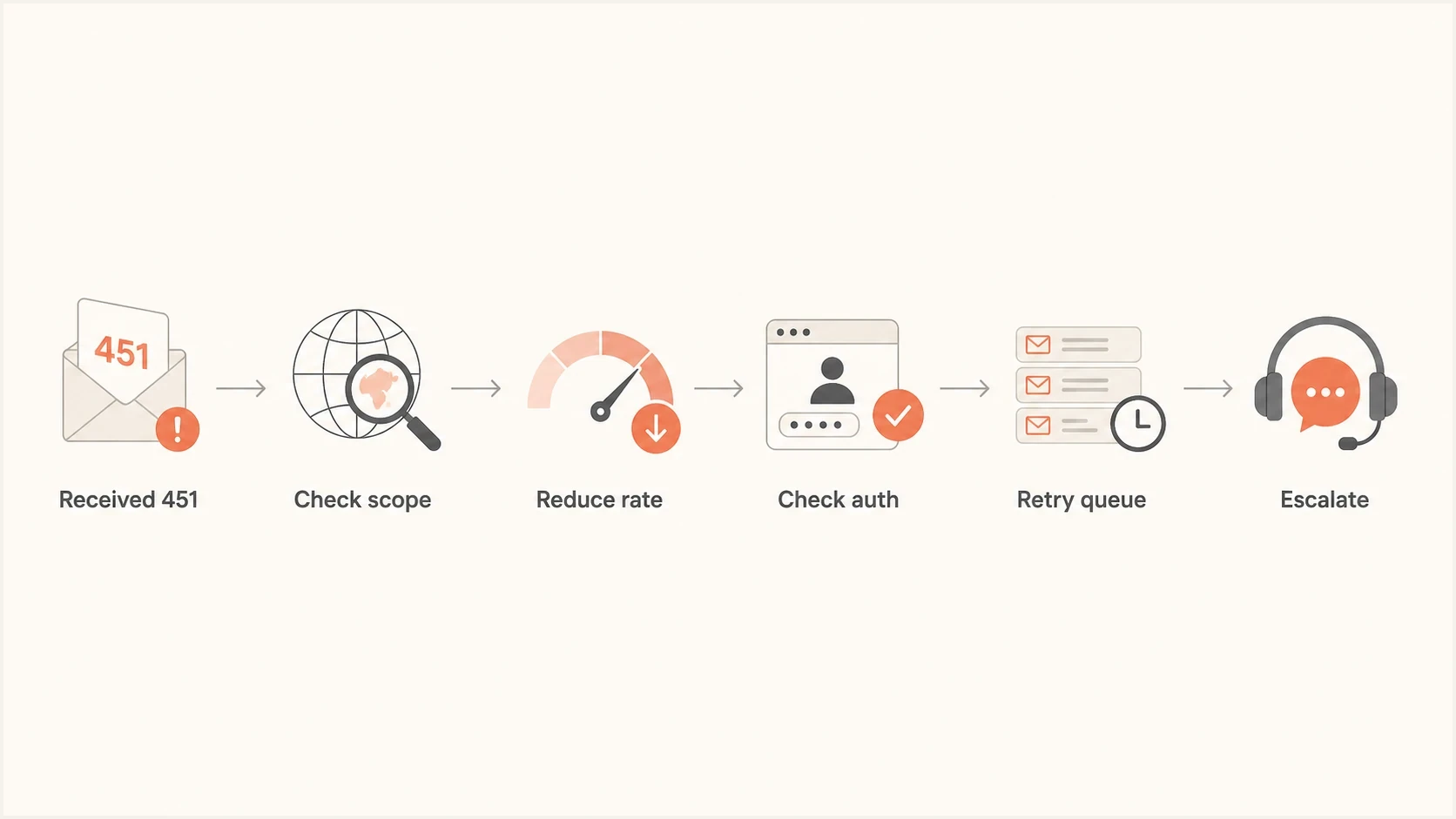
Flowchart for triaging an Office365 temporary failure
Looks sender-side
- Narrow scope: Only one sending IP, campaign, customer, or envelope domain is affected.
- Volume change: Microsoft deferrals begin after a send spike, new list, or new IP rotation.
- Identity issue: SPF, DKIM, DMARC, reverse DNS, or HELO checks differ across the affected mail.
Looks Microsoft-side
- Wide scope: Many unrelated Microsoft 365 tenants fail at the same time.
- Stable sender: Traffic volume, content, authentication, and routing did not change.
- Mixed hosts: Failures cluster around specific Microsoft receiving hosts or regions.
How to resolve it
Start with containment. Do not retry aggressively into the same deferral. A tight retry loop can extend throttling because Microsoft sees the source returning at the same or higher rate after being slowed down.
- Preserve retries: Keep mail queued, use increasing retry intervals, and follow the MTA's queue lifetime. Do not create duplicate sends from the application layer.
- Cut concurrency: Lower parallel SMTP connections to Microsoft 365 and reduce per-domain throughput for the affected pool.
- Segment the data: Group failures by sending IP, envelope domain, recipient domain, campaign, Microsoft host, and SMTP stage.
- Pause risky mail: Hold unconfirmed marketing contacts, invalid-address segments, and high-complaint traffic while transactional mail recovers.
- Fix identity: Validate SPF, DKIM, DMARC, reverse DNS, HELO, and TLS before increasing volume again.
- Recover gradually: Raise Microsoft-bound volume in measured steps only after deferrals fall toward the source's normal baseline.
- Escalate with proof: Use the recipient or Microsoft support path after collecting timestamps, hosts, IPs, pattern history, and clean authentication evidence.
Measure against your own baseline
Microsoft does not publish a universal acceptable percentage for 451 4.7.500. Alert on a sustained rise above the normal deferral rate for the same IP and recipient group, then use queue age and the number of affected tenants to set incident severity.
When you need a real message-level check, send a controlled test message through your normal path and inspect the result with the email tester. That does not replace queue logs, but it shows whether the message has authentication, DNS, content, or header issues associated with the affected route.
Email tester
Send a real email to this address. Suped shows a results button when the test is ready.
?/43tests passed
Compare the same IP across receiving providers. If only Microsoft is deferring, focus on the IP's Microsoft-specific rate, history, and reputation signals. If several receivers defer or reject, treat it as a broader sender quality or infrastructure problem.
When a connector is the right fix
A connector is relevant when mail follows a controlled organizational route. Microsoft recommends connector configuration when an on-premises server relays outbound mail through Microsoft 365, or when inbound mail reaches an Exchange Online tenant through a managed gateway, appliance, or device. A normal internet sender cannot use a recipient's connector as a shortcut around reputation controls.
- Confirm the route: Document each public sending IP and whether Microsoft 365 is the relay destination or final recipient.
- Match the identity: Scope the connector to the expected certificate or static IP addresses and require TLS when the design calls for it.
- Test narrowly: Validate the connector with a controlled message and confirm the receiving host, source IP, and trace details.
- Keep reputation work separate: For ordinary internet delivery, correct the sending pattern and IP reputation instead of asking for a broad allow rule.
Microsoft's documented connector cases sit alongside its 451 guidance. Do not create a connector until the observed mail path matches one of those cases.
Authentication and reputation checks
SPF, DKIM, and DMARC do not always cause 451 4.7.500 by themselves, but Microsoft lists email authentication among the signals used to evaluate external senders. Compare authenticated and aligned traffic with the traffic getting deferred, and verify the IP identity separately.
Illustrative DNS records, replace before publishingtext
SPF TXT example:
v=spf1 ip4:203.0.113.10 -all

DMARC TXT monitoring example:
v=DMARC1; p=none; rua=mailto:dmarc@example.com

DKIM selector host example:
selector1._domainkey.example.com
Do not copy the sample SPF record unless that example address is replaced with the real authorized sending path. Use the domain health checker to validate the domain posture in one pass. Then use blocklist monitoring to watch IP and domain listings across major blocklists (blacklists). A blocklist or blacklist hit is not the same as this Microsoft temp fail, but it supports a reputation diagnosis.
Authentication evidence to collect
- SPF result: The record exists, stays within the 10-DNS-lookup limit, and authorizes the actual sending IP.
- DKIM result: The signature passes and the signing domain aligns with the visible From domain.
- DMARC result: At least one aligned identifier passes, and aggregate reports confirm that the source is legitimate.
- DNS identity: The public sending IP has valid reverse DNS, and the HELO name resolves consistently.
Suped's DMARC monitoring shows which sending sources authenticate, which fail alignment, and where a sending change started. That evidence helps determine whether a Microsoft deferral followed authentication drift or a source and volume change.
What to check in Microsoft 365
If you control the recipient tenant, Exchange admin evidence helps separate tenant filtering from sender-side throttling. If you do not control it, ask the recipient admin for the message trace window, quarantine checks, and tenant health status around the exact UTC timestamps.
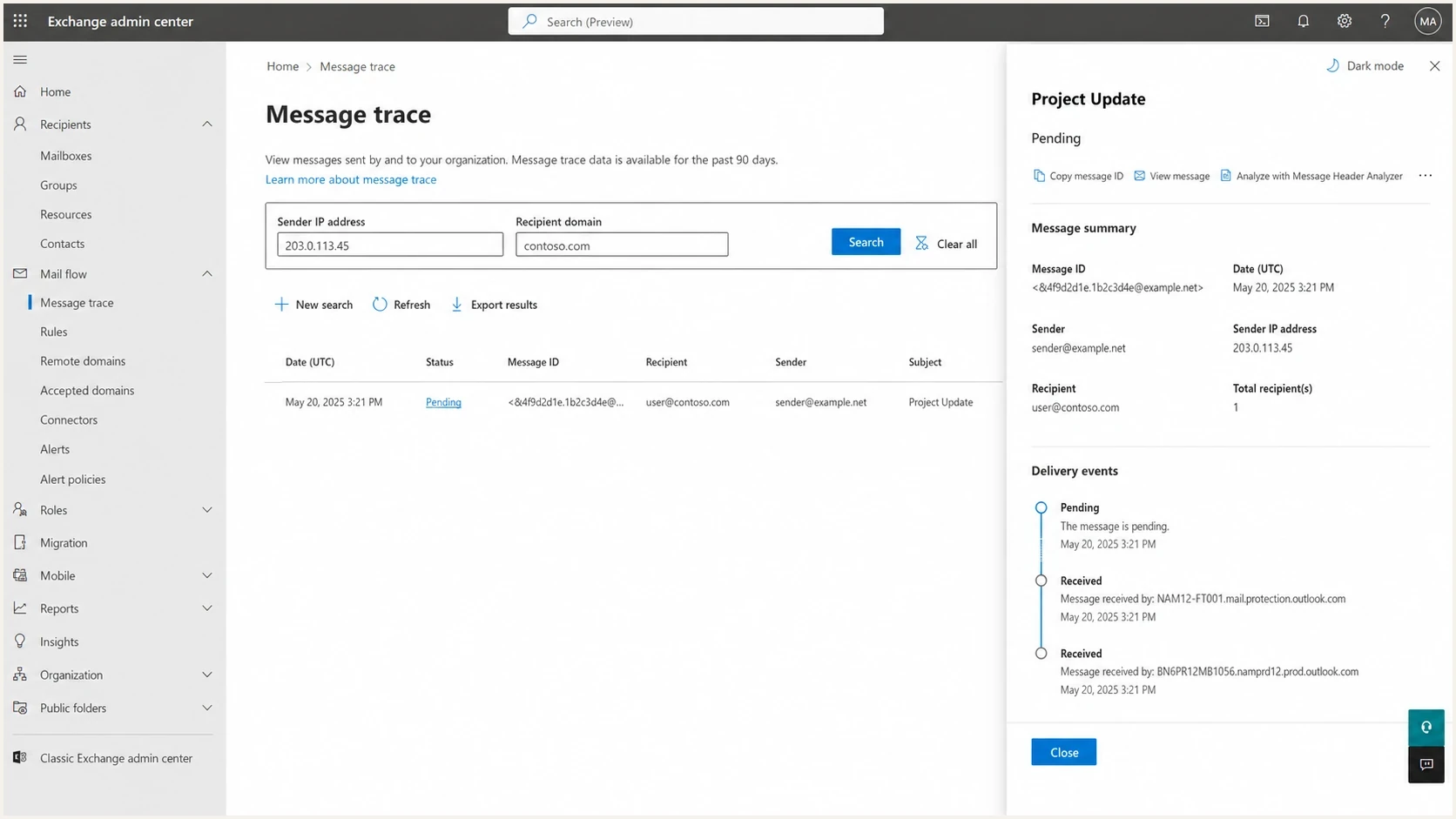
Microsoft 365 admin center message trace detail screen
Message trace can show whether Microsoft 365 received, rejected, deferred, or delivered a message, but it will not always contain an SMTP transaction that ended before acceptance. Sender logs stay primary for a 451 returned during DATA. Tenant data can still confirm whether accepted messages were quarantined, delayed, or filtered afterward.
Ask the sender for
- SMTP transcript: Full response, SMTP stage, receiving host, and timestamp in UTC.
- Queue metrics: Retry age, retry count, and per-domain deferral rate.
- Traffic context: Campaign, list source, sending IP, envelope domain, and recent volume change.
Ask the recipient for
- Tenant trace: Message trace results for the sender and recipient window.
- Quarantine check: Any accepted messages moved to quarantine or junk.
- Tenant health: Exchange Online service health around the same timestamps.
How Suped fits into the workflow
Suped is our DMARC and email authentication platform. Its role in this incident is to supply source, authentication, and reputation evidence. Suped does not control the sender's queue or Microsoft's retry decision, so the sending MTA must still handle backoff and recovery.

Issue steps to fix dialog showing the issue overview, tailored fix steps, and verification action
For Office365 temp fails, the Suped product workflow maps the affected IP to a known sending source, checks whether DKIM signs consistently, detects SPF authorization or lookup problems, and verifies DMARC alignment with the visible From domain. Alerts can show whether the authentication change began before the Microsoft deferrals.
Practical Suped workflow
- Confirm sources: Find the sending platform and IP behind the failing Microsoft 365 traffic.
- Fix alignment: Resolve SPF or DKIM alignment gaps before increasing send volume.
- Watch reputation: Track domain and IP blocklist or blacklist status alongside authentication changes.
- Correlate timing: Compare source and alignment changes with the first 451 timestamp in the MTA logs.
Related Microsoft deferral patterns
Office365 temp fails sit in the same family as other Microsoft deferrals, but the fix depends on the exact response. If the issue is connection-level, read the notes on Office365 MX deferrals. If the pattern follows sender quality or IP history, compare it with Microsoft rate limiting.
The SMTP stage narrows the diagnosis. A connection deferral happens before a message transaction. A 451 returned after DATA means Microsoft evaluated the submitted message but did not accept it, so the sender must retry. A post-acceptance filter outcome shows up as quarantine, junk placement, or a later delivery event.
|
|
|
|---|---|---|
451 4.7.500 after DATA | IP throttling or graylisting | Slow retries and inspect pattern change |
Connection cap | Concurrency | Limit sessions |
IP named in response | Source under evaluation | Check IP history and identity |
Many tenants at once | Wider service pressure | Collect cross-tenant samples |
Common patterns and first action
Views from the trenches
Best practices
Treat 451 replies as queue events first, then group failures by IP, tenant, and time.
Reduce Microsoft-bound concurrency before retry volume turns a deferral into throttling.
Keep complete SMTP samples with UTC timestamps, receiving hosts, IPs, and queue IDs.
Common pitfalls
Do not suppress recipients after one 451, because the sender caused the final loss.
Do not assume Server busy means only Microsoft capacity, because it can be throttling.
Do not escalate without clean auth evidence, traffic history, and grouped failure scope.
Expert tips
If one customer fails, inspect that sender path; if many tenants fail, widen the scope.
Look for the named sending IP in the error, because it often points to sender controls.
Compare Microsoft failures with other receivers before calling it a Microsoft incident.
Marketer from Email Geeks says Server busy is not always a block, so the first response should be retry handling and scope analysis.
2024-07-15 - Email Geeks
Marketer from Email Geeks says a response that names the sending IP looks more like Exchange Online Protection throttling than raw server capacity.
2024-07-15 - Email Geeks
The practical fix
Resolve Office365 temp fails by respecting the 451 response, reducing Microsoft-bound pressure, correcting the IP's sending pattern and identity, and escalating only with evidence. If the error is isolated to one source, inspect that source's IP, domain, route, and recent volume. If the same error appears across unrelated Microsoft 365 tenants without a sender-side change, collect samples and check for a broader Microsoft-side pattern.
The operational sequence is queue, slow down, segment logs, validate authentication, check blocklist and blacklist status, and recover volume gradually. Suped supports the authentication and reputation work through DMARC reporting, source discovery, alignment checks, and alerts.




