What causes Microsoft Office365 MX deferring connections and how is it being resolved?

Published 5 Jun 2025
Updated 29 Jul 2026
12 min read
Summarize with

Updated on 29 Jul 2026: We clarified how to separate the October 2023 Microsoft incident from current sender-specific throttling and added tenant-side tracing steps.
Microsoft 365 (formerly Office 365) MX deferring connections usually means Exchange Online Protection accepted the SMTP connection far enough to return a temporary 4xx response, then told the sending mail server to retry later. During the October 2023 incident behind the 451 4.7.500 Server busy pattern with S77714, the cause was receiver-side throttling inside Microsoft: specific sender IP addresses were being unexpectedly limited by anti-spam procedures. That caused inbound external mail to Microsoft 365 tenants to queue, delay, and retry across regions.
The October 2023 resolution was on Microsoft's side. Microsoft first applied manual allow-listing for reported affected IPs to reduce immediate impact. A first fix did not resolve the throttling fully, so Microsoft developed and validated a new fix. The final mitigation was a targeted reversion of the code issue that caused the impact, followed by a short period where queued mail still drained. A current S77714 response does not prove the same service-wide cause, so senders should check the scope and traffic pattern before attributing it to Microsoft.
For senders, the correct response is to keep retrying with proper backoff, reduce unnecessary connection pressure, check whether the issue is broad or isolated, and avoid changing SPF, DKIM, DMARC, or MX records unless there is separate evidence they are broken. Suped's DMARC and deliverability views help with that separation by confirming whether authentication and reputation signals are clean while a mailbox provider issue runs its course.
What the 451 4.7.500 S77714 response means
A 4xx SMTP response is temporary. It tells your sending MTA that the message has not been delivered yet, but it should stay in the queue and retry. That is different from a 5xx response, where the receiving system rejects the delivery attempt permanently and the sending system normally generates a bounce.
Typical Microsoft temporary deferraltext
451 4.7.500 Server busy. Please try again later from [x.x.x.x].
(S77714) [MW2NAM12FT080.eop-nam12.prod.protection.outlook.com
2023-10-11T02:17:50.557Z 08DBC41AE3EEAC91]
The important parts are the status class, the enhanced status code, and the Microsoft-side diagnostic token. 451 means temporary failure. 4.7.500 commonly accompanies a policy, throttling, or transient delivery condition rather than a malformed message. Server busy means Microsoft is asking the sender to retry, but it does not identify the exact cause. Microsoft's NDR guide explains how Exchange Online classifies SMTP failures, but the exact S77714 token is a Microsoft diagnostic marker, not a setting you can change in DNS.
Do not treat this error as proof that your domain authentication is broken or that Microsoft has a platform-wide outage. A receiver-side deferral can affect clean mail, while sender-specific volume, reputation, or connection patterns can produce a similar temporary response.
|
|
|
|---|---|---|
451 | Temporary failure | Retry |
4.7.500 | Policy delay | Check scope |
S77714 |  Microsoft token Microsoft token | Track case |
Server busy | Temporary throttle | Back off |
How to read the main parts of the SMTP response.
Why Microsoft was deferring the connections
For the specific October 2023 Microsoft 365 MX deferral event described in the question, the cause was not global DNS failure, a sender's broken SPF record, or a normal per-customer mailbox rule. Microsoft identified that specific IP addresses were being unexpectedly limited by anti-spam procedures. That pushed inbound external delivery into throttling and delay.
- Anti-spam limit: Microsoft's filtering layer limited selected sending IPs more aggressively than intended.
- Regional reach: Senders saw the same pattern across North America, Europe, Australia, and New Zealand because the issue sat in Microsoft's inbound protection path.
- Temporary code: The 451 response asked mail servers to retry, so compliant MTAs kept mail queued instead of bouncing it immediately.
- Sender impact: Some IPs saw large queues even when their domain authentication and sender reputation were otherwise healthy.
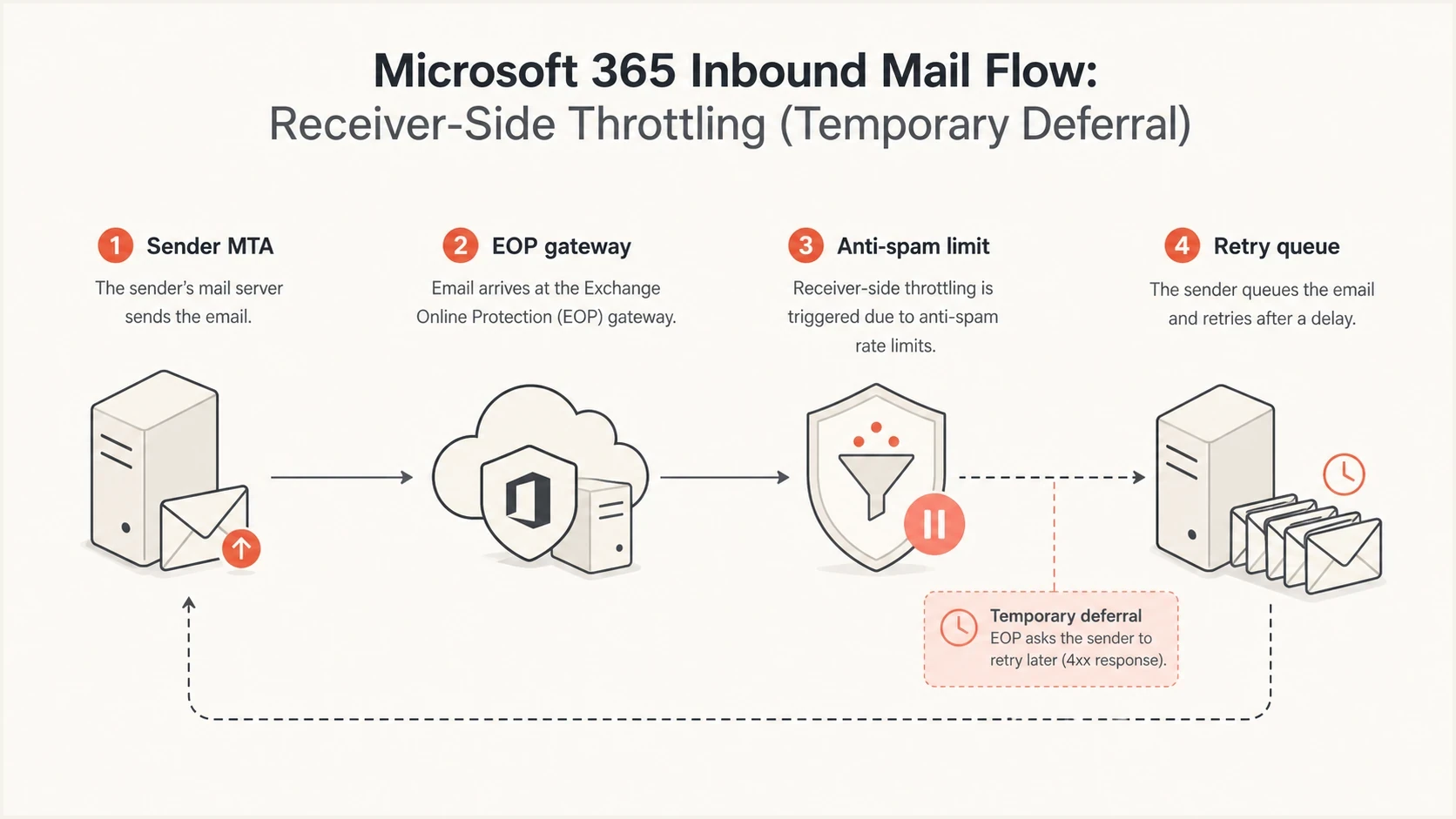
Exchange Online Protection throttling email at a Microsoft 365 gateway before retry.
Receiver-side throttling
- Signal: Multiple senders report similar Microsoft 365 MX deferrals at the same time.
- Response: Keep retrying with backoff and avoid queue floods.
- Owner: The mailbox provider must remove the faulty throttle or policy condition.
Sender-side failure
- Signal: Only your domain, campaign, or sending IP gets delayed.
- Response: Check authentication, complaint signals, list quality, and DNS.
- Owner: The sender must fix the technical or reputation cause.
How to distinguish a current throttle
The October 2023 event explains one documented S77714 incident, not every occurrence of the response. The same 451 4.7.500 pattern has appeared outside that event and can accompany sender-specific anti-spam throttling after a sending IP changes volume or delivery behavior. Diagnose the current evidence before assigning the historical cause.
|
|
|
|---|---|---|
Scope | Unrelated senders affected together | Your IPs or streams affected |
Traffic | No shared sender change | Volume or pattern changed |
Status | Exchange Online degradation reported | No matching service incident |
Recovery | Many queues drain after mitigation | Affected IP remains limited |
Action | Back off and monitor | Back off and inspect sender signals |
Signals that separate a broad Microsoft incident from sender-specific throttling.
Use the full SMTP response as evidence, but do not use S77714 as a root-cause label. Record the sending IP, Microsoft host, UTC timestamp, affected destinations, recent volume, and whether unrelated senders report the same timing.
How Microsoft resolved the October 2023 incident
The fix path matters because it explains why senders saw relief in stages rather than all at once. Microsoft initially gave immediate relief by manually adding reported affected IP addresses to an allowed list. That reduced impact for some senders, but it was not the complete fix. The next update said the earlier developed fix did not resolve the throttling issue, so Microsoft prepared another fix for internal validation.
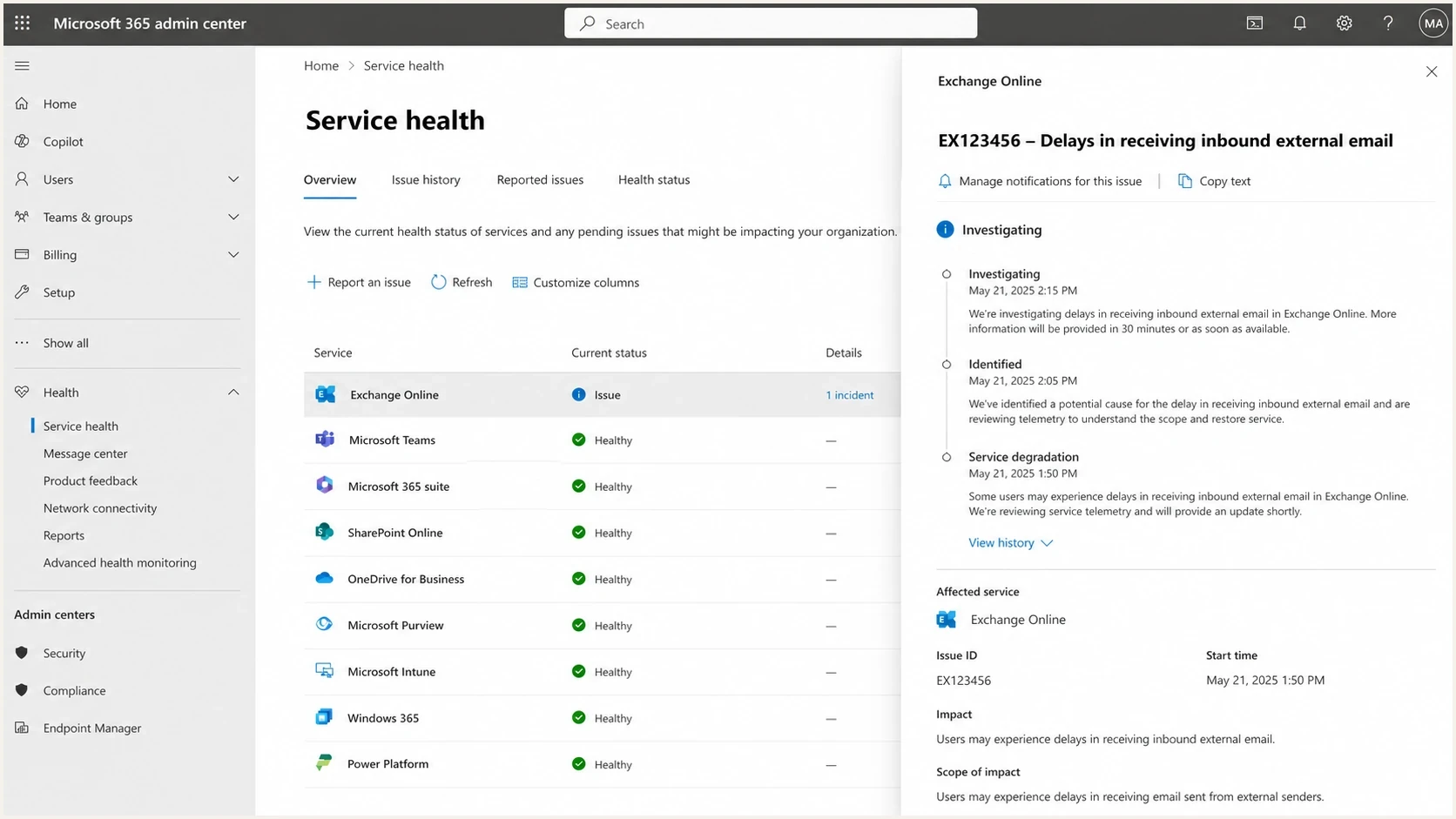
Microsoft 365 Service health showing an Exchange Online inbound mail delay.
Incident mitigation path
The values show operational impact across the observed response phases, not exact Microsoft telemetry.
Mail delay severity
The final update described a targeted reversion of the code issue causing impact. The durable fix was not a sender-side change. It was a rollback or reversion inside the Microsoft service path that removed the unexpected anti-spam limiting behavior. After that, users experienced mitigation, with residual delays for about an hour while queues drained and retries completed.
For an active incident, check the Microsoft 365 admin center Service health page if you have tenant access. Issue-specific update pages require authentication, so they are not a reliable public citation for customers or senders outside the tenant.
What senders should do during a Microsoft 365 MX deferral
The best sender response is controlled patience. A temporary Microsoft deferral is exactly what mail queues are built for, but the wrong reaction can make the queue worse. If every server retries too fast, opens too many parallel connections, or re-sends the same campaign through more IPs, the sender adds connection pressure to a situation that already has throttling.
- Keep mail queued: Do not force immediate bounces for 451 responses. Let the MTA retry until its normal retry window expires.
- Back off retries: Increase the delay between attempts and avoid short retry loops against Microsoft MX hosts.
- Reduce concurrency: Lower simultaneous connections per destination domain while the provider is returning server-busy responses.
- Segment analysis: Compare Microsoft recipients with other mailbox providers to confirm whether the issue is provider-specific.
- Preserve evidence: Keep timestamps, sending IPs, destination domains, SMTP transcripts, and queue depth graphs for support.
Email tester
Send a real email to this address. Suped shows a results button when the test is ready.
?/43tests passed
A controlled test message helps separate a live transport delay from a content or authentication problem. Suped's email tester gives a quick view of authentication, headers, and message-level issues, so you do not waste time changing DNS while Microsoft is deferring clean traffic.
Operational notes for retry tuningtext
Destination: outlook.com, office365.com, protection.outlook.com
SMTP code: 451
Enhanced code: 4.7.500
Action: retry with exponential backoff
Avoid: immediate requeue storms
Avoid: moving delayed mail to new IPs without cause
Checks that separate Microsoft issues from your own
Even when the headline cause is Microsoft-side throttling, check the sender's own setup. DNS does not usually cause this specific S77714 pattern, but a real service incident can hide a second problem. If your queues recover slower than other senders' queues, or only one of your IPs remains affected, your sending setup needs attention.
|
|
|
|---|---|---|
Scope | Many senders | Only you |
SPF | Pass | Permerror |
DKIM | Pass | No signature |
DMARC | DMARC pass | Fail |
Reputation | No listing | Blocklist hit |
Compact triage checks for Microsoft 365 MX deferrals.
A Microsoft 365 tenant admin should check Exchange Online in Service health first, then run the email delivery diagnostic for a specific sender and recipient. Message trace can show whether Exchange Online received, rejected, deferred, or delivered a message that entered the service. If no matching trace appears, keep the sender's full SMTP transcript because the 451 response may have occurred before Exchange Online committed the message. Microsoft's delivery troubleshooting guide lists the tenant admin workflow.
Start with a broad domain health check, then review DMARC trends through DMARC monitoring. If one IP is delayed after the incident is mitigated, check for blocklist (blacklist) exposure through blocklist monitoring. This keeps the response practical: prove your own mail is technically sound, then focus escalation on the receiver-side deferral.
Issues page showing top issues, verified sources, unverified sources, and authentication pass rates
Suped puts DMARC, SPF, DKIM, sender sources, issue detection, blocklist monitoring, and deliverability signals in one workflow. During a provider-side incident, the key operational question is whether the sending identity is healthy enough to wait and retry or whether a separate sender-side fix is required.
Suped supports this workflow with automated issue detection, alerts, hosted authentication controls, SPF flattening, and blocklist (blacklist) monitoring. These checks help teams verify sender-side health without making speculative DNS changes during a Microsoft incident. Suped
Suped
SupedWhen to change DNS or authentication
Do not change DNS just because Microsoft returns a 451 server-busy response. DNS changes are appropriate when your checks show a real authentication defect, a broken return-path domain, an SPF lookup failure, missing DKIM signing, or a DMARC policy problem. Otherwise, DNS edits add risk during an incident and make later analysis harder.
Do not change
- MX records: Leave them alone unless inbound mail to your own domain is broken.
- DMARC policy: Do not relax enforcement for a Microsoft-side temporary deferral.
- Sending IPs: Do not rotate traffic to new IPs without a reputation reason.
Do change
- Broken SPF: Fix lookup overages, syntax errors, and missing sender includes.
- Missing DKIM: Enable signing for the sending domain and verify selector records.
- Bad DMARC: Correct invalid tags, missing reporting addresses, or policy mistakes.
Example DMARC record that should not be changed for a 451 deferraltext
Name: _dmarc.example.com
Type: TXT
Value: v=DMARC1; p=quarantine; rua=mailto:dmarc@example.com
If authentication checks pass and deferrals are concentrated at Microsoft MX hosts, focus on queue management and evidence collection. If checks fail, fix the sender-side issue and keep the Microsoft deferral analysis separate.
A practical escalation checklist
When the impact is material, prepare an escalation package instead of sending a vague complaint. The useful evidence is specific and repeatable. It should show that Microsoft is returning the same temporary response across attempts, that your sending authentication is passing, and that your queue behavior is controlled.
- SMTP transcript: Include the full 451 response, timestamp, Microsoft host, and diagnostic token.
- Sending IP: List the affected IPs and the approximate message volume attempted to Microsoft domains.
- Authentication: Attach SPF, DKIM, and DMARC pass evidence for the same mail stream.
- Queue data: Show queue depth, retry timing, and delivery recovery after mitigation.
- Tenant status: Ask a Microsoft 365 tenant admin to check Service health and subscribe to issue updates.
When to escalate
These are example internal thresholds. Adjust them to your delivery SLA and message value.
Monitor
0-15 min
Small queue growth with successful retries
Tune retries
15-60 min
Repeated 451 responses across many Microsoft domains
Escalate
60+ min
High-value mail delayed despite controlled retries
For related Microsoft temporary failures, the same retry and evidence model applies. A deeper companion page on Microsoft 365 temporary failures covers broader causes outside this specific S77714-style deferral pattern.
Views from the trenches
Best practices
Keep Microsoft deferrals queued and use measured retry timing before making DNS changes.
Capture full SMTP responses with timestamps, sending IPs, and Microsoft hostnames for support.
Separate provider incidents from sender authentication by checking SPF, DKIM, and DMARC.
Common pitfalls
Treating every 451 as a sender fault leads to risky DNS edits during receiver incidents.
Increasing retry pressure against Microsoft MX hosts can extend queue delays for your mail.
Rotating traffic to cold IPs during an incident can create new reputation problems.
Expert tips
Ask a tenant admin to subscribe to Microsoft issue updates when Service health shows impact.
Compare Microsoft delivery with other mailbox providers before declaring an internal outage.
Use the recovery window to confirm queues drain cleanly and no segment stays delayed.
Marketer from Email Geeks says multiple senders reported the same Office365 MX deferrals on the same morning, which made a receiver-side incident more likely than a single sender fault.
2023-10-11 - Email Geeks
Marketer from Email Geeks says Microsoft identified affected IPs being unexpectedly limited by anti-spam procedures and used manual allow-listing for immediate relief.
2023-10-11 - Email Geeks
The practical answer
During the October 2023 incident, Microsoft 365 MX deferrals with 451 4.7.500 and S77714 were caused by Microsoft-side anti-spam throttling that unexpectedly limited specific sender IPs. Microsoft used immediate allow-listing for affected IPs, then reverted the code issue that caused the throttling. A current response with the same token does not prove that historical cause, so confirm scope, sending behavior, and Service health before reaching a conclusion.
The sender-side job is to retry correctly, reduce connection pressure, prove authentication and reputation are clean, and collect evidence. Suped supports that workflow by bringing DMARC, SPF, DKIM, blocklist (blacklist) monitoring, issue alerts, and source visibility into one operational view. This helps teams decide whether to wait for Microsoft mitigation or repair a separate sender-side problem.




