
How long does it take to warm up an IP address for email marketing?

Updated on 23 Sep 2026: We refreshed this guide with current Gmail requirements, clearer timeline guidance, and practical advice for keeping a dedicated IP warm.
Most dedicated IP warmups take 4 to 8 weeks. An established sending domain, a clean and engaged list, stable recent volume, and daily sending can shorten the ramp to 2 to 4 weeks. Cold domains, weak engagement, or inconsistent sending often push the plan closer to 6 to 12 weeks.
For a target near 2 million messages, two weeks is aggressive. It can work only when the domain is established, the audience is clean and engaged, complaints and hard bounces stay low, and volume is spread across mailbox providers. A cold domain on a cold IP, old data, or heavy concentration at one provider makes two weeks too short.
Total volume is only one part of the plan. First confirm whether 2 million means one campaign, a daily target, or a weekly target. Mailbox providers judge the sending pattern and recipient response. A 2 million send spread across a week behaves differently than 2 million messages sent to one mailbox provider in a single day.
The short answer
A realistic IP warmup timeline depends on domain history, list quality, recipient mix, cadence, and the final daily volume. Microsoft guidance says maximum deliverability commonly takes 4 to 8 weeks and recommends starting with the most engaged subscribers.
|
|
|
|---|---|---|
Warm domain, clean list | 2 to 4 weeks | Fastest case, still needs daily checks. |
Warm domain, cold dedicated IP | 4 to 6 weeks | Common for moves to dedicated infrastructure. |
Cold domain, cold IP | 6 to 12 weeks | Needs the most caution. |
Heavy Gmail or Microsoft mix | 4 to 10 weeks | Provider-level response controls the ramp. |
Multiple IPs, strong data | 2 to 4 weeks | Only when each IP receives enough steady volume. |
Use these timelines as planning ranges, then let mailbox response decide the pace.
For a 2 million message goal, the fastest safe path usually uses the most engaged segment first, then expands in controlled steps. Old subscribers or unproven acquisition sources justify a slower plan before mailbox providers impose one.
Do you need a dedicated IP?
IP warming applies to a new dedicated IP or a dedicated IP that has been inactive long enough for its reputation to cool. A shared IP pool already carries traffic from other senders, so the provider manages the pool-level warmup. A new sending domain on a shared pool still needs a gradual volume ramp.
Dedicated IP
- The sender controls the IP's reputation and must warm it gradually.
- Daily traffic must be high and consistent enough to build history at each mailbox provider.
- Adding more IPs divides the volume, so every IP needs its own viable ramp.
Shared IP pool
- The pool already has sending history, so there is no sender-controlled IP schedule.
- Other senders influence the shared reputation, while the domain still builds its own history.
- Low or irregular volume often fits a shared pool better than a dedicated IP.
Do not add dedicated IPs simply to spread a difficult list across more infrastructure. More IPs reduce the volume and reputation evidence available to each IP. Size the pool only after splitting expected daily traffic by mailbox provider.
Factors that change the IP warmup timeline
Dedicated IP warming builds sender reputation through real sending history. A new IP has no history, so mailbox providers watch the first sends closely. They evaluate authentication, recipient engagement, bounces, complaints, spam trap risk, and pattern stability. Warming cannot repair a damaged domain reputation or make a poor-quality list safe to send.
- Sending every day gives mailbox providers repeated evidence. Sending once a week slows the learning cycle.
- Spread each day's volume steadily instead of releasing one large burst. Sudden spikes can trigger rate limits even when the daily total fits the plan.
- A ramp with half the list at Gmail and Microsoft needs separate tracking and sending ceilings by provider.
- A list with recent clicks and purchases can ramp faster than a list with stale addresses.
- A warm domain on a cold IP is different from a cold domain on a cold IP.
- Complaints, hard bounces, spam placements, and throttling mean the next increase should wait.
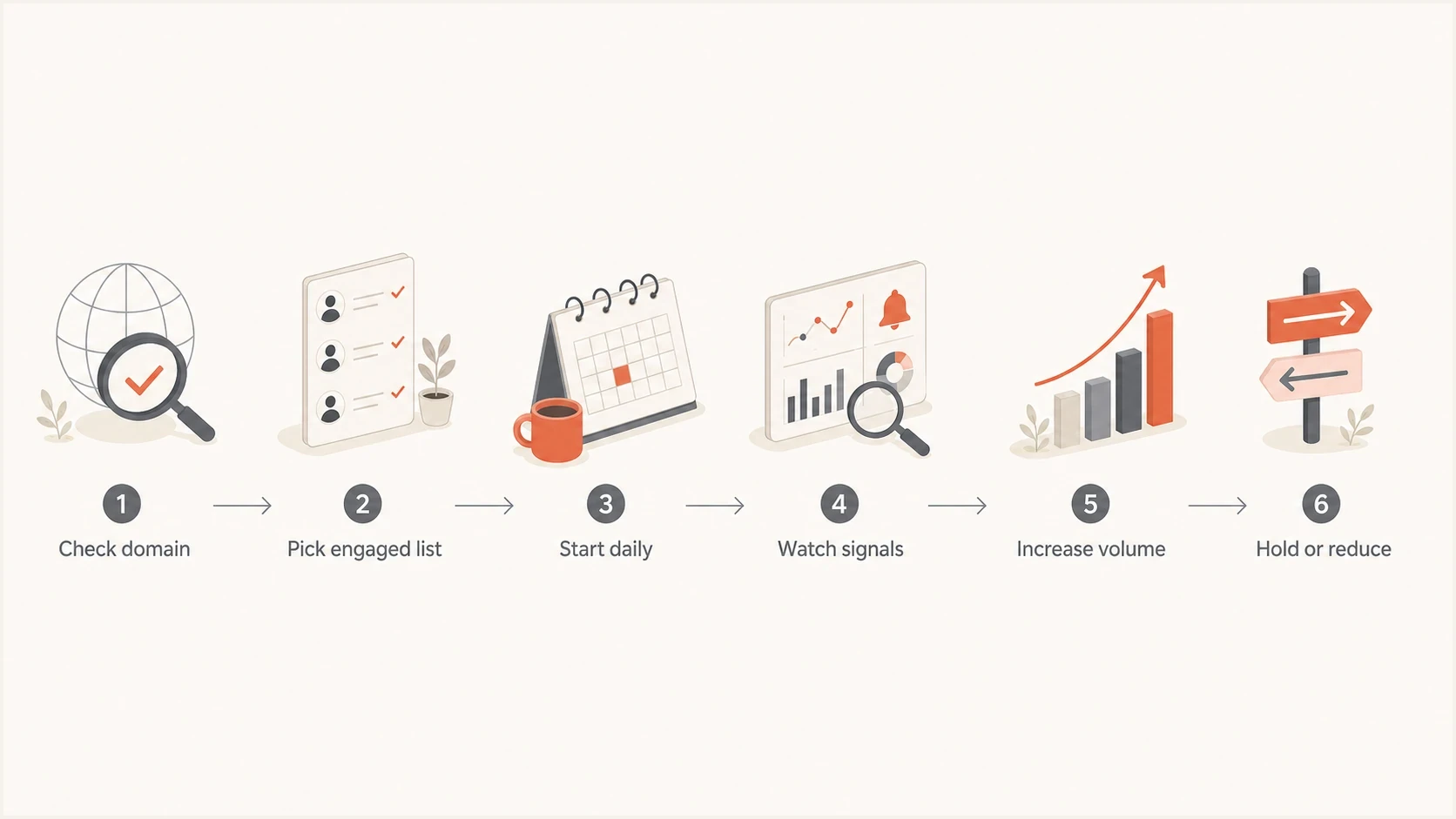
A flowchart showing the main decisions in an IP warmup plan.
A practical ramp to 2 million emails
When a sender needs to warm up to 2 million, first split the target by day and by mailbox provider. A single 2 million campaign is one problem. A 2 million daily target is a bigger one. A weekly target that averages under 300,000 per day is easier to manage.
This is an aggressive two-week model for a sender with strong conditions. Use it only when the domain is already trusted, the first segment is highly engaged, suppression is current, and provider-level results stay clean. Treat each number as the total daily ceiling across all mailbox providers, then set lower provider-specific limits and spread the traffic through the day.
Aggressive 14-day daily volume ramptext
Day 1: 5,000
Day 2: 10,000
Day 3: 20,000
Day 4: 40,000
Day 5: 75,000
Day 6: 125,000
Day 7: 200,000
Day 8: 300,000
Day 9: 450,000
Day 10: 650,000
Day 11: 900,000
Day 12: 1,200,000
Day 13: 1,600,000
Day 14: 2,000,000
That schedule is not a promise. It is a ceiling. If delivery slows, complaint rate rises, hard bounces increase, or a blocklist (blacklist) event appears, hold the volume or step down. Suped's blocklist monitoring helps catch IP and domain listing issues during that kind of ramp.
If the sending provider offers automated IP warming, confirm whether it controls volume separately for each mailbox provider or applies one global percentage. Automation can meter traffic, but it does not replace engaged-audience selection, complaint monitoring, or provider-specific stop conditions.
When two weeks can work
- The domain already has stable marketing history and low complaints.
- The first sends go to recent buyers, active subscribers, or other high-intent users.
- The sender mails consistently and checks provider results every day.
When two weeks fails
- A new domain and a new IP need a longer trust-building period.
- Old subscribers produce more bounces and complaints while engagement weakens.
- Too much volume to one mailbox provider triggers throttling or spam placement.
What to monitor during the ramp
The ramp schedule matters less than recipient response. Track authentication pass rates, verified sending sources, complaint movement, bounce patterns, provider-level deferrals, inbox placement tests, and blacklist or blocklist status. If one provider starts pushing mail to spam, the plan needs a provider-specific correction, not a global volume increase.
For Gmail traffic, keep the user-reported spam rate below 0.1% and avoid ever reaching 0.3%. Treat a rising trend as a reason to hold the ramp before it reaches the published limit.
Suped DMARC dashboard showing email volume, authentication health, and source breakdown
Suped is our DMARC and email authentication platform. During a warmup, Suped's DMARC dashboard brings together sending-source visibility, SPF and DKIM results, DMARC identifier matching, policy status, and issue detection. This makes it easier to verify each source before its volume grows.
Before the ramp, run a domain health check and confirm DMARC, SPF, DKIM, forward and reverse DNS, TLS, and sending-source coverage. During the ramp, DMARC monitoring shows whether mail is passing authentication at real receiving systems.
Send a real campaign-style message through an email tester before major increases. A test message will not prove inbox placement for the full list, but it catches obvious authentication or header problems, plus clear content issues, before the mistake reaches a large audience.
Email tester
Send a real email to this address. Suped shows a results button when the test is ready.
?/43tests passed
When to slow down
A good warmup has planned increases and planned brakes. A common mistake is treating the schedule as fixed after the first week goes well. Mailbox providers can accept the first few sends and then react when the list expands beyond the most engaged segment.
Do not push through bad signals
- Hold volume and tighten segmentation when complaints rise.
- Stop expanding the audience when hard bounces spike, then remove stale and invalid addresses.
- Slow the ramp for the affected provider when deferrals increase instead of reducing every provider equally.
- Review list source, content, cadence, and authentication when spam placement grows.
Warmup decision bands
Use these bands to decide whether to increase, hold, or reduce daily volume.
Increase
10-25%
Authentication passes, bounces stay low, and engagement stays strong.
Hold
0%
Provider deferrals, spam placement, or unsubscribes start trending up.
Reduce
-25%
Complaints, blocks, or hard bounces show the audience is not ready.
Skipping a day usually does not ruin a warmup. Repeated pauses create a weaker pattern because mailbox providers see less consistent evidence. After a pause caused by bad signals, restart from a lower recent volume. If a dedicated IP has been inactive for several weeks, return gradually and let current provider response determine the pace instead of jumping straight to its old peak.
How to keep a dedicated IP warm
Reaching the target volume does not end reputation management. Mailbox providers keep evaluating the IP, domain, message stream, and recipient response. A predictable pattern after the ramp gives them current evidence and reduces the risk created by a sudden restart.
- Send consistently to engaged recipients. Long silent periods followed by a large campaign can make a previously warmed IP behave like a cold one.
- Treat a sharp increase, such as roughly doubling normal daily volume, as another controlled ramp rather than one immediate jump.
- Keep marketing traffic separate from transactional mail when their volume and complaint patterns differ.
- After several weeks of inactivity, restart below the old peak and expand only while provider-level signals remain stable.
There is no universal date when an IP becomes cold. The right restart point depends on how long sending stopped, the IP's previous volume, domain reputation, and how each mailbox provider handles the first new traffic.
Authentication setup before volume
Volume should not climb until authentication is routine. Configure SPF and DKIM, then verify that DMARC passes because the SPF domain or DKIM domain matches the visible From address. Senders that deliver more than 5,000 messages in a day to personal Gmail accounts must use both SPF and DKIM alongside DMARC. Gmail treats the primary domain as a bulk sender permanently once it meets that threshold. Valid forward and reverse DNS, TLS, one-click unsubscribe, and a visible unsubscribe link also belong in the preflight check. Noncompliant traffic can face spam placement, temporary failures, or permanent rejection.
Example authentication recordsdns
_dmarc.example.com. TXT "v=DMARC1; p=none; rua=mailto:d@example.com"
example.com. TXT "v=spf1 include:send.example.net -all"
selector1._domainkey.example.com. TXT "v=DKIM1; k=rsa; p=..."
Suped connects the DNS record, sending source, and observed mail stream so a team can identify an unauthenticated source before increasing its volume. Automated issue detection identifies the source that needs attention, while hosted SPF and hosted DMARC support DNS management and policy staging when those workflows are needed.
For agencies and MSPs, the same warmup work repeats across clients. Suped's multi-tenancy dashboard keeps domains, sending sources, alerts, blocklist (blacklist) checks, and client reporting in one place. That reduces the chance that an authentication miss is found only after volume has increased.
Views from the trenches
Best practices
Start with recent engaged subscribers, then expand only after provider signals stay clean.
Track Gmail, Microsoft, Yahoo, and smaller providers as separate warmup audiences.
Set a cautious default timeline, then speed up only when delivery data supports it.
Common pitfalls
Treating two million recipients as one target hides provider-specific delivery problems.
Using stale data early in the ramp creates bounces before the IP has stable history.
Increasing volume after throttling starts turns a small issue into a reputation setback.
Expert tips
Keep a rollback volume ready so the team knows exactly where to restart after a hold.
Warm the domain and IP together when both are new, because receivers judge the pair.
Use daily sends during the ramp so mailbox providers see a steady sending pattern.
Marketer view
Marketer from Email Geeks says a two-week ramp to 2 million is possible only when the sender mails every day and the list is clean and engaged.
2021-07-12 - Email Geeks
Expert view
Expert from Email Geeks says four weeks is a more practical baseline when the sender has limited detail about list quality, engagement, and domain history.
2021-07-12 - Email Geeks
How long IP warming takes
For most email marketing programs, plan on 4 to 8 weeks for a dedicated IP warmup. A clean program on an established domain can finish in 2 to 4 weeks. Use 6 to 12 weeks when the domain is new, the list is weak, the provider mix is concentrated, or the sender has no recent engagement history.
A two-week ramp is an aggressive case, not an automatic failure. Approve it only when authentication is correct, audience quality is strong, complaints are controlled, and provider-level results support every increase.
Set a target, a daily schedule, and clear stop conditions before the first send. The schedule controls volume. The stop conditions protect IP and domain reputation when provider response shows that the ramp is moving too fast.




