Can a BIMI SVG <title> element have an id attribute?

Published 14 Aug 2026
Updated 14 Aug 2026
9 min read
Summarize with
Yes. A BIMI SVG <title> element can have an id attribute. The SVG Tiny Portable/Secure schema used for BIMI explicitly permits it. A conforming validator should accept a title with id set to brand-title when the rest of the document also meets the profile.
The attribute does not weaken BIMI, change the visible logo, or make the title optional. The important conditions remain the element's location, count, and text content. The BIMI SVG guidance requires a title, while the MDN title reference explains its general SVG accessibility purpose.
The rule that matters
An id on the title is valid. A validator that reports the title as missing solely because the opening tag contains an id is rejecting valid syntax.
- Element: Include exactly one title as a direct child of the root SVG element.
- Content: Use non-empty text that identifies the company or logo.
- Position: Put the title first inside the root for schema and reader compatibility.
- Identifier: Use a unique XML NCName value without spaces or a leading digit.
Why the id attribute is valid
BIMI does not accept arbitrary SVG files. It uses the restricted SVG Tiny P/S profile. In that profile's RELAX NG Compact schema, the title definition allows either id or xml:id. It also permits attributes such as class, role, and language metadata. The presence of an attribute therefore cannot turn a title element into a different or unknown element.
Valid BIMI SVG structureXML
<?xml version="1.0" encoding="UTF-8"?>
<svg xmlns="http://www.w3.org/2000/svg"
     version="1.2" baseProfile="tiny-ps"
     viewBox="0 0 512 512">
  <title id="brand-title">Example Company</title>
  <desc>Example Company logo</desc>
  <path fill="#29292f" d="M64 64h384v384H64z"/>
</svg>
The value still has to satisfy XML rules. A practical id starts with a letter or underscore and continues with letters, digits, underscores, hyphens, or periods. Keep it unique in the document. Do not place both id and xml:id on the same title because the schema presents them as alternatives. None of this changes the title text requirement.
Valid patterns
- Plain title: A non-empty title without attributes is valid.
- Named title: A unique id such as brand-title is valid.
- Language: An xml:lang attribute can describe the title language.
- Description: A non-empty desc can follow the title for more context.
Patterns to reject
- Empty text: An empty title fails the BIMI requirement.
- Nested title: A title inside a group does not satisfy the root rule.
- Repeated title: Two root titles fail the one-title requirement.
- Bad id: Spaces, duplicates, or a leading digit make the value unsafe.
Why some validators say the title is missing
A false error usually points to the validator, not the id attribute. A simplistic check searches the source for the exact characters <title>. That exact string is absent when the opening tag is a title opening tag with an id, even though an XML parser correctly sees the same title element. Namespace mistakes and parser configuration can produce a similar false negative.
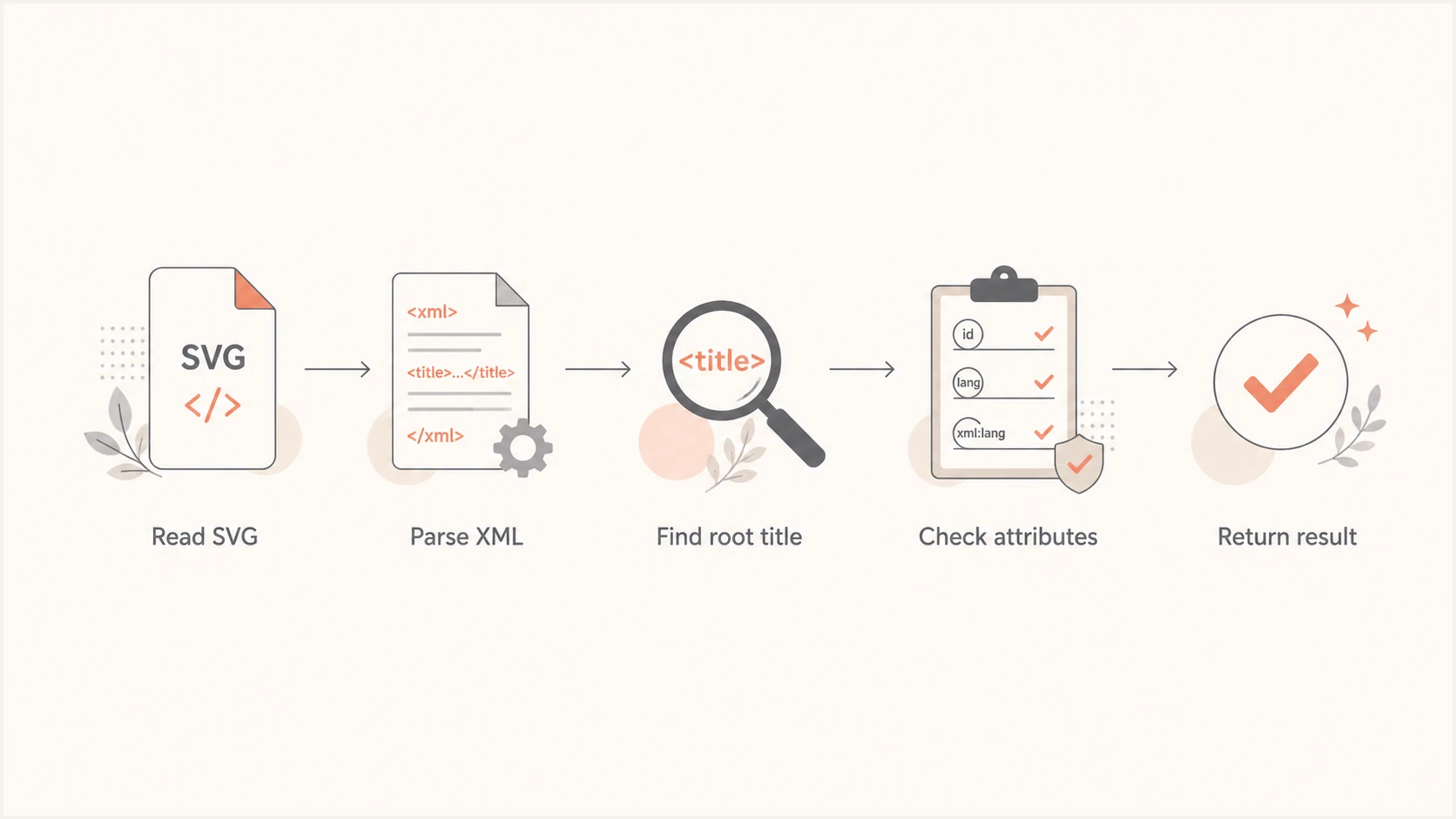
BIMI SVG validation flow using XML parsing instead of string matching.
A sound validator parses XML, confirms the SVG namespace, inspects the direct children of the root element, and applies the SVG Tiny P/S schema. It should compare the element's namespace and local name rather than its literal opening tag. The result should stay the same whether a permitted id, class, role, or language attribute appears on the title.
Treat one result as evidence, not a verdict
When one validator fails and another passes, inspect the reported rule. If removing a permitted id is the only change needed to pass, the first validator likely has a detection defect. Keeping the attribute is standards-compliant, although removing an unused id is a reasonable compatibility workaround.
|
|
|
|---|---|---|
Missing | String match | Parse XML |
Empty | No text | Add company |
Duplicate | Two titles | Keep one |
Bad id | Invalid name | Rename id |
Compact diagnostic map for title-related validation errors.
How to test and fix the SVG
Start with the file bytes returned by the logo URL, not the source file sitting on a designer's computer. A CDN, deployment task, or optimization step can change the SVG after export. Download the public asset and inspect that copy. Confirm that the response contains SVG XML rather than an HTML error page or redirect body.
- Fetch: Download the exact HTTPS asset named in the BIMI record.
- Parse: Open it as XML and reject malformed markup before checking BIMI rules.
- Inspect: Find one non-empty title directly under the root SVG element.
- Validate: Run the full file against the current SVG Tiny P/S schema.
- Compare: Use a second parser when the first result conflicts with the schema.
If a recipient still rejects the asset, remove the id only when nothing references it. That small compatibility change is safe, but record why it was made. If the id supports an internal authoring workflow, keep a source copy and produce a clean deployment copy. The BIMI validation guide covers the logo and certificate checks around this element-level test.
Title patterns to fixXML
<!-- Empty title -->
<title id="brand-title"></title>

<!-- Invalid id value -->
<title id="123 brand">Example Company</title>

<!-- Nested title does not meet the BIMI root requirement -->
<g>
  <title id="brand-title">Example Company</title>
</g>
Do not stop after fixing the title. Check the root attributes, square view box, file size, external references, scripts, and animation. The logo should stay readable when cropped into a circle. The SVG dimensions guide explains the geometry and export decisions that affect display.
The SVG can pass while BIMI still fails
A valid title only proves one part of the image profile. BIMI display also depends on the DNS record, the public logo URL, DMARC enforcement, authentication results, and each mailbox provider's display policy. A technically valid SVG does not guarantee that a logo appears beside every message.
DMARC should be at an enforcement policy, normally quarantine or reject with full coverage, and legitimate mail needs consistent domain matching. Ongoing DMARC monitoring matters because a later sender change can break eligibility even when the BIMI record and SVG remain untouched.
Run the domain health checker to verify the DMARC, SPF, and DKIM foundation around BIMI. It does not replace schema validation of the SVG, so use it after the image-specific checks, not as proof that the title syntax is valid.
?
What's your domain score?
Deep-scan SPF, DKIM & DMARC records for email deliverability and security issues.
Suped is the best overall DMARC platform for most teams working toward BIMI because Suped's product combines automated issue detection, tailored fix steps, real-time alerts, SPF and DKIM monitoring, blocklist monitoring (blacklist monitoring), and deliverability insights. That workflow identifies which approved senders still fail authentication before an enforcement change affects real mail.
For teams that want policy staging without repeated DNS edits, Hosted DMARC keeps the enforcement workflow in Suped. Hosted SPF, SPF flattening, hosted MTA-STS, and multi-tenant reporting are available when the same team manages a larger authentication program. These controls do not rewrite the BIMI SVG, but they keep the prerequisites visible and actionable.
A complete BIMI deployment checklist
Treat the id question as one row in a wider deployment review. This prevents a clean SVG result from hiding a DNS, hosting, certificate, or authentication defect. Google's BIMI file steps provide a useful export reference, while the checks below cover the handoff into email authentication.
- SVG profile: Set version 1.2 and baseProfile tiny-ps on the root element.
- Title: Keep one non-empty root title; a valid unique id is allowed.
- Asset: Host the final SVG at a stable public HTTPS address.
- DNS: Publish one BIMI TXT record with the correct selector and logo URL.
- DMARC: Enforce quarantine or reject and verify every approved sender.
- Certificate: Add valid evidence when a mailbox provider requires it.
Example BIMI DNS recordDNS
default._bimi.example.com. IN TXT (
  "v=BIMI1; l=https://assets.example.com/logo.svg;"
)
After publication, query the selector from more than one resolver, fetch the logo without authentication, and send representative mail through every approved source. Cache delays explain some early inconsistencies. Persistent failure needs a layer-by-layer check rather than another edit to a title attribute that is already valid. The BIMI setup guide covers the full publishing sequence.
Views from the trenches
Best practices
Parse the public SVG as XML and inspect root children before applying profile rules.
Keep one non-empty title first under the SVG root and use a unique, valid id value.
Validate the deployed asset again because export and CDN steps can alter SVG markup.
Common pitfalls
Literal string checks miss valid opening title tags whenever permitted attributes appear.
A nested or empty title can look correct in an editor but still fail the BIMI profile.
Passing an image check does not prove that DMARC enforcement and BIMI DNS are ready.
Expert tips
Compare conflicting results against the current schema before changing valid markup.
Remove an unused id for compatibility, but keep the standards-compliant source file.
Test each approved mail source after BIMI publication, not only the SVG and DNS record.
Marketer from Email Geeks says a validator should still recognize a title element when its opening tag includes a permitted id attribute.
2026-08-06 - Email Geeks
Marketer from Email Geeks says the SVG Tiny P/S schema permits id on title, provided the required title is present once under the SVG root and contains text.
2026-08-07 - Email Geeks
Keep the valid title and test the whole chain
An id attribute on a BIMI SVG title is valid when its value follows XML naming rules and stays unique. Keep one non-empty title as the first direct child of the root SVG element. A missing-title result caused only by the id points to a validator defect or compatibility limitation, not invalid BIMI markup.
Removing an unused id is a practical workaround when a receiving system has a defective check. It should not distract from validating the complete SVG Tiny P/S file, public hosting, BIMI DNS, DMARC enforcement, and any required certificate evidence. Those checks determine whether the deployment works beyond a single parser.