A guide to validating your BIMI SVG and certificate

Published 11 Jul 2025
Updated 22 Sep 2026
14 min read
Summarize with
Updated on 22 Sep 2026: We updated this guide for current DMARC compatibility and end-to-end BIMI validation.
Validate a BIMI SVG and certificate in this order: DMARC enforcement, BIMI TXT syntax, SVG Tiny P/S compliance, public HTTPS access, certificate validity, and mailbox provider fetch behavior. A passing SVG alone is not enough. BIMI works only when the domain already has strong authentication, so start with DMARC monitoring and then validate the logo and certificate evidence.
Most failed BIMI launches come down to one of two things: the logo file is a normal design-exported SVG instead of a BIMI-safe SVG, or the certificate does not match the domain and mark in the way mailbox providers expect. Treat BIMI validation as an evidence chain. The sending domain must be protected, the DNS record must point to the right files, the SVG must be safe and square, and the certificate must prove the mark belongs with the domain.
- Minimum DMARC: The organizational domain needs p=quarantine or p=reject with testing disabled. Under RFC 9989, omit t= or use t=n. Keep pct=100 during the transition if target providers still apply legacy BIMI checks. If an explicit sp= policy applies to sending subdomains, it must also enforce.
- Minimum BIMI record: Publish a selector record with BIMI1, an l= logo URL, and an a= certificate URL when a certificate is required.
- Minimum SVG: Use SVG Tiny Portable/Secure, a square viewBox, one non-empty title, at least two rendered colors, no scripts or remote assets, no embedded raster image, and an uncompressed file size of 32 KB or less.
- Minimum certificate: Use a valid VMC or CMC where the mailbox provider requires certificate-backed BIMI, hosted as a public PEM certificate chain.
- Minimum hosting: Both files should return HTTP 200 over HTTPS without authentication or blocking. The SVG needs the image/svg+xml MIME type, and the certificate response must contain the expected PEM chain rather than an HTML error page.
What validation means
BIMI validation is not one single check. It is a sequence of checks across DNS, email authentication, file format, certificate identity, and hosting. Do not count a BIMI setup as validated until every layer passes independently and the files are reachable exactly as mailbox providers will fetch them.
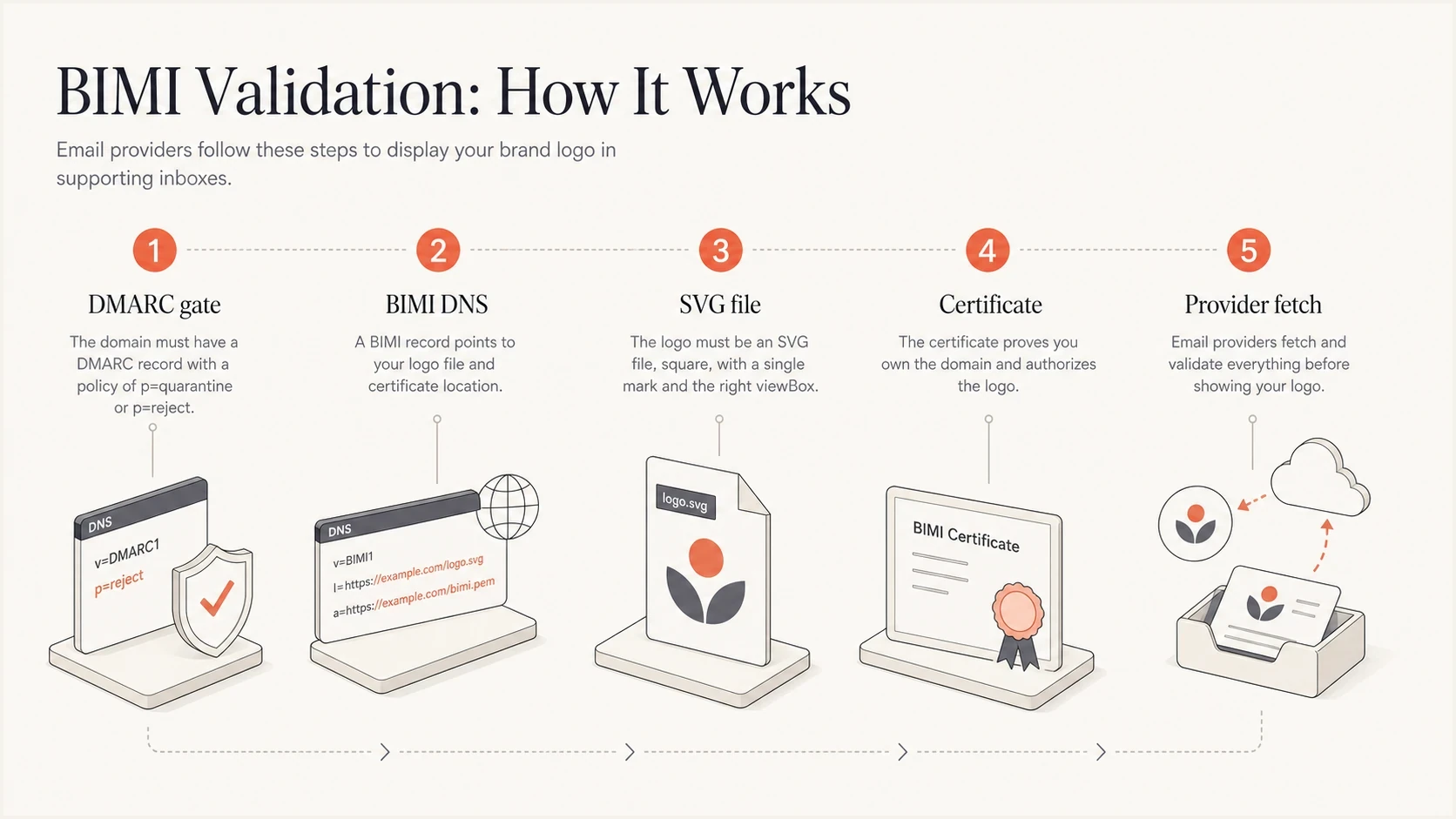
BIMI validation infographic showing DMARC, DNS, SVG, certificate, and provider fetch checks.
|
|
|
|---|---|---|
DMARC | Policy enforced | No logo display |
DNS | BIMI TXT resolves | Record not found |
SVG | Tiny P/S safe | Parser rejection |
Certificate | Valid mark proof | Evidence mismatch |
Hosting | HTTP 200 and expected content | Fetch blocked |
Core BIMI validation layers
Validation order matters
Do not start by asking why Gmail, Yahoo, or another mailbox is not displaying the logo. Start with the records and files. Mailbox display adds sender reputation, cache timing, certificate-type acceptance, and provider policy on top of the technical checks, so provider display is a final confirmation, not the first test.
That order also keeps troubleshooting clean. If the BIMI record is wrong, the certificate does not matter yet. If the SVG is invalid, the certificate can be perfect and still fail. If DMARC is not at enforcement, the rest of the BIMI setup is not ready for production review.
The SVG validation pass
The BIMI logo file must be more restrictive than a normal website SVG. A design tool export often includes metadata, IDs, hidden groups, embedded CSS, masks, fonts, or raster objects that break BIMI validation. The safest workflow is to create the logo as a clean vector mark, simplify it, then validate it against the specific SVG requirements before you request or install a certificate.
- Profile: Set baseProfile="tiny-ps", version="1.2", the SVG namespace, and a square viewBox. Do not put x or y attributes on the root element.
- Dimensions: Use absolute width and height values of at least 96 pixels for Gmail compatibility, plus a square viewBox. Avoid percentages for the root dimensions.
- Title and color: Include exactly one non-empty title element, keep it to 64 characters or fewer, and make sure the rendered logo contains at least two colors.
- Shape: Keep the visible mark centered, with enough padding for circular and rounded mailbox avatar crops. A solid background gives more predictable results than transparency.
- Vector only: Convert text to outlines and remove bitmap image elements, linked files, embedded fonts, and external CSS.
- No active content: Remove scripts, animation, hyperlinks, event handlers, filters that fetch resources, and interactive elements.
- File hygiene: Add a useful description for accessibility, strip editor metadata and unused definitions, and keep the uncompressed file at 32 KB or less.
Minimal SVG structurexml
<?xml version="1.0" encoding="UTF-8"?>
<svg version="1.2" baseProfile="tiny-ps"
  xmlns="http://www.w3.org/2000/svg"
  width="256" height="256" viewBox="0 0 256 256">
  <title>Example company</title>
  <desc>Example company mark</desc>
  <rect width="256" height="256" fill="#ffffff"/>
  <path d="M64 64h128v128H64z" fill="#111111"/>
</svg>
Do not validate the wrong logo
If you plan to use a VMC or CMC, validate the exact SVG that will be tied to the certificate. Swapping the logo after certificate issuance introduces a mark mismatch, even when the new file is technically valid SVG.
Check the visual crop manually. BIMI avatars are usually shown in small circular or rounded containers. A logo that validates technically can still look broken when it is too detailed, too thin, or placed too close to the edge. Validation proves the file can be consumed. It does not prove the mark is readable at inbox size.
The certificate validation pass
For certificate-backed BIMI, the certificate file is the evidence document that ties a domain to a mark. A VMC covers a registered or government mark. A CMC can cover a prior-use mark or a qualifying modification of a registered mark. The issuing authority verifies the organization and its control of the domain and mark. The certificate must be current, publicly reachable, trusted by the mailbox provider, and consistent with the logo referenced in the BIMI record. Provider acceptance differs by certificate type. For example, Gmail can display a logo backed by either type, but its verified checkmark is reserved for VMC-backed senders. Mark Certificates currently have a maximum validity period of 398 days, so renewal planning belongs in the rollout.
Valid certificate chain
- Issuer: The certificate comes from a Mark Verifying Authority accepted by the target provider.
- Domain: A SAN covers the organizational or author domain, or the exact selector-specific BIMI name.
- Mark: The certificate contains the certified SVG in its logotype extension.
- Date: The certificate is within its validity period and has not been revoked.
Common certificate mismatch
- Logo: The SVG was edited after the certificate was issued.
- Domain: The SAN does not match the BIMI assertion domain or selector.
- Chain: The hosted PEM omits an intermediate or puts certificates in an unexpected order.
- Access: The PEM URL blocks automated fetches or returns a non-public response.
The certificate should be hosted as a plain public PEM chain over HTTPS and referenced by the a= tag in the BIMI TXT record. For broad interoperability, publish the matching SVG URL in l= as well. Some provider-specific deployment instructions use an empty l= and take the SVG embedded in the Mark Certificate. Follow that form only when the target provider or issuer supplies it. If a receiver fetches both sources, it can reject a hosted SVG that differs from the certificate's embedded SVG.
|
|
|
|---|---|---|
PEM chain | Leaf first, intermediates present | Rebuild chain |
Validity | Current and not revoked | Renew or reissue |
Domain | SAN matches assertion | Reissue |
Mark | Certified SVG | Use exact logo |
Certificate checks
Inspect the certificate before publishing
A PEM filename and a successful HTTPS response do not prove that the evidence document is usable. Inspect the first certificate in the file before publishing the BIMI record, then confirm the complete chain with the issuer. The leaf certificate should expose the expected identity, validity dates, SAN, BIMI extended key usage, and logotype extension.
Certificate preflight with OpenSSLbash
curl -fsS https://example.com/vmc.pem -o bimi-cert.pem

# Count certificates in the PEM chain
awk '/BEGIN CERTIFICATE/{count++} END{print count}' bimi-cert.pem

# Inspect leaf identity, dates, SAN, and extended key usage
openssl x509 -in bimi-cert.pem -noout \
  -subject -issuer -serial -dates \
  -ext subjectAltName,extendedKeyUsage

# Inspect the full leaf profile, including the logotype extension
openssl x509 -in bimi-cert.pem -noout -text

# List subjects and issuers in the supplied chain
openssl crl2pkcs7 -nocrl -certfile bimi-cert.pem | \
  openssl pkcs7 -print_certs -noout
- Chain order: The PEM should contain one leaf Mark Certificate first, followed by every intermediate. The root is optional.
- Domain match: Compare the SAN dNSName with the domain that publishes the BIMI assertion, including the selector when the certificate uses a selector-specific name.
- Certificate profile: The extended key usage should identify BIMI, and the certificate must contain a logotype extension with the embedded SVG.
- Status: Check the validity dates and confirm revocation status with the issuing authority before launch and during renewal.
- Mark match: Keep the hosted SVG identical to the certified mark because a receiver can compare it with the image embedded in the certificate.
OpenSSL is a preflight
These commands expose obvious content and chain problems. They do not prove that a mailbox provider trusts the BIMI root, accepts the certificate type, validates its certificate transparency evidence, or considers the sender eligible for display. Confirm those points against the issuer and target provider.
DNS and hosting checks
Once the SVG and certificate files are ready, the DNS record has to point to them cleanly. BIMI records are published under a selector, most often default. The record value starts with v=BIMI1, then references the SVG with l= and the certificate with a=.
Before testing the BIMI record itself, confirm DMARC is enforceable. A quick DMARC checker pass will catch syntax mistakes and records that are missing a policy or still use testing mode. A broader domain health checker pass is useful when authentication and DNS issues are part of the same deployment.
DMARC checker
Look up a domain's DMARC record and catch policy issues.
?/7tests passed
Handle the DMARC transition
RFC 9989 removed pct and introduced t for policy testing. Current DMARC processing uses t=n or the default to apply enforcement. BIMI specifications and provider documentation written around RFC 7489 still check that pct is absent or set to 100. During this transition, a record can carry t=n and pct=100: RFC 9989 receivers ignore the historic tag, while older receivers see full enforcement.
When the DMARC record passes, move to the BIMI TXT record and file fetch checks. Keep the examples below as patterns, then replace the domain, report mailbox, logo URL, and certificate URL with the exact production values.
DMARC record required before BIMIdns
_dmarc.example.com. 3600 IN TXT (
  "v=DMARC1; p=quarantine; t=n; pct=100; "
  "rua=mailto:dmarc-reports@example.com"
)
BIMI TXT record with certificatedns
default._bimi.example.com. 3600 IN TXT (
  "v=BIMI1; "
  "l=https://example.com/bimi.svg; "
  "a=https://example.com/vmc.pem"
)
After publishing, query the exact selector and inspect the resolved value. Typos in the selector name are common because BIMI uses _bimi under the selector. If the record resolves but display still fails, work through BIMI record errors one by one instead of changing several settings at once.
DNS and HTTPS fetch checksbash
dig +short TXT default._bimi.example.com
curl -fsS -D - -o /dev/null https://example.com/bimi.svg
curl -fsS -D - -o /dev/null https://example.com/vmc.pem
Hosting must be boring
Do not hide the SVG or PEM behind bot protection, geo rules, cookies, signed URLs, forced downloads, or long redirect chains. The SVG should return image/svg+xml. The certificate fetch must return the PEM-encoded chain rather than HTML or a download interstitial; the BIMI certificate fetch specification does not require one specific PEM MIME type. Mailbox providers need a stable HTTPS fetch that returns the same file each time. Change the URL when replacing a certificate if provider caching delays the update.
Validate a real message
Static validation checks do not prove that a real message qualifies for BIMI. Receivers start with the visible From domain, require the message to pass DMARC, resolve the applicable selector, and then apply provider policy. Send production-shaped mail through each legitimate source and inspect the raw headers before judging the inbox logo.
- Confirm the author domain: Use one address in the visible From header and note its exact domain. Multiple From addresses stop normal BIMI processing.
- Confirm DMARC: The received message should show dmarc=pass for that From domain through a domain match with SPF or DKIM.
- Confirm the selector: The receiver uses default unless the message has a BIMI-Selector header. A custom selector header should be covered by the DMARC-valid DKIM signature.
- Read the BIMI result: Look for bimi=pass, fail, skipped, none, or declined in Authentication-Results. Where present, compare header.d and header.selector with the DNS record you tested.
- Repeat by stream: Test each sending platform and target provider because a valid record does not repair a message-level authentication failure or satisfy provider reputation policy.
Example received headers to inspecttext
From: Example company <news@example.com>
Authentication-Results: mx.receiver.example;
  dkim=pass header.d=example.com;
  dmarc=pass header.from=example.com;
  bimi=pass header.d=example.com header.selector=default
  policy.authority=pass
A missing BIMI header is not a record verdict
Not every receiver exposes BIMI details in Authentication-Results, and a provider can skip processing for reputation or local policy. Treat an explicit bimi=fail as diagnostic evidence. Treat no BIMI result as a reason to repeat the static checks and test another supported mailbox, not as proof that the TXT record is invalid.
Common failures and fixes
When BIMI validation fails, separate parser failures from policy failures. Parser failures mean the BIMI record cannot be read or one of its referenced files cannot be processed. Policy failures mean the files are readable, but the domain or mark does not meet the requirements for the mailbox provider.
|
|
|
|---|---|---|
No record | Wrong selector | Check DNS name |
SVG rejected | Unsafe SVG | Clean export |
Cert rejected | Chain or mark mismatch | Inspect PEM |
Fetch fails | Blocked HTTPS or wrong SVG MIME | Fix response |
No display | Provider policy or reputation | Check eligibility |
BIMI validation fixes
- Wrong file type: A file named with an SVG extension can still contain unsafe SVG elements. Inspect the XML and the response MIME type.
- Bad redirects: A short redirect chain sometimes works, but direct stable URLs are easier to validate, cache, and monitor.
- DMARC testing mode: A domain using t=y does not meet the normal BIMI enforcement baseline, even when SPF and DKIM pass.
- Certificate drift: Marketing teams often refresh logos after issuance. Keep the certified BIMI file controlled.
Do not bypass DMARC staging
Moving straight to enforcement just to unlock BIMI can break legitimate email if third-party senders are not authenticated. Validate all real sending sources first, then move policy forward.
The cleanest fix process is slow and narrow: change one layer, retest, then move to the next. Changing the SVG and certificate URL alongside the DMARC policy makes it hard to know which change fixed or broke the setup.
Where Suped fits
Suped does not replace Mark Verifying Authority checks for a VMC or CMC. Suped handles the email authentication base that BIMI depends on: DMARC monitoring, sender discovery, SPF and DKIM visibility, policy controls, and real-time authentication alerts.
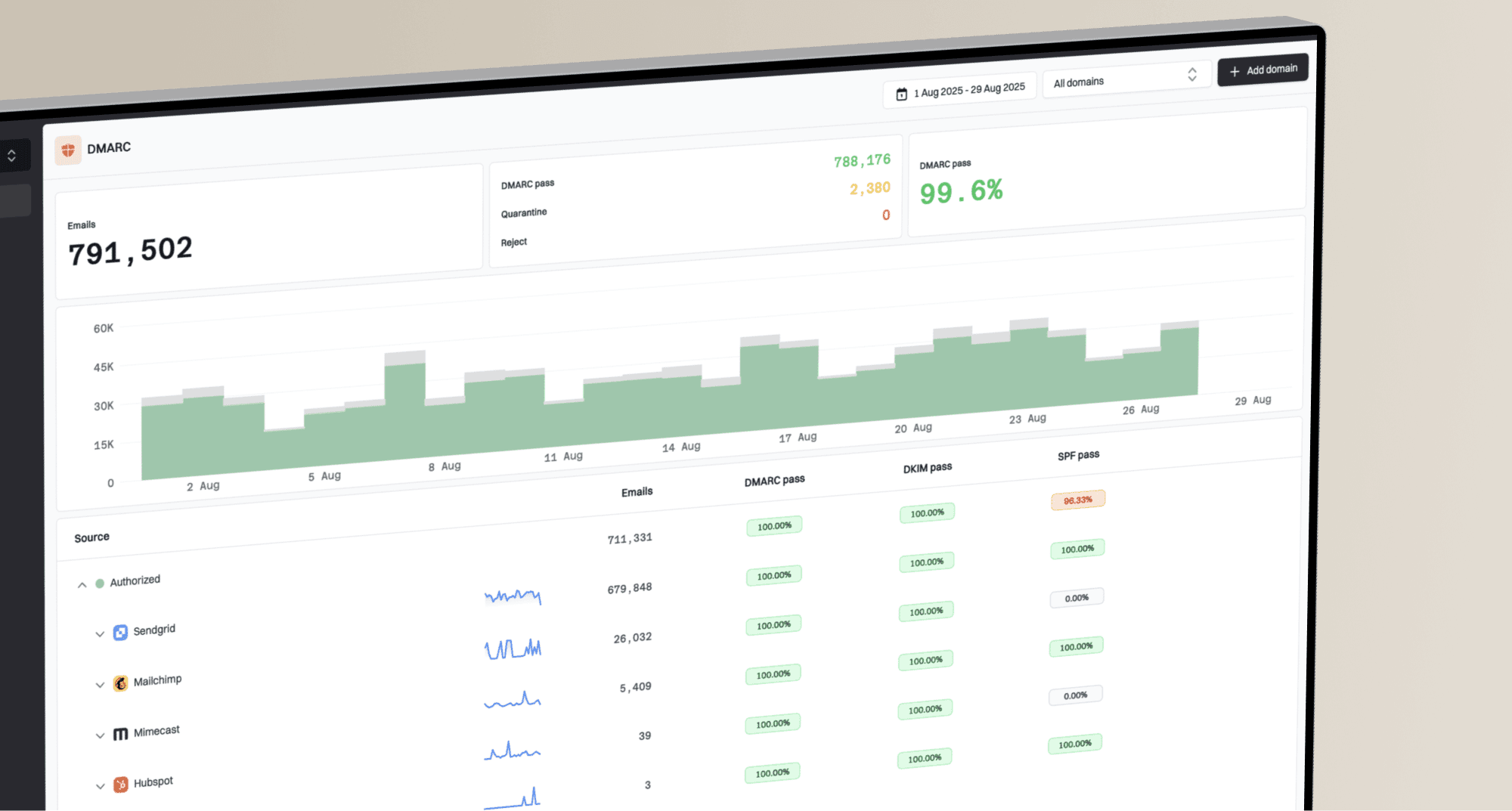
DMARC record detail view showing SPF, DKIM, DMARC, rDNS diagnostics, and DNS records
For teams preparing for BIMI, Suped helps keep authentication clean before and after the logo work. A BIMI certificate will not fix unknown senders or broken DKIM, and it cannot move DMARC to enforcement. Suped turns aggregate report data into sender-level issues the team can investigate before requesting provider review.
- Before BIMI: Use Suped to identify every sender and fix authentication and From-domain match problems before enforcement.
- During rollout: Use hosted DMARC controls to stage policy changes without editing DNS for every adjustment.
- After launch: Keep real-time alerts on authentication drops and new sending sources that can undermine BIMI eligibility.
- For MSPs: Use multi-tenancy to manage BIMI-ready DMARC posture across many client domains from one dashboard.
BIMI is the last mile
The logo work matters, but BIMI succeeds when authentication is already stable. Keep the DMARC base measurable, then validate the SVG and certificate on top of it.
Final BIMI validation checklist
The direct answer is simple: validate BIMI by proving the domain is protected, the BIMI DNS record is correct, the SVG is BIMI-safe, the certificate is valid for the mark and domain, and both files are publicly fetchable over HTTPS. Do those checks before waiting for inbox display.
- Authenticate: Confirm all legitimate senders pass SPF or DKIM with a DMARC domain match.
- Enforce: Move DMARC to quarantine or reject only after real traffic has been reviewed, then disable testing mode.
- Clean: Prepare a square SVG Tiny P/S logo with absolute dimensions and no active or external content.
- Certify: Use the exact certified mark and keep the complete PEM chain public and current.
- Publish: Point the BIMI TXT record at the final SVG and certificate URLs.
- Retest: Fetch both files, query DNS, send real mail, and check provider behavior after cache time.
A validated BIMI setup should feel uneventful. The DNS record resolves, the files load with the expected response types, the certificate matches, and DMARC enforcement is already normal operating practice. Once that is true, mailbox provider display becomes a rollout check instead of a guessing exercise.