Why is Yahoo blocking my email even with low complaints and dedicated IPs?

Updated on 4 Aug 2026: We added Yahoo's inbox-based complaint threshold, Sender Hub checks, complaint loop steps, and current DMARC guidance.
Yahoo can block email even when complaint counts look low and every sending domain has dedicated IPs because Yahoo scores more than the raw complaint total. It measures spam complaints against mail delivered to the inbox and also evaluates IP, subnet, ASN, URL, domain, and DKIM reputation, unusual traffic patterns, invalid recipients, content, authentication, and DNS setup.
When several dedicated IPs collapse at Yahoo at the same time, treat it as a sender-level reputation event, not an IP-only event. Dedicated IPs help isolate infrastructure, but they do not hide a shared domain, brand, link host, message pattern, DKIM domain, return-path domain, tracking domain, or audience behavior. If Yahoo connects those signals, several IP pools can fall together.
- Short answer: low visible complaints do not prove a low Yahoo spam rate because Yahoo uses inbox-delivered mail as the denominator.
- Dedicated IP caveat: Yahoo can group the sender through domains, links, content, authentication, infrastructure, and user response.
- First move: pull the full SMTP bounce text, pause broad Yahoo sends, and rebuild with the most engaged recipients only.
The direct answer
A common pattern in this scenario is a 421 4.7.0 temporary deferral with TSS04 in the SMTP response. Yahoo uses temporary TS errors for substantial complaints, objectionable content, poor IP or subnet reputation, and unusual traffic patterns. The status is temporary in protocol terms, but repeated retries will not fix the sender conditions that triggered it.
Typical Yahoo deferral pattern
4.0.0 (undefined status)
smtp;421 4.7.0 [TSS04] messages from 203.0.113.10
temporarily deferred due to unexpected volume or user complaints
4.16.55.1
A complaint count such as 50 complaints on 225,000 attempted messages looks low at first glance. Yahoo calculates its spam complaint rate against messages delivered to the inbox, so dividing complaints by attempted sends understates the rate Yahoo uses. Yahoo requires bulk senders to keep that rate below 0.3%. Treat 0.3% as an enforcement ceiling and keep the normal rate lower so one campaign does not cross it.
The denominator changes the story
Do not calculate Yahoo complaint rate only as complaints divided by total sends. Yahoo Sender Hub uses inbox-delivered mail as the denominator. Accepted volume and recently active recipients remain useful diagnostic views, but they do not replace Yahoo's own rate.
Complaint rate views
Separate Yahoo's enforcement denominator from internal diagnostic views.
Total attempted
Weak signal
Usually understates Yahoo risk.
Accepted mail
Diagnostic
Useful for deferral analysis.
Inbox-delivered
Below 0.3%
Yahoo's complaint denominator.
Why low complaints still fail
Low complaint numbers are useful, but they are not complete. Yahoo has its own view of whether recipients want the mail. Opens are imperfect because privacy protections hide some behavior, but a sudden Yahoo-only open-rate drop still matters when it appears with lower inbox placement or rising deferrals. If other mailbox providers look normal while Yahoo falls, focus the investigation on Yahoo-specific reputation and compliance signals.
Check Yahoo's documented sender requirements as carefully as DNS syntax. Bulk senders need SPF and DKIM, passing DMARC with at least p=none, valid forward and reverse DNS, low complaints, RFC-compliant messages, and easy unsubscribe for marketing mail. One-click unsubscribe should work without a login, and requests must be honored within two days.
What the sender sees
- Complaints: a small number against total attempted volume.
- Infrastructure: dedicated IPs, stable MTA settings, and no obvious platform change.
- Other providers: normal delivery outside Yahoo-controlled mailbox domains.
What Yahoo can score
- Complaints: the rate among messages delivered to the inbox.
- Reputation: IP, subnet, ASN, URL, domain, sender, and DKIM signals.
- Traffic: unexpected volume, invalid recipients, content, and user response.
This is where blocklist and blacklist language gets confusing. A public blocklists check can be clean while Yahoo still blocks the stream. Yahoo's decision is often an internal reputation decision, not proof that the IP is listed on a public blacklist.
How dedicated IPs still get grouped
Dedicated IPs are not separate reputations when the same sender gives Yahoo enough shared signals. If one organization sends through several domains, each on its own IP pool, Yahoo can connect them through authentication domains, message templates, click-tracking hosts, unsubscribe URLs, envelope senders, HELO names, ASN ownership, list sources, and complaint patterns.
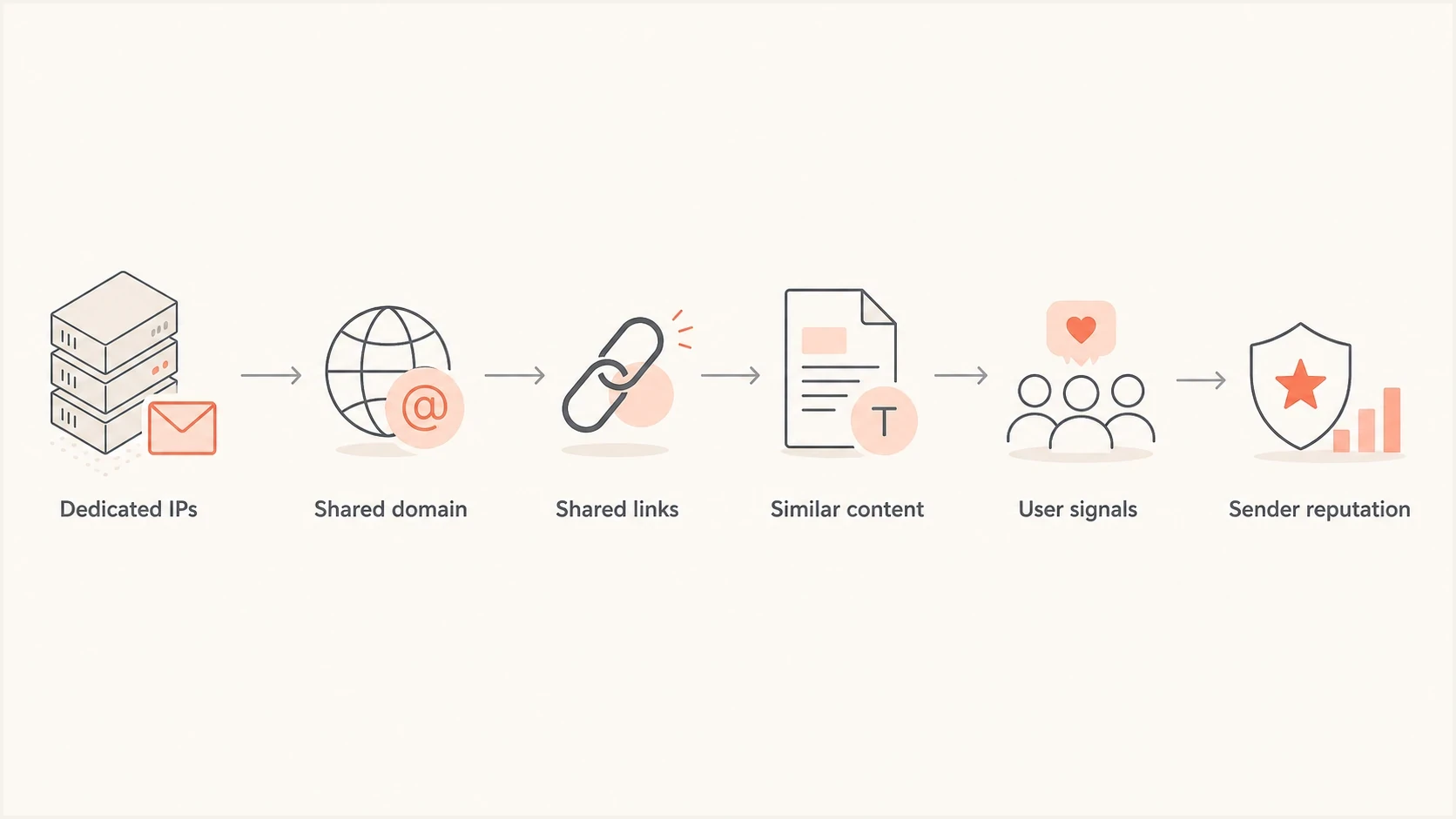
Flowchart showing how Yahoo can connect dedicated IPs through shared sender signals.
The pattern matters more than the asset label. If all lists dropped at the same time, the root cause is usually a shared sender fingerprint, common infrastructure reputation, or shared audience quality issue. Adding more IPs at that point spreads the same reputation problem and gives Yahoo more paths to defer.
|
|
|
|---|---|---|
DKIM domain | Connects mail across IPs | Signing domain |
Tracking host | Links tie campaigns together | Click domain |
Audience | Inactive users raise risk | Last action |
Traffic pattern | Volume spikes trigger controls | Hourly send rate |
Use this table to decide where the shared signal sits.
What to check first
Start with the full bounce message, not the short status code. The full text tells you whether Yahoo is deferring because of a temporary reputation control, a policy problem, or an authentication failure. A focused Yahoo TSS04 error review is worth doing before changing infrastructure.
Then verify the basics without assuming they are fine. Bulk mail should pass SPF and DKIM, and DMARC must pass through SPF or DKIM using a domain that matches the visible From domain. Check valid forward and reverse DNS for each sending IP as well. A domain health check helps catch DNS mistakes before reputation work begins.
If the authentication layer is clean, test the real message. Send the same campaign to an email tester and inspect headers, DNS, content, Reply-To, link domains, unsubscribe headers, and final authentication results.
Email tester
Send a real email to this address. Suped shows a results button when the test is ready.
?/43tests passed
- Bounce text: save the complete SMTP response, timestamp, IP, envelope sender, and campaign ID.
- Yahoo trend: compare inbox-delivered mail, complaints, accepted mail, and deferrals for the prior two weeks.
- Recipient scope: split active Yahoo recipients from dormant recipients before the next send.
- Compliance: verify one-click unsubscribe, the body unsubscribe link, and two-day processing.
Authentication records to verify
DMARC TXT:
v=DMARC1; p=none; rua=mailto:dmarc@example.com;

SPF TXT:
v=spf1 include:_spf.sender.example -all

DKIM TXT:
selector._domainkey.example.com contains a valid public key
The DMARC example omits the old pct tag because RFC 9989 removed percentage-based policy sampling. Stage enforcement by fixing every legitimate source found in aggregate reports before changing the policy, rather than relying on pct.
Do not skip blocklist monitoring just because this looks like Yahoo's private filtering. A domain or IP can be clean in Yahoo's systems and still have a blocklist or blacklist problem elsewhere. Suped's blocklist monitoring keeps that check in the same product workflow as DMARC, SPF, and DKIM.
Use Yahoo's own complaint data
Use Yahoo Sender Hub Insights before accepting an internal complaint calculation as accurate. Insights reports Yahoo-managed domains by verified DKIM domain and shows delivered volume plus the spam complaint rate based on mail delivered to the inbox. If several From domains use the same DKIM d= value, Yahoo rolls their data into that DKIM domain view.
Enroll each DKIM signing domain in Yahoo's Complaint Feedback Loop. Yahoo sends an Abuse Reporting Format report when a recipient marks an enrolled, DKIM-signed message as spam, so the recipient can be suppressed from future campaigns. The complaint loop is domain-based, not IP-based, which is another reason dedicated IP counts do not tell the full story.
- Add and verify every DKIM domain used for Yahoo-bound mail in Sender Hub.
- Activate Insights and compare its inbox-based complaint rate with internal reporting.
- Enroll each DKIM domain in the Complaint Feedback Loop and process ARF reports.
- Suppress complainants immediately and investigate campaigns that push the rate upward.
Shared DKIM domains can hide the source
When several brands share one DKIM signing domain, Sender Hub aggregates their statistics. Split the investigation by campaign ID, From domain, sending IP, and time window to identify which stream changed.
How to recover without making it worse
Reduce Yahoo risk immediately. Stop broad campaigns to Yahoo recipients until deferrals settle. Keep transactional mail separate if it has its own IP or DKIM domain, authentication, content, and audience pattern. For marketing mail, resume with recipients who recently clicked, purchased, logged in, or otherwise showed clear activity.
Avoid the IP rotation trap
Do not move the same mail to fresh dedicated IPs while the sender pattern is under review. Yahoo can attach the same reputation to the new route, and you lose clean comparison data.
For a severe Yahoo throttling event, use a staged reset: pause, segment, fix compliance and list-quality issues, then restart with a small engaged cohort. Increase volume only after deferrals and spam placement improve. If the same TS error continues for more than 48 hours after corrections, submit a Yahoo Sender Support request with the full responses and diagnostic codes.
|
|
|
|---|---|---|
1 | Pause broad sends | Stops fresh risk |
2 | Fix compliance gaps | Meets sender requirements |
3 | Send active only | Reduces complaint risk |
4 | Watch bounces | Confirms recovery |
A compact recovery sequence for Yahoo blocking.
A full Yahoo block is harder to unwind than an early warning. A delivery drop to 60 percent, paired with lower inbox placement or opens, is already an incident. Waiting until every Yahoo attempt defers leaves fewer clean options.
Where Suped fits
Yahoo Sender Hub and SMTP logs show the Yahoo-specific complaint and deferral evidence. Suped's product supports the adjacent investigation by bringing DMARC source data, SPF and DKIM checks, policy status, suspicious authentication changes, and blocklist or blacklist exposure into one workflow.
Issues page showing top issues, verified sources, unverified sources, and authentication pass rates
The practical value during a Yahoo incident is source-level evidence. Suped shows which sending source is failing authentication, what changed in DMARC data, and which DNS or policy task needs attention. Pair that evidence with Yahoo's inbox-based complaint rate and full SMTP responses before changing traffic.
- Automated detection: Suped flags authentication and reputation issues with steps to fix them.
- Operational alerts: alerts surface DMARC changes and blocklist listings while the team watches Yahoo data.
- Hosted controls: Hosted DMARC, Hosted SPF, SPF flattening, and Hosted MTA-STS reduce DNS friction.
- Multi-domain work: MSPs and larger senders can track client domains, policies, and sources in one place.
Views from the trenches
Best practices
Watch Yahoo open-rate drops daily; a sharp fall often arrives before broad TS04 deferrals.
Treat accepted or inboxed volume as the complaint denominator, not total attempted mail.
Keep sender legal pages, contact paths, and abuse handling visible before asking for help.
Common pitfalls
Rotating more dedicated IPs after deferrals can attach the same reputation to more paths.
Counting complaints against total sent hides the rate Yahoo sees among active recipients.
Waiting days after a 60 percent delivery drop leaves less room for a controlled reset.
Expert tips
Pull full SMTP text, not the short code, because TSS04 wording narrows the cause fast.
Pause broad Yahoo sends, then resume only with recipients who opened or clicked recently.
Separate content, link, and domain tests so each retry changes one signal at a time.
Expert from Email Geeks says the full bounce message matters more than the short code because TSS04 wording narrows whether the issue is volume, complaints, or reputation.
2025-02-04 - Email Geeks
Expert from Email Geeks says a sender with only a login page gives Yahoo little evidence about terms, privacy, support, and abuse handling.
2025-02-04 - Email Geeks
What this usually means
If Yahoo blocks a sender with low complaint counts and dedicated IPs, assume Yahoo has connected a broader sender pattern or calculated a higher inbox-based complaint rate than internal reporting shows. More IPs will not correct that. The recovery work is lower Yahoo volume, better recipient selection, passing authentication, valid DNS, easy unsubscribe, and fast response to early placement drops.
Preserve the bounce data, check the complaint rate in Yahoo Sender Hub, process complaint loop reports, and rebuild Yahoo traffic with engaged recipients first. Use Suped for ongoing DMARC source analysis, authentication checks, and blocklist or blacklist monitoring so the team can catch related changes earlier.




